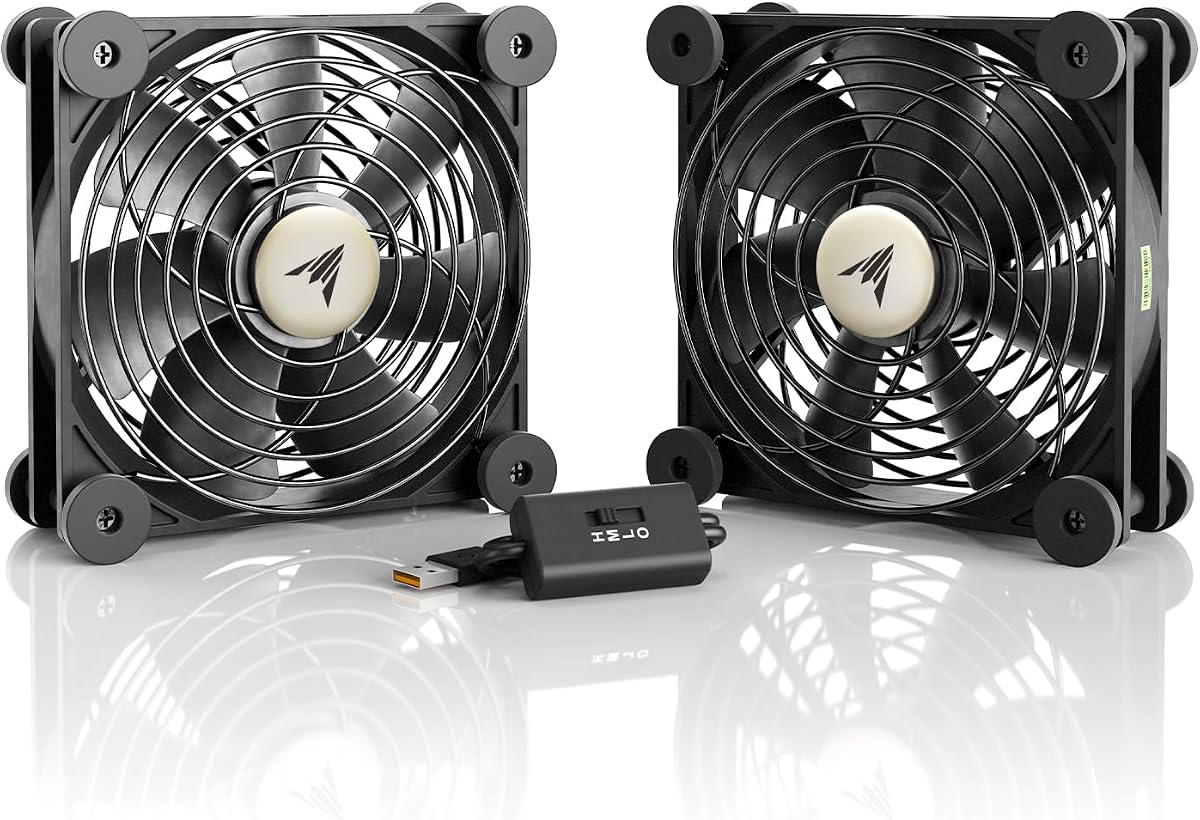
AC Infinity MULTIFAN S7
4.7Editor score
USB powered convenience
Multi-speed controller
Ultra-quiet operation
AV receivers generate significant heat during operation, which can lead to performance issues and shortened lifespans. Proper ventilation is essential to protect your investment and ensure consistent audio performance during long movie nights or gaming sessions.
We compared ten top-rated cooling fans specifically designed for AV equipment. Our analysis focuses on noise levels, airflow capacity, installation ease, and compatibility with standard home theater cabinets and racks.
Each pick highlights key features and trade-offs to help you choose the right solution for your setup. Note that product availability and pricing can change frequently, so verify details before purchasing.
4.7Editor score

4.8Editor score

4.4Editor score
As an Amazon Associate we earn from qualifying purchases.
The following table provides a side-by-side comparison of all ten products evaluated in this guide. Review the specifications and features to determine which cooling solution best fits your AV receiver and cabinet requirements.
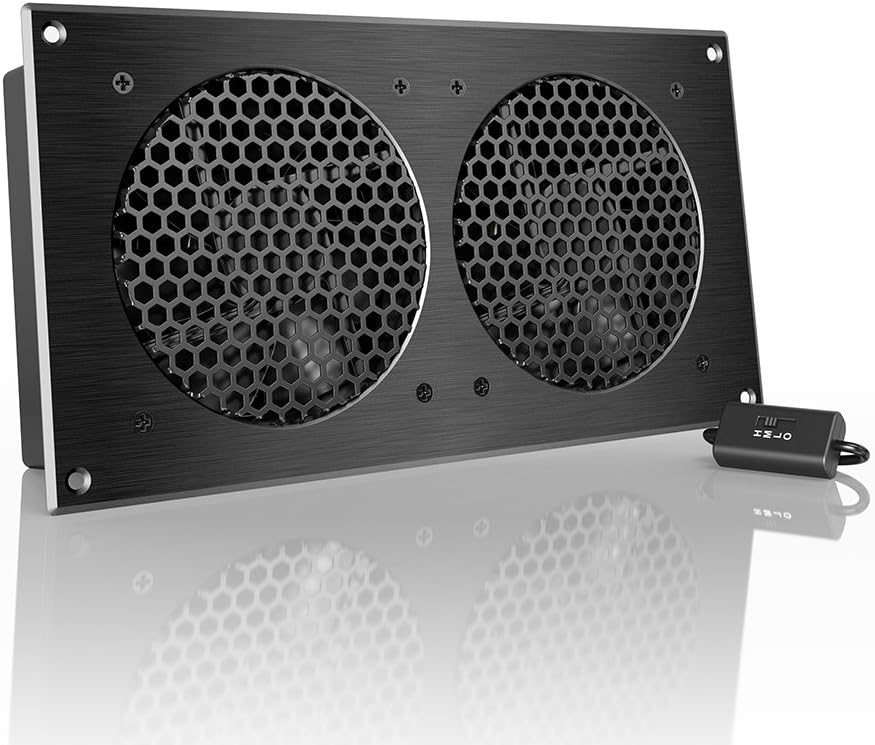


The AC Infinity AIRCOM S7 is a top-rated cooling system with a 4.8 star rating. It excels in providing powerful airflow while maintaining whisper-quiet performance suitable for living rooms.
We may earn a commission when you buy through this link, at no additional cost to you.
Its dual-ball bearing fans with PWM-controlled motors ensure efficient heat dissipation. The thermal trigger modes allow automatic speed adjustment based on temperature, optimizing noise and cooling balance.
While it costs more than basic fans, the build quality justifies the investment. The requirement for top clearance may not suit all furniture arrangements but ensures optimal exhaust flow.
This fan is ideal for users prioritizing performance and silence. It effectively protects AV receivers from overheating without distracting from your viewing experience.
The thermal trigger modes automatically adjust fan speed based on real-time temperature readings. This ensures your equipment stays cool without unnecessary noise when temperatures are low.
With noise levels as low as 19 dBA, this system operates nearly silently. The PWM-controlled motors minimize vibration and hum, making it perfect for home theaters.
We may earn a commission when you buy through this link, at no additional cost to you.
The AC Infinity MULTIFAN S7 offers excellent value with a 4.7 star rating. It provides reliable cooling for AV components using dual USB-powered fans.
We may earn a commission when you buy through this link, at no additional cost to you.
Its multi-speed controller lets you fine-tune performance for noise or airflow. The dual-ball bearings ensure longevity, while the USB plug simplifies connection to electronics.
Though airflow is moderate compared to premium units, it suits standard receivers. The need for a USB port might limit placement options in older equipment setups.
Choose this for budget-friendly, versatile cooling. It balances cost and performance well for those needing basic ventilation without complex wiring.
Powered via standard USB ports found on many AV devices, this fan eliminates the need for extra wall outlets. This plug-and-play setup saves time and reduces cable clutter.
Dual-ball bearings rated for 67,000 hours ensure the fans operate reliably for years. You can lay them flat or upright, adapting to various cabinet configurations easily.
We may earn a commission when you buy through this link, at no additional cost to you.
The Noctua NV-FS2 is a premium fan set with a 4.4 star rating. It features state-of-the-art NF-A12x25 fans for exceptional cooling efficiency and quietness.
We may earn a commission when you buy through this link, at no additional cost to you.
Extra-soft silicone gaskets and pads reduce vibrations significantly. The NA-FC1 controller allows precise speed adjustment, while the universal power supply works across regions.
Its cost reflects top-tier build quality and versatility. The included accessories like extenders and adaptors add complexity but offer flexibility in placement.
This kit suits users seeking maximum performance and silence. It is ideal for high-end AV setups where every decibel and degree of heat matters.
NV-MPG1 gaskets and NV-MPP1 pads isolate vibrations effectively. This ensures the fan runs smoothly without transmitting mechanical noise to your cabinet or receiver.
The NV-PS1 power supply includes adaptors for EU, US, and UK sockets. This universal design makes it convenient for international users or travel scenarios.
We may earn a commission when you buy through this link, at no additional cost to you.
This 120mm fan plugs directly into standard outlets, rated 4.7 stars. It offers straightforward cooling without extra power supplies, ideal for quick setups.
We may earn a commission when you buy through this link, at no additional cost to you.
The built-in speed controller lets you adjust airflow from gentle to maximum. The slim 25mm profile fits tight spaces, while the finger guard adds safety.
Its design is functional but lacks premium finishes. The exposed guard might collect dust, and the look may not match high-end home theaters.
Select this for practical, no-fuss cooling. It works well for utility spaces or where appearance is less critical than immediate heat relief.
No adapters or extra cables are needed since it plugs directly into 110V-240V outlets. This simplifies setup and reduces potential points of failure.
At just 25mm thick, this fan fits into tight spaces where bulkier models cannot. You can mount it behind equipment or in narrow cabinet slots.
We may earn a commission when you buy through this link, at no additional cost to you.
This cabinet fan features no-drill installation with a 4.0 star rating. It fits existing door gaps to vent hot air without permanent modifications to furniture.
We may earn a commission when you buy through this link, at no additional cost to you.
Powered by USB 5V, it connects easily to receivers or chargers. The speed controller allows you to balance noise and cooling based on need.
While the rating is moderate, the convenience is high. Airflow is sufficient for basic ventilation but may not suffice for heavy thermal loads.
Renters or those avoiding DIY should consider this. It provides adequate cooling for enclosed spaces while protecting your furniture integrity.
The slim door-gap design lets you install cooling without drilling holes. This preserves the value and look of your expensive cabinet or media center.
Standard USB 5V power means you can use any compatible port or adapter. This flexibility simplifies cable management and source selection.
We may earn a commission when you buy through this link, at no additional cost to you.
This door fan mounts on cabinet gaps with a 4.4 star rating. Its slim design makes it perfect for narrow consoles where standard fans won't fit.
We may earn a commission when you buy through this link, at no additional cost to you.
USB power ensures simple operation via adapters or devices. Quiet performance helps maintain a peaceful environment while cooling AV gear effectively.
The need for an existing gap limits some installs. It works best on cabinets with built-in ventilation slots or natural air gaps.
Choose this for discreet, non-invasive cooling. It balances functionality with aesthetics, ideal for modern entertainment setups requiring minimal hardware.
The ultra-slim profile fits narrow cabinets where traditional fans fail. This ensures you can cool gear even in compact media consoles or shelves.
Quiet cooling performance keeps noise levels low during operation. This is crucial for home theaters where distracting sounds can ruin immersion.
We may earn a commission when you buy through this link, at no additional cost to you.
This fan installs in under 60 seconds without tools, rated 4.2 stars. It uses non-destructive brackets to attach to cabinet doors or vents.
We may earn a commission when you buy through this link, at no additional cost to you.
The 120mm fan delivers optimal airflow for electronics while remaining silent. USB power allows connection to AV receivers for seamless integration.
Its reliance on door gaps may limit placement in solid doors. Brackets are convenient but may require care to avoid damage during adjustment.
Perfect for renters needing quick cooling solutions. It effectively protects gear from overheating without compromising furniture integrity or aesthetics.
Non-destructive mounting brackets allow setup without hardware or tools. You can adjust and reposition the fan easily as your needs change.
Engineered to pull heat away from receivers and consoles efficiently. This prevents overheating that can degrade performance over time.
We may earn a commission when you buy through this link, at no additional cost to you.
This fan set is engineered for vibration reduction with a 4.4 rating. It includes silicone pads and gaskets that minimize mechanical noise transmission.
We may earn a commission when you buy through this link, at no additional cost to you.
The controller allows tuning speed for near-silent or max airflow. A safety grill prevents accidents, making it versatile for different placements.
The complexity and cost are higher than single-fan options. Managing multiple parts might be challenging for casual users seeking simplicity.
Ideal for audiophiles prioritizing silence. It ensures your equipment runs cool without introducing vibration that could affect audio quality.
Offset design optimizes acoustics and ventilation in both intake and exhaust. This dual-use capability maximizes versatility in different cabinet setups.
The pre-installed fan grill adds extra protection against contact. This is useful for open setups where fingers or pets might interact with moving blades.
We may earn a commission when you buy through this link, at no additional cost to you.
This dual-fan USB system has a 4.3 rating with 18 dBA noise. The 140mm fans provide decent airflow with customizable low, medium, and high settings.
We may earn a commission when you buy through this link, at no additional cost to you.
Daisy-chain multiple units for expanded cooling coverage. Its compact size fits tight spaces, making it ideal for crowded AV cabinets.
Sleeve bearings have shorter lifespans than ball bearings. Airflow is modest, so it may struggle with high-heat components in hot climates.
Good for light-duty cooling in quiet areas. It offers solid value for those needing flexible airflow without electrical complexity.
At 18 dBA, this fan operates nearly inaudibly during low settings. This makes it suitable for bedrooms or living spaces where noise matters.
USB compatibility allows chaining multiple fans for combined cooling power. You can expand airflow by adding more units to your setup easily.
We may earn a commission when you buy through this link, at no additional cost to you.
This dual 120mm fan unit has a 4.3 rating with hydraulic bearings. It moves ample air to cool multiple devices simultaneously, perfect for dense setups.
We may earn a commission when you buy through this link, at no additional cost to you.
The inline switch provides three speed settings for noise or airflow. USB power allows connection to any port, and the extension cable adds reach.
Its larger size requires adequate shelf space or mounting area. The controller is functional but basic, lacking advanced thermal triggers or automation.
Choose this for reliable long-term cooling. It balances performance and cost well for standard home theater cabinets or network racks.
Dual 120mm fans generate significant airflow for multi-device cooling. Place them under or on top of gear to maximize heat exhaust efficiency.
Hydraulic bearings ensure quiet and lasting performance for daily use. This design reduces friction and wear for reliable 24/7 operation.
We may earn a commission when you buy through this link, at no additional cost to you.
Selecting the right cooling fan involves evaluating several technical and practical factors. Consider the following criteria to ensure optimal protection and performance.
Airflow capacity determines how effectively a fan moves air away from heat sources. Measured in CFM, higher values typically provide better cooling for demanding receivers.
Look for fans with at least 100 CFM for enclosed cabinets. Ensure the direction matches your ventilation setup to avoid heat recirculation.
Noise levels impact your viewing experience, measured in dBA. Lower values are essential for living rooms or bedrooms where distraction matters.
Prioritize fans under 25 dBA for quiet operation. PWM or ball bearing motors generally offer better noise control than cheaper alternatives.
Power source affects convenience and cable management. USB fans are flexible, while wall-plug units offer stronger performance without relying on receiver ports.
Choose USB for simplicity or wall outlets for robust airflow. Ensure your receiver has available ports or outlets for clean setup.
Installation method depends on your furniture and technical comfort. Some fans require drilling while others use door gaps or top exhausts.
Opt for non-drill options if you want to preserve furniture. Verify cabinet dimensions to avoid fit issues before purchase.
Control features like speed controllers or thermal triggers offer customization. These allow you to adjust airflow based on real-time needs or temperature.
Fans with adjustable settings provide better balance between noise and cooling. Thermal automation can save energy and reduce wear when not needed.
Build quality impacts longevity and reliability. Materials like aluminum frames and dual-ball bearings resist wear and vibration better.
Invest in durable materials to prevent early failure. Check warranty terms to ensure support if issues arise after use.
Dimensions dictate whether a fan fits your space. Slim profiles are critical for tight cabinets, while standard sizes might suit open shelves.
Measure your enclosure before buying to confirm clearance. Overlooking size can lead to placement problems or restricted airflow.
Aesthetics matter if your fan is visible. Brushed finishes or minimal designs blend better with modern AV gear than industrial looks.
Consider color and finish to match your setup. Visible fans should look intentional rather than afterthought additions.
Place the fan near vents or hot spots to maximize heat removal. Ensure the exhaust direction pushes warm air away from the receiver rather than circulating it.
Regularly clean dust from fan blades and grills to maintain performance. Use compressed air or a soft cloth every few months to prevent clogging.
Adjust speed settings to balance cooling needs with noise tolerance. Lower speeds work for moderate heat while higher settings handle intense usage.
Yes, cooling fans help extend lifespan by reducing thermal stress on internal components. Overheating is a common cause of failure, so maintaining safe temperatures prevents degradation and protects your investment.
Yes, fans designed for cabinet use work inside closed cabinets. Look for exhaust designs that vent air through door gaps or slots to ensure hot air escapes effectively.
USB fans draw power from your electronics, while wall-powered fans use outlets directly. Wall units often offer stronger performance, whereas USB models provide simpler installation.
Ideal receiver fans operate under 25 dBA for quiet performance. This ensures they do not interfere with dialogue or music during movies or music playback sessions.
Not necessarily. Many modern fans offer no-drill solutions using door gaps or non-destructive mounting brackets. These preserve furniture integrity while providing effective cooling options.
Yes, fans with high airflow can cool multiple devices. Position them to circulate air over all heat sources or use dual-fan units to increase coverage area.
Speed control is important for balancing noise and cooling. It lets you adjust based on usage or temperature, preventing unnecessary noise when full power is not needed.
Fans typically last several years depending on usage. If noise increases or performance drops, replacement may be needed. High-quality bearings can extend this lifespan further.
The AC Infinity AIRCOM S7 leads as the top choice, while the MULTIFAN S7 offers great value. The Noctua NV-FS2 provides premium features for discerning users.
Prioritize noise levels and airflow capacity when evaluating options. Your specific space constraints and ventilation needs will dictate the most suitable model.
Always verify current availability and pricing before purchasing. Technology and market options evolve, so checking the latest details ensures you select the right tool.