
VSDISPLAY H/D VGA DVI LVDs Controller Board 40Pin
4.4Editor score
Supports VGA and DVI inputs
Built-in audio speaker connector
Plug and play setup
Finding the right LCD Controller Board for Laptop Screen is essential for repairing damaged displays or building custom monitors. These boards act as the bridge between your video source and the panel, ensuring signals are processed correctly for a clear image.
We evaluated ten real products based on compatibility, interface types, and user feedback to create this comprehensive list. Each entry includes detailed specifications and troubleshooting tips to help you avoid common pitfalls like wrong resolutions or power issues.
Every pick highlights specific screen models and connection types to streamline your selection process. Please note that availability and pricing fluctuate frequently so verify the current listings before making your final purchase decision today.
4.4Editor score

4.4Editor score

5.0Editor score
As an Amazon Associate we earn from qualifying purchases.
The following table provides a side-by-side comparison of all ten products to help you quickly identify the right board for your specific screen model and interface needs.



This controller board is specifically designed for 1366×768 resolution panels with a 30-pin eDP interface making it a top choice for HD laptop screen repairs. It supports panels ranging from 11.6 to 15.6 inches and includes pre-connected cables for easier setup.
We may earn a commission when you buy through this link, at no additional cost to you.
The board ensures stable signal transmission with an LED indicator to confirm power status. It features energy-saving design with low standby consumption and includes detailed instructions for pin alignment and troubleshooting factory mode issues.
One trade-off is that it will not work with 1920×1080 panels so verifying your screen resolution is critical before purchase. Additionally you must supply your own 12V 2A power adapter which adds a small step to the installation process.
This board is ideal for users repairing common HD resolution laptop screens who need a reliable and straightforward driver solution. We recommend it for DIY projects where screen compatibility is confirmed to ensure optimal performance and stability.
The board provides a stable high-quality HD signal specifically tuned for 1366×768 panels to prevent display errors.
Pre-connected signal cables and clear Pin 1 markings simplify the setup process for non-technical users.
We may earn a commission when you buy through this link, at no additional cost to you.
This budget-friendly board supports 15.6 inch 1366×768 screens with a 40-pin LVDS interface and offers both VGA and DVI video inputs. It includes a speaker connector for audio and provides LED indicators to help users diagnose connection issues quickly.
We may earn a commission when you buy through this link, at no additional cost to you.
The board features a plug and play design that allows for quick setup once the correct screen is connected. It also includes built-in self-check functions that display status messages on screen to help users troubleshoot signal or resolution problems.
Users need to provide their own 12V power adapter and ensure the current is sufficient to avoid restart loops. While compatible with specific models the board does not support newer eDP interfaces limiting its use to older laptop panels.
This board is a cost-effective solution for repairing older 40-pin LVDS screens where budget is a primary concern. We recommend it for users with confirmed compatible models who want a simple and functional driver setup without extra cost.
VGA and DVI inputs allow connection to various external devices without needing additional adapters.
LED status indicators and on-screen messages help identify power and signal issues during installation.
We may earn a commission when you buy through this link, at no additional cost to you.
This controller board is designed for 1920×1080 Full HD screens with a 30-pin eDP interface and supports panels from 11.6 to 17.3 inches. It does not require driver installation and provides clear LED status feedback during setup to simplify the process.
We may earn a commission when you buy through this link, at no additional cost to you.
The board lists extensive compatible models and guides users through troubleshooting common issues like black or white screens. It ensures direct connection to the display panel for optimal data transmission and includes instructions for cable alignment.
Users must supply their own 12V power adapter and verify the resolution settings match the board capabilities to avoid display problems. The setup process is straightforward but requires attention to detail to ensure the correct signal format.
This board is a solid choice for upgrading or repairing Full HD laptop screens with eDP interfaces. We recommend it for users who need a reliable driver that supports high-resolution displays across multiple screen sizes.
Designed for 1920×1080 resolution to deliver crisp and vibrant image quality on compatible panels.
No software installation needed allowing for immediate use after physical connection to the display.
We may earn a commission when you buy through this link, at no additional cost to you.
This board is optimized for 1280×1024 resolution screens with a 30-pin LVDS interface and supports VGA and DVI video inputs. It includes an audio output connector and provides LED indicators to help users verify power and signal status during setup.
We may earn a commission when you buy through this link, at no additional cost to you.
The product lists compatible screen models from 17 to 19 inches and guides users through troubleshooting common connection issues. It features a plug and play design with clear instructions for cable alignment and power requirements.
Users need to provide a 12V 3A power adapter which is higher than some other models. This requirement ensures stable operation but adds to the setup complexity for those without a suitable power source readily available.
This board is ideal for users working with specific gaming panels that require 1280×1024 resolution support. We recommend it for projects where audio output and multiple input options are desired for enhanced display functionality.
Built-in speaker connector allows direct audio output without needing external speakers for basic use.
Requires 12V 3A power supply to maintain stable operation and prevent screen flickering issues.
We may earn a commission when you buy through this link, at no additional cost to you.
This controller board is designed for 21.5 to 23.8 inch 1920×1080 screens with a 30-pin LVDS interface. It includes a USB cable for touch functionality and an audio output connector to support multi-purpose display projects with input options.
We may earn a commission when you buy through this link, at no additional cost to you.
The board lists specific compatible models and guides users through setup with clear instructions for cable and power connections. It supports both VGA and DVI inputs for versatile external device compatibility.
Users must provide a 12V 3A power adapter which is essential for stable operation with larger screens. The product is not compatible with all models so verifying the exact screen number before purchase is critical to avoid issues.
This board is a strong choice for DIY monitor projects using larger 1080p panels with touch capabilities. We recommend it for users who need audio output and touch support along with standard video input options.
Includes USB cable for touch functionality enabling interactive display capabilities on compatible screens.
Speaker connector included for direct audio output enhancing the display experience without extra hardware.
We may earn a commission when you buy through this link, at no additional cost to you.
This controller board is designed for 1920×1080 Full HD screens with a 30-pin eDP interface and supports panels from 11.6 to 17.3 inches. It includes pre-connected signal cables for ease of use and provides clear troubleshooting guidance for common display issues.
We may earn a commission when you buy through this link, at no additional cost to you.
The board lists extensive compatible models and ensures vibrant color reproduction with standard 12V 2A power requirements. It features plug and play installation with Pin 1 alignment markings to simplify the setup process for users.
Users must supply their own 12V power adapter and verify that the screen resolution matches the board capabilities. This board is specifically not compatible with 1366×768 panels so careful model verification is essential.
This board is ideal for users repairing Full HD laptop screens with eDP interfaces across multiple sizes. We recommend it for DIY projects where stability and broad model compatibility are prioritized for reliable performance.
Ensures vibrant color reproduction for high-definition displays to enhance visual quality in projects.
Pre-connected cables and clear alignment markings reduce setup complexity for non-technical users.
We may earn a commission when you buy through this link, at no additional cost to you.
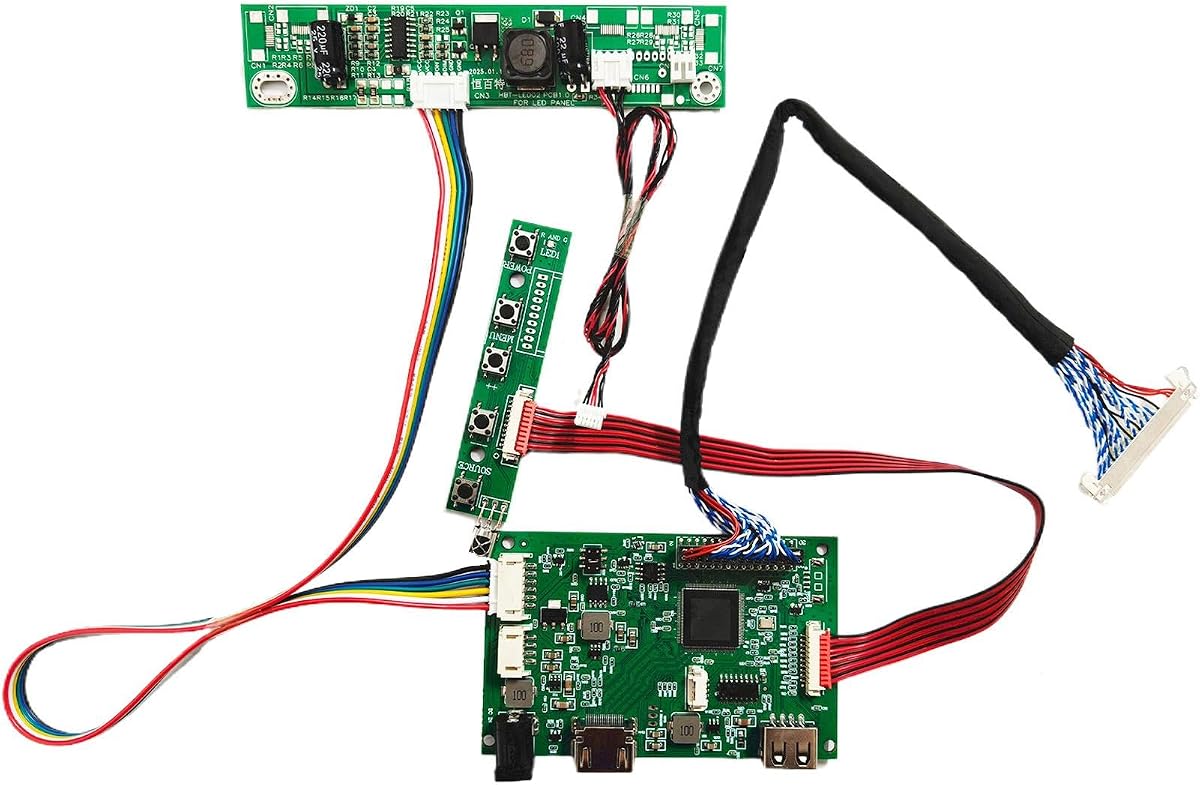
This controller board supports a wide range of LCD screen sizes from 10 to 65 inches and offers HDMI DVI and VGA inputs. It features the NT68676 chipset and includes multiple OSD language options for international users.
We may earn a commission when you buy through this link, at no additional cost to you.
The board includes basic OSD functions like power menu volume and adjustment controls to manage display settings. It is designed as a universal kit suitable for various DIY notebook display projects across different panel types.
Users need to verify specific model compatibility and provide their own power adapter and signal cables for setup. This flexibility allows for broad use but requires more research to ensure the correct components are selected.
This board is ideal for large-scale DIY projects requiring versatile input options and broad size compatibility. We recommend it for users comfortable with verifying hardware details and sourcing necessary accessories independently.
Multiple OSD language support makes the board accessible to users from different regions and languages.
NT68676 chipset ensures reliable signal processing for consistent display performance across supported panels.
We may earn a commission when you buy through this link, at no additional cost to you.
This controller board is designed for 21.5 to 23.8 inch 1920×1080 screens and offers unique USB playback capabilities for video pictures and text. It includes HDMI video input support and audio output for versatile multimedia display projects.
We may earn a commission when you buy through this link, at no additional cost to you.
The board supports image rotation up to 180 degrees which adds flexibility for different display orientations. It also includes an inverter board and signal cable to simplify the initial setup process for users.
Users must provide their own 12V 2A power adapter and verify the exact screen model for compatibility. This ensures that the board operates correctly with the selected panel and avoids potential display issues.
This board is a top choice for multimedia display projects requiring USB playback and HDMI input options. We recommend it for users who need a high-rated solution with unique features like image rotation.
USB support for video pictures and text playback enhances display versatility without external devices.
180-degree image rotation allows flexible screen orientation for various viewing setups and needs.
We may earn a commission when you buy through this link, at no additional cost to you.
This controller board is designed for 15.6 inch 1366×768 screens with a 40-pin LVDS interface and offers HDMI and VGA inputs. It focuses on precise signal transmission and optimized image quality with adjustable parameters for brightness and color.
We may earn a commission when you buy through this link, at no additional cost to you.
The board continuously monitors status and adjusts to abnormal current or voltage to extend screen lifespan. It also supports external devices like set-top boxes for multi-device signal switching in various scenarios.
Users should verify the exact screen model to ensure compatibility with the specific board features. While no user ratings are available the product description emphasizes stability and quality optimization for reliable performance.
This board is ideal for users working with 15.6 inch 40-pin panels requiring HDMI and VGA input options. We recommend it for projects where image optimization and stable operation monitoring are key priorities.
Adjustable parameters for brightness contrast and color enhance the visual experience for specific content.
Compatible with external devices enabling flexible signal switching for diverse viewing applications.
We may earn a commission when you buy through this link, at no additional cost to you.
This controller board is designed specifically for B173HW01 and B173HW02 matrix panels with 1920×1080 resolution and 40-pin LVDS interface. It features high interface matching requirements and strict screen adaptability to ensure perfect display performance.
We may earn a commission when you buy through this link, at no additional cost to you.
The board includes a signal processing core that converts video signals into screen-recognizable formats and manages brightness and color adjustments. It supports low-power mode to extend battery life and ensures stable operation through voltage management.
Because this board is tailored to specific matrix models users must verify the exact panel type before purchasing. This level of specificity ensures optimal performance but limits general compatibility with other screen models.
This board is the top choice for users with specific 17.3 inch panels that require high precision and power management. We recommend it for projects where perfect model fit and low power consumption are critical.
Signal processing core ensures accurate conversion of video signals for optimal display recognition and output.
Low power consumption management extends battery life and ensures stable voltage for long-term operation.
We may earn a commission when you buy through this link, at no additional cost to you.
Selecting the right controller board requires careful attention to resolution interface type and power requirements to ensure compatibility with your specific screen model.
The board must match your screen resolution exactly such as 1366×768 or 1920×1080 using mismatched resolutions will cause display errors or no signal. Always verify the resolution printed on your screen label before purchase to avoid returns.
Check whether your screen uses eDP or LVDS interfaces and how many pins it requires such as 30 or 40 pin. Connecting the wrong interface type will prevent the board from communicating with the display panel.
Most boards require a 12V DC adapter with amperage ranging from 2A to 3A depending on screen size and power needs. Insufficient current can lead to flickering or constant rebooting so match the adapter to the board specs.
Always match the controller board to the specific panel model number printed on the screen such as LP156WH4 or B156HAN01.1. Even small differences in model numbers can indicate incompatible internal connections.
Consider whether you need HDMI VGA or DVI inputs for your intended use case such as connecting a gaming console or PC. Some boards include USB playback capabilities which add extra functionality for media displays.
If you want built-in audio check whether the board includes a speaker connector for external speakers. This allows you to add sound to your DIY monitor project without extra hardware.
Basic on-screen display controls like volume and menu navigation help adjust brightness and color settings after installation. Ensure the board includes a keyboard or remote for easy access to these features.
Look for boards from sellers who offer technical support or compatibility verification before purchase. This can save time and cost if your screen model is not widely documented or supported.
Begin by verifying your screen model and interface type against the board specifications to ensure full compatibility before starting assembly. This step prevents costly mistakes and ensures the board matches your panel exactly.
Connect the signal cable to the screen ensuring Pin 1 aligns with the red circle marking on the board. Power on the board before attaching the screen cable to check LED status indicators for correct power supply.
Adjust brightness and color settings using the onboard OSD menu after the display stabilizes. Periodically check power connections and avoid frequent hot-swapping of signal cables to maintain long-term board health.
No using a higher resolution board with a lower resolution panel will not display correctly and may result in a blank screen. Always match the board resolution exactly to the screen panel resolution for proper operation.
No most controller boards operate without driver installation and work via direct hardware connection to the display. Simply connect the cables power on and ensure the input signal matches the board settings.
This usually indicates the power supply does not provide enough current for the board and panel to operate properly. Try using a higher amperage adapter matching the board specs to resolve the issue.
HDMI generally offers better video quality and supports audio in one cable while VGA is older and video only. Choose based on your available devices and whether audio needs to be integrated directly.
Yes if the board includes HDMI input you can connect gaming consoles directly to the screen for display. Ensure the console output matches the board resolution requirements for stable gaming performance.
Pin 1 is typically marked by a small red square or circle on the connector housing near the edge. Align this with the matching mark on the board connector to avoid reversing signal connections.
This guide has presented ten top-rated options covering a range of resolutions interfaces and sizes for DIY laptop screen projects. Each pick balances compatibility and performance to help you choose the most suitable board for your needs.
Prioritize resolution and interface matching above all else to ensure your board works with your specific screen panel. Also consider input options and power requirements to simplify setup and enhance functionality.
Prices and availability change regularly so verify current listings and compatibility before finalizing your purchase. With the right board your repair or custom monitor project can deliver reliable and high-quality display performance.