
ASUS Vivobook Go 15
4.3Editor score
Affordable price point
Slim profile design
Essential performance
Finding a lightweight ASUS laptop can transform your mobile productivity and entertainment experiences. These devices balance portability with powerful hardware, ensuring you stay connected whether you are commuting or working remotely.
We evaluated ten distinct models ranging from budget-friendly options to premium ultrabooks. Each device was assessed based on processor speed, display clarity, storage capacity, and overall build quality to ensure a comprehensive comparison.
Every pick highlights specific strengths and ideal use cases for different users. Please note that product specifications and availability may change over time, so verify the latest details before making your final purchase decision.
4.3Editor score
3.7Editor score

4.4Editor score
As an Amazon Associate we earn from qualifying purchases.
The following table provides a side-by-side overview of key specifications for each model featured in this guide to help you quickly identify the best fit for your needs.





The ASUS Vivobook Go 15 stands out as a top contender for users seeking a balanced and affordable portable device. With a solid 4.3 rating, it delivers reliable performance for everyday tasks while maintaining a sleek and durable profile.
We may earn a commission when you buy through this link, at no additional cost to you.
Its AMD Ryzen 3 7320U processor handles multitasking efficiently, supported by 8GB of DDR5 RAM for smooth application switching. The 15.6-inch display features slim bezels that maximize screen space within a compact footprint.
While the 128GB storage is modest, it is sufficient for basic users who rely on cloud storage. The military grade durability ensures the chassis can withstand daily wear and tear during commutes or travel.
This laptop is ideal for students or professionals needing a budget friendly machine that does not compromise on essential features. Its fast charging and privacy shutter add practical value for on the go productivity.
The chassis is designed to be lightweight yet robust, passing rigorous military grade testing for resistance to shocks and extreme temperatures.
The NanoEdge display technology reduces bezel width significantly, providing a more immersive viewing experience for media consumption and work.
We may earn a commission when you buy through this link, at no additional cost to you.
This model improves upon the base Vivobook Go 15 with a faster Ryzen 5 processor and significantly more storage. It is an excellent choice for those who need slightly better performance without a large budget increase.
We may earn a commission when you buy through this link, at no additional cost to you.
The 512GB SSD ensures you have ample room for documents, media, and applications. Combined with 8GB RAM, it handles multitasking and light workloads with impressive speed for its price point.
Like its sibling, it maintains the durable chassis and slim profile. The silver finish offers a professional look that suits both casual and business environments comfortably.
Ideal for budget conscious buyers who want future proof storage and CPU capabilities, this laptop offers a practical balance. It is particularly suited for remote workers needing reliable hardware.
The Ryzen 5 chip provides enhanced performance for browsing and light gaming compared to lower tier options in the same price range.
With half a terabyte of storage, users no longer need to rely heavily on external drives for basic file management.
We may earn a commission when you buy through this link, at no additional cost to you.
The ASUS Vivobook 14 introduces the Snapdragon X processor and is a strong contender for users interested in AI capabilities. With a high 4.8 rating, it promises excellent efficiency and performance for modern workflows.
We may earn a commission when you buy through this link, at no additional cost to you.
Equipped with 16GB RAM, this machine handles multiple applications smoothly. The Snapdragon X chip is designed for long battery life and seamless integration with Windows Copilot+ features.
Its compact 14 inch form factor makes it easy to carry. The 512GB SSD provides quick access to files, ensuring you spend less time waiting and more time working.
Best for users ready to embrace next generation computing and AI assistance, this model stands out. It is highly recommended for those who prioritize speed and future proofing.
The Copilot+ PC designation indicates advanced AI features designed to streamline productivity and enhance user interaction.
16GB of RAM ensures that you can run several heavy applications simultaneously without system slowdowns.
We may earn a commission when you buy through this link, at no additional cost to you.
For those who need more screen real estate without sacrificing portability, the Vivobook 16 is a compelling choice. It offers a spacious display that enhances productivity for multitasking and media consumption.
We may earn a commission when you buy through this link, at no additional cost to you.
The Snapdragon X processor ensures that the extra screen size does not drain the battery excessively. Users can enjoy a larger workspace while maintaining a reasonable weight for travel.
With 16GB RAM and a 512GB SSD, this device is ready for demanding tasks. The WUXGA resolution provides sharp visuals that make text and images look crisp.
Ideal for professionals who need a bigger canvas for spreadsheets or design work, this laptop delivers. It strikes a great balance between screen size and lightweight mobility.
The 16-inch screen offers a 16:10 aspect ratio which provides more vertical space for scrolling and document editing.
Powered by Qualcomm technology, this device optimizes power consumption to extend battery life during intensive use.
We may earn a commission when you buy through this link, at no additional cost to you.
This model is designed for basic tasks and students on a strict budget. It offers a simple and portable solution for web browsing, word processing, and video conferencing without high costs.
We may earn a commission when you buy through this link, at no additional cost to you.
While the 4GB RAM limits multitasking, it is adequate for light usage. The Intel N4500 processor ensures basic responsiveness for everyday applications and internet browsing.
The 128GB storage is limited but serves well for essential documents. Fast charging technology helps keep the device ready for use even if you forget to charge it overnight.
Best for students or secondary devices used mainly for reading and simple writing, this is a solid pick. It keeps costs low while providing necessary features for education.
This model prioritizes affordability, making it accessible for users who need a device for essential tasks only.
Features like a numeric keypad and privacy shutter add convenience for students taking notes and joining online classes.
We may earn a commission when you buy through this link, at no additional cost to you.
This laptop shines with its generous 16GB of RAM which allows for smooth operation of many open tabs and programs. It is a great choice for users who keep many applications running simultaneously.
We may earn a commission when you buy through this link, at no additional cost to you.
The Intel i3 processor provides solid performance for general tasks, while the fast SSD ensures quick system boot up. Wi-Fi 6 ensures stable connectivity in crowded networks like offices or cafes.
The 14-inch screen is compact enough for travel but still comfortable for daily use. The blue finish adds a touch of style to a practical and efficient workstation.
Ideal for home office users or students with heavy research needs, this device handles complexity well. Its memory makes it a reliable tool for productivity.
The 16GB RAM allows you to switch between browsers, office suites, and media players without lag.
Wi-Fi 6 support means faster downloads and better stability when connecting to wireless routers.
We may earn a commission when you buy through this link, at no additional cost to you.
This model features a sleek silver finish that appeals to professionals. It combines the efficiency of the Snapdragon X processor with a high resolution display for sharp visuals.
We may earn a commission when you buy through this link, at no additional cost to you.
The 16GB RAM ensures that you can work through complex projects without interruptions. The Snapdragon architecture helps maintain battery life even when the screen is bright.
While some users may need time to adjust to the new computing environment, the performance benefits are significant. The device supports advanced AI tools that can streamline workflows.
Best for business users who prefer a professional aesthetic and need reliable performance, this is a strong option. It is well suited for modern corporate environments.
The cool silver chassis provides a sophisticated look that fits well in formal business settings.
The WUXGA resolution offers a clear and detailed image quality for presentations and spreadsheets.
We may earn a commission when you buy through this link, at no additional cost to you.
Featuring the 13th Gen Intel processor, this laptop offers impressive performance for its class. The 6-core design allows for efficient multitasking and quick response times.
We may earn a commission when you buy through this link, at no additional cost to you.
With 16GB RAM, users can handle demanding applications smoothly. The 14-inch screen provides a good balance between portability and usability for daily tasks.
The 256GB storage is adequate for those using cloud services. Its lightweight design makes it easy to carry around campus or office environments.
Ideal for those who prioritize CPU performance and weight, this device delivers. It is a practical choice for general computing needs.
The 13th Gen processor brings enhanced efficiency and speed to a compact device profile.
At just over three pounds, this laptop is easy to transport for long commutes.
We may earn a commission when you buy through this link, at no additional cost to you.
This model is noted for its battery life which can last up to 11 hours on a single charge. It is a reliable companion for long days without access to an outlet.
We may earn a commission when you buy through this link, at no additional cost to you.
The Ryzen 3 processor supports efficient power usage while maintaining decent performance. The 256GB SSD provides double the storage of the base model for extra files.
With a full sized keyboard including a numeric keypad, it is convenient for data entry. The military grade durability ensures it can handle rougher conditions.
Best for travelers or students needing all day power, this laptop is ideal. It combines essential features with a long lasting battery.
The efficient processor helps maximize the battery capacity for uninterrupted work sessions.
A numeric keypad is included which is helpful for accountants or data entry tasks.
We may earn a commission when you buy through this link, at no additional cost to you.
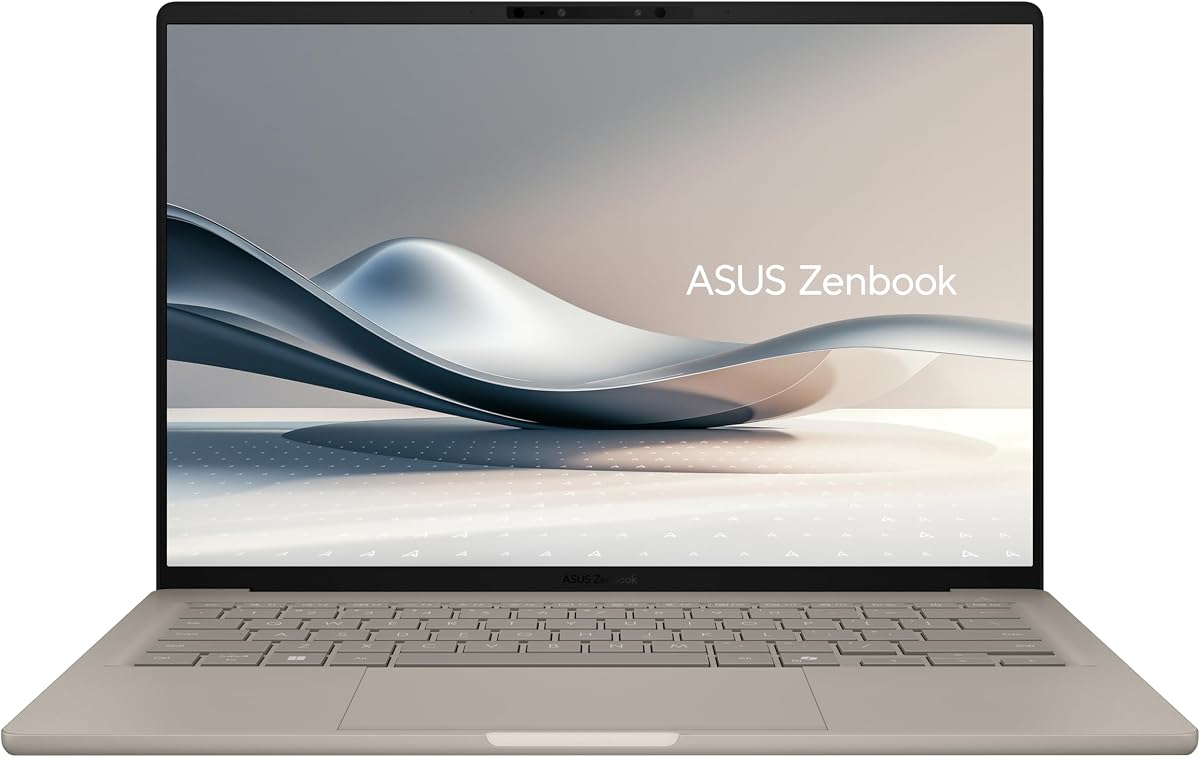
The ASUS Zenbook A14 is the lightest 14-inch Copilot+ PC available. It redefines portability with a weight of just 980g making it effortless to carry anywhere.
We may earn a commission when you buy through this link, at no additional cost to you.
Its OLED display offers stunning contrast and color which is rare for ultra lightweight laptops. The Ceraluminum build provides durability despite the thin design.
While the rating is lower than other models, the innovation in materials and weight is unmatched. It supports advanced AI features for enhanced productivity.
Best for frequent travelers who value weight above all, this is the ultimate choice. It is a premium device for those who prioritize mobility.
Weighing less than a kilogram, this laptop sets a new standard for mobile computing.
The OLED panel ensures deep blacks and vivid colors for an exceptional viewing experience.
We may earn a commission when you buy through this link, at no additional cost to you.
Choosing the right ASUS laptop requires evaluating several key factors to ensure it meets your specific needs and lifestyle requirements.
The processor is the brain of your laptop and dictates how fast tasks are completed. Modern AMD Ryzen and Intel Core processors offer excellent efficiency for thin devices. Consider your needs for multitasking and specific applications.
Look for at least an i3 or Ryzen 3 for basic use and aim higher for productivity. The Snapdragon X chips offer new AI benefits for future proofing.
RAM determines how many apps you can run at once. 8GB is the standard minimum while 16GB ensures smooth performance. Storage speed matters for boot times and app loading.
Prioritize SSDs over eMMC storage for reliability. Ensure capacity matches your file volume needs without relying heavily on cloud services.
A high resolution screen reduces eye strain and makes text crisp. WUXGA and FHD are standard options for thin laptops. Brightness levels are crucial for outdoor use.
Consider OLED panels for better contrast but note they may cost more. The NanoEdge design maximizes screen real estate within a smaller frame.
Long battery life is essential for lightweight laptops intended for mobile use. Aim for devices rated for 8 hours or more of typical usage. Fast charging adds convenience when power is low.
Check reviews to see real world performance. Processor choice greatly impacts how long a charge will last during your day.
Thin laptops must be robust to survive travel. Look for military grade certifications like MIL STD 810H. Materials like Ceraluminum offer strength without extra weight.
A sturdy hinge ensures the screen stays secure. Durability features protect your investment from daily wear and accidental drops.
Limited ports can require dongles for peripherals. Check for USB-C HDMI and standard USB-A slots. A headphone jack is often needed for private listening.
Ensure the laptop supports charging via USB-C for convenience. Good connectivity saves time and frustration when connecting to displays or drives.
Comfortable typing is key for long sessions. ErgoSense keyboards provide good travel and feedback. A precision touchpad supports gestures and navigation.
A numeric keypad is helpful for data entry tasks. Key backlighting aids in typing in dim environments or on planes.
Windows 11 Home provides the latest features and security. Some models offer S Mode which restricts apps to Microsoft Store. Understand the difference before purchasing.
New AI features on Copilot+ PCs offer unique tools. Ensure your workflow is compatible with the operating system provided.
To maintain performance, regularly update your drivers and operating system. Use the built-in ASUS Armoury Crate software to manage power modes. Select balanced or performance modes depending on your activity.
Avoid placing the laptop on soft surfaces like beds while in use. This prevents overheating by blocking ventilation grills. Use a hard flat surface for cooling efficiency.
Use a privacy shutter when not in video calls to protect security. Clean the screen with a microfiber cloth and avoid harsh chemicals. A soft brush removes dust from keyboard crevices.
Yes many models feature military grade durability testing to ensure they can withstand shocks and vibrations. The chassis is designed to be robust despite the slim profile making them suitable for commuting and travel.
Most of these ultra thin models have soldered RAM that cannot be upgraded. It is important to choose the memory capacity that suits your needs at the time of purchase.
WUXGA offers a higher resolution of 1920×1200 pixels compared to FHD's 1920×1080. This provides more vertical space for viewing content and working with documents simultaneously.
Most models include USB-C or HDMI ports that allow connection to external displays. This expands your workspace for productivity or presentations without taking up desk space.
Battery life varies by model and usage but most offer between eight to twelve hours of typical use. Power saving settings can extend this time for light tasks like web browsing.
Yes Windows 11 Home supports essential professional tools and security features. It offers improved window management and supports Android apps which can enhance productivity for many users.
We have reviewed ten excellent options ranging from budget friendly to premium ultrabooks. The Zenbook A14 leads in portability while the Vivobook Go 15 offers great value.
Consider your priorities such as screen size memory or battery life when deciding. The right laptop will support your workflow whether you are a student or a professional.
Remember that specifications and prices may change so check the latest details before buying. We hope this guide helps you find the perfect lightweight ASUS laptop for your needs.