
Nettbe 60 PCS Reusable Ties
4.8Editor score
Adjustable hook and loop
Reusable multiple times
Versatile home use
A cluttered desk can ruin your gaming setup. Good cable management keeps wires hidden and organized. This guide reviews ten top products to help you choose the right solution.
We compared kits, trays, and clips based on durability and ease of use. Each item offers unique features for different desk sizes and needs. Our analysis helps you find the best fit.
Each pick shows key specs, pros, and cons for informed decisions. Prices may change frequently due to demand. Always check current listings before buying to ensure value.
4.8Editor score

4.7Editor score
4.6Editor score
As an Amazon Associate we earn from qualifying purchases.
This side-by-side comparison highlights key features across all ten products to help you find the ideal fit for your gaming PC setup.
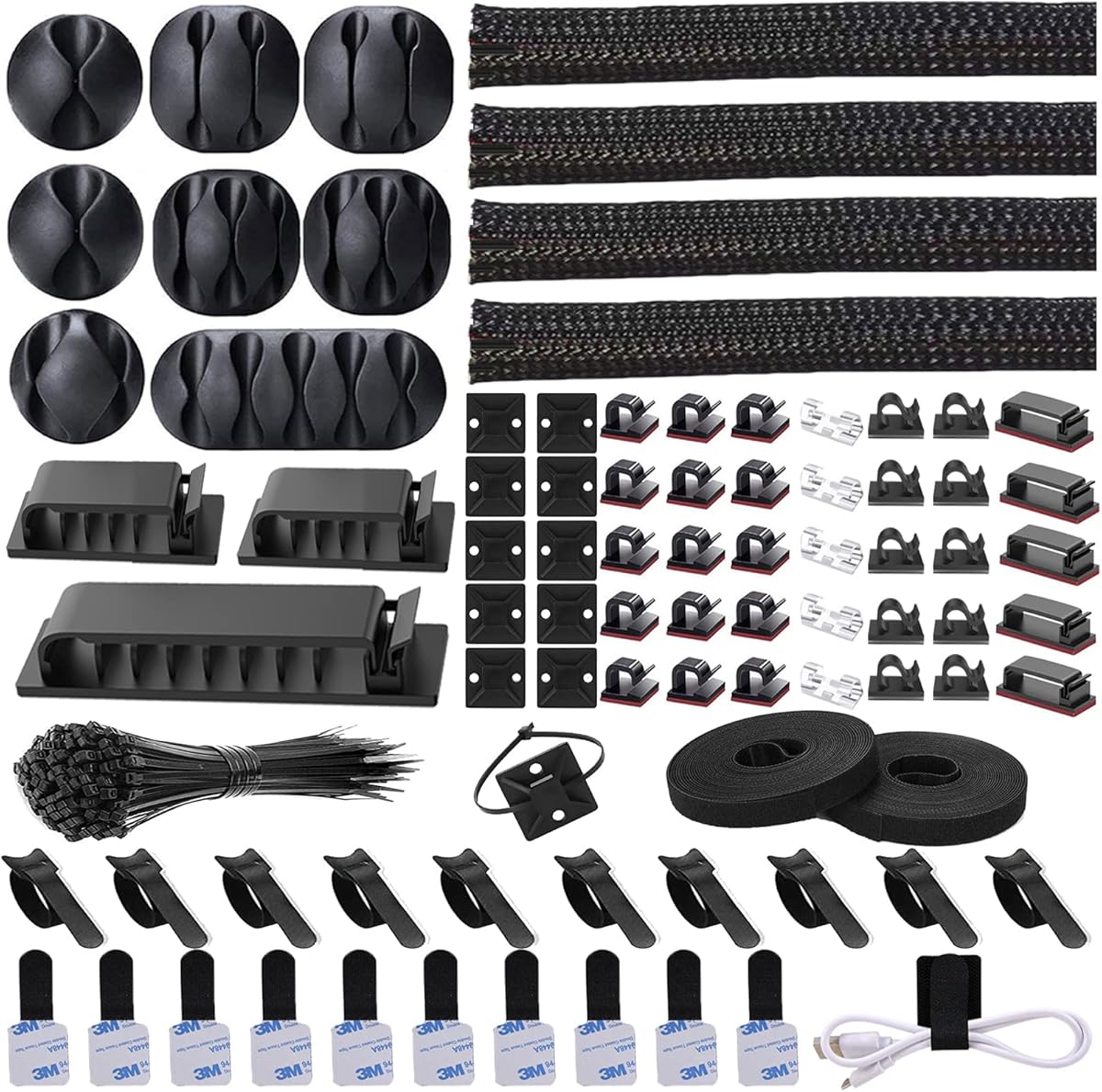




This kit offers an extensive range of tools for organizing cables around your gaming PC. With 192 pieces, you get sleeves, ties, and clips to handle any setup. It ranks high for value and versatility.
We may earn a commission when you buy through this link, at no additional cost to you.
The included components feature strong self adhesive pads that stick well to clean surfaces. The split sleeves make loading wires easy without unplugging devices. Clips come in black and transparent to blend with your desk.
Some users note that adhesive strength depends on surface cleanliness. Dust or uneven textures can reduce hold. Ensure the surface is wiped down before applying for best results.
This is ideal for gamers wanting a complete solution in one box. It covers most basic needs without buying multiple items. Great for new builds or refreshing old setups.
Having every tool needed in one package saves time and money. You won't need to search for extra ties or clips later.
Split design allows you to wrap cables without disconnecting them. This makes adding or removing devices simple and fast.
We may earn a commission when you buy through this link, at no additional cost to you.
This organizer kit focuses on strong adhesion and durable components. It includes sleeves, ties, and clips designed for long term use. The materials are sturdy and nontoxic for safe home environments.
We may earn a commission when you buy through this link, at no additional cost to you.
The self adhesive sticky pads ensure holders stay affixed to your surface reliably. Clips work on desks, walls, and cabinets. The split wire loom loads wires quickly without tools or drilling.
Installation requires a clean surface to maximize grip. Rough or dirty spots may weaken the bond. Take time to prep the area before attaching any clips or holders.
Choose this if you need reliable holding power for heavy cables. It is great for permanent setups under desks or along baseboards. The variety of clips offers flexibility for different layouts.
The strong pads keep cables from falling over time. This reduces the risk of loose wires tangling in your foot space.
Made from quality materials, this kit avoids toxic elements. It lasts for years without degrading or breaking easily.
We may earn a commission when you buy through this link, at no additional cost to you.
This wire loom provides solid protection for cables running across your floor. It features a split design that makes loading wires effortless. It is UL Recognized for safety and insulated to prevent hazards.
We may earn a commission when you buy through this link, at no additional cost to you.
The sleeve closes on itself once loaded for a perfect wire wrap. It guards against pets chewing on cords which keeps your setup safe. Temperature range supports diverse environments without melting or degrading.
The diameter is fixed at half an inch which might limit thicker bundles. If you have many cables together, you may need larger options. Check cord width before purchasing to ensure fit.
This is perfect for protecting specific cable runs under desks or in corners. It works well for power cords and audio video cables. Gamers with pets will find the chew protection especially valuable.
The sleeve prevents pets from damaging cables by chewing. This saves money on replacements and avoids electrical risks.
Being UL Recognized means it meets safety standards. You can trust it to handle electrical loads safely without fire risk.
We may earn a commission when you buy through this link, at no additional cost to you.
These J channels offer a spacious solution for hiding power cords under desks. Each pack includes six channels designed to hold up to ten cables. The PVC material is flame retardant for enhanced safety.
We may earn a commission when you buy through this link, at no additional cost to you.
The outward facing opening design makes adding or removing cables easy. Pre-applied adhesive allows quick installation. With heat, you can remove them without leaving residue on your furniture.
Powdered or uneven surfaces may hinder the adhesive strength. Ensure the area is smooth for best results. If you need a permanent fix, consider screws instead of just tape.
This is best for organized office desks or computer tables where many cables converge. The size helps keep wires out of sight. Gamers with large setups will appreciate the capacity.
Each channel can theoretically hold up to ten cables. This reduces the need for multiple raceways in one spot.
The PVC material resists ignition during electrical fires. This adds a critical safety layer for your gaming setup.
We may earn a commission when you buy through this link, at no additional cost to you.
These reusable cable ties are excellent for bundling loose cords efficiently. The hook and loop design allows you to adjust the tightness. With 60 pieces, you have enough for every wire in your setup.
We may earn a commission when you buy through this link, at no additional cost to you.
Made from premium nylon adhesive materials, they can be used multiple times. This reduces waste compared to single-use zip ties. They work well in home, office, and garage settings.
They might not hold very heavy cables securely on their own. For heavy items, use these alongside clips or trays. Regular checks ensure the adhesive does not lose strength over time.
This is perfect for managing small cables like USB or headphone wires. They keep bundles neat and organized without tools. A great low-cost addition to any cable management kit.
You can reuse these straps for different setups. This saves money and reduces environmental waste significantly.
The hook and loop system adapts to any bundle size. You can tighten or loosen as needed without cutting.
We may earn a commission when you buy through this link, at no additional cost to you.
These trays provide an easy way to organize cables under a desk. They come with strong adhesive backing for a quick installation without tools. Users report improved desk aesthetics and reduced visible clutter.
We may earn a commission when you buy through this link, at no additional cost to you.
The design is spacious enough to hold multiple cables and power strips. The adhesive is praised for its strength and durability. It keeps the tray in place over long periods without bending.
Because it uses adhesive only, removal can be tricky on delicate surfaces. Heat may be needed to soften the glue without damage. Ensure your desk surface is smooth for best adhesion.
This is ideal for gamers who want a simple tray fix. It fits standard desks well and holds necessary equipment securely. The 2-pack allows for flexible placement along the desk.
Using trays makes your desk look cleaner and organized. This reduces visual distractions during gaming sessions.
No drilling means you can install without tools. This is perfect for renters who need non-permanent solutions.
We may earn a commission when you buy through this link, at no additional cost to you.
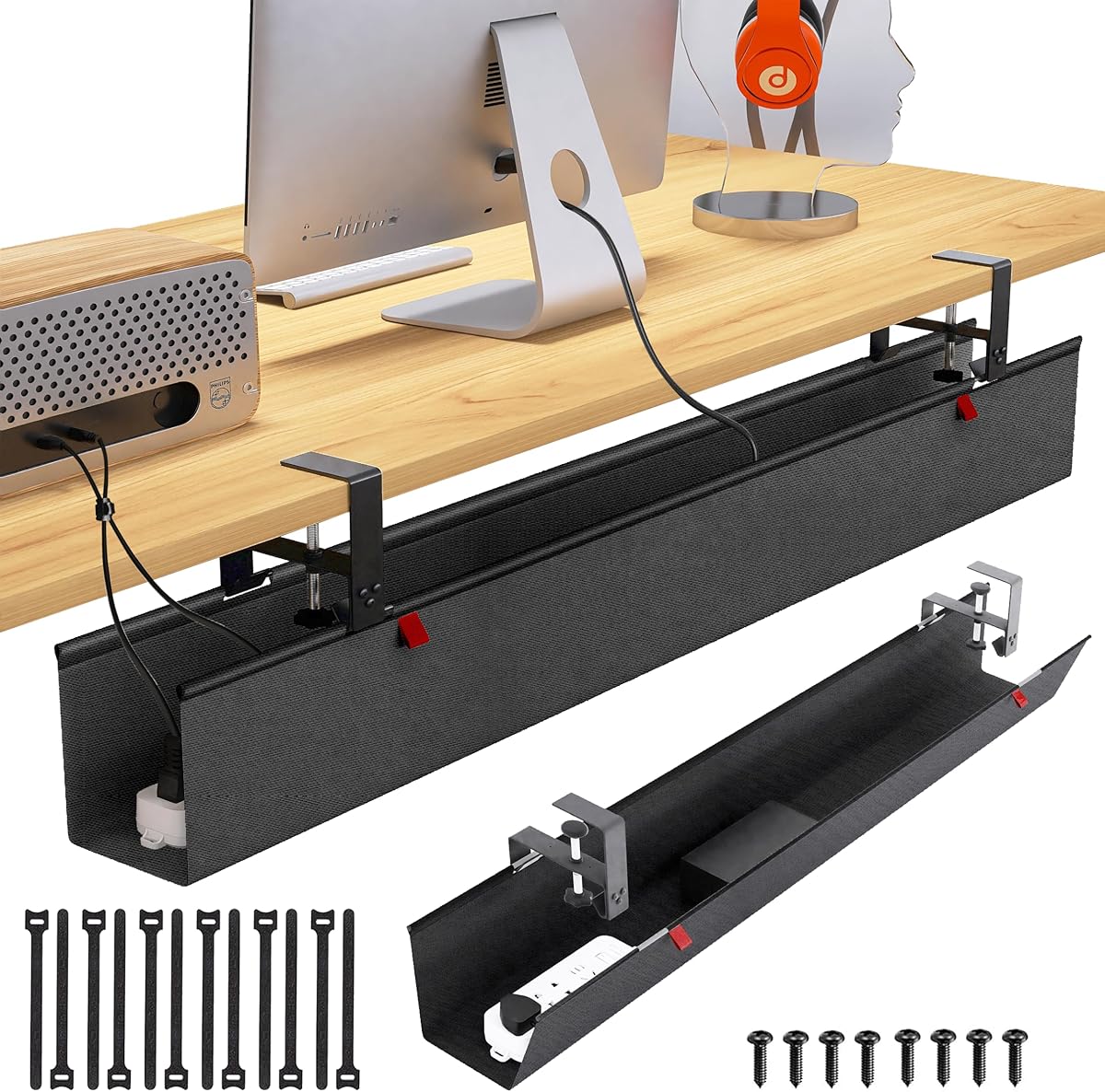
This tray offers a large capacity for hiding adapters and sockets under tables. It supports clamp-on or screw fixing for versatile installation. The 600D Oxford fabric is flame retardant and durable.
We may earn a commission when you buy through this link, at no additional cost to you.
The heavy-duty clamp allows weight loading without sagging. You can unfold the tray for easy access. It fits wood, glass, and metal tables easily. Each item stays fixed with built-in ties.
If your table has built-in drawers, you may need extra edge space. Ensure at least 5.3 inches of space along edges. The clips are visible from the side so not fully hidden.
Choose this for desks needing a large solution without drilling. It holds heavy power supplies without deforming. Great for gamers with multiple monitors and power bricks.
The 36 inch size fits all adapters and sockets. You can hide everything under the table cleanly.
The reinforced clamp supports heavy weight without bending. This keeps your power supply secure and stable.
We may earn a commission when you buy through this link, at no additional cost to you.
This metal tray uses a mesh structure to ensure ventilation for power supplies. The 25 inch length holds cables and sockets securely. It supports around 15 lbs without deforming easily.
We may earn a commission when you buy through this link, at no additional cost to you.
Non-slip rubber pads protect your desk surface from scratches. The clamp allows both inward and outward installation. You can change positions easily as needed. Assembly takes only three minutes.
Assembly requires screws to join the two parts. If you need a quick setup, ensure tools are handy. Sharp edges may be present so handle with care during install.
This works well for standing desks or home setups needing ventilation. The mesh prevents dust buildup and heat. Gamers needing airflow for power strips will love this design.
The mesh structure maintains airflow to prevent overheating. This keeps your power supply safe from excess heat.
Non-slip rubber pads prevent scratches on your desk. You can mount firmly without damaging the surface.
We may earn a commission when you buy through this link, at no additional cost to you.
These clips are built for flexibility and reuse. The elastic loop holds cables from one inch diameter easily. You can add or remove wires without waste. Comes with adhesive, screws, and zip ties.
We may earn a commission when you buy through this link, at no additional cost to you.
The upgraded white silicone elastic loop offers long lasting strength. The larger square base improves attachment security. The impact-resistant ABS allows one-handed operation for convenience.
For ultimate strength, screws might be needed over adhesive. If you move cables often, the loop helps swap them easily. The 10 count fits smaller setups or specific areas.
Ideal for gamers who swap gear often. The loop allows fast changes without new tools. This is perfect for charging stations or bedside desks.
Swap cables without throwing away ties. This reduces waste and keeps your setup flexible.
Use adhesive, screws, or ties for mounting. You can choose the best method for your surface.
We may earn a commission when you buy through this link, at no additional cost to you.
This tray completes a clean gaming setup by hiding cables effectively. The high-density black Oxford fabric blocks the view of wires. It supports heavy gear without bowing or deforming.
We may earn a commission when you buy through this link, at no additional cost to you.
The anti-sag base supports power bricks and surge protectors. The side opening allows easy routing of thick cables. It keeps your power connections clean and safe from pets.
While premium, the cost may be higher than standard trays. Ensure you need the extra length to justify it. Fabric can collect dust so check periodically for debris.
Best for serious gamers wanting a stealth battlestation. It keeps RGB lights pop without cable distractions. If you have a large setup, this ensures a professional look.
The blackout fabric hides wires completely. Your setup looks clean and professional.
The reinforced base supports heavy gear easily. No bowing happens even with power bricks.
We may earn a commission when you buy through this link, at no additional cost to you.
Choosing the right management tool requires looking at capacity, installation, and material.
Ensure the tray or sleeve fits your cable volume. Larger setups need wider trays to avoid congestion and overheating. Measure your available space before buying to ensure proper fit.
Choose a size that matches your cable volume to avoid congestion.
Decide if you need adhesive or screw mounting. Adhesive is easier but may leave residue. Screws offer more stability for heavy trays.
Match the method to your desk material for best results.
Look for flame retardant materials like PVC or high-density fabric. Strong adhesives and sturdy clips last longer. Metal mesh provides ventilation while fabric offers stealth.
Select durable materials to ensure long-term safety and function.
Consider if you need split sleeves or open trays. Open designs make adding cables easier without disconnection. Closed designs hide more but require more work to adjust.
Prioritize access based on how often you change cables.
Black trays and transparent clips suit dark gaming setups. Fabric covers offer more blackout than mesh. Choose a finish that matches your desk color.
Pick a style that blends with your gaming decor.
Sleeves and trays that hide cords protect against chewing. Strong clips keep wires from dangling. Ensure all materials are non-toxic and safe.
Safety should be a priority in homes with pets or kids.
Reusable ties and adjustable clips help future changes. Kits offer more variety than single trays. Consider how often you plan to update your setup.
Opt for reusable options to adapt your setup easily.
Metal mesh trays help power supplies stay cool. Closed fabric trays might trap heat. If you have hot adapters, choose breathable designs.
Ventilation is key to preventing overheating of power gear.
Install trays on clean, flat surfaces. For adhesive, press firmly for a minute to bond.
Bundle cables neatly before securing. Leave slack for moving your chair or desk.
Check adhesive and clips monthly to ensure they stay tight. Replace worn ties immediately.
Use under desk trays or sleeves to bundle cables together. Secure them with adhesive mounts to keep them hidden from view. This reduces clutter and keeps your workspace clean.
Yes, kits provide all tools needed in one package. They are cost effective compared to buying each item separately. This saves time and ensures compatibility.
Metal mesh offers ventilation while fabric offers a sleek look. PVC is durable and flame retardant for safety. Choose based on your cooling needs and style.
Use a hairdryer to warm the adhesive before peeling. Pull slowly to avoid damaging your desk surface. Clean residue with mild soap and water.
Yes, many trays are spacious enough for power strips. Ensure the tray supports the weight and provides airflow. This keeps power gear organized and safe.
Reusable ties can last years if not overstretched. Adhesive clips may weaken after a year. Check them regularly and replace if they lose grip.
Split sleeves provide a physical barrier to discourage chewing. While not indestructible, they reduce damage risk. Ensure they cover the exposed parts fully.
Wipe metal trays with a dry cloth to remove dust. Fabric trays can be vacuumed lightly. Avoid using liquid cleaners on adhesive parts.
We reviewed ten top products ranging from kits to large trays. The Alex Tech protector and Nettbe ties offer great value for basic needs.
Prioritize capacity and installation method based on your desk type. For a clean look, consider the 48 inch tray for stealth and support.
Prices change often so verify current listings before buying. Use these tips to keep your setup safe, clean, and efficient.