
Silverstone Technology RM4A
3.6Editor score
Supports 360mm radiators
Includes USB Type-C interface
8 PCI expansion slots available
Selecting the right 4U Rackmount GPU Server Chassis is critical for deploying high-performance computing clusters. These units must accommodate powerful GPUs while maintaining optimal airflow and cooling efficiency for stable operations.
We evaluated ten leading models based on build quality expansion slot counts cooling solutions and storage flexibility. Our analysis focuses on real-world usability for data centers and enterprise environments requiring robust GPU support.
Each pick highlights specific strengths like liquid cooling compatibility or hot-swap drive bays. Prices fluctuate frequently so verify current listings before purchasing to ensure you get the best value for your specific configuration needs.
3.6Editor score

5.0Editor score

As an Amazon Associate we earn from qualifying purchases.
The following table provides a side-by-side comparison of all ten selected chassis options. Review the key specifications to determine which model best aligns with your GPU and storage requirements.


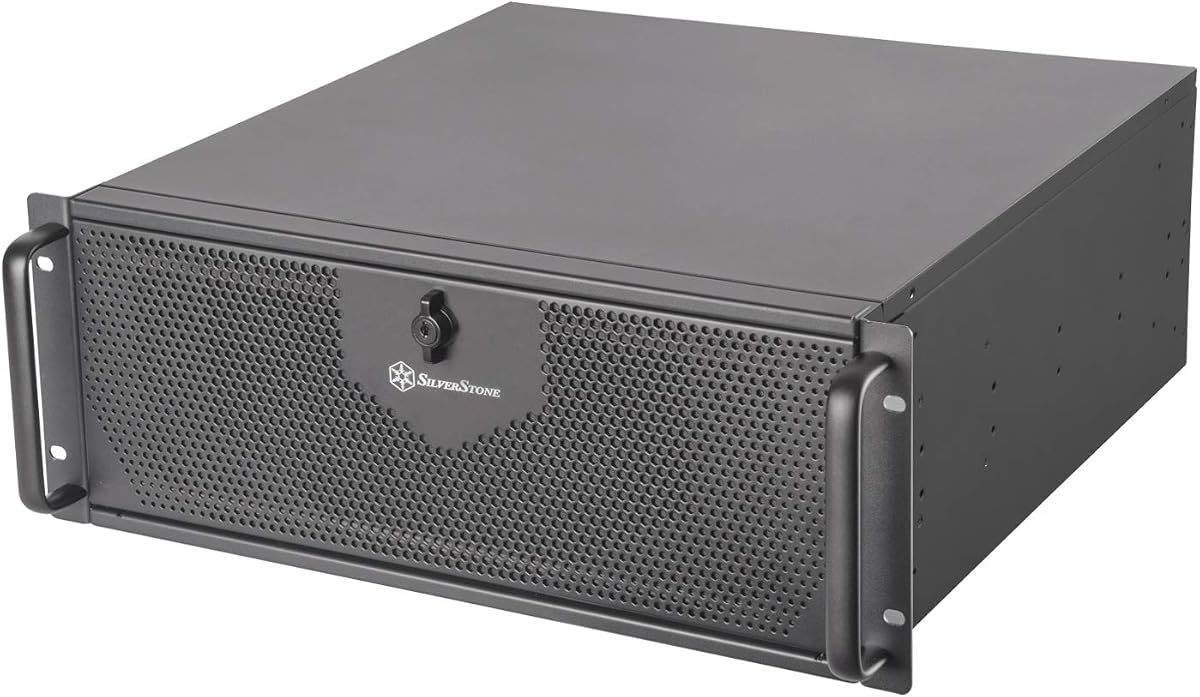
The SilverStone Technology RM44 stands out as the top choice for high-performance GPU server deployments. With a 4.3 rating from verified buyers, it balances advanced cooling with robust expansion capabilities effectively.
We may earn a commission when you buy through this link, at no additional cost to you.
Its standout quality is the enhanced liquid cooling support allowing up to a 360mm radiator. This is crucial for dense GPU setups where air cooling alone might struggle to maintain safe thermal levels during heavy loads.
While the price is higher than basic models, the inclusion of USB-C and extensive PCIe slots justifies the investment. Users gain significant flexibility for future upgrades without needing to replace the entire chassis.
Data center managers and AI researchers should consider this unit for its thermal management. It ensures stable performance for intensive tasks while providing the connectivity needed for modern peripheral devices.
This chassis accommodates up to a 360mm liquid cooling radiator making it ideal for overclocked GPUs or high-TDP accelerators.
With eight PCIe slots and USB-C ports the system offers excellent flexibility for networking cards and fast data transfer needs.
We may earn a commission when you buy through this link, at no additional cost to you.
The Silverstone Technology RM4A offers an accessible entry point for those needing a 4U chassis with cooling options. While it holds a 3.6 rating it provides essential features for modest GPU server builds.
We may earn a commission when you buy through this link, at no additional cost to you.
It supports 360mm radiators which is rare at this price tier. This allows for passive or active liquid cooling setups that can significantly reduce noise compared to high-RPM fan-only configurations.
The main trade-off is in overall build perception and accessory quality compared to premium brands. However for small offices or labs on a tight budget the functionality remains solid for standard workloads.
Small businesses looking to deploy entry-level AI or rendering servers will find this cost-effective. It meets the basic requirements for GPU density without the premium cost of enterprise-grade units.
The support for 360mm radiators enables efficient thermal management at a fraction of the cost of competing enterprise chassis models.
Including a USB Type-C interface ensures you can connect modern peripherals without needing extra adapters on the front panel.
We may earn a commission when you buy through this link, at no additional cost to you.
The ZhenLoong X412 targets users needing extreme storage density and power capacity. It supports up to four GPUs and twelve drive bays including hot-swap capabilities for critical applications.
We may earn a commission when you buy through this link, at no additional cost to you.
A key feature is the inclusion of two 2000W power modules allowing for a stacked 3000W output. This is ideal for powering multiple high-end GPUs without needing external power distribution units.
However the shipping timeline of 30 to 40 days may delay project deployment. The build quality is also less documented than established brands so buyers should plan for potential compatibility verification.
Organizations needing massive local storage alongside GPU compute power will appreciate the form factor. It bridges the gap between storage servers and compute nodes in a single compact unit.
The dual CRPS setup allows for redundant or stacked power delivery ensuring your GPUs run without interruption during maintenance.
With support for U.2 NVMe and SAS drives this chassis can adapt to both high-speed caching and bulk storage needs.
We may earn a commission when you buy through this link, at no additional cost to you.
The RackChoice 4U is a reliable choice for mixed-use servers where storage access is frequent. It features an 8-bay hot-swap backplane with 12Gbps speeds for fast data retrieval and management.
We may earn a commission when you buy through this link, at no additional cost to you.
Its compatibility with EATX and ATX boards makes it a flexible platform for various CPU and GPU configurations. The included cables simplify the initial setup reducing the need for extra purchases.
While it lacks specialized GPU cooling features like liquid ports it focuses on robust air cooling with PWM fans. This ensures stable temperatures for standard compute loads without complex plumbing.
Small to medium businesses seeking a cost-effective server chassis for file sharing or moderate compute will find this suitable. It balances ease of use with essential enterprise features.
Hot-swap bays allow technicians to replace drives quickly without powering down the entire system improving uptime significantly.
Included MiniSAS to SATA cables ensure you have the right connectors on hand to start your storage setup immediately.
We may earn a commission when you buy through this link, at no additional cost to you.
The Rosewill RSV-AI01 is explicitly marketed for AI and machine learning workloads. It supports up to four GPUs and includes features designed to maintain thermal stability under heavy computational stress.
We may earn a commission when you buy through this link, at no additional cost to you.
With a pre-installed rail kit installation in standard 19-inch racks is straightforward. This saves time and effort compared to models where rails are sold separately or require complex assembly.
Users should expect to manage cable routing carefully to maximize the airflow designed for four GPUs. While functional it may require more attention to detail than top-tier enterprise units.
Research teams and small labs focusing on AI will find the form factor helpful. It provides the physical structure needed to house multiple accelerators securely in a rack environment.
The chassis is optimized to support the physical dimensions and power needs of multiple GPUs used in training and inference.
Rails included in the box mean you can mount the chassis immediately upon arrival without ordering additional accessories.
We may earn a commission when you buy through this link, at no additional cost to you.
The Supermicro CSE-747BTQ-R2K04B commands a perfect 5.0 rating from users who value reliability. It is designed specifically to house four double-width GPUs with efficient cooling airflow.
We may earn a commission when you buy through this link, at no additional cost to you.
Enterprise buyers will appreciate the intrusion switch and HDD door lock for physical security. These small details ensure that the hardware remains safe in shared or public data center environments.
The build quality is robust enough to support heavy expansion cards without flexing. This stability is critical when using large cooling solutions on GPUs that add significant weight.
For mission-critical deployments where uptime is non-negotiable this chassis is a top recommendation. It eliminates many common points of failure found in cheaper consumer-grade alternatives.
Included locks and switches allow you to restrict unauthorized access to drives and internal components easily.
The internal layout is designed to ensure even airflow across all four GPU slots preventing localized hot spots.
We may earn a commission when you buy through this link, at no additional cost to you.
This barebone system supports the latest Intel Xeon 6700/6500 series processors and DDR5 memory. It is built to handle the high power demands of next-generation GPUs like the H100.
We may earn a commission when you buy through this link, at no additional cost to you.
The chassis supports up to 8 full-height full-length PCIe 5.0 x16 GPUs. This density is ideal for large-scale AI training clusters where compute throughput is the primary bottleneck.
With 2700W redundant power you can scale compute power without worrying about thermal throttling. The cooling design ensures that even 600W cards can run at peak performance safely.
IT directors planning multi-year AI infrastructure investments will find this a robust foundation. It future-proofs the hardware slot for upcoming releases that require higher bandwidth.
The slots are rated for PCIe 5.0 ensuring maximum bandwidth for high-end accelerators requiring fast data transfer.
With 32 DIMM slots the system can support massive memory configurations required for large model training and inference.
We may earn a commission when you buy through this link, at no additional cost to you.
Designed for AMD EPYC 9005 processors this chassis offers high core counts and memory bandwidth. It is engineered to support the most demanding GPU acceleration tasks.
We may earn a commission when you buy through this link, at no additional cost to you.
The 3200W redundant power supply provides extra headroom for power-hungry GPUs. This ensures stability even when running multiple accelerators at maximum load without tripping breakers.
The airflow design is tuned for high TDP components. This allows 600W cards to operate efficiently without needing to ramp up fan speeds excessively.
Organizations standardizing on AMD server architectures will find this chassis integrates seamlessly. It offers the scale needed for HPC and enterprise AI without complex custom cooling.
The board design supports the latest EPYC 9005 series ensuring you can leverage the highest core count available.
With 3200W available you can run multiple high-end GPUs without needing external power injection or complex PSU setups.
We may earn a commission when you buy through this link, at no additional cost to you.
This barebone system pairs AMD EPYC processors with a 2700W Titanium certified power supply. This high efficiency rating helps reduce operational costs in large data center deployments.
We may earn a commission when you buy through this link, at no additional cost to you.
The chassis supports up to eight GPUs making it a viable option for dense computing racks. It balances core count with GPU density better than many competing 4U units.
Titanium certification ensures minimal power loss during operation. For organizations with thousands of servers even small efficiency gains translate to significant savings in electricity bills.
Facility managers and system integrators will appreciate the efficiency and scalability. It is a premium choice for those who need high performance while optimizing energy usage.
The power supply meets 80-PLUS Titanium standards reducing wasted energy and lowering the total cost of ownership.
With support for eight GPUs the system grows with your compute needs without requiring immediate infrastructure changes.
We may earn a commission when you buy through this link, at no additional cost to you.
The Silverstone RM42 boasts a high 4.7 rating reflecting user satisfaction with its build and features. It includes an anti-theft lock making it ideal for public or semi-accessible environments.
We may earn a commission when you buy through this link, at no additional cost to you.
Support for 240mm radiators provides basic liquid cooling capability. While not as robust as the RM44 it suffices for moderate GPU cooling needs without needing external loops.
The chassis supports SSI-EEB motherboards but limits storage to two fixed bays. This trade-off prioritizes CPU and GPU density over massive internal storage capacity.
Educational institutions and labs will find this a safe and reliable option. The security features and decent airflow make it a smart choice for shared server rooms.
The front panel lock prevents unauthorized access to drives and components protecting your data and hardware investment.
Support for 240mm radiators offers a middle ground for cooling without the space requirements of larger 360mm units.
We may earn a commission when you buy through this link, at no additional cost to you.
Choosing the right chassis requires balancing GPU density cooling capacity and storage needs. This guide outlines the critical factors to consider before making a purchase.
Verify the number of full-height expansion slots your chassis offers. High-end GPUs often require two slots each meaning a system with up GPUs needs at least eight slots plus room for networking cards.
Aim for a chassis with at least eight expansion slots to accommodate multiple GPUs without physical interference.
Heat dissipation is the most critical factor for GPU servers. Look for chassis that support liquid cooling radiators or have high-wattage PWM fans to prevent thermal throttling during intense workloads.
Ensure the airflow path aligns with your cooling strategy to maximize heat removal from the GPUs effectively.
Consider the number and type of drive bays needed. Hot-swap bays allow for quick maintenance without shutting down the server which is vital for data centers requiring high uptime.
Prioritize hot-swap bays if you need frequent drive access for backups or data storage.
Check the maximum motherboard size supported by the chassis. Enterprise servers often use SSI-EEB or E-ATX boards which require larger internal dimensions than standard ATX cases.
Confirm your chosen motherboard fits within the chassis dimensions before purchasing.
Calculate the total power draw of your components. GPU clusters demand high wattage often exceeding 2000W. Ensure the chassis supports CRPS units or high-wattage standard PSUs.
Choose a chassis compatible with redundant power supplies for critical systems.
Heavy GPUs add significant weight to a system. A chassis made of medium carbon alloy steel ensures rigidity and prevents flexing which can damage the motherboard over time.
Look for reinforced mounting points for PCIe cards and drives.
If the server is in a shared environment physical security is essential. Features like drive door locks and intrusion switches protect against unauthorized tampering or theft.
Opt for models with anti-theft locks for public access environments.
Check if the chassis includes mounting rails. Buying rails separately can be costly and time-consuming. A complete kit ensures a smooth installation process in standard 19-inch racks.
Verify that the included rails are compatible with your specific rack cabinets.
Always install the chassis into the rack frame before adding heavy components like GPUs to prevent tipping. Secure the front and rear mounting screws firmly to ensure stability during operation.
Monitor your cooling system regularly by checking fan speeds and liquid cooling levels. If you notice increased noise or temperatures dust intake vents may need cleaning to maintain airflow.
Use cable management arms and straps to organize power and data cables. This improves airflow and makes future upgrades or troubleshooting much faster and easier for maintenance staff.
A 4U rackmount chassis is a server case that fits into a standard 19-inch equipment rack. It stands 7 inches tall providing enough space for multiple GPUs large motherboards and extensive cooling systems.
Liquid cooling is recommended for dense GPU setups where air cooling may not suffice. Many 4U chassis support radiators up to 360mm making them suitable for custom loop cooling to handle high heat loads.
Yes most models support up to 8 GPUs. However you must ensure the chassis has enough PCIe slots and physical spacing to accommodate the thickness of three or four cards without blocking airflow.
For GPU servers a 2000W or higher redundant power supply is ideal. Redundancy ensures continuous operation if one unit fails while high wattage supports the peak power draw of multiple high-end GPUs.
Hot-swap bays are essential for servers that require continuous operation. They allow you to replace failing drives without shutting down the system minimizing downtime for critical applications.
Use the included sliding rails to mount the chassis. Secure the outer rails to the rack cabinet screws and slide the chassis in. Add additional brackets if the rack requires extra support.
The Supermicro CSE-747BTQ and SilverStone RM44 stand out for balancing cooling and expansion effectively. They meet the needs of most AI and rendering clusters without compromising on stability.
Prioritize thermal performance and power supply redundancy when selecting a model. These factors will determine the long-term reliability of your server infrastructure more than any other specification.
Always verify current prices and shipping times before finalizing your purchase. Hardware availability fluctuates and checking the latest listings ensures you get the best deal for your build.