
MELOGAGA RGB Computer Speakers
4.2Editor score
Dual 3W drivers
7 color LED lighting
Inline volume control
Compact space saving design
Discover the top cheap PC speakers for every budget. This guide compares sound quality, design, and value to help you find the perfect audio setup today.
Finding the right audio setup doesn't have to break the bank. Cheap PC speakers offer impressive sound quality and reliable performance for everyday computing tasks without demanding a premium price tag from your wallet.
We evaluated ten distinct models based on sound clarity, build quality, ease of use, and overall value. Our analysis focuses on real-world performance metrics to ensure you get a speaker system that delivers consistent results across various media.
Each selection highlights key strengths and potential limitations to guide your decision-making process. Remember that availability and costs fluctuate frequently, so verify current listings before finalizing your purchase to ensure you secure the best deal available.
4.2Editor score

4.6Editor score

4.2Editor score
This side-by-side comparison breaks down the essential specifications and features of each model to help you quickly identify the right option for your specific desktop or laptop setup needs.



The Creative Pebble 2.0 stands out as a top choice for affordable audio enhancement. With a strong rating and innovative driver design, it delivers clear audio for work and entertainment alike.
We may earn a commission when you buy through this link, at no additional cost to you.
Its far-field drivers and 45-degree elevation ensure sound reaches your ears directly without distortion. The single USB cable simplifies connection while maintaining consistent power and audio signal delivery.
While it lacks a headphone port, this omission keeps the design sleek and functional for most users. The bass is adequate for casual listening though audiophiles might seek deeper lows.
This speaker is ideal for anyone needing reliable sound without cluttering their desk. It balances price and performance effectively making it a smart choice for daily computer use.
The elevated drivers direct sound upward ensuring you hear every detail without needing complex positioning.
One USB cable handles both power and audio reducing cable clutter on your workspace significantly.
We may earn a commission when you buy through this link, at no additional cost to you.
MELOGAGA RGB speakers offer an entry-level solution for users seeking visual flair alongside decent audio. The compact design fits easily into tight desks while adding a touch of gaming style.
We may earn a commission when you buy through this link, at no additional cost to you.
Dual 3W drivers provide balanced sound suitable for media consumption. The inline volume knob allows quick adjustments without navigating software menus during gameplay or calls.
Build quality reflects the budget price with plastic components that may not last years of heavy use. Bass response is limited but acceptable for general multimedia tasks.
This pair is perfect for gamers or students wanting color without spending much. It delivers essential functionality well enough for daily entertainment needs.
Dynamic RGB lighting cycles through seven colors adding a personalized glow to your desktop environment.
The inline rotary knob offers precise sound level changes instantly without interrupting your workflow.
We may earn a commission when you buy through this link, at no additional cost to you.
The FUNLOGY Speaker brings premium features to the affordable segment. Recognized with a VGP award it offers superior build quality and audio clarity compared to standard options.
We may earn a commission when you buy through this link, at no additional cost to you.
With 14W output and a 30-degree tilt the sound projects directly to you. Gold-plated inputs reduce noise ensuring clean transmission during high-volume listening sessions.
While costlier than basic models the longevity and sound precision justify the investment. The lack of Bluetooth keeps it simple but limits wireless compatibility.
Buy this if you want better performance without breaking the bank. It suits office workers and casual gamers needing clear immersive audio.
Japanese design standards ensure durable materials and precise engineering for long-term reliability.
The upward tilt optimizes audio paths reducing reflections and improving clarity at ear level.
We may earn a commission when you buy through this link, at no additional cost to you.
Amazon Basics speakers provide a straightforward solution for everyday audio needs. They deliver consistent performance with a reliable power source and easy volume adjustment.
We may earn a commission when you buy through this link, at no additional cost to you.
The metal finish adds a touch of durability while the padded base protects surfaces. Blue LEDs offer visual feedback without being overly distracting during work.
Sound quality is functional but lacks depth compared to higher-end models. Bass is present but not particularly resonant for music enthusiasts.
Choose this for a no-fuss upgrade to your laptop audio. It serves well for video calls and general multimedia playback.
USB power means no wall outlet needed reducing outlet congestion around your desk.
Inline volume control lets you adjust sound levels quickly without reaching for the keyboard.
We may earn a commission when you buy through this link, at no additional cost to you.
These speakers focus on clear sound reproduction in a small package. The column design allows for vertical placement saving horizontal desk space effectively.
We may earn a commission when you buy through this link, at no additional cost to you.
Plug-and-play functionality ensures immediate use with any device. The long cable provides flexibility for positioning speakers away from the main computer unit.
While volume control relies on system settings which some users may find inconvenient. The audio output remains crisp for dialogue and high frequencies.
Ideal for minimalists who value aesthetics alongside function. It works well for office environments needing clean audio.
The vertical column design keeps desk clutter low while maintaining stereo separation.
Anti-slip foot pads ensure speakers stay put even during vigorous typing or movement.
We may earn a commission when you buy through this link, at no additional cost to you.
This soundbar mounts directly to your monitor freeing up desk real estate. Adaptive channel switching ensures correct audio orientation regardless of clip position.
We may earn a commission when you buy through this link, at no additional cost to you.
Dual drivers and passive radiators deliver surprising bass depth for such a compact device. USB-C compatibility makes it future-proof for modern laptops.
Touch buttons offer sleek control but may lack tactile feedback for some users. The clamp requires a sturdy monitor edge to prevent sagging.
Perfect for tight setups where every inch matters. It delivers rich sound without the bulk of traditional speakers.
Clipping to the monitor keeps audio hardware off the desk surface entirely.
Sensors detect left and right channels automatically ensuring proper stereo imaging.
We may earn a commission when you buy through this link, at no additional cost to you.
Designed for portability these speakers fit easily into travel bags or small desks. The headphone jack allows direct audio output if you prefer private listening.
We may earn a commission when you buy through this link, at no additional cost to you.
A simple On/Standby switch on the front panel adds convenience for quick power management. The compact size ensures they take up minimal room.
Power is limited to 1.1W per speaker so volume may struggle in loud rooms. Bass is minimal but adequate for quiet environments.
Best for users needing travel-friendly audio or a secondary set. It offers simplicity and ease of use.
The headphone jack lets you switch between speakers and headphones instantly.
Front control switch allows quick toggling without unplugging cables constantly.
We may earn a commission when you buy through this link, at no additional cost to you.
These speakers work across Windows, macOS, and Linux seamlessly. The passive radiator boosts low-end frequencies for a fuller sound experience.
We may earn a commission when you buy through this link, at no additional cost to you.
A single USB cable provides both power and audio simplifying setup. High-excitation drivers deliver loud output suitable for larger desks.
Finish is practical but utilitarian. The lack of separate audio inputs limits routing options for advanced users.
Great for multi-device households or offices. It balances performance and compatibility well.
Driverless setup ensures instant compatibility across major operating systems.
Passive radiators resonate to create deeper sound than standard drivers alone.
We may earn a commission when you buy through this link, at no additional cost to you.
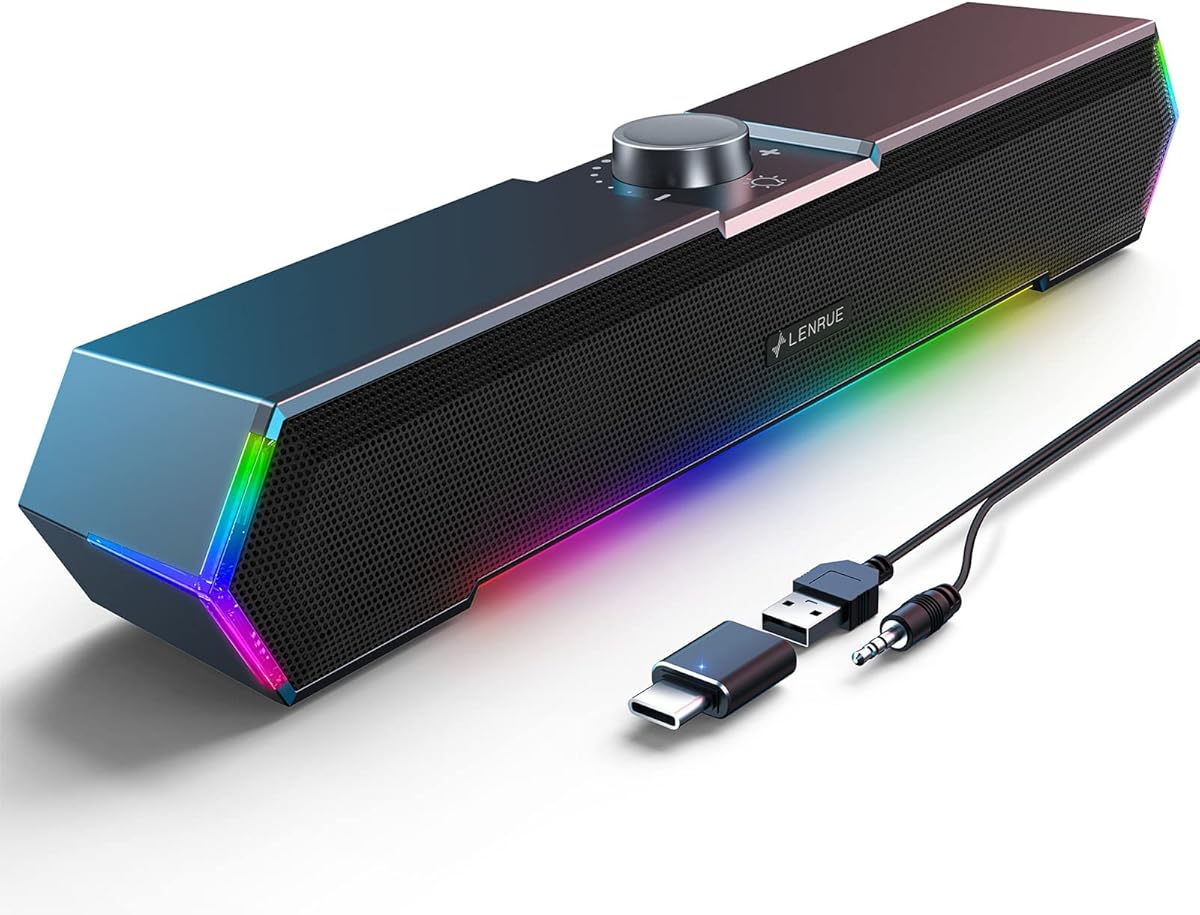
LENRUE G11 speakers feature unique angular lights that enhance gaming vibes. Surge amplifier ICs reduce distortion for clear sound even at high volumes.
We may earn a commission when you buy through this link, at no additional cost to you.
The design fits neatly under monitors to save desk space. Touch buttons for lighting allow quick toggling without physical strain.
Audio is solid but lacks dedicated inputs for headphones. Lights may be distracting during work tasks though they can be turned off.
Recommended for gamers seeking ambiance. It merges function with visual style effectively.
Dynamic light patterns sync with your setup to create a gaming atmosphere.
Amplifier technology ensures sound remains clean without static or noise.
We may earn a commission when you buy through this link, at no additional cost to you.
Uakinat speakers offer a straightforward plug-and-play experience. Glued cables prevent tangling making installation quick and clean.
We may earn a commission when you buy through this link, at no additional cost to you.
Anti-slip pads ensure stability on smooth surfaces. Volume control is inline for easy access during use.
Sound quality is clear but limited in bass response. Fixed cable lengths may restrict placement options.
Best for users prioritizing simplicity. It provides reliable audio without extra features.
Cables are glued to prevent desk clutter and improve aesthetics.
Volume knob allows quick changes without stopping your activity.
We may earn a commission when you buy through this link, at no additional cost to you.
Selecting the right speakers involves balancing sound quality, features, and your specific workspace needs. Here are key factors to consider before purchasing.
Most budget speakers use USB power which eliminates the need for wall outlets. Check if your computer has free USB ports to avoid using a hub.
USB power keeps the setup clean and portable for laptops or compact desks.
Look for 3.5mm aux inputs for analog connections or USB for digital. Some models offer both flexibility for older devices.
Ensure the cables included are long enough for your desk layout.
Wattage affects volume but driver size impacts clarity. Passive radiators enhance bass for a fuller experience without needing large woofers.
Prioritize clear highs and mids over sheer volume for better listening.
Small desks benefit from clip-on or vertical designs. Monitor mounts save surface space but require compatible hardware.
Choose a footprint that fits your existing desk without obstruction.
Physical knobs or buttons offer faster access than system settings. Inline controls allow quick adjustments during media playback.
Touch buttons are modern but may lack tactile feedback for precision.
Plastic is common but metal finishes offer durability. Anti-slip pads protect surfaces and prevent movement.
Check for sturdy hinges or clips if mounting is required.
Ensure the speakers support your operating system. Most USB devices work across Windows and Mac by default.
Verify driver requirements to avoid installation headaches.
RGB lighting adds visual appeal but consumes extra power. Toggle options help reduce distraction during work.
Decide if aesthetics outweigh potential noise or battery drain.
Connect the USB cable to a powered port and the audio jack to your device. If sound is not detected, change the default playback device in your OS settings.
Place speakers at ear level facing you for the best stereo image. Adjust the angle to reduce reflections from walls or monitors.
Dust the surface regularly with a soft cloth to prevent clogged drivers. Avoid moisture or liquids near the electronics to maintain longevity.
Most modern USB speakers plug and play without drivers. The operating system auto-recognizes them as standard audio devices. If issues arise update your audio drivers.
Yes, most models are designed for both desktops and laptops. Ensure your laptop has a free USB port for power and audio input.
Check system volume levels and speaker knobs. Ensure both software and hardware controls are at maximum. Try different ports or cables.
Most budget models rely on wired connections for stability. Check product details as some higher-end options may offer Bluetooth capabilities.
Most do not include built-in microphones. You may need a separate mic for calls. Look for combo ports if you want to plug one in.
3W to 5W per speaker is usually sufficient for small rooms. Higher wattage is needed for larger spaces but costs more.
Some models have specific mounts. Measure clearance to ensure speakers fit without blocking ports or fans. Clips are often included.
Yes, most USB devices work with macOS. Select the speaker as the output device in Sound Preferences. No drivers are typically required.
We highlighted the Creative Pebble 2.0 and MELOGAGA RGB as top picks for their balance of price and performance. FUNLOGY stands out for those seeking slightly better quality.
Prioritize features that match your daily use whether it is lighting, mounting, or pure audio fidelity. Avoid overspending on capabilities you will not use regularly.
Prices and availability change often so verify current details before buying. Check reviews for recent updates to ensure the product still meets expectations.