
MNN 15.6" FHD 60Hz Portable Monitor
4.3Editor score
Full HD 1080P display
Dual Type-C ports
Lightweight and portable
Finding the right external monitor for MacBook Neo enhances your workflow significantly. Portable screens provide flexibility for remote work and travel while maintaining seamless connectivity with your device.
We evaluated ten top-rated monitors based on display quality, connectivity options, and portability. Our analysis ensures you find a screen that fits your specific professional or creative needs effectively.
Each pick highlights key features and real-world performance. Prices and availability change frequently so verify current details before purchasing to ensure you get the best value today.
4.3Editor score

4.8Editor score
4.8Editor score
As an Amazon Associate we earn from qualifying purchases.
This comparison table outlines key specifications for each monitor to help you quickly identify the right fit for your MacBook Neo setup and budget requirements.


The VisionOwl Portable Monitor stands out as a top choice for users seeking high performance. With a 2.5K resolution and 144Hz refresh rate, it delivers sharp and fluid visuals suitable for creative work and gaming.
We may earn a commission when you buy through this link, at no additional cost to you.
Its 16:10 aspect ratio aligns perfectly with MacBook screens ensuring a seamless viewing experience without distracting black bars. The 470 nits brightness ensures visibility even in well-lit environments making it versatile for various settings.
While the price is higher than basic models the build quality and display features justify the investment. The metal chassis adds durability and the included accessories ensure you can set up quickly without needing extra cables.
This monitor is ideal for professionals and gamers who demand quality on the go. Its combination of resolution speed and aspect ratio makes it a reliable companion for your MacBook Neo.
The 16:10 aspect ratio matches MacBooks perfectly ensuring edge-to-edge content without black bars for a native feel.
A 144Hz refresh rate provides smooth motion clarity making it excellent for gaming or dynamic content creation workflows.
We may earn a commission when you buy through this link, at no additional cost to you.
The MNN 15.6" FHD offers excellent value for budget-conscious buyers. It provides a solid Full HD experience with IPS colors making it a practical choice for everyday tasks and travel.
We may earn a commission when you buy through this link, at no additional cost to you.
Its lightweight design and dual Type-C ports simplify connectivity. You can connect to your MacBook Neo easily using a single cable for power and video which reduces clutter during your work sessions.
Although it lacks the high brightness of more expensive models it performs well in indoor settings. The glossy screen enhances color vibrancy which can be pleasing for media consumption and casual gaming.
This monitor is perfect for students or travelers who need extra screen space without breaking the bank. It delivers reliable performance for basic productivity and entertainment needs effectively.
Dual Type-C ports allow flexible power and video connection options reducing the need for multiple cables.
Ultra slim profile and light weight make it easy to fit into backpacks for commuting or travel.
We may earn a commission when you buy through this link, at no additional cost to you.
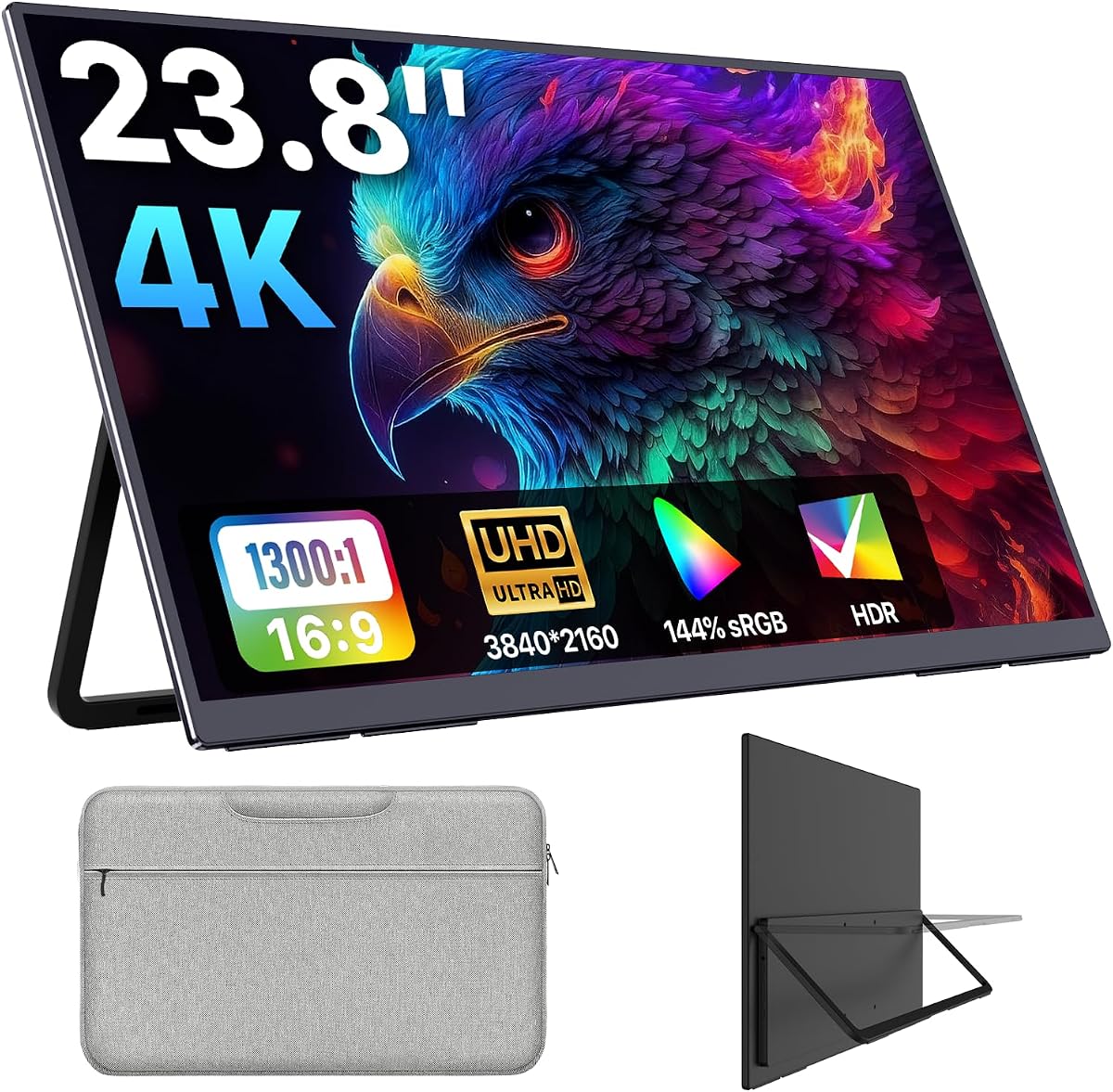
The Upperizon Portable Monitor delivers a premium large screen experience. With 4K resolution and a 23.8 inch panel it offers incredible detail and space for multitasking or detailed creative work.
We may earn a commission when you buy through this link, at no additional cost to you.
Its 144% sRGB coverage ensures colors are vivid and accurate making it a great tool for graphic design or video editing. The anti-glare coating reduces reflections improving comfort during long usage sessions.
While it is heavier than 15 inch models it remains portable enough for travel. The sturdy kickstand and VESA compatibility provide versatile mounting options for fixed desk setups or mobile use.
This monitor is best for professionals needing maximum clarity and space on the go. It transforms your mobile setup into a high-end workstation capable of handling demanding visual tasks.
3840×2160 resolution provides sharp text and images essential for professional content creation and review work.
144% sRGB coverage ensures vibrant accurate colors that match professional editing standards for creators.
We may earn a commission when you buy through this link, at no additional cost to you.
The InnoView 15.6 inch monitor is designed with travelers in mind. It comes with a protective case ensuring your screen stays safe during transit while offering reliable Full HD visuals for work.
We may earn a commission when you buy through this link, at no additional cost to you.
Integrated speakers add convenience by eliminating the need for external audio during video calls or media playback. The dual Type-C ports allow flexible connection options ensuring compatibility with various laptops and phones.
While it is not the brightest option it provides consistent performance for everyday tasks. The case and stand features make it practical for quick setup anywhere from airports to hotel rooms effectively.
This monitor suits users who value convenience and protection. It offers a balanced solution for those needing a dependable secondary screen for business travel or remote work.
Includes a protective case and sturdy stand ensuring your screen stays safe and upright during travel.
Built-in speakers provide convenient sound output without needing extra peripherals for meetings or videos.
We may earn a commission when you buy through this link, at no additional cost to you.
The InnoView 1080P monitor offers a compact and slim design. It includes a protective sleeve and adjustable stand making it easy to secure in any environment without taking up much space.
We may earn a commission when you buy through this link, at no additional cost to you.
Its IPS A+ screen delivers decent color accuracy for daily tasks. The 90° adjustable stand allows you to find a comfortable viewing angle whether sitting at a desk or on a table.
While it lacks higher resolution options it remains a solid budget choice. The included accessories add value and ensure your monitor stays protected during regular travel or commuting.
Ideal for users seeking a minimal footprint this monitor provides essential features for a second screen setup. It balances affordability with practical usability for students and casual users.
Built-in stand adjusts up to 90 degrees for comfortable viewing in different work environments.
Includes a protective sleeve ensuring safe transport and storage for your portable display.
We may earn a commission when you buy through this link, at no additional cost to you.
The Cocopar 16 Inch monitor combines high resolution with speed. Its 2.5K QHD panel and 144Hz refresh rate make it suitable for gaming or fast scrolling through documents and spreadsheets.
We may earn a commission when you buy through this link, at no additional cost to you.
A metal chassis gives it a premium feel compared to plastic models. The 110% sRGB color coverage ensures vivid visuals making it a solid choice for creators who care about color fidelity.
While it may be slightly heavier the build quality justifies the weight. It offers a reliable setup for those who want a durable screen that can handle frequent travel and use.
This monitor is great for users who value performance and durability. It provides a balance of speed and image quality for both entertainment and professional tasks.
144Hz refresh rate ensures smooth motion clarity essential for gaming and dynamic content viewing.
Full metal chassis provides longevity and a premium look for frequent travelers and professionals.
We may earn a commission when you buy through this link, at no additional cost to you.
The ASUS ZenScreen focuses on long-term viewing comfort. Its anti-glare surface and Eye Care technology reduce strain making it suitable for extended work sessions without causing fatigue or headaches.
We may earn a commission when you buy through this link, at no additional cost to you.
A built-in kickstand supports both portrait and landscape modes flexibly. The USB Type-C connectivity ensures a simple connection process for MacBook Neo users needing a quick second screen setup.
While it does not have the highest resolution the reliability and warranty are strong points. The 3-year warranty offers peace of mind for professional users relying on it daily for work.
Ideal for users prioritizing health and durability this monitor delivers steady performance. It is a practical tool for those who spend hours working on dual screens.
Certified flicker-free and low blue light technologies protect your eyes during long daily usage hours.
Kickstand supports both portrait and landscape orientations for diverse workflow needs.
We may earn a commission when you buy through this link, at no additional cost to you.
The KEFEYA screen extender offers a unique clip-on design. It attaches to your laptop to create a dual screen setup without needing separate stands or bulky extra equipment on your desk.
We may earn a commission when you buy through this link, at no additional cost to you.
Its 180° rotation allows you to customize the viewing angle freely. This flexibility is perfect for collaborative work or different seating positions allowing you to share your screen easily.
While it is optimized for laptops between 13 and 17 inches check your laptop size carefully. It requires an extra power cable which adds a minor detail to manage during setup.
This monitor is perfect for travelers needing a compact dual screen solution. It maximizes space efficiency and simplifies your mobile workstation setup significantly.
Expands your workspace by adding a secondary screen without needing a separate stand on the desk.
180° rotation allows custom angles for presentations or comfortable viewing in different positions.
We may earn a commission when you buy through this link, at no additional cost to you.
The kksmart 18.5 inch monitor offers a larger viewing area than standard portable screens. It is a great middle ground for users wanting more screen space without committing to a full desktop size.
We may earn a commission when you buy through this link, at no additional cost to you.
Its 100Hz refresh rate ensures smooth visuals for gaming or fast scrolling. The 4-side frameless design provides a modern look and maximizes the usable screen area for better focus.
Although it is heavier than smaller models it remains portable enough for travel. The VESA compatibility allows you to mount it on arms for flexible desk arrangements when not traveling.
This monitor suits users needing extra space for spreadsheets or coding. It balances size and portability for those who want a robust second screen on the go.
18.5 inch panel offers a balance between portability and extra workspace for productivity.
4-side frameless bezel maximizes viewing area for a cleaner modern look.
We may earn a commission when you buy through this link, at no additional cost to you.
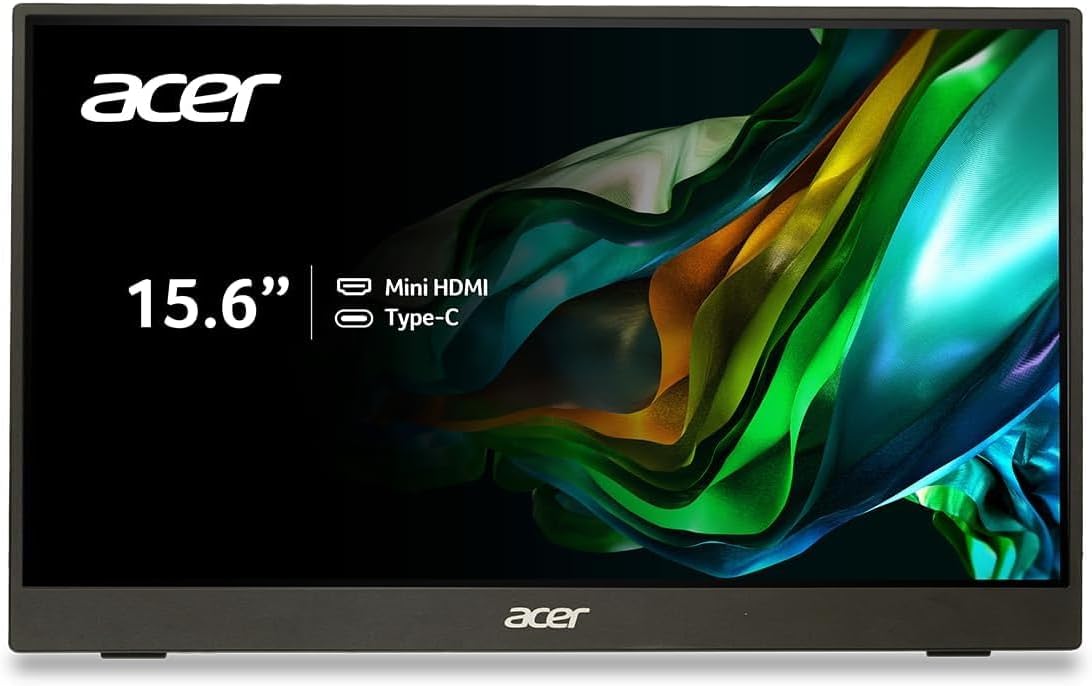
The Acer 15.6 inch monitor provides a straightforward and reliable option. Its slim profile makes it easy to carry in a laptop bag ensuring you can set up anywhere quickly.
We may earn a commission when you buy through this link, at no additional cost to you.
AMD FreeSync technology reduces screen tearing during media consumption or gaming. The 4ms response time ensures clear images which is beneficial for fast-paced visual content.
While it lacks advanced features like high refresh rates it covers basic needs well. The tilt support offers some ergonomic flexibility though it is not adjustable like a full stand.
This monitor is ideal for users needing a simple portable display. It is a practical choice for everyday tasks and occasional entertainment without complexity.
Reduces screen tearing for smoother visual experience during video playback or gaming.
Ultra-slim design fits easily into bags making it ideal for travel and commuting.
We may earn a commission when you buy through this link, at no additional cost to you.
Choosing the right portable monitor involves balancing resolution, connectivity, and portability. This guide breaks down the key factors to consider for your specific needs.
Resolution impacts clarity and text sharpness. Look for at least Full HD (1080P) for standard work but consider 2.5K or 4K for design and detailed editing tasks.
Size determines portability versus workspace. 15.6 inches offers a balance while 18.5 inches or larger provides more space but adds weight to your travel bag.
USB-C is essential for modern MacBooks to support single cable power and video. Ensure the monitor has full-featured USB-C ports for the easiest setup experience.
HDMI is a useful backup option for older laptops or gaming consoles. Dual ports offer flexibility allowing you to connect multiple devices without extra adapters.
Standard 60Hz monitors suffice for office work and browsing. Higher refresh rates like 120Hz or 144Hz provide smoother motion for gaming and dynamic content.
A faster refresh rate reduces blur and lag making it beneficial for fast-paced tasks. Choose based on whether you prioritize productivity or entertainment.
Lightweight monitors are crucial for daily travel. Look for slim designs under 2 lbs that fit easily in backpacks without adding significant bulk.
Consider the case or sleeve included with the monitor. Protective packaging ensures safety during transit and adds to the overall convenience of portable use.
IPS panels generally offer better color accuracy than TN panels. Look for high sRGB coverage if you work with graphics or photo editing.
Color gamut affects how vibrant images appear. A wider gamut ensures realistic colors making content more engaging for viewers and creators.
Prolonged screen time can cause eye strain. Technologies like flicker-free and low blue light help reduce discomfort during long work sessions.
Anti-glare coatings minimize reflections in bright environments. These features improve comfort and reduce the need to adjust brightness frequently.
Metal chassis options provide durability and a premium feel. They are more resistant to wear and tear compared to plastic models over time.
Check the warranty period offered by the manufacturer. A longer warranty indicates confidence in the product and protects your investment against defects.
Built-in speakers can be convenient for calls and media but often lack high fidelity. Consider if external audio is needed for your setup.
VESA mounting holes allow you to attach the monitor to arms or stands. This adds versatility for desk setups where space is limited.
Connect the monitor to your MacBook Neo using the USB-C cable first. Ensure your laptop supports Thunderbolt 3 or 4 for power pass-through to avoid needing extra adapters.
Adjust the brightness and color settings to match your environment. Using anti-glare modes can reduce eye strain during extended usage sessions.
Store the monitor in a protective case when not in use. Cleaning the screen with a microfiber cloth prevents scratches and ensures clear visuals.
It depends on your MacBook Neo's power output. Some newer models can power a monitor via USB-C alone but others may need an additional power adapter to prevent flickering.
Yes if it has HDMI or USB-A support. You may need adapters to convert ports but most portable monitors support universal compatibility via HDMI connections.
The 16:10 aspect ratio is ideal for matching MacBook screens. It reduces black bars and provides a seamless mirroring or extended desktop experience.
Use a dry microfiber cloth to wipe away dust. Avoid chemical cleaners or paper towels which might scratch the anti-glare coating on the display surface.
Yes especially if it has a high refresh rate like 144Hz. This ensures smooth motion and reduces lag for competitive or casual gaming sessions.
Most portable monitors allow portrait mode via settings or rotation. Check the stand or VESA options to adjust the screen orientation for coding or reading.
Our top picks cover a range of needs from budget travel options to high-performance premium displays. The VisionOwl model offers the best balance of speed and resolution for most users.
Consider your primary use case whether it is creative work or general productivity. Prioritize connectivity and resolution to ensure the monitor fits your workflow needs.
Prices and models change so always check current listings before buying. Verify that the selected monitor supports your specific MacBook Neo ports for a smooth experience.