
Vaydeer Vertical Laptop Stand Holder Organizer
4.6Editor score
Adjustable width for thickness
Three-in-one design saves space
Lightweight ABS plastic material
A laptop rack for desk helps you organize your workspace while improving ergonomics. Choosing the right one ensures your device stays cool and secure during long work sessions.
We evaluated ten top-rated models based on durability, compatibility, and design. Each option offers unique features to suit different desk setups and usage needs effectively.
Every pick highlights key strengths and trade-offs to help you decide. Prices and availability may change, so check current listings before making your final purchase decision.
4.6Editor score

4.8Editor score

4.6Editor score
As an Amazon Associate we earn from qualifying purchases.
The following table compares key specifications across all ten models to help you quickly identify the right fit for your workspace needs and device types.





The OMOTON Dual Vertical Desk Laptop Stand Holder stands out with its ability to support two laptops simultaneously. It earns a high rating for its durable aluminum build and protective design.
We may earn a commission when you buy through this link, at no additional cost to you.
Its updated dock version accommodates various laptop models including MacBook and Surface. The adjustable width ensures a snug fit while silicone mats protect devices from scratches effectively.
While the design is polished, the silver finish may not match darker desks. Adjusting slots requires a bit of effort but ensures stability once set up correctly.
Ideal for users managing multiple devices, this rack keeps desks tidy. It balances functionality and protection, making it a top choice for organized workspaces.
Managing two laptops side by side becomes seamless with this dual dock design. It maximizes vertical space while keeping each device secure and accessible.
Silicone mats cover all contact points to prevent scratches. The non-slip base ensures the stand stays put even during active use.
We may earn a commission when you buy through this link, at no additional cost to you.
The NODOCA 2-Slot Laptop Storage is designed to sit on the side of your desk. It features a headphone holder and supports various laptop brands effectively.
We may earn a commission when you buy through this link, at no additional cost to you.
Made from high-strength carbon steel, it offers durability. The adjustable size ensures compatibility with different device thicknesses while keeping your workspace tidy.
Installation requires a desk with specific depth and thickness. This constraint may limit use on some furniture but ensures stability when mounted correctly.
Perfect for users needing extra space, this rack adds storage without cluttering your desk. Its multi-use potential includes storing tablets and keyboards easily.
Placing the rack on the desk side frees up valuable surface area. It keeps laptops accessible but out of the main work zone.
The built-in hook holds headphones or controllers, reducing cable clutter. This small addition enhances functionality significantly for daily users.
We may earn a commission when you buy through this link, at no additional cost to you.
The BYMECOST No Drill Under Desk Laptop Mount offers hidden storage for your devices. It attaches easily to the desk frame and supports various accessories.
We may earn a commission when you buy through this link, at no additional cost to you.
Constructed from high-quality metal, it holds up to 44lbs. The hollow structure aids air circulation while the powder coating resists wear and cleaning.
Installation is quick but requires careful measurement of your desk dimensions. Avoid using on tables with crossbars to ensure proper fit and stability.
Ideal for clean desk setups, this mount removes clutter from the surface. It organizes chargers and small devices effectively for better workflow.
Storing devices under the desk creates a minimalist appearance. It keeps essentials close without visually overwhelming your workspace.
Three openings help route charging cables neatly. This feature prevents tangling and keeps cords organized for easier access.
We may earn a commission when you buy through this link, at no additional cost to you.
This adjustable laptop stand focuses on ergonomics to reduce strain during work. It features ventilation holes and rubber mats to secure your device effectively.
We may earn a commission when you buy through this link, at no additional cost to you.
The sturdy metal construction supports up to 17.6 lbs. Its foldable design makes it easy to pack for travel or storage when not in use.
While effective for posture, it does not offer vertical storage. Users prioritizing desk space might prefer a vertical stand for better organization.
Great for home or office use, this riser improves viewing angles. It balances portability with stability for comfortable daily laptop sessions.
Adjusting the height and angle aligns your screen with eye level. This reduces stress on your neck and back during long work periods.
Ventilation holes allow airflow to cool your device. This design helps prevent overheating during intensive computing tasks.
We may earn a commission when you buy through this link, at no additional cost to you.
The LOXP Adjustable Laptop Stand features a unique 360 degree rotating base for flexibility. It is designed to keep your laptop at eye level comfortably.
We may earn a commission when you buy through this link, at no additional cost to you.
Made from one-piece fiber metal, it offers durability and stability. The rotating base allows you to turn the laptop without moving your desk setup.
While sturdy, the metal build adds some weight compared to plastic. This ensures stability but might reduce portability slightly for travelers.
Ideal for collaborative work or flexible setups, this stand adapts to various angles. It combines ergonomic benefits with a robust construction for daily use.
The 360 degree base lets you pivot the screen easily. This is useful for sharing content with colleagues without lifting the device.
Adjustable height keeps your screen at eye level. This helps maintain good posture during long working sessions.
We may earn a commission when you buy through this link, at no additional cost to you.
The BESIGN LS03 Aluminum Laptop Stand elevates your device for better viewing angles. Its detachable design makes assembly quick and storage simple.
We may earn a commission when you buy through this link, at no additional cost to you.
Made from premium aluminum, it supports up to 8.8 lbs without wobbling. The open design ensures airflow to keep your laptop cool during use.
While effective, the angle is not adjustable which may limit flexibility. Users preferring varied angles might find this a minor limitation.
Great for everyday desk setups, this stand improves posture and ventilation. It is a reliable choice for users needing a simple ergonomic solution.
Assembling in three steps makes setup effortless for anyone. The detachable design also simplifies packing or storage.
Open aluminum structure promotes airflow around your device. This helps prevent overheating during intensive tasks.
We may earn a commission when you buy through this link, at no additional cost to you.
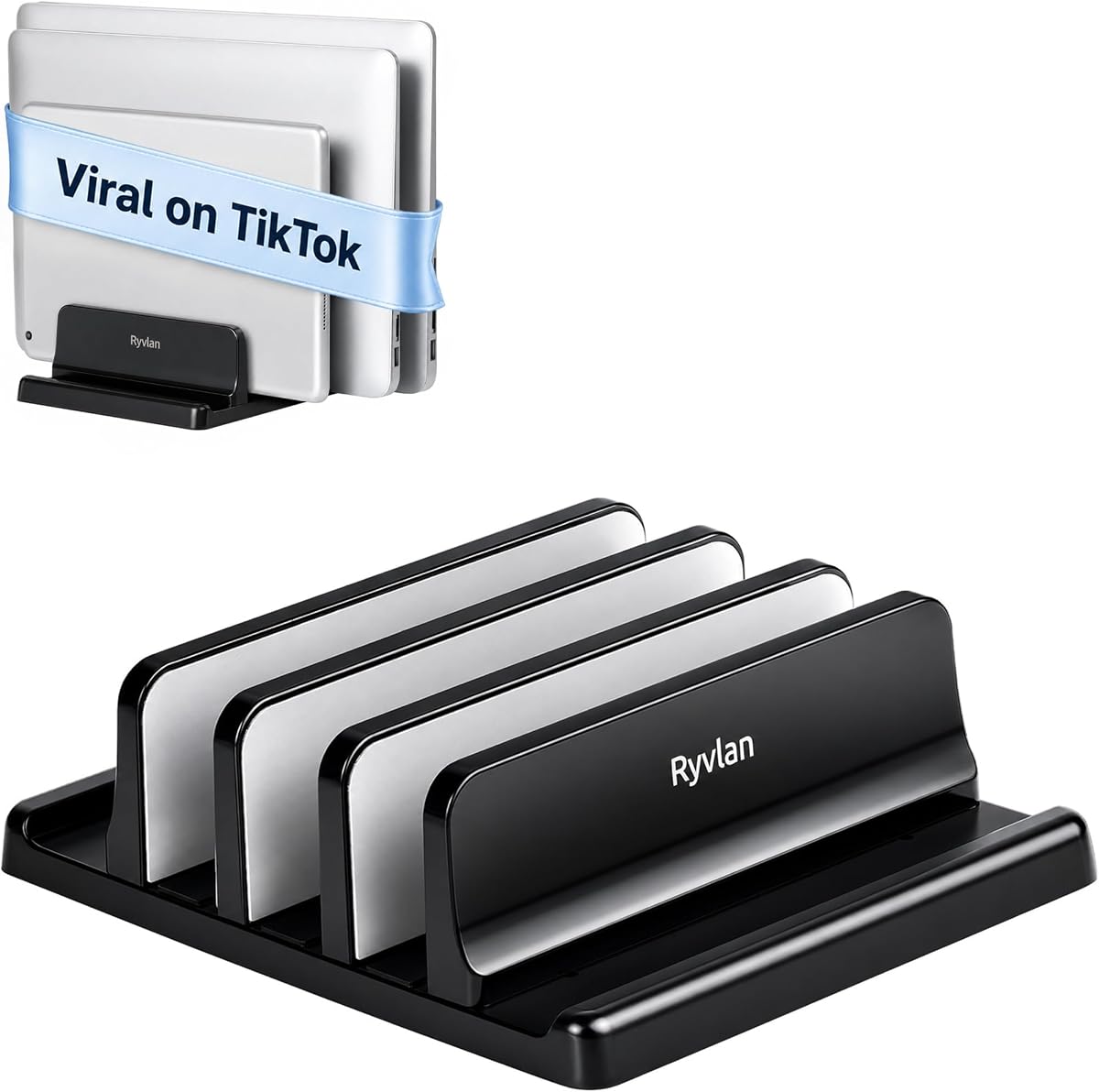
The Ryvlan Vertical Laptop Stand supports up to three laptops plus two tablets. It is designed to clear your desk while keeping devices organized.
We may earn a commission when you buy through this link, at no additional cost to you.
Each slot adjusts from 0.47 to 1.2 inches to fit various devices. The silicone padding protects against scratches while the ABS body stays light.
While the design is versatile, the plastic feel may not appeal to all. Adjusting slots takes a minute with the included wrench.
Ideal for shared spaces, this stand organizes multiple devices efficiently. It saves valuable desk space while keeping everything within reach.
Holding three laptops and two tablets in one footprint saves space. This is useful for teams or families sharing multiple devices.
Every slot adjusts to fit different device thicknesses. This ensures a snug fit without wobbling.
We may earn a commission when you buy through this link, at no additional cost to you.
This Vaydeer Vertical Stand offers a simple solution for storing a laptop and phone. It saves desk space while keeping your devices tidy and protected.
We may earn a commission when you buy through this link, at no additional cost to you.
The adjustable width fits thicknesses from 0.55 to 1.69 inches. Soft silicone mats protect your laptop while the polished finish adds style.
While lightweight, the ABS plastic may feel less robust than metal. It works well for standard setups but might not suit heavy users.
Perfect for small desks, this stand maximizes vertical space efficiently. It provides a neat and organized look for daily work.
Using vertical space keeps your desk clear for other items. This helps create a cleaner and more focused workspace.
Silicone mats around the groove prevent scratches effectively. This ensures your devices stay safe during daily use.
We may earn a commission when you buy through this link, at no additional cost to you.
The Elestoria 5-Slot Vertical Stand is designed for heavy use with four laptop slots. It features a premium aluminum build that ensures stability and durability.
We may earn a commission when you buy through this link, at no additional cost to you.
Adjusting width is tool-free allowing you to fit laptops from 12mm to 38mm. The closed design secures devices upright without tipping risks.
While effective, the price is higher than plastic options. It also occupies more space which may not suit very small desks.
Ideal for studios or offices with multiple devices, this stand organizes tech cleanly. It offers professional-grade storage for serious users.
Solid aluminum ensures longevity and a professional look. It matches modern office environments well with a polished finish.
Holding up to four laptops makes this ideal for teams. It streamlines your tech ecosystem on a single desktop.
We may earn a commission when you buy through this link, at no additional cost to you.
The WALI Monitor Stand serves as a large platform for laptops and screens. It provides multiple height settings to improve your viewing position effectively.
We may earn a commission when you buy through this link, at no additional cost to you.
With a metal shelf supporting up to 44lbs, it holds devices securely. Vented holes prevent overheating while the space below stores accessories.
While practical, the wide footprint may limit desk space. Users preferring vertical storage might find this less suitable for their needs.
Great for multi-device setups, this riser improves ergonomics. It keeps your screen at eye level while organizing your workspace below.
Three height settings let you customize your viewing position. This flexibility helps reduce strain during long work hours.
Open space beneath the stand stores keyboards and accessories. This reduces clutter and keeps your desk organized.
We may earn a commission when you buy through this link, at no additional cost to you.
Selecting the right laptop rack involves assessing your workspace and usage needs. Consider materials, capacity, and design to find the best fit for your setup.
Materials like aluminum and steel offer durability and stability. Plastic options are lighter but may not support heavier devices over time.
Prioritize metal builds for longevity and professional aesthetics.
Check if the rack supports your laptop size and thickness. Adjustable slots allow flexibility for different models and accessories.
Ensure the stand fits your specific device dimensions before purchasing.
Some racks hold multiple laptops while others focus on one. Consider how many devices you need to store simultaneously.
Choose multi-slot stands for shared workspaces or multiple laptops.
Ergonomic designs elevate your screen to eye level. This helps reduce neck strain and improves posture during work.
Look for adjustable height options to suit your comfort.
Vertical stands save horizontal space on your desk. Some models offer under-desk mounting for a cleaner look.
Select a design that aligns with your available surface area.
Some racks require drilling while others use no-drill mounts. Consider your desk material and willingness to modify furniture.
No-drill options are easier for renters and temporary setups.
Look for silicone pads to prevent scratches on your devices. A stable base prevents slipping and accidental falls.
Prioritize protective mats for valuable devices.
Foldable designs are ideal for travel or storage. Portable stands can be moved easily between different locations.
Choose lightweight options if you move your setup often.
Install your rack according to the manufacturer instructions. For no-drill mounts, ensure the desk edge is clean and flat.
Adjust slot widths to fit your devices snugly. Use included tools to tighten screws if needed.
Regularly clean the stand with a soft cloth to prevent dust buildup. Check screws periodically to maintain stability.
Aluminum and steel are top choices for their durability and strength. These materials provide better stability and heat dissipation compared to plastic.
Most racks feature adjustable widths to accommodate different devices. Always check the thickness range before purchasing to ensure a proper fit.
Quality racks include silicone pads to prevent scratches. Ensure the stand is stable to avoid accidental slips or falls.
No-drill models are designed for easy installation. Simply clip them onto the desk edge without tools or drilling.
Use a soft cloth to wipe away dust and debris. Avoid harsh chemicals that may damage protective coatings or surfaces.
While optional, racks improve ergonomics and organization. They help keep your desk tidy and reduce physical strain.
We reviewed ten top laptop racks ranging from budget to premium options. Each model offers unique features to suit different workspace needs.
Consider your device count and desk space when making a choice. Ergonomics and material quality should guide your decision.
Always verify current prices and availability before purchasing. This ensures you get the best deal for your specific setup.