
ASRock J4125M
3.4Editor score
Intel Quad Core J4125
DDR4 Memory Support
Compact Micro ATX Design
This guide compares ten top low power motherboard options for NAS, home servers, and energy efficient builds based on performance and connectivity features.
Low power motherboards are essential for building energy efficient systems like network attached storage or home servers. They consume less electricity while maintaining reliable performance for 24/7 operation in various environments.
We evaluated ten carefully selected models based on processor efficiency, connectivity options, and overall stability. Each product offers unique features suitable for different use cases ranging from basic office tasks to advanced virtualization setups.
Each pick highlights key specifications and real world performance characteristics. Please note that prices and availability change frequently so verify current details before making your final purchasing decision today.
3.4Editor score

4.5Editor score
This side by side comparison highlights key specifications across all ten models to help you identify the best fit for your specific low power computing needs efficiently.





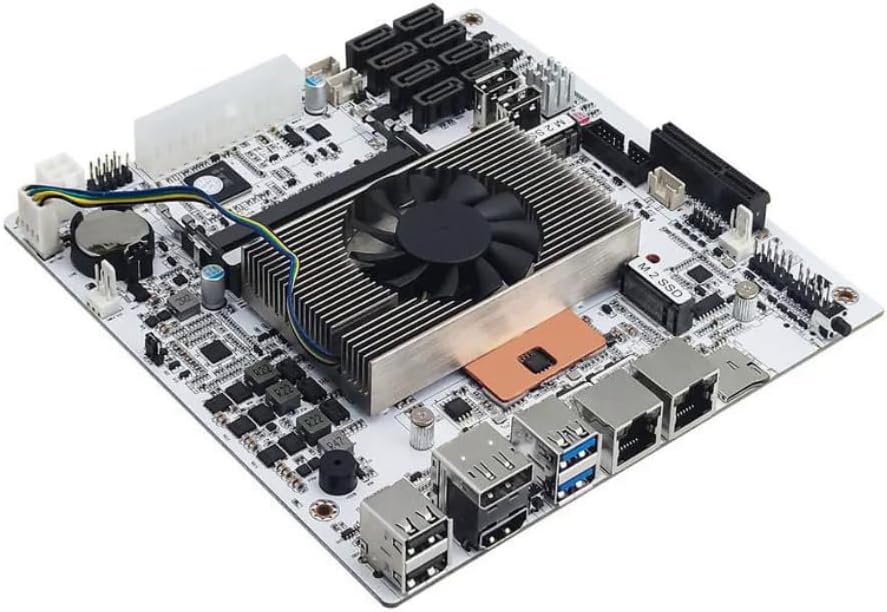
This motherboard delivers exceptional performance for NAS and network security tasks with its low power Intel Celeron N5105 processor. It holds a solid 4.5 star rating from users who appreciate its robust feature set designed for continuous operation in demanding environments.
We may earn a commission when you buy through this link, at no additional cost to you.
The standout quality here is the four 2.5GbE network ports which provide incredible bandwidth for file transfers and virtualization. Combined with six SATA ports and two M.2 NVMe slots you get massive storage flexibility without sacrificing power efficiency during heavy workloads.
While it requires both 24PIN and 4PIN power connectors and may take minutes to read memory on first boot these are minor trade-offs. The industrial quality PCB and extensive connectivity options justify the setup effort for professional applications.
Anyone building a high performance home server or firewall appliance should buy this board. Its balance of low power consumption and high throughput makes it the top recommendation for energy conscious users needing serious networking capabilities.
Four 2.5GbE ports enable link aggregation or dedicated networks for storage and management traffic simultaneously.
Dual 4K display support via HDMI and DisplayPort allows multi monitor setups for monitoring and administration tasks.
We may earn a commission when you buy through this link, at no additional cost to you.
The ASRock D1800M offers a simple entry into low power computing with an included Intel J1800 processor. With a 4.0 star rating it appeals to users needing basic functionality for light office work or media playback without high costs.
We may earn a commission when you buy through this link, at no additional cost to you.
Its main strength lies in affordability and simplicity. The DDR3 memory support and two SATA ports cover essential needs for those upgrading older systems or building very budget constrained projects where modern speeds are less critical.
However the older memory standard and limited storage mean this isn't suitable for heavy modern workloads. Users should expect slower file transfers compared to newer boards but the low cost compensates for these performance constraints in light use cases.
Choose this board for basic home office or retro computing projects where cost is the primary driver. It provides a reliable foundation for systems that do not require high speed storage or large capacity memory expansion.
The included processor eliminates separate CPU costs making this one of the most affordable complete motherboard solutions available.
DDR3 support allows reuse of existing memory modules from older systems reducing overall upgrade expenses significantly.
We may earn a commission when you buy through this link, at no additional cost to you.
This GIGABYTE model supports a wide range of AMD Ryzen processors including the efficient 5000 series. Its 4.4 star rating reflects solid performance for budget gaming or light server builds using AM4 socket compatibility.
We may earn a commission when you buy through this link, at no additional cost to you.
The 3+3 power phase design and chipset heatsinks provide steady power delivery and heat dissipation. Two M.2 slots offer fast storage options while PCIe 4.0 support ensures readiness for modern graphics cards or high speed NVMe drives.
While the VRM might limit extreme overclocking it remains stable for standard low power Ryzen CPUs. The Q-Flash utility allows BIOS updates without a CPU which adds convenience for users who may need to update firmware later.
Buy this for affordable Ryzen builds needing modern connectivity. It balances cost and features well for users who want AM4 compatibility without spending on premium tier motherboards for general purpose computing.
Compatible with Ryzen 3000 to 5000 series allowing users to choose low power APUs or dedicated CPUs flexibly.
PCIe 4.0 M.2 slot ensures high speed SSDs perform at maximum potential for quick system and application loading.
We may earn a commission when you buy through this link, at no additional cost to you.
The MSI PRO B550M-P features passive cooling and AI fan adjustment for efficient thermal management. With a 4.4 rating users praise its stability and support for high speed memory overclocking on the AM4 platform.
We may earn a commission when you buy through this link, at no additional cost to you.
Passive chipset heatsinks and Frozr AI cooling help maintain low noise levels during operation. The double M.2 connectors support both Gen4 and Gen3 drives providing flexible high speed storage options for system and media files.
Lack of onboard WiFi means you will need an adapter for wireless connectivity. However the memory boost feature allows significant performance gains with compatible DDR4 sticks making it ideal for memory sensitive applications.
Select this for silent AM4 builds needing fast storage and cooling. It works well for users who prefer wired networks and want efficient thermal management without active cooling noise in low power environments.
Frozr AI cooling adjusts fan speeds automatically based on system temperatures to reduce noise during idle periods.
Dual M.2 slots allow mixing Gen4 and Gen3 SSDs for balanced performance across different storage needs.
We may earn a commission when you buy through this link, at no additional cost to you.
This ASRock model integrates the Intel J4125 quad core processor for efficient daily tasks. While it has a lower 3.4 star rating it remains a budget friendly choice for users needing basic multi tasking without high power draw.
We may earn a commission when you buy through this link, at no additional cost to you.
The DDR4 support and M.2 key E slot for WiFi offer modern connectivity options despite the older PCIe 2.0 slot. This makes it suitable for lightweight servers or home theater PCs where low electricity usage is prioritized over raw speed.
Performance may not match newer models but the low cost compensates for limitations in high performance scenarios. Users seeking simple media streaming or file sharing without excessive heat output find this board adequate for their needs.
Perfect for cost sensitive builds needing four cores. Buy this if your primary goal is reducing electricity bills while maintaining enough power for everyday home office or light entertainment tasks.
Four cores allow multiple applications to run simultaneously without significant performance degradation compared to dual core alternatives.
Dedicated M.2 key E slot simplifies adding WiFi or Bluetooth adapters for flexible connectivity options.
We may earn a commission when you buy through this link, at no additional cost to you.
The ASRock B550M-HDV supports high speed DDR4 memory up to 4733MHz overclocked. With a 4.5 rating it appeals to users needing quick RAM access for responsive system performance on the AM4 socket.
We may earn a commission when you buy through this link, at no additional cost to you.
Six power phase design and Full Spike Protection ensure electrical stability during operation. Three video outputs including HDMI DVI and VGA provide maximum compatibility for older monitors or specialized display setups in office environments.
Limited to two DIMM slots means maximum capacity is restricted compared to boards with four slots. However the high speed support benefits applications that prioritize latency over capacity such as real time data processing.
Choose this for speed focused AM4 builds. It suits users who want reliable power delivery and diverse display options without extra cost for features they do not need in standard configurations.
Support for overclocked DDR4 speeds reduces latency and improves responsiveness in memory dependent applications like virtualization.
Three video outputs ensure you can connect virtually any monitor type without needing adapters or external hardware.
We may earn a commission when you buy through this link, at no additional cost to you.
This Mini ITX board combines compact size with Intel WiFi and Bluetooth connectivity. With a 4.4 rating it is popular for small form factor builds where wireless access and space efficiency are critical requirements.
We may earn a commission when you buy through this link, at no additional cost to you.
Direct 6 phase digital PWM with 55A DrMOS provides stable power delivery for efficient Ryzen CPUs. Three display interfaces support multi monitor setups in a small chassis ideal for home media centers or wall mounted systems.
PCIe 3.0 limits top speed compared to newer 4.0 boards but is sufficient for most low power use cases. The two DIMM slots restrict memory capacity but fit perfectly in tight space constrained environments.
Ideal for space constrained wireless builds. Buy this if you need a tiny system with integrated networking and enough power for light server or media tasks.
Built-in Intel WiFi and Bluetooth eliminate the need for separate network cards saving valuable internal space.
Digital PWM ensures clean and stable power to the CPU for consistent performance even in small chassis.
We may earn a commission when you buy through this link, at no additional cost to you.
The ASRock B550M WiFi holds a perfect 5.0 star rating for its feature rich design on the AM4 platform. Users praise the Wi-Fi 6E support and premium audio which elevate the experience beyond standard low power boards.
We may earn a commission when you buy through this link, at no additional cost to you.
Eight phase power delivery ensures stable operation for Ryzen processors while Hyper M.2 slots provide top tier storage speeds. This combination supports virtualization and high throughput tasks without compromising power efficiency during operation.
The higher price reflects these premium features which may be unnecessary for very basic setups. However for users needing top performance in a low power footprint the investment provides tangible benefits for daily use.
Buy this for premium AM4 wireless builds. It offers the best balance of modern connectivity and performance for users who want high quality components without sacrificing energy efficiency.
Wi-Fi 6E access to 6GHz bands reduces latency and increases speed for responsive network performance.
Realtek ALC1220 codec with Nahimic delivers immersive sound for media playback and voice communication tasks.
We may earn a commission when you buy through this link, at no additional cost to you.
This industrial Mini ITX board features an 8th generation U-series CPU with 8 threads for efficient virtualization. With a 4.1 rating users value its compact size and powerful networking options for 24/7 home server applications.
We may earn a commission when you buy through this link, at no additional cost to you.
Eight SATA ports plus dual M.2 slots offer massive storage capacity in a small form factor. The dual 2.5GbE LAN ports support link aggregation or separate networks for storage and management traffic efficiently.
A known sleep mode bug may affect power states but does not impact continuous operation. The included fan cooler ensures thermal stability making it reliable for enclosed or densely packed network equipment rooms.
Select this for compact NAS or firewall builds. It delivers high connectivity density and efficient processing for users needing maximum storage and network power in minimal physical space.
Eight SATA ports enable large storage arrays without external enclosures ideal for personal cloud or media server builds.
VT-x and VT-d support ensure smooth operation of multiple virtual machines on a single low power system.
We may earn a commission when you buy through this link, at no additional cost to you.
This specialized NAS motherboard integrates the Core i5 8265U processor for robust handling of complex tasks. With no current ratings it appeals to professionals needing high performance low power solutions for continuous 24/7 operation.
We may earn a commission when you buy through this link, at no additional cost to you.
Eight SATA ports and dual M.2 NVMe slots provide extensive storage options for large data archives. The dual 2.5GbE LAN supports high throughput NAS setups while PCIe passthrough enables custom network or acceleration hardware integration.
Lack of sleep mode support is acceptable for always on NAS environments. The 6MB cache and virtualization support allow efficient VMs and containerized workloads without excessive power consumption during heavy data processing.
Invest in this for professional grade NAS builds. It balances processing power with massive storage density for users managing large data repositories or advanced virtualized server environments.
Eight SATA ports enable direct connection of multiple hard drives for large scale data storage without external bridges.
Virtualization passthrough support allows hardware acceleration cards to be dedicated to specific virtual machines for performance.
We may earn a commission when you buy through this link, at no additional cost to you.
Selecting the right low power motherboard requires evaluating several factors including processor efficiency connectivity options and physical form factor to match your specific project goals.
Look for motherboards with processors rated for low Thermal Design Power TDP ideally 15W or less for 24/7 operation. Intel Celeron or Core U series and AMD Ryzen U series chips often provide the best balance of performance and electricity usage.
Choose a CPU with enough cores for your workload but avoid overprovisioning which wastes energy when not needed.
DDR4 memory offers better efficiency than older DDR3 standards while providing sufficient speed for most server and NAS tasks. Ensure the board supports enough DIMM slots for your storage and application requirements.
Prioritize boards with dual channel support to maximize memory bandwidth without increasing power draw significantly.
Check for sufficient SATA ports and M.2 slots to connect your drives directly without additional controllers. NVMe support provides faster speeds for system files while SATA works well for bulk storage.
More ports mean fewer adapters and lower power consumption from external expansion cards in your system.
Gigabit Ethernet is standard but 2.5GbE ports offer faster transfer rates for NAS or firewall appliances. Dual LAN ports allow link aggregation or separate management networks without extra hardware costs.
Integrated WiFi is helpful but may add power draw compared to a simple wired connection for always on systems.
Mini ITX boards save space and often include built-in WiFi but have fewer expansion slots. Micro ATX offers more ports while remaining compact for standard small form factor cases.
Verify your case supports the motherboard dimensions and that power supply connectors match your board requirements.
Some industrial boards require both 24PIN and 4PIN power connections for stability. Standard consumer boards usually work with just the 24PIN connector.
Ensure your power supply has the necessary cables to avoid needing adapters that complicate your build.
Modern UEFI BIOS allows easier updates and configuration compared to legacy systems. Features like Q-Flash let you update without a CPU which is valuable for maintenance.
Check manufacturer support pages for long term firmware updates to ensure security patches remain available.
Passive cooling heatsinks reduce noise while maintaining stable temperatures for continuous operation. Active cooling with fans works but may require more space and maintenance.
Look for boards with dedicated chipset heatsinks and VRM cooling for longevity in enclosed environments.
Install the motherboard in a compatible case ensuring all standoffs are in place to prevent short circuits. Connect power supply cables matching the board requirements including 24PIN and 4PIN where needed.
Plug in memory modules securely and connect storage drives to SATA or M.2 slots. Ensure network cables are firmly seated for reliable connectivity during continuous operation periods.
Update the BIOS to the latest version before heavy use to benefit from stability improvements. Monitor temperatures periodically using software tools to ensure thermal management remains effective.
Low power motherboards use processors with low Thermal Design Power typically 15W or less. They often feature optimized power delivery circuits and efficient memory support to minimize electricity consumption.
Yes many of these boards support multiple SATA ports and Ethernet connections ideal for Network Attached Storage. Look for models with dual LAN ports for better network performance.
Most support basic PCIe slots but may not have bandwidth for high end GPUs. They are designed for integrated graphics or low profile cards in home servers.
Industrial or specialized boards need extra 4PIN connections to deliver stable voltage for integrated processors. This ensures reliable operation during continuous 24/7 usage cycles.
Yes for budget builds or legacy systems where cost is critical. They consume less power but may lack modern connectivity speed and memory capacity.
Some boards feature Flashback or Q-Flash Plus that allow USB updates with just a USB stick. Check manufacturer specs to see if this feature is available before purchasing.
We highlighted ten top options including the Celeron N5105 for overall performance and the ASRock J4125M for budget needs. Each model offers unique strengths depending on your specific NAS server or home automation goals.
Prioritize energy efficiency and connectivity density when selecting a board. Ensure compatibility with your case and power supply to avoid unnecessary upgrades later.
Check current prices and availability before buying as models change frequently. Verify the latest firmware support to ensure your system remains secure and functional for years.