
VIVO Adjustable Single Laptop Car Mount
3.9Editor score
Universal seat bolt fit
Ventilated tray surface
Quick disconnect mechanism
Holds up to 11 lbs
Discover the top laptop stands for trucks in October 2026. This guide compares ten durable mounts for Ford, Chevy, RAM, and more to help you work safely on the
Finding a reliable laptop stand for your truck is essential for professionals who work on the go. Whether you are a technician, fleet manager, or remote worker, having a stable surface for your device ensures productivity. The best models offer no-drill installation and ergonomic adjustments to keep you comfortable.
We compared ten top-rated truck laptop mounts based on stability, compatibility, and build quality. Our analysis focuses on how well each stand handles rough roads, protects your device from heat, and fits specific vehicle models like Ford F-Series or Chevy Silverado. Every product listed meets strict criteria for safety and durability.
Each pick highlights unique features such as cooling fans, adjustable arms, and quick-release mechanisms. These details help you choose the right stand for your daily needs and vehicle type. Keep in mind that prices and availability change frequently, so check current listings before making your final purchase decision.
3.9Editor score

4.3Editor score
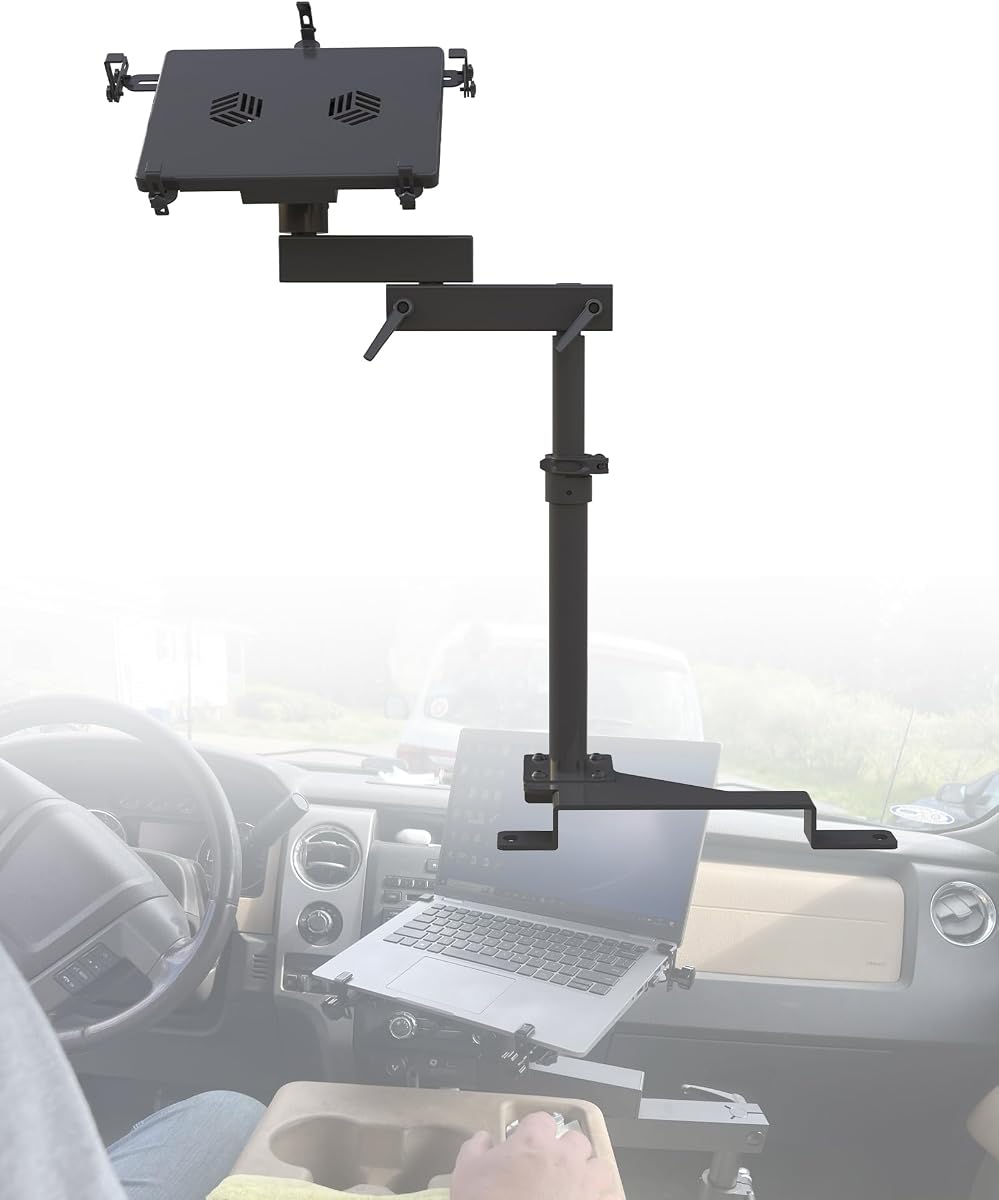
4.6Editor score
This side-by-side comparison reviews ten durable laptop mounts designed for trucks and SUVs. We evaluate each model on stability, cooling features, adjustability, and vehicle compatibility to help you find the perfect workstation for your ride.
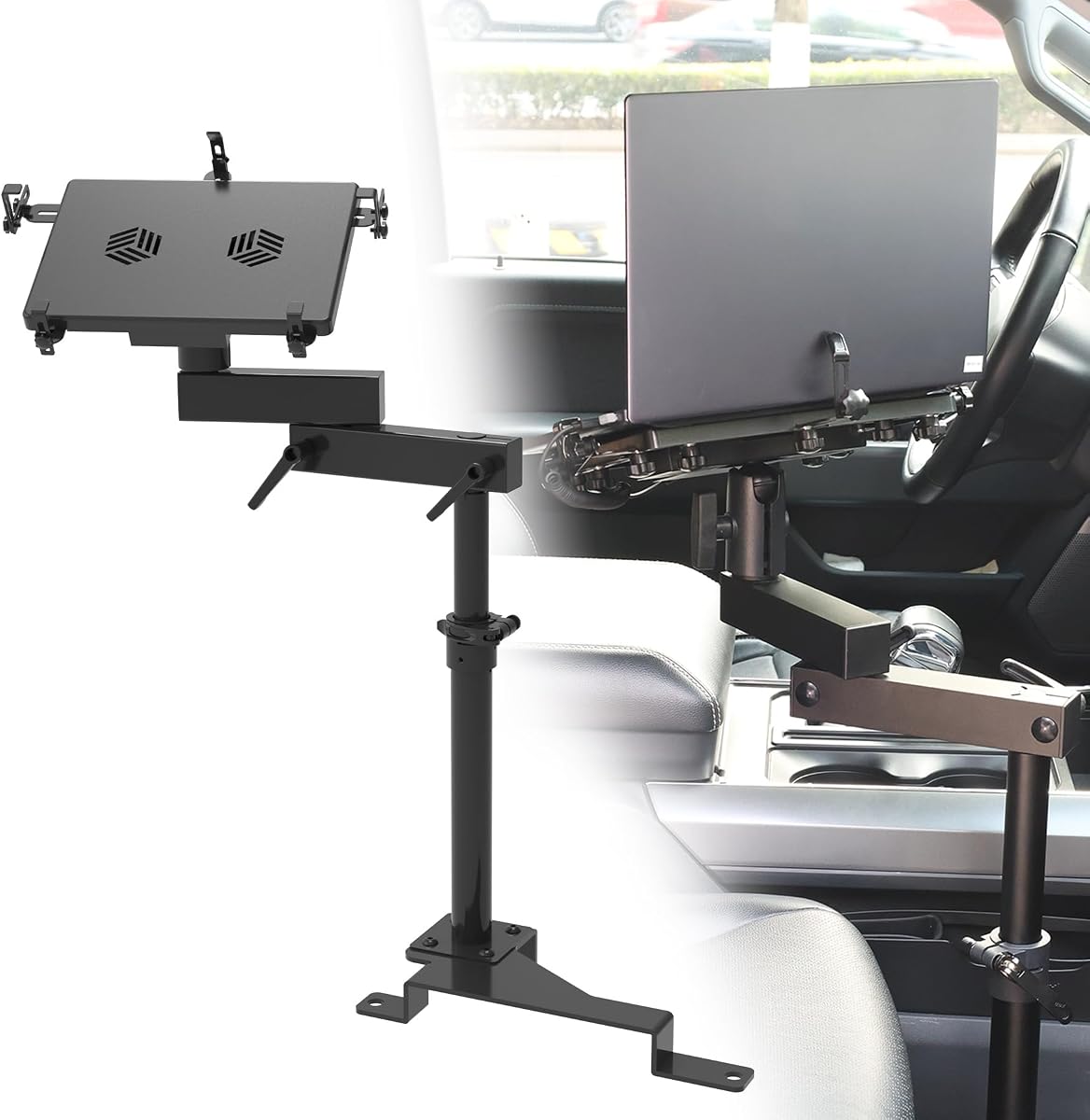
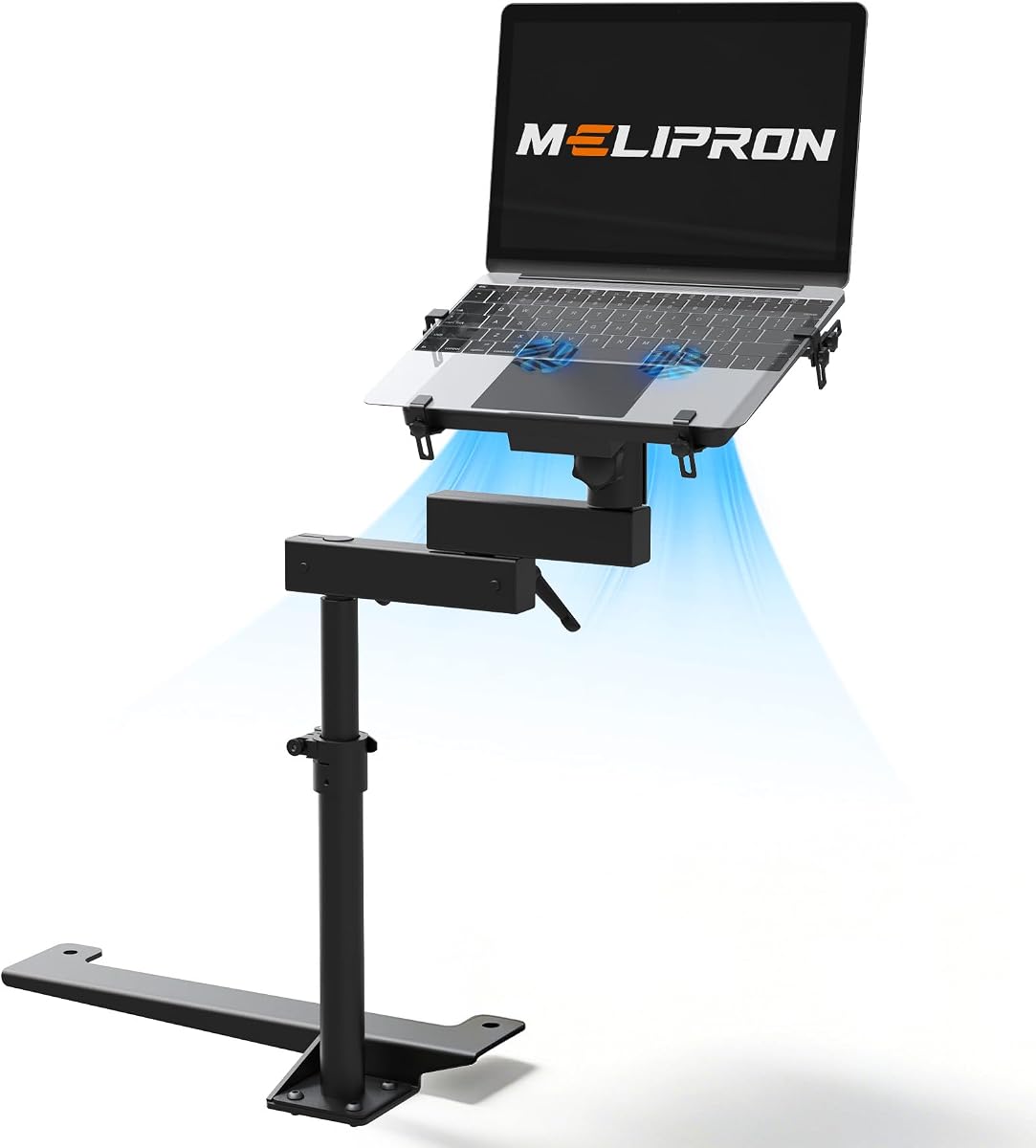


The MELIPRON No-Drill Truck Laptop Mount is our top pick for its rugged build and versatile design. It features a heavy-duty aluminum and steel construction that keeps your laptop stable even on bumpy terrain. With built-in cooling fans and a 360-degree swivel, it ensures your device stays cool and accessible.
We may earn a commission when you buy through this link, at no additional cost to you.
This mount attaches directly to passenger seat rail bolts without drilling, making it ideal for leased or fleet vehicles. The adjustable height and tilt help reduce neck strain during long work sessions. You can quickly remove the telescopic pole to free up space when the workstation is not needed.
While the mount is highly stable, it may require specific bolt configurations on some trucks. The cooling fans are effective but might produce a slight hum in quiet environments. These trade-offs are minor compared to the robust support and ease of installation offered by this model.
Professionals like field technicians and fleet managers will find this stand invaluable for on-the-go work. Its combination of safety, comfort, and durability makes it the best overall choice for truck laptop mounts. We recommend this model for anyone needing a reliable mobile workstation.
The heavy-duty aluminum and steel frame ensures your laptop remains steady even when driving over uneven surfaces.
Dual USB cooling fans prevent overheating during extended use, while the sturdy build protects your device from vibrations.
We may earn a commission when you buy through this link, at no additional cost to you.
This MELIPRON mount is specifically tailored for Ford F-Series trucks from 2015 to 2026. It offers a robust solution for F-150 F-250 and other heavy-duty models. The dual swing arms provide extended reach, allowing you to position your laptop comfortably without cluttering the passenger area.
We may earn a commission when you buy through this link, at no additional cost to you.
The mount includes integrated cooling fans to protect your device from heat during long trips. Its patented design ensures unparalleled comfort and durability. The quick-release structure lets you detach and reattach the stand easily, maintaining flexibility for daily use or passenger needs.
Because it is designed for Ford trucks, compatibility may be limited for other vehicle brands. The price is higher than universal options, but the specialized fit justifies the cost for Ford owners. This focus on specific models ensures a snug and stable installation.
Ford truck owners who need a dedicated workspace will appreciate this tailored approach. The combination of cooling, reach, and stability makes it a strong contender. We suggest this stand for those prioritizing exact fit and professional-grade features.
The dual swing arms extend the laptop closer to the driver or passenger, improving accessibility and reducing stretching.
Designed explicitly for Ford F-Series, this mount ensures a secure bolt connection that matches your vehicle seat rail layout.
We may earn a commission when you buy through this link, at no additional cost to you.
Tailored for Chevy Silverado and GMC Sierra trucks, this mount offers a stable workstation for professionals. The three-point support base distributes load effectively to prevent wobbling on uneven roads. Aircraft-grade aluminum construction ensures it withstands daily commercial use without compromising durability.
We may earn a commission when you buy through this link, at no additional cost to you.
Vinyl-coated tray clamps secure your device without scratching the surface. Integrated cooling fans help maintain optimal operating temperatures during long shifts. The adjustable height and rotation allow for ergonomic viewing angles that preserve driver visibility while working.
Compatibility is limited to specific Chevy and GMC models from 2019 to 2026. Installation relies on existing seat bolts, so verification is necessary before purchase. These limitations are balanced by the high-quality materials and specialized fit for owners of these trucks.
If you drive a Silverado or Sierra, this stand provides a reliable and safe workspace. Its focus on stability and device protection makes it a top choice for fleet and personal use. We recommend checking compatibility details before ordering to ensure a perfect fit.
The base anchors at three points on the seat rail, distributing weight to minimize movement while driving.
Vinyl-coated clamps hold your laptop securely without leaving marks on your device.
We may earn a commission when you buy through this link, at no additional cost to you.
This premium mount delivers exceptional stability and security for Ford truck owners. The five-clamp securing system combined with a strap reduces device shifting even on challenging terrain. Dual articulating swing arms offer precise positioning, keeping the laptop accessible while maintaining road visibility.
We may earn a commission when you buy through this link, at no additional cost to you.
The three-point support base anchors firmly to the seat rail for rock-solid stability. Powder-coated alloy steel construction ensures long service life and resistance to wear. A telescopic pole allows quick release to free up passenger space when the stand is not in use.
Installation can be slightly more involved due to the advanced clamping system, but detailed videos assist. The weight is higher than basic models, which contributes to its stability. These factors make it ideal for professionals who prioritize safety and adjustability over simplicity.
For Ford users seeking a high-end solution, this stand is a top recommendation. Its comprehensive features and robust design make it worth the investment. We suggest this model for those who need a secure and adjustable workspace daily.
Five adjustable clamps and a strap hold your laptop firmly in place, reducing movement and potential damage.
Dual swing arms with four locking joints let you adjust height and angle precisely for optimal ergonomics.
We may earn a commission when you buy through this link, at no additional cost to you.
The VIVO mount is an excellent budget-friendly option for various vehicle types. Its universal mounting feet accommodate exposed floor seat bolts in trucks, vans, and SUVs. The ventilated surface increases airflow to help cool your laptop during use, while flexible clips secure your device quickly.
We may earn a commission when you buy through this link, at no additional cost to you.
Full articulation allows you to find the perfect ergonomic angle with tilt, swivel, and height adjustments. The quick disconnect mechanism returns your seat to a functional passenger area in seconds. This versatility makes it suitable for shared vehicles or occasional use.
Weight capacity is limited to 11 pounds, which may exclude heavier laptops. The build is lighter than premium models, which could affect stability on very rough roads. However, these trade-offs are acceptable for the affordable price and broad compatibility it offers.
For users needing a flexible and cost-effective solution, this mount is a smart choice. It provides essential adjustability and stability without a high price tag. We recommend this for those working with multiple vehicles or on a tighter budget.
Three mounting feet allow this stand to fit a wide range of vehicles with standard seat rail bolts.
Open tray design promotes airflow to help prevent heat buildup during extended laptop sessions.
We may earn a commission when you buy through this link, at no additional cost to you.
This mobile truck stand is designed for fleet operations and field service. The triangular three-point base limits mount movement when parked, while a long strap reduces device shifting during transit. Dip-coated clamp contact points add grip and protect your device from scratches.
We may earn a commission when you buy through this link, at no additional cost to you.
Cooling fans increase airflow during extended work, and the tray supports devices up to 17 inches. The upper workstation detaches at the center joint, reducing passenger-side obstruction. A detailed fit check guide helps verify compatibility before ordering.
The design is not compatible with hook-style seat mounts, so checking your seat rail is crucial. Some users may find the strap system time-consuming compared to simpler clips. Still, these features prioritize safety and protection for professional daily use.
Fleet managers and mobile service technicians will value the secure setup and easy removal. The robust design ensures device safety across various vehicle types. We recommend this stand for those who need reliable support for frequent work travel.
Dip-coated clamps and a securing strap prevent scratches and movement on bumpy roads.
Removing the upper workstation preserves passenger space while keeping the base installed for quick setup.
We may earn a commission when you buy through this link, at no additional cost to you.
This innovative mount offers dual functionality as a steering wheel holder and a desktop stand. It provides a portable solution for drivers needing quick access to their laptop during short trips. The compact design stores easily in a seat seam or briefcase, making it ideal for travelers.
We may earn a commission when you buy through this link, at no additional cost to you.
Installation is simple without tools, and the five-position height adjustment ensures comfort. Flipping the design switches between steering wheel lock and desktop mode in seconds. This flexibility suits various situations, from temporary office setups to entertainment.
Stability is lower than seat-rail mounts, so it is best used when parked. The design prioritizes portability over ruggedness, which limits heavy use cases. These trade-offs are acceptable for users valuing convenience and ease of storage.
For occasional users or those seeking a temporary solution, this stand is practical. Its portability and dual modes make it a versatile accessory. We suggest this model for travelers who need a compact and easy-to-use option.
Flip the tray to switch between steering wheel mount and desktop stand in seconds.
Foldable design and simple storage let you take this stand anywhere without bulk.
We may earn a commission when you buy through this link, at no additional cost to you.
The Mobotron MS-526B offers a complete accessory package for enhanced stability. It includes a support brace, screen stabilizers, and a USB cooling fan preinstalled in the mounting deck. This bundle adds value and ensures your device stays secure and cool.
We may earn a commission when you buy through this link, at no additional cost to you.
Installation is straightforward with a no-drilling solution that fits flat passenger seat rails. The mounting deck secures most laptops and tablets, offering ergonomic adjustments for driver or passenger use. Its universal base makes it a solid choice for various vehicles.
The design is older compared to newer mounts, which may lack some modern features. The cooling fan might be less efficient than dual-fan systems. However, the included accessories compensate by providing comprehensive support and ease of use.
Those seeking an all-in-one solution with accessories will find this mount useful. Its balance of stability and convenience makes it a reliable choice. We recommend this for users who want extra components included in their purchase.
Includes stabilizers and support brace for enhanced rigidity and device protection.
Most users can install this mount in under ten minutes without special tools.
We may earn a commission when you buy through this link, at no additional cost to you.
This standard mount is a straightforward option for those needing basic stability. It features a fully adjustable tray with vertical and horizontal movement for ergonomic viewing. The quick-release lever and screw allow users to adjust their workstation into the best position quickly.
We may earn a commission when you buy through this link, at no additional cost to you.
With no drilling required, it installs easily on flat passenger seat rails. The weight capacity is higher when parked, supporting up to 17 pounds. However, moving capacity is lower, which may limit use on rough roads.
Compared to modern mounts, it lacks cooling fans or complex arm systems. The design is simple and functional, suited for basic needs. These trade-offs keep the price lower but may not satisfy all professional requirements.
For users seeking a no-frills stand with solid basic features, this is a good fit. Its simplicity and adjustability make it accessible. We recommend this for those prioritizing ease of use over advanced features.
Adjustment knobs let you position the tray without tools for immediate access.
No drilling is required, making this a quick and clean setup for most vehicles.
We may earn a commission when you buy through this link, at no additional cost to you.
This MELIPRON mount is built for RAM Heavy Duty and DS platforms from 2012 to 2026. The heavy-duty steel base anchors directly to seat rail bolts to prevent wobbling on uneven roads. It includes cooling fans and vinyl-coated clamps to protect your device during long shifts.
We may earn a commission when you buy through this link, at no additional cost to you.
Adjustments include height tilt and rotation for precise positioning. The three-point support system distributes load effectively, ensuring stability for typing or diagnostics. It connects directly to passenger seat bolts without drilling, preserving your vehicle structure.
Compatibility is strictly limited to specific RAM models, so verification is essential. The design prioritizes heavy-duty performance which may not suit smaller vehicles. These limitations ensure optimal performance for RAM owners but reduce universal appeal.
RAM truck owners needing a dedicated, stable workspace will find this stand ideal. Its focus on durability and vehicle fit makes it a strong choice. We recommend checking your model year before purchasing to ensure compatibility.
Steel base and aluminum build withstand vibration and heat for long-term daily operation.
Designed for RAM 2500 to 5500, ensuring exact fit for heavy-duty models.
We may earn a commission when you buy through this link, at no additional cost to you.
Choosing the right laptop stand for your truck involves evaluating several key factors to ensure safety and comfort. This guide outlines the most important aspects to consider before making your purchase decision.
Ensure the mount fits your specific truck model and year. Many mounts are designed for Ford Chevy or RAM trucks. checking the compatibility list prevents installation issues. Universal models work across brands but may lack specialized stability.
Always verify seat bolt type and rail flatness before ordering to confirm fitment.
Look for no-drill options that use existing seat bolts to avoid vehicle damage. Quick-release features allow you to remove the stand when not in use. Anchoring systems should be sturdy enough to prevent wobble on rough terrain.
Choose a mechanism that balances stability with ease of removal for your needs.
Adjustable height tilt and rotation help reduce neck and wrist strain during long work sessions. Dual swing arms offer extended reach without cluttering space. Proper ergonomic alignment improves visibility and comfort for both driver and passenger.
Prioritize mounts with multiple locking joints for precise positioning.
Integrated cooling fans prevent overheating during extended use in hot vehicles. Tray clamps should secure devices without scratching surfaces. Vibration-resistant builds protect your laptop from shocks on uneven roads.
Ensure the mount provides adequate airflow and secure clamping for your device type.
Check the weight limit for both parked and moving scenarios. Heavy-duty aluminum and steel builds ensure longevity. Consider daily use frequency to select a stand that withstands constant operation.
Select a model with a higher capacity than your device weight for safety.
Detailed instructions and videos simplify setup for users without technical skills. Quick-release mechanisms restore passenger space efficiently when the stand is not needed. Simple installation reduces time and effort required for daily use.
Look for mounts that come with clear guides and minimal tools for setup.
A warranty of at least two years protects against defects and ensures reliable support. Responsive customer service helps with fitment and product concerns. Free replacement parts reduce long-term costs for damaged components.
Choose brands with strong after-sales support to protect your investment.
Telescopic poles and detachable stations free up room for passengers when not in use. The mount should not obstruct vehicle controls or visibility. Clear space ensures safety and comfort for all occupants.
Prioritize stands with quick removal features if you share your vehicle.
Install the mount by locating the passenger seat rail bolts and attaching the base according to instructions. Tighten all screws securely to ensure stability. Check that the stand does not block airbags or vehicle controls before driving.
Adjust the laptop to a comfortable viewing angle using tilt and height controls. Secure your device with clamps or straps to prevent sliding during transit. If using cooling fans, connect them to a USB port to maintain optimal device temperature.
To remove the stand, use the quick-release mechanism and store the detachable parts properly. Clean the mount regularly with a damp cloth to remove dust and debris. Inspect bolts and joints periodically to ensure continued safety and performance.
Most modern truck laptop mounts use a no-drill installation that anchors to existing seat bolts. This preserves your vehicle structure and avoids leaks. Always verify seat rail compatibility before purchasing.
Stands designed for moving vehicles provide stability through heavy-duty anchors and secure clamps. However, always prioritize road safety and adjust settings only when parked if possible. Ensure your visibility is not obstructed by the laptop.
Many models support laptops up to 17 inches and most tablets. Check weight limits and tray dimensions to ensure your device fits securely. Adjustable clamps help accommodate various device sizes.
Use a damp cloth to wipe down the steel and aluminum surfaces regularly. Avoid harsh chemicals that might damage the finish. Inspect moving parts for dust accumulation to maintain smooth adjustments.
Some mounts require exposed seat bolts for installation. Check your vehicle manual or consult a professional to confirm bolt accessibility. Universal models may offer alternative mounting feet for different seat designs.
Cooling fans help prevent overheating during extended use in hot vehicle environments. They are especially useful for heavy workloads or summer months. If your laptop runs cool, a ventilated tray might suffice.
Many designs allow permanent installation, but quick-release options offer flexibility for passenger space. Consider your daily needs to decide whether to keep the base attached or remove it when not in use.
Most reputable brands provide at least a two-year warranty covering defects. Some include free replacement parts for missing components. Review warranty terms before purchasing for peace of mind.
We explored ten durable laptop stands tailored for trucks and SUVs, highlighting top picks for budget, premium, and specific vehicle needs. The MELIPRON No-Drill mount stands out for its overall stability and features, while options like VIVO offer affordability.
When choosing a stand, prioritize compatibility, cooling, and adjustability to match your work habits. Ensure the mount supports your device weight and provides ergonomic comfort. Investing in a quality stand improves safety and efficiency on the road.
Prices and availability change frequently, so check current listings before purchasing. We hope this guide helps you select the perfect truck laptop mount for your professional needs. Keep safety and convenience in mind for a productive mobile workspace.