
OMTech K40+ 45W Desktop CO2 Laser Engraver & Cutter
4.4Editor score
45W upgraded laser power
12 by 8 workspace
Integrated air assist system
This guide compares the top CO2 Laser Cutters for professionals and hobbyists. Find the best machine for your budget, workspace, and cutting needs today.
CO2 laser cutters have revolutionized how makers and businesses handle precision cutting and engraving tasks. These machines use a focused beam to slice through materials like wood, acrylic, and leather with incredible accuracy and speed.
We analyzed ten top models based on power output, working area, safety features, and software compatibility. Our goal is to help you find a machine that matches your specific project requirements and skill level.
Each pick highlights unique strengths such as autofocus systems, pass-through doors, or industrial-grade tubes. Please note that prices and availability can change frequently, so verify details before purchasing.
4.4Editor score

4.5Editor score

5.0Editor score
This side-by-side comparison highlights the key specifications of all ten selected CO2 laser cutters. Use this table to quickly identify which machine offers the power and size you need.


The xTool P3 stands out as a flagship machine designed for serious production environments. With a 4.5 star rating, it combines raw power with intelligent automation to streamline complex workflows efficiently.
We may earn a commission when you buy through this link, at no additional cost to you.
Its ACS system uses LiDAR and dual cameras to handle material placement automatically, which saves significant time on large batches. The 80W output allows for clean cuts through thick acrylics that other machines struggle with.
While the initial investment is substantial, the smart nesting feature reduces material waste effectively. The Class 1 safety enclosure ensures that users can operate without constant supervision in busy spaces.
This machine is ideal for professionals who need reliability and speed. If you require a system that minimizes setup time and maximizes output quality, the xTool P3 delivers exceptional value.
The automated creation system handles autofocus and positioning so you focus on design details rather than manual adjustments.
With smart nesting and high speed capabilities, you can complete large orders faster while using less material per job.
We may earn a commission when you buy through this link, at no additional cost to you.
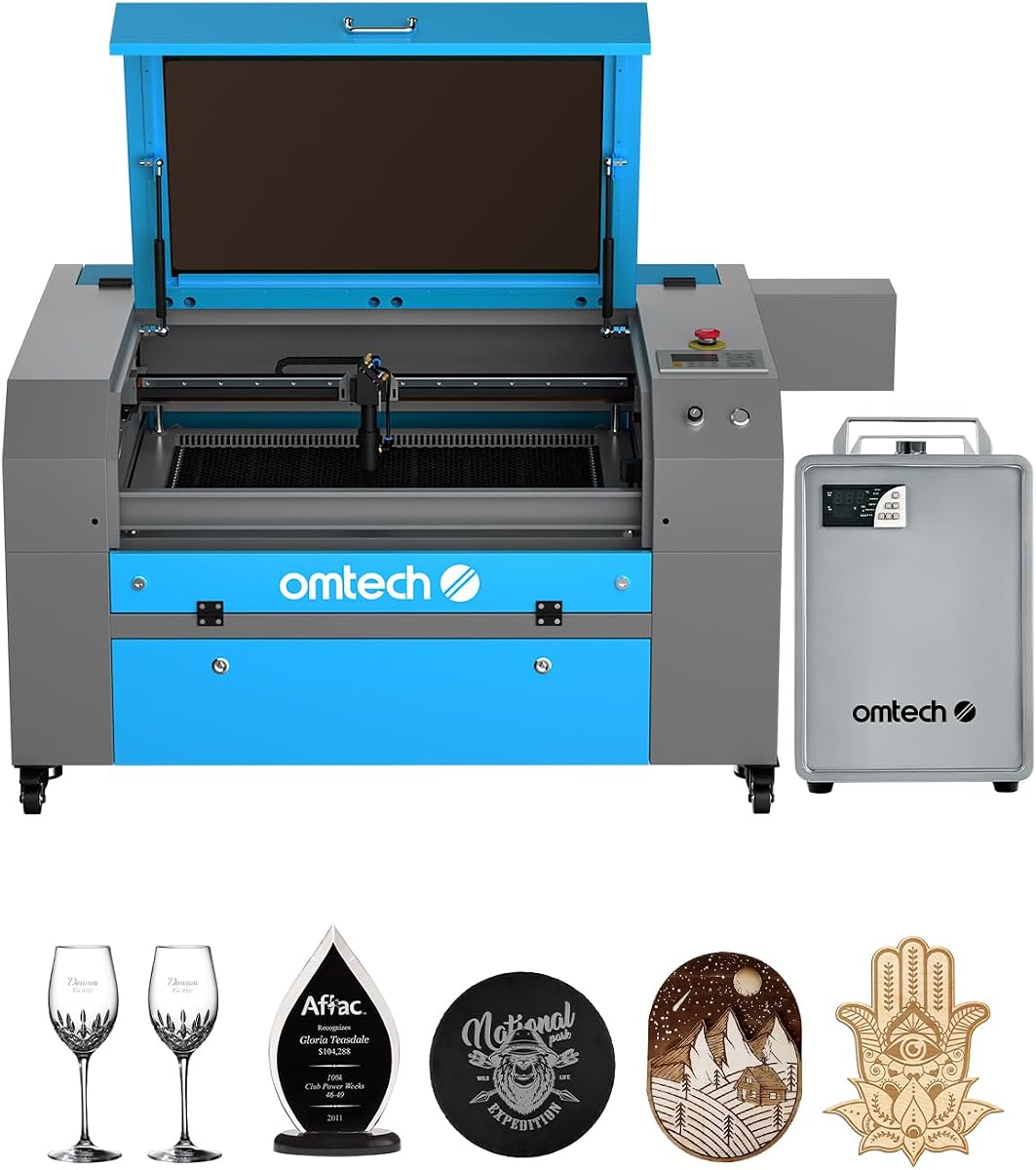
The OMTech K40+ offers an accessible entry point into CO2 laser cutting for hobbyists and small businesses. It features an upgraded 45W tube that improves cutting speed significantly over older K40 models.
We may earn a commission when you buy through this link, at no additional cost to you.
The integrated air assist helps maintain clean edges and protects the lens during high power operations. Support is comprehensive with a 24/7 global team ready to assist with technical issues.
While the workspace is compact at 12×8 inches, it handles standard projects well. The ability to use popular software like LightBurn ensures you have the tools needed for precise engraving.
For those starting out or managing a tight budget, this model provides a solid balance of features and cost. It is a reliable choice for learning the ropes of laser cutting.
Despite the lower price tag, you still get professional features like air assist and compatibility with top tier software.
The dedicated support team ensures you can resolve issues quickly, keeping your production time minimal.
We may earn a commission when you buy through this link, at no additional cost to you.
The VEVOR 100W delivers a perfect balance of power and workspace size for professional use. It holds a 5.0 rating, indicating high satisfaction among users regarding its performance and build quality.
We may earn a commission when you buy through this link, at no additional cost to you.
With a 24×35 area, you can tackle larger materials without needing to seam pieces together. The pass-through doors allow for handling even longer items like wooden boards or metal sheets.
The digital control panel makes it easy to manage settings and transfer files directly via USB or network. It supports popular design software ensuring flexibility for various workflows.
If you need a machine that can handle industrial volume and larger formats, this is an excellent investment. The safety features and robust construction make it suitable for continuous operation.
The generous dimensions allow for cutting larger sheets without needing to join multiple pieces for single designs.
High speeds and digital controls streamline your workflow so you can produce more units in less time.
We may earn a commission when you buy through this link, at no additional cost to you.
The OMTech Maker 90W is designed for users who need to run sessions for extended periods. The included water chiller keeps the tube cool, which is essential for maintaining power and longevity.
We may earn a commission when you buy through this link, at no additional cost to you.
Its four-way pass-through doors make it easy to fit larger items into the 20×28 workspace without lifting heavy materials. This feature is particularly useful for custom furniture or signage.
Safety is prioritized with an interlock system that cuts the beam if the window is opened. The flame retardant viewing window ensures safe monitoring of the engraving process.
This model is suitable for small shops needing reliable performance without frequent tube replacements. The added cooling system provides peace of mind during high volume production runs.
The bundled chiller maintains consistent temperature allowing for longer continuous runs without overheating issues.
Pass-through doors accommodate oversized materials, expanding the types of projects you can handle easily.
We may earn a commission when you buy through this link, at no additional cost to you.
The OMTech Maker 60W offers convenient features like autofocus and bundled LightBurn software. It simplifies the setup process, making it easier for beginners to start cutting immediately.
We may earn a commission when you buy through this link, at no additional cost to you.
The autofocus bed adjusts at the touch of a button to find the perfect focal distance. This eliminates guesswork and ensures consistent results across different material thicknesses.
With the water chiller included, you are prepared for continuous work without worrying about cooling issues. The flame retardant window adds an extra layer of protection for the user.
This machine is great for those who want premium features without needing to buy them separately. The combination of software and hardware support makes it a strong contender.
Automatic focus saves time on setup, allowing you to move straight to engraving without manual calibration.
LightBurn software is included, providing you with top tier tools to design and manage your cutting projects.
We may earn a commission when you buy through this link, at no additional cost to you.
This variation of the K40+ focuses on core functionality and reliability for desktop users. It keeps the footprint small while still offering features like air assist to improve cut quality.
We may earn a commission when you buy through this link, at no additional cost to you.
The 12×8 workspace is perfect for small projects like keychains or badges. The honeycomb bed supports flat materials effectively, while optional accessories allow for cylindrical engraving.
Safety is a priority with flame retardant panels and an emergency stop function. The high powered exhaust fan helps keep the workspace clear of smoke during operations.
For hobbyists with limited desk space, this unit provides a manageable and safe environment. It strikes a good balance between capability and ease of storage in a home office.
The compact design allows you to use a powerful tool without sacrificing your available workspace.
Flame retardant materials and emergency stops ensure safe handling of high energy laser equipment in a home.
We may earn a commission when you buy through this link, at no additional cost to you.
The OMTech Pronto 100W is engineered for speed, offering engraving rates up to 39.4 inches per second. This high throughput makes it ideal for businesses needing to fulfill orders quickly.
We may earn a commission when you buy through this link, at no additional cost to you.
The large 40×24 area gives you flexibility in choosing material sizes. Autofocus technology ensures precision without requiring manual adjustments for every new job setup.
A powerful air pump and fan maintain clean cuts and reduce material burn. Safety features like water protection and temperature alarms provide reliable operation during long runs.
If time is money, this model helps you maximize output without compromising on quality. The robust tube life and advanced airflow systems support consistent performance over time.
Rapid engraving speeds significantly reduce production times, allowing you to take on more work efficiently.
Advanced airflow keeps cuts clean and edges smooth, reducing post-processing requirements for finished items.
We may earn a commission when you buy through this link, at no additional cost to you.
With 130W of power, the OMTech Pronto 130W handles thicker materials with ease. It is a top choice for those working with substantial nonmetallics that require deep cuts.
We may earn a commission when you buy through this link, at no additional cost to you.
The expansive 51×35 workspace accommodates large format projects effortlessly. Two-way pass-through doors further increase the versatility for handling long or bulky items.
Autofocus simplifies the workflow by ensuring accurate focusing on various thicknesses. The tube is designed for extended lifespan, reducing long term operational costs.
For serious commercial users, this model offers the power and capacity needed for demanding tasks. Its reliability and high performance make it a standout option in the market.
The 130W output allows cutting through thick materials faster and more reliably than lower wattage machines.
The generous workspace enables you to work on large signs or parts without needing to piece materials together.
We may earn a commission when you buy through this link, at no additional cost to you.
This version of the K40+ is optimized for those with very limited workspace. It retains the core benefits of CO2 cutting in a package that fits easily into smaller rooms.
We may earn a commission when you buy through this link, at no additional cost to you.
The 12×8 bed is sufficient for small crafts and personalized gifts. It is a great way to enter the laser cutting field without a significant financial commitment.
Safety features are standard, including protection panels and emergency stops. The machine works well with standard software, giving you access to powerful design tools.
For beginners or those working in tight quarters, this is a practical choice. It allows you to build skills and confidence before moving to a larger, more expensive unit.
Its compact dimensions ensure you can fit a laser cutter into apartments or small home offices easily.
A lower price point makes it accessible for hobbyists looking to start their cutting journey without high costs.
We may earn a commission when you buy through this link, at no additional cost to you.
The OMTech Pro 130W is a high end solution designed for industrial applications. It offers a massive 35×55 workspace and servo motors for precise and rapid movement.
We may earn a commission when you buy through this link, at no additional cost to you.
Built-in water chiller and touchscreen control simplify operation and maintenance. WiFi connectivity allows for convenient management of files and settings remotely.
The frame is designed for stability and high volume use. Safety features like flame retardant windows and status lights ensure safe monitoring during production runs.
For established businesses needing industrial capacity, this machine is a top performer. Its advanced features and large size support professional needs and high demand workflows.
Servo motors and large workspace support high volume production with consistent accuracy for professional outputs.
Touchscreen and WiFi interfaces make it easy to manage jobs and settings without needing a connected PC always.
We may earn a commission when you buy through this link, at no additional cost to you.
Selecting the right CO2 laser cutter requires understanding your specific needs regarding power, size, and safety. This guide outlines the key factors to consider before making a purchase.
Laser power determines what materials you can cut and how thick they can be. Higher wattage like 100W or 130W allows for cutting thicker acrylics and woods faster than 40W models.
Choose a power level that matches your most common project requirements to ensure efficiency without overspending.
The working area defines the maximum size of material you can process in one setup. Larger beds like 51×35 inches are essential for big projects but require more physical space.
Measure your workspace and consider future project sizes to decide on the right bed dimensions for your needs.
Safety is critical when dealing with high power lasers. Look for enclosed designs, interlocks, and proper ventilation to prevent accidents and fumes.
Prioritize machines with Class 1 ratings or strong enclosure systems to protect yourself and others while working.
Software is the bridge between your design and the machine. Support for popular programs like LightBurn or CorelDRAW ensures you can edit files easily.
Ensure the cutter supports your preferred software to avoid compatibility issues during your workflow.
CO2 tubes generate significant heat that must be managed to maintain performance. Water chillers are essential for extended use to prevent overheating and tube degradation.
Choose a machine that includes a chiller or allows easy external cooling for reliable long sessions.
The initial price is just the start; consider accessories like rotary axes or air assist systems you may need later. A higher upfront cost can save money on accessories later.
Calculate the total cost of ownership to ensure you stay within your budget while getting necessary features.
Reliable customer support is vital when technical issues arise. Look for brands offering extensive warranty periods and responsive help lines for troubleshooting.
Strong support networks reduce downtime and keep your production running smoothly when problems occur.
Different cutters handle different materials better. Ensure the machine can cut your specific materials like leather, acrylic, or wood without burning or struggling.
Check material lists and cutting depths to confirm the machine fits your specific material applications.
Always start by securing your material flat on the bed to prevent movement. Check the focal length and set the focus using the manual or automatic focus feature before beginning.
Run a test cut on scrap material to verify speed and power settings. This step helps avoid wasting material and ensures the cut quality meets your expectations.
Clean the mirrors and lens regularly to maintain optimal beam quality. Check the water chiller levels and air filters to keep the machine running efficiently and safely.
Generally, CO2 lasers cannot cut metal directly. They are designed for non-metallic materials like wood and acrylic. For metal, you would need a fiber laser cutter or a CO2 laser with a metal coating option.
You should always wear laser safety glasses rated for the specific wavelength of your machine. Ensure the room is well ventilated or use an exhaust fan to remove fumes from cutting.
Keep the water cooling system clean and free of algae to prevent overheating. Avoid using the tube at maximum power continuously to extend its lifespan and ensure stable output.
Yes, CO2 lasers are ideal for cutting acrylic because they produce clean, polished edges. The process vaporizes the material efficiently, resulting in smooth cuts without burrs.
Most machines support industry standard software like LightBurn. This allows you to import various file types and control settings without needing proprietary software from the manufacturer.
You need space for the machine plus clearance for pass-through doors if available. Allow extra room for exhaust systems and a stable surface to prevent vibrations during operation.
Typical CO2 tubes last between 5,000 and 10,000 hours of use depending on maintenance. Using them at moderate power and keeping them cool can maximize their operational life.
Check local regulations regarding laser safety and ventilation. Ensure your workspace is in a fire safe area with proper exhaust to comply with safety standards.
Choosing the right CO2 laser cutter depends on balancing power, size, and your budget. The top picks offer options for everyone from hobbyists to industrial users.
Prioritize safety and material versatility when making your decision. A machine that fits your workflow will help you produce higher quality results consistently.
Always check current availability and pricing before buying to ensure you get the best deal. We hope this guide helps you find the perfect tool for your creative projects.