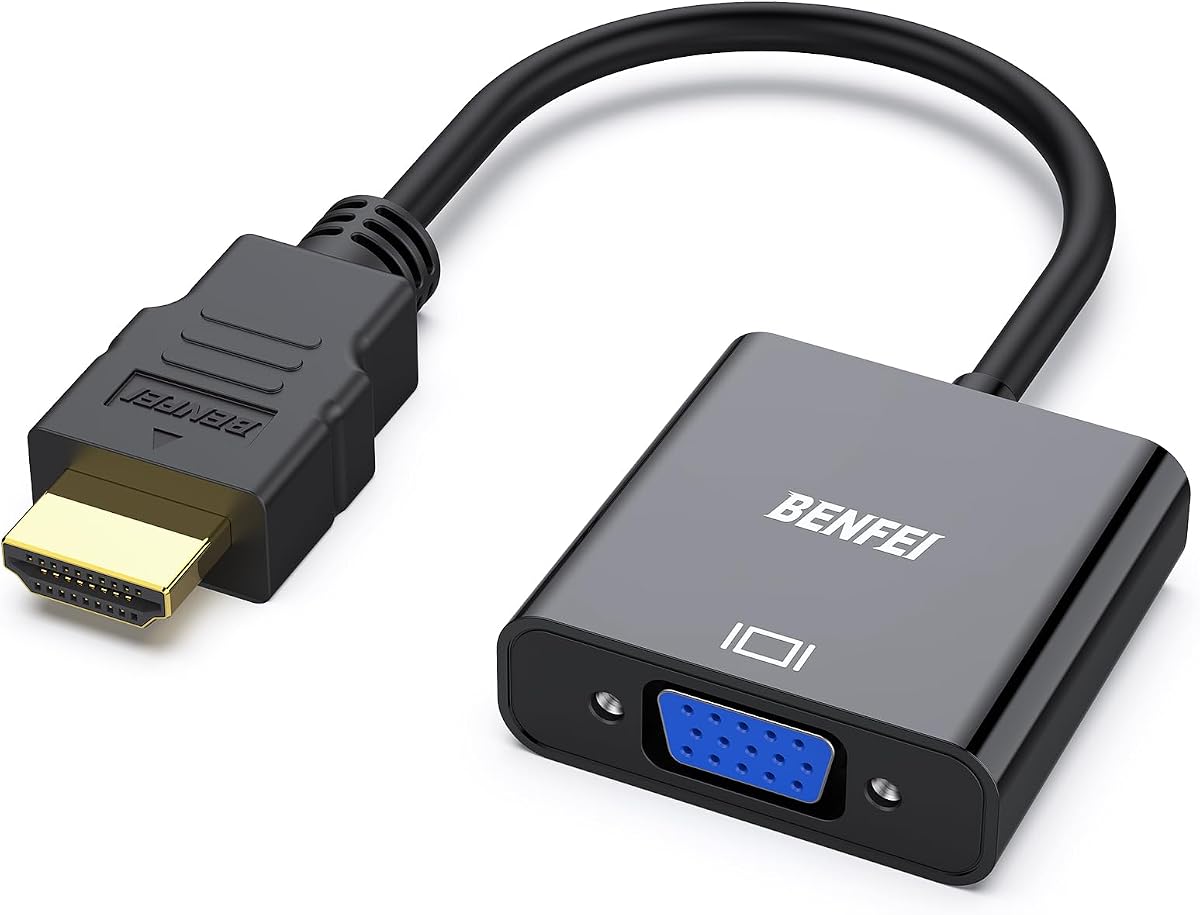
BENFEI HDMI to VGA Gold-Plated Adapter
4.6Editor score
Compact and portable design
Supports up to 1080p resolution
Gold-plated HDMI connector
This guide compares the top HDMI to VGA converter adapter models for 2026 based on compatibility, video quality, audio support, and reliability for diverse
Finding the right HDMI to VGA converter adapter is essential for connecting modern devices to legacy displays. These small gadgets bridge the gap between digital HDMI sources and analog VGA monitors ensuring seamless video output for work or entertainment needs.
We evaluated ten highly rated converters based on build quality, signal stability, audio capabilities, and broad device compatibility. Our analysis focuses on real-world performance metrics like resolution support, power requirements, and user feedback to help you choose wisely.
Each pick highlights key strengths and limitations so you can match the adapter to your specific setup. Please note that product availability and pricing can change frequently so verify current details before making your final purchase decision today.
4.6Editor score

4.6Editor score

4.5Editor score
The following table provides a side-by-side comparison of all ten selected converters highlighting their key specifications and unique features to help you quickly identify the best fit for your specific connection requirements.


The BENFEI HDMI to VGA Gold-Plated Adapter stands out as a top choice for users needing reliable digital to analog conversion. It holds a solid 4.6 star rating reflecting consistent performance across diverse setups.
We may earn a commission when you buy through this link, at no additional cost to you.
Its built-in advanced IC chip ensures stable signal conversion from HDMI digital to VGA analog. The gold-plated HDMI connector resists corrosion and abrasion which improves long term transmission quality.
Users should note it requires a separate VGA cable and does not provide audio output. These trade-offs are acceptable given its low cost and high compatibility with most HDMI devices.
This adapter is ideal for business travelers or home users connecting laptops to projectors. Its compact size fits easily into pockets while delivering clear Full HD video.
The advanced IC chip inside ensures stable conversion from digital HDMI to analog VGA signals for clear picture quality.
Gold plated connectors resist corrosion and abrasion while molded strain relief increases overall cable durability.
We may earn a commission when you buy through this link, at no additional cost to you.
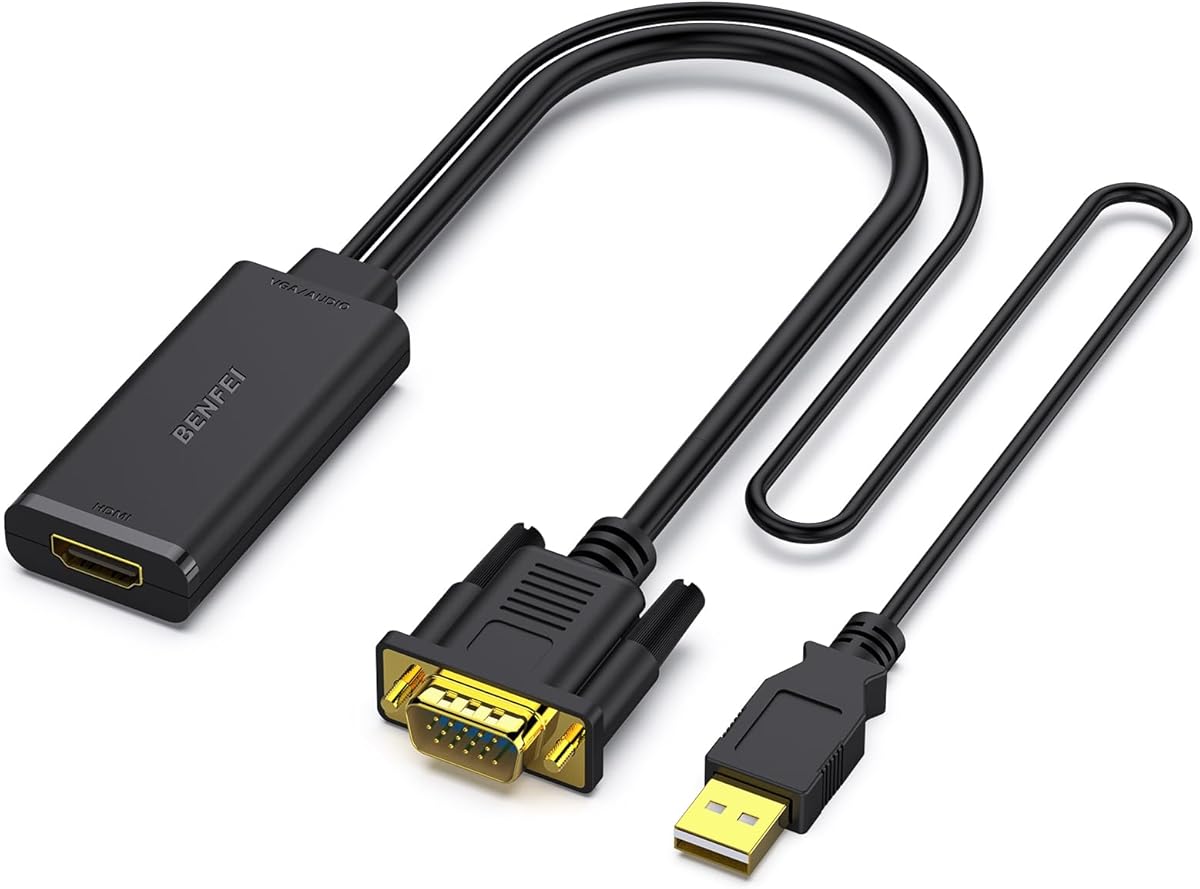
This BENFEI adapter reverses the typical flow by converting VGA analog signals to digital HDMI outputs. It is perfect for connecting older laptops or PCs to modern HDMI TVs or monitors.
We may earn a commission when you buy through this link, at no additional cost to you.
It includes an integrated USB cable for audio output over HDMI ensuring both video and sound reach your display. The 1080p resolution support delivers crisp visuals for presentations or media.
The adapter is not bidirectional so it cannot convert HDMI to VGA. Users must also provide their own HDMI cable for the connection to function properly.
Ideal for users with legacy VGA output devices needing to connect to modern HDMI screens. The USB audio feature adds significant value for audio syncing.
An integrated USB cable embeds audio along with video over HDMI allowing you to configure sound output from Windows.
Works with computers laptops and devices having VGA output connecting to any HDMI monitor or TV plug and play.
We may earn a commission when you buy through this link, at no additional cost to you.
The Moread HDMI to VGA Adapter offers exceptional peace of mind with its unconditional five year warranty. This long term support reflects confidence in its build quality and reliability.
We may earn a commission when you buy through this link, at no additional cost to you.
It features a built-in advanced IC chip for stable signal conversion and gold plated connectors to resist corrosion. The adapter supports up to 1080p Full HD resolution for sharp visuals.
Like many adapters in this class it requires a separate VGA cable and lacks audio output. These are standard trade-offs for simple unidirectional video adapters.
Best for users seeking long term reliability and customer service support. The five year warranty makes it a safe investment for regular use.
Exclusive unconditional five year warranty ensures long time satisfaction with friendly customer service ready to solve problems timely.
Supports resolutions up to 1920×1080 at 60 Hz including 720p and 1600×1200 for high definition monitors.
We may earn a commission when you buy through this link, at no additional cost to you.
The StarTech Active HDMI to VGA Adapter eliminates the need for external power making it ideal for travel and quick setups. It converts HDMI signals to VGA using integrated GPU resources efficiently.
We may earn a commission when you buy through this link, at no additional cost to you.
It supports resolutions up to 1920×1200 and works across Windows macOS ChromeOS and Linux without drivers. The design supports screw-locking VGA cables to prevent accidental disconnections.
While slightly more expensive than basic adapters its no power requirement adds significant convenience. The short cable length may limit placement flexibility compared to longer cable options.
Perfect for professionals needing reliable connection on the go without extra power bricks. Its universal OS support ensures it works with most modern systems.
Reduces clutter by eliminating need for external power adapter or USB connection making it ideal for travel.
Compatible with any OS including Windows macOS ChromeOS and Linux working with HDMI laptops from all platforms.
We may earn a commission when you buy through this link, at no additional cost to you.
This BENFEI cable integrates the HDMI to VGA conversion into a six foot cable eliminating extra dongles. It offers a cleaner setup when you need moderate reach between source and display.
We may earn a commission when you buy through this link, at no additional cost to you.
The gold plated connectors resist corrosion while molded strain relief increases durability. It supports up to 1080p Full HD resolution ensuring clear video quality for presentations.
It does not include audio output so you may need separate speakers. The integrated cable approach simplifies connections but reduces flexibility if you need different cable lengths.
Ideal for users wanting an all-in-one solution without extra adapters. The six foot length suits many home or office desk configurations perfectly.
Six foot HDMI to VGA cable provides moderate reach while eliminating need for separate adapter and VGA cable.
Gold plated connectors resist corrosion and molded strain relief increases cable durability for long term use.
We may earn a commission when you buy through this link, at no additional cost to you.
This adapter uniquely adds a 3.5mm audio jack allowing simultaneous audio and video playback through external speakers. It is specially designed for TV sticks and low power devices needing extra power.
We may earn a commission when you buy through this link, at no additional cost to you.
It includes a Micro USB port for essential power on low output HDMI devices. The 3.5mm audio output lets you connect to speakers via included cable for better sound.
Users should note audio cable is sold separately. The external power requirement adds a step but ensures compatibility with more devices like Raspberry Pi or Apple TV.
Best for users needing audio output alongside video on legacy VGA displays. The TV stick compatibility makes it versatile for streaming setups.
Independent 3.5mm audio output achieves simultaneous audio and video playback connecting to speakers easily.
Specially designed for TV sticks with Micro USB port essential for devices with low power output HDMI ports.
We may earn a commission when you buy through this link, at no additional cost to you.
The UGREEN Active HDMI to VGA Adapter provides audio output through a dedicated 3.5mm jack making it great for presentations requiring sound. It also includes a separate micro USB cable for optional power.
We may earn a commission when you buy through this link, at no additional cost to you.
This optional power optimizes compatibility with devices like MacBook Mini 2014 or Apple TV that may need extra power. The adapter supports up to 1080p resolution for clear video.
VGA and audio cables are sold separately which adds to total cost. However the audio feature adds significant value over basic video only adapters at this price.
Ideal for users needing audio and video on VGA displays without extra dongles. The optional power cable ensures it works with low power sources.
HDMI to VGA with audio converter provides 3.5mm line-out jack connecting to external speakers or headphones.
Separate micro USB cable included for power optimizing compatibility with more devices like Apple TV or Raspberry Pi.
We may earn a commission when you buy through this link, at no additional cost to you.
The JideTech converter uses external 5V power for stable performance ensuring reliable transmission especially over longer distances. Its active conversion chipset ensures reliable HDMI to VGA signal conversion.
We may earn a commission when you buy through this link, at no additional cost to you.
It includes a 3.5mm audio output allowing connection to external speakers or amplifiers for optimal sound quality. The one-way design converts HDMI to VGA only not bidirectional.
Users need a 5V power adapter which adds to setup complexity. However this ensures compatibility with a wider range of HDMI source devices including high power ones.
Best for professional or industrial installations requiring stable long-distance signal transmission. The audio output and power make it robust for demanding environments.
Powered by 5V DC input to provide stable performance for long-distance transmission and compatibility with wide range of HDMI devices.
Separates audio from HDMI signals through 3.5mm audio port allowing connection to external speakers or amplifiers.
We may earn a commission when you buy through this link, at no additional cost to you.
This StarTech adapter features an integrated audio port enabling connection of VGA monitors to speakers for optimal sound quality. Its compact design fits perfectly in laptop carrying cases for easy travel.
We may earn a commission when you buy through this link, at no additional cost to you.
It supports resolutions up to 1920×1200 or 1080p producing crisp crystal-clear picture quality. No installation software or drivers are required providing a simple plug and play solution.
The lack of external power option may limit compatibility with low power HDMI sources. The audio port adds significant value for presentations needing sound without extra cables.
Ideal for business professionals needing portable audio and video adapters. The plug and play setup simplifies use during quick presentations.
Integrated audio port enables you to connect VGA monitor to speakers for optimal sound quality during presentations.
No installation software or drivers required providing simple plug and play solution for easy user-friendly setup.
We may earn a commission when you buy through this link, at no additional cost to you.
The Dell HDMI to VGA Adapter offers a branded solution designed for seamless compatibility with Dell systems. It provides a compact dongle design that is easy to carry and store.
We may earn a commission when you buy through this link, at no additional cost to you.
It converts HDMI signals to VGA using standard connector types ensuring straightforward connection. The trusted brand quality offers peace of mind regarding build and reliability.
Detailed feature specifications are limited compared to other adapters so check compatibility carefully. The price may be higher for a basic adapter but brand assurance can be valuable.
Best for users with Dell devices seeking a branded and simple adapter solution. Its compact design makes it suitable for travel.
Dell branded adapter ensures seamless compatibility with Dell laptops and desktops for reliable connection performance.
Compact dongle design makes it easy to carry and store fitting well in laptop cases or bags.
We may earn a commission when you buy through this link, at no additional cost to you.
Selecting the right HDMI to VGA converter adapter requires careful consideration of direction, audio needs, power options, and compatibility to ensure a smooth setup.
Confirm the adapter converts from HDMI source to VGA display not the reverse. Using a bidirectional adapter incorrectly can damage equipment or fail to function.
Always choose a unidirectional HDMI to VGA adapter when connecting modern laptops to older monitors.
Many adapters pass through video only so you need a model with a 3.5mm audio jack if sound is required. Check if the audio cable is included or sold separately.
Prioritize adapters with audio output if connecting to projectors or monitors without built-in speakers.
Some adapters need external USB power especially for low-power HDMI ports like those on Raspberry Pi or Apple TV. Others draw sufficient power from the HDMI port alone.
Choose an adapter with external power support if you plan to use it with diverse or power-sensitive devices.
Look for adapters supporting at least 1080p resolution to ensure clear and sharp video quality on modern displays. Higher resolution support like 1440p may be needed for professional monitors.
Verify resolution capabilities match your display requirements to avoid blurry or distorted output.
Gold-plated HDMI connectors resist corrosion and improve signal transmission over time. Molded strain relief adds durability to prevent cable breakage from bending or pulling.
Choose adapters with gold-plated connectors and reinforced cable ends for long-term reliability.
Compact and lightweight designs are ideal for travelers who need to carry adapters in bags or pockets. Aluminum or durable plastic housings protect internal components from physical damage.
Prioritize compact designs if you frequently move between locations or attend business presentations.
Longer warranty periods like 18 months or 5 years indicate manufacturer confidence in product durability. Responsive customer support helps resolve compatibility issues quickly.
Check warranty terms and customer service availability before purchasing to protect your investment.
Basic adapters are affordable while models with audio or extra features cost more. Evaluate which features you truly need to avoid overpaying for unnecessary capabilities.
Compare multiple options within your budget to find the best balance of features and cost.
Connect the adapter's HDMI male end to your source device and attach a VGA cable to the female VGA port. Ensure the VGA cable connects securely to your display.
If your adapter requires external power plug the USB cable into a USB port or power adapter before connecting. Power on your display and source device to establish the connection.
Handle the adapter gently and store it in a protective case to avoid damage to ports or cables. Periodically check connectors for dust and clean them to maintain optimal signal quality.
Most standard adapters only transmit video so you need one with a 3.5mm audio jack for sound. Check product details to confirm audio support before purchasing to ensure compatibility.
Many adapters support gaming consoles like Xbox but check specific compatibility for your model. Some low-power devices may require external USB power to function correctly.
Most modern adapters support up to 1080p Full HD resolution at 60 Hz. Some models support higher resolutions like 1440p or 2560×1440 for better clarity.
No most HDMI to VGA adapters are plug and play requiring no driver installation. They work automatically with Windows macOS and Linux operating systems.
No this is a unidirectional adapter converting HDMI source to VGA display only. It cannot convert VGA signals to HDMI for connecting older devices to new monitors.
Ensure the adapter is connected properly and the display is set to the correct input. If needed plug in the USB power cable to provide sufficient power.
Yes many adapters work with Mac laptops but check compatibility for specific models like Macbook Pro. Some may require external USB power for stable operation.
You need a standard VGA male to male cable to connect the adapter to your display. Ensure the cable is fully inserted and tightened at both ends.
The top picks like BENFEI Moread and StarTech offer excellent balance of reliability features and value for most users. Consider your specific needs for audio power or cable length before choosing.
Prioritize adapters with gold-plated connectors and strong warranties to ensure long term performance. Matching the adapter to your source device power capabilities avoids connection issues.
Check current availability and pricing on trusted retailers before purchase since these details change frequently. Verify compatibility with your specific devices to ensure a smooth connection experience.