
ARESGAME AGV Series 500W
4.4Editor score
80 Plus Bronze certified
Non Modular design
5 Year Warranty
Discover the best cheap power supply for gaming PC options in October 2026. This guide compares top budget PSUs for efficiency, reliability, and performance.
Finding a cheap power supply for gaming PC does not mean sacrificing quality or safety. Many budget units now offer reliable performance for mid-range builds without breaking the bank. Understanding efficiency ratings and connector types helps you choose the right unit for your needs.
We evaluated ten top-rated models based on certification, build quality, warranty, and user feedback. Our selection includes options from trusted brands like Corsair, MSI, and Thermaltake. Each unit was analyzed for stability, noise levels, and compatibility with modern components.
This guide breaks down the strengths and weaknesses of every pick so you can build confidently. Prices fluctuate often so check current listings before buying. We focus on value and longevity to help you invest wisely in your system power.
4.4Editor score

4.7Editor score

4.6Editor score
Compare the top ten budget power supplies side by side to find the perfect match for your gaming rig. This table highlights key specifications like wattage, certification, and unique features to streamline your decision process.



The MSI MAG A650BN stands out as a top contender in the budget segment. It offers a solid 650 watts of power with a high 4.7 user rating indicating strong satisfaction. This unit combines efficiency with reliability making it an ideal choice for many gamers.
We may earn a commission when you buy through this link, at no additional cost to you.
Its low-noise fan ensures that your system runs quietly even under heavy load. The active PFC design helps improve efficiency and reduces power waste. Industrial level protections like OVP and SCP keep your components safe from voltage spikes and short circuits.
While it is non-modular the cables are manageable for most mid-tower cases. The compact size fits well in smaller builds without sacrificing output. This trade-off is acceptable given the price point and performance reliability it delivers daily.
If you need a dependable power supply without overspending the A650BN is highly recommended. It strikes a perfect balance between cost and quality for mid-range gaming rigs. Check current pricing to secure this excellent value before stock runs low.
The low-noise fan design minimizes distractions during intense gaming sessions.
Industrial level protections ensure safety against common electrical hazards.
We may earn a commission when you buy through this link, at no additional cost to you.
The CORSAIR RM750e brings premium features to the affordable market. It supports the latest ATX 3.1 standard making it future-proof for new GPUs. Users appreciate the fully modular design which reduces cable clutter significantly inside the case.
We may earn a commission when you buy through this link, at no additional cost to you.
Its 120mm rifle bearing fan keeps noise low even at full load. The 105°C rated capacitors provide steady power and long-term electrical performance. Modern standby compatibility ensures fast wake times and better low-load efficiency for daily tasks.
Although it costs more than basic units the build quality justifies the expense. The clean look from modular cables improves airflow and aesthetics. This premium approach helps maintain system stability during extended gaming marathons.
For those willing to invest slightly more the RM750e offers superior value. It is perfect for builders planning upgrades within the next few years. Verify availability to ensure you get the latest revision of this trusted unit.
Supports PCIe 5.1 platform for stable GPU power delivery.
Fully modular cabling reduces clutter and improves airflow.
We may earn a commission when you buy through this link, at no additional cost to you.
The ARESGAME AGV Series 500W is a top pick for entry-level builds. It delivers 500 watts of continuous output with 80 Plus Bronze certification for decent efficiency. The 5-year warranty provides peace of mind for budget-conscious buyers looking for longevity.
We may earn a commission when you buy through this link, at no additional cost to you.
Its all-black cables avoid the messy yellow and blue mix found on cheaper units. The 120mm ultra-quiet fan ensures cooling without disturbing noise levels. Heavy protection features include OVP and UVP to guard against voltage fluctuations.
While 500 watts is limited for high-end GPUs it suits mid-range systems well. The non-modular design means some cables may go unused but management is straightforward. This simplicity reduces cost while maintaining essential safety standards for daily use.
If you are building on a tight budget this unit delivers solid performance. It fits well with budget graphics cards and standard CPUs efficiently. Ensure your total system power needs stay within the 500-watt limit before buying.
Ideal for beginners needing reliable power without overspending.
80 Plus Bronze ensures effective power transmission and savings.
We may earn a commission when you buy through this link, at no additional cost to you.
The Segotep 650W Gold offers high efficiency at an attractive price point. Its 80 Plus Gold certification guarantees exceptional efficiency and lower energy consumption. The single 12V output delivers reliable stable power even under high amperage loads.
We may earn a commission when you buy through this link, at no additional cost to you.
Global voltage adaptation makes it suitable for use worldwide without needing adapters. Four PCI-E 6+2 pin connectors support modern graphics cards effectively. Wires can be separated from the supply to look cleaner inside the case.
The non-modular design adds some cable clutter but the build quality compensates. It is a great choice for those who want gold efficiency without premium costs. Proper cable management helps maximize airflow in standard mid-tower chassis units.
Consider this unit if you prioritize efficiency and global compatibility. It supports 40-series graphics cards well with enough headroom for stability. Check the connector count to ensure it matches your GPU requirements before purchasing.
80 Plus Gold rating reduces waste and lowers electricity bills.
Global voltage adaptation simplifies travel and international use.
We may earn a commission when you buy through this link, at no additional cost to you.
Thermaltake SMART 600W delivers continuous output at 40 degrees Celsius reliably. It meets Intel ATX 12V and EPS 12V standards for broad compatibility across systems. The 80 Plus certification ensures typical load efficiency while active PFC improves power factor.
We may earn a commission when you buy through this link, at no additional cost to you.
Industry-grade protections like over power and short circuit keep hardware safe. It supports two PCI-E connectors for graphics cards effectively. The high MTBF rating suggests long-term reliability for daily gaming usage cycles.
While it uses older standards it remains functional for most mid-range builds. The design is basic but functional for users prioritizing performance over aesthetics. This unit offers a balance of durability and standard features for regular gamers.
Choose this if you prefer a well-known brand with proven reliability. It fits well with standard motherboards and GPUs needing moderate power. Verify connector types match your components to ensure a successful installation process.
100000 hour MTBF indicates expected long-term operation without failure.
Over power and short circuit protection prevent component damage.
We may earn a commission when you buy through this link, at no additional cost to you.
The Segotep GM850 supports the latest ATX 3.1 and PCIe 5.1 standards. It can hold up to 200 percent total power excursion for GPU stability. The 80 Plus Gold certified ensures higher efficiency and lower energy consumption effectively.
We may earn a commission when you buy through this link, at no additional cost to you.
Its fully modular design with flat white cables improves airflow and strengthens management. The native 12VHPWR cable can generate up to 600 watts for new cards. A DC-DC structure provides stable and safe output for system components.
This model is great for future builds requiring high wattage headroom. The flat cables look cleaner and are easier to route than traditional ones. It combines modern tech with solid electrical design for consistent performance under load.
Ideal for users needing 850 watts with next-gen connector support. Check the warranty terms and ensure your case fits the dimensions provided. Verify compatibility with your motherboard to avoid any installation hurdles during setup.
Native 12VHPWR cable supports high-power PCIe 5.1 graphics cards.
Flat white cables improve airflow and case aesthetics significantly.
We may earn a commission when you buy through this link, at no additional cost to you.
This 1000W unit delivers gold-level performance with 92 percent efficiency. It supports ATX 3.1 and PCIe 5.1 for high-performance components. The dual-color 12V-2×6 cable helps visualize proper connection for safety.
We may earn a commission when you buy through this link, at no additional cost to you.
A 140mm low-noise fan with silent mode outperforms standard fans. ARGB lighting allows style adjustments to match your build aesthetic. Japanese 105°C capacitors enable maximum stability and unwavering performance for esports.
The 10-year limited warranty guarantees long-term reliable operation. Tool kits include testers and combs for easier cable management. This setup is perfect for enthusiasts wanting future-proof power without premium branding costs.
Choose this if you need headroom for multiple GPUs or heavy loads. The RGB and modular design enhance case looks and airflow. Confirm your case clearance for the 150mm depth before buying to fit properly.
1000W output ensures stability for top-tier high-end graphics cards.
Dual-color cable lets you see if connections are plugged in properly.
We may earn a commission when you buy through this link, at no additional cost to you.
The MSI MAG A650BE offers semi-modular convenience at a great price. It provides 650 watts of power with 80 Plus Bronze efficiency for typical loads. The 120mm low noise fan ensures quiet operation during intense gaming sessions.
We may earn a commission when you buy through this link, at no additional cost to you.
DC-DC circuit design maintains stable voltage across all outputs reliably. Active PFC design improves power factor and reduces energy waste effectively. Industrial level protections keep components safe from over-voltage and temperature spikes.
Semi-modular cables mean essential lines are fixed but others are flexible. This offers a balance between cost and case cleanliness for most builds. The compact design fits well in standard ATX cases without crowding airflow.
Pick this if you want a flexible PSU without full modular costs. It suits mid-range systems well with good reliability and quiet operation. Check your case depth to ensure the compact unit fits with your cables.
Semi-modular design offers essential fixed cables plus optional flexible ones.
DC-DC circuit design ensures consistent voltage across all outputs.
We may earn a commission when you buy through this link, at no additional cost to you.
GAMEMAX RGB-850-SE blends performance with customizable RGB lighting sync. It delivers 850 watts with 90 percent efficiency for peak performance. The fully modular design with Japanese capacitors ensures stable output for hardware.
We may earn a commission when you buy through this link, at no additional cost to you.
ARGB lighting effects sync vividly with mainstream motherboard software. A 140mm ultra-quiet fan maintains heat dissipation without disturbing noise. This unit allows you to adjust light styles according to your personal needs.
ATX 3.0 readiness ensures full compatibility with 40-series graphics cards. The whisper-quiet fan is perfect for users who value a peaceful environment. Japanese capacitors provide long-lasting reliability for stable daily operations.
Choose this if aesthetics are a priority alongside solid power delivery. The modular setup keeps cable clutter low while the RGB adds flair. Ensure your motherboard supports the ARGB standard for synchronized lighting effects.
Sync RGB lighting with motherboard software for a unified look.
80 Plus Gold delivers 90 percent efficiency under typical loads.
We may earn a commission when you buy through this link, at no additional cost to you.
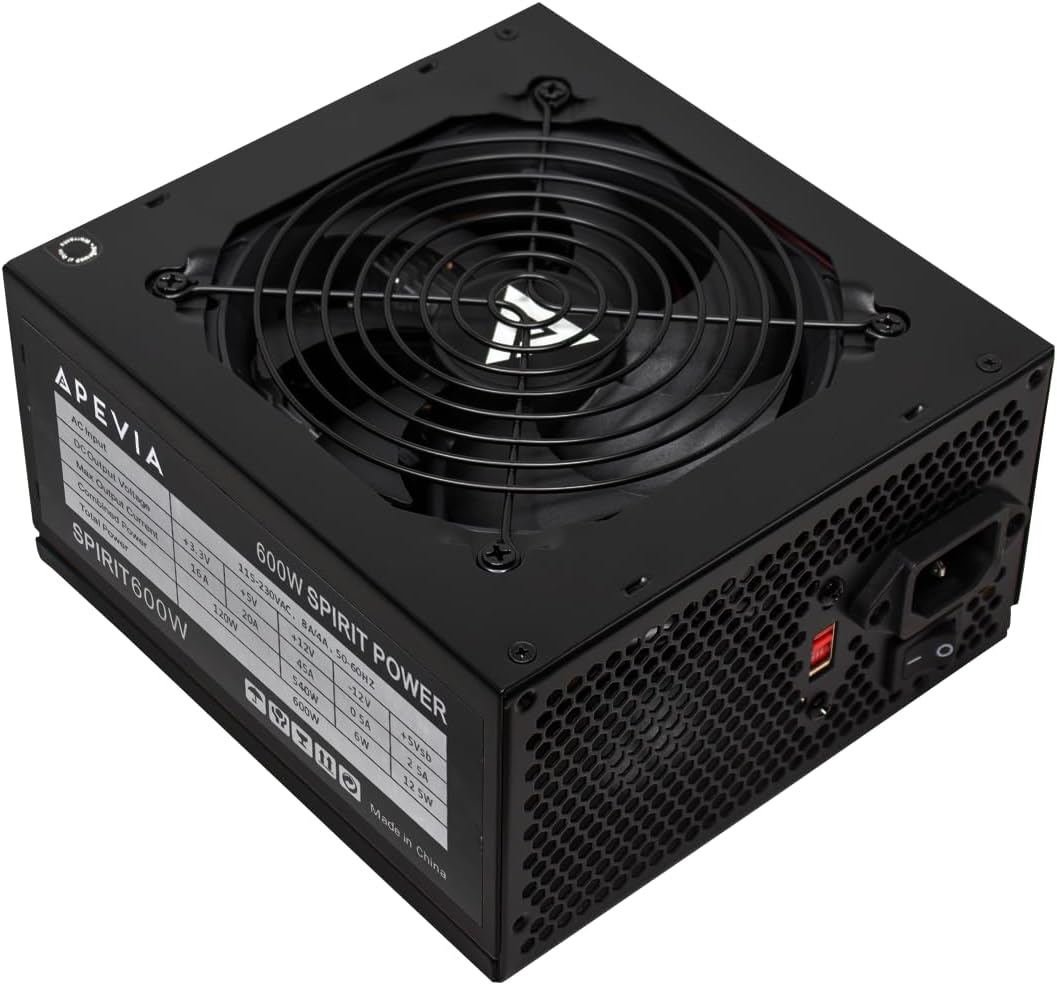
The Apevia SPIRIT600W supports dual and multi-core CPUs effectively. It delivers 600 watts with a single 12V output for higher power usage. Heavy-duty protections cover short-circuit and over-temperature conditions safely.
We may earn a commission when you buy through this link, at no additional cost to you.
Split connectors allow flexibility for 4+4 CPU or 20+4 motherboard cables. The 120mm auto-thermally controlled fan manages heat efficiently. All connectors are provided to support various legacy and modern device needs.
This unit offers practical flexibility with a black sandblasted casing. It ensures power supply will not power on without proper connections to the PC. This feature prevents accidental startup and protects components during testing phases.
Select this for basic builds needing adaptable connector configurations. Ensure all cables are properly connected to avoid power-on issues. Verify wattage requirements match your specific components before proceeding with installation.
Split connectors allow use with 4+4 CPU or 6+2 GPU cables.
Over-voltage and over-temperature safeguards protect sensitive hardware.
We may earn a commission when you buy through this link, at no additional cost to you.
Selecting the right power supply requires balancing wattage, efficiency, and reliability. This guide covers essential factors to ensure your gaming PC runs safely and efficiently.
Determine your total power draw by summing your GPU and CPU needs. Aim for at least 20 percent headroom to handle spikes without overloading the unit.
Choose a PSU with 500W to 750W for most budget builds to ensure stability.
Look for 80 Plus Bronze or Gold certification to reduce energy waste. Higher efficiency means less heat generation and lower electricity bills over time.
Bronze offers good value while Gold provides better long-term savings for daily use.
Fully modular PSUs allow you to connect only needed cables for cleaner builds. Semi-modular units offer a middle ground with fixed essential connectors.
Budget non-modular units save cash but may require extra cable management work.
Ensure the PSU has enough PCIe connectors for your graphics card. Check for 12VHPWR support if using modern high-performance NVIDIA models.
Legacy compatibility with SATA and Molex connectors is vital for older peripherals.
Verify the unit includes OVP, OCP, and SCP protections for safety. These features prevent voltage spikes and short circuits from damaging your hardware.
Industrial-level protection standards are crucial for long-term system reliability and stability.
Choose a unit with a large fan or silent mode to reduce distractions. Look for low noise specifications in reviews to ensure a quiet gaming experience.
Quiet fans maintain cooling performance while keeping ambient noise levels low.
A longer warranty indicates manufacturer confidence in the unit's build quality. Look for at least a 5-year guarantee to protect your investment.
Check if the warranty is valid in your region and requires proof of purchase.
Stick with established brands known for quality control and customer support. Research user feedback to see how units perform under real-world gaming loads.
Reputable brands often provide better reliability and easier support channels.
Install the PSU in the case ensuring the fan faces the correct airflow direction. Secure it with screws to avoid rattling and vibration during operation.
Connect all necessary cables to components before powering on the system. Double-check that the GPU has sufficient PCIe power connections for stability.
Keep the case vents clean and avoid blocking the PSU intake. Regular dusting maintains cooling performance and prevents overheating over time.
Calculate your total system draw by adding the GPU and CPU requirements plus peripherals. Use an online PSU calculator or check component specs. Add 20 percent for headroom and safety during peak load.
Yes 80 Plus Bronze provides decent efficiency for most gaming setups. It is suitable for mid-range builds where budget is a priority. Just ensure it has enough wattage and connectors for your specific components.
A low-quality cheap PSU can damage your PC due to poor regulation. Stick to reputable brands with proper protection features like OVP and SCP. Avoid no-name units that lack safety certifications entirely.
Modular PSUs let you plug in only the cables you need. Non-modular units have all cables attached which can cause clutter. Modular improves airflow and aesthetics but costs slightly more.
Noise often comes from the fan spinning fast under load or dust buildup. Clean the unit regularly and check if the fan is obstructed. Some units have silent modes or larger fans for quieter operation.
Check the wattage headroom and connector types for your planned GPU. If the PSU supports ATX 3.1 or 12VHPWR it is more future-proof. Ensure it has enough PCIe connectors for new cards.
A quality budget unit typically lasts 5 to 10 years with proper care. Look for a long warranty as a sign of expected lifespan. Avoid cheap units with very short warranties if possible.
The MSI MAG A650BN, CORSAIR RM750e, and ARESGAME AGV Series stand out as top picks. Each offers unique strengths whether you prioritize quality performance or low cost. Select the one that fits your specific build requirements best.
Prioritize safety features and efficiency ratings when choosing your unit. A reliable power supply protects your expensive components from voltage spikes. It is worth spending a little extra for better protection and peace of mind.
Prices change frequently so verify the current list price before buying. Check user reviews for recent feedback on reliability and build quality. With the right choice you will enjoy stable performance for your gaming rig.