
10Gtek 10Gb Dual RJ45 Port Network Card
4.1Editor score
Intel X540 Controller Chip
Dual Copper RJ45 Ports
Windows and Linux Support
Compare the top 10GB Ethernet Cards for speed and reliability. This guide reviews features, compatibility, and performance to help you upgrade your network
Finding the right 10GB Ethernet Card can transform your network performance significantly. These adapters allow for faster data transfers and smoother online experiences. A good card ensures stability and supports various devices effectively.
We compared ten top-rated models based on speed, compatibility, and build quality. Our analysis focuses on real-world performance and ease of installation. Each option offers unique benefits for different user needs and budgets.
Each pick highlights key strengths and potential limitations for informed decisions. Prices and availability may change frequently across different retailers. Check current listings before purchasing to ensure you get the best deal today.
4.1Editor score

4.2Editor score

4.6Editor score
This side-by-side comparison highlights the key specifications and features of the top ten 10GB Ethernet Cards available today. Reviewing these details helps you understand which model fits your specific networking requirements and hardware setup best.




The TP-Link TX401 is a top choice for upgrading to 10Gbps speeds. It delivers reliable performance with a user-friendly installation experience. Users appreciate the included cable and strong software support.
We may earn a commission when you buy through this link, at no additional cost to you.
Its 10GBase-T technology ensures fast data transfers while remaining compatible with older networks. The Quality of Service feature helps prioritize gaming traffic effectively. This makes it versatile for both home and office environments.
While it can generate heat under load, the design manages this well. Driver support is robust across Windows and Linux systems. The included cable adds value but may need replacement for longer runs.
This card suits gamers and professionals needing reliable high-speed networking. It balances performance with ease of use effectively. For most users, it offers the best combination of features and stability.
The built-in Quality of Service technology prioritizes gaming packets to reduce lag.
A 1.5 meter CAT6A cable is included to ensure optimal signal quality out of the box.
We may earn a commission when you buy through this link, at no additional cost to you.
The VIMIN 10G network card stands out with its dual RJ45 ports. This allows for increased bandwidth or failover options in server setups. Users value the Intel chipset for consistent performance and stability.
We may earn a commission when you buy through this link, at no additional cost to you.
Its wide operating system support makes it suitable for various environments. The flexible PCIe compatibility allows installation in different slot types. Heat dissipation features ensure the card runs cool during heavy use.
However, it does not support intermediate speeds like 2.5G or 5G. This limits flexibility if your network uses multi-gig standards. Installation may require manual driver adjustments for some systems.
This card is ideal for servers or workstations needing dual high-speed links. It offers strong reliability for demanding tasks. Consider your speed requirements carefully before choosing this dual-port option.
Two RJ45 ports allow for load balancing or redundant connections in network setups.
The Intel X540-T2 controller ensures stable performance and reduced packet loss.
We may earn a commission when you buy through this link, at no additional cost to you.
The 10Gtek 10Gb card offers a budget-friendly option with dual ports. It uses an original Intel controller for stable performance in server environments. Users appreciate the included low profile bracket for small cases.
We may earn a commission when you buy through this link, at no additional cost to you.
Its support for various storage protocols makes it useful for NAS setups. The three-year warranty provides added peace of mind for buyers. Compatibility with Windows and Linux allows flexible deployment options.
Windows 11 support requires manual setup which might complicate installation. The lack of hot swapping means you must shut down to install. These trade-offs are acceptable for the price point and value.
This card suits small businesses or homelabs needing affordable dual 10G links. It balances cost with reliable hardware features. Check compatibility with your OS version before purchasing to ensure smooth setup.
Get two 10Gbps connections at a lower price point than many competitors.
A three-year free warranty and lifetime technology support add value to the purchase.
We may earn a commission when you buy through this link, at no additional cost to you.
The Asus Network Card NADACA0140 delivers hyper-fast 10Gbps networking speeds. It is designed to handle bandwidth-demanding tasks with ease. Users appreciate the full compatibility with current network standards.
We may earn a commission when you buy through this link, at no additional cost to you.
Built-in QoS technology helps prioritize bandwidth for a smoother online experience. The single RJ45 port easily upgrades desktops using standard cables. Asus brand reputation adds trust for long-term reliability.
It lacks dual ports which limits flexibility for advanced networking needs. The price is higher than some budget options available in the market. However, the build quality and support justify the cost for many users.
This card is perfect for home users wanting a reliable single 10G upgrade. It simplifies the process of moving from Gigabit to 10 Gigabit. Ensure your router supports 10G to maximize its potential fully.
Built-in QoS lets you prioritize important traffic like gaming or video calls.
Supports Windows and Linux with flexible OS integration for diverse setups.
We may earn a commission when you buy through this link, at no additional cost to you.
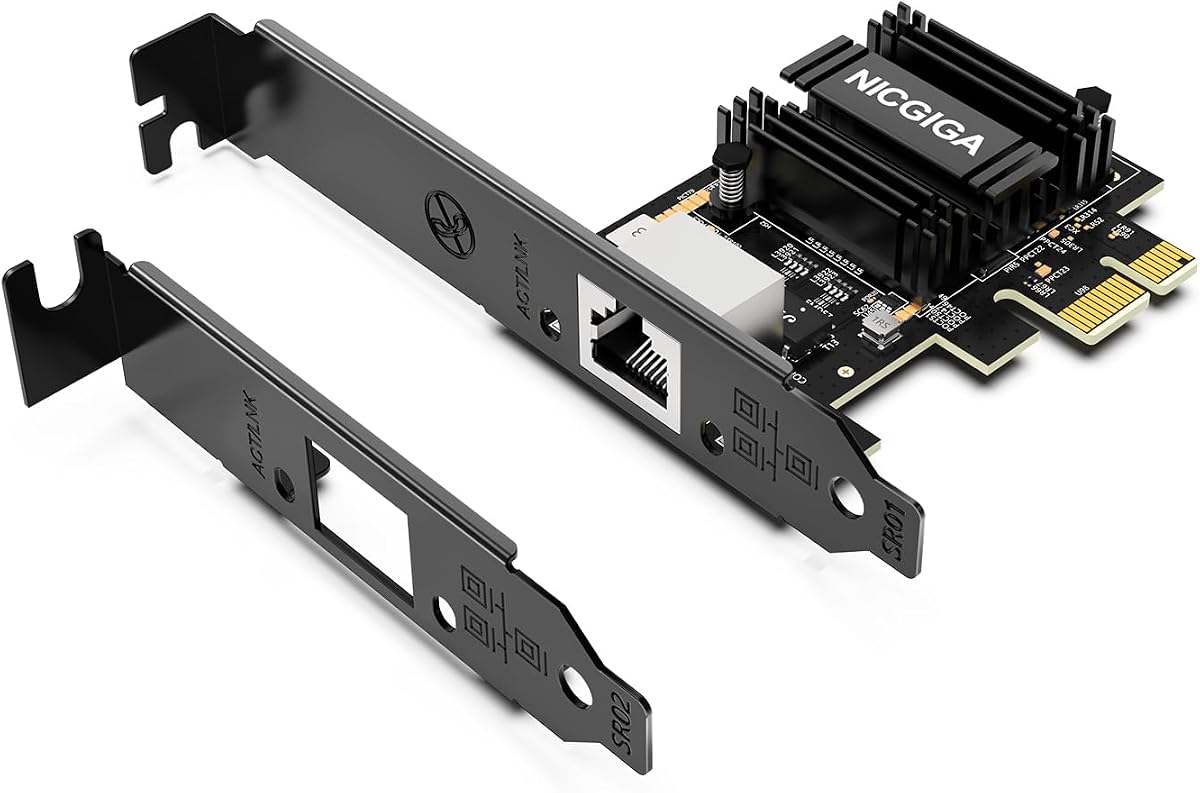
The NICGIGA 10Gb card uses the latest Realtek RTL8127 controller. It offers blazing-fast speeds with extreme stability for local transmissions. The compact PCIe 4.0 x1 interface fits easily into x1 slots.
We may earn a commission when you buy through this link, at no additional cost to you.
Auto-negotiation ensures compatibility with various network speeds and devices. It supports modern Linux kernels and virtualization platforms well. Low power consumption helps keep system temperatures lower during operation.
It is not compatible with older PCI slots which limits legacy upgrades. Linux users with older kernels might need to install drivers manually. These minor issues do not detract from its compact efficiency.
This card suits Mini PCs and ITX builds needing high-speed networking. It maximizes slot efficiency without blocking GPU lanes. Ideal for users with space constraints seeking reliable 10G connectivity options.
Uses a PCIe 4.0 x1 slot to convert compact systems to 10G networking.
The efficient chipset generates less heat than older 10G solutions for stability.
We may earn a commission when you buy through this link, at no additional cost to you.
The VunLink 10GbE card delivers stable low-latency network performance. It is built for reliable 10Gbps connectivity across NAS and servers. Multi-Gig auto-negotiation ensures seamless integration with existing infrastructure.
We may earn a commission when you buy through this link, at no additional cost to you.
Its energy-efficient design reduces heat output compared to traditional solutions. The included brackets allow flexible installation in full or compact systems. Users value its focus on NAS and media editing workflows.
Driver installation might vary depending on the specific OS version used. Optimal performance requires Cat6a cables which can be costly. These factors are manageable for most users seeking reliable storage access.
This card is tailored for users building high-speed NAS systems. It balances performance with energy efficiency effectively. Consider your cabling setup to ensure you get the advertised 10G speeds.
Designed specifically for high-speed file transfers in network attached storage.
Built for stable performance suitable for editing and cloud storage tasks.
We may earn a commission when you buy through this link, at no additional cost to you.
The Asus XG-C100F supports fiber optic technology for high-speed transfers. This allows for much greater transmission distances than traditional copper cables. Users value the SFP+ cage for connection flexibility and reliability.
We may earn a commission when you buy through this link, at no additional cost to you.
A stylish aluminum heatsink keeps the card cool during high-performance tasks. Built-in QoS technology boosts bandwidth for important streams like gaming. This ensures consistent performance even under heavy network loads.
Fiber components can be more expensive than copper alternatives. You need to purchase separate SFP modules for use which adds cost. These are necessary trade-offs for the benefits of fiber connectivity options.
This card is perfect for users needing long-distance 10G connections. It excels in environments where signal degradation is a concern. Evaluate your distance needs before choosing fiber over copper connections.
Supports the latest fiber optic technology for transmission over greater distances.
A built-in aluminum heatsink ensures the card stays cool during operation.
We may earn a commission when you buy through this link, at no additional cost to you.
The Synology E10G30-T2 adapter is designed for high-performance storage. It features two 10GbE ports to support demanding NAS workloads effectively. The five-year warranty reflects confidence in its build quality and reliability.
We may earn a commission when you buy through this link, at no additional cost to you.
Its automatic speed negotiation ensures seamless integration with existing networks. Purpose-built compatibility with Synology systems simplifies setup for users. This reduces potential issues during installation or driver configuration phases.
The price is higher than many generic adapters available on the market. Checking compatibility is essential before purchase to avoid fit issues. These costs are justified for Synology users needing premium support.
This adapter is ideal for Synology NAS owners seeking top performance. It offers reliability and long-term support unmatched by others. Ensure your DSM version meets requirements before ordering this premium add.
Designed specifically for Synology systems to ensure maximum compatibility and stability.
A five-year warranty provides long-term peace of mind for investment protection.
We may earn a commission when you buy through this link, at no additional cost to you.
The TRENDnet TEG-10GECTX adapter is compliant with NDAA and TAA standards. This makes it suitable for government customers with strict requirements. The card includes standard and low-profile brackets for flexible installation options.
We may earn a commission when you buy through this link, at no additional cost to you.
It supports 2.5G Base-T which allows flexibility with existing cabling. The 3-year manufacturer protection adds value for business buyers. Reliable tech support ensures help is available during business hours.
The specific compliance focus may not matter for general home users. It lacks some advanced features found in other high-end models. However, it offers solid performance for those needing compliance guarantees.
This card is best for government or business environments with compliance needs. It provides reliable performance with strong support options. Check your regulatory requirements before choosing this specific adapter model.
Meet government requirements with adapters designed for compliance and security.
Access to English-speaking advisors ensures help is available during business hours.
We may earn a commission when you buy through this link, at no additional cost to you.
The Cable Matters USB-C adapter offers portable 10GbE performance. It supports auto-negotiation for broad compatibility across various devices. Low-heat operation ensures reliable performance without thermal throttling issues.
We may earn a commission when you buy through this link, at no additional cost to you.
Its rugged design includes aluminum housing and braided cable for durability. This makes it ideal for travel kits and mobile workstations. Plug-and-play support on macOS simplifies setup significantly for users.
Real-world speeds may vary based on port and network equipment quality. macOS might report slower link rates depending on the specific model used. These are common limitations with USB 10G adapters generally.
This adapter suits mobile professionals needing high-speed wired connectivity. It provides flexibility for those without PCIe slots. Ensure your USB port supports Gen 2×2 for best results.
Compact and rugged design perfect for travel and mobile workstation setups.
Advanced chipset and thermal design minimize heat for stable operation.
We may earn a commission when you buy through this link, at no additional cost to you.
Choosing the right 10GB Ethernet Card involves understanding several key factors that affect performance and compatibility. This guide helps you identify what matters most for your specific setup and use case.
Ensure the card matches your system's PCIe slot type. Common types include PCIe x1, x4, x8, and x16. Some cards are designed for specific slots to maximize bandwidth.
Check your motherboard manual to confirm available slots and generation. Mismatched slots may limit speed or cause installation issues.
Verify that the card supports your operating system. Many cards work with Windows and Linux but may require specific drivers. Older systems might need manual driver installation.
Download the latest drivers from the manufacturer's site before installing. This prevents connectivity issues after the hardware is mounted in the system.
Decide between copper RJ45 or fiber optic SFP+ connectors. Copper is standard for most setups while fiber offers longer transmission distances. Your switch or router ports determine your choice.
Consider your existing cabling when making this decision. Replacing cables to match the connector can add to the total cost of ownership.
Choose between single or dual port models based on needs. Dual ports offer redundancy or increased bandwidth for servers. Single ports are sufficient for most home workstations.
Evaluate if you need failover or link aggregation features. These require two active ports to function effectively in a network.
High-performance cards can generate significant heat. Look for models with heatsinks or active cooling if your case has poor airflow. Power consumption affects energy bills and system stability.
Check the card's power requirements against your PSU capacity. Some cards may need extra connectors or higher wattage for operation.
Selecting a reputable brand ensures better driver support and reliability. Warranties vary from one year to five years depending on the manufacturer. Longer warranties reduce risk for expensive components.
Read customer reviews to gauge long-term satisfaction. Reliable support channels help resolve issues quickly when they arise.
Some cards offer QoS, Wake-on-LAN, or specific storage protocols. These features can enhance usability for gaming or NAS setups. Identify which features are necessary for your workflow.
Unnecessary features may increase price without adding value. Focus on what aligns with your specific usage patterns.
Prices range widely based on features and brand. Determine a budget that balances cost with required performance levels. Cheaper options may lack support or durability.
Investing slightly more often yields better stability. Consider the total cost including cables and potential upgrades when budgeting.
Install the card by powering down your computer and opening the case. Insert the card into the appropriate PCIe slot and secure it with screws. Close the case and power on the system to detect the hardware.
Install the latest drivers from the manufacturer's website immediately. Configure network settings to assign an IP address if not using DHCP. Test connection speed using online tools to verify performance.
Keep the card clean from dust buildup which can cause overheating. Ensure your case has adequate airflow around the card area. Regularly check for driver updates to maintain security and performance.
Yes, for best performance use CAT6a or CAT7 cables. Standard CAT5e may work for short distances but can limit speeds. Proper cabling ensures you get the full 10Gbps rates.
Most PCs with available PCIe slots can support these cards. Check your motherboard for x1, x4, or x8 slots. Compact systems might need low-profile brackets for proper fit.
Your router must have 10G ports to utilize this speed. Many home routers still use standard Gigabit. Check switch specifications to confirm support for higher speeds.
Many 10G cards support Linux but might need manual driver installs. Recent kernels handle Realtek and Intel chipsets well. Check community forums for specific distro compatibility.
10G is ten times faster than standard Gigabit speeds. Transferring large files happens significantly quicker. Ideal for media editing and cloud backup workflows.
Gaming mostly depends on latency not bandwidth. However 10G helps with local server games. Download speeds benefit greatly from higher bandwidth available.
The TP-Link TX401 leads as the best overall with excellent features. Budget users may prefer the 10Gtek for dual ports. Synology offers top premium support for NAS systems.
Prioritize compatibility with your system and existing network gear. Ensure your router and cabling can support 10G speeds fully. This maximizes the investment in high-speed networking hardware.
Prices and availability change frequently across retailers. Check current listings to ensure you get the best deal. Always verify warranty terms before finalizing your purchase decision.