
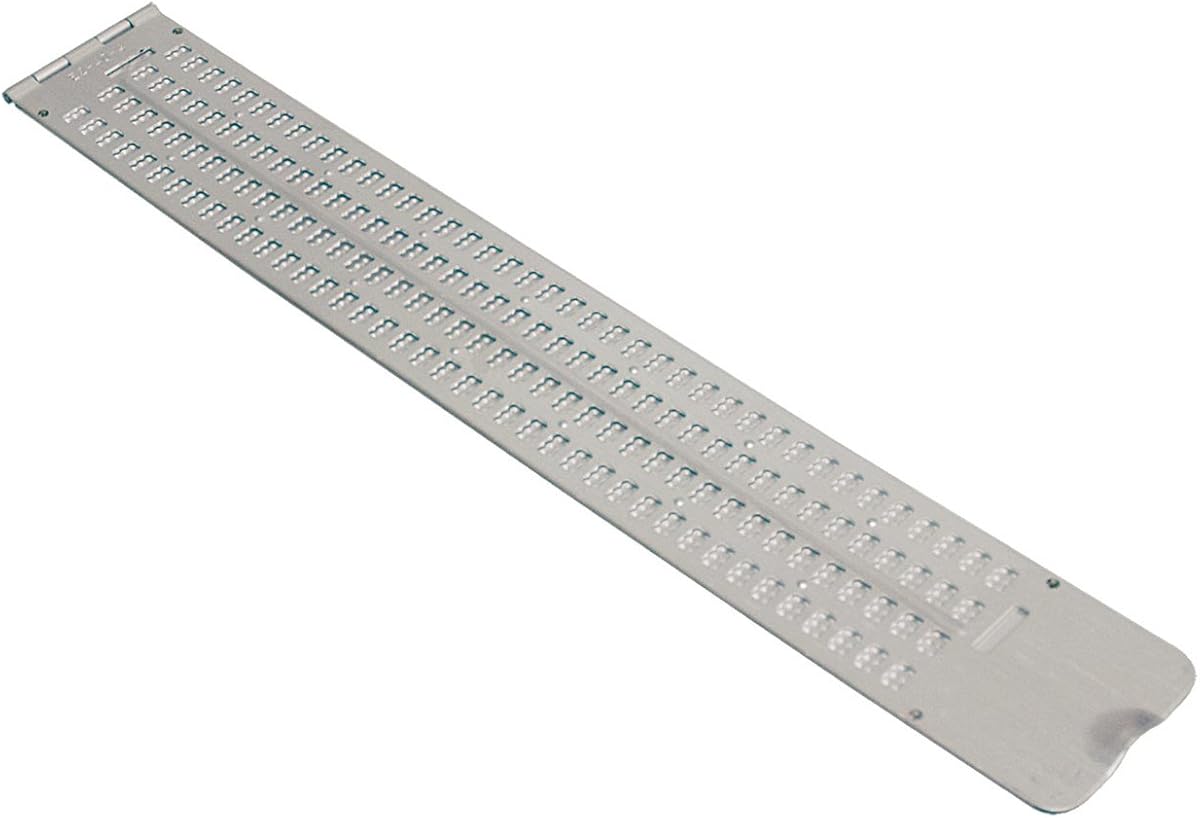
Braille Slate- 13 Lines, 36 Cells, Pins Down
3.4Editor score
Thirteen lines thirty six cells
Durable aluminum construction
Includes free stylus tool
This guide compares the top Braille displays for blind users, covering portable and desktop models with essential features for accessibility and efficiency.
Navigating the digital world requires reliable tools for blind users, and Braille displays remain a cornerstone of accessibility. These devices convert on-screen text into tactile feedback, allowing users to read and write with precision. Choosing the right model depends on individual needs, whether for work, study, or daily communication tasks.
We evaluated ten distinct products ranging from high-end refreshable displays to simple manual slates. Our analysis focuses on connectivity, build quality, battery life, and compatibility with screen readers. Each product offers unique advantages for different use cases, ensuring that every user can find a solution that fits their lifestyle and budget constraints effectively.
Each pick in this list highlights key strengths and potential limitations to help you make an informed decision. Whether you need a compact travel companion or a robust desktop solution, this guide covers the essentials. Please note that pricing and availability may change over time, so checking current listings is always recommended before purchasing.
3.4Editor score

5.0Editor score

4.0Editor score
This side-by-side comparison highlights the core specifications of each product to help you quickly identify the best fit for your specific accessibility requirements.




The Brailliant BI 40X stands out as a premium solution for blind users who need robust reading and writing capabilities. With a perfect rating from users, this device offers a spacious 40-cell display that reduces the need for constant scrolling. It is designed for those who demand reliability and extensive connectivity options in their daily tech setup.
We may earn a commission when you buy through this link, at no additional cost to you.
Key strengths include its ability to connect to five Bluetooth devices simultaneously, allowing seamless switching between phones, tablets, and computers. The onboard KeySoft Lite apps provide utilities like calculators and editors, making it more than just a display. Additionally, the 32GB internal storage ensures you can store large documents or audio files directly on the unit.
While the device is highly capable, the price point is significantly higher than basic slates or smaller displays. Users may also find the learning curve steep if they are new to refreshable Braille technology. However, these trade-offs are acceptable given the professional-grade features and long-term durability it offers for serious users.
This display is ideal for professionals, students, or anyone who relies heavily on Braille for work and education. Its comprehensive feature set ensures you stay productive across multiple devices without needing extra peripherals. For those seeking a top-tier accessory, the Brailliant BI 40X is a strong recommendation for your accessibility toolkit.
The device supports Bluetooth 5 technology for faster and more stable wireless connections across multiple devices.
With up to 20 hours of battery life, you can work or study for a full day without searching for an outlet.
We may earn a commission when you buy through this link, at no additional cost to you.
The Brailliant BI 20X offers a compact alternative to larger displays while maintaining core functionality for blind users. It provides a 20-cell refreshable display that is perfect for reading shorter texts or navigating interfaces. With a solid rating, it appeals to users who prioritize portability without sacrificing essential connectivity features.
We may earn a commission when you buy through this link, at no additional cost to you.
This device allows connection to five Bluetooth devices and one USB device simultaneously, ensuring you can switch between phone and computer easily. The onboard apps include editors and online library access, making it useful for study or leisure. Its 16GB internal storage and 20-hour battery life support extended use away from home.
The primary trade-off is the smaller display size, which means more scrolling for longer documents. Some users may also find the feature set less extensive than the 40X model. However, for daily commuting or travel, the reduced bulk makes it a practical choice for those who need a reliable assistant.
Ideal for students or professionals who move frequently, this display balances size and function well. It ensures you have access to critical information without the weight of a larger unit. If you need a versatile companion for everyday tasks, the Brailliant BI 20X is a smart investment for accessibility.
Connect to multiple devices at once via Bluetooth and USB for effortless switching between your tech.
Onboard apps like Calculator and Online Libraries make it a standalone tool for daily tasks.
We may earn a commission when you buy through this link, at no additional cost to you.
This Braille Slate provides a simple and effective way to write Braille without any electronic components. With 13 lines and 36 cells, it offers ample space for notes or short documents. Its rating reflects a classic tool that serves specific needs well, particularly for those learning Braille or needing a quick writing aid.
We may earn a commission when you buy through this link, at no additional cost to you.
The slate is made of durable aluminum and features a hinge design that makes opening and closing easy. Pins are down for writing, which is the standard convention for manual embossing. It comes with a free stylus, ensuring you have everything needed to start writing immediately upon purchase.
While it lacks the connectivity of electronic displays, this slate is invaluable for learning Braille structures or taking quick notes without power. The manual nature means it does not replace a screen reader but complements it. For users on a tight budget or beginners, this is an essential educational tool.
Best suited for students or beginners learning Braille, this slate is a reliable and cost-effective solution. It helps build muscle memory and literacy skills without the complexity of devices. If you need a straightforward writing aid, this slate is a fundamental addition to your collection.
Use the manual pins down method to emboss text directly onto paper for reliable physical records.
The aluminum build ensures the slate withstands regular use in bags or on desks without damage.
We may earn a commission when you buy through this link, at no additional cost to you.
This Business Card Slate is designed for quick and precise embossing on small items like cards or labels. With a high satisfaction rating, users appreciate its thin design and the built-in signature guide. It is a niche tool that excels in specific tasks rather than general document production.
We may earn a commission when you buy through this link, at no additional cost to you.
Measuring about 4 by 2.5 inches, this slate is incredibly portable and fits easily in a pocket. It allows you to emboss 4 lines of text with straight lines thanks to the guide. The included Classic Stylus is durable and ensures clean dot impressions on your chosen paper.
The limitation is its size, which restricts it to short messages or labels rather than full pages. However, for its intended purpose, it is highly effective and convenient. It serves well for professionals who need to label personal items or create Braille business cards.
This slate is perfect for small-scale tasks where precision and portability are key. It complements larger slates by handling the fine details of labeling and signing. If you need a reliable tool for business cards or small notes, this slate is an excellent choice.
The built-in guide ensures your signature or text stays perfectly straight on small items.
Its ultra-thin design allows it to slip into wallets or pockets for instant access.
We may earn a commission when you buy through this link, at no additional cost to you.
This Full-Page Slate is a robust tool for writing complete pages of Braille without moving the device. Rated positively by users, it features 25 lines and 28 cells to match standard letter-size paper. It is designed for those who need to produce substantial text assignments or reports.
We may earn a commission when you buy through this link, at no additional cost to you.
Made of durable plastic, it operates quietly, which is considerate for shared environments like classrooms. The embossed line numbers help you find your place if interrupted, and you can leave paper inside without crumpling. It also supports labeling tape, adding versatility to your writing options.
While the plastic is quiet, it may feel less substantial than metal slates to some users. The size makes it less convenient for travel compared to smaller options. However, for desk work or home use, it is an unparalleled tool for producing large volumes of text efficiently.
Best for students or writers who need to write full pages, this slate is highly functional. It ensures you can focus on content rather than constantly repositioning paper. If you are looking for a desk-focused writing tool, this full-page slate is a strong recommendation.
The plastic material produces less noise than metal, making it perfect for study environments.
Designed specifically for North American letter-size paper to maximize your writing area.
We may earn a commission when you buy through this link, at no additional cost to you.
This Pocket Slate offers a unique combination of width and portability for mobile writing tasks. With 4 lines and 40 cells, it allows for long lines of text in a compact form. Its rating suggests it is a reliable tool for users who need to write while on the move.
We may earn a commission when you buy through this link, at no additional cost to you.
Constructed from lightweight aluminum, it is durable enough to withstand travel in a backpack or briefcase. The pins up configuration makes it suitable for reading Braille as well as writing. This dual functionality adds value for those who want to review notes immediately after writing.
The vertical space is limited to four lines, so you may need to write multiple sections for long texts. However, for its size, the cell count is impressive and useful for quick notes. It strikes a good balance between utility and portability for daily carry.
Ideal for professionals or students on the go, this slate is a practical addition to your bag. It helps you capture thoughts quickly without needing an electronic device. If you need a versatile travel companion for writing and reading, this pocket slate is a smart choice.
The pins up design allows you to read what you have written without turning the slate.
Lightweight aluminum ensures it survives daily travel without adding significant weight to your bag.
We may earn a commission when you buy through this link, at no additional cost to you.
The Hable One is a portable keyboard designed to make typing on smartphones and tablets more accessible. With a high rating, it appeals to users who want a tactile way to input text without memorizing complex Braille codes. It integrates well with screen readers to provide a seamless workflow.
We may earn a commission when you buy through this link, at no additional cost to you.
This device connects easily to iPhone and Android devices, allowing you to navigate and type with 8 tactile buttons. It comes with free onboarding calls and tutorials, ensuring you can master it quickly. The battery lasts over a month, reducing the need for frequent recharging during travel.
While it does not provide reading output like a display, it excels at input and privacy. You can type private information discreetly without needing to look at the screen. However, users who need to read large volumes of text may prefer a dedicated Braille display instead.
This keyboard is perfect for users who need an efficient and private way to communicate on mobile devices. It removes barriers for those unfamiliar with Braille while enhancing accessibility for experienced users. If you want a portable typing tool for your phone, the Hable One is an excellent option.
Free tutorials and onboarding help you learn to type without prior Braille knowledge.
Type privately with your phone in your pocket, keeping conversations secure and unseen.
We may earn a commission when you buy through this link, at no additional cost to you.
This Label-Maker is a specialized tool for creating Braille labels to organize your home or office. With a solid rating, it allows users to emboss letters and numbers on vinyl tape easily. It is designed for blind users and sighted helpers who need to mark items quickly.
We may earn a commission when you buy through this link, at no additional cost to you.
The device includes one roll of half-inch wide tape, so you can start immediately. It features a dial to select letters and a trigger to make symbols, followed by cutting and peeling. The upper rim is embossed in Braille, making it intuitive for users to align the settings correctly.
While it is versatile for small labels, it is not intended for full-page writing. The tape size is fixed, so it works best for containers or small objects. However, for labeling needs, it is a reliable and user-friendly solution that improves accessibility in daily life.
This labeler is best for households or offices that need organized and accessible labeling systems. It helps bridge communication gaps by allowing sighted and non-sighted users to label items together. If you need a practical way to organize items with Braille, this maker is a great tool.
Spin dial and squeeze trigger to create durable Braille labels for organizing your space.
Braille markings on the dial ensure easy selection of characters without sight assistance.
We may earn a commission when you buy through this link, at no additional cost to you.
These Keyboard Overlays are an economical way to add Braille markings to your existing computer keyboard. With a positive rating, they help visually impaired users navigate their workstation more effectively. The stickers are transparent, allowing you to see the original keys while feeling the Braille.
We may earn a commission when you buy through this link, at no additional cost to you.
Made of Lexan material with 3M adhesive, they are designed not to slip or curl over time. Installation is simple with a peel-and-stick method that does not require tools. They work specifically with Windows PCs, making them a targeted solution for desktop environments.
While they do not provide reading capabilities, they assist with typing and navigation on the physical keyboard. Some users may find the stickers wear down over heavy use. However, as a low-cost upgrade for your setup, they offer significant value for daily computer use.
This option is ideal for users who already have a computer and want to improve tactile navigation. It is a practical bridge for low vision or blind users who rely on standard keyboards. If you need to mark your workspace, these overlays are a simple and effective choice.
Turn your existing keyboard into a bilingual tool without buying new hardware.
The 3M adhesive ensures the stickers stay flat and secure through regular typing use.
We may earn a commission when you buy through this link, at no additional cost to you.
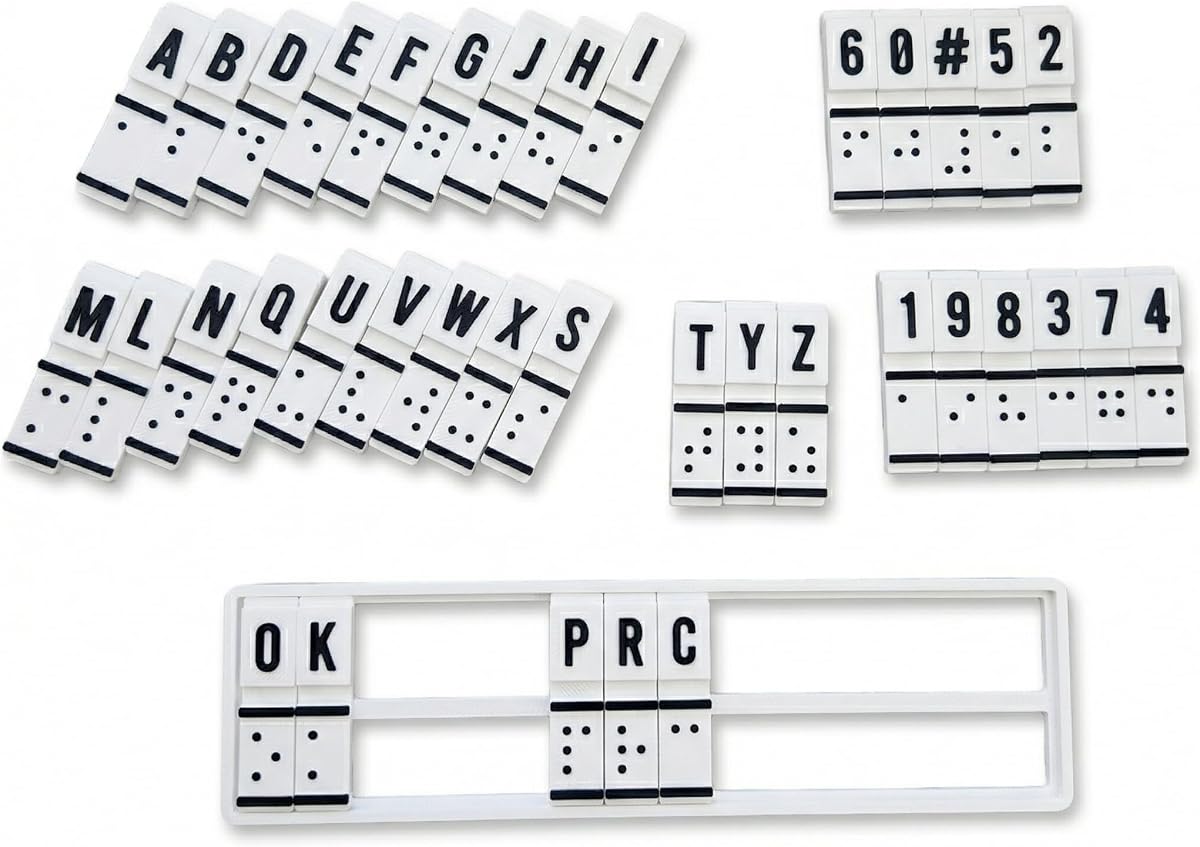
This Training Machine is designed to help beginners learn Braille through interactive tactile exercises. It combines education with translation functions in a compact device. The rating suggests users have mixed experiences, but it remains a niche tool for those focusing on skill building.
We may earn a commission when you buy through this link, at no additional cost to you.
The device features raised Braille cells and mechanisms for manual input, helping build muscle memory without electronics. It supports text-to-Braille conversion, allowing users to bridge sighted and non-sighted communication. This makes it useful for educators and rehabilitation specialists working with new students.
Some users find the device basic compared to modern digital tools, which affects its overall rating. However, its portability and simplicity make it a good starting point for self-study or therapy sessions. If you are new to Braille, it offers a low-tech way to practice patterns.
Ideal for educators or students starting their Braille journey, this machine offers a dedicated learning environment. It helps build confidence and literacy skills through hands-on interaction. If you need a simple educational aid, this machine is a practical resource for your practice routine.
The tactile design allows you to feel and create Braille directly for better retention.
Convert text to Braille easily to practice reading with sighted family or teachers.
We may earn a commission when you buy through this link, at no additional cost to you.
Choosing the right Braille display or slate requires understanding your daily needs and budget. This guide breaks down the most important factors to consider.
The number of cells determines how much text you can read at once. Displays with 40 cells are better for long documents, while 20-cell models are more compact for general navigation.
Choose more cells if you read long texts and fewer if you prioritize portability.
Modern displays often support Bluetooth and USB to connect with phones and computers. Ensure the device supports the protocols your devices use for seamless integration.
Check for Bluetooth 5 or USB-C support to ensure future compatibility.
For portable use, battery life is crucial. Many displays last up to 20 hours on a single charge, which covers a full work or study day.
Prioritize models with at least 20 hours of usage to avoid interruptions.
Decide if you need a refreshable display for reading or a manual slate for writing. Electronic devices offer reading capabilities while slates focus on tactile writing practice.
Electronic displays are better for reading while slates suit manual writing tasks.
Plastic slates are quieter and lighter, while metal slates are more durable. For displays, look for rugged designs if you travel frequently.
Choose based on whether you prioritize quietness or durability.
Some devices come with built-in apps like calculators or editors. These features can add value by reducing the need for extra software on your computer.
Look for devices with useful onboard apps for a complete workflow.
Start by connecting your device to your computer or phone via Bluetooth or USB. Follow the manufacturer's instructions to pair and ensure screen reader compatibility.
Keep your displays clean by using a soft cloth to wipe the surface regularly. For slates, store them in a protective case to avoid bending the pins or damaging the paper.
Charge electronic devices before use to ensure consistent performance. Avoid exposing your device to extreme temperatures or moisture to extend its lifespan.
A Braille display is a device that converts digital text into Braille characters for tactile reading. It uses pins that raise and lower to form letters and symbols, allowing blind users to read content from computers or phones.
Yes, knowing Braille is essential for using a display effectively. These devices do not speak the text aloud but provide tactile feedback that requires literacy in Braille to understand.
High-quality displays can last several years with proper care. Regular cleaning and avoiding physical stress on the pins will help maintain functionality over a long period.
Yes, Braille slates are purely manual tools that require no electricity or computer connection. They are excellent for writing notes or practicing Braille offline.
Electronic Braille displays range from a few hundred to several thousand dollars. Manual slates are significantly cheaper and provide a low-cost alternative for basic writing tasks.
The difference is the number of characters shown at once. A 40 cell display shows more text per line, which is useful for long documents, while 20 cell is more compact for general navigation.
This guide has highlighted the top options from premium electronic displays to simple manual slates. Each product offers unique benefits depending on whether you need reading, writing, or both.
Prioritize connectivity and battery life if you use your device for work or study. For learners, manual slates are a great starting point to build foundational skills.
Remember that prices and availability may change, so always check current listings before purchasing. Finding the right tool can make a significant difference in your daily accessibility.