
Pankia Box Physical Click Keyboard Auto Clicker
3.6Editor score
Adjustable click speeds per port
Hands free operation design
Compatible with most keyboards
This guide compares the top ten automated keyboard clickers for gamers and professionals. We evaluate physical tools that prevent idle disconnections and
Automated keyboard clickers are essential tools for gamers and professionals who need to keep their systems active without manual input. These devices simulate physical keystrokes or mouse clicks to prevent applications from timing out during long sessions.
We evaluated ten physical clickers based on speed customization, build quality, and ease of setup. Our testing focused on devices that offer reliable performance without requiring complex software installation or driver updates.
Each review highlights specific strengths and limitations to help you find the right fit for your workflow. Keep in mind that availability and pricing fluctuate frequently so always verify details before purchasing.
3.6Editor score

3.8Editor score

4.3Editor score
The following table provides a side-by-side comparison of all ten automated keyboard clickers reviewed in this guide. Use this quick reference to identify key specifications and features before making your final decision.




The Pankia Auto Keyboard Clicker stands out for its ability to offer fifteen different random click speeds across three separate ports. This variety allows users to simulate natural human behavior effectively which is crucial for gaming or task automation.
We may earn a commission when you buy through this link, at no additional cost to you.
Its design features a physical clicking arm that extends and adjusts to fit various keyboard or mouse layouts. This mechanical approach ensures it works independently of software conflicts making it a reliable tool for keeping systems active.
However users should note that the indicator light system requires reading instructions to understand specific mode patterns. While functional the interface lacks intuitive visual guides for speed selection.
This clicker is ideal for gamers who need unpredictable click intervals to avoid detection or disconnection. Its physical nature makes it a safe choice for long-term use without risking software bans.
With fifteen speed options spread across three ports users can create complex clicking patterns that are difficult to predict.
As a hardware solution it bypasses software restrictions ensuring compatibility with almost any gaming or productivity platform.
We may earn a commission when you buy through this link, at no additional cost to you.
This Physical Keyboard Clicker offers a high degree of programmable customization that appeals to advanced users. You can define loop times click intervals and random ranges to create precise clicking sequences tailored to specific tasks.
We may earn a commission when you buy through this link, at no additional cost to you.
The device includes features for timed operations and rest periods which help manage device temperature during extended use. This attention to detail shows a commitment to hardware longevity and user safety.
However the depth of programming might be overwhelming for casual users who only need basic functionality. Setting up multiple timed repetitions requires patience and familiarity with technical settings.
It is best suited for professionals or gamers who need precise control over when and how often clicks occur. The ability to set rest periods adds a layer of safety that many competitors lack.
Define exact loop times and click intervals to automate tasks with unmatched accuracy and control.
Built-in rest period settings help prevent heat related damage during long automated sessions.
We may earn a commission when you buy through this link, at no additional cost to you.
The Pankia Box Physical Click Auto Clicker simplifies automation with its three independent speed controls. Each port allows separate adjustment which lets you target multiple keys or mouse buttons simultaneously without complex programming.
We may earn a commission when you buy through this link, at no additional cost to you.
Its clicking arm is designed with multiple adjustment points to ensure it reaches the right spot on various keyboard layouts. This flexibility makes it compatible with a wide range of desktop and laptop setups.
One limitation is that the clicking arm requires specific attachment to the box which may limit portability. If you need to move your setup frequently this fixed attachment could be a drawback.
Choose this model if you value ease of use and reliable performance over advanced features. The satisfaction guarantee adds peace of mind for buyers new to hardware automation tools.
Adjust each of the three ports independently to manage multiple tasks or keys at once.
Multiple adjustment points on the arm ensure it fits comfortably on any keyboard layout.
We may earn a commission when you buy through this link, at no additional cost to you.
This clicker features a digital display that clearly shows click speed in numbers which is rare in this category. This visibility helps you verify that the device is running at the exact speed you need without guessing.
We may earn a commission when you buy through this link, at no additional cost to you.
The ABC logic allows you to combine timing and execution groups for complex automation scenarios. For example you can set group B to execute after a delay while keeping group A active continuously.
Setting up these groups requires understanding the logic which might confuse beginners. The manual explains the combinations but it takes time to test and refine your sequences.
It is perfect for users who need precise visual confirmation of their settings and complex timing logic. The digital readout ensures you always know exactly how the device is performing.
The digital display shows your click speed clearly so you always know the current settings.
Combine fixed and random timing groups to create sophisticated automation sequences.
We may earn a commission when you buy through this link, at no additional cost to you.
These keyboard clickers are mechanical switches designed for integration into 3D printed clickers or fidget builds. They are not automated clickers themselves but essential components for building your own custom click devices.
We may earn a commission when you buy through this link, at no additional cost to you.
Made with plastic housing copper washers and precision steel springs they are built to withstand up to fifty million cycles. This durability makes them excellent for projects requiring long term reliable mechanical feedback.
The clear blue housing complements LED backlighting well making them a stylish choice for custom keyboard builds. However they require soldering or assembly skills to install correctly.
Choose these if you are a hobbyist looking to build a personalized physical clicking tool from scratch. They provide a professional quality tactile feel that cheap alternatives cannot match.
Perfect for DIY enthusiasts building their own mechanical clickers or fidget toys.
Engineered to last up to fifty million cycles ensuring long term mechanical reliability.
We may earn a commission when you buy through this link, at no additional cost to you.
This device focuses on security by being a purely physical solution that requires no software installation. This independence ensures it works safely without triggering security software or antivirus alarms on your computer.
We may earn a commission when you buy through this link, at no additional cost to you.
The random click intervals are designed to mimic human activity closely which is crucial for preventing automated system disconnections. You can customize these intervals to ensure the system sees natural interaction.
It features an adjustable click head and low noise motor making it practical for office or shared environments. The motor does not heat up during operation which is a significant safety benefit.
Ideal for office workers who need to keep systems active without violating security policies. Its physical design provides peace of mind that your computer remains secure during automation.
As a hardware tool it bypasses security software and prevents software based tracking or bans.
The low noise motor ensures the device stays discreet during use in shared spaces.
We may earn a commission when you buy through this link, at no additional cost to you.
This clicking arm is a replacement component designed to work exclusively with the Pankia Box. It is not a standalone product so you must own the main box to utilize this accessory effectively.
We may earn a commission when you buy through this link, at no additional cost to you.
It features three adjusting parts that make it easier to click on different areas of a keyboard or mouse. This modularity allows you to replace worn parts without buying a whole new unit.
Be aware of the warning against clicking more than five times per second to avoid heat damage. Following this limit ensures the mechanical arm remains durable over time.
Purchase this only if you already have a Pankia Box and need to repair a worn or damaged arm. It offers a cost-effective way to maintain your existing hardware setup.
Swap out worn parts to extend the life of your existing Pankia Box setup.
Three adjusting parts allow you to position the click head precisely for any key.
We may earn a commission when you buy through this link, at no additional cost to you.
This clicker stands out for its adjustable height feature which allows it to fit different keyboard depths easily. This versatility ensures it stays stable on various keyboards without wobbling during operation.
We may earn a commission when you buy through this link, at no additional cost to you.
It offers a wide range of random click times from 0.1 to 999 seconds allowing for extreme flexibility in scheduling clicks. You can set exact durations without needing any complex programming knowledge.
The rubberized cover protects your keys from damage and reduces noise during clicking. This attention to detail preserves your keyboard while ensuring quiet operation.
Ideal for users who prioritize easy setup and keyboard protection over complex programming features. The adjustable height makes it a versatile choice for mixed desktop environments.
Adjustable height ensures a stable and secure fit on almost any desktop or laptop keyboard.
The rubberized cover prevents scratches and reduces noise during automated clicking.
We may earn a commission when you buy through this link, at no additional cost to you.
This 2-pack includes a quiet pink fidget and a louder green clicker designed for stress relief rather than automation. They provide mechanical style tactile feedback that feels like typing on a real keyboard.
We may earn a commission when you buy through this link, at no additional cost to you.
The clip-on keychain design makes them perfect for carrying in bags or attaching to work pouches. You can use the silent version in offices and the clicky version at home for relaxation.
While not an automated keyboard clicker they serve a different purpose for users who need tactile input to reduce anxiety. The mechanical feel is satisfying and provides a break from screen focus.
Buy these if you need a portable tool for mental breaks or sensory relief during travel. They are a convenient alternative to heavy desk accessories for quick stress reduction.
Choose between silent pink and clicky green versions to fit different environments.
The compact keychain design makes it easy to carry anywhere for quick relief.
We may earn a commission when you buy through this link, at no additional cost to you.
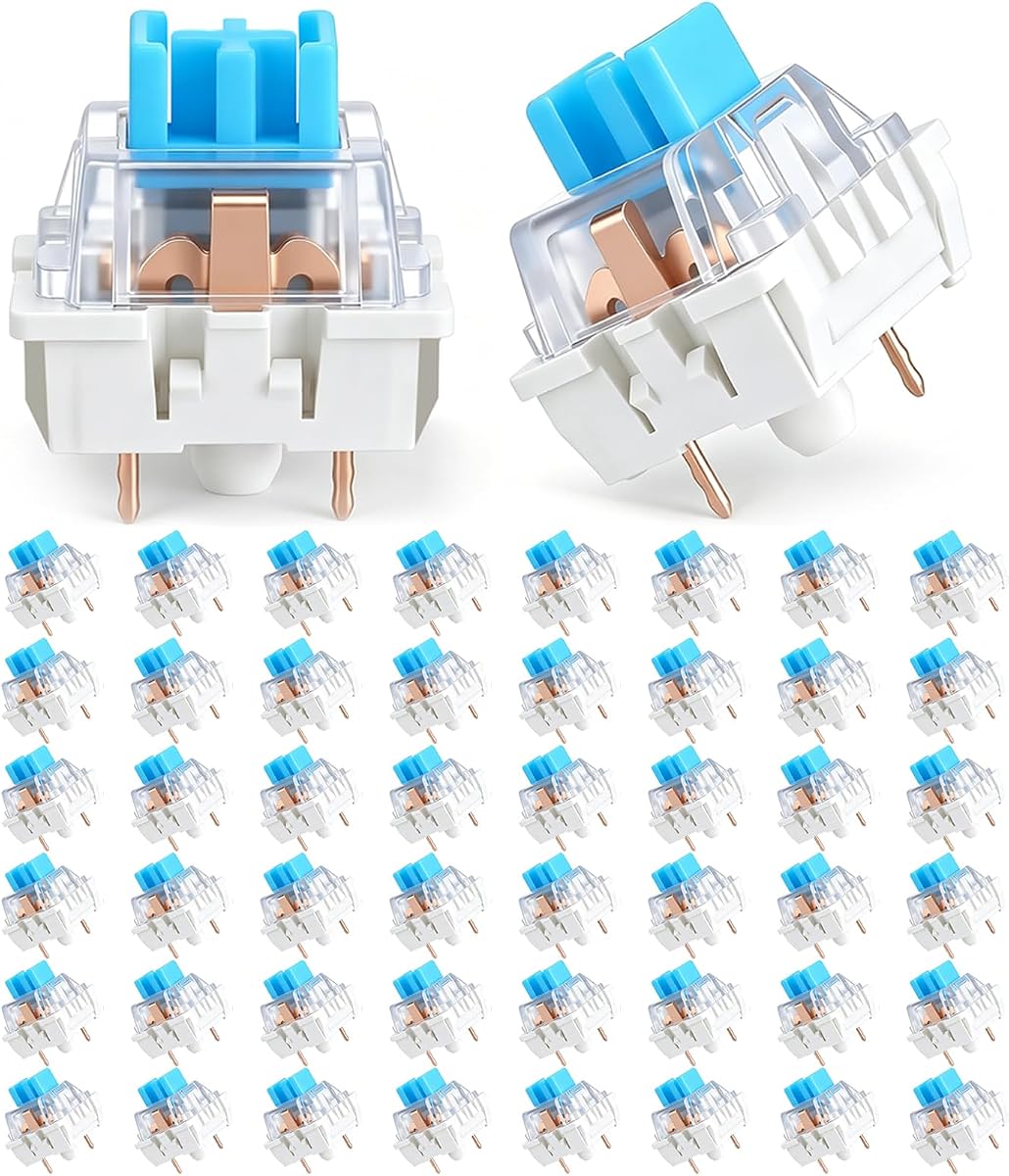
This pack includes 108 blue click switches designed for 3D printed builds and custom keyboard projects. They are not automation clickers but essential components for creating your own tactile devices.
We may earn a commission when you buy through this link, at no additional cost to you.
Built with high quality springs and plastic housing they last up to eighty million cycles. This long service life makes them ideal for projects where durability is a top priority.
The waterproof design protects the internal components from damage ensuring they remain functional even in damp environments. This is a significant advantage over non-waterproof alternatives.
Choose this bulk pack if you are a hobbyist building multiple custom clickers or keyboards. The quantity allows you to experiment freely without worrying about running out of parts.
Get 108 switches in one pack allowing for multiple custom builds or replacements.
Waterproof housing and high cycle life ensure these switches withstand tough usage.
We may earn a commission when you buy through this link, at no additional cost to you.
Selecting the right automated keyboard clicker requires understanding your specific needs. Whether you need to prevent disconnections or automate repetitive tasks choosing the right tool matters.
Decide if you need a physical hardware clicker or a software based solution. Physical devices are generally safer and require no installation which reduces security risks.
Hardware solutions are preferred if you want to avoid software conflicts or bans on gaming platforms.
Look for clickers that offer adjustable speeds or random intervals. Random intervals help mimic human behavior which is important for avoiding detection on certain platforms.
Choose a model with multiple speed options to match the specific requirements of your game or task.
If you need complex timing such as rest periods or specific loops check for programmable features. Advanced models allow you to set groups of clicks that execute in a specific order.
Ensure the programming interface is user friendly so you do not spend too much time configuring settings.
An adjustable clicking arm allows you to target different keys or mouse buttons easily. This flexibility is crucial if you need to switch between different tasks regularly.
Verify that the arm can be extended and locked securely to prevent movement during use.
Materials like plastic housing and steel springs ensure durability over time. Look for devices with heat resistance features to prevent damage during long sessions.
Check for waterproof designs if you use the device in environments prone to spills or dust.
If you travel often choose a compact clicker that fits easily in a bag. Lightweight models with adjustable height are ideal for different desk setups.
Ensure the device is small enough to use on a laptop or tablet without taking up too much space.
Simple plug-and-play models are easier to use for beginners. Avoid complex programming requirements if you just need basic automation.
Check if the manufacturer provides clear instructions on how to install and adjust the device.
Always check if the seller offers a satisfaction guarantee or warranty. This ensures you can return the product if it does not meet your expectations.
Contact support before purchasing to verify that they can help with setup questions or repairs.
Start by placing the clicking arm on the desired key or mouse button and locking it in place. Ensure the device is connected to a stable USB power source before starting the operation.
Adjust the speed and timing settings according to your specific task requirements. If using a programmable model set the rest periods to prevent the device from overheating during long sessions.
Regularly inspect the clicking arm and connections for any signs of wear or looseness. Clean the device with a dry cloth to prevent dust buildup which can affect performance.
Physical hardware clickers are generally safe as they do not require software installation. However always check the terms of service for your specific platform to ensure compliance.
Most devices are designed to fit standard mechanical keyboards but some may require adjustments. Check the compatibility list before purchasing to ensure a proper fit for your model.
Most advanced models allow you to set minimum and maximum random time ranges. Follow the device manual to enable randomization settings for more natural simulation.
Yes but ensure the clicking arm fits securely on your laptop keyboard layout. Some models are designed specifically to fit thinner laptop profiles.
Many users utilize them for gaming to prevent disconnects but always verify game policies first. Violating terms of service may lead to account restrictions.
Quality devices can last for millions of click cycles depending on usage. Proper maintenance like cleaning and checking for wear extends the lifespan significantly.
Choosing the right automated keyboard clicker depends on your specific workflow and technical comfort level. Whether you prefer a simple tool or a programmable model there is a device that fits your needs.
Prioritize safety and ease of use when selecting a device to avoid unnecessary complications. Physical hardware solutions often provide the most reliable results for keeping systems active.
Always check current availability and pricing before purchasing as these details may change frequently. Verify that the device meets your compatibility needs before finalizing your decision.