
Thermalright Assassin X120 Refined SE
4.7Editor score
4 Heat Pipes with AGHP
TL-C12C PWM Fan
Wide Socket Compatibility
This guide compares the top CPU Air Cooler Fan Heatsink models for performance, noise, and compatibility to help you find the perfect cooling solution for your
Selecting the right cooling solution is critical for maintaining system stability and extending hardware lifespan. A high-quality CPU Air Cooler Fan Heatsink ensures your processor stays within safe temperature limits even under heavy loads. This involves evaluating thermal conductivity, fan noise levels, and physical dimensions to fit your case.
We analyzed ten leading models based on thermal performance, build quality, and user feedback. Our comparison focuses on heat pipe counts, fan speeds, and mounting compatibility across modern Intel and AMD platforms. Each entry provides detailed specifications to help you make an informed decision without guesswork.
Every pick highlights specific strengths such as budget efficiency, premium silence, or advanced RGB integration. Prices fluctuate frequently so verify current listings before purchasing. Use this resource to identify the ideal balance of cooling power and acoustic comfort for your specific computing needs.
4.7Editor score

4.8Editor score

4.8Editor score
The following table presents a side-by-side comparison of all ten selected models to facilitate easy evaluation of their core specifications and capabilities.


This cooler stands out as the best budget option with a 4.7 rating. It combines thermal efficiency and quiet operation for mainstream builds. The 4 heat pipes deliver solid performance without breaking the bank.
We may earn a commission when you buy through this link, at no additional cost to you.
Its TL-C12C PWM fan provides up to 66 CFM airflow while staying under 25 dB noise. AGHP technology ensures reliable cooling regardless of orientation. The metal fasteners support both Intel and AMD platforms seamlessly.
The main trade-off is the lack of RGB lighting and premium aesthetics. The aluminum cover is functional but plain compared to modern designs. However, thermal performance remains high for the price.
Ideal for budget builders prioritizing cooling over looks. Its compatibility with LGA1851 and AM5 makes it future-proof. Choose this for silent, efficient cooling at a fraction of premium costs.
AGHP solves gravity issues in horizontal or vertical orientations for consistent cooling.
The 1550 RPM fan balances airflow and noise for a peaceful system.
We may earn a commission when you buy through this link, at no additional cost to you.
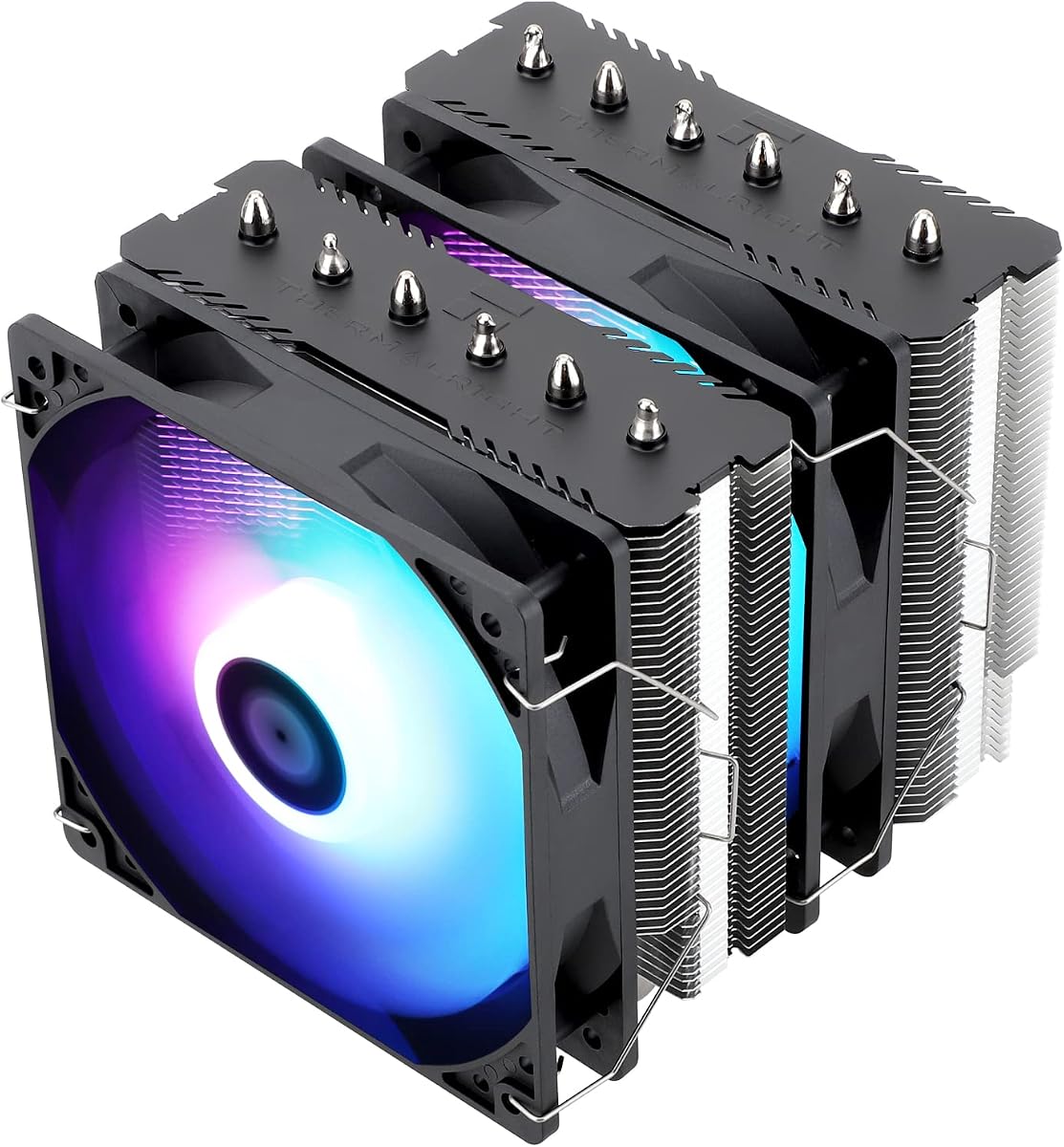
This model merges high-end cooling with vibrant RGB aesthetics. It features a dual tower design with six heat pipes for maximum thermal dissipation. The ARGB fans synchronize with motherboard lighting for a cohesive look.
We may earn a commission when you buy through this link, at no additional cost to you.
Its TL-C12C-S fans deliver 66 CFM airflow with PWM control. The dual tower configuration supports TDPs up to 245W. The aluminum cover and heat pipes are optimized for longevity and performance.
Installation requires careful case selection due to 155mm height. The ARGB adds visual flair but demands a 5V 3pin header. Ensure RAM clearance is sufficient before mounting the dual fans.
Perfect for enthusiasts wanting top-tier cooling with style. Its compatibility with LGA1851 and AM5 ensures future readiness. Choose this for balanced performance and lighting customization.
Six heat pipes and dual fans handle extreme heat loads effectively.
Fans link to motherboard 5V 3pin headers for synchronized lighting effects.
We may earn a commission when you buy through this link, at no additional cost to you.
A legendary dual tower cooler with a 4.8 rating for excellence. Its all-black design and NF-A15 fans provide elite cooling without noise. The 6 heat pipes and dual 140mm fans rival liquid coolers.
We may earn a commission when you buy through this link, at no additional cost to you.
Performance is top-tier with up to 245W TDP support. The SecuFirm2 mounting system ensures secure fits across Intel and AMD sockets. It includes premium NT-H1 thermal paste for immediate installation.
Cost is significant compared to budget options but longevity justifies it. The 158mm height may limit case compatibility. However, the cooling and acoustic results are unmatched in air cooling.
Ideal for users demanding peak silent performance. Its six-year warranty reflects exceptional reliability. Choose this for the best balance of quiet and cooling power.
140mm NF-A15 fans provide high airflow with minimal noise at low speeds.
The chromax.Black finish matches modern black-themed builds perfectly.
We may earn a commission when you buy through this link, at no additional cost to you.
This tower cooler offers exceptional performance in a 120mm footprint. Two NF-A12x25 fans deliver high airflow while maintaining whisper-quiet operation. The all-black design fits many color schemes effortlessly.
We may earn a commission when you buy through this link, at no additional cost to you.
Its 158mm height ensures compatibility without RAM overhang. The dual fan configuration provides ample cooling for high-end CPUs. SecuFirm2 mounting supports LGA1851 and AM5 sockets securely.
It is expensive but justifies the price with durability. The 120mm fans may not cool extreme overclocks as well as 140mm models. However, it excels in standard high-performance scenarios.
Recommended for those needing top-tier cooling in smaller cases. Its warranty and build quality ensure long-term satisfaction. Choose this for reliable, efficient thermal management.
The NF-A12x25 fans offer advanced aerodynamics for quiet cooling.
Single tower shape avoids blocking PCIe slots on most motherboards.
We may earn a commission when you buy through this link, at no additional cost to you.
This cooler features a unique digital top cover for real-time monitoring. A 120mm TL-P12-S fan provides 70 CFM airflow for aggressive cooling. The ARGB fans sync with your motherboard for visual flair.
We may earn a commission when you buy through this link, at no additional cost to you.
The screen displays CPU temperature and usage directly on the heatsink. This offers instant visibility without software overhead. The single tower design fits most cases with 151mm height.
Digital monitoring adds cost compared to standard models. The fan noise reaches 29.8dB under full load. Ensure TRCC software is supported for display functionality.
Best for users wanting system stats at a glance. Its compatibility with LGA1851 and AM5 ensures future proofing. Choose this for tech-focused aesthetics.
Top cover LCD displays real-time CPU metrics for instant system insight.
2000 RPM fan speed ensures rapid heat dissipation during loads.
We may earn a commission when you buy through this link, at no additional cost to you.
A classic dual tower cooler with 4.8 rating for reliability. Its six heat pipes and two 140mm fans deliver top cooling performance. The classic design is trusted by enthusiasts worldwide.
We may earn a commission when you buy through this link, at no additional cost to you.
NF-A15 fans with Low-Noise Adaptors ensure ultra-quiet function. The SecuFirm2 system supports all modern sockets including LGA1851. It comes with NT-H1 paste for seamless installation.
Price is high relative to market but durability justifies it. The dual fans may require wider RAM clearance. Yet performance rivals high-end liquid cooling solutions.
Ideal for silent enthusiasts prioritizing performance. Its six-year warranty ensures peace of mind. Choose this for long-term reliability.
Dual fans and six heat pipes provide maximum heat dissipation capacity.
140mm NF-A15 fans balance airflow and silence effectively.
We may earn a commission when you buy through this link, at no additional cost to you.
This asymmetrical dual tower model ensures full compatibility with RAM. The single NF-A15 fan maintains excellent cooling while avoiding PCIe blockage. Its chromax.Black finish matches modern builds seamlessly.
We may earn a commission when you buy through this link, at no additional cost to you.
SecuFirm2 mounting works across all standard Intel and AMD sockets. The 160mm height accommodates most tower cases without clearance issues. It includes NT-H1 thermal paste for ease.
Single fan reduces peak airflow but preserves case clearance. Noise levels remain low with PWM control. It suits users with high-RAM configurations.
Best for systems needing full fan clearance. Its build quality guarantees long service life. Choose this for balanced aesthetics and utility.
Offset fans avoid blocking memory modules and PCIe slots on most boards.
140mm fan delivers powerful cooling with minimal acoustic disturbance.
We may earn a commission when you buy through this link, at no additional cost to you.
A compact dual tower cooler ideal for small form factor builds. Its 110mm height fits HTPCs without hindering RAM or PCIe slots. The NF-A9 92mm fan provides quiet operation.
We may earn a commission when you buy through this link, at no additional cost to you.
SecuFirm2 mounting ensures secure installation across modern sockets. Dual tower layout enhances thermal dissipation despite compact size. It includes NT-H1 paste for immediate use.
Fan size limits max cooling for high TDP CPUs. The compact height is a trade-off for performance. Still, it is one of the best small coolers.
Recommended for tiny cases needing strong cooling. Its six-year warranty ensures reliability. Choose this for SFF efficiency.
Compact dual tower provides powerful cooling in a minimal footprint.
110mm height avoids obstructing internal components in small cases.
We may earn a commission when you buy through this link, at no additional cost to you.
A classic single tower cooler known for reliability and quietness. The NF-F12 fan delivers focused airflow for effective heat dissipation. Its slim design avoids RAM and PCIe obstruction.
We may earn a commission when you buy through this link, at no additional cost to you.
SecuFirm2 mounting supports all standard Intel and AMD sockets. The 120mm fan operates silently with PWM control. It includes NT-H1 paste for easy setup.
Single fan limits max thermal output compared to dual towers. However, it suffices for mid-range to high-end builds. Noise levels remain exceptionally low.
Ideal for users seeking simple, effective cooling. Its build quality guarantees long service life. Choose this for straightforward performance.
NF-F12 fan optimizes airflow for maximum cooling in a compact design.
SecuFirm2 system works seamlessly across major socket types.
We may earn a commission when you buy through this link, at no additional cost to you.
A value dual tower model with 4.8 rating for performance. Six soldered heat pipes and dual TL-C12C fans ensure effective cooling. The nickel-plated pipes resist corrosion over time.
We may earn a commission when you buy through this link, at no additional cost to you.
Dual fans deliver 66 CFM airflow each for balanced distribution. SecuFirm2 mounting supports Intel and AMD sockets securely. Its 155mm height requires larger cases.
Design is functional rather than aesthetic with no RGB. Ensure case and motherboard clearance before purchase. Performance rivals premium units at a lower price.
Best for budget-conscious builders seeking top cooling. Compatibility with LGA1851 and AM5 ensures future use. Choose this for high performance per dollar.
Soldered heat pipes improve thermal transfer speed and consistency.
Two fans provide steady airflow across the heatsink fins.
We may earn a commission when you buy through this link, at no additional cost to you.
Selecting the right CPU cooler requires evaluating several key factors beyond basic compatibility.
Look at TDP ratings and heat pipe counts. Models with more pipes like 6 offer better cooling. Dual towers typically outperform single towers in high-load scenarios.
Dual fan setups provide better airflow and redundancy. Single fans are quieter but may struggle with extreme heat. Check fan RPM and CFM for airflow capacity.
Ensure support for your CPU socket like LGA1851 or AM5. Check case height limits to avoid clearance issues. Also verify RAM slot clearance for dual tower designs.
Noise levels are measured in dB. Aim for models under 25 dB for quiet operation. PWM control helps maintain low noise during idle.
Look for copper heat pipes and nickel plating for durability. Aluminum fins reduce weight but may conduct heat slower. Solid metal construction ensures longevity.
SecuFirm2 systems provide secure fits across sockets. Check if backplates are included or reused. Proper mounting ensures optimal thermal contact.
ARGB fans add visual appeal but require headers. Matte black finishes suit modern builds. Decide if lighting is worth extra cost.
Premium brands like Noctua offer six-year warranties. Longer coverage signals confidence in build quality. Check customer support policies before purchasing.
Dust accumulation reduces cooling efficiency so clean fins monthly with compressed air. Keep the fan area free from debris to maintain airflow. Check that screws remain tight after a few weeks of use.
Air cooling uses fans and heatsinks to dissipate heat while liquid cooling uses pumps and radiators. Air coolers are often more reliable and simpler to install.
Check the cooler's height specification against your case's max CPU cooler clearance. Also ensure the width does not obstruct RAM slots or PCIe components.
Fan speeds increase automatically via PWM when temperatures rise. This results in louder noise. Use software to set custom fan curves for balance.
Thermal paste dries out over time and loses efficiency. It is best to replace it with new paste each time you remove or reinstall a cooler.
RGB fans add visual flair but do not improve cooling performance. They are worth it if aesthetics are a priority but add to cable clutter and cost.
Clean it at least once every three to six months. Dust reduces cooling efficiency by blocking airflow through fins and fan blades.
Remember to check current prices and promotions before finalizing your purchase. Prices fluctuate and may offer better value at different times.