
CENMATE Aluminum 4 Bay
4.3Editor score
Affordable aluminum build
Supports 2.5 and 3.5 drives
Active cooling fan included
This guide compares the top Direct Attached Storage enclosures for high-speed external storage. We analyze speed, capacity, RAID support, and build quality.
Direct Attached Storage offers a reliable way to expand your computer capacity without the complexity of networked solutions. These enclosures connect directly via USB or Thunderbolt, delivering fast transfer speeds and massive capacity for professionals and enthusiasts alike.
We evaluated ten top-rated DAS enclosures based on transfer speeds, drive compatibility, cooling performance, and overall build quality. Each model was reviewed to highlight its unique strengths, ensuring you find the right storage solution for your specific workflow and budget needs.
Each pick below showcases key features, pros, cons, and detailed specs to help you make an informed decision. Note that product availability and pricing can fluctuate frequently, so always check current listings before finalizing your purchase for the best deal.
4.3Editor score

4.2Editor score

4.1Editor score
Below is a side-by-side comparison of the top Direct Attached Storage enclosures available this year. We highlight key specifications to help you quickly identify which model best fits your storage capacity and speed requirements.


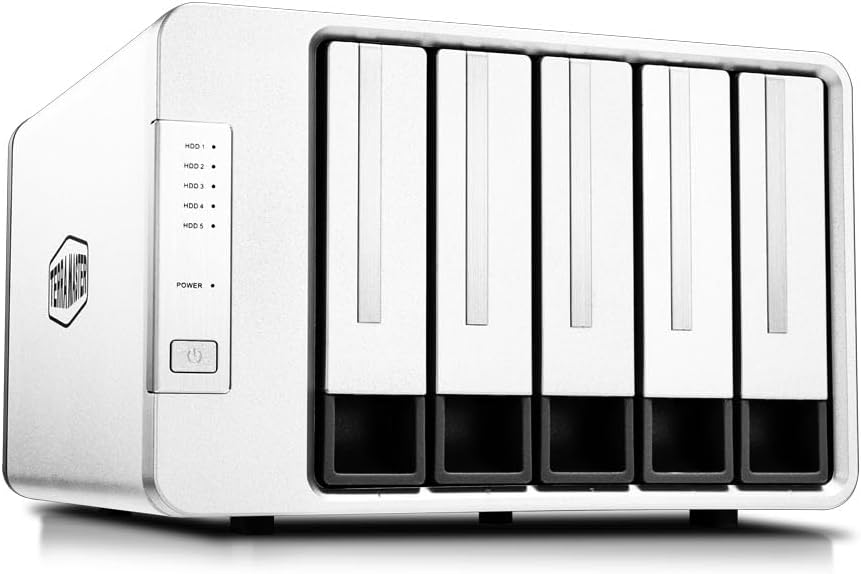


The TERRAMASTER D4-320 is a robust Direct Attached Storage solution designed for users needing fast access to large datasets. It delivers solid performance with its USB 3.2 Gen2 interface, making it ideal for content creators and professionals managing heavy workloads.
We may earn a commission when you buy through this link, at no additional cost to you.
Its standout feature is the combination of high-speed transfer capabilities and excellent thermal management. The enclosure supports up to four hard drives, allowing for a massive total capacity of 120TB. The tool-free trays and hot-swap support add significant convenience for users who frequently swap drives.
While it lacks hardware RAID features, which might be a downside for those needing redundant storage without software overhead, its simplicity is also a strength. The plug-and-play nature ensures it works seamlessly across Windows, macOS, and Linux without requiring complex driver installations or setup processes.
This enclosure is the top recommendation for users seeking a balance of speed, capacity, and ease of use. Whether you are backing up media files or need fast external storage for video editing, the D4-320 provides a reliable foundation for your workflow.
The D4-320 achieves read/write speeds up to 1,016 MB/s when equipped with four high-capacity drives, ensuring quick file transfers.
An intelligent temperature-controlled fan and sound-absorbing panels keep the device quiet and cool, even under heavy load.
We may earn a commission when you buy through this link, at no additional cost to you.
The QNAP TR-004 is a powerful DAS enclosure that stands out due to its hardware RAID support. This feature is crucial for users who require data redundancy and performance without relying on software RAID solutions, which can tax the host computer.
We may earn a commission when you buy through this link, at no additional cost to you.
Designed with versatility in mind, the TR-004 can serve as external storage or expand the capacity of a QNAP NAS. However, users should note that specific NAS models are not compatible, and storage pools cannot be combined into the connected NAS, limiting some integration possibilities.
The inclusion of lockable drive bays adds a layer of physical security, ensuring your drives are protected from unauthorized removal. This makes the TR-004 particularly suitable for shared environments or office settings where physical access might be a concern.
For QNAP ecosystem users or those needing hardware RAID in a simple enclosure, the TR-004 is an excellent choice. Just ensure your existing infrastructure meets the compatibility requirements before making the purchase to avoid integration issues.
Supports RAID 0, 1, 5, and JBOD modes for enhanced performance and data redundancy without software overhead.
Lockable drive bays prevent accidental or unauthorized removal of hard drives, adding an extra layer of security.
We may earn a commission when you buy through this link, at no additional cost to you.
The TERRAMASTER D8 Hybrid offers a unique storage architecture by supporting both traditional HDDs and high-speed NVMe SSDs simultaneously. This hybrid approach allows users to optimize their storage hierarchy, keeping frequently accessed 'hot' data on SSDs while archiving 'cold' data on HDDs.
We may earn a commission when you buy through this link, at no additional cost to you.
With a staggering total capacity of up to 152TB, this enclosure is a powerhouse for professional media workflows. The NVMe slots offer significantly faster speeds compared to SATA drives, ensuring that active projects run smoothly without bottlenecks during editing or rendering tasks.
The power on recovery feature ensures that the enclosure automatically reboots after an unexpected power loss, maintaining system stability. While the higher price and complexity might not suit everyone, the flexibility it offers for performance optimization is unmatched in the DAS category.
Ideal for video editors and 3D artists, the D8 Hybrid provides the speed needed for real-time work and the bulk storage needed for archives. It represents the future of external storage, blending speed and capacity in a single unit.
Simultaneously supports four HDDs and four NVMe SSDs for optimized storage hierarchy and workflow efficiency.
Power on recovery ensures the device automatically reboots after abnormal power loss, reducing downtime risks.
We may earn a commission when you buy through this link, at no additional cost to you.
The CENMATE Aluminum 4 Bay delivers excellent value for users seeking a reliable storage expansion solution without breaking the bank. Its aluminum alloy construction not only looks premium but also aids in passive heat dissipation, keeping drives cooler during extended use.
We may earn a commission when you buy through this link, at no additional cost to you.
Equipped with a built-in cooling fan, this enclosure ensures that even when fully loaded with drives, temperatures remain within safe limits. The plug-and-play functionality and tool-free design make it incredibly easy to set up and expand storage as needed.
While the USB 3.0 interface limits speeds to 5Gbps, which is half of the newer USB 3.2 Gen2, it remains fast enough for most general backups and file transfers. The 40-50 decibel fan noise is noticeable but acceptable for a desktop environment.
For budget-conscious buyers who still want quality build and solid performance, the CENMATE is a top pick. It is perfect for personal storage expansion or small business backups where cost-efficiency is a priority.
Premium aluminum alloy construction offers durability and improved heat dissipation for long-lasting performance.
Built-in fan activates to maintain optimal drive temperatures, preventing overheating during heavy transfers.
We may earn a commission when you buy through this link, at no additional cost to you.
The SABRENT 5-Bay USB-C is a premium solution for users requiring maximum reliability and speed. By utilizing a dedicated ASMedia controller for each bay, it ensures that each drive operates independently, reducing the risk of bottlenecks during simultaneous transfers.
We may earn a commission when you buy through this link, at no additional cost to you.
Unlike many competitors that require external power bricks, this enclosure features an internal auto-switching power supply. This design simplifies desk setup and enhances portability, making it a sleek choice for professional workstations where cable management matters.
The aluminum housing is reinforced for durability, and the tray-less hot-swap design allows for quick drive changes without powering down the system. While it lacks hardware RAID, its individual drive mounting offers flexibility for users who manage their storage via software.
If you need a high-end DAS dock for a multi-drive workstation, the SABRENT model is the best choice. Its combination of internal power, dedicated controllers, and robust build quality justifies the premium price tag for serious users.
A dedicated ASMedia ASM1351 controller for each of the five bays provides stable independent drive connections.
Internal power supply eliminates external bricks, and the aluminum housing ensures efficient heat dissipation.
We may earn a commission when you buy through this link, at no additional cost to you.
The TERRAMASTER D8 Hybrid 2 builds on its predecessor with refined features that enhance productivity. Its unique One-Touch Power Mode Switch allows users to toggle between power-saving and active modes, optimizing energy use without sacrificing performance when needed.
We may earn a commission when you buy through this link, at no additional cost to you.
With read speeds reaching up to 1020 MB/s using M.2 SSDs, this enclosure is exceptionally fast for video editing and large file transfers. The inclusion of Thunderbolt 4 compatibility ensures it works seamlessly with high-end Apple Macs and modern PCs.
While it retains the hybrid storage advantage of combining HDDs and NVMe SSDs, the improved software support with TPC Backupper simplifies data protection. The plug-and-play nature remains intact, ensuring that compatibility across macOS and Windows is seamless for diverse teams.
For professionals who demand top-tier speeds and flexible power management, the D8 Hybrid 2 is an exceptional choice. It balances high performance with energy efficiency, making it a versatile tool for any demanding creative or technical workflow.
TPM technology optimizes power efficiency with a simple switch between Power Save and Active modes for workflows.
Supports Thunderbolt 3 and 4 connections, ensuring seamless integration with modern Mac and PC setups.
We may earn a commission when you buy through this link, at no additional cost to you.
The TERRAMASTER D5-310 stands out in the DAS market for its physical RAID control knob, making it easy to switch between different RAID modes without software. This simplicity is a major advantage for users who need quick configuration changes or redundancy without technical overhead.
We may earn a commission when you buy through this link, at no additional cost to you.
Supporting RAID levels like 0, 1, 5, and 10, it provides robust data protection options. The hot spare feature is particularly valuable, as it automatically replaces a failed drive in supported RAID configurations, minimizing downtime and the risk of data loss during critical operations.
While the USB 3.1 Gen 1 interface limits transfer speeds compared to newer USB 3.2 standards, the reliability offered by hardware RAID often outweighs raw speed for backup-focused workflows. The tool-free drive bays make expanding storage straightforward and accessible.
Ideal for users prioritizing data safety and ease of RAID management, the D5-310 is a solid choice. It simplifies complex storage tasks through hardware design, making it accessible even for those less familiar with storage configurations.
A dedicated RAID knob on the back allows users to easily switch between RAID 0, 1, 5, and 10 modes.
The hot spare feature automatically replaces failed drives in RAID 1, 5, or 10 to prevent data loss.
We may earn a commission when you buy through this link, at no additional cost to you.
The WAVLINK 4-Bay Hard Drive enclosure offers a unique twist on DAS by including a 4K HDMI output. This feature transforms the device into a docking station, allowing users to connect directly to displays and manage media playback without a host computer.
We may earn a commission when you buy through this link, at no additional cost to you.
Designed for versatility, it supports USB 3.2 speeds up to 10Gbps, ensuring fast data transfers. The aluminum shell not only looks professional but also provides excellent heat dissipation, keeping the system cool during heavy usage or extended media streaming sessions.
While the HDMI functionality requires host support for video output, it opens up creative possibilities for digital signage or media centers. The hot-swappable bays with independent power switches add convenience for managing different storage pools without shutting down the system.
This enclosure is perfect for users who need both fast storage and display connectivity. It bridges the gap between external storage and media hub, making it a versatile tool for presentations or creative content consumption.
The HDMI interface supports up to 4K@60Hz resolution, enabling direct display connectivity and media playback.
Dual temperature-controlled fans activate automatically at 48°C to keep drives cool and performing optimally.
We may earn a commission when you buy through this link, at no additional cost to you.
The ORICO 5 Bay Hard Drive Enclosure is designed for users who value quick and easy setup. Its magnetic chip cover eliminates the need for screws or tools, making it one of the most user-friendly options for installing multiple hard drives rapidly.
We may earn a commission when you buy through this link, at no additional cost to you.
With support for up to 110TB total capacity, it offers plenty of room for expanding storage. The USB 3.1 Gen 1 Type-C interface ensures decent transfer speeds, while the 60mm fan and honeycomb panel design maintain effective cooling during operation.
While it has limitations with Linux systems regarding multi-drive reads, it performs exceptionally well on Windows and macOS. The multiple protection features, including over-voltage and over-current safeguards, add a layer of security to your valuable data.
For home users or small offices needing a simple and efficient storage expansion solution, this ORICO model is highly recommended. It prioritizes ease of use and reliability, making it a practical choice for non-technical users.
Magnetic chips on the cover allow for screw-free installation, making drive swaps quick and effortless.
Drives are recognized in just 3 seconds after plug-and-play connection, saving valuable setup time.
We may earn a commission when you buy through this link, at no additional cost to you.
The QNAP TR-002 is a compact Direct Attached Storage solution ideal for users who need just a little extra storage without bulk. Despite its smaller size, it retains powerful features like hardware RAID and USB Type-C connectivity, ensuring performance isn't sacrificed for portability.
We may earn a commission when you buy through this link, at no additional cost to you.
It is designed to integrate smoothly with QNAP NAS systems, serving as external storage or expanding the capacity of existing servers. The lockable drive bays provide peace of mind for security, ensuring that your data remains safe from accidental disconnection.
With RAID support for 0, 1, and JBOD, it offers flexibility for data management on a smaller scale. Its USB Type-C interface supports high-speed data transfer, making it suitable for backing up laptops or desktops that require frequent access to external data.
For those who need a reliable, compact, and secure storage option, the TR-002 is an excellent choice. It is particularly effective for solo professionals or small offices where space is limited but performance and reliability are still required.
A small footprint makes it ideal for desks with limited space while still offering full hardware RAID capabilities.
Seamlessly expands QNAP NAS capacity or serves as a high-speed external backup solution for personal use.
We may earn a commission when you buy through this link, at no additional cost to you.
Choosing the right Direct Attached Storage enclosure involves considering interface speed, drive compatibility, and specific features like RAID support. Here are key factors to help you select the best model for your needs.
The interface determines your maximum transfer speeds. USB 3.2 Gen2 offers up to 10Gbps, while USB 3.0 and USB 3.1 Gen 1 offer up to 5Gbps. For large file transfers, opt for USB 3.2 or Thunderbolt compatibility to avoid bottlenecks.
Prioritize USB-C connections for future-proofing and versatility, ensuring your enclosure works with modern laptops without adapters.
Consider how many drives you need to install. Some enclosures support two or four bays, while others go up to eight. Ensure the max capacity per bay meets your long-term storage needs as drive sizes increase.
Check that the enclosure supports both 3.5-inch HDDs and 2.5-inch SSDs, providing flexibility to mix storage types for speed and capacity.
Hardware RAID provides data redundancy and performance without taxing your computer. Models with physical RAID knobs or dedicated controllers are ideal for users who need reliable data protection.
If you do not need redundancy, a DAS with individual drive mounting (JBOD) offers simpler management and better compatibility across operating systems.
Multiple drives generate significant heat, so effective cooling is essential. Look for models with temperature-controlled fans or solid aluminum chassis to dissipate heat efficiently.
Noise levels can vary significantly, so if you work in a quiet environment, choose enclosures with sound-dampening features or fanless designs.
Hot-swap functionality allows you to replace drives without powering down the device. This is crucial for workflows that require frequent drive changes or maintenance.
Tool-free tray designs enhance this convenience, enabling quick installation without needing additional hardware or screws.
Ensure the enclosure supports your operating system natively. Most modern DAS models work with Windows, macOS, and Linux, but some may require formatting to specific file systems.
Check for cross-platform support if you use multiple devices, ensuring seamless data sharing without complex driver installations.
Look for added value features like backup software, HDMI outputs, or power management modes. These can enhance functionality beyond basic storage needs.
Features like power-on recovery ensure system stability during unexpected power outages, protecting your hardware from data corruption.
Connect your enclosure to a USB 3.0 or higher port on your computer for optimal speed. If using a hub, ensure it provides adequate power to avoid drive spin-up issues or data transfer interruptions during operation.
Format the drives using your operating system's disk utility tool before first use. Choose a file system like exFAT for cross-platform compatibility or NTFS/HFS+ for system-specific performance and features.
Keep the enclosure in a well-ventilated area to prevent overheating. Regularly clean dust from the vents using compressed air, and avoid placing heavy objects on top to maintain structural integrity and cooling efficiency.
DAS connects directly to a single computer via USB, offering faster speeds and simplicity. NAS connects to your network, allowing multiple devices to access data simultaneously but often at slower speeds due to network bottlenecks.
Yes, most DAS enclosures are sold diskless. You must purchase compatible HDDs or SSDs separately to install inside the enclosure and populate the drive bays.
Yes, most models support mixing 3.5-inch HDDs and 2.5-inch SSDs. Ensure you use the provided adapters or brackets for 2.5-inch drives to fit securely in the trays.
RAID provides data redundancy, protecting against drive failure. However, you should always maintain separate backups regardless of RAID usage, as RAID is not a substitute for true data backup.
Most modern DAS enclosures support macOS natively via USB. However, you may need to reformat drives to APFS or exFAT for macOS recognition before first use.
Modern enclosures often include power recovery features to prevent data corruption. However, sudden power loss can still damage data. Use a UPS or ensure your computer handles power interruptions gracefully.
We reviewed ten top DAS enclosures to help you find the perfect balance of speed, capacity, and reliability. Whether you need budget-friendly storage or high-end RAID capabilities, there is a model here for your specific workflow.
Prioritize interface speed and cooling performance when making your decision. Features like hot-swap and tool-free trays can save significant time and effort over the lifespan of your storage setup.
Always check current pricing and availability before purchasing to ensure you get the best value. With the right DAS enclosure, expanding your storage becomes a seamless and efficient experience.