
HUANUO Printer Stand
4.5Editor score
14.1 inch max height
No tool assembly design
Supports up to 38 lbs
This guide compares the top computer printer drawers for office storage, focusing on durability, mobility, file organization, and desktop space optimization
Finding the right computer printer drawers can transform a cluttered workspace into an efficient office hub. These versatile units combine storage solutions with sturdy surfaces for your printing needs. A good model offers ample room for documents while keeping your equipment secure and accessible.
We evaluated ten top-rated options based on stability, mobility, and organizational features. Our comparison considers load capacity, drawer types, and ease of assembly to help you choose wisely. Each product was analyzed for its suitability across different home and professional environments.
Each pick highlights unique strengths like charging stations or heavy-duty frames. Readers will find detailed insights into pros, cons, and specific use cases. Please note that prices and availability may change frequently on retail platforms.
4.5Editor score

4.8Editor score

4.4Editor score
This side-by-side comparison highlights the key specifications and unique features of each top-rated computer printer drawer to help you make an informed decision quickly.


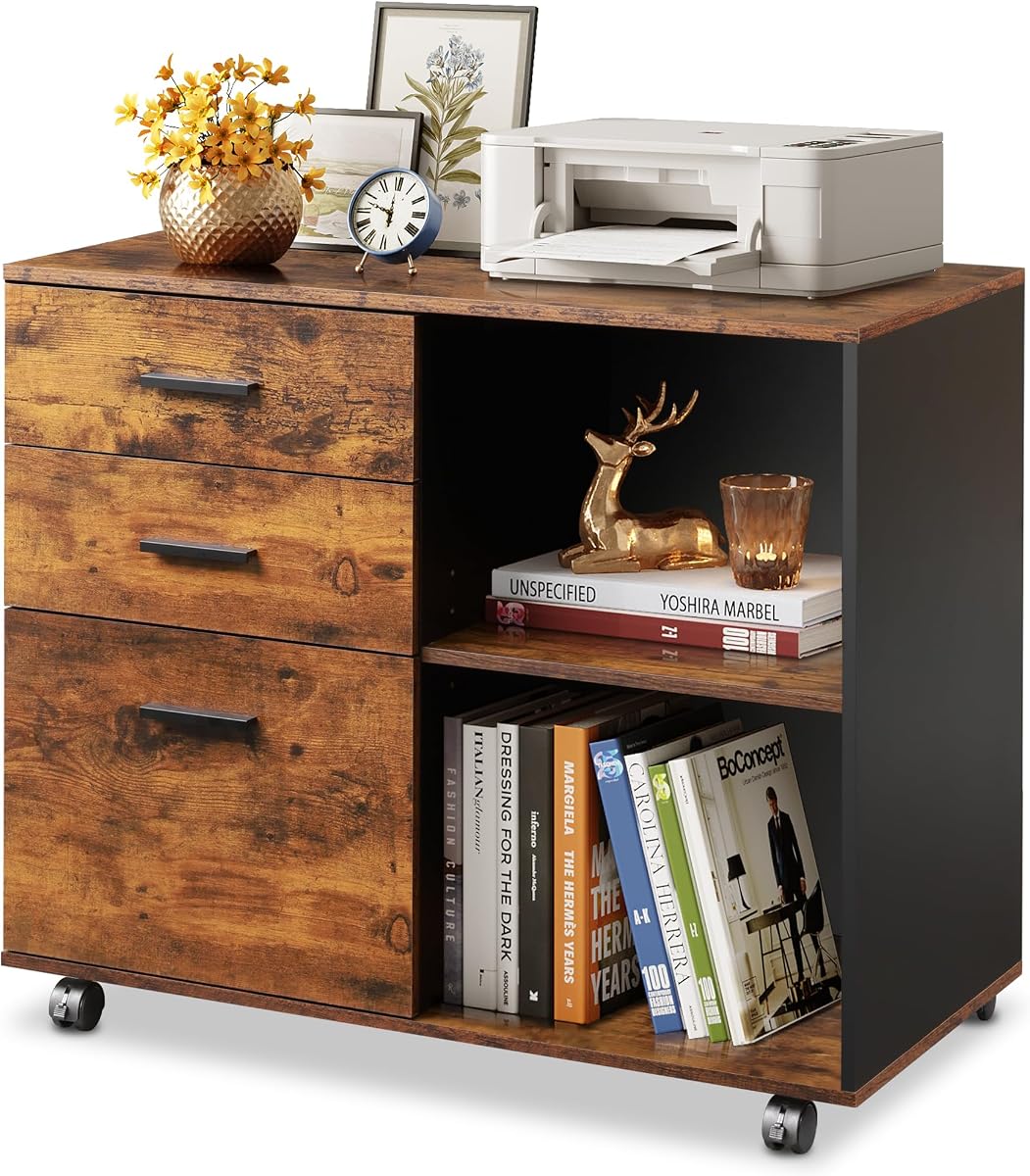
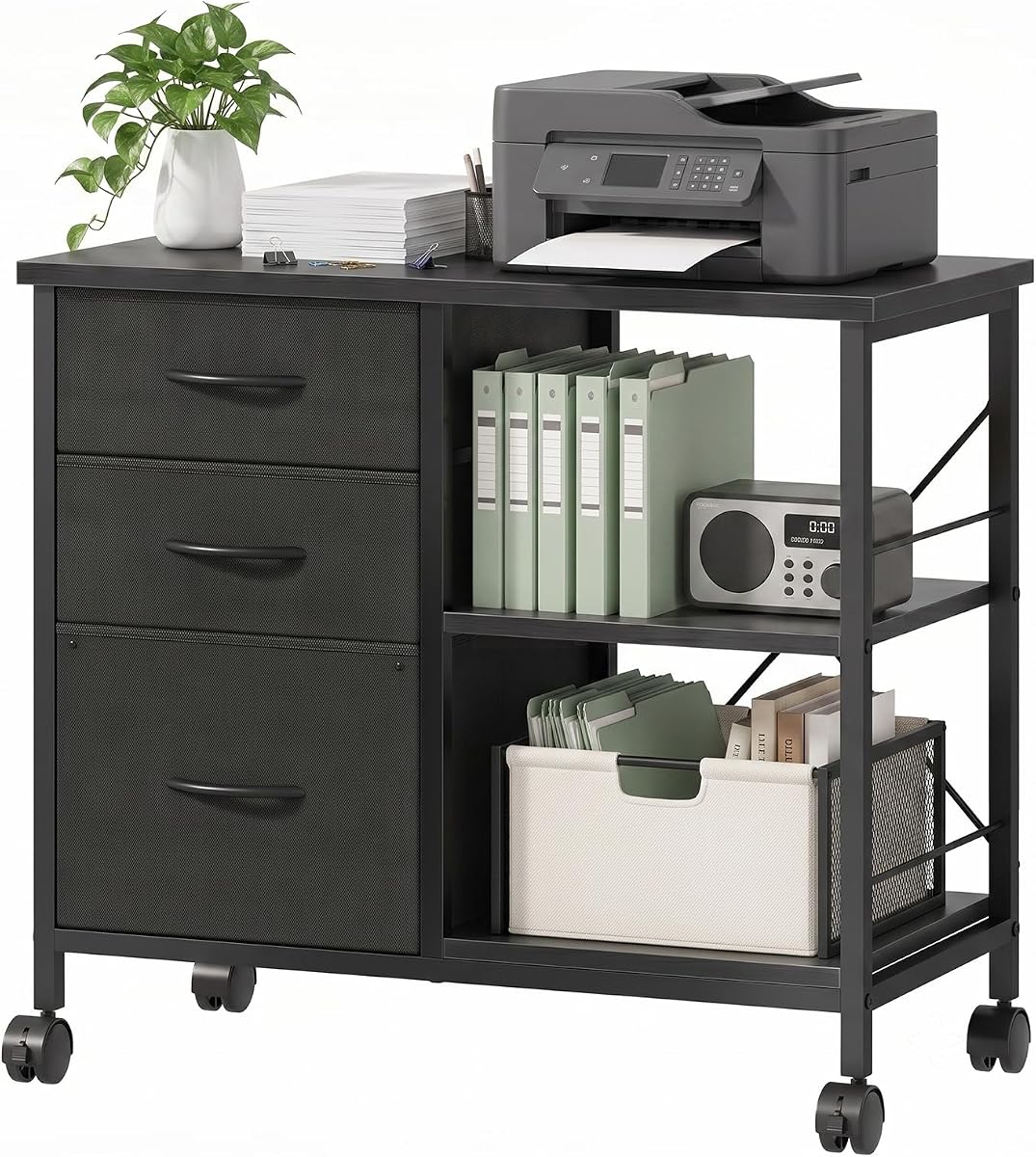
The OLIXIS Mobile File Cabinet stands out as the top choice for organizing office supplies and printers. With an impressive rating from verified buyers, it combines durability with smart design features. Its reinforced frame ensures stability while keeping your workspace tidy and efficient for daily tasks.
We may earn a commission when you buy through this link, at no additional cost to you.
This unit features a spacious bottom drawer designed specifically for letter-size and A4 hanging files. Two compact drawers above handle smaller items like pens and notebooks, keeping essentials within reach. The wood top provides a solid surface for printers, ensuring they stay level during operation.
While the fabric drawers are easy to use, they lack the rigidity of solid wood options. Users might need to reinforce heavy loads inside to prevent sagging. However, the smooth-rolling casters with locks make moving this cabinet a breeze whenever layout changes are needed.
Ideal for home offices and small workstations, this cabinet maximizes vertical space effectively. Anyone needing a mobile solution for files and printers will appreciate its versatility. It remains a reliable investment for maintaining an organized environment without sacrificing floor space.
The bottom drawer is optimized for hanging files, allowing quick access to important documents.
The reinforced top surface ensures your printer stays steady, reducing the risk of paper jams.
We may earn a commission when you buy through this link, at no additional cost to you.
The HUANUO Printer Stand is an excellent entry-level option for those needing a compact storage solution. It offers a straightforward design that maximizes desk space without breaking the bank. Users appreciate the ease of setup and its ability to keep essentials organized.
We may earn a commission when you buy through this link, at no additional cost to you.
This stand features a storage drawer with dividers for organizing office supplies like paperclips or pens. The bottom shelf is perfect for holding paper stacks or reference books. Its design ensures that valuable desktop real estate is freed up for work tasks.
The weight capacity is modest, meaning it is best suited for standard home printers. Users should avoid placing heavy multifunction devices on it to prevent instability. The lack of tools required for assembly is a significant convenience factor for busy individuals.
For students or remote workers with limited budgets, this stand provides essential functionality. It fits perfectly under desks, making it ideal for smaller rooms. With proper care, it serves as a reliable companion for light office duties.
Its compact height ensures it slides easily under standard desks, utilizing wasted space efficiently.
Integrated features help keep cords tidy, reducing the risk of tangled wires near your feet.
We may earn a commission when you buy through this link, at no additional cost to you.
The JUSTOGO Printer Stand delivers premium quality with a robust build designed for heavy-duty use. It features multiple shelves and fabric drawers to handle extensive office equipment needs. Its industrial aesthetic adds a modern touch to any professional environment.
We may earn a commission when you buy through this link, at no additional cost to you.
With three spacious open shelves, this unit can accommodate multiple devices like scanners or printers simultaneously. The fabric drawers provide organized storage for paper and files. The frame construction ensures it supports up to 130 pounds without wobbling.
Assembly requires time and careful attention to the instructions, which may be challenging for some users. The larger size means it might not fit in very small spaces. However, the durability justifies the extra effort for long-term use.
Business owners or those with multiple devices will find this stand incredibly useful. It serves as a central hub for all printing needs. For those seeking a sturdy, stylish solution, this premium option is highly recommended.
The large shelves allow you to place multiple printers or scanners on one stable platform.
Its elevated design uses vertical space effectively, keeping the floor area clear and accessible.
We may earn a commission when you buy through this link, at no additional cost to you.
The GYIIYUO 2 Drawer Cabinet offers a versatile design that adapts to various office needs. Its wide top supports large printers or even dual monitor arms, making it a great multi-use unit. The unique dual-support system allows switching between mobile and stationary modes.
We may earn a commission when you buy through this link, at no additional cost to you.
With a 24-inch wide desktop, there is ample room for workspace expansion. The deep bottom drawer holds A4 folders, while an open shelf provides quick access to items. This layout ensures that frequently used items are always within reach.
The side storage bag adds extra utility but may wear out faster than rigid drawers. Some users report that assembly instructions could be clearer for smoother setup. Despite this, the stability provided by the leveling feet is highly appreciated.
Freelancers or teachers needing extra storage space will benefit from this cabinet. It balances mobility with stability, making it suitable for various floor types. For a solution that grows with your needs, this cabinet is a strong contender.
You can switch between casters for movement and leveling feet for stability in seconds.
The included side bag provides a unique spot for tablets or stationary items.
We may earn a commission when you buy through this link, at no additional cost to you.
The MAHANCRIS File Cabinet integrates modern tech needs with traditional storage. It includes a charging station with USB ports, allowing you to power devices while you work. The fabric drawers are stylish and functional for daily organizational tasks.
We may earn a commission when you buy through this link, at no additional cost to you.
This unit features adjustable hanging rods to support various file sizes effectively. The two open shelves are perfect for printers or scanners, keeping them at a comfortable working height. The design solves the problem of distant outlets in many offices.
The fabric drawers may require occasional vacuuming to remove dust or debris. While the power cord is long, some users may need an extension cable. Overall, the convenience of charging multiple devices is a standout feature for modern workspaces.
Professionals who need to keep tablets or phones charged will find this cabinet indispensable. It brings a warm, rustic look to any room. For a blend of function and aesthetics, this cabinet is an excellent choice.
The USB ports and outlets allow you to charge devices without hunting for power sources.
Adjustable rods ensure that hanging files stay neat and properly aligned.
We may earn a commission when you buy through this link, at no additional cost to you.
The DEVAISE 5 Drawer Cabinet offers extensive storage options for those with high-volume needs. Its five drawers allow for detailed organization of documents and supplies. The white finish complements many office styles, making it a versatile addition.
We may earn a commission when you buy through this link, at no additional cost to you.
Crafted from durable particle board, this cabinet is built to withstand daily use. The top surface supports printers effectively, while the drawers keep everything tidy. Users appreciate the water-resistant finish that makes cleaning spills easy.
The weight capacity is decent, but care should be taken not to overload individual drawers. Assembly can take some time to ensure all parts are aligned correctly. However, the resulting stability and storage space are worth the effort.
This cabinet is perfect for offices that need to store a lot of paperwork. It keeps the workspace clean and professional. For a traditional look with ample space, this unit stands out as a reliable option.
Five separate drawers allow you to categorize documents and supplies efficiently.
The white design fits well in bright offices and is easy to wipe clean.
We may earn a commission when you buy through this link, at no additional cost to you.
The DUMOS 3 Drawer Cabinet is engineered to support heavier printers with stability. A reinforced back support bar ensures that large devices remain secure during operation. Its steel and wood frame provides a durable foundation for daily office tasks.
We may earn a commission when you buy through this link, at no additional cost to you.
With a top that holds up to 110 pounds, this cabinet handles heavy-duty printing needs. The drawers organize smaller items effectively, keeping the workspace clutter-free. Assembly is quick due to the tool-free design, which many users find convenient.
The fabric drawers are smooth to operate but may not hold heavy weights well. Users should prioritize keeping heavy objects on the top or bottom shelves. Despite this, the overall build quality and stability are impressive for the price.
For offices with larger printers, this cabinet offers the support needed to avoid tipping. It is also easy to move with its lockable wheels. A practical choice for those prioritizing durability and capacity.
The back support bar is designed to prevent larger printers from tipping over.
Tool-free assembly steps allow you to start using the unit almost immediately.
We may earn a commission when you buy through this link, at no additional cost to you.
The VASAGLE 3 Drawer Cabinet combines elegance with functionality for the modern office. Its fabric and steel blend offers a unique look that stands out in any room. The large worktop provides a generous surface for printers and other gear.
We may earn a commission when you buy through this link, at no additional cost to you.
This unit features a side storage pouch for quick access to small items. The three fabric drawers are spacious enough for A4 folders and supplies. Lockable casters ensure stability when the unit is stationary during use.
While the design is appealing, fabric drawers require care to avoid stains or tears. Users might find assembly time-consuming if parts are not sorted beforehand. However, the aesthetic appeal and functionality make it a strong contender.
For those seeking a cabinet that looks great in a living room or studio, this is a great pick. It keeps the space looking organized without compromising on storage. An ideal choice for design-conscious professionals.
The 60 by 40 cm top offers plenty of space for larger devices.
The fabric and steel mix adds a unique visual element to traditional office furniture.
We may earn a commission when you buy through this link, at no additional cost to you.
The DEVAISE 3 Drawer Cabinet offers lateral storage ideal for quick access to files. Its full extension slides make it easy to reach documents at the back of the drawer. The rustic brown finish adds a professional touch to any setting.
We may earn a commission when you buy through this link, at no additional cost to you.
With a weight capacity of 150 pounds, this unit is built to handle heavy use. The adjustable rails in the bottom drawer support standard filing formats effectively. The top surface is spacious enough for a printer and supplies.
Assembly requires attention to detail to ensure the unit remains stable during movement. The five casters provide smooth motion but may require occasional checks. Overall, the combination of capacity and function makes it a top choice.
This cabinet is well-suited for home offices or small business environments. It balances style with practicality, making it a versatile addition to your space. For those needing reliable storage, this option is highly recommended.
Full extension slides allow you to access all items in the drawer easily.
A 150-pound capacity ensures that heavy office equipment stays secure.
We may earn a commission when you buy through this link, at no additional cost to you.
The 3-Drawer Lateral Cabinet offers a robust design at a competitive value for buyers. With a perfect rating from users, it demonstrates reliability and satisfaction across various uses. The thickened steel frame ensures it can handle heavy loads safely.
We may earn a commission when you buy through this link, at no additional cost to you.
This unit supports up to 110 pounds, making it suitable for large printers. The three fabric drawers provide ample space for organizing supplies and notebooks. Labeled parts ensure a quick setup process for most users.
Fabric drawers may not be as durable as wood options in high-traffic areas. However, the price point and performance make up for this minor limitation. Users appreciate the locking casters that keep the unit steady.
For anyone seeking a balance of quality and cost, this cabinet is an excellent pick. It is ideal for small offices or home workspaces needing extra storage. A practical solution that delivers consistent performance day after day.
A perfect score indicates high customer satisfaction and quality construction.
Labeled parts make assembly straightforward and reduce setup time significantly.
We may earn a commission when you buy through this link, at no additional cost to you.
Selecting the right computer printer drawers requires considering several key factors to ensure they meet your specific workspace needs effectively.
Weight capacity is crucial when choosing a unit, as it determines how much weight the top surface can safely support. Look for models rated for at least 100 pounds if you plan to place heavy printers on top. This ensures stability and prevents tipping during operation or movement.
Always check the manufacturer's specs to confirm the limit matches your equipment needs.
Consider whether you need the unit to move frequently or stay in one spot. Rolling casters allow for easy reconfiguration, while locking wheels keep the unit steady during printing. Some models offer dual systems with both wheels and feet for maximum flexibility.
Choose models with lockable casters for stability when in use.
Drawers can be made of fabric or solid materials like wood or metal. Fabric drawers are lighter and more affordable but may wear out faster. Solid drawers offer better durability and security for sensitive documents.
Prioritize solid drawers if security and longevity are your main concerns.
Measure your available space to ensure the unit fits under desks or beside furniture. Check both the width and depth to confirm it accommodates your equipment without obstructing traffic. Height matters too if you plan to store it under a counter.
Take precise measurements of your workspace before purchasing.
Some units require tools and time to assemble, while others offer tool-free options. Consider your comfort with DIY projects before making a purchase. Clear instructions and labeled parts make the process much smoother for everyone.
Look for tool-free assembly if you want a quick setup experience.
Choose a finish that complements your existing furniture style. Wood grain, metal frames, or solid colors can match different decor themes. A well-matched unit enhances the overall look of your office space.
Select a style that fits your home or office theme.
Features like USB ports, side storage, or cable management add significant value to basic models. These extras help keep your workspace organized and functional. Consider what extra tools or storage options you need regularly.
Look for added features that improve daily workflow.
Materials like steel and reinforced particle board offer better longevity. Check for scratch-resistant or water-resistant surfaces if spills are likely in your environment. A durable unit will save you money in the long run.
Choose sturdy materials to ensure the unit lasts for years.
Place the unit on a flat surface and lock the wheels before using it as a printer stand. This prevents wobbling during operation and ensures the printer stays level. If it has leveling feet, adjust them for extra stability on uneven floors.
Regularly clean the drawers and top surface with a dry cloth to remove dust and debris. Fabric drawers may need occasional vacuuming to maintain freshness and prevent clogs. Avoid harsh chemicals that could damage the finish or materials.
Do not overload the drawers beyond their recommended weight limits to maintain structural integrity. Distribute weight evenly across shelves and top surfaces to avoid tipping hazards. Rotate contents periodically to prevent wear on the rails and sides.
For most home printers, a capacity of at least 50 pounds is sufficient. For larger office models, aim for 100 pounds or more to ensure stability. Always check your printer's weight before purchasing.
Most models designed for under-desk use have a max height of around 14 to 20 inches. Measure your desk clearance to ensure a proper fit. Look for adjustable or low-profile options if space is tight.
Fabric drawers are generally durable but may wear out faster than solid wood options. They are best for lightweight items like pens or paper. For heavy files, solid drawers are more reliable.
Many units include basic tools like Allen wrenches with the packaging. However, some models require you to have your own screwdrivers or drill. Check product descriptions for details before buying.
Most models have levers on the caster wheels that push down to lock them. Ensure all wheels are locked before placing heavy equipment on the unit. This prevents accidental movement and keeps the stand steady.
Use hanging file folders for larger documents and dividers for smaller items. Label the front of drawers to quickly identify contents. This setup keeps your workspace tidy and efficient.
Choosing the right computer printer drawers involves balancing capacity, mobility, and style. The OLIXIS, HUANUO, and JUSTOGO models stand out for their reliability and specific strengths in different scenarios.
Prioritize weight capacity and stability if you use heavy equipment daily. For lighter needs, focus on ease of assembly and design. Ensure the unit fits your workspace dimensions before purchasing to avoid returns.
Remember that prices and availability may change over time. Check current listings for the most up-to-date deals. With the right choice, you can transform your workspace into a more organized and efficient environment.