
Logitech Brio 101 Full HD 1080p Webcam
4.4Editor score
Auto-Light Balance RightLight
Privacy with a Slide cover
Built-In Mic for clear calls
This guide compares the top 1080p webcams for video calls streaming and content creation helping you choose the best camera for your needs.
Choosing the right 1080p webcam is essential for clear video calls and professional streaming. A good camera ensures you look sharp and sound clear during meetings.
We compared ten top-rated models based on image quality, microphone performance, and ease of use. Our analysis covers various price points and specific use cases.
Each pick highlights key strengths and trade-offs to help you decide quickly. Note that prices fluctuate so check current listings before purchasing your device.
4.4Editor score

4.6Editor score

4.4Editor score
Here is a side-by-side look at all ten webcams to help you see how they stack up in terms of features and performance for your needs.




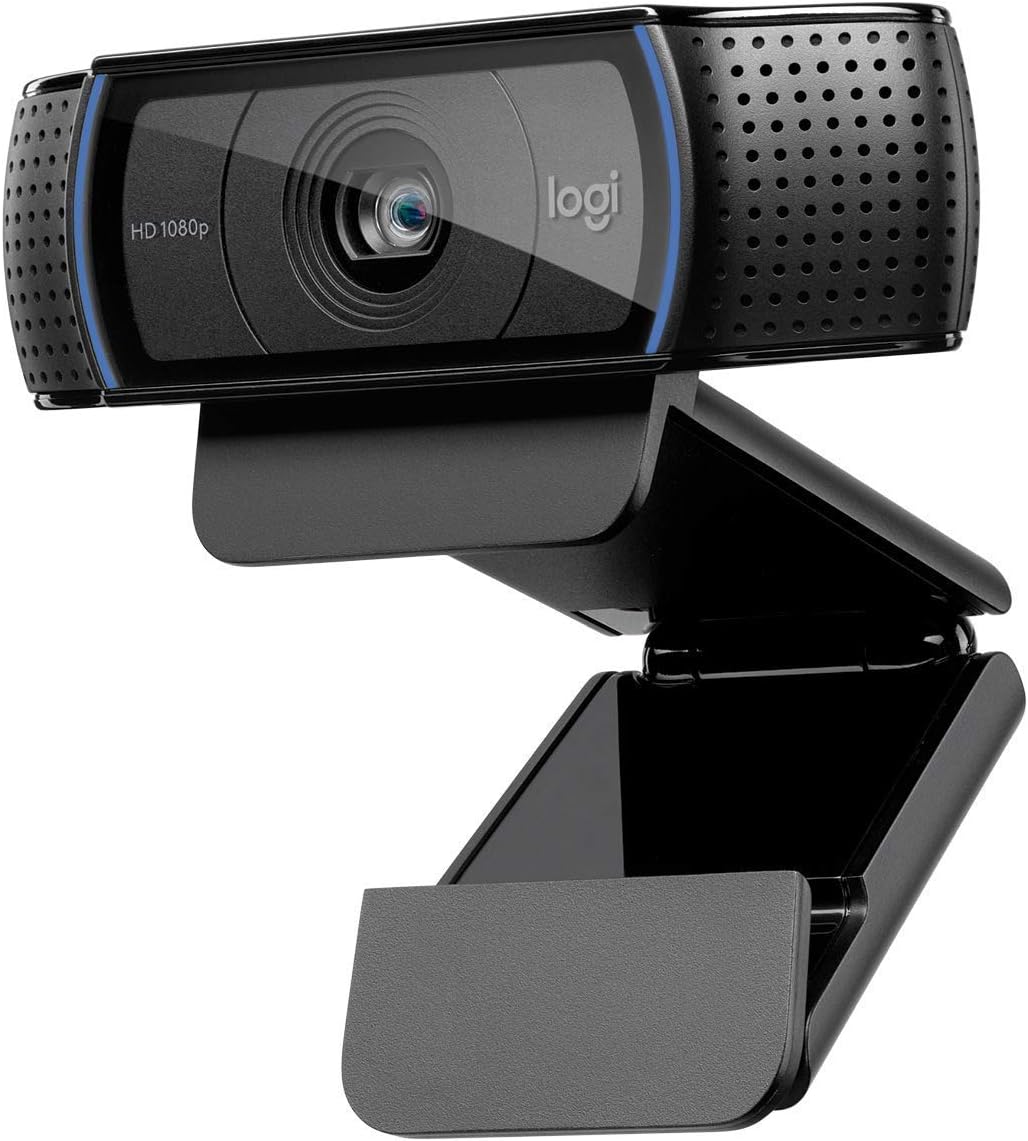


The Logitech C920x HD Pro stands out as a top contender for those seeking reliable performance at a reasonable price. It delivers crisp Full HD video and clear audio making it a strong choice for daily calls.
We may earn a commission when you buy through this link, at no additional cost to you.
Its autofocus and lighting correction ensure you look your best even in less than ideal rooms. The dual microphones capture your voice clearly while reducing background noise effectively.
While it lacks a privacy shutter unlike the C920S the performance is solid for most users. The software ecosystem adds value for those who want more control over their settings.
This webcam is perfect for professionals who need consistent quality without breaking the bank. We recommend it as the go to choice for standard video conferencing needs.
The dual microphones and HD autofocus work together to ensure your voice and face are captured clearly regardless of room conditions.
It works seamlessly with popular platforms like Zoom and Teams without requiring complex configuration or additional drivers for setup.
We may earn a commission when you buy through this link, at no additional cost to you.
The Logitech Brio 101 offers excellent value for users needing basic 1080p video without the cost of premium models. It includes a privacy shutter which is a nice touch at this price.
We may earn a commission when you buy through this link, at no additional cost to you.
RightLight technology automatically adjusts brightness to help you look good in various lighting conditions. The built-in mic is clear enough for most standard calls and meetings.
While it may not match the high-end performance of other models it is very capable for everyday use. The recycled plastic construction is an added bonus for environmentally conscious buyers.
We suggest this model for students or home office workers looking for a simple reliable solution. It balances cost and features effectively to meet essential needs.
This webcam includes a physical privacy cover and is made with post-consumer recycled plastic to appeal to security and environmental values.
Automatic brightness adjustment helps reduce shadows and keeps your face visible even when lighting behind you is challenging.
We may earn a commission when you buy through this link, at no additional cost to you.
The EMEET S600 is a standout for streamers and creators who demand the highest visual quality. It features a Sony sensor and phase detect autofocus for sharp accurate tracking during calls.
We may earn a commission when you buy through this link, at no additional cost to you.
While it supports 4K it performs exceptionally well at 1080p too. The adjustable field of view lets you control how much of your room is visible to your audience.
The build quality is robust and the privacy cover is integrated securely. Software customization allows for deep tuning of image and audio settings for professional results.
This webcam is ideal for those who want a professional setup that grows with their needs. It justifies its price with advanced features rarely found in competitors.
PDAF provides faster and more precise focusing compared to standard contrast detection keeping you sharp during movement.
Built-in noise filtering ensures your voice is heard clearly without background distractions using proprietary algorithms.
We may earn a commission when you buy through this link, at no additional cost to you.
The Logitech C920S HD Pro is very similar to the C920x but includes a privacy shutter. This addition makes it a favorite for users who prioritize security during idle times.
We may earn a commission when you buy through this link, at no additional cost to you.
Video quality is sharp and colors are vibrant thanks to the glass lens. The autofocus works well to keep you in focus as you move slightly during calls.
While it lacks the software license included with the C920x the hardware performance is top notch. It is a great choice for those who want physical privacy control.
We recommend this model for home offices where security is a concern. It offers a balanced package of features that fit most professional requirements.
The snugly fitting cover gives you physical peace of mind when you are not actively participating in a video meeting.
Full HD video and HD autofocus ensure you look professional and sharp during every call.
We may earn a commission when you buy through this link, at no additional cost to you.
The Logitech C920e is designed with business needs in mind. It comes certified for Zoom and Microsoft Teams ensuring seamless integration into enterprise workflows.
We may earn a commission when you buy through this link, at no additional cost to you.
The 78-degree field of view is perfect for individual users or small desk setups. It ensures you are framed well without excessive background distraction.
Management software like Sync helps IT departments keep devices updated and secure. The attachable privacy screen is convenient but not as integrated as a shutter.
This webcam is the best choice for corporate deployments. It provides reliability and compliance features that organizations often require.
Sync device management lets administrators ensure all devices are up to date with firmware updates and security patches.
The clip is adjustable and durable ensuring the camera stays put on laptops or monitors during daily use.
We may earn a commission when you buy through this link, at no additional cost to you.
The EMEET C960 offers a wide field of view which is great for group calls or showcasing items to your audience. It captures more participants without needing to reposition frequently.
We may earn a commission when you buy through this link, at no additional cost to you.
It includes both USB Type-A and Type-C adapters making it compatible with modern and older devices. The privacy cover adds a layer of security when not in use.
The fixed focus is limited compared to autofocus models but it is optimized for typical desk distances. The dual mics help ensure your voice is picked up clearly.
We recommend this for users who need flexibility in framing. It is a budget-friendly option with practical features for home and office.
Included adapters let you connect to both legacy ports and modern USB-C devices easily.
The removable cover provides security and can be taken off for better image quality when privacy is not needed.
We may earn a commission when you buy through this link, at no additional cost to you.
The NexiGo N60 provides a solid entry-level experience for those needing basic 1080p video. It delivers clear sharp images and includes a noise-cancelling microphone.
We may earn a commission when you buy through this link, at no additional cost to you.
Its privacy cover blocks the lens when not in use which is a good security practice. It supports a wide range of operating systems and platforms seamlessly.
Some users report firmware issues that may require support contact for resolution. The fixed focus is adequate for desk use but lacks the flexibility of higher-end models.
This model is a good choice for budget-conscious shoppers. It covers all the basics without the complexity of advanced features.
The microphone filters out ambient noise to ensure your voice is the focus during conversations.
The privacy cover gives you peace of mind when you are not actively using the camera.
We may earn a commission when you buy through this link, at no additional cost to you.
The Logitech HD Pro Webcam C920 is a classic choice that has stood the test of time. It continues to deliver reliable performance for video calls and streaming.
We may earn a commission when you buy through this link, at no additional cost to you.
Its widespread compatibility and plug-and-play nature make it easy to set up on any system. The image quality remains competitive for standard 1080p tasks.
As an older model it lacks some modern features like integrated privacy covers. However it remains a solid performer for those who prioritize simplicity.
This webcam is a safe option for general use. It balances quality and reliability for users who do not need the newest bells and whistles.
This model has been a staple in home offices for years proving its durable design and consistent performance.
No special software is needed to get started making it ideal for less tech-savvy users.
We may earn a commission when you buy through this link, at no additional cost to you.
The Logitech Brio 105 offers a great balance of business features at an accessible price. It includes a privacy shutter and is certified for Google Meet.
We may earn a commission when you buy through this link, at no additional cost to you.
RightLight 2 technology ensures you look good even in suboptimal lighting conditions. This is a practical choice for businesses deploying multiple units.
While it does not have the extensive customization of higher models it is very reliable for daily meetings. The microphone captures audio clearly for standard use.
We recommend this for small businesses or remote teams. It provides essential business features without a high cost.
Certification ensures seamless integration with Google Meet for a smooth conferencing experience.
Automatic light balancing helps maintain a clear image even when lighting is poor.
We may earn a commission when you buy through this link, at no additional cost to you.
The Logitech Brio 100 Renewed offers a budget-friendly way to get a reliable 1080p webcam. It delivers clear video and a good field of view for calls.
We may earn a commission when you buy through this link, at no additional cost to you.
This renewed unit provides an eco-friendly option without compromising on core performance. The plug-and-play nature ensures you can start working immediately.
Buying renewed means you save money but may have limited warranty coverage compared to a new item. The performance is generally consistent with brand expectations.
This model is ideal for cost-conscious buyers. It is a practical choice for personal use or light office work.
Renewed products let you get trusted hardware at a lower price while supporting sustainability.
Full HD 1080p ensures you look sharp during calls even with a narrow field of view.
We may earn a commission when you buy through this link, at no additional cost to you.
Selecting the right webcam involves weighing several factors to match your specific needs and environment.
Resolution determines the clarity of your video image. Most 1080p webcams offer 30fps which is smooth enough for calls. Higher frame rates like 60fps are better for fast motion.
Look for Full HD 1080p at 30fps or higher to ensure a professional appearance.
Field of View (FOV) defines how much of your surroundings the camera captures. A narrower FOV focuses on you while a wider one includes more room.
Choose a 90 degree FOV for group calls or 60 to 75 degrees for individual focus.
Clear audio is as important as clear video. Many webcams have built-in mics but check for noise cancellation features to reduce background noise.
Opt for models with dual microphones for better stereo sound and noise reduction.
Good lighting helps your camera perform best. Some models include auto-light balance to adjust exposure dynamically.
Prioritize webcams with light correction if you often work in suboptimal lighting.
Privacy covers allow you to physically block the lens when not in use. This is a key security feature for remote workers.
Look for integrated privacy shutters or attachable screens for peace of mind.
Webcams come with clips for monitors or tripod threads for flexibility. USB-A or USB-C connectivity affects compatibility with your devices.
Ensure the mount fits your setup and the connection matches your available ports.
Verify that the webcam works with your operating system and preferred software. Most support Windows macOS and major conferencing platforms.
Check for certification for specific platforms like Zoom if you use them frequently.
Durable construction ensures the webcam lasts through daily use. Plastic vs metal build affects stability and feel.
Choose models with sturdy clips and reliable materials for long-term use.
Clean the lens gently with a microfiber cloth to maintain video clarity. Avoid using harsh chemicals that could damage the lens coating.
Position the camera at eye level to ensure a natural angle. This avoids unflattering perspectives and makes you look more professional.
Keep the software updated to maintain performance. Check for driver updates if you experience connection issues or quality drops.
Yes 1080p webcams offer a clear sharp image that is ideal for most calls and meetings. They balance quality and cost well for everyday users and professionals alike.
A privacy shutter provides physical security by blocking the lens when not in use. It is a useful feature for protecting your privacy at home or work.
30fps is sufficient for most video calls and meetings. Higher rates like 60fps are better for gaming or fast streaming content.
Most modern webcams are compatible with both Windows and macOS. Always verify compatibility in the product details for specific OS versions.
Improve lighting by facing a light source or using a ring light. Clean the lens regularly and adjust software settings for optimal exposure.
An external mic can offer superior audio quality but built-in mics are often sufficient for calls. Consider external options if you need studio grade audio.
We reviewed ten 1080p webcams ranging from budget-friendly options to premium business models. The Logitech C920x and Brio 101 stand out as top choices for most users.
Prioritize features like privacy covers and light correction if you work in challenging environments. Budget models can still deliver excellent performance if you choose wisely.
Prices change frequently so check current listings to find the best deal on your chosen webcam today.