
Eaton Tripp Lite BC350R
4.5Editor score
350VA UPS power
Wall mount compatible
Easy battery replacement
Find the best Battery Backup for Small Office to protect critical equipment from outages and surges. Compare top UPS models with surge protection and runtime
Protecting your small office from power outages is critical for maintaining productivity and preventing data loss. A reliable battery backup ensures your computers and network devices keep running during unexpected interruptions, keeping your business operations smooth and uninterrupted.
We compared ten top-rated UPS systems based on performance, outlet count, surge protection, and ease of use. Each product was evaluated for its ability to safeguard essential office equipment while providing enough runtime to save work and shut down safely.
Each pick highlights key features, pros, and cons to help you choose the right model for your workspace. Please note that prices and availability can change frequently, so check current listings before making your final purchase decision today.
4.5Editor score

4.5Editor score
4.9Editor score
This side-by-side comparison highlights the key specifications of each UPS model to help you quickly identify the best fit for your office power needs.


This CyberPower UPS stands out with its PFC Sinewave technology, ideal for modern computers and workstations. It holds a strong 4.5 rating for reliably protecting office gear from surges and outages. The color LCD panel provides instant visibility into power conditions.
We may earn a commission when you buy through this link, at no additional cost to you.
It features 12 outlets with a mix of battery backup and surge-only protection, ensuring your entire setup stays safe. Automatic Voltage Regulation corrects minor fluctuations without draining the battery, extending runtime significantly. The included PowerPanel software allows advanced monitoring and control.
While it is larger than some models, the robust build quality and extensive outlet options justify the footprint. The 500k equipment guarantee offers peace of mind for critical office equipment. The unit is UL safety certified for secure operation.
Anyone running active PFC power supplies or needing pure sine wave output should choose this model. It is perfect for small offices with multiple devices requiring stable power. Its balance of performance and features makes it the top recommendation.
Pure sine wave power prevents damage to sensitive electronics like servers and workstations that use active power factor correction.
The color display shows battery capacity, load level, and warnings clearly, allowing quick assessment of power health.
We may earn a commission when you buy through this link, at no additional cost to you.
Ideal for very small offices or single workstations, this BC350R provides essential protection without breaking the budget. It holds a 4.5 rating for simplicity and reliability. The 350VA capacity is enough for routers and single desktops.
We may earn a commission when you buy through this link, at no additional cost to you.
Its compact design allows flexible placement on desks or walls using built-in slots. The automatic restart ensures devices power back on when electricity returns. It includes a circuit breaker for safety against overloads.
The lower VA means shorter runtime for heavy loads, so it suits basic needs best. The battery is replaceable to extend the unit life. It filters noise to protect connected hardware effectively.
This UPS is the smart choice for tight budgets needing basic surge and outage protection. If you only need to keep a router or one PC running briefly, it works well. Its simplicity and low cost win here.
Keyhole slots on the bottom enable secure wall mounting to free up valuable desk space in compact offices.
Plug in, press power, and you are done. No complex settings or software required for basic use cases.
We may earn a commission when you buy through this link, at no additional cost to you.
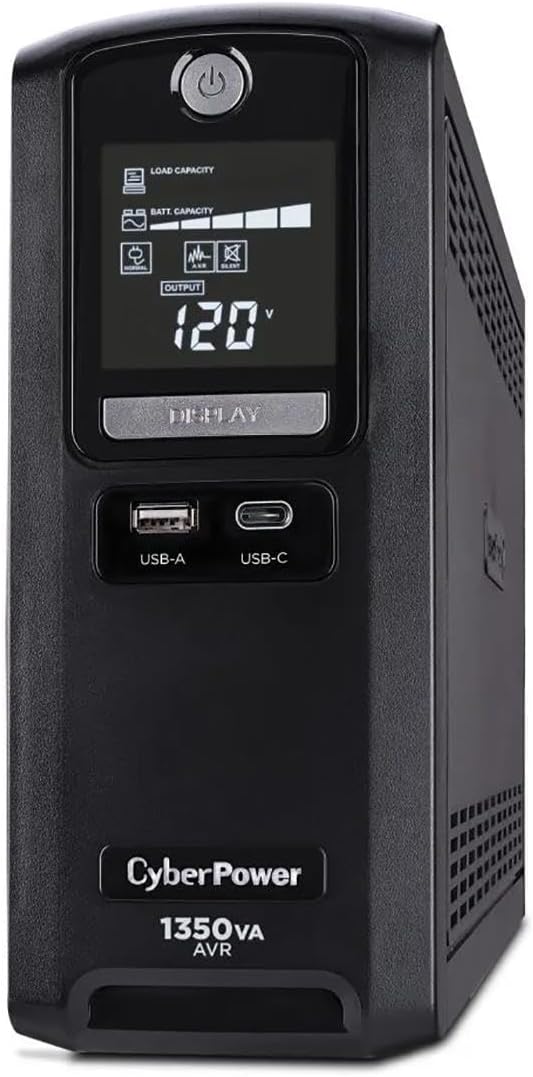
The CST135UC earns a high 4.9 rating for exceptional reliability and runtime. It provides 1350VA power with simulated sinewave suitable for most office gear. Its runtime at half load offers ample time to save data.
We may earn a commission when you buy through this link, at no additional cost to you.
Unique among peers, it protects network and coax lines from surges traveling via phone or cable. Dual USB ports let you charge mobile devices during an outage. GreenPower technology minimizes energy waste efficiently.
The price reflects its superior build and extended battery life. It is ideal for offices with critical network infrastructure needing stability. The included software helps manage connected devices remotely.
Choose this if you need the highest reliability and network protection available. The extra runtime ensures you can shut down servers gracefully. Its features justify the cost for business-critical applications.
Surge protection extends beyond AC outlets to cover telephone and coaxial cables, shielding modems and routers from line surges.
Type A and C ports supply power to phones and tablets, keeping teams connected even when grid power fails.
We may earn a commission when you buy through this link, at no additional cost to you.
This Intelligent LCD UPS offers 1500VA capacity for heavy office setups. It holds a 4.5 rating for consistent power delivery. The color panel keeps users informed on load and battery status instantly.
We may earn a commission when you buy through this link, at no additional cost to you.
With 12 outlets, it supports multiple monitors and peripherals. AVR adjusts incoming voltage without using battery, preserving charge time. The equipment guarantee ensures coverage for connected devices.
The simulated wave may not suit highly sensitive hardware but works well for standard PCs. Its robust design handles surges effectively. The included software enables smart power management.
Perfect for offices with many peripherals needing ample outlets. It balances capacity with usability well. Choose this if you need power for workstations and networking gear.
The LCD screen provides clear details on power conditions to alert users before issues affect equipment.
Twelve outlets provide flexibility to connect many devices at once without needing extra extension strips.
We may earn a commission when you buy through this link, at no additional cost to you.
The EC850LCD features ECO mode to reduce energy waste when computers sleep. It holds a 4.4 rating for practical office protection. The LCD shows battery health clearly to avoid surprises.
We may earn a commission when you buy through this link, at no additional cost to you.
It detects when a PC sleeps and cuts power to attached peripherals, saving energy. This feature reduces monthly electricity costs. The outlets are well spaced for bulky plugs.
Its VA rating suits single PCs and basic networking. The LCD keeps users aware of power issues quickly. It is a reliable choice for cost-conscious buyers.
Great for offices aiming to lower power bills while maintaining protection. The ECO feature is a smart addition for idle devices. Choose this for energy savings and reliable backup.
ECO mode detects sleep states and turns off connected peripherals automatically, cutting unnecessary power usage during downtime.
Wide spacing between outlets allows larger adapters to plug in without blocking neighboring sockets.
We may earn a commission when you buy through this link, at no additional cost to you.
This slim standby UPS saves space without sacrificing outlet count. It holds a 4.5 rating for consistent backup. The 900VA capacity supports small office needs effectively.
We may earn a commission when you buy through this link, at no additional cost to you.
Its narrow design fits easily on desks or shelves. High efficiency reduces power draw during idle times. The outlets allow full setup connectivity without extra strips.
Battery life is standard for the class. It works well for gaming consoles and routers. The included warranty offers good coverage.
Ideal for offices needing compact power with plenty of outlets. Choose it if space is tight but you still need protection.
Slim profile ensures the unit fits in tight spaces while still offering ample connectivity options.
High efficiency design lowers power consumption and reduces energy costs over time.
We may earn a commission when you buy through this link, at no additional cost to you.
The AVRG900LCD adds data line protection against surges from phone or coax. It holds a 4.6 rating for solid performance. The intelligent LCD keeps you informed of power status.
We may earn a commission when you buy through this link, at no additional cost to you.
Twelve outlets support full office gear. AVR corrects voltage fluctuations to protect hardware. The connected equipment guarantee adds security.
Data protection is useful for offices with internet or phone gear. It ensures network hardware stays safe. This model balances features well.
Choose this if you need to protect modems and routers too. It offers comprehensive protection beyond standard outlets.
Includes protection for phone and coax lines to prevent damage from surges entering through network cables.
LCD provides clear information on battery and load status for better power management.
We may earn a commission when you buy through this link, at no additional cost to you.
The BC450 offers 8 outlets for small office setups. It holds a 4.2 rating for basic protection. Its 450VA supports routers and single PCs effectively.
We may earn a commission when you buy through this link, at no additional cost to you.
Wall mount tabs make installation flexible in cramped spaces. It provides 316 joules of surge protection. The LED status light is clear.
Runtime is short under load, so use for graceful shutdown. Battery replacement is straightforward. It is a practical choice for basic needs.
Select this if you need to wall mount and save space. It works for critical connectivity devices like routers.
Bottom mounting tabs allow secure wall installation, freeing up desk space in small offices.
Internal battery can be swapped easily to restore performance without buying a new unit.
We may earn a commission when you buy through this link, at no additional cost to you.
APC is a trusted name delivering 600VA backup. It holds a 4.5 rating for reliability. The USB port charges phones during outages conveniently.
We may earn a commission when you buy through this link, at no additional cost to you.
Five outlets have full backup plus two surge-only. Battery swaps are simple without special tools. It guards against surges and brownouts well.
Full load runtime is short, but half load lasts longer. The design keeps critical devices safe. It suits typical home or small office desks.
Choose APC for trusted support and replacement parts. Good for those who want easy battery swaps.
Built-in USB port delivers power to mobile devices during outages to keep communication active.
Simple battery swap extends unit life and maintains protection without replacing the entire device.
We may earn a commission when you buy through this link, at no additional cost to you.
This standby UPS offers essential protection at entry level. It holds a 4.4 rating for simplicity. The 425VA supports small devices like routers.
We may earn a commission when you buy through this link, at no additional cost to you.
Eight outlets provide flexibility for basic setups. LED lights show power and fault status clearly. It filters line noise to protect gear.
Low VA limits runtime under load but works for shutdown. It is a cost-effective solution for light use. The warranty adds security.
Select this for simple protection needs on a budget. It keeps routers safe during brief outages.
LED lights provide clear feedback on power status to alert users to faults instantly.
Affordable price point makes this a practical choice for basic surge and outage protection.
We may earn a commission when you buy through this link, at no additional cost to you.
Selecting the right UPS requires understanding your power needs and device types. This guide covers key factors to consider.
VA and watts determine how much load a UPS can handle. Calculate total wattage of devices to choose appropriate capacity.
Select a model with 20% higher wattage than your load for safety.
Runtime depends on load and battery size. Higher loads reduce time; aim for at least 10 minutes at half load.
Check half load runtime to ensure enough time for data saving.
Count outlets needed and look for spaced plugs. Mix battery and surge-only outlets for flexibility.
Choose a model with enough outlets to avoid extension cords.
Pure sine wave suits active PFC gear; simulated wave works for standard electronics. Choose based on device specs.
Use sine wave for modern computers and workstations.
Surge suppression ratings (joules) protect against spikes. Higher ratings offer better protection for sensitive gear.
Look for high joules ratings for robust protection.
LCD displays show real-time status; software allows remote shutdown. Useful for unattended systems.
Pick units with clear LCDs or software support.
Batteries wear after 3–5 years. Replaceable batteries save money. Check ease of swap and availability.
Ensure battery is user-replaceable to reduce costs.
Wall mount options save space. Consider unit dimensions to fit your desk or server rack.
Check dimensions and mounting tabs before buying.
Place the UPS in a well-ventilated area away from heat sources to maintain optimal battery life. Ensure the unit sits on a stable surface to avoid tipping.
Connect critical devices to battery backup outlets and non-critical items to surge-only outlets. Avoid overloading the UPS by checking total wattage against rated capacity.
Perform regular self-tests and check battery status indicators monthly. Replace the battery every 3 to 5 years to ensure reliable protection during outages.
Calculate the total wattage of all devices you want to protect. Choose a UPS with at least 20% higher wattage capacity. Also consider runtime needs and outlet count for your setup.
Pure sine wave delivers clean power like the grid and suits active PFC gear. Simulated sine wave is cheaper and works for most standard electronics but may cause issues with some hardware.
Batteries typically last 3 to 5 years depending on usage. Regular testing helps monitor health. Replacing the battery restores performance without buying a new unit.
Printers draw high surge currents and can overload many UPS units. It is better to plug printers into surge-only outlets rather than battery backup outlets to avoid issues.
AVR stabilizes input voltage without using battery power. It corrects minor fluctuations to extend runtime. This keeps devices safe and preserves battery life.
Follow the manufacturer instructions to open the battery access panel. Disconnect old battery connectors carefully and install the new unit. Ensure screws are secured properly.
Yes, power outages cause data loss and hardware damage. A UPS provides enough time to save work and shut down safely, protecting both equipment and productivity.
Keep the unit dust free and in a cool location. Run self tests monthly and check warning indicators. Replace the battery when capacity drops to maintain reliability.
Our top picks like the CyberPower CP1500PFCLCD and CST135UC deliver strong performance and protection. Budget options such as the Eaton BC350R offer value for basic needs.
Prioritize capacity and waveform type based on your devices. Ensure enough outlets and runtime to avoid data loss and equipment damage during outages.
Prices and availability change often so check current listings before purchasing. Investing in a quality UPS safeguards your office equipment and keeps operations running smoothly.