
SteelSeries Nimbus+ Bluetooth Mobile Gaming Controller with iPhone Mount
4.0Editor score
Apple Licensed Wireless Connectivity
50 Plus Hour Battery Life
Clickable Joysticks
This comprehensive guide compares the top gaming controller for Apple TV options to help you choose the best device for immersive cloud and native gaming on
Finding the right gaming controller for Apple TV transforms your living room into a powerful gaming station. Modern controllers offer wireless connectivity and precise inputs that enhance gameplay across various streaming services and native apps.
We evaluated ten top-rated controllers based on compatibility, battery life, build quality, and feature sets. Our analysis focuses on devices that seamlessly integrate with tvOS while delivering responsive controls for competitive and casual gaming sessions.
Each pick highlights unique strengths tailored to different player needs and budgets. Prices and availability change frequently so verify current details before purchasing to ensure you get the best value for your specific gaming requirements today.
4.0Editor score

4.7Editor score

4.1Editor score
This side-by-side comparison details the core specifications and capabilities of each selected controller to help you quickly identify the device that matches your preferred gaming style and platform requirements.
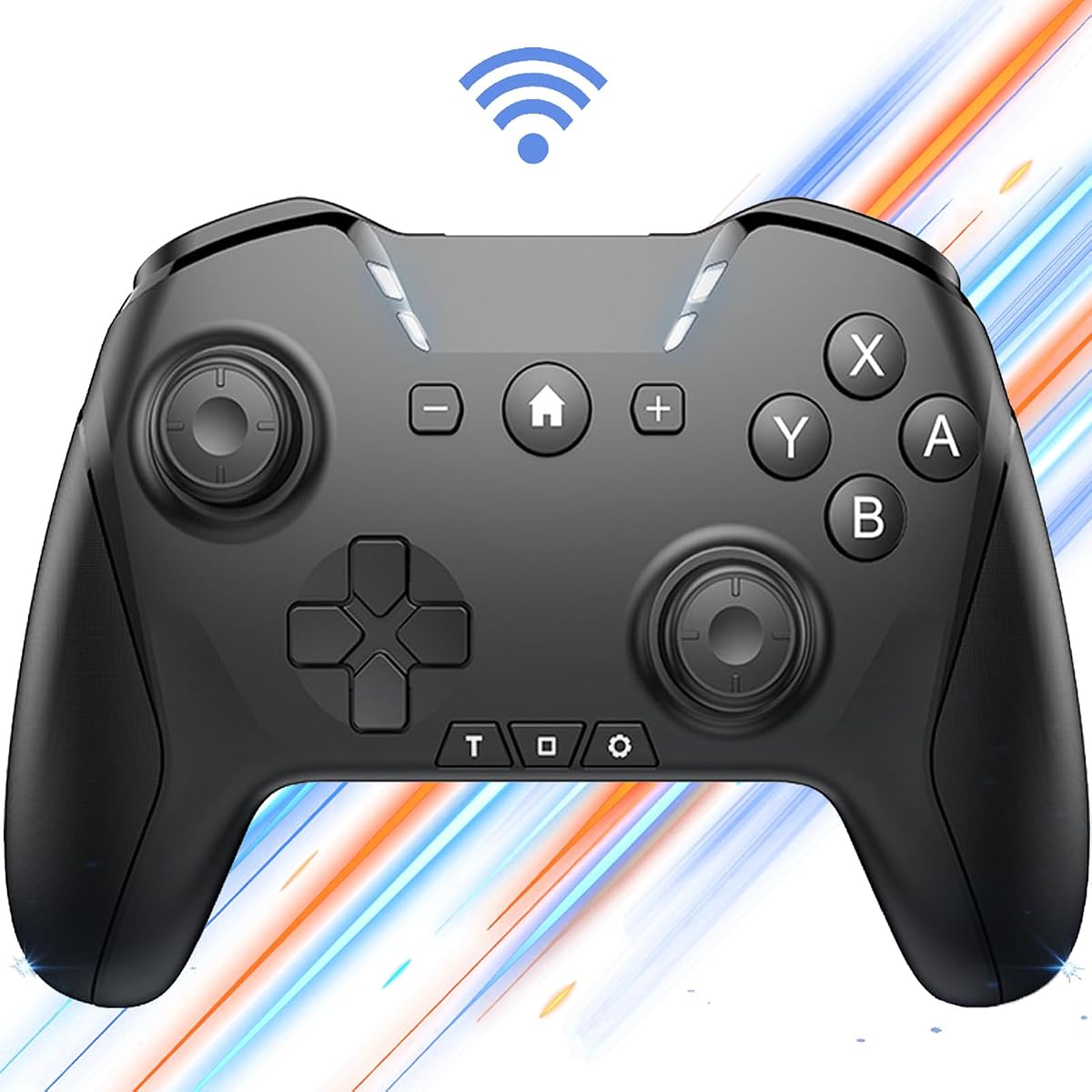


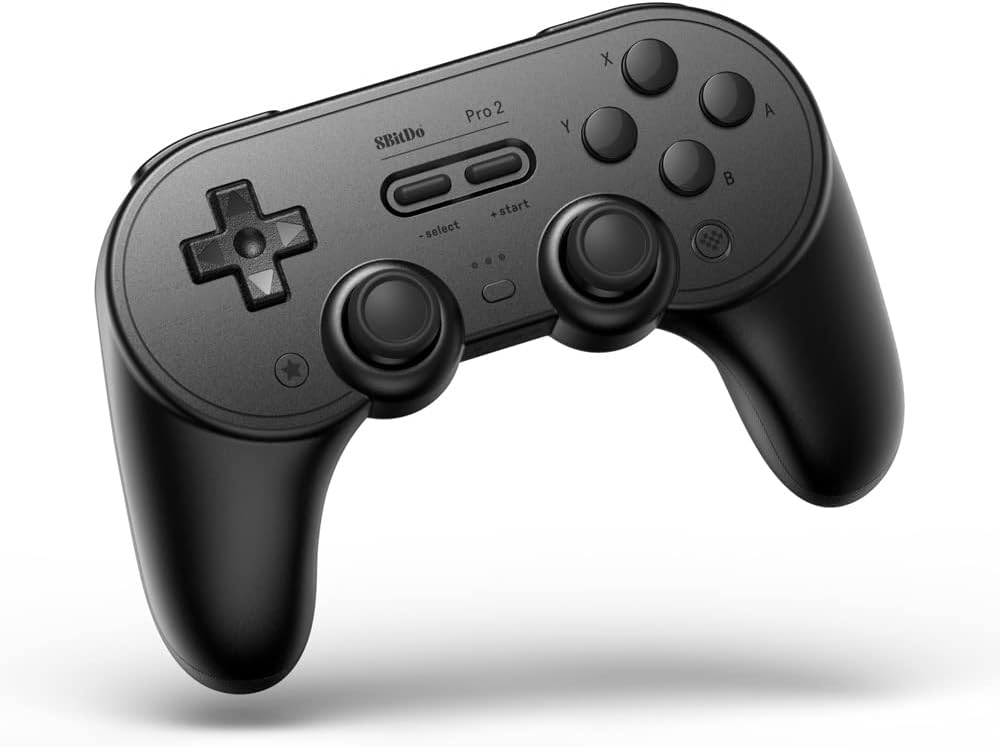


This versatile Bluetooth controller offers robust features tailored for serious gamers who demand customization across multiple platforms. Its 4.0 rating reflects solid performance in connectivity and battery endurance for extended play sessions.
We may earn a commission when you buy through this link, at no additional cost to you.
The standout capabilities include programmable macros allowing up to 30 seconds of automated inputs and interchangeable buttons to suit left or right handed preferences. The 650mAh battery supports roughly 15 hours of gameplay on a single charge.
Users may find the configuration options overwhelming initially since manual setup is required to unlock all functionalities. The device is slightly heavier than minimalist controllers which might affect comfort during very long sessions.
Ideal for enthusiasts seeking advanced tools like turbo and motion controls without paying premium brand prices. This device delivers extensive functionality for diverse gaming needs across Apple TV and other devices.
Program specific button combinations and turbo speeds to optimize your gameplay efficiency and comfort during long sessions.
Enjoy uninterrupted gaming with the large capacity battery designed to last through marathon play without frequent recharges.
We may earn a commission when you buy through this link, at no additional cost to you.
The SteelSeries Nimbus+ stands out as a reliable choice for Apple device owners seeking seamless integration and long play sessions. Its 4.0 rating underscores its stability and responsiveness across iOS and tvOS environments.
We may earn a commission when you buy through this link, at no additional cost to you.
Key strengths include an impressive 50 plus hour battery life that minimizes charging interruptions and tactile D-pad buttons for precise navigation. The clickable L3/R3 joysticks add extra input options for games requiring advanced commands.
Optimizing compatibility often requires downloading the SteelSeries Engine which adds a setup step before first use. The controller is designed specifically for Apple products limiting its utility for cross platform gamers.
Best suited for dedicated Apple users who prioritize battery life and official licensing for consistent performance. It offers a premium feel and reliable connection for casual and competitive gaming on Apple TV.
Experience weeks of gaming on a single charge thanks to the efficient power management built into the controller design.
Trust that every feature works correctly with tvOS due to rigorous testing and certification by Apple standards.
We may earn a commission when you buy through this link, at no additional cost to you.
The GMBACK Wireless Switch 2 Pro delivers high value with essential features like macros and wide compatibility at an accessible price. A 4.1 rating indicates consistent satisfaction among users seeking functional controllers without breaking the bank.
We may earn a commission when you buy through this link, at no additional cost to you.
Highlights include the loop macro function for automating repetitive tasks and an 800mAh battery supporting 15 to 20 hours of gameplay. It also features 6-Axis gyro controls and customizable RGB lighting for a personalized look.
Some users report variability in build quality and basic software interfaces that lack advanced configuration options found in higher tier models. It may not offer the same durability as premium options over years of heavy use.
Perfect for budget conscious gamers who want versatile features and solid battery life for casual sessions. It bridges the gap between affordability and functionality for Apple TV and mobile gaming.
Automate repetitive game tasks with custom recording to save time and effort during grinding or farming activities.
Use the same controller across Switch, PC, and Apple TV for a unified experience without buying multiple devices.
We may earn a commission when you buy through this link, at no additional cost to you.
VOYEE Switch Controllers feature striking RGB lighting and strong responsiveness earning a high 4.4 rating among casual gamers. They deliver solid performance for sports and action titles with customizable vibration feedback.
We may earn a commission when you buy through this link, at no additional cost to you.
The design includes a lightning bolt LED style with four modes and 3-speed turbo options for rapid input. One key wake up capability simplifies starting gameplay while the 4-level vibration enhances immersion in key moments.
PC users must connect via wired link which limits mobility compared to fully wireless alternatives. The runtime of 10 to 15 hours is good but falls short of extended endurance models.
Recommended for players who value visual flair and responsive controls for standard gaming. It fits well in home setups where style matches function for comfortable play sessions.
Enhance your gaming ambiance with customizable RGB lighting that matches your room setup and personal preference.
React quickly with low latency buttons and joysticks that register commands instantly for precise gameplay.
We may earn a commission when you buy through this link, at no additional cost to you.
The 8BitDo SN30 Pro holds the highest rating at 4.7 offering durable Hall Effect joysticks and official Apple TV support. Its retro design appeals to players who appreciate classic aesthetics combined with modern precision.
We may earn a commission when you buy through this link, at no additional cost to you.
Features include Hall Effect sensors for precise stick control and motion controls with rumble for enhanced feedback. It supports up to 18 hours of play and includes a USB-C connector for charging.
The smaller battery compared to top endurance options may require more frequent charging for marathon gamers. The compact retro shape might feel too small for users with larger hands or those preferring modern bulky controllers.
Excellent for retro enthusiasts and general users seeking reliable Apple compatibility. It balances portability and performance for seamless gameplay on Apple TV and mobile platforms.
Enjoy long-lasting accuracy without stick drift thanks to magnetic sensors that prevent physical wear on components.
Evoke nostalgia with classic styling that blends seamlessly into retro gaming collections and modern setups alike.
We may earn a commission when you buy through this link, at no additional cost to you.
This Renewed version offers the trusted SteelSeries Nimbus+ experience at a reduced cost while maintaining official Apple compatibility. A 3.6 rating reflects variability in individual unit condition but consistent functionality for basic needs.
We may earn a commission when you buy through this link, at no additional cost to you.
It provides stable wireless connectivity and responsive buttons for smooth gameplay without cables. The built-in battery allows extended sessions suitable for streaming services and native Apple TV games.
Lower ratings may stem from cosmetic wear or battery degradation in some units which varies by seller. Warranty options are often shorter than new products so buyers should check seller policies carefully.
Best for budget focused buyers who prioritize compatibility and brand reliability over pristine condition. It remains a solid pick for standard Apple TV gaming without premium spending.
Access premium Apple features at a lower price point by selecting certified renewed options with tested functionality.
Rely on Apple licensing to ensure smooth pairing and full feature support across iOS and tvOS devices.
We may earn a commission when you buy through this link, at no additional cost to you.
The 8BitDo Pro 2 offers professional grade features including back buttons and advanced software mapping for deep customization. With a 4.5 rating it balances comfort and power across multiple platforms including Apple TV.
We may earn a commission when you buy through this link, at no additional cost to you.
Two pro-level back buttons allow complex actions without removing fingers from the front controls. The Ultimate software on PC and iOS enables custom profiles and easy switching between modes for different games.
The advanced features come with a higher price and a learning curve for new users to master all mapping options. Battery life of 20 hours is good but not the best in class for long trips.
Ideal for serious gamers who demand customization and cross platform consistency. It provides a premium experience that grows with your skills and changing gaming needs.
Enjoy extended play without hand fatigue thanks to a shape designed for natural grip and reduced strain.
Switch between tailored control schemes instantly to adapt to different game genres and play styles easily.
We may earn a commission when you buy through this link, at no additional cost to you.
This standard SteelSeries Nimbus+ delivers official Apple certification ensuring maximum compatibility across all iOS and tvOS devices. A 4.1 rating points to consistent performance and reliability for daily gaming needs.
We may earn a commission when you buy through this link, at no additional cost to you.
Key features include 50 plus hour battery life that ensures weeks of play and tactile D-pad buttons for clear feedback. Clickable joysticks add extra functionality that enhances control in supported games.
The lack of advanced customization options like macro buttons makes it less flexible than higher end models. It may carry a higher cost compared to third-party options that offer similar wireless features.
Recommended for users who want guaranteed performance without configuration hassles. It serves as a dependable standard controller for Apple TV streaming and local gaming.
Rest assured that every function will work seamlessly across your Apple ecosystem without driver issues or glitches.
Feel every input clearly with tactile buttons and clickable sticks that reduce accidental presses and improve control.
We may earn a commission when you buy through this link, at no additional cost to you.
AceGamer Aurora II integrates Hall Effect technology and strong battery life into a versatile controller supporting many platforms. A 4.2 rating reflects satisfaction with its precision and connectivity for various gaming scenarios.
We may earn a commission when you buy through this link, at no additional cost to you.
It includes customizable back keys for enhanced gameplay and a 1000mAh battery that reduces charging frequency. The Hall Effect sensors ensure accurate movement without drift while 2.4G wireless offers stable performance.
The pairing process requires specific button sequences which might confuse new users initially. Xbox compatibility is excluded limiting its utility for Xbox focused gamers or hybrid setups.
Great for PC and mobile users seeking precision and extra programmable inputs. It offers a balanced mix of tech features and battery power for immersive gaming.
Maintain accurate movement accuracy over time using Hall Effect sensors that prevent physical wear and signal loss.
Switch between PC mobile and console devices seamlessly with broad support that fits diverse gaming setups.
We may earn a commission when you buy through this link, at no additional cost to you.
The Official Luna Wireless Controller is designed for seamless cloud gaming with low latency connectivity through Cloud Direct. A 4.4 rating highlights its stability and ease of use across supported services and devices.
We may earn a commission when you buy through this link, at no additional cost to you.
It enables switching screens and resuming games easily which aids cloud gaming users who move between devices. Support includes Bluetooth and USB for flexibility on Windows Mac and mobile platforms.
Its strengths are optimized for Luna users so performance on other streaming services may vary slightly compared to general controllers. It works well but lacks advanced customization features found in dedicated gaming pads.
Best for Prime members and Luna subscribers seeking an integrated experience. It provides reliable wireless control for cloud gaming and general Apple TV use effectively.
Experience fast response times with Cloud Direct technology that minimizes lag for smoother streaming gameplay.
Pause your game on one device and resume instantly on another without losing progress or control settings.
We may earn a commission when you buy through this link, at no additional cost to you.
Selecting the right controller involves evaluating several factors that influence comfort compatibility and overall gaming experience on Apple TV.
Ensure the controller supports tvOS or MFi certification for seamless pairing without needing extra apps or configuration. Many controllers work on PC and mobile but may lack specific features for Apple TV such as wake up functionality.
Check official compatibility lists or user reviews confirming tvOS support before purchasing to avoid connectivity issues.
Look for rechargeable models with at least 10 to 15 hours of runtime to cover long streaming or gaming sessions without frequent charging. Higher capacity batteries reduce interruptions but add to the device weight.
Prioritize units with USB-C charging for faster top-ups and better longevity over micro USB alternatives found on older models.
Choose a controller that fits comfortably in your hands with textured grips to prevent slipping during intense play sessions. Consider button placement and stick height to minimize fatigue during extended Apple TV gaming.
Test the shape if possible or select models with adjustable components to accommodate different hand sizes and preferences.
Features like programmable buttons macro recording and motion controls enhance gameplay efficiency for competitive or repetitive tasks. Ensure these features are supported by your games and platform to maximize their value.
Advanced software support enables deep customization but may require PC access so confirm setup requirements before buying.
Durable materials and robust joysticks prevent wear and drift over time especially with daily use. Hall Effect sensors are recommended for long-term accuracy and reduced mechanical failure risk.
Read reviews on durability and warranty terms to gauge reliability and potential replacement costs over the controller lifespan.
Bluetooth connections offer wireless freedom but require stable pairing and can sometimes lag compared to wired links. 2.4G wireless via dongle provides lower latency but needs a USB port on the TV or receiver.
Select connectivity that matches your TV's input capabilities and your preference for cable-free play versus signal stability.
Budget controllers provide basic functionality while premium models offer better build and features justifying higher costs. Consider how often you play to decide if investing in a higher end model is worthwhile for longevity.
Balance cost with necessary features ensuring you pay for what you need rather than extra specs that go unused.
Start by ensuring your Apple TV is updated to the latest tvOS version to support modern Bluetooth controllers. Power on the controller and enter pairing mode by holding the specified buttons until the LED indicator flashes steadily.
Navigate to Settings on Apple TV then to Remotes and Devices and select Add Accessory to discover and connect your controller. Confirm pairing on both devices and test basic functions by navigating the Apple TV menu with the directional pad.
Store your controller in a dry cool place when not in use to protect internal components from moisture and heat. Charge the battery regularly and clean buttons and joysticks with a soft cloth to maintain responsiveness and hygiene.
Not necessarily since many Bluetooth controllers compatible with iOS work with Apple TV. However MFi certified models ensure seamless pairing and wake up functionality without extra steps. Always check tvOS compatibility lists to confirm features work as expected on your device.
Yes Xbox Series X and Xbox One controllers with Bluetooth can pair with Apple TV and most streaming apps. Some games may lack full support so testing with your specific apps is recommended before purchase to confirm functionality.
Most modern controllers use USB-C cables for fast and universal charging. Connect the cable to a power adapter or your computer until the indicator shows full charge. Avoid overcharging by unplugging once the battery indicator turns green or stops blinking.
Disconnecting often results from low battery signal interference or outdated tvOS software. Try recharging fully moving closer to the TV and restarting your Apple TV. Updating your controller firmware through its app can also resolve connection stability issues.
Wired controllers eliminate battery concerns and reduce latency but restrict movement and require USB ports. Wireless offers convenience and comfort for couch gaming which is ideal for most Apple TV users. Choose based on your preference for freedom versus reliability.
Many controllers listed support multiple platforms like PC Android and Nintendo Switch allowing versatile use. Confirm specific support for your other devices in the product description to ensure compatibility across your gaming ecosystem without extra adapters.
The top picks include the 8BitDo SN30 Pro for premium precision the SteelSeries Nimbus+ for battery life and the GMBACK for budget friendly macro features. Each offers unique strengths tailored to different gaming styles and platform needs on Apple TV.
Prioritize battery capacity and tvOS compatibility to ensure smooth uninterrupted gameplay without frequent interruptions. Comfort and customization features like programmable buttons should also factor into your decision based on how you play most often.
Prices and availability change frequently so verify current details and read recent user reviews before purchasing. Checking the latest seller ratings helps ensure you get a quality product that meets your expectations for performance and durability.