
Phezer P15 Handheld Inkjet Printer for Flat Surface 0.5 Inch Nozzle
4.1Editor score
Cortex-A9 quad core CPU
No app or computer needed
25 languages supported
Discover the top 10 handheld inkjet printers for 2026. We compare battery life, print quality, and versatility to help you choose the right coding solution.
Finding the right handheld inkjet printer can transform how you label products and manage inventory. These devices offer speed and precision that manual marking simply cannot match in today's fast-paced environments.
We evaluated ten top models based on battery endurance, print clarity, surface compatibility, and ease of use. Our analysis focuses on real-world performance for businesses needing reliable coding solutions.
Each pick highlights key strengths and ideal use cases for different industries. Prices may vary over time, so please verify current offers before making your final purchasing decision.
4.1Editor score

4.7Editor score
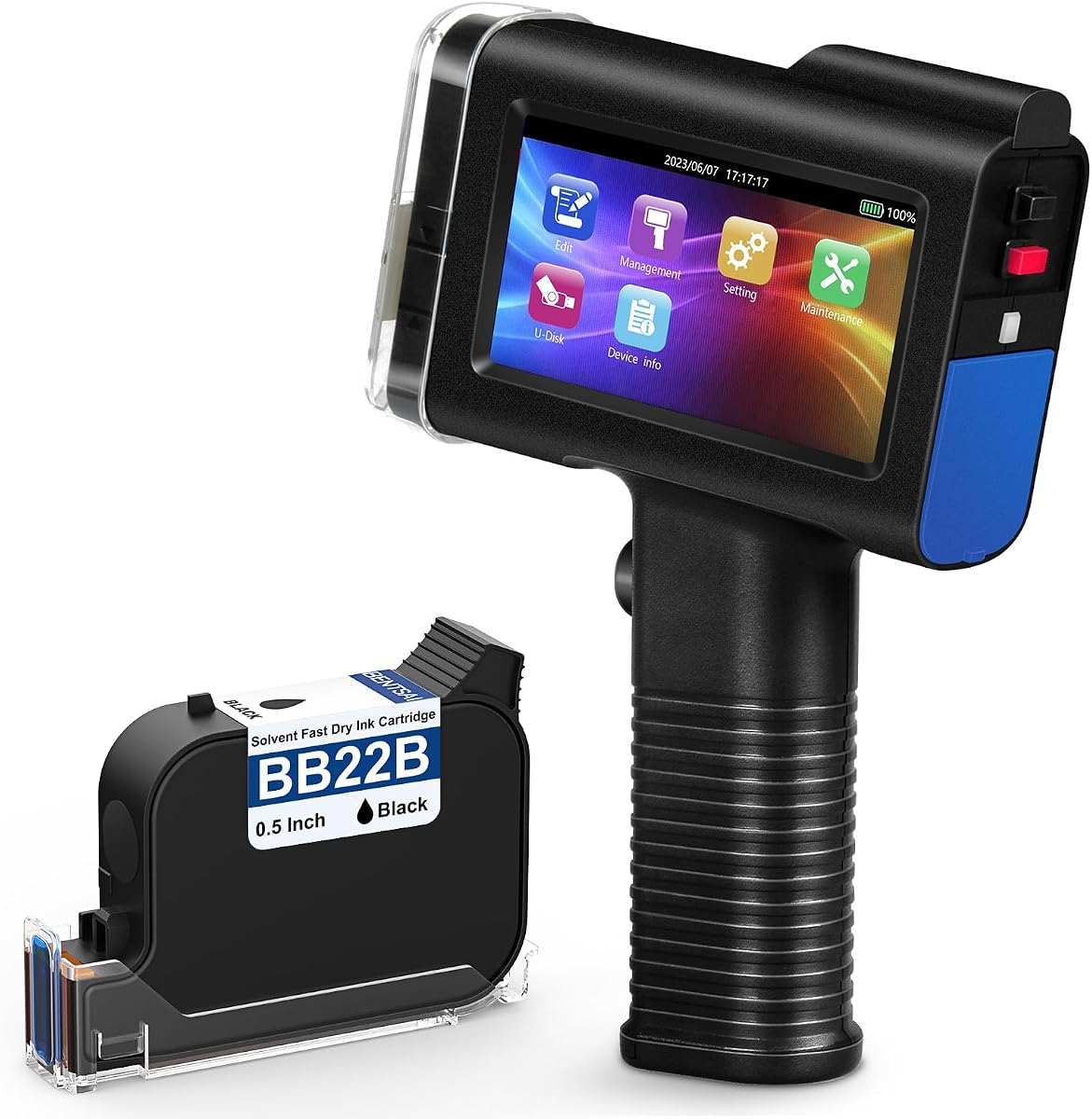
4.4Editor score
This table provides a side-by-side overview of the ten leading models reviewed in this guide. It highlights key specifications to help you quickly identify the best fit for your specific labeling needs.


This model stands out as a top contender in the handheld inkjet printer market. With a rating of 4.7 stars it delivers reliable performance for businesses needing durable and clear markings on various surfaces.
We may earn a commission when you buy through this link, at no additional cost to you.
The 4.3 inch HD capacitive touchscreen offers intuitive navigation allowing users to create templates easily. The 42ml fast-dry ink ensures prints are waterproof and fade-resistant within seconds of application.
While it is slightly heavier than lighter models the extended battery life compensates by enabling up to 16 hours of operation. This makes it ideal for long production shifts without interruptions.
Business owners managing packaging or inventory will appreciate the support for JPG PNG and BMP files. It handles barcodes logos and dates seamlessly making it a versatile tool for any labeling task.
The interface allows direct editing on the touchscreen so you do not need external software for quick changes.
With 28 language interfaces this printer fits seamlessly into international operations and diverse team environments.
We may earn a commission when you buy through this link, at no additional cost to you.
The JC01 model emphasizes portability without sacrificing functionality. It is designed for high-paced environments where workers need to move quickly between labeling tasks on different products.
We may earn a commission when you buy through this link, at no additional cost to you.
Weighing just 390g it includes a wrist strap to prevent accidental drops. The 300-nozzle system ensures clear prints on curved surfaces like bottles and pipes with consistent quality.
Users should note that while durable the lightweight design may feel less robust to some. However the drop-resistant build mitigates most risks during routine industrial use.
The battery life supports all-day use on a single charge. This reliability makes it a strong choice for warehouse staff needing consistent performance throughout long shifts.
The lightweight frame and included wrist strap allow for comfortable one-handed operation during prolonged labeling sessions.
Its system handles various materials including foam and aluminum ensuring broad application across different product types.
We may earn a commission when you buy through this link, at no additional cost to you.
BENTSAI brings premium quality with its BT-HH6105B2 model. It excels in print resolution delivering 600 DPI output for sharp logos and barcodes that scan reliably every time.
We may earn a commission when you buy through this link, at no additional cost to you.
The ink has strong adhesion and dries in 2-5 seconds even on challenging surfaces like cement or leather. This ensures markings remain legible even in tough environments.
While the battery life is slightly shorter at 8 hours the print quality compensates for many users. The ability to mount it on conveyor lines boosts efficiency for automated workflows.
This model is ideal for businesses prioritizing clarity and durability. Its user-friendly interface and protective cap help maintain performance over extended periods of use.
High-resolution printing ensures that barcodes and logos remain crisp and scannable across various materials.
The option to mount on conveyor lines allows for hands-free marking which increases throughput in production settings.
We may earn a commission when you buy through this link, at no additional cost to you.
This printer offers exceptional flexibility with adjustable print heights from 0.03 inches to 1 inch. It is suitable for industries needing variable data sizes on packaging or containers.
We may earn a commission when you buy through this link, at no additional cost to you.
The 5-roller system ensures smoother printing compared to standard models. This design choice reduces wear and improves stability during operation on uneven surfaces like cardboard boxes.
Although the price is higher it delivers industry-leading uninterrupted printing. Users report zero shutdowns on workflow thanks to unique motherboard technology that optimizes power usage.
It is backed by over 100 global patents ensuring robust performance. The ergonomic handle makes extended use comfortable for workers in manufacturing and logistics roles.
Adjustable height settings allow customization for different labeling requirements without needing multiple devices.
The upgraded roller system provides stability that minimizes ink splatter and ensures consistent line quality.
We may earn a commission when you buy through this link, at no additional cost to you.
The Phezer P15 is an excellent budget-friendly option that still offers professional features. It operates independently without needing a computer or app connection for quick labeling tasks.
We may earn a commission when you buy through this link, at no additional cost to you.
It features a built-in memory card and 2000mAh battery providing reliable power for daily operations. The system supports 25 languages which aids in diverse workforce environments.
While it is not as lightweight as other models it remains easy to operate with one hand. The 8+ printing content options allow flexibility for various business needs.
The 42ml quick-drying ink cartridge is included and prevents clogging effectively. This model is ideal for small businesses looking for reliable cost-saving labeling solutions.
No external connectivity is required making setup instant and reducing dependency on IT infrastructure.
Multiple ink colors including UV and invisible options add security and flexibility to product labeling.
We may earn a commission when you buy through this link, at no additional cost to you.
The MS-Z10 offers a balance of portability and performance. It delivers high-resolution performance with up to 600 DPI for clear text and graphics on various materials.
We may earn a commission when you buy through this link, at no additional cost to you.
The positioning plate helps achieve accurate prints on curved surfaces like pipes. This accessory is valuable for DIY workshops and logistics teams handling irregular items.
Users should be aware that the ink is water-resistant but not permanent. It is suitable for temporary markings or short-term inventory tracking rather than long-term branding.
Technical support is available to assist with setup and maintenance. The compact design ensures it is lightweight for on-the-go printing needs.
The included positioning plate improves accuracy ensuring clean prints even on challenging geometries.
Multiple DPI settings allow users to choose between speed and resolution based on their immediate task.
We may earn a commission when you buy through this link, at no additional cost to you.
This model is designed for larger marking needs with a maximum print height of 1 inch. It is suitable for industrial settings where visibility of batch numbers is critical.
We may earn a commission when you buy through this link, at no additional cost to you.
The infrared aiming assist improves positioning accuracy reducing the need for alignment plates. This feature is helpful for workers marking products quickly on assembly lines.
Beginners will find the user manual and simple interface easy to follow. The waterproof ink ensures durability even in environments where moisture is present.
Users receive a complete package with alignment plate and USB cable. The battery life supports continuous operation making it a solid choice for commercial needs.
Infrared assist technology helps users maintain accuracy without physical guides reducing alignment time.
Simple setup and intuitive controls allow new users to start coding immediately without training.
We may earn a commission when you buy through this link, at no additional cost to you.
The XMINI is one of the lightest options available weighing only 0.54 pounds. This makes it exceptionally easy to carry for workers moving between multiple locations.
We may earn a commission when you buy through this link, at no additional cost to you.
It features a 2.4 inch resistive touch screen which is durable and anti-interference. Although smaller it supports all essential functions for effective labeling.
Users should calibrate the screen after receipt to maintain accurate response. The positioner plate helps locate printing positions accurately for consistent results.
It includes a touch pen to avoid accidental touches during operation. This attention to detail ensures a smooth user experience even with a compact design.
The ultra-light design allows for effortless transport making it ideal for mobile labeling tasks.
Essential tools like touch pen and positioner plate are provided to enhance usability out of the box.
We may earn a commission when you buy through this link, at no additional cost to you.
The E12 Mini stands out with its detachable handle that converts to compact mini mode. This allows true pocket-sized portability for tight spaces like warehouse ladders.
We may earn a commission when you buy through this link, at no additional cost to you.
It supports dynamic dates and sequential serial numbers for flexible tracking. The proprietary quick-dry formula achieves waterproof adhesion in under 3 seconds.
Users must note that custom logos are limited to files under 300 kb. This constraint ensures quick processing but may limit complex graphic designs.
Technical support includes step-by-step video tutorials for instant setup. The anti-clog nozzles provide consistent quality even with intermittent use.
Converting to a compact mode makes storage easy in tight spaces without sacrificing print quality.
Support for dynamic data allows real-time updates on product batches without manual re-entry.
We may earn a commission when you buy through this link, at no additional cost to you.
This printer offers a user-friendly interface with an ergonomic grip for comfortable handling. It supports direct USB data upload for efficient batch coding without extra software.
We may earn a commission when you buy through this link, at no additional cost to you.
The 16 hours continuous printing capability ensures seamless all-day performance. This makes it ready to address sudden printing needs at any moment.
The wrist strap prevents drops which is crucial in busy warehouse environments. It balances lightweight design with robust performance for varied surfaces.
It supports variable databases from a USB drive for complex tasks. This feature adds value for businesses needing precise and customized product identification.
Direct USB upload allows quick data updates reducing the time needed for preparation.
Ergonomic grip and wrist strap ensure safety and comfort during prolonged daily use.
We may earn a commission when you buy through this link, at no additional cost to you.
Choosing the right printer requires evaluating several factors including battery life print quality and surface compatibility. This guide outlines the key elements to consider.
Battery capacity determines how long you can work on a single charge. Models offering 16 hours are ideal for full shifts without interruption.
Prioritize units with long endurance if you work in remote areas without easy access to power sources.
Higher DPI ensures clearer text and barcodes that scan easily. Look for models supporting at least 300 DPI for professional results.
If you need high-quality logos check for devices offering 600 DPI capabilities.
Ensure the printer works on your specific materials such as metal plastic or cardboard. Some models handle curved surfaces better than others.
Check for adjustable nozzle systems if you need to print on uneven or rough textures.
Quick-drying ink is essential to prevent smudging. Capacities around 42ml offer a good balance of cost and performance.
Waterproof and fade-resistant inks are recommended for outdoor storage or harsh environments.
Touchscreens should be responsive and intuitive. Look for models with preloaded templates to simplify daily operations.
Multilingual support is crucial if your team includes speakers from different regions.
Lightweight printers reduce fatigue during prolonged use. Features like wrist straps add safety in industrial settings.
Ergonomic handles ensure a comfortable grip which improves accuracy and comfort.
USB ports allow easy importing of logos and batch data. Independence from computers or apps adds convenience.
Check compatibility with file formats like BMP JPG or PNG to avoid conversion issues.
A solid warranty protects your investment against defects. Look for models backed by reliable technical assistance.
Access to user manuals and video tutorials helps resolve issues quickly without downtime.
Begin by charging the battery fully before the first use to ensure maximum capacity. Install the ink cartridge carefully ensuring it clicks into place to avoid leaks.
Create your desired template on the touchscreen using preloaded formats or USB imports. Adjust print height settings based on the surface you are marking.
After each use cover the nozzle with a protective cap to prevent ink from drying out. Clean the rollers and positioning plate regularly with a soft cloth to maintain print quality.
Yes most models come with positioning plates that help guide the printer on curved surfaces. Some units feature specialized nozzle systems designed specifically for round containers.
A single 42ml cartridge can print up to 1 million characters depending on the print size. This yields weeks of regular use for most small business needs.
Most modern handheld printers function independently with their own operating systems. You can edit text and import files directly via USB without a PC.
Many models offer waterproof and fade-resistant ink suitable for industrial environments. Always check specific product details to ensure the ink meets your durability needs.
Yes the high-resolution capabilities of these printers ensure sharp barcodes and QR codes. They are designed to meet standard scanning requirements for logistics.
Always replace the protective cap on the nozzle immediately after use. Store the printer in a cool dry place to avoid extreme temperature changes.
We have reviewed ten top models that excel in battery life print quality and versatility. Whether you choose the Editor's Choice or a budget option each offers distinct benefits.
Prioritize features that match your workflow such as print resolution or portability. Ensuring the device works on your specific surfaces is essential for daily operations.
Remember to check current prices and availability as offers may change over time. Investing in the right model will streamline your labeling process effectively.