
ASUS ROG Raikiri II Pro PC Controller
4.0Editor score
8K sampling rate for low latency
Hot-swappable TMR joysticks included
Full color display for customization
This guide compares the top ASUS ROG Ally controllers for PC and handheld gaming, highlighting connectivity, ergonomics, and customization features for gamers
Finding the right controller for your ASUS ROG Ally or PC setup is crucial for immersive gaming. A quality controller offers precise inputs, comfortable ergonomics, and reliable connectivity to enhance your experience across various genres.
We evaluated ten top-rated models based on connectivity options, build quality, battery life, and customization features. Our analysis focuses on how well each controller integrates with the ROG ecosystem and supports competitive or casual play styles.
Each pick highlights key strengths and potential trade-offs to help you choose the best fit for your needs. Prices and availability change frequently, so please check current listings before making your final purchasing decision today.
4.0Editor score

3.9Editor score

3.9Editor score
This side-by-side comparison evaluates all ten selected controllers based on their core specifications, connectivity options, and unique features to help you make an informed decision for your gaming setup.


The ASUS ROG Raikiri II Xbox Wireless Controller stands out as a versatile option for PC and ROG Ally users. With a solid 3.9 rating, it offers reliable performance through its tri-mode connectivity and anti-drift TMR joysticks.
We may earn a commission when you buy through this link, at no additional cost to you.
Its 1000Hz polling rate ensures ultra-low latency in wired and 2.4GHz wireless modes, enhancing responsiveness during fast-paced gaming. The four programmable rear buttons allow for quick access to complex commands without taking your thumbs off the sticks.
While the rating is decent, some users might find the price point high compared to standard controllers. However, the inclusion of a charging stand and protective case adds value, and the extended 30-hour battery life minimizes downtime during long sessions.
This controller is ideal for gamers who prioritize connectivity flexibility and precision. If you need a reliable input device for both PC and Xbox Ally setups, the Raikiri II delivers strong performance and durability for daily use.
The 1000Hz polling rate combined with ROG SpeedNova technology provides a competitive edge in wireless gaming.
TMR joysticks consume less power and offer better anti-drift performance than traditional Hall Effect alternatives.
We may earn a commission when you buy through this link, at no additional cost to you.
The ASUS ROG Raikiri II Pro PC Controller is engineered for competition-level performance with an 8K sampling rate. Its 4.0 rating reflects high satisfaction among users seeking minimal latency and maximum customization options for their gaming setup.
We may earn a commission when you buy through this link, at no additional cost to you.
Key strengths include the hot-swappable TMR joysticks which allow easy replacement without tools. The full color display lets you customize profiles and calibration on the fly, while the 79-hour battery life ensures extended use without frequent recharges.
The main trade-off is the higher cost compared to standard controllers. While the extra features like additional customizable bumpers and front buttons enhance control, they may not be necessary for casual players who prefer simpler interfaces.
Choose this controller if you demand the highest responsiveness and are willing to invest in premium hardware. It is perfect for competitive gamers who need every advantage in terms of latency and input precision during intense matches.
ROG SpeedNova technology with 8K sampling delivers extremely responsive control for high-stakes gaming scenarios.
The full color display enables quick profile changes and joystick calibration adjustments during gameplay.
We may earn a commission when you buy through this link, at no additional cost to you.
The ASUS ROG Raikiri Pro OLED Display offers an impressive feature set at a competitive price point. With a 3.9 rating, it balances customization and connectivity well for players looking to upgrade their control setup without overspending.
We may earn a commission when you buy through this link, at no additional cost to you.
Its built-in OLED display allows for unique animations and status indicators, adding a personal touch to your controller. Tri-mode connectivity ensures you can connect via USB-C, 2.4GHz RF, or Bluetooth depending on your device and preference.
Some users may find the setup process requires using Armoury Crate for full customization. However, the ability to remap buttons and adjust trigger dead zones offers significant flexibility for different game genres and play styles.
This controller is a strong candidate for gamers who want premium features like an OLED screen and DAC audio at a reasonable cost. It fits well into the ROG ecosystem and supports both PC and Xbox platforms effectively.
Create a unique look with customizable animations and view status indicators on the integrated OLED panel.
The built-in ESS DAC provides immersive audio quality with a 3.5mm jack for direct headphone connection.
We may earn a commission when you buy through this link, at no additional cost to you.
The ASUS ROG Tessen Mobile Gaming Controller is specifically designed for Android phone users seeking console-grade control on the go. Its 4.1 rating highlights user satisfaction with its unique foldable form factor and responsive wired connectivity.
We may earn a commission when you buy through this link, at no additional cost to you.
Key strengths include its ultra-portable design that folds neatly for pocket-sized storage. The secure phone holder supports a wide range of device thicknesses, while the 500Hz polling rate via USB-C ensures zero-latency responsiveness during critical moments.
The limitation is its exclusivity to Android phones and wired connection requirement. While this restricts wireless flexibility, it eliminates battery anxiety through 18W pass-through charging, making it ideal for extended gaming sessions without interruption.
If you primarily play on an Android device and want a controller that combines portability with performance, the Tessen is an excellent choice. It is particularly suited for competitive mobile titles like Warzone Mobile where precision is key.
Experience lightning-fast responsiveness with a 500Hz polling rate via wired USB-C connectivity.
Compatible with phones from 7 to 14.5mm thickness and most protective cases using rubber support pads.
We may earn a commission when you buy through this link, at no additional cost to you.
The ASUS ROG Raikiri Pro Gaming Controller brings an OLED display to the mid-range market with a 3.4 rating. It offers versatile connectivity and extensive customization options for users who value visual feedback and audio quality.
We may earn a commission when you buy through this link, at no additional cost to you.
Its standout features include a built-in OLED display for status indicators and animations. The tri-mode connectivity ensures compatibility across devices, while the up to 48-hour battery life supports long sessions without frequent interruptions or charging stops.
Some users report inconsistencies with software integration via Armoury Crate which might limit customization efficiency. However, the hardware itself remains robust with intuitive rear controls and selectable step triggers for varied gaming preferences and play styles.
This controller is suitable for those who prioritize visual customization and battery life over raw performance metrics. It provides a solid entry into premium ROG features without the higher price tag associated with the Pro II models.
Create a unique look with customizable animations and switch profiles on the fly using the OLED screen.
Up to 48-hour battery life enables nonstop gaming across various devices and connection types.
We may earn a commission when you buy through this link, at no additional cost to you.
The ASUS ROG Raikiri Pro Gaming Controller (Renewed) offers a budget-friendly way to access premium features like an OLED display. While it lacks a public rating, the product is tested and certified to work like new with a warranty included.
We may earn a commission when you buy through this link, at no additional cost to you.
It retains all the customization capabilities of the original model including remappable buttons and adjustable joystick sensitivity. The tri-mode connectivity and up to 48-hour battery life ensure it remains a practical choice for PC and Xbox gaming setups.
Buying renewed products carries some risk regarding cosmetic condition or wear. However, the 90-day warranty provides peace of mind and ensures that functionality is verified before shipping to the customer directly.
This option is ideal for cost-conscious gamers who want high-end specs without paying full retail price. It serves as a reliable alternative for those willing to accept minor cosmetic variations in exchange for significant savings on hardware.
The refurbishing process includes functionality testing, inspection, and repackaging to ensure quality standards.
Comes with a 90-day warranty to cover any potential issues after purchase of the renewed unit.
We may earn a commission when you buy through this link, at no additional cost to you.
The ASUS ROG Xbox Ally is a complete handheld gaming system rather than just a controller. With a 4.3 rating, it stands out for its integration with Xbox Game Pass and its capable AMD Ryzen Z2 A processor performance.
We may earn a commission when you buy through this link, at no additional cost to you.
Its 7-inch 1080p 120Hz display offers vivid visuals and smooth motion for various game genres. The device supports connecting multiple external controllers via dual USB-C ports which enhances multiplayer flexibility and social gaming options at home.
As an all-in-one solution it may not fit users looking solely for a controller to pair with existing setups. However, its battery life and fast charging capabilities ensure extended gameplay sessions without frequent downtime or power interruptions.
If you need a versatile gaming device that functions as both a console and a handheld this system is ideal. It combines ROG hardware design with Xbox software benefits making it a powerful choice for portable gaming enthusiasts.
Boot straight into the Xbox experience and access your full library with Xbox Play Anywhere integration.
A 7-inch 1080p 120Hz display with FreeSync Premium ensures smooth motion and vivid colors.
We may earn a commission when you buy through this link, at no additional cost to you.
The ASUS ROG Raikiri II Xbox Wireless Gaming Controller (Renewed) provides access to advanced features like TMR joysticks at a lower cost. While there is no public rating, it offers reliable connectivity options and strong battery performance for daily gaming.
We may earn a commission when you buy through this link, at no additional cost to you.
It supports 2.4GHz, Bluetooth, and wired connections which ensures flexibility across different gaming platforms and devices. The included travel case adds value for mobile users who want to protect their controller during transport or storage.
As a renewed product the physical condition may vary from unit to unit slightly. However, the core features like anti-slip grip and extended battery life remain intact providing a solid experience for casual and competitive play alike.
Consider this option if you want premium ROG controller features without the full price tag. It is a practical choice for gamers who prioritize performance and connectivity over pristine cosmetic condition on their hardware.
Use low-latency 2.4GHz RF, Bluetooth, or wired USB-C to play on PC and ROG Ally devices.
Up to 50-hour battery life ensures nonstop gaming across long sessions without frequent recharging.
We may earn a commission when you buy through this link, at no additional cost to you.
The CRKD NEO S Wireless Collectible Controller offers unique designs with a 4.3 rating for its Hall Effect thumbsticks and customization options. It stands out for its collectible nature and compatibility with a wide range of gaming platforms including ROG Ally.
We may earn a commission when you buy through this link, at no additional cost to you.
Its Hall Effect sensors ensure precise control without stick drift over time which is crucial for longevity. The re-mappable back buttons and adjustable trigger sensitivity allow users to tailor the controller to their specific gaming style and preferences.
The main limitation is the reliance on a mobile app for customization which might be less convenient for desktop users. However, the swappable stick tops and collectible nature add personality and value beyond standard gaming hardware performance.
This controller is great for players who want both function and style in their setup. It supports multiple platforms seamlessly and provides reliable performance for casual and competitive gaming across various devices and genres.
Hall Effect sensor thumbsticks guarantee precise and responsive control while eliminating stick drift issues.
Bluetooth pairing allows wireless connection to PC, Switch, Steam Deck, and ROG Ally devices.
We may earn a commission when you buy through this link, at no additional cost to you.
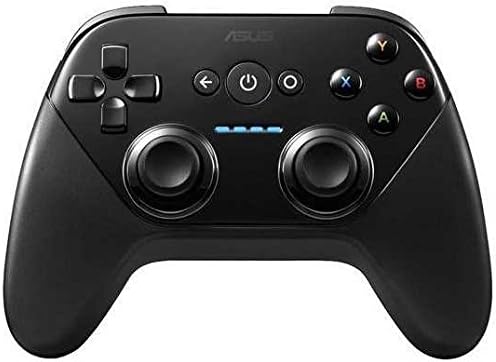
The ASUS TV500BG Gamepad Wireless Gaming Controller is a straightforward option for Android TV and PC users. With a 4.2 rating, it provides reliable control and progress tracking features that integrate well with Google Play Games ecosystems.
We may earn a commission when you buy through this link, at no additional cost to you.
Its primary strength lies in its compatibility with both Android and Windows systems making it versatile for home entertainment. Tracking progress across devices ensures your achievements are saved whether you are playing on a phone tablet or TV.
This controller lacks advanced features like programmable paddles or OLED displays found in newer models. However for basic gaming needs on Android TV it delivers consistent performance and easy pairing without complex setup or configuration steps.
Consider this for simple living room gaming where cost and ease of use matter most. It offers a practical solution for casual gamers who want to enjoy titles on their TV without investing in high-end hardware.
Track your progress and earn achievements across your Android phone, tablet, and TV seamlessly.
Engineered for accurate control in Android TV and PC games ensuring consistent input reliability.
We may earn a commission when you buy through this link, at no additional cost to you.
Selecting the right controller involves evaluating connectivity, battery life, and customization features to match your gaming habits and hardware setup.
Most modern controllers offer tri-mode connectivity including USB-C, Bluetooth, and 2.4GHz RF. Choose 2.4GHz for low-latency gaming and Bluetooth for convenience when mobility is prioritized.
Ensure the controller supports your specific console or PC platform to avoid compatibility issues during setup.
Longer battery life reduces interruptions during extended play sessions. Models offering over 30 hours allow for days of use on a single charge depending on usage patterns.
Look for fast charging capabilities if you prefer quick top-ups over waiting for a full charge cycle.
TMR and Hall Effect joysticks are preferred for their anti-drift performance and precision. Traditional potentiometer sticks may degrade faster under heavy use.
Prioritize models with hot-swappable modules if you plan to replace worn parts without buying a new controller.
Programmable rear buttons allow quicker access to complex commands and actions. This feature is essential for competitive gaming or complex RPG navigation.
Software support for button remapping and sensitivity adjustments ensures you can fine-tune the controller to your preferences.
Ergonomic grips and durable materials ensure comfort during long sessions. Look for anti-slip textures and balanced weight distribution to prevent hand fatigue.
Premium models often include accessories like protective cases or charging stands which add value and protect your investment.
Controllers with OLED displays provide status indicators and animations that enhance user experience. These are useful for quick profile changes without navigating menus.
Consider if visual customization is important to you or if functional features take priority over aesthetic elements.
Verify if the controller is certified for Xbox or PC to ensure full feature support. Some models work better with specific ecosystems like ROG Ally than others.
Check for support for mobile platforms if you plan to use the controller on Android phones or tablets occasionally.
Higher prices often correlate with advanced features like 8K sampling rates or OLED displays. Assess which features you truly need versus those that are luxury additions.
Consider renewed options for significant savings if you are comfortable with minor cosmetic variations on the hardware.
To start using your controller, connect it via USB-C, Bluetooth, or the 2.4GHz dongle depending on your preferred mode. Install Armoury Crate software if you wish to remap buttons or adjust sensitivity settings.
For maximum battery life, disable RGB lighting and vibration when not in use. This can significantly extend the time between charges and reduce wear on internal components.
Clean the joystick caps and buttons regularly with a soft dry cloth. Avoid using water or harsh chemicals that could damage the internal electronics or sensors over time.
Yes, most models in this guide support the ROG Xbox Ally via USB-C or 2.4GHz connectivity. They are designed to integrate seamlessly with the ROG ecosystem for optimal performance and compatibility.
Both TMR and Hall Effect joysticks use magnetic sensing to prevent drift. TMR joysticks typically consume less power and offer precise tracking compared to traditional potentiometers in standard controllers.
Several models support Android and iOS devices via Bluetooth or USB-C adapters. Always check the product specifications to confirm mobile compatibility and pairing instructions for your specific phone.
Most advanced features like remapping and trigger adjustment require Armoury Crate software. Some basic settings can be managed via on-device buttons or companion apps depending on the model.
Battery life varies by model ranging from 30 to 79 hours depending on usage. Features like RGB lighting and vibration can reduce this time, so turning them off extends battery life significantly.
Standard warranty policies apply to new products while renewed items often come with 90-day coverage. Check the product page for specific warranty details and support options before purchasing.
We have reviewed ten top controllers ranging from budget-friendly mobile options to high-performance PC models. The ROG Raikiri II Pro offers ultimate performance while the Tessen caters to mobile gamers effectively.
Prioritize connectivity, battery life, and ergonomic comfort when making your decision. Features like TMR joysticks and programmable buttons can significantly enhance your gameplay experience across different genres.
Remember to check current prices and availability before purchasing as these may fluctuate. Choose the model that best aligns with your gaming habits and budget to ensure the best overall experience.