
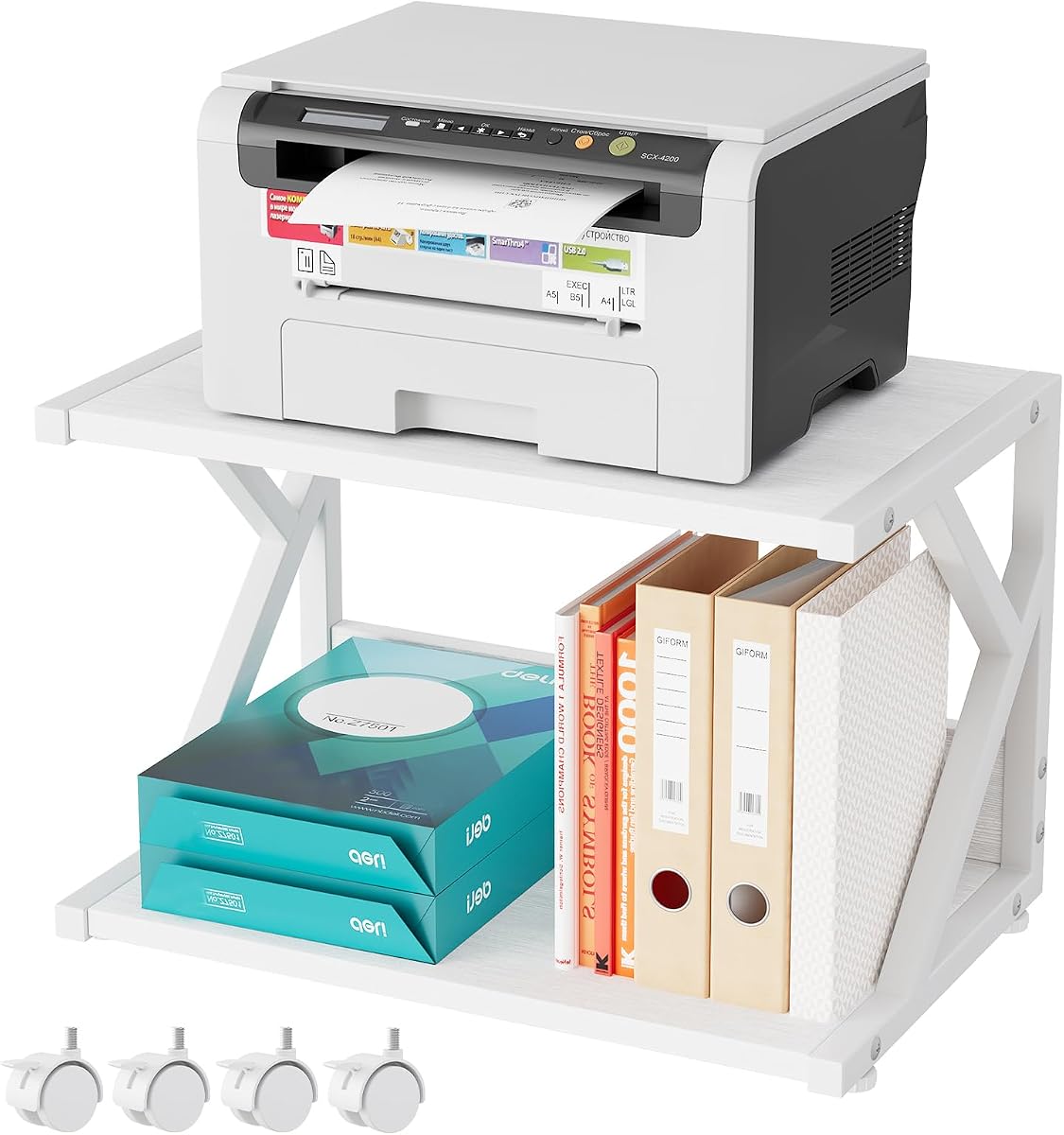
YATINEY Desktop Printer Stand
4.7Editor score
Z-shaped modern design
Easy assembly under ten minutes
Versatile multi-purpose use
Finding the right desktop printer stand can transform your workspace into a more efficient and organized environment. A quality stand elevates your printer to a comfortable height while freeing up valuable desk surface for other tasks. It also provides essential storage space for supplies like paper, ink, and documents.
We evaluated ten highly rated options based on durability, storage capacity, ease of assembly, and overall design. Each product was assessed for its ability to support various printer models and integrate seamlessly into different office styles. Our comparison highlights the strengths and unique features of every stand on this list.
Each pick below showcases specific details about construction, dimensions, and ideal use cases to help you make an informed decision. Please note that product availability and pricing can fluctuate over time so check current listings for the latest offers. Use this guide as a reliable starting point for your search.
4.7Editor score

4.8Editor score

4.7Editor score
As an Amazon Associate we earn from qualifying purchases.
The following table provides a side-by-side comparison of all ten desktop printer stands featured in this guide to help you quickly identify key specifications and features that matter most to your workspace setup.


The YAOHUOO 2-Tier Desktop Printer Stand stands out as a top choice for those seeking reliable organization. With a high user rating, it combines sturdy construction with practical features like a fabric drawer and open shelving. This stand supports various printer models while keeping your workspace tidy.
We may earn a commission when you buy through this link, at no additional cost to you.
Its 2-tier design offers ample space for two printers or a printer and accessories. The middle open shelf provides flexible storage for files or plants. The included drawer keeps small items like ink cartridges private and accessible without cluttering the desk surface.
While the fabric drawer is convenient, it may not be as durable as solid wood over long-term heavy use. Additionally, the black finish requires regular dusting to maintain its sleek appearance. These minor trade-offs are acceptable given the overall value and functionality offered.
This stand is ideal for home offices needing compact storage without sacrificing stability. If you want a balance of aesthetics and utility, the YAOHUOO model is a strong recommendation. It fits well on most desks and supports standard printers effectively.
The open design allows easy access to printers and supplies without needing to open doors or drawers.
Spills and stains can be wiped clean quickly thanks to the waterproof MDF surface.
We may earn a commission when you buy through this link, at no additional cost to you.
The YATINEY Desktop Printer Stand PS02BR offers exceptional value for budget-conscious buyers. Its Z-shaped design adds a modern touch to any room while providing functional storage. Users appreciate the ease of assembly and the sturdy build quality for the price.
We may earn a commission when you buy through this link, at no additional cost to you.
Each tier supports up to 44 lbs ensuring stability for most desktop printers. The open design keeps files and supplies within easy reach without cluttering your desk. This stand works well in offices, kitchens, or living rooms for various storage needs.
Keep in mind that assembly tools are sometimes not included requiring you to use your own. The open shelves may collect dust more than enclosed units so regular cleaning is needed. These points are minor given the overall affordability and design flexibility.
This stand is perfect for those wanting style and function without a high cost. It suits small spaces where a compact footprint is essential. If you need a reliable and affordable printer shelf, this YATINEY model is a top contender.
The angled structure saves space and adds a distinctive look to your desk setup.
Works great as a spice rack or display stand beyond just holding printers.
We may earn a commission when you buy through this link, at no additional cost to you.
The FITUEYES Large Desktop Printer Stands delivers premium storage solutions for larger workspaces. Its generous dimensions support oversized printers while offering three compartments for organized storage. The stackable feature adds flexibility for growing office needs.
We may earn a commission when you buy through this link, at no additional cost to you.
Non-slip rubber feet protect your desk from scratches and prevent movement during use. Assembly is straightforward with all necessary hardware provided. The black finish blends well with most modern office decor styles.
Due to its size it may not fit on smaller desks without careful planning. The weight ensures stability but makes relocation slightly more difficult. These factors are acceptable for users prioritizing capacity and durability over portability.
Ideal for professional offices or heavy printer users needing maximum storage. If you have a large printer and need room for supplies this stand is highly recommended. It balances capacity with style effectively.
Stacking units vertically allows you to increase storage without expanding footprint.
Spacious top shelf fits even larger business printers without crowding.
We may earn a commission when you buy through this link, at no additional cost to you.
This Printer Stand for Desk is built for robust performance with a 100 lb capacity. It exceeds typical limits making it safe for heavy-duty printers or stacked equipment. The design prioritizes safety with rounded corners and anti-slip pads.
We may earn a commission when you buy through this link, at no additional cost to you.
It serves multiple roles such as a bookshelf or plant stand adding versatility. Assembly is simple allowing quick setup in any room. The sturdy frame ensures no wobbling even with heavy loads on top.
Its industrial look might not suit all decor styles. For small home printers it may seem larger than necessary. These are minor downsides given the exceptional strength and safety features provided.
Best for offices needing reliable support for heavy equipment. If durability and safety are priorities this stand is a smart investment. It handles demanding tasks with ease.
Rounded edges prevent accidental bumps and protect desk surfaces from damage.
Works equally well as a plant stand or kitchen spice rack.
We may earn a commission when you buy through this link, at no additional cost to you.
The Marbrasse Metal Printer Stand offers practical organization with dedicated pen holders. It keeps your desk tidy by housing pens and paper within easy reach. The metal construction ensures longevity and resists rust effectively.
We may earn a commission when you buy through this link, at no additional cost to you.
A storage drawer adds privacy for documents and supplies. The letter tray manages loose papers efficiently. Assembly is quick allowing you to start organizing right away.
Pen holders may not fit larger markers or scissors. The mesh design can trap dust requiring occasional cleaning. These are minor issues for such a functional organizer.
Ideal for desks needing extra organization for writing tools. If you value quick access to stationery this stand is useful. It combines storage with utility well.
Hanging holders save desk space and keep writing tools accessible.
Steel frame and mesh ensure long-term stability and resistance to wear.
We may earn a commission when you buy through this link, at no additional cost to you.
The HUANUO Printer Stand provides excellent mobility with optional locking wheels. It allows you to move your printer easily between locations. The adjustable height fits seamlessly under most desks for space savings.
We may earn a commission when you buy through this link, at no additional cost to you.
A storage drawer with dividers organizes accessories neatly. The stackable design simplifies assembly without tools. It supports up to 38.5 lbs which covers most home printers.
Wheels are optional so you must install them for rolling. The max height may not suit all desk types. These considerations are minor for such a versatile cart.
Best for users needing to relocate printers often. If under desk storage is key this stand is ideal. It combines function with flexibility.
Locking casters let you move and secure the unit as needed.
Fits under tables to free up valuable desktop space for work.
We may earn a commission when you buy through this link, at no additional cost to you.
This Printer Stand with Storage features a unique foldable fabric drawer for flexibility. The dual-rod system ensures stability for heavy printers. It offers three tiers which can hold two printers simultaneously if needed.
We may earn a commission when you buy through this link, at no additional cost to you.
The vintage particle board adds rustic charm to any room. It supports printers and supplies effectively. Assembly is straightforward with clear instructions provided.
The fabric drawer may not last as long as solid storage. Particle board is less resistant to moisture than wood. These trade-offs are acceptable for the price and design.
Perfect for those wanting stylish storage on a budget. If you need space for multiple devices this stand is practical. It blends utility with aesthetics well.
Enhanced stability prevents wobbling even with heavy loads on shelves.
Drawer folds away when not needed to save floor space.
We may earn a commission when you buy through this link, at no additional cost to you.
The YATINEY PS01BR offers a hidden non-woven drawer for discreet storage. It keeps private documents out of sight while maintaining an open feel. The assembly takes about ten minutes making setup fast.
We may earn a commission when you buy through this link, at no additional cost to you.
Open shelves allow easy reach to papers and books. The chipboard frame is durable and easy to wipe down. It fits well in offices and study rooms.
The drawer is not waterproof so keep liquids away. The industrial look might not match all decor. These points are minor given the functionality.
Ideal for needing private storage with quick access. If you want simplicity and privacy this stand works well. It balances openness with security.
The bottom drawer keeps sensitive papers secure and out of sight.
Simple structure allows setup in minutes without complex steps.
We may earn a commission when you buy through this link, at no additional cost to you.
This HOOBRO stand includes a charging station with outlets and USB ports. It allows you to charge devices while printing. The compact size fits small corners without crowding your workspace.
We may earn a commission when you buy through this link, at no additional cost to you.
Storage hooks hold cables or bags keeping things tidy. The industrial look adds style. Assembly is quick with numbered parts.
Small printers fit best due to limited dimensions. USB charging may not be fast for tablets. These are acceptable for a compact design.
Great for small desks needing charging convenience. If you want a compact unit with power options this stands out. It is practical for modern workspaces.
Outlets and USB ports allow simultaneous device charging and printing.
Compact footprint leaves more room for your keyboard and monitor.
We may earn a commission when you buy through this link, at no additional cost to you.
The aboxoo Desktop Printer Stand lets you choose between wheels or fixed pads. This flexibility suits different room needs. The waterproof surface resists scratches and spills effectively.
We may earn a commission when you buy through this link, at no additional cost to you.
A white finish complements modern decor. It holds up to 44 lbs per layer ensuring reliability. Assembly takes fifteen minutes with clear steps.
White surfaces require frequent cleaning to stay bright. Larger prints may need two people to assemble. These are minor concerns for a versatile stand.
Ideal for those needing mobility options or modern style. If you want scratch resistance and flexibility this stand is great. It fits various environments well.
Customize stability or mobility based on your specific needs.
Waterproof and scratch-resistant finish ensures long-lasting use.
We may earn a commission when you buy through this link, at no additional cost to you.
Selecting the right printer stand involves considering size, material, storage needs, and design compatibility with your space.
Measure your printer and available desk space before purchasing. Ensure the top shelf width and depth accommodate your printer with room for cables.
Check height clearance especially if placing under a desk to avoid hitting overhead cabinets.
Metal frames offer better stability while wood provides a warmer look. Look for waterproof or scratch-resistant surfaces to protect against spills.
Choose materials that match your office aesthetic and withstand daily use.
Decide if you need open shelves for quick access or drawers for privacy. Multi-tier stands allow you to store supplies like paper and ink.
Consider hidden storage options to keep your desk tidy.
Some stands include optional wheels for moving the unit easily. If you need mobility ensure the wheels lock securely for stability.
Fixed feet provide better stability for heavy printers on desks.
Check if tools are included or if you need to provide your own. Look for clear instructions and labeled parts for quick setup.
Some models offer tool-free assembly saving time and effort.
Choose a color and finish that matches your existing furniture. Industrial, modern, or rustic styles can enhance your office decor.
Ensure the stand blends seamlessly with your workspace.
Verify the stand supports your printer's weight plus any extra equipment. Most stands hold between 40 to 100 lbs safely.
Higher capacity ensures safety for larger printers.
Look for features like charging stations, pen holders, or adjustable height. These add value and convenience to your workspace.
Select stands with features that match your workflow needs.
Place the stand on a flat stable surface and assemble according to instructions to ensure safety. Check all screws and joints are tight before placing your printer on top.
Keep the surface clean by wiping it with a soft dry cloth regularly. For waterproof surfaces use a damp cloth to remove dust and spills.
If your stand has wheels ensure they are locked when stationary to prevent sliding. Periodically check the stability of legs and shelves to avoid accidents.
Measure your printer's width depth and height to ensure fit. The stand should support the weight and provide space for cables.
Yes many stands are designed to fit under desks with adjustable height. Check clearance height before purchasing.
Use a soft damp cloth to wipe dust and dry immediately. Avoid harsh chemicals to protect the finish.
Most stands include clear instructions and require basic tools. Assembly typically takes 10 to 20 minutes.
Some models offer optional or included wheels. Check the product specs before purchasing for mobility features.
Metal frames and scratch-resistant surfaces offer the best durability. Wood with waterproof coating is also a good option.
The YAOHUOO 2-Tier Desktop Printer Stand stands out as the top pick for overall organization and value. The YATINEY PS02BR offers excellent budget-friendly functionality while the FITUEYES model provides premium storage capacity.
Prioritize size weight capacity and storage needs when making your choice. Ensure the design matches your office style and that assembly is simple for your skill level.
Prices and availability can change so verify current details on product pages before buying. Use this guide as a trusted resource to find the perfect stand for your workspace.