
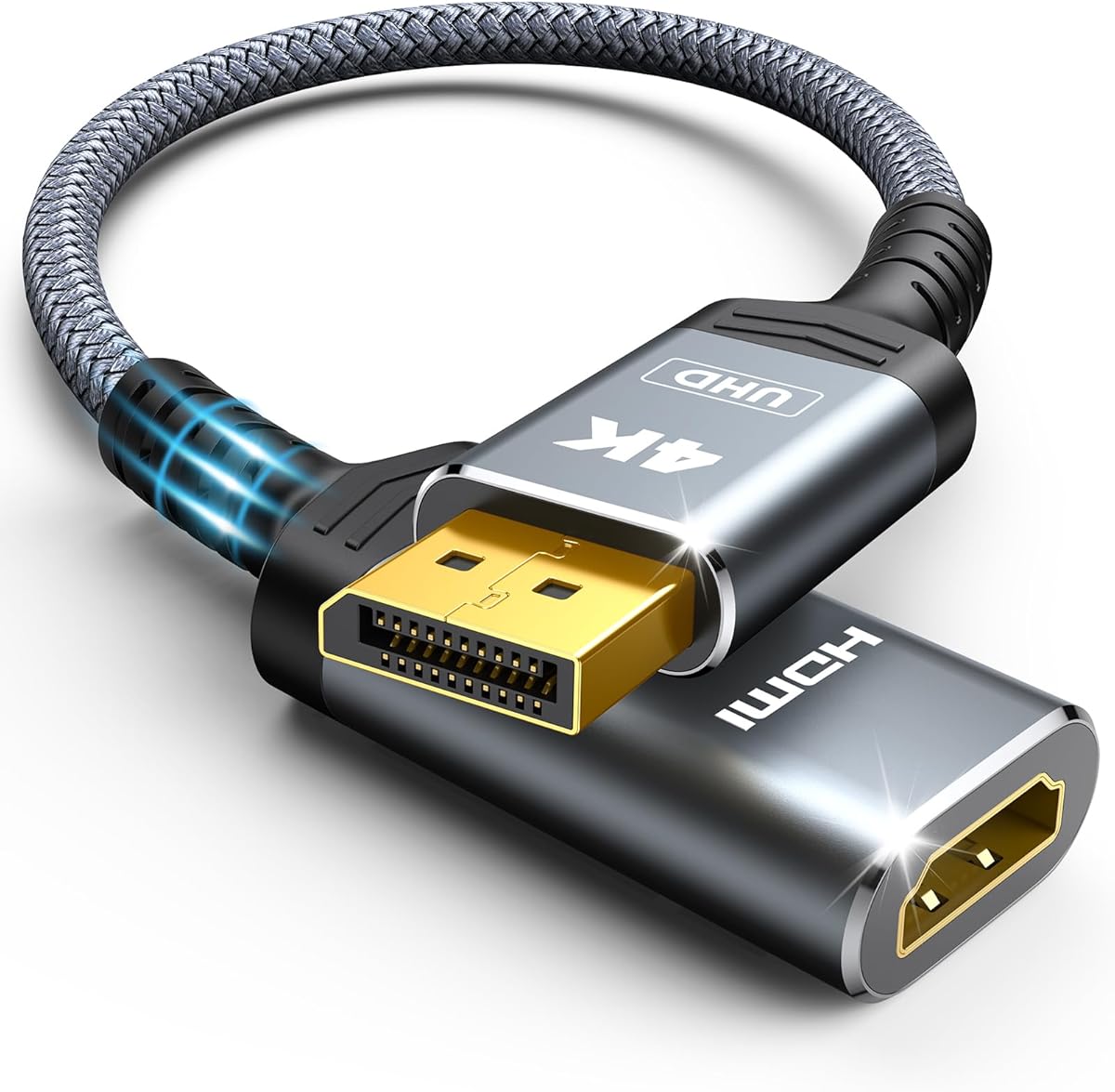
Moread 4K DisplayPort to HDMI Adapter
4.6Editor score
Compact lightweight portable design
Gold plated connectors for stability
Supports 1080p at 120Hz
This guide compares the top HDMI to Displayport Converter models for reliable video signal conversion, high resolution support, and broad device compatibility
Connecting modern devices to legacy monitors often requires specific adapters to ensure seamless video and audio transmission. A high-quality HDMI to Displayport Converter bridges this gap effectively. Selecting the right one ensures stable signal conversion without compromising visual fidelity or audio clarity during daily use or professional presentations.
Our evaluation process focused on compatibility, resolution support, build quality, and user feedback across multiple scenarios. We analyzed technical specifications including bandwidth capabilities, power requirements, and connector durability. This list covers the most reliable options available, ranging from passive adapters for PCs to active converters for gaming consoles.
Each product review highlights specific strengths and limitations to help you match the adapter to your unique setup needs. Note that availability and pricing may vary over time due to market conditions. Always verify current stock and compatibility details before purchasing to ensure the device meets your specific resolution and refresh rate requirements.
4.6Editor score
4.6Editor score

4.4Editor score
The following table provides a side-by-side comparison of all ten selected models, highlighting key specifications such as resolution limits, connector types, and specific use cases to help you make an informed decision quickly.



This adapter is a top choice for users needing to connect a DisplayPort source to an HDMI display. It receives high ratings for reliability and consistent signal transmission. The build quality reflects attention to detail, making it suitable for professional environments where uptime matters.
We may earn a commission when you buy through this link, at no additional cost to you.
It supports up to 4K at 30Hz and backward compatible with lower resolutions like 1080p. The gold-plated ports and flexible nylon design help prevent physical wear over time. This ensures long-term usability without frequent replacement or connection issues during important presentations.
Users should note it is unidirectional and does not support HDMI source devices. High-resolution transmission can cause slight heating which is normal for this technology. Ensure your display supports the refresh rate settings to avoid flickering or signal loss during extended use sessions.
Buy this if you have a PC with a DisplayPort output and need a reliable link to an HDMI monitor. It stands out for its balance of performance and durability. Most users find it delivers exactly what is promised without unexpected technical failures or setup complications.
The advanced conversion chip ensures that video signals remain stable and clear during extended usage sessions without dropout or visual artifacts.
Military-grade tensile nylon and gold-plated ports provide exceptional resistance against wear and corrosion for long-term reliability.
We may earn a commission when you buy through this link, at no additional cost to you.
This model offers a cost-effective solution for connecting laptops with DisplayPorts to HDMI monitors. It is highly rated for its stability and simple plug-and-play functionality. Users appreciate the secure connection provided by the latches which prevent accidental disconnections.
We may earn a commission when you buy through this link, at no additional cost to you.
It supports high-resolution video up to 4K at 30Hz ensuring clear visuals for work or entertainment. The compact design makes it easy to carry in a bag for business travel. An 18-month warranty provides additional peace of mind regarding product longevity and customer service.
Keep in mind it does not support HDMI to DisplayPort conversion which limits flexibility for some setups. It is a passive adapter meaning no external power is needed for most devices. Ensure your device supports DisplayPort Alternate Mode for full compatibility and proper signal handshaking.
Consider this if you need a reliable and budget-friendly adapter for occasional or regular office use. It performs well for standard tasks like screen mirroring or extending displays. The value proposition is strong given the warranty coverage and consistent performance over time.
Built-in latches on the DisplayPort connector ensure a firm grip that prevents accidental unplugging during movement.
The lightweight profile allows easy storage in pockets or laptop bags for presentation readiness on the go.
We may earn a commission when you buy through this link, at no additional cost to you.
This adapter is designed for users with HDMI output devices like gaming consoles or laptops needing DisplayPort monitors. It uses active conversion to ensure signal compatibility which passive adapters cannot provide. The need for USB power ensures consistent performance even at higher resolutions.
We may earn a commission when you buy through this link, at no additional cost to you.
It supports video up to 4K at 30Hz making it suitable for detailed work or media consumption. The gold-plated connectors and sturdy housing reflect a premium build quality intended for durability. Users report fewer flickering issues compared to cheaper alternatives in this category.
The requirement for a USB power source adds a step to the setup process which some may find less convenient. It is not recommended for use with DisplayPort KVM switches due to potential compatibility constraints. Always check your source device capabilities before purchasing to avoid mismatched expectations.
Buy this if you need a reliable link from HDMI to DisplayPort for professional or creative workflows. The active chip ensures compatibility that passive models lack. While it costs more the stability and performance justify the investment for critical display needs.
Unlike passive adapters this model converts HDMI signals actively ensuring compatibility with monitors requiring DisplayPort input.
Included USB cable provides necessary power for stable signal transmission at high resolutions without flickering.
We may earn a commission when you buy through this link, at no additional cost to you.
This adapter is notable for supporting higher refresh rates like 144Hz and 60Hz for 4K which many standard adapters lack. It is designed for HDMI sources such as consoles or PCs connecting to DisplayPort monitors. Users appreciate the smooth video experience for gaming or dynamic content.
We may earn a commission when you buy through this link, at no additional cost to you.
It includes a USB power cable to ensure stable signal transmission especially at higher bandwidths. The active conversion chip handles the necessary signal translation efficiently. Compatibility covers a wide range of devices including popular gaming consoles and laptops with HDMI outputs.
The USB power requirement means you need an available port which can be a constraint on crowded desks. It is not compatible with VR headsets or KVM switches which limits specific use cases. Always check your monitor supported refresh rates to maximize the benefit of this adapter.
Choose this if you need high refresh rates for gaming or smooth motion video playback. It fills a gap for users with HDMI sources needing DisplayPort displays at higher speeds. The performance for a solid alternative to more expensive specialized solutions.
Capable of 2K at 144Hz and 4K at 60Hz for fluid visuals ideal for gaming and animations.
Works with major consoles and PCs making it versatile for home entertainment and work environments.
We may earn a commission when you buy through this link, at no additional cost to you.
This adapter stands out with an impressive five-year warranty indicating strong confidence in its durability. It connects DisplayPort sources to HDMI displays effectively for daily tasks like presentations or media viewing. The build quality is robust with a reinforced housing that withstands regular handling.
We may earn a commission when you buy through this link, at no additional cost to you.
It supports video up to 4K at 30Hz and offers clear audio pass-through without distortion. The latches on the connector ensure a secure fit preventing accidental disconnections. Users often recommend it for its reliability and consistent performance over extended periods of use.
As a passive adapter it does not support HDMI sources which limits its flexibility for some users. It is designed specifically for computers with DP ports connecting to standard HDMI monitors. Ensure your display settings match the supported refresh rates to avoid potential signal issues.
Buy this if you want a dependable adapter backed by a strong warranty for long-term use. It is a solid choice for office or home setups where stability is prioritized over advanced features. The balance of price and performance makes it a top contender in its class.
An unconditional five-year warranty offers extensive protection and confidence in product longevity.
The DisplayPort connector includes latches to maintain a firm connection during transport or vibration.
We may earn a commission when you buy through this link, at no additional cost to you.
This adapter focuses on high-speed video transmission supporting 4K at 60Hz for smooth visuals. It is designed for HDMI sources connecting to DisplayPort monitors making it ideal for gaming or media playback. The aluminum housing provides effective heat dissipation to maintain signal integrity during use.
We may earn a commission when you buy through this link, at no additional cost to you.
It complies with the HDCP 2.2 standard ensuring compatibility with protected content sources. Users report it works well with a variety of devices including PCs and consoles without needing extra software. The gold-plated connectors help reduce signal loss and improve longevity against wear.
While it handles high resolutions well it may not support specific VR headsets or advanced switching setups. It is unidirectional so ensure your source has an HDMI port and display has DisplayPort. Always verify your device power requirements to ensure stable performance without flickering.
Choose this if you need reliable high-speed video output for gaming or entertainment systems. It balances performance and build quality effectively for most general needs. The compatibility with modern standards makes it a versatile option for diverse setups.
Supports 4K at 60Hz ensuring smooth and detailed visuals for modern applications.
Aluminum casing resists corrosion and aids heat dissipation for stable operation.
We may earn a commission when you buy through this link, at no additional cost to you.
This pack offers two adapters which is excellent for users with multiple devices needing connections. Each unit supports 4K video output making it suitable for high-definition presentations and viewing. The aluminum housing adds a premium feel and improves heat dissipation during operation.
We may earn a commission when you buy through this link, at no additional cost to you.
Users find it convenient for setups involving multiple computers or workstations that need HDMI output. It is a passive adapter meaning no power cable is required for most standard displays. Compatibility covers most PCs and laptops with DisplayPorts connecting to standard HDMI monitors.
Since it is unidirectional it cannot be used to connect HDMI sources to DisplayPort displays. Ensure your device supports DisplayPort Alternate Mode for proper functionality. The two-pack value is strong for offices or homes with mixed device configurations.
Buy this if you need reliable adapters for multiple displays at a reasonable price. It provides consistent performance and build quality across both units. The packaging and design reflect attention to user convenience for everyday connectivity needs.
Includes two adapters for multi-device setups reducing the need for future purchases.
Anti-corrosion housing extends usage life and helps manage heat during long sessions.
We may earn a commission when you buy through this link, at no additional cost to you.
This model features a short cable design ideal for setups where space is tight or clutter is a concern. The braided sheath adds significant durability protecting the internal wires from wear and tear. Users appreciate the robust build and consistent performance in daily use.
We may earn a commission when you buy through this link, at no additional cost to you.
It supports 4K video at 30Hz and includes detailed audio channels for immersive sound. The strain relief at both ends helps prevent connection damage from repeated bending. The aluminum housing ensures better heat dissipation which maintains signal quality over time.
The short length limits placement options so ensure your devices are close enough for connection. It is a passive adapter requiring no external power for most standard laptops and PCs. Check your monitor settings to match the supported refresh rates for optimal visual quality.
Choose this if you need a durable and neat solution for close-proximity connections. It combines reliability with a high-quality design that stands out in the category. The short length makes it perfect for compact workstations or travel setups.
The braided sheath protects the cable from daily wear and increases overall lifespan.
At 0.66ft it reduces clutter and keeps connections neat on crowded desks.
We may earn a commission when you buy through this link, at no additional cost to you.
This adapter excels at converting HDMI signals to DisplayPort with support for high refresh rates up to 144Hz. It is designed for HDMI sources like gaming consoles or PCs needing DisplayPort monitors for smooth visuals. The braided cable design adds a layer of physical protection against daily stress.
We may earn a commission when you buy through this link, at no additional cost to you.
It supports 4K video at 60Hz and high-definition audio for immersive experiences. The aluminum casing helps manage heat which is crucial for active conversion chips. Users report stable connections when the USB power cable is properly connected to a power source.
The need for external power adds a requirement that passive adapters do not have. Ensure your device has an available USB port to support the adapter chip. Compatibility is broad but verify your source device capabilities before purchasing for best results.
Buy this if you need high refresh rates and reliable performance for gaming or media. It bridges the gap between HDMI sources and DisplayPort displays effectively. The build quality and performance justify the setup requirements for demanding use cases.
Capable of 144Hz and higher for fluid visuals in gaming and motion content.
Braided nylon provides extra protection against wear and physical stress.
We may earn a commission when you buy through this link, at no additional cost to you.
This adapter provides a stable conversion from HDMI to DisplayPort for various devices including consoles and PCs. It supports high-resolution video and audio making it suitable for entertainment and work. The compact design allows for easy storage and portability when traveling or working remotely.
We may earn a commission when you buy through this link, at no additional cost to you.
It uses a built-in IC chip to convert signals ensuring compatibility with monitors requiring DisplayPort. Users appreciate the reliable performance and audio quality provided by the 8 channel support. The design keeps heat in check for consistent operation during extended sessions.
Ensure your source device has an HDMI output and your monitor has DisplayPort for proper function. It requires external power which may limit placement options slightly. Always check your display settings to match the supported refresh rates for the best viewing experience.
Consider this if you need a reliable converter for HDMI sources to DisplayPort displays. It offers a good balance of performance and portability for general use. The broad compatibility makes it a versatile choice for mixed device environments.
Lightweight and small for easy transport and setup anywhere.
Built-in IC chip ensures consistent signal conversion and stability.
We may earn a commission when you buy through this link, at no additional cost to you.
Selecting the right adapter requires understanding your specific device outputs and display inputs to ensure compatibility and performance.
Always verify whether you need to convert from HDMI to DisplayPort or vice versa as most adapters are unidirectional. Using a DP to HDMI adapter on an HDMI source will not work regardless of brand or price point.
Choose a converter that matches your source device output to your monitor input to avoid compatibility issues.
Check the maximum resolution supported by the adapter such as 4K at 30Hz or 60Hz to match your display capabilities. High refresh rates like 144Hz are essential for gaming or dynamic content but require specific active adapters.
Ensure the adapter supports your monitor native resolution to avoid visual glitches or black screens.
Passive adapters work when the source supports DisplayPort Alternate Mode usually for PCs while active adapters need a chip to convert HDMI to DP actively. Active converters are necessary for HDMI sources like consoles or older laptops lacking alternate mode support.
Select active adapters for HDMI sources to ensure reliable signal handshaking with DisplayPort displays.
Active adapters often require external USB power to maintain stable signal transmission at high resolutions. Ensure you have an available USB port on your source device to power the adapter properly.
Verify if the adapter comes with a power cable to avoid interruptions during use.
Look for features like gold-plated connectors and reinforced housings that resist corrosion and physical wear over time. Braided nylon cables or aluminum casings provide additional protection against damage.
A durable build ensures the adapter lasts longer and reduces the need for frequent replacements.
Check the manufacturer warranty period which can range from 18 months to 5 years depending on the brand. Strong support and warranty terms provide peace of mind regarding potential defects or compatibility issues.
Prefer brands with clear customer service channels for resolving technical problems quickly.
To set up your adapter connect the source end to your device output and the display end to your monitor. Ensure all connections are secure to prevent intermittent signal loss or visual flickering.
If using an active adapter plug the USB power cable into a compatible port on your source device. Verify that your display is powered on and set to the correct input source to detect the signal properly.
Handle the adapter gently during plugging and unplugging to avoid damaging the connectors. Store it in a cool dry place when not in use to maintain its physical condition over time.
Yes if the adapter supports HDMI to DisplayPort conversion and you have an HDMI output on your console. Ensure you choose an active converter that can handle the necessary bandwidth for gaming. Not all adapters support consoles so check compatibility carefully.
MacBooks with DisplayPort Alternate Mode support work with passive adapters while older models may require active converters. Check your specific model specifications to confirm compatibility with DisplayPort outputs. Some newer MacBooks only support HDMI requiring a different setup.
Flickering often occurs due to incompatible resolution settings or insufficient power for active adapters. Ensure your display settings match the supported refresh rates and connect any required USB power source. Rebooting your device can also help reset the signal handshake.
Most adapters support audio pass-through but check specifications to confirm they handle your desired audio channels. High-quality converters will support digital audio formats ensuring sound is transmitted along with video.
HDMI to DP converters take HDMI output from devices like consoles and convert to DisplayPort input on monitors. DP to HDMI adapters do the opposite allowing PCs to connect to HDMI TVs. They are not interchangeable due to signal conversion requirements.
While many adapters allow quick connection changes hot plugging can sometimes cause signal instability or errors. It is best to power off devices before connecting or disconnecting to ensure safe operation and prevent hardware stress.
The right converter depends on your specific source and display setup to ensure smooth and reliable performance. Our top picks offer strong reliability and features that suit both professional and home environments.
Prioritize models that support your required resolution and refresh rates while considering power needs and build quality. Compatibility checks can save time and effort when connecting devices for presentations or media.
Always verify current product details before purchasing to ensure they meet your needs. Prices and availability may fluctuate so checking real-time options helps secure the best choice for your setup.