
Computer Fan Stand 120mm
4.4Editor score
Heavy duty metal build
360 degree rotation
Fits standard fans
Finding the right cooling solution is essential for maintaining device performance. A computer fan stand helps dissipate heat effectively while improving ergonomics for daily use across various devices.
We evaluated ten top-rated models based on cooling efficiency, build quality, adjustability, and user feedback. Our analysis ensures you find a reliable option tailored to your specific computing needs and budget.
Each pick highlights unique strengths like airflow design or portability. Keep in mind that pricing and availability may change over time, so verify current details before making your final purchase decision today.
4.4Editor score

4.4Editor score
4.6Editor score
As an Amazon Associate we earn from qualifying purchases.
The following table offers a side-by-side look at all ten models, highlighting their core specifications and key differentiators to help you decide quickly.


The Kootek Laptop Cooling Pad is a robust solution for thermal management. With a 4.4 rating it offers five quiet fans and dual USB hubs making it a top choice for users needing extra connectivity and cooling power.
We may earn a commission when you buy through this link, at no additional cost to you.
Its standout feature is the flexible fan control via two switches allowing you to run one four or all five fans. The ergonomic stand provides six height settings ensuring comfortable viewing angles during long work or gaming sessions.
While the unit requires USB power and the included cable is standard USB-to-USB needing an adapter for Type C devices the cooling performance and build quality make it a reliable choice. The stoppers keep laptops secure effectively preventing slips.
This stand is ideal for anyone seeking a versatile cooling pad that doubles as an ergonomic desk setup. Its compatibility with most 12 to 17 inch laptops ensures broad appeal across different user needs.
The five built-in fans with blue LEDs allow customizable airflow control to match your specific cooling demands.
Connect additional peripherals directly to the cooling pad to free up ports on your laptop for other devices.
We may earn a commission when you buy through this link, at no additional cost to you.
The YICOSUN Adjustable Stand combines cooling with style through its integrated RGB lighting. Rated 4.4 it features two quiet fans and a foldable aluminum design perfect for users who value aesthetics and portability in their workspace setup.
We may earn a commission when you buy through this link, at no additional cost to you.
This model offers three-speed adjustable cooling to manage heat during intensive tasks like gaming or DJing. The ergonomic design supports better posture while the lightweight foldable structure makes it easy to carry or store when not in use.
Although it has fewer fans than some competitors the aluminum build ensures durability and effective heat dissipation. Remember to remove the laptop before adjusting the height to ensure safety as noted in the product instructions.
Ideal for travelers or those with small desks this stand balances performance and portability. Its compatibility with 10 to 16 inch laptops from brands like MacBook and Dell makes it a versatile choice for many users.
The dual quiet fans work with RGB lights to provide efficient airflow while enhancing the visual appeal of your setup.
Its foldable and lightweight aluminum design ensures you can take your cooling solution anywhere without added bulk.
We may earn a commission when you buy through this link, at no additional cost to you.
This Laptop Stand for Desk features an active cooling fan to prevent overheating during long sessions. With a 4.5 rating it stands out for its foldable portability and compatibility with MacBook and other laptop sizes.
We may earn a commission when you buy through this link, at no additional cost to you.
The open-frame design allows air to flow freely while the screw adjustment tool lets you modify load capacity up to 5kg. It includes ports like USB-A and USB-Type-C along with a phone mount for added functionality.
While the load adjustment requires some setup the benefits of a lightweight durable riser make it worthwhile. The anti-slip base ensures stability and the foldable design measures just 1.3 inches thick when stored.
This is a great choice for users needing a versatile laptop riser that cools actively. Whether for work or gaming its compatibility and portability make it a strong contender in the market.
The built-in active fan helps dissipate heat effectively preventing performance throttling during extended laptop usage.
Multiple ports and a phone mount allow you to organize your workspace by connecting devices directly to the stand.
We may earn a commission when you buy through this link, at no additional cost to you.
This Cooling Pad offers three ultra-silent fans and a 5-level height adjustment for ergonomic comfort. Rated 4.3 it is designed as a family-friendly solution supporting gaming work and online classes effectively.
We may earn a commission when you buy through this link, at no additional cost to you.
The sturdy metal support bar and ABS material ensure durability while the built-in phone holder adds convenience. Two USB ports allow multiple devices to connect and the anti-slip pads keep laptops secure during use.
While the main body uses ABS material it remains heat-resistant and wear-resistant. The simple wheel switch for fan speed makes it easy for any family member to use without confusion.
Ideal for households with multiple devices this stand provides essential cooling and connectivity. Its compatibility with laptops up to 17 inches ensures it fits a wide range of family tech needs.
The 5-level height adjustment lets you find the perfect viewing angle to reduce strain during extended use.
Built-in phone holder and USB ports allow you to organize your space and keep devices connected easily.
We may earn a commission when you buy through this link, at no additional cost to you.
This Computer Fan Stand is a cost-effective solution for directing airflow with standard 120mm or 140mm fans. With a 4.4 rating it features a heavy-duty metal construction that ensures stability for DIY cooling projects.
We may earn a commission when you buy through this link, at no additional cost to you.
The 360 degree rotation allows precise airflow control to target specific components like GPUs or routers. Tool-free installation with thumb screws makes setup quick while the weighted base keeps the unit steady during operation.
While the fan is not included this mount allows you to use existing cooling hardware. Care should be taken during installation due to metal edges but it offers excellent value for targeted desktop cooling needs.
Perfect for tinkerers or users needing flexible airflow this stand delivers reliable performance. Its design keeps PCI slots available enabling installation without modifying your PC case significantly.
Vertical rotation lets you direct airflow upward downward or at angles to cool specific components efficiently.
The all-metal construction with a weighted base ensures stability even when using high-speed industrial fans.
We may earn a commission when you buy through this link, at no additional cost to you.
This Desk Fan Stand Mount is built from full aluminum ensuring durability and a sleek look. Rated 4.3 it offers 360 degree vertical rotation to channel airflow where needed for standard 120mm fans.
We may earn a commission when you buy through this link, at no additional cost to you.
The upgraded version focuses on rust-proof aluminum construction making it lightweight yet sturdy. Tool-free installation with thumb screws simplifies setup while the heavy-duty build maintains stability even at high fan speeds.
While it does not fit 140mm fans the premium materials ensure long-lasting performance. The package includes only the stand so users must provide their own fan for the system to function properly.
Ideal for users prioritizing material quality this mount offers flexible cooling options. Its compact design fits well on desks and ensures your cooling hardware is securely and effectively positioned.
Constructed from full aluminum this stand provides rust-proof durability and a refined appearance for your desk.
The 360 degree rotation lets you direct air to specific areas ensuring maximum cooling flexibility for your devices.
We may earn a commission when you buy through this link, at no additional cost to you.
This Desk Fan Stand Mount supports both 120mm and 140mm PC fans effectively. With a 4.3 rating it features heavy-duty metal construction and 360 degree vertical rotation for flexible airflow direction.
We may earn a commission when you buy through this link, at no additional cost to you.
The design ensures stability even at high speeds while tool-free installation with thumb screws makes setup straightforward. It is ideal for users needing a simple reliable mount to position fans on a desktop.
While it lacks extra features its robust build serves the core function well. The package includes the stand only so users need their own compatible fans to utilize the cooling capabilities.
This is a practical choice for standard cooling needs without unnecessary extras. Its versatility with fan sizes makes it suitable for various setups and ensures steady performance over time.
Heavy-duty metal construction keeps the stand secure and stable even when mounting fans running at high speeds.
Vertical rotation allows you to angle the fan precisely to direct airflow wherever it is needed most.
We may earn a commission when you buy through this link, at no additional cost to you.
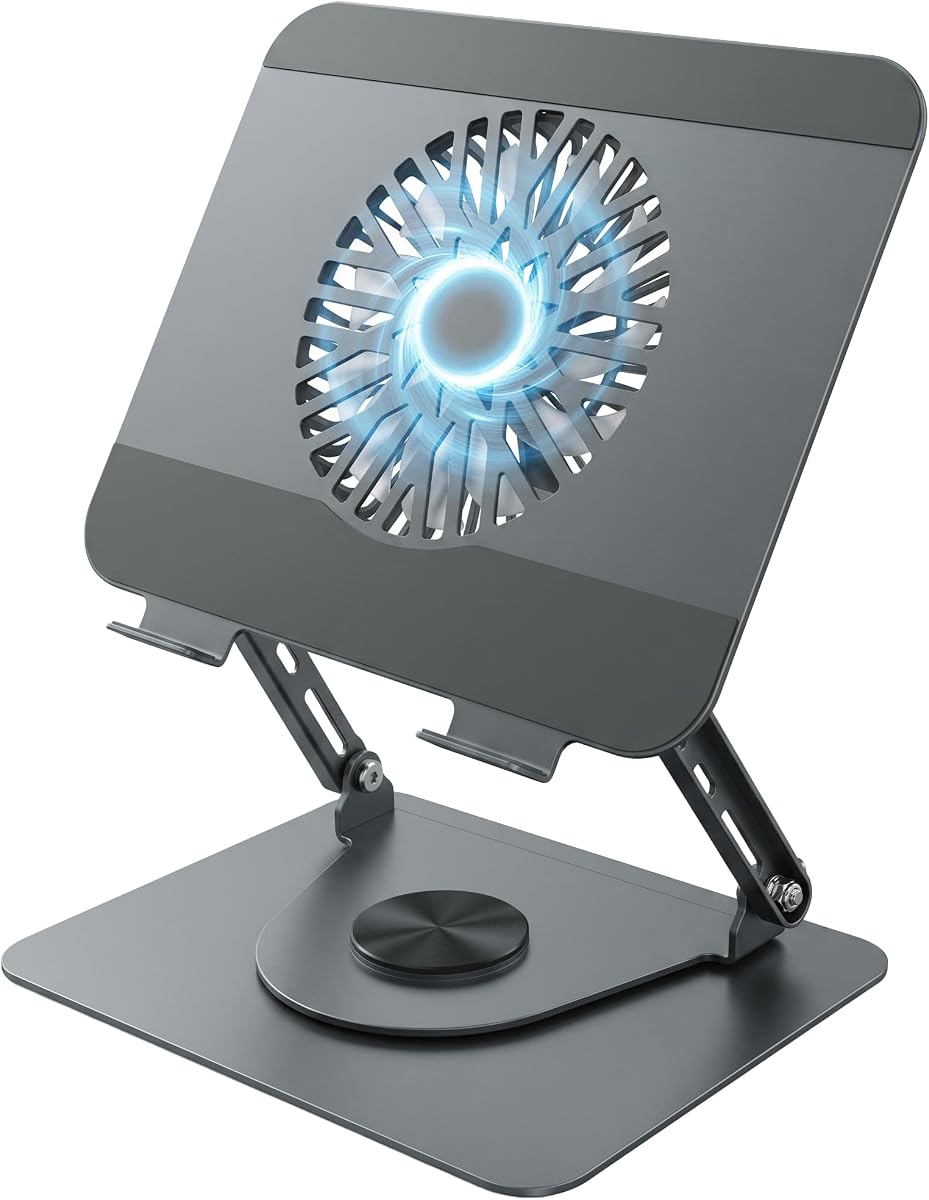
This Laptop Stand features a 360 degree rotating base and an integrated central fan for cooling. Rated 4.6 it combines ergonomic adjustability with premium design to enhance workspace efficiency and comfort.
We may earn a commission when you buy through this link, at no additional cost to you.
The smooth rotation allows easy screen sharing during meetings while adjustable height settings help find an eye-level position. Non-slip silicone pads protect the device while the platform creates usable space underneath for accessories.
While the integrated fan is fixed rather than modular the overall build quality and convenience justify the higher price. It is a sophisticated choice for users prioritizing aesthetics and desk organization alongside cooling.
Ideal for professionals or gamers needing reliable heat dissipation this stand delivers. Its ergonomic design supports better posture making it a strong option for long work sessions.
The 360 degree swiveling base makes it effortless to turn your screen toward colleagues without moving the stand.
Elevating your laptop creates usable space underneath for keyboards mice or notes to keep your desk tidy.
We may earn a commission when you buy through this link, at no additional cost to you.
This Fan Stand Mount is crafted from high-quality aluminum via CNC machining for precision. Rated 4.0 it supports 120mm 140mm and 180mm fans with multi-angle adjustment for versatile placement.
We may earn a commission when you buy through this link, at no additional cost to you.
The three precision damped pivot hinges allow 360 degree horizontal rotation and 180 degree vertical tilt. Tool-free installation using included thumbscrews ensures a secure fit while the stable base prevents unwanted movement.
While it is more expensive than standard mounts the premium build quality and extensive compatibility justify the cost. The matte finish resists corrosion delivering both durable performance and a sleek elegant look.
Perfect for custom builds or premium setups this bracket ensures your fans are positioned exactly right. Its stability and ease of adjustment make it a strong choice for serious cooling enthusiasts.
CNC machining creates a smooth refined texture with excellent corrosion resistance for a premium appearance.
Damped pivot hinges let you adjust the fan's angle freely and hold it securely in place at any position.
We may earn a commission when you buy through this link, at no additional cost to you.
This Desk Fan Stand Mount is built with a thick solid metal frame eliminating vibration and shaking. With a perfect 5.0 rating it supports 120mm and 140mm fans with full vertical rotation for unlimited airflow.
We may earn a commission when you buy through this link, at no additional cost to you.
Large textured thumb knobs allow quick assembly without tools making it simple to mount or reposition any standard fan. It is ideal for laptop cooling routers modems and 3D printer hot ends.
While the solid metal adds weight it ensures rock-solid stability during operation. The versatility covers wide daily and hobby use cases ensuring your overheating devices stay cool and efficient.
Perfect for users needing reliability this mount delivers premium performance. Its sturdy construction and ease of use make it a top choice for any computer fan setup.
The thick solid metal frame bracket eliminates wobbling and buzzing for a smooth quiet operation.
Large textured thumb knobs let you mount and lock any standard fan quickly without extra tools.
We may earn a commission when you buy through this link, at no additional cost to you.
Selecting the right computer fan stand involves evaluating several key factors to ensure optimal cooling and ergonomic support for your workspace.
Check whether the stand supports the specific fan sizes you plan to use such as 120mm 140mm or 180mm. Many models are designed for standard square-frame fans so confirm dimensions before purchase.
Ensuring compatibility prevents installation issues and guarantees effective airflow for your specific hardware.
Materials like aluminum alloy or heavy-duty metal provide durability and heat resistance. Aluminum offers a lightweight rust-proof option while steel adds stability for larger fans.
Choose a material that balances weight and sturdiness based on your usage environment.
Look for stands with 360 degree rotation or multiple height settings to direct airflow efficiently. Adjustable hinges allow precise positioning to target hotspots on your devices.
Higher adjustability provides better control over cooling distribution across different surfaces.
Tool-free installation with thumb screws simplifies setup and future adjustments. This convenience is useful for users who may need to reposition fans frequently.
Easy assembly ensures you spend less time setting up and more time benefiting from improved cooling.
For laptop stands check if the design improves viewing angles and posture. An ergonomic riser helps reduce neck and shoulder strain during long sessions.
Prioritize models that align your screen with eye level for comfortable long-term use.
Foldable or lightweight designs are ideal if you travel or move desks often. Portable stands can be stored easily when not in use saving valuable space.
Select a compact model if mobility is a key requirement for your setup.
Features like USB hubs phone holders or RGB lighting enhance functionality and aesthetics. Consider what extras add value to your specific workflow or environment.
Useful add-ons can organize your workspace and reduce cable clutter effectively.
To set up your stand place it on a flat stable surface and secure any base pads. If using external fans attach them firmly with the provided thumb screws ensuring no movement during operation.
For laptop stands adjust the height to match your eye level and slide the device carefully into place. Use anti-slip pads to prevent sliding while ensuring cables do not block the cooling vents.
Regularly clean dust from fans and surfaces using a soft cloth or compressed air. Check screws periodically to tighten any loose parts and maintain stability over time.
Most stands support laptops from 12 to 17 inches but you should verify the specific range. Universal fit models offer broader compatibility while some may be limited to smaller devices.
Generally laptop cooling stands include built-in fans while desk fan mounts usually require you to provide the fan. Check product descriptions carefully to confirm what is included in the package.
A fan stand lifts the device to increase airflow around vents and directs air to hotspots. This prevents heat buildup and helps maintain optimal performance during heavy usage.
Aluminum alloy offers lightweight corrosion resistance while metal provides stability and heat dissipation. Your choice depends on whether you prioritize portability or durability for your setup.
Many stands feature 360 degree rotation or adjustable hinges to direct airflow precisely. This flexibility allows you to target specific components or areas needing cooling.
Some laptop stands include built-in USB hubs allowing you to connect peripherals directly. Check models with extra ports if you need additional connectivity for mice keyboards or drives.
The ten models reviewed provide diverse options for cooling and ergonomics. Top picks like the Kootek Laptop Cooling Pad offer comprehensive features while budget choices deliver essential stability effectively.
Prioritize factors like build material adjustability and compatibility to ensure the stand meets your specific needs. A well-chosen model improves both device longevity and daily comfort significantly.
Always verify current availability and pricing before purchasing as details may change over time. Investing in the right computer fan stand is a practical step toward a cooler organized workspace.