
Thermaltake View 380 TG ARGB
4.7Editor score
Dual chamber design
Hidden connector support
ARGB fans included
This guide compares the top ten dual system PC cases for October 2026, evaluating thermal performance, airflow design, and compatibility for advanced multi-syst
Dual system PC cases offer a unique solution for enthusiasts who need to run two independent computing environments within a single chassis footprint. These specialized enclosures provide distinct compartments or mounting areas for separate motherboards, power supplies, and graphics cards, allowing users to consolidate hardware while maintaining isolation. Whether you are a server enthusiast, a game server host, or a professional needing distinct workstations, these cases streamline your desk setup significantly.
To compile this comprehensive list, we evaluated ten top-rated models available on the market today, focusing on their ability to support multiple systems effectively. We analyzed airflow dynamics, cable management features, build quality, and specific design elements that facilitate dual motherboard installations. Our comparison covers a wide range of prices and form factors, ensuring you find a solution that fits your specific technical requirements and aesthetic preferences without compromise.
Each pick in this guide highlights specific strengths, from premium liquid cooling support to budget-friendly options that still deliver robust dual system capabilities. We detail the unique features that set each case apart, helping you make an informed decision based on your hardware needs. Please note that product availability and pricing can fluctuate frequently, so always check the current listings before making your final purchase decision online.
4.7Editor score

4.7Editor score
4.6Editor score
The following table provides a side-by-side comparison of all ten dual system PC cases featured in this guide. It highlights key specifications such as form factor support, fan capacity, and unique features to help you quickly identify the model that best suits your dual system build requirements.


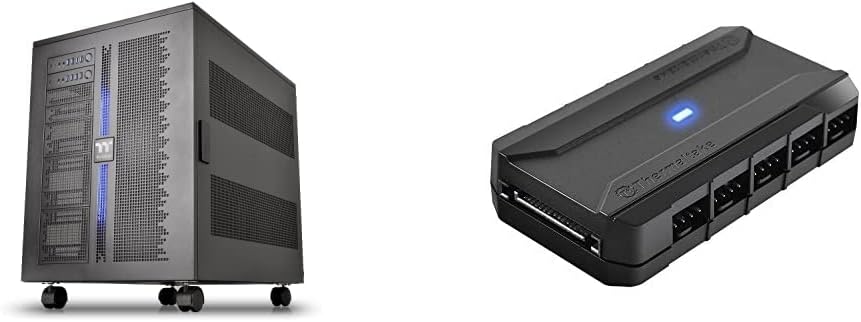
The Thermaltake Core W200 stands out as a true powerhouse for enthusiasts who need to run two separate systems within a single chassis. This case is specifically designed to house two motherboards, power supplies, and graphics cards in a back-to-back configuration, making it an ideal solution for home servers or workstation consolidation. Its robust construction and exceptional cooling capabilities ensure that both systems can operate independently without thermal interference.
We may earn a commission when you buy through this link, at no additional cost to you.
One of the most impressive features of the Core W200 is its support for massive cooling solutions, including up to 600mm radiators. This level of thermal management is crucial when running two high-performance systems that generate significant heat. The included Commander FP hub further enhances cooling efficiency by powering up to ten PWM fans simultaneously, allowing for precise control over airflow and noise levels throughout the chassis.
While the Core W200 offers unparalleled versatility and cooling potential, it does come with a large physical footprint and a higher price point compared to standard cases. The fully modular design allows for easy dismantling and customization, but this complexity may be overwhelming for casual builders. However, for those who require maximum performance and dual system capabilities, these trade-offs are well justified by the functionality provided.
If you need a case that can genuinely support two independent systems with top-tier cooling options, the Thermaltake Core W200 is the ultimate choice. It is best suited for advanced users who prioritize performance and customization over compact design. With its robust features and modular architecture, it offers a unique solution for serious enthusiasts looking to optimize their hardware setup.
The back-to-back configuration allows two complete systems to coexist without interference, maximizing desk space.
Support for up to 600mm radiators ensures even the most demanding dual system builds stay cool under load.
We may earn a commission when you buy through this link, at no additional cost to you.
The Cooler Master HAF II 500 offers a high-performance approach to airflow with its oversized cooling system that includes two 220mm front intake fans and a 180mm rear exhaust. This design prioritizes airflow throughput, making it an excellent choice for builders who need to cool powerful components efficiently. While not a dedicated dual system chassis, its spacious interior can accommodate larger configurations that might include multiple GPUs.
We may earn a commission when you buy through this link, at no additional cost to you.
What sets this case apart is its attention to detail in cable management and component support. The split-level cable management system optimizes routing space, creating room for the oversized rear exhaust fan to operate effectively. Additionally, the MasterRail mounting system provides flexibility for mounting various fan and radiator sizes, allowing you to customize the cooling solution to your specific needs.
The Dual-Mode GPU Holder is a standout feature that supports either a single GPU clamped for stability or two GPUs up to 3.6 slots thick each. This versatility is beneficial for users who might want to run multi-GPU setups or need extra stability for heavy graphics cards. The flexible storage cage further adds to the adaptability of the case, supporting both 3.5-inch and 2.5-inch drives.
For those seeking high airflow and robust component support without the complexity of a dual system chassis, the HAF II 500 is a strong contender. It delivers exceptional value with its included large fans and thoughtful design features. While it may not house two full systems, its cooling performance and flexibility make it a great option for high-end single system builds.
The 220mm and 180mm fans provide massive airflow potential that standard 120mm fans cannot match.
MasterRail system allows for flexible installation of fans and radiators to optimize thermal performance.
We may earn a commission when you buy through this link, at no additional cost to you.
The NZXT H9 Flow RGB+ introduces a dual-chamber design that separates main components from the PSU and drives, significantly improving thermal performance and cable management. This separation ensures that heat from power supplies and storage does not interfere with critical components like the CPU and GPU. While not a dual system chassis, this design offers a level of organization and cooling efficiency that appeals to high-end builders.
We may earn a commission when you buy through this link, at no additional cost to you.
This case boasts a panoramic view with seamless, wraparound tempered glass paneling that showcases every detail of your build. The optimized airflow is achieved through perforated steel panels and angled front-right fans, ensuring efficient cooling for high-performance systems. With support for up to nine 140mm fans, the H9 Flow RGB+ provides extensive cooling capacity for even the most demanding configurations.
Cable management is made effortless with extra-wide channels, built-in Velcro straps, and tie-down points. The case is also back-connect ready, compatible with rear-connecting motherboards like ASUS BTF and MSI Project Zero for a cleaner look. These features combine to create a build experience that is both visually stunning and highly functional.
For those who want the benefits of dual-chamber organization with a stunning aesthetic, the H9 Flow RGB+ is an excellent choice. It balances performance and design beautifully, making it a favorite among enthusiasts who value looks as much as function. While it doesn't house two systems, its thermal separation offers similar benefits for a single high-end build.
Separation of PSU and drives from main components ensures cleaner airflow and better thermal management.
Wraparound tempered glass provides an unobstructed view of your build, highlighting components and RGB.
We may earn a commission when you buy through this link, at no additional cost to you.
The Antec Flux Pro distinguishes itself with a unique combination of metal, glass, and wood materials that create a high-quality texture. This full-tower E-ATX case supports up to twelve fans, with six PWM fans included out of the box. The multi-directional vent design ensures excellent airflow, making it a robust option for high-performance builds that require significant cooling capacity.
We may earn a commission when you buy through this link, at no additional cost to you.
One of the most innovative features is the iShift PSU 90-degree mount, which allows for a different PSU orientation to optimize airflow. The case also includes a CPU/GPU dual temperature display, giving you real-time monitoring of critical components directly on the case. These features demonstrate a commitment to performance and user convenience.
The removable cooling brackets on the top, front, and PSU shroud provide flexibility for customizing your cooling setup. The case supports the simultaneous installation of a 420mm radiator and a 360mm radiator, offering extensive liquid cooling options. This level of support ensures that even the most demanding hardware configurations can be accommodated effectively.
For builders who appreciate unique aesthetics and robust performance features, the Flux Pro is a compelling option. It offers a blend of style and substance with its material mix and thermal capabilities. While not a dual system case, its extensive cooling support and monitoring features make it a strong contender for single system high-performance builds.
The combination of wood, glass, and metal creates a distinctive look that stands out from standard cases.
Built-in CPU and GPU temperature displays allow for real-time monitoring without software intervention.
We may earn a commission when you buy through this link, at no additional cost to you.
The ASUS TUF Gaming GT502 brings a rugged yet refined design to the mid-tower category with its dual-chamber internals that divide the main chamber and rear chamber. This separation allows for clean builds and independent cooling zones for the CPU and GPU, improving thermal efficiency. While not a dual system chassis, this design offers similar organizational benefits that enhance airflow and component management.
We may earn a commission when you buy through this link, at no additional cost to you.
Versatile graphic card mounting options are a key feature, with an included vertical mount and bundled support bracket to banish sag. Tool-free side panels can be removed simply by pressing a button hidden on the rear, providing easy access for upgrades. These design choices prioritize user convenience without compromising on aesthetics or performance.
The panoramic view is achieved through tempered glass panels at the front and side, providing a tactfully tinted view of the main chamber. The front panel includes high-speed connectivity options such as USB 3.2 Gen 2 Type-C and USB 3.0 ports. These features combine to create a case that is both functional and visually appealing.
For gamers and builders who want a balance of durability and design, the GT502 is an excellent choice. Its dual-chamber layout offers meaningful separation of components, making it a strong contender for high-performance systems. While it does not support two motherboards, its features ensure a clean and efficient build experience.
The separation of the main and rear chambers helps organize cables and improves component cooling efficiency.
Side panels are removable with a simple button press, making upgrades and maintenance incredibly easy.
We may earn a commission when you buy through this link, at no additional cost to you.
The ASUS ROG Strix Helios II is designed for showcase builds with its premium aluminum front panel featuring a diamond-grille design. This EATX case supports graphics cards up to 450mm long and radiators up to 420mm, making it suitable for high-end configurations. The dual tempered glass side panels provide an unobstructed view of your components, highlighting your build's aesthetics.
We may earn a commission when you buy through this link, at no additional cost to you.
Optimal thermal performance is achieved with pre-installed four 140mm performance fans that deliver ultimate airflow. The case is ready for the DIY experience with support for EATX motherboards and graphics cards, plus a graphics card slot clamp and rear detachable PSU bracket. These features make building and upgrading a straightforward and enjoyable process.
Cable management is effortless thanks to a multifunction cover with graphics card holders, a PSU shroud, a cable cover, and rear cable clips. The advanced I/O panel includes two USB 20Gbps Type-C ports and four USB-A 3.0 ports, ensuring fast connectivity. These design elements combine to create a case that is both beautiful and highly functional.
For those seeking a premium case with exceptional build quality and support for large components, the Helios II is a top choice. Its EATX support and extensive cooling options make it ideal for high-performance builds. While it does not support dual systems, its features ensure a superior single system experience.
The aluminum front panel with diamond-grille design provides a distinctive look that stands out.
Support for 450mm GPUs and 420mm radiators ensures compatibility with the most demanding hardware.
We may earn a commission when you buy through this link, at no additional cost to you.
The HAVN HS 420 features a hybrid structure that balances traditional case size ratios with a dual-chamber design for optimal GPU cooling. This design directs cool air from the bottom intake onto the centrally positioned GPU, ensuring effective thermal management. The case supports a total of eleven 140mm fans, providing extensive cooling capacity for high-performance builds.
We may earn a commission when you buy through this link, at no additional cost to you.
Heat-Formed UniSheet Glass Panel offers a panoramic view with minimal visual distortion, thanks to a custom curve radius. The unique SimpliCable routing system and fan hub make cable management user-friendly, with top-to-bottom grooved guides for a pristine appearance. These features combine to create a case that is both visually stunning and highly functional.
Customization is a key focus, with customizable space for combinations of storage, fans, radiators, and portable displays. The 3-way adjustable support bracket handles a wide range of graphics cards, maintaining a neat and smoothly integrated appearance. Vibration isolation via flexible rubber pads on fan brackets helps avoid resonance build-up during operation.
For those who want a balance of design and performance with robust cooling options, the HS 420 is a great choice. Its hybrid structure and extensive fan support make it ideal for thermal enthusiasts. While it does not support dual systems, its features provide a superior single system experience.
The hybrid design directs cool air to the GPU efficiently while maintaining traditional case dimensions.
Grooved guides and a fan hub simplify cable routing for a clean and organized interior.
We may earn a commission when you buy through this link, at no additional cost to you.
The NZXT H6 RGB+ brings the dual-chamber design to a compact footprint, making it ideal for those with limited desk space. The dedicated secondary chamber isolates power and cables from your main build, while angled front-right fans deliver targeted airflow directly to your hottest components. This separation ensures efficient cooling and a clean build within a smaller chassis.
We may earn a commission when you buy through this link, at no additional cost to you.
A seamless curved glass panel offers a stunning view with minimal distortion, keeping every component and RGB detail front and center. The high-airflow mesh across the top, front-right, and right panels improves airflow without restricting intake. These features combine to create a case that is both visually appealing and highly functional.
The case ships without fans, allowing you to fully customize your cooling and lighting preferences. However, it includes standardized mounts across the top, front-right, bottom, and rear for flexible cooling. The GPU anti-sag bracket is integrated and adjustable, ensuring that even the heaviest GPUs remain properly aligned and supported.
For those seeking a compact yet high-performing case with a dual-chamber design, the H6 RGB+ is an excellent option. Its seamless glass and efficient airflow make it a strong contender for smaller builds. While it does not support dual systems, its features ensure a superior single system experience in a compact form factor.
The compact footprint maintains the benefits of dual-chamber design for smaller desk setups.
Single-piece bent glass provides an unobstructed view that highlights your build beautifully.
We may earn a commission when you buy through this link, at no additional cost to you.
The Thermaltake Capo X delivers a unique cross-platform architecture for parallel operation, allowing two independent mATX systems to run simultaneously within a single chassis. This design minimally impacts the footprint while opening extra desk space for the tools you need to get the job done. Each system features its own I/O, ensuring complete independence and functionality.
We may earn a commission when you buy through this link, at no additional cost to you.
Configurable cooling is a key feature, with support for up to thirteen 120mm fans and up to 420mm/360mm radiators. This ample space for cooling ensures that both systems can operate without thermal interference. Hidden connector support allows for support for mATX hidden connector motherboards, providing a cleaner build with fewer visible cables.
Stable support is achieved through two detachable clamp GPU braces that mount directly to the chassis frame. These braces provide top and bottom support for each of the graphics cards, ensuring stability during operation. The individual I/O for each system is thoughtfully located, with the top system at the top and the bottom system at the bottom front foot.
If you need a case that can genuinely support two independent mATX systems with parallel operation, the Capo X is a top choice. Its unique architecture and cooling capabilities make it an excellent solution for server enthusiasts or professionals needing distinct workstations. While limited to mATX, its features ensure a powerful dual system experience.
Two independent mATX systems can operate simultaneously, maximizing desk space and utility.
Separate I/O ports for each system ensure complete independence and ease of access.
We may earn a commission when you buy through this link, at no additional cost to you.
The Thermaltake View 380 TG offers a dual chamber design with pillarless front and side tempered glass panels at a budget-friendly price. This case is compatible with hidden-connector motherboards, allowing for a cleaner build with fewer visible cables. The inclusion of four hydraulic bearing 120mm ARGB Lite fans ensures a visually appealing start to your build.
We may earn a commission when you buy through this link, at no additional cost to you.
I/O ports include Gen.2 USB 3.2 Type-C, USB 3.0, and HD Audio, providing essential connectivity options. The case supports a max radiator size of 360mm and max VGA length of 415mm, making it suitable for standard builds. These features combine to create a case that offers excellent value without compromising on aesthetics.
For those seeking a budget-friendly option with a dual chamber design and tempered glass views, the View 380 TG is a strong contender. Its compatibility with hidden-connector motherboards and included ARGB fans add value that is hard to beat at this price point. While it does not support dual systems, its features provide a great single system experience.
If you want a case that balances cost with dual-chamber benefits, the View 380 TG is an excellent choice. Its design and included components make it a great starting point for new builders. While it lacks dual motherboard support, its features ensure a satisfying single system build experience.
The affordable price makes this case accessible to a wide range of builders without sacrificing features.
Compatibility with hidden-connector motherboards ensures a clean build with minimized cable clutter.
We may earn a commission when you buy through this link, at no additional cost to you.
Selecting the right dual system PC case requires careful consideration of several factors to ensure your build meets both functional and aesthetic needs.
Ensure the case supports the specific motherboard form factors you intend to use for both systems. True dual system cases often support mATX for both systems, while dual-chamber cases are optimized for single system builds with separate component zones. Check compatibility with your chosen hardware to avoid fit issues.
Verify motherboard form factor support before purchasing to ensure both systems fit within the designated areas without modification.
Dual systems generate more heat than a single system, so adequate cooling capacity is essential. Look for cases with support for multiple fans and large radiators to maintain optimal temperatures for both systems. Ensure the airflow design allows for independent cooling zones if possible.
Prioritize cases with high fan capacity and large radiator support to ensure thermal stability under load.
Cable management becomes more complex with multiple systems, so look for features that simplify routing. Cases with ample space for cables, tie-down points, and organized routing channels make a significant difference. Proper cable management improves airflow and aesthetics.
Choose a case with ample cable routing space and tie-down points to maintain a clean and functional build.
Dual system cases are generally larger than standard cases, so ensure your workspace can accommodate the dimensions. Consider the desk space you have available and measure carefully to avoid issues. Some cases offer unique designs that minimize footprint while maximizing capacity.
Measure your available desk space carefully to ensure the case dimensions fit your environment comfortably.
High-quality materials such as tempered glass, steel, and aluminum contribute to durability and aesthetics. Look for robust construction that can support heavy components like GPUs and radiators. Material choice also impacts heat dissipation and overall build quality.
Select a case with durable materials and robust construction to ensure longevity and component support.
Dual system cases should provide separate I/O ports for each system to ensure independent operation. Check that the case includes the necessary ports for USB, audio, and other connectivity options you require. Proper I/O placement is crucial for usability.
Ensure the case provides separate and accessible I/O ports for each system to maintain independent functionality.
Dual system cases vary widely in price, so determine your budget before shopping. Higher-end models may offer more features, but budget options can still provide essential functionality. Balance cost with the features you need most for your build.
Set a clear budget to guide your selection and balance cost with necessary features for your specific needs.
Consider the look you want for your build, such as glass panels, RGB lighting, or minimal designs. Many dual system cases offer panoramic views or unique designs that showcase components. Aesthetics play a key role in the overall appeal of your build.
Choose a design that matches your aesthetic preferences, whether it is glass panels, RGB, or a minimal look.
When setting up a dual system case, ensure both motherboards and power supplies are securely mounted according to the manufacturer's guidelines. Use the provided standoffs and screws to prevent short circuits. Proper mounting ensures stability and reduces risk of hardware damage.
Regularly clean filters and fans to maintain optimal airflow and prevent dust accumulation. Dust buildup can lead to overheating and reduced performance. A soft brush or compressed air is ideal for cleaning without damaging components.
Monitor temperatures regularly using software tools to ensure both systems remain within safe operating limits. High temperatures can indicate cooling issues that need attention. Addressing thermal concerns early prevents potential hardware failures.
A dual system PC case is designed to house two separate computing systems within a single chassis. It provides independent mounting areas for motherboards, power supplies, and GPUs, allowing for parallel operation. This design is ideal for users who need multiple workstations or servers in one footprint.
Not all dual system cases support ATX motherboards for both systems. Many true dual system cases are optimized for mATX motherboards to save space. Always check the specific case specifications to ensure compatibility with your desired motherboard form factor.
Dual systems generate significantly more heat than single systems, so ample cooling is essential. Look for cases that support multiple fans and large radiators to maintain optimal temperatures. Proper airflow design is crucial to prevent overheating under load.
Dual system cases vary in price, ranging from budget-friendly options to premium models. The cost depends on build quality, features, and brand. Determine your budget and prioritize features that meet your specific needs.
Many dual system cases support liquid cooling with space for large radiators. However, ensure the case supports the specific radiator size you plan to use. Proper clearance for tubes and pumps is also important for successful installation.
Cable management in dual system cases requires planning and organization. Look for cases with ample space for cables, tie-down points, and routing channels. Keeping cables organized improves airflow and aesthetics.
Dual system cases typically provide separate I/O ports for each system. These include USB, audio, and other connectivity options. Ensure the I/O placement allows easy access for both systems without obstruction.
Yes, most dual system cases support GPUs in both systems. However, check clearance for GPU length and ensure adequate cooling. Proper support brackets are often included to prevent GPU sag.
Choosing the right dual system PC case involves balancing performance, compatibility, and budget. Our top picks include the Thermaltake Core W200 for extreme capabilities, the NZXT H9 Flow RGB+ for dual-chamber excellence, and the Thermaltake View 380 TG for budget-friendly value.
Consider your specific needs such as cooling requirements, form factor compatibility, and desk space when making your decision. Ensure the case supports your motherboard size and provides adequate cooling to maintain system stability.
Always check current prices and availability before purchasing, as these can vary over time. Taking the time to research will help you find the perfect case for your dual system build.