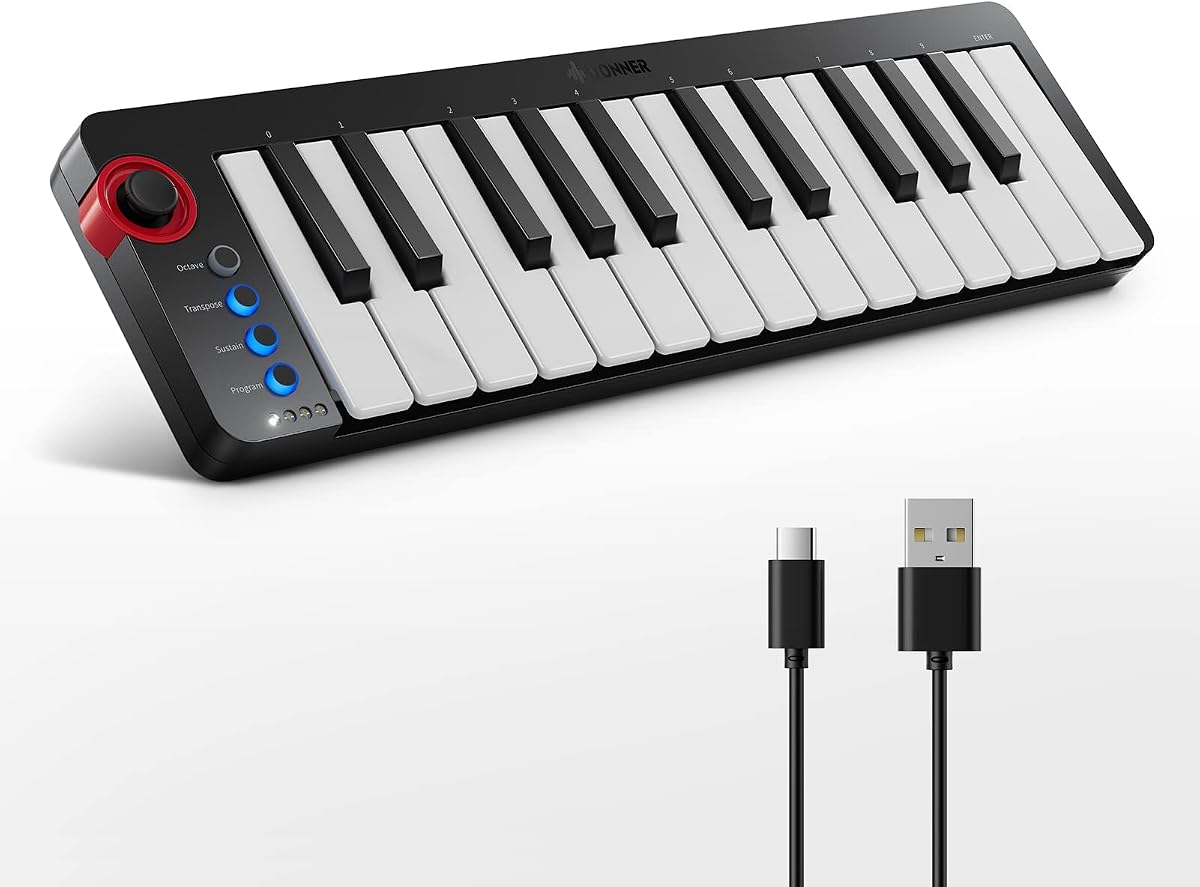
Donner Mini MIDI Keyboard N-25
4.1Editor score
Compact 25 key design
Velocity sensitive mini keys
40 teaching courses included
Discover the top 25 key MIDI controllers for music production. This guide compares features, keybeds, and DAW integration to help you choose the right
Finding the right keyboard for your music setup can be challenging. A good controller offers responsive keys, intuitive controls, and seamless software integration to streamline your creative process effectively.
We evaluated ten leading models based on build quality, key feel, connectivity options, and software bundles. Each product was analyzed for its suitability across different workflows and production needs.
Every pick highlights unique strengths and potential trade-offs to guide your decision. Keep in mind that availability and promotions change frequently so verify details before purchasing.
4.1Editor score

4.6Editor score

4.6Editor score
This side-by-side comparison outlines the core specifications and standout features of each model to help you identify the best fit for your studio environment.


The Akai MPK Mini MK3 stands out as a top choice for producers seeking a compact yet powerful interface. With a strong user rating and professional features, it balances performance with portability effectively.
We may earn a commission when you buy through this link, at no additional cost to you.
Its standout qualities include the 8 backlit velocity-sensitive MPC-style pads and a versatile 4-way thumbstick for pitch and modulation. The arpeggiator offers adjustable resolution and modes to enhance melodic creativity without complex routing.
While the keys do not feature aftertouch, the velocity sensitivity remains consistent. The compact form factor means some users might find the keybed cramped for extensive performance.
This controller is ideal for beat makers and songwriters working in limited spaces. Its comprehensive software bundle and seamless integration make it a reliable companion for modern production workflows.
The 4-way thumbstick provides precise control over pitch bends and modulation, allowing expressive performances without reaching for multiple knobs.
NKS compatibility ensures that Native Instruments presets are directly browsable and controllable, streamlining the workflow for users of these popular sound libraries.
We may earn a commission when you buy through this link, at no additional cost to you.
The Launchkey Mini 25 MK4 offers advanced features typically found in larger controllers, making it a premium choice for serious producers. Its focus on creative workflows sets it apart in the compact category.
We may earn a commission when you buy through this link, at no additional cost to you.
Notable features include FSR drum pads with polyphonic aftertouch, which enable complex drum programming and clip launching. Scale Mode helps users stay in key while composing, reducing wrong notes during live performance.
The device is NKS ready, ensuring smooth integration with Native Instruments. However, the higher cost may be a barrier for beginners, and the mini keys offer limited travel for expressive playing.
For users invested in modern production software, this controller delivers exceptional value. The included software bundle and intuitive mapping justify the investment for those seeking deep integration.
The FSR pads support polyphonic aftertouch, allowing for nuanced control over velocity and pressure, which is rare in this size class.
Launchkey works intuitively with major DAWs like Ableton Live and Logic, offering immediate transport and clip control upon connection.
We may earn a commission when you buy through this link, at no additional cost to you.
The Donner N-25 is designed with beginners in mind, offering a cost-effective way to start music production. It includes teaching courses that add significant value for new learners.
We may earn a commission when you buy through this link, at no additional cost to you.
Its simple layout features velocity-sensitive mini keys and light-up buttons that make learning engaging. Connectivity options include USB-MIDI for computers and OTG support for smartphones, allowing mobile creation.
While the build quality is basic, it meets the needs of casual users. The lack of advanced controls like knobs or sliders limits deep mixing capabilities compared to higher-end models.
This controller is perfect for students or hobbyists wanting to explore MIDI without a large financial commitment. The included courses help bridge the gap between instrument and software.
The inclusion of 40 keyboard teaching courses provides structured learning that helps users understand music theory and arrangement basics quickly.
Connectivity via OTG adapter allows this device to function with iOS and Android apps, turning a smartphone into a portable music studio.
We may earn a commission when you buy through this link, at no additional cost to you.
The LPK25 is renowned for its minimalistic approach, focusing purely on keyboard input and essential controls. It is ideal for travelers who need a lightweight solution to capture ideas on the go.
We may earn a commission when you buy through this link, at no additional cost to you.
It features an arpeggiator and clock for creative control without a computer. The dedicated octave buttons allow access to the full range of software instruments despite the compact keybed.
Users should note the absence of drum pads, which limits its use for beat-making. The keys may feel less responsive than larger controllers but remain functional for melodic work.
This controller is best suited for composers who prioritize portability over extra features. Its compatibility with all major applications ensures it works wherever you create music.
By stripping away unnecessary controls, the LPK25 focuses on core keyboard performance, reducing clutter on your desktop setup.
Works seamlessly with popular DAWs like GarageBand, Logic, and Cubase, ensuring broad support across different production environments.
We may earn a commission when you buy through this link, at no additional cost to you.
Arturia MiniLab 3 is designed to adapt to your needs, offering a balance of keys and controls for fluid music creation. It emphasizes ease of use with a well-thought-out layout.
We may earn a commission when you buy through this link, at no additional cost to you.
The inclusion of four faders provides hands-on control over mixing and automation, which is rare in this class. It features velocity-sensitive keys that respond well to dynamics for expressive performances.
Users might need to install proprietary software to unlock all features, which could be a hurdle for some. However, the build quality is generally considered superior to many competitors in its price range.
This controller is a strong choice for producers who want a compact controller that feels like a full studio tool. The included software ensures you have everything needed to start composing immediately.
Four faders allow precise mixing and parameter tweaking, giving you tactile control over your DAW without needing a mouse.
MiniLab 3 adapts to your style and workflow, allowing you to control instruments and mute tracks easily during live sessions.
We may earn a commission when you buy through this link, at no additional cost to you.
The Rhymo controller distinguishes itself with modern connectivity options like USB-C and Bluetooth MIDI. This allows for versatile connections to computers and tablets without extra adapters.
We may earn a commission when you buy through this link, at no additional cost to you.
It includes an X-Y joystick for pitch bend and modulation, which offers a different tactile experience compared to traditional wheels. The loop function and tap tempo provide added convenience for on-the-go production.
Bluetooth connectivity may introduce latency depending on your device, so USB is preferred for recording. The brand is less established, which might affect long-term support or software updates.
For users needing flexible connectivity, this controller offers excellent value. Its feature set covers essential production needs without requiring a bulky setup.
USB-C power and Bluetooth MIDI ensure compatibility with the latest devices, making it a versatile choice for modern setups.
The X-Y joystick provides dynamic control over multiple parameters simultaneously, enhancing performance capabilities during live recording.
We may earn a commission when you buy through this link, at no additional cost to you.
The M-VAVE controller offers a unique wireless experience with its built-in battery and Bluetooth connection. This allows you to compose without tethering your device to a computer or wall outlet.
We may earn a commission when you buy through this link, at no additional cost to you.
It features smart chord and smart sound functions to simplify music making for those with limited theory knowledge. The RGB backlit pads enhance visual feedback during performance.
While the wireless mode is convenient, you may face latency issues or connection drops. The software support is less robust compared to major brands, limiting advanced customization options.
This device is ideal for casual creators who value freedom of movement. The ability to pack it into any bag makes it perfect for spontaneous composition anywhere.
Bluetooth connectivity and a long-lasting battery enable untethered use, perfect for composing in cafes or on planes.
Smart chord functions allow users to play complex harmonies with single key presses, lowering the barrier for beginners.
We may earn a commission when you buy through this link, at no additional cost to you.
The MPK Mini Play MK3 is a standalone keyboard that includes a built-in speaker and internal sounds, allowing for instrument-free music making. It retains the familiar layout of the MPK Mini series.
We may earn a commission when you buy through this link, at no additional cost to you.
It offers over 100 internal sounds including pianos and synths. The OLED display provides visual feedback on sounds and settings, enhancing usability without needing a computer.
The speaker is useful for demos but may not be loud enough for studio monitoring. Battery operation requires batteries which are not included, adding to the initial cost.
For users seeking a portable instrument that works without a computer, this is an excellent choice. Its versatility bridges the gap between a MIDI controller and a standalone synthesizer.
With built-in sounds and a speaker, you can play and create music anywhere without needing a laptop or DAW connected.
The OLED display clearly shows selected sounds and settings, making navigation intuitive during live performance.
We may earn a commission when you buy through this link, at no additional cost to you.
This black variant of the MPK Mini MK3 offers the same robust performance as the standard model with a premium aesthetic finish. It appeals to users looking for a cohesive studio look.
We may earn a commission when you buy through this link, at no additional cost to you.
It includes all the core features such as velocity-sensitive keys, backlit pads, and the versatile thumbstick. The included software and NKS bundle ensure you have a complete production setup.
While functionally identical to other versions, the black finish adds a touch of elegance. Some buyers might pay slightly more for the specific color choice.
If aesthetics matter to your studio setup, this model delivers the same reliability with a distinct visual appeal. It remains a top contender for both beginners and professionals.
The matte black finish blends well with modern studio equipment, providing a professional look on your desk.
Despite the color difference, all performance features match the white version ensuring consistent quality across the line.
We may earn a commission when you buy through this link, at no additional cost to you.
The APC Key 25 MK2 is uniquely designed for Ableton Live users, combining a keyboard with a dedicated clip launch grid. It streamlines the live performance workflow for electronic music producers.
We may earn a commission when you buy through this link, at no additional cost to you.
Its 5×8 RGB pad matrix provides visual feedback for clip launching, making it easy to organize and trigger samples during performances. The 25 responsive keys allow for melodic and bass input simultaneously.
While optimized for Ableton, its functionality might feel restricted for users of other DAWs. The pads lack velocity sensitivity compared to drum pads, which limits their use for melodic instruments.
For dedicated Ableton users, this controller offers unmatched integration. It transforms your workflow by combining playing and launching in one compact unit.
The dedicated grid allows instant triggering of clips, loops, and samples, making live improvisation and performance seamless.
Pre-mapped for Ableton Live, it offers immediate control over device macros and scenes without complex setup.
We may earn a commission when you buy through this link, at no additional cost to you.
Selecting the right controller involves evaluating keybeds, controls, and connectivity to match your specific production needs.
The physical feel of the keys significantly impacts your playing experience. Look for velocity-sensitive keys that respond to your touch to allow dynamic performances. Full-size keys offer better playability but 25-key models usually use mini keys to save space.
Prioritize models with consistent key feel if you plan to record many melodies or bass lines.
Consider what controls you need beyond keys. Knobs, sliders, and pads can automate your DAW or trigger samples. Some models include dedicated arpeggiators which are great for instant creative ideas.
Ensure the layout matches your workflow so you can access controls without fumbling.
Check how the controller connects to your devices. USB power is convenient, but Bluetooth MIDI offers wireless freedom. Also verify compatibility with your operating system and mobile apps if needed.
Standard USB-C is becoming the norm for modern connectivity and faster data transfer.
Many controllers come with free software like DAWs or virtual instruments. This adds significant value especially for beginners who do not own production tools yet.
Check the licenses and features included to ensure they meet your long-term needs.
Seamless integration with your chosen Digital Audio Workstation is crucial. Look for specific mappings for Ableton Live, Logic, or FL Studio to reduce manual configuration.
Universal MIDI control works everywhere but deep integration saves time during sessions.
If you move between locations, weight and size are key factors. Slim designs with sturdy build quality protect your investment while making transport easy.
Battery powered options enable creation without access to power outlets.
Price ranges vary but often reflect build quality and feature sets. Entry-level options provide basics while premium models offer advanced controls and better keys.
Assess what features you truly need before spending to avoid overspending on unused capabilities.
Consider if the controller will grow with you. Models with customizable mappings or upgradeable firmware ensure longevity as your skills improve.
Choosing a versatile platform prevents the need for frequent replacements as your studio expands.
Connect your controller via USB or Bluetooth to your computer or mobile device. Install necessary drivers if prompted and open your DAW to map the controls to parameters.
Use the octave buttons to shift the range of your keyboard so you can play bass and lead parts without moving your hands excessively. Assign knobs to common parameters like filter cutoff or reverb.
Clean the keys and pads regularly with a dry cloth to prevent dust buildup. Store the unit in a protective case when traveling to avoid accidental damage or impacts.
Most controllers require a computer to function as they transmit MIDI data to software. However some standalone models have built-in sounds and speakers allowing you to play without a computer.
Mini keys are smaller and designed for portability. Full-size keys are standard piano keys that offer better playability for complex techniques but take up more space.
Many models support iOS and Android via USB-C or Bluetooth MIDI adapters. Always check specific compatibility details for your phone model to ensure connectivity.
You need a Digital Audio Workstation or DAW to record and arrange. Many controllers come with a free DAW or virtual instruments which you can use to start creating immediately.
Yes you can connect multiple controllers to your computer. Most systems allow you to assign different MIDI channels or ports to each device for expanded control.
Velocity sensitivity detects how hard you press the keys and adjusts volume or intensity accordingly. This adds expression to your playing making it sound more natural.
We highlighted ten top performers offering a range of features from portable travel-friendly units to those with deep DAW integration. Whether you need a budget option or a premium tool there is a fit for everyone.
Prioritize keybed feel and software compatibility to ensure the controller supports your creative goals. Consider how the included software can help you start producing immediately.
Always verify current availability and features on product pages as offerings may change. Taking time to compare these options will help you invest in a controller that lasts.