
Unlocked 4G LTE WiFi Router
5.0Editor score
Affordable price point
Strong 200 meter coverage
Easy plug and play setup
This guide compares the top 4G LTE router with SIM card slot models for reliable connectivity in rural areas, backups, and mobile setups across various needs.
Finding reliable internet connectivity outside traditional wired networks requires a robust 4G LTE router with SIM card slot. These devices convert cellular signals into usable Wi-Fi, ensuring you stay connected anywhere coverage exists without needing physical cables or fixed line infrastructure.
We evaluated ten leading models based on speed, coverage, carrier compatibility, and ease of setup. Our analysis focuses on real-world performance metrics, antenna design, and failover capabilities to help you choose the right unit for your specific environment and usage demands.
Each pick highlights unique strengths from budget-friendly options to premium enterprise-grade units. Prices and availability fluctuate frequently so check current listings before purchasing. Our goal is to provide clear comparisons for informed decisions on mobile broadband solutions.
5.0Editor score

4.3Editor score

4.2Editor score
This side-by-side comparison outlines key specifications and features across all ten selected models to help you quickly identify which device aligns best with your connectivity requirements and budget constraints.



The Cudy LT500 stands out as a versatile choice for anyone needing reliable backup internet. With a 4.3-star rating it balances speed and features well. Its dual-band Wi-Fi 5 ensures smooth streaming even when cellular loads are high.
We may earn a commission when you buy through this link, at no additional cost to you.
Key strengths include its robust failover system which automatically switches to cellular when your primary internet drops. The built-in VPN support allows secure remote access without extra hardware. External antennas boost reception in rural areas effectively.
Trade-offs involve the Cat 4 limitation which caps download speeds at 150Mbps. Modern Wi-Fi 6 models offer better density but this unit delivers solid performance for standard home or small office needs without complexity.
Buy this if you need a plug-and-play backup solution with enterprise features like VPN and failover. It is ideal for remote offices or homes where internet stability is critical and wired options are unreliable.
Automatic switching to cellular ensures critical connections stay alive when primary broadband fails without requiring manual intervention or downtime.
Supports WireGuard OpenVPN and IPsec allowing secure remote access to your network from anywhere with a cellular connection.
We may earn a commission when you buy through this link, at no additional cost to you.
The GL-X2000 Spitz Plus represents the premium tier with Cat 12 speeds and Wi-Fi 6 support. It delivers significantly faster data rates and better device handling than standard units. This makes it suitable for high-demand environments.
We may earn a commission when you buy through this link, at no additional cost to you.
Standout features include Dual-SIM capability for choosing the strongest carrier signal automatically. Multi-WAN allows distributing bandwidth across cellular Ethernet or tethering. SMA connectors let you add external antennas for better range.
Cost and complexity are trade-offs. It requires more technical knowledge to configure effectively than simpler routers. Budget-conscious users may find the features unnecessary for basic web browsing or streaming needs.
Choose this if you need maximum speed and flexibility for demanding workloads. It is perfect for offices requiring failover with load balancing or users in areas where carrier switching improves reliability.
3CA technology combines three carriers to boost bandwidth and reliability resulting in faster speeds and more consistent connections in urban areas.
Distribute traffic across multiple sources like cellular and Ethernet to optimize bandwidth usage and ensure network resilience during peak times.
We may earn a commission when you buy through this link, at no additional cost to you.
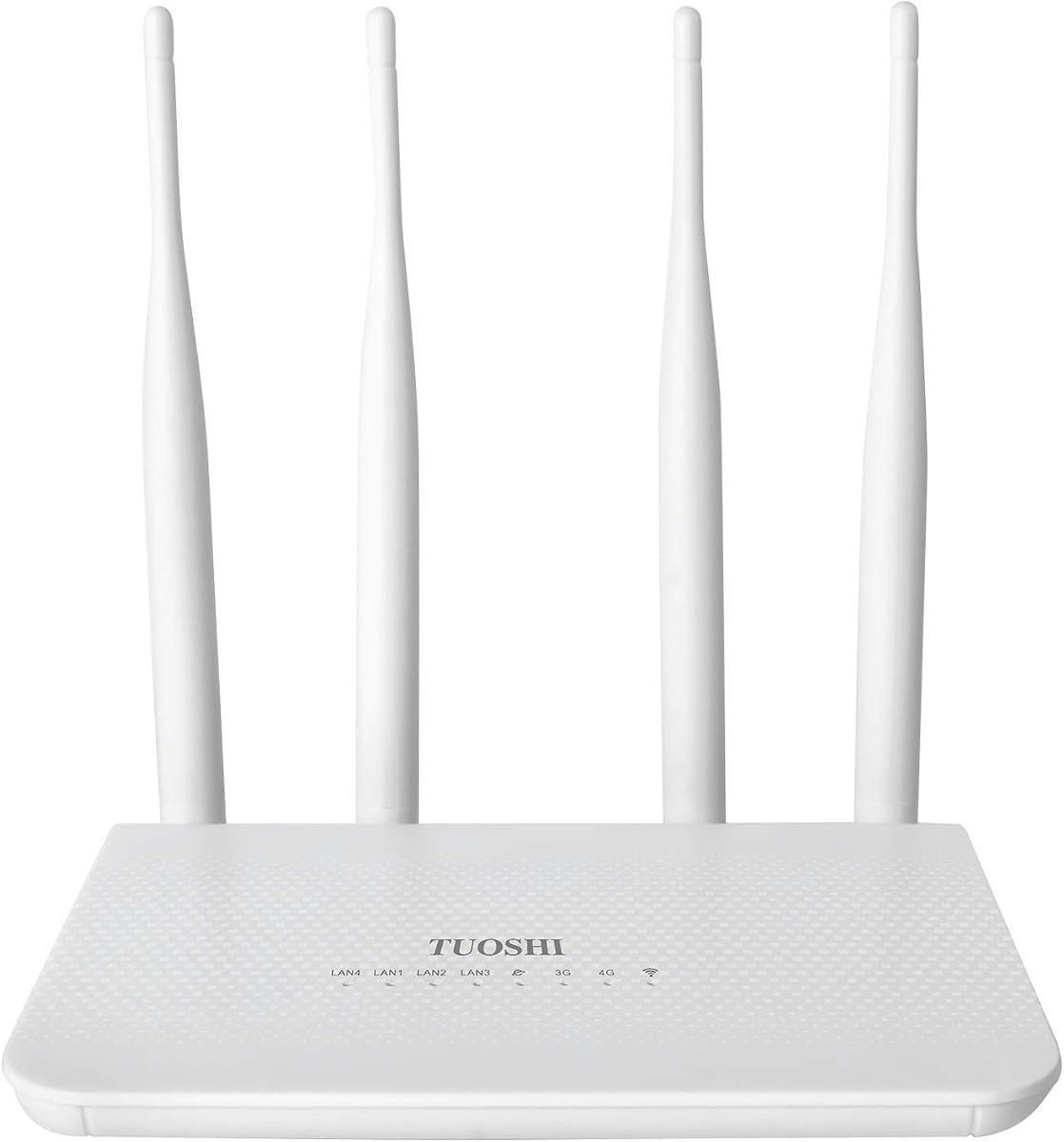
This router offers exceptional value with a perfect 5.0-star rating from users. It converts 4G LTE to Wi-Fi effortlessly with high-gain antennas covering large areas. The setup is straightforward making it accessible for non-technical users.
We may earn a commission when you buy through this link, at no additional cost to you.
Performance shines in simplicity and coverage. The four 5dBi antennas minimize interference and provide stable signals. It supports enough devices for small homes or offices without lag during standard use like streaming or browsing.
It lacks advanced features like dual-band Wi-Fi or automatic failover. Users needing enterprise-grade redundancy might find it limiting. However for basic mobile internet needs it delivers reliable connectivity at a fraction of the cost.
Buy this if you want a budget-friendly entry into mobile broadband. It is ideal for vacation homes or temporary setups where cost and ease of use matter most than high-end features.
Four high-performance antennas ensure stable transmission up to 200 meters reducing interference and maintaining consistent connection quality.
Plug-and-play functionality means you can insert a SIM card and get online immediately without needing complex configuration steps or setup guides.
We may earn a commission when you buy through this link, at no additional cost to you.
This router earns a high 4.7 rating thanks to its robust antenna design. Six external antennas ensure strong signal strength across large homes. It supports both AT&T and T-Mobile for flexible carrier options.
We may earn a commission when you buy through this link, at no additional cost to you.
Dual-band Wi-Fi provides stability by separating 2.4GHz and 5GHz traffic. The automatic switch to cellular ensures uninterrupted connectivity when broadband fails. Setup is user-friendly for beginners needing quick internet access.
Carrier compatibility is limited to AT&T and T-Mobile. Verizon users cannot use this device. Also Cat 4 speeds cap at 150Mbps which may be slow for heavy multi-device households.
Choose this if signal strength and ease of use are priorities. It works well for remote homes where coverage varies and you need a simple reliable connection without advanced configuration.
Six high-performance antennas enhance signal strength and coverage throughout large spaces for reliable wireless connectivity everywhere.
Both 2.4GHz and 5GHz bands ensure stable network performance by balancing traffic between devices efficiently.
We may earn a commission when you buy through this link, at no additional cost to you.
The N300 router focuses on coverage expansion through mesh capability. It supports multiple carriers and bands including Verizon with specific settings. Security features like L2TP and WPA3 protect data privacy on public networks.
We may earn a commission when you buy through this link, at no additional cost to you.
External antennas improve signal reach significantly. The web interface is simple for managing settings. However speeds are limited to N300 which may bottleneck high-speed LTE performance.
Its rating reflects mixed experiences with speeds and stability. Users needing robust security or mesh expansion may find it useful despite lower performance. Advanced settings require careful configuration.
Consider this if you need mesh support or specific carrier bands. It fits scenarios where expanding Wi-Fi range matters more than raw speed or latest technology.
Allows seamless network expansion across rooms for consistent coverage without connectivity drops when moving between areas.
Embedded L2TP PPTP OpenVPN and WPA3 encryption safeguard data privacy against external threats effectively.
We may earn a commission when you buy through this link, at no additional cost to you.
This AC1200 model combines speed with a slim profile. It offers dual-band Wi-Fi for balanced performance. Six built-in antennas maintain signal quality without external attachments. It supports both wired and cellular backups.
We may earn a commission when you buy through this link, at no additional cost to you.
Setup involves just two steps inserting SIM and power. This simplicity helps travelers or temporary users. However Verizon is excluded from support so carriers must be confirmed before purchase.
Lack of rating data makes performance less certain. Users should verify firmware updates for optimal operation. The compact design suits portable needs but may lack customization options.
Pick this if you prefer a compact portable unit with reliable backup. It is useful for short-term deployments or travel where space and speed matter.
Compact design ensures high-quality signal transmission while being an ideal companion for travel and mobile office setups.
Enjoy peace of mind with seamless transition between wired broadband and cellular access when one connection falters.
We may earn a commission when you buy through this link, at no additional cost to you.
This single-band router provides basic connectivity with automatic switching to cellular. It supports many devices and includes VPN for secure connections. High-gain antennas ensure stable reception in most areas.
We may earn a commission when you buy through this link, at no additional cost to you.
The simplicity of setup appeals to non-tech users. It handles streaming and browsing well under normal loads. However single-band Wi-Fi may struggle with interference in crowded environments.
Ethernet ports are limited to two plus one WAN. This restricts wired connections. For wireless-focused setups it works well. Advanced networking features are minimal.
Choose this for essential mobile internet at a low cost. It fits casual users needing a reliable backup without complex configurations or high bandwidth demands.
Automatically switches to 4G network when broadband disconnects ensuring uninterrupted connectivity without manual intervention.
VPN functionality ensures secure and private internet connections for all connected devices and online activities.
We may earn a commission when you buy through this link, at no additional cost to you.
This router is designed for international use with SIM cards from 100+ countries. It offers reliable 4G connectivity with simple plug-and-play setup. Detachable antennas allow customization for different regions.
We may earn a commission when you buy through this link, at no additional cost to you.
TP-Link is a trusted brand with field-tested compatibility. It works well as a backup option using Ethernet when 4G fails. However speeds are capped at N300 for slower transfers.
It comes with a UK plug requiring an adapter for US outlets. This adds slight inconvenience for domestic buyers. Still global travelers find this flexibility invaluable.
Buy this if you travel internationally and need universal connectivity. It is ideal for frequent travelers or expats needing a reliable SIM-based router abroad.
SIM cards in 100+ countries are assured by years of field tests ensuring broad network coverage everywhere.
Enjoy stable and efficient connections to every device thanks to the two external antennas that can be adjusted.
We may earn a commission when you buy through this link, at no additional cost to you.
MOFI4500 targets enterprise users with wide band support and included antennas. It works with AT&T T-Mobile and Verizon for broad coverage. The built-in repeater extends Wi-Fi range significantly.
We may earn a commission when you buy through this link, at no additional cost to you.
High-end specs justify the price for professional use. It supports dozens of LTE bands ensuring connection even in remote rural areas. Setup requires technical knowledge but offers deep customization.
It is overkill for simple home needs. Basic users may find features underutilized. However reliability and performance are unmatched in this class for critical infrastructure.
Choose this for professional or critical infrastructure needs. It fits scenarios where uptime and range are paramount and you need enterprise-grade reliability.
Includes upgraded cellular performance antennas to significantly enhance signal quality and connection stability in challenging areas.
Built-in wireless repeater mode extends WiFi range to cover larger properties or remote locations effectively.
We may earn a commission when you buy through this link, at no additional cost to you.
This router offers flexibility with Router AP and Repeater modes. It supports 32 devices and covers major US bands. The detachable antenna allows customization. Setup requires disabling PIN codes on SIMs.
We may earn a commission when you buy through this link, at no additional cost to you.
Multiple modes suit varied scenarios from travel to home use. Repeater mode extends existing networks well. However mixed reviews indicate inconsistent performance with some units requiring tweaks.
Value is its main advantage. It delivers functional connectivity at a low cost. Users willing to troubleshoot occasional issues find it sufficient for casual browsing and media streaming.
Pick this if you need multi-mode flexibility at a budget price. It works for temporary setups or secondary networks where advanced features are not critical.
Supports Router Mode AP Mode and Repeater Modes to suit various needs from conversion to network extension.
Provides functional connectivity and multiple features at an affordable price for budget-conscious users needing flexible internet access.
We may earn a commission when you buy through this link, at no additional cost to you.
Selecting the right router requires balancing speed coverage compatibility and features. This guide explains key factors to consider before buying a unit that suits your specific needs.
LTE categories determine maximum download and upload speeds. Cat 4 supports up to 150Mbps which is sufficient for most households. Cat 12 models offer carrier aggregation for faster rates suitable for heavy usage.
For standard streaming and browsing Cat 4 is adequate. Choose higher categories if you require faster throughput for large file transfers or multiple active devices.
Dual-band routers separate 2.4GHz and 5GHz signals reducing interference. Wi-Fi 5 AC1200 is standard while Wi-Fi 6 provides better device handling. Single-band units are cheaper but prone to congestion in crowded areas.
Prioritize dual-band models for stability. Wi-Fi 6 is beneficial for households with many connected devices but may not be necessary for basic use cases.
Check supported bands against your carrier requirements. Some units exclude Verizon or Sprint. Ensure the router supports bands like 2 4 5 12 13 17 and 66 for AT&T and T-Mobile.
Always verify carrier lists before buying. Incompatible bands result in weak or nonexistent signals regardless of router quality.
External antennas improve signal strength significantly. Models with four or six antennas cover larger areas. Built-in antennas are convenient but may limit customization options for difficult terrain.
Opt for external antennas if you reside in remote or low-signal areas. Look for SMA connectors if you plan to upgrade antennas later.
WAN failover automatically switches to cellular when wired internet fails. This is critical for offices or remote sites needing uptime. Some units allow load balancing across multiple connections.
Prioritize failover if reliability is a priority. Manual switching is less practical for critical operations requiring continuous connectivity without interruption.
VPN support secures remote access. Built-in servers like OpenVPN or WireGuard protect traffic on public networks. WPA3 encryption adds an extra layer of device security.
Ensure the router supports modern encryption standards. Secure remote access is vital if managing home or business networks from mobile locations.
Plug-and-play units simplify installation without complex software. Web interfaces should be intuitive for management. Firmware updates are easier on models with clear support pages.
Choose user-friendly models if you lack technical expertise. A straightforward setup reduces initial frustration and ensures faster deployment.
Prices range from budget models to premium enterprise units. Higher cost often brings better build quality and features. Balance needs against expense to avoid overpaying for unused capabilities.
Assess your required features before buying. A mid-range unit often offers the best balance of performance and value for typical home or office use.
Begin by inserting a compatible SIM card into the designated slot. Ensure the PIN code is disabled to avoid lockout. Power on the device and wait for the signal light to stabilize before connecting devices.
Access the web interface using the provided IP address. Configure APN settings if needed for your carrier. Set a strong password to prevent unauthorized access to your mobile network.
Position the router near a window for optimal signal. Regularly update firmware to maintain security. Monitor usage to prevent exceeding data caps set by your carrier plan.
Yes you need a separate data plan from a carrier like AT&T or T-Mobile. The router itself does not include data. Choose a plan with unlimited or enough monthly data for your usage.
Only specific models support Verizon. Most budget units work only with AT&T and T-Mobile. Check supported bands and carrier lists before purchasing to ensure compatibility with your provider.
Units with failover automatically switch to cellular when wired broadband fails. This keeps devices online without interruption. Models without failover require manual switching to cellular mode.
No SIM cards are sold separately. You must purchase a compatible SIM card from your carrier. Ensure the SIM is activated and supports data before attempting setup.
Most routers support between 10 and 32 devices. Higher-end models handle more connections without slowdown. Check specifications for supported device counts before purchase.
Some models include SMA connectors for external antennas. Look for routers supporting this feature if you need extended range. Built-in antennas may be sufficient for standard home use.
Wi-Fi 6 offers better performance with many devices and efficiency. However Wi-Fi 5 is sufficient for standard browsing and streaming. Choose based on the number of devices you connect.
Log into the web interface to find the firmware section. Download updates from the manufacturer website. Always backup settings before updating to prevent data loss.
Our top picks include the Cudy LT500 for reliability and the GL.iNet Spitz Plus for premium features. The Unlocked 4G LTE WiFi Router offers the best budget option for straightforward needs.
Prioritize carrier compatibility and failover features when deciding. Speed and Wi-Fi standards matter most if you have many connected devices. Balance cost against required functionality for best value.
Prices change frequently so verify current listings before purchasing. Always check carrier requirements to ensure a smooth setup process. With the right unit you stay connected anywhere with cellular coverage.