
TP-Link Nano AC600 USB WiFi Adapter
4.5Editor score
Compact Nano Design
Dual Band Connectivity
Easy Plug and Play
This guide compares the top 5GHz WiFi dongles for desktops and laptops, evaluating speed, range, and compatibility to help you choose the best adapter.
Modern computing often relies on wireless connectivity to stay productive and entertained. A reliable 5GHz WiFi dongle can transform your desktop or laptop into a powerful networking station. Selecting the right adapter ensures smooth streaming, gaming, and video calls without frustrating interruptions.
We evaluated ten leading models based on real-world performance metrics and user feedback. Our analysis focuses on data throughput, signal stability, and ease of installation across various operating systems. Each product was scrutinized for its ability to handle high-bandwidth tasks efficiently.
Every pick highlights key strengths such as range, speed, and dual-band flexibility. We also note compatibility limits to help you avoid driver issues. Please verify current availability and details before purchasing as specs may change over time.
4.5Editor score

4.4Editor score

4.1Editor score
The following table provides a side-by-side overview of all ten models. It highlights their primary specs to help you quickly identify which adapter fits your specific hardware needs.


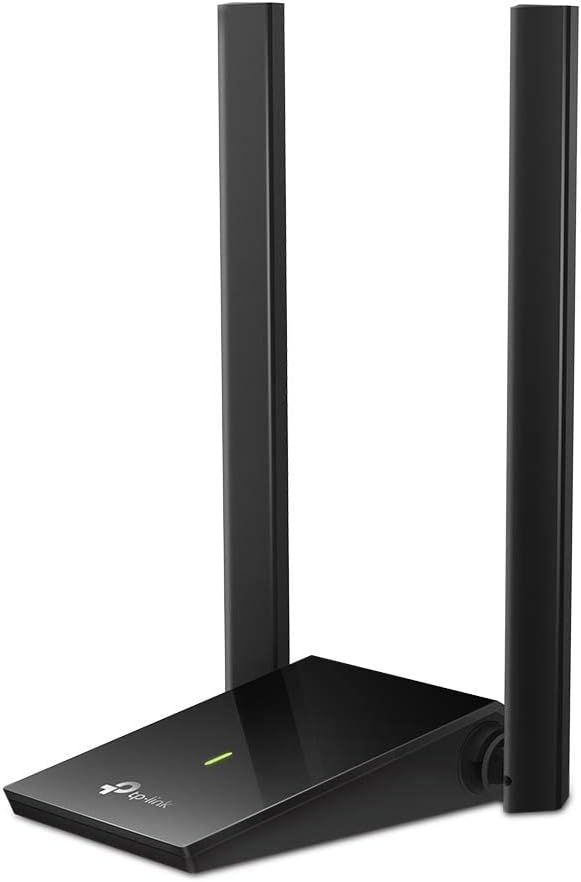


This adapter combines strong performance with a user-friendly design. With a solid 4.4 rating, it stands out for its ability to handle heavy traffic loads.
We may earn a commission when you buy through this link, at no additional cost to you.
The AC1300 speed offers significant bandwidth for streaming and gaming. MU-MIMO support ensures your connection remains stable even when multiple devices are active on the network.
Some users might find the driver process slightly extra on older systems. This is a minor trade-off considering the performance gains and reliability it provides for modern desktops.
Anyone looking for a balanced upgrade for their PC should consider this model. It delivers consistent results without breaking the budget or requiring technical expertise to set up.
The dual-band configuration allows you to prioritize bandwidth-intensive tasks on the 5GHz band effectively.
Beamforming technology helps direct the signal towards your router for a more consistent connection experience.
We may earn a commission when you buy through this link, at no additional cost to you.
This nano adapter is perfect for users who need to connect without blocking other ports. It holds an impressive 4.5 rating for its simplicity and reliability.
We may earn a commission when you buy through this link, at no additional cost to you.
Despite its small size, it supports both 2.4GHz and 5GHz bands. This flexibility allows you to switch to the faster 5GHz band when needed for better performance.
Speed is naturally lower than higher-end models which might limit 4K streaming on very slow connections. For general browsing and media consumption, it provides ample bandwidth at a low cost.
This choice is ideal for laptops or small form factor desktops. It offers a convenient way to get wireless connectivity without sacrificing desk space or budget.
Its miniature footprint allows it to remain plugged in without interfering with other USB ports or cases.
Compatibility extends across various Windows versions and macOS versions ensuring broad utility.
We may earn a commission when you buy through this link, at no additional cost to you.
This model pushes the boundaries of what a USB adapter can achieve with WiFi 6 technology. It is designed for power users who need maximum bandwidth and range.
We may earn a commission when you buy through this link, at no additional cost to you.
With speeds up to 1800Mbps and high gain antennas, it overcomes obstacles better than standard adapters. The included extension cable lets you place the unit in a location with the strongest signal.
The higher price reflects the advanced chip and superior build quality. Compatibility is limited to Windows systems which might be a constraint for Mac users or Linux enthusiasts.
Gamers and streamers looking for the lowest latency should prioritize this option. It is a robust solution for ensuring your desktop always has the fastest possible wireless link.
WiFi 6 features like OFDMA and MU-MIMO optimize data transfer for multiple devices simultaneously.
Dual external antennas ensure that you can maintain high speeds even from distant rooms.
We may earn a commission when you buy through this link, at no additional cost to you.
A reliable workhorse for desktop users needing consistent connectivity. It delivers solid AC600 speeds with a high gain antenna for extended coverage.
We may earn a commission when you buy through this link, at no additional cost to you.
The adjustable antenna allows you to fine-tune the reception based on your room layout. This flexibility helps you avoid dead spots that might occur with fixed adapters.
While it lacks the latest WiFi 6 features it still handles everyday tasks effectively. The price point remains accessible making it a great option for basic upgrades.
This adapter is suitable for those who want a simple plug and play solution. It balances performance and cost well for typical home office or entertainment setups.
Rotating the antenna helps you align with your router for better reception.
The high gain design improves signal transmission through walls and furniture.
We may earn a commission when you buy through this link, at no additional cost to you.
This adapter offers high speeds through dual external antennas for better reception. It supports AC1300 standards making it suitable for modern gaming needs.
We may earn a commission when you buy through this link, at no additional cost to you.
The USB 3.0 interface ensures that the adapter does not bottleneck your network connection. Dual antennas help capture signals from further away compared to single antenna models.
Some users might find the size slightly larger than nano options. This is a trade-off for the added performance and stability it brings to your desktop setup.
Choose this if you need higher speeds without spending on premium WiFi 6 models. It is a practical solution for extending your network range reliably.
The 5GHz band delivers up to 867Mbps for fast file transfers and streaming.
Dual antennas work together to improve capture and transmission efficiency.
We may earn a commission when you buy through this link, at no additional cost to you.
UGREEN brings WiFi 6 technology to desktop users with a simple plug-in experience. It supports Windows 10 and 11 systems with minimal setup steps.
We may earn a commission when you buy through this link, at no additional cost to you.
The built-in drivers save you from downloading extra files manually. This convenience makes it easy to get online quickly after plugging the device into your USB port.
Users on older systems might need to check driver availability carefully. The benefits of lower latency and better efficiency are worth the extra check for most.
This adapter is perfect for users wanting to upgrade to WiFi 6 easily. It offers modern features in a package that is straightforward to install and use.
Built-in drivers simplify the installation process for supported Windows systems.
WiFi 6 technology ensures better performance in crowded wireless environments.
We may earn a commission when you buy through this link, at no additional cost to you.
This adapter features a powerful external antenna to maximize signal strength. It supports WiFi 6 standards for improved efficiency and speed on modern networks.
We may earn a commission when you buy through this link, at no additional cost to you.
The 6dBi high gain antenna helps you connect from further away. You can also use AP Mode to turn your PC into a hotspot for other devices easily.
Setup is generally quick but may require driver installation on some systems. The range benefits provided by the antenna make it a strong choice for larger homes.
Select this if you need to cover larger areas or share your connection. It provides a balance of modern tech and practical utility for various setups.
The 6dBi antenna provides multi-dimensional rotation to improve signal reception.
Turn your computer into a Wi-Fi hotspot to share internet with other devices.
We may earn a commission when you buy through this link, at no additional cost to you.
Designed for desktop PCs this adapter uses two high gain antennas for robust signal. It offers AC1300 speeds ensuring your system can handle heavy data loads.
We may earn a commission when you buy through this link, at no additional cost to you.
The adjustable multi-directional antenna lets you position it for optimal reception. This flexibility ensures you can get the best possible connection regardless of your setup.
While it is optimized for desktop use it supports macOS systems too. The main trade-off is the need for driver setup which adds a small step to installation.
Ideal for desktop users needing stability and speed this model performs well. It is a solid choice for those prioritizing range and consistent performance.
Dual high gain antennas improve range and signal quality significantly.
Adjustable antennas enable flexible positioning for the best reception.
We may earn a commission when you buy through this link, at no additional cost to you.
This model delivers top-tier speeds with AX1800 capabilities for demanding tasks. It incorporates WPA3 security to keep your browsing data safe from potential threats.
We may earn a commission when you buy through this link, at no additional cost to you.
With both AP Mode and high data rates it offers great versatility. The cooling design helps maintain performance during long sessions without overheating issues.
The price is higher than standard models but justifies the speed gains. Driver setup is straightforward on supported systems making access easier.
Power users who need maximum performance should consider this adapter. It ensures your connection keeps up with the latest high-bandwidth applications.
WPA3-SAE encryption provides a more secure browsing experience.
Use as an adapter or switch to AP Mode to share internet seamlessly.
We may earn a commission when you buy through this link, at no additional cost to you.
This mini adapter offers a compact solution for users needing WiFi 6 speeds. Its tiny footprint makes it ideal for laptops or small form factor PCs.
We may earn a commission when you buy through this link, at no additional cost to you.
It delivers faster speeds than older models thanks to modern WiFi 6 tech. The pre-loaded driver ensures you can get started quickly without hunting for software.
The USB 2.0 interface might limit peak speeds slightly compared to USB 3.0. However for most daily tasks the performance is more than sufficient.
Choose this if you need modern speeds in the smallest package possible. It is a great way to upgrade your wireless capabilities without bulk.
With a compact design this dongle integrates seamlessly with desktop or laptops.
Advanced features enable fast and reliable performance for your PC.
We may earn a commission when you buy through this link, at no additional cost to you.
Selecting the right adapter requires understanding your hardware needs and usage habits. Below are key factors to help you find the best option.
Ensure your chosen adapter matches your router capabilities. Newer WiFi 6 adapters offer better efficiency and speed but require a compatible router for full benefits.
Verify your router supports WiFi 6 or AC standards before purchasing an adapter to get the most performance.
Check that the adapter drivers support your specific OS. Some models are Windows only while others work on Mac or Linux systems.
Always check the product page for OS compatibility details to avoid installation issues.
USB 3.0 provides faster data transfer and lower latency than USB 2.0. Higher speed adapters benefit from the extra bandwidth of USB 3.0 ports.
Connect your adapter to a USB 3.0 port whenever possible to avoid bottlenecks.
External antennas generally provide better range than built-in ones. Look for models with high-gain antennas if you are far from your router.
Dual antennas can further improve signal stability and throughput in complex environments.
Match the adapter speed to your internet plan and usage needs. Streaming and gaming benefit from higher rated speeds like AC1300 or AX1800.
Consider AC600 for basic tasks if you want a budget-friendly option with good performance.
Adapters with built-in drivers simplify installation and save time. Others may require downloading drivers which can be a hurdle for some users.
Prefer models with plug-and-play drivers if you want a quick setup process.
Modern adapters support WPA3 encryption for improved network safety. This is crucial for protecting your data on public or home networks.
Ensure the adapter supports current encryption standards to stay safe online.
Prices vary based on features and speed capabilities. Determine a reasonable budget that balances performance with affordability.
Often mid-range models offer the best value for typical home and office use.
First insert the adapter into an available USB port on your computer. Wait for your system to detect it automatically and install necessary drivers.
Once connected select your network from the available list and enter your password. Ensure you connect to the 5GHz band for better speed and less interference.
Keep the adapter clear of obstructions and heat sources. Periodically check for driver updates to maintain optimal performance and security.
It works with most routers but you need a compatible router to access the full 5GHz capabilities. Older routers might limit the speed you can achieve with a newer adapter.
Some adapters come with built-in drivers for modern Windows systems. Others may require you to download drivers from the manufacturer website first.
Range depends on the antenna and environment. Most dongles work well within 30 to 50 feet but walls can reduce signal strength significantly.
Not all models support macOS so check compatibility carefully. TP-Link offers some options that work on Mac but Windows only models exist too.
WiFi 6 offers lower latency and better efficiency for multiple devices. It is ideal if you have a modern router and multiple connected devices.
Yes but speeds may be limited compared to USB 3.0. It is best to use a USB 3.0 port for optimal performance.
We reviewed ten top models ranging from budget nano options to high speed WiFi 6 adapters. The TP-Link AC1300 remains a top choice for its balance of speed and reliability.
Prioritize compatibility and range based on your specific setup needs. Modern WiFi 6 adapters offer future-proofing but standard AC adapters still serve well for many users.
Always verify current product details and availability before purchasing. Prices and availability can change so checking the latest info ensures you get the best deal.