
HP Smart Tank 5003
4.1Editor score
Three years ink included
Mess-free refill system
Borderless print support
Compare the top AI printers for home and office including HP and Liene models with smart features for faster printing and precise cutting results.
AI printers are transforming how we handle documents and creative projects by automating complex tasks. These devices use smart algorithms to optimize layouts, enhance colors, and reduce waste significantly.
We evaluated ten leading models based on performance, smart features, and reliability. Our analysis focuses on how well each printer integrates artificial intelligence into everyday printing workflows for users.
Each pick highlights unique strengths like speed, ink efficiency, or specialized cutting capabilities. Prices and availability change frequently so verify current details before making your final purchase decision today.
4.1Editor score

3.9Editor score

4.2Editor score
This side-by-side comparison highlights the key specifications and smart capabilities of each model to help you find the right fit for your specific printing needs.




The HP OfficeJet Pro 8125 stands out as a top choice for home offices needing reliable smart printing. It holds a solid rating and offers professional-quality color documents with fast black print speeds that keep up with daily workflows.
We may earn a commission when you buy through this link, at no additional cost to you.
Its standout feature is the HP AI print formatting tool which removes unwanted content from web pages and emails automatically. This ensures your printed documents look clean and professional without wasting paper on awkward layouts or extra margins.
While it offers great speed and connectivity, users should note the cartridge policy restricts third-party options. This trade-off ensures security and reliability but may limit flexibility for those seeking non-HP consumables for routine printing tasks.
If you need a trustworthy printer with advanced smart features for business documents and reports this model delivers consistent results. Its balance of speed, security, and AI assistance makes it ideal for focused home office environments.
HP AI easily removes unwanted content from emails and web pages so your prints are just the way you want without manual editing.
HP Wolf Essential Security bolsters security to keep your network protected from cyber threats while dual-band Wi-Fi ensures stable connections.
We may earn a commission when you buy through this link, at no additional cost to you.
The HP Smart Tank 5003 offers exceptional value for households printing high volumes of documents without worrying about frequent ink purchases. Its rating reflects user satisfaction with the reliable tank system and included ink supply.
We may earn a commission when you buy through this link, at no additional cost to you.
This model comes fully loaded with savings offering up to three years of ink right out of the box. The mess-free refill system makes it simple to keep printing without squeezing bottles or spilling ink on your desk.
While it lacks some advanced AI tools found in pro models its core functionality is robust and efficient. Users trade complex smart features for significant long-term savings on consumables which suits budget-conscious buyers perfectly.
For anyone needing a dependable printer for homework or home office tasks this tank system minimizes running costs effectively. It is the smart choice for those prioritizing ink capacity over advanced digital automation features.
Get up to six thousand color or black pages right out of the box with no complicated maintenance required for years of printing.
Simply plug ink bottles into the cartridge-free tank and let them drain without squeezing or spilling to keep your workspace clean.
We may earn a commission when you buy through this link, at no additional cost to you.
The Liene PixCut S1 is a specialized premium device designed for creators who want to make custom stickers and labels easily. Its rating highlights the seamless integration of printing and cutting technology in one compact device.
We may earn a commission when you buy through this link, at no additional cost to you.
AI image extraction allows you to automatically recognize and extract subjects from photos for precise cutting. The high-precision system follows every edge with pinpoint accuracy ensuring professional-quality results without manual trimming efforts.
While it excels at crafting it is not a general document printer so its use case is specific. This specialization ensures superior quality for DIY projects but limits its utility for standard office document printing needs.
If you love DIY crafts or custom gifts this device brings your imagination to life with stunning realistic colors. The lack of subscription fees adds to the appeal making it a great investment for hobbyists.
Upload a photo pick a style and watch AI bring your vision to life instantly with stunning realism and no design experience required.
Four-layer thermal dye-sublimation technology automatically laminates stickers during printing to ensure they remain vibrant scratch-resistant and intact over time.
We may earn a commission when you buy through this link, at no additional cost to you.
The HP Envy 6155 is perfect for homes needing high-quality color documents and borderless photos. It has a strong rating due to its ability to match screen colors accurately for vibrant prints.
We may earn a commission when you buy through this link, at no additional cost to you.
True-to-screen technology ensures documents and photos look as vibrant as they do on your display. The 60% recycled plastic content shows a commitment to sustainability without compromising performance quality or user experience.
Its main drawback is the slower speed compared to office models which might frustrate heavy document users. However for everyday homework and photo printing the quality and ease of use outweigh the speed limitations.
Choose this model if you prioritize visual fidelity and eco-friendly design for home use. It balances smart AI tools with user-friendly controls making it accessible for families and casual users.
Print documents and photos that look as vibrant as they do on your screen with HP's P3 technology for accurate color reproduction.
Made with at least 60% recycled plastic content this printer helps reduce environmental impact while maintaining reliable daily performance.
We may earn a commission when you buy through this link, at no additional cost to you.
The HP OfficeJet Pro 9135 delivers professional quality for offices requiring high speed and fax capabilities. Its high print speed helps teams manage presentations and brochures efficiently without waiting around for output.
We may earn a commission when you buy through this link, at no additional cost to you.
Single-pass 2-sided scanning is a massive time saver for busy workloads. Two 250-sheet input trays mean you can print for longer periods without refilling paper reducing interruptions during critical business tasks.
While effective the higher cost and instant ink policy might be barriers for small home offices. For corporate environments the efficiency gains and security features justify the investment in this premium hardware.
If you need a workhorse that keeps up with a busy schedule this model is designed for you. Its combination of speed large capacity and smart AI tools makes it a reliable office partner.
Auto document feeder with single-pass 2-sided scanning lets you digitize double-sided documents quickly without flipping pages manually.
HP Wolf Pro Security bolsters security and helps keep your network protected from cyber threats for safe office data handling.
We may earn a commission when you buy through this link, at no additional cost to you.
The HP Smart Tank 7603 brings fax capability to the affordable ink tank category for home offices. It offers up to 3 years of ink included ensuring low-cost high-volume printing without frequent cartridge changes.
We may earn a commission when you buy through this link, at no additional cost to you.
Its magic touch control panel offers modern interaction though users may need time to master it. With fax and ADF included it handles multi-function needs that smaller models often lack for growing home businesses.
While not the fastest printer its reliability and low running costs make it a strong contender. It balances convenience and savings making it suitable for users who need fax functionality without buying multiple devices.
Choose this if you need fax capability and want to avoid cartridges. It delivers consistent results and simple maintenance for those prioritizing long-term savings over raw speed.
Get up to 8000 color or 6000 black pages right out of the box to handle heavy printing needs without interruption.
Simply plug ink bottles into the cartridge-free tank and let them drain without squeezing or spilling to keep your workspace clean.
We may earn a commission when you buy through this link, at no additional cost to you.
The HP OfficeJet Pro 8139 stands out for offering a full year of instant ink trial instead of the usual months. This long trial period helps you lock in savings for business documents and reports for a full year.
We may earn a commission when you buy through this link, at no additional cost to you.
Fax functionality combined with automatic document feeder makes it versatile for small businesses needing professional correspondence. Wolf Essential Security ensures your data stays protected while printing securely over wireless networks.
While speed is standard for its class the convenience of a year of ink adds significant value. Users appreciate the reduced hassle of ink delivery which ensures you never run out unexpectedly during busy periods.
If you need fax and long-term ink coverage this model offers a balanced set of features. It is an excellent choice for small offices that value convenience and security in their workflow.
Subscribe to instant ink service to get ink delivered before you run out and save up to 50% on ink for a full year.
HP Wolf Essential Security bolsters security and helps keep your network protected from cyber threats during everyday printing tasks.
We may earn a commission when you buy through this link, at no additional cost to you.
The HP Smart Tank 7603 provides reliable performance for home offices needing fax and high-capacity ink. With up to 3 years of ink included it offers peace of mind for continuous printing without interruptions.
We may earn a commission when you buy through this link, at no additional cost to you.
Its magic touch control panel adds a modern user interface to navigate functions easily. Wireless printing and mobile support keep you connected so you can send documents from your phone or laptop seamlessly.
While it lacks advanced AI layout tools it focuses on core reliability and cost efficiency. This simplicity appeals to users who want a straightforward printer that handles high volumes efficiently.
Choose this model if you need fax and tank technology without extra complexity. It is a dependable choice for users prioritizing low running costs and consistent output quality.
Get up to 8000 color or 6000 black pages right out of the box with cartridge-free refills for long-term use.
Enjoy borderless prints and mobile printing with easy setup for professional-looking documents and photos at home.
We may earn a commission when you buy through this link, at no additional cost to you.
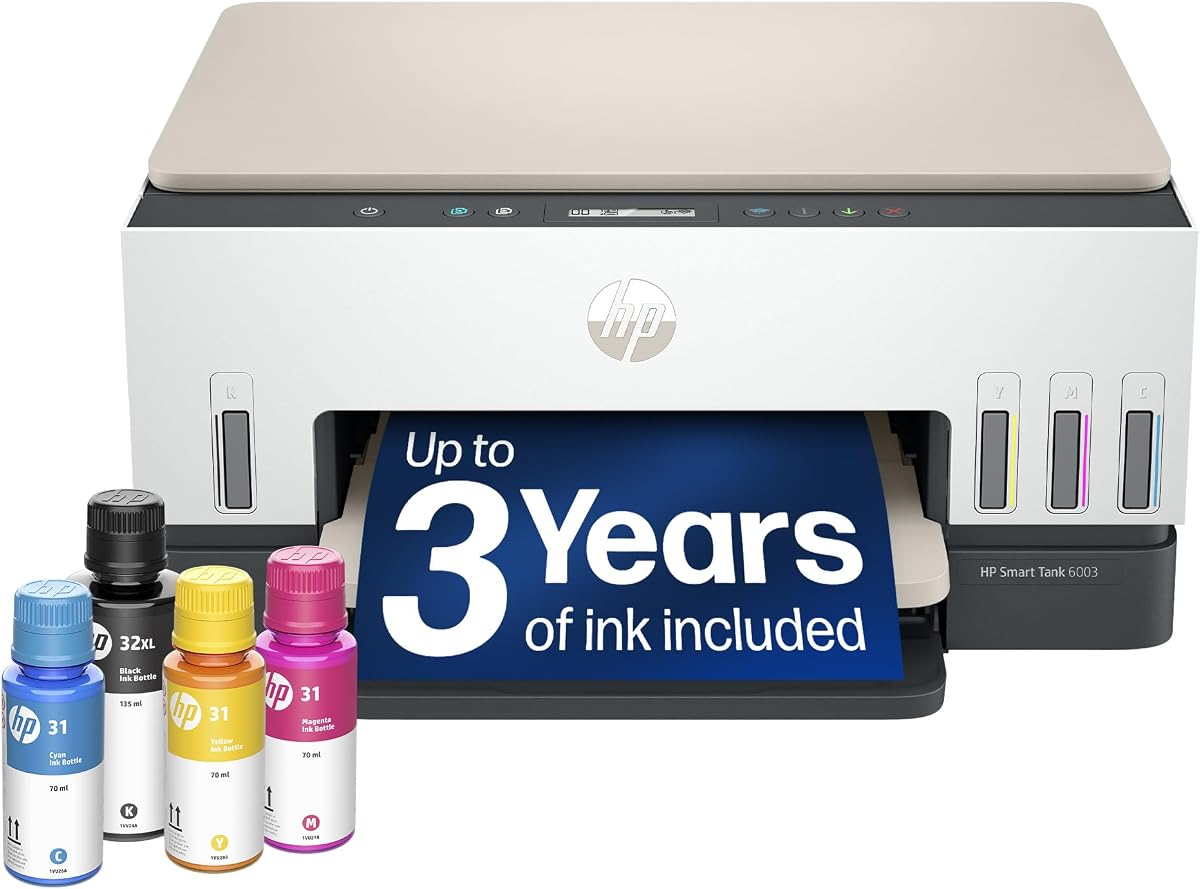
The HP Smart Tank 6003 is designed for homes needing a simple and cost-effective printing solution. It includes up to 3 years of ink right out of the box to support everyday high-volume printing needs.
We may earn a commission when you buy through this link, at no additional cost to you.
Its wireless printing capabilities allow you to send documents from your phone easily. With borderless print support you can create photos and documents that look professional without worrying about white edges on paper.
While it does not offer fax functionality its focus on simplicity keeps the price accessible. Users benefit from the mess-free refill system which maintains a clean workspace during regular maintenance tasks.
If you need a straightforward tank printer for home use this model delivers value without clutter. It is ideal for families who want reliable output without advanced office features.
Stay connected with reliable wireless printing so you can print copy or scan from your smartphone with ease.
Replenish ink with HP's easy-access mess-free refill system to avoid squeezing or spilling when adding ink to the tank.
We may earn a commission when you buy through this link, at no additional cost to you.
The Bambu Lab P2S Combo brings AI to 3D printing with high-speed precision and multi-color support. It holds the highest rating in this lineup due to its exceptional speed and automated setup process.
We may earn a commission when you buy through this link, at no additional cost to you.
AI failure detection and automatic calibration make professional-grade 3D printing accessible even for beginners. With setup ready in just 15 minutes you can start creating complex models immediately without technical hurdles.
While it is specialized for 3D models its smart airflow and workflow support are unmatched. The adaptive airflow system ensures consistent results for overhangs and engineering-grade materials effectively during printing.
For creative projects and prototypes this model unlocks limitless creativity with seamless workflows. It is the top choice for anyone serious about advanced 3D printing with smart automated features.
Prints up to 600 mm/s while maintaining exceptional accuracy for sharp and smooth layers with consistent results.
AMS 2 Pro enables seamless multi-color printing with built-in filament drying to keep every spool ready for flawless prints.
We may earn a commission when you buy through this link, at no additional cost to you.
Selecting the right AI printer involves balancing smart features with your specific printing needs and volume requirements.
AI features vary significantly by model. Some focus on layout optimization to save paper while others offer image extraction for cutting. Consider whether you need document smart or creative smart tools.
Prioritize printers with AI tools that solve your biggest pain points like reducing waste or automating design work.
Print speed in pages per minute matters for productivity. Home users may find 10-15ppm sufficient while offices often need 20ppm or higher to keep up with demand.
Match the speed to your workload to ensure the printer can handle peak times without frustrating delays.
Cartridge systems offer simplicity while ink tanks reduce long-term costs. Tank printers are ideal for high-volume users who print hundreds of pages monthly without frequent refills.
Choose a tank system if cost per page is a priority and cartridges if you need compact and simple operation.
Wireless connectivity allows printing from phones and laptops. Dual-band Wi-Fi ensures stable connections and avoids interference from other home networks.
Verify the printer supports your preferred apps and devices for seamless mobile printing workflows.
Larger input trays reduce the need to refill paper constantly. Models with 250-sheet trays are better for offices than those with 100-sheet trays.
Check the tray size against your daily page count to avoid frequent interruptions.
Office printers should include security like Wolf Security to protect networks. This is vital for handling sensitive business documents or customer data.
Ensure the model has robust security to keep your network protected from potential cyber threats.
Recycled plastic content and energy-saving modes reduce environmental footprints. Brands are increasingly committing to sustainable design in their new models.
Look for high recycled content percentages if eco-friendly manufacturing is a priority for your purchase.
Many printers offer instant ink trials ranging from 3 months to a year. Factor these savings into your total cost of ownership.
Choose models with longer trials if you want immediate cost savings without buying extra ink upfront.
To start using your AI printer connect it to your Wi-Fi network and install the corresponding app on your device. This allows you to manage settings and access AI features like layout optimization easily.
Regularly clean the print heads and scan glass to maintain quality. Use the printer's maintenance tools to run cleaning cycles if print streaks appear on your documents.
Keep your firmware updated to ensure security patches and new AI features are available. Follow the manufacturer's instructions for updates to avoid interruptions during printing.
AI in these printers helps optimize layouts, remove unwanted content, and enhance images. It automates tasks like formatting documents to save paper and ensure professional results without manual editing.
Tank printers often pair well with AI features because they support high-volume smart processing. They reduce cost per page making frequent AI optimization more affordable over time.
Most HP printers block non-original chips via firmware. Using original cartridges ensures reliability and security features like Wolf Protection work correctly without issues.
Yes all models support wireless printing via mobile apps. You can scan, copy, or print directly from smartphones using the manufacturer's app for easy access.
Smart tanks suit high-volume home printing while pro models fit offices needing fax and speed. Choose based on your daily page count and specific feature requirements.
No it is optional but often included for a trial period. You can opt out later though using original ink ensures security and warranty coverage remain valid.
AI tools like in the PixCut S1 extract subjects from images and cut around them automatically. This ensures precise edges for stickers without manual tracing or trimming.
Resolution and image complexity affect speed more than text. AI optimization helps reduce processing time by streamlining layout before the actual printing begins.
Our top picks highlight models that balance AI capabilities with performance. Whether you need a budget tank or a premium cutter there is a model for every use case.
Prioritize what matters most like speed, ink savings, or smart features to find the right fit. Avoid overpaying for features you won't use by focusing on your main goals.
Prices and availability change frequently so check current details before purchasing. This guide helps you compare smart features so you can make an informed decision for your needs.