
AI Voice Sticker Printer, Mini Thermal Sticker Maker with 7 Art Styles
5.0Editor score
Instant voice-to-sticker magic
Color preview screen included
Portable and lightweight design
Discover the best AI sticker printer maker options for kids and creators. This guide compares top models with voice-to-image features, thermal printing, and
AI sticker printers are transforming how children and creators bring imagination to life. These devices use voice commands or touch inputs to generate custom designs instantly. The best models combine ease of use with high-quality thermal printing for endless creative fun.
We evaluated ten leading products based on print quality, connectivity, ease of use, and creative features. Our analysis focuses on voice activation, app support, portability, and durability. Each option offers unique strengths for different needs and budgets.
Every pick in this guide highlights key benefits and real-world performance insights. We include detailed specifications and user-focused reviews to help you decide. Remember that prices and availability can change, so check current offers before purchasing.
5.0Editor score

4.8Editor score

4.2Editor score
This side-by-side comparison highlights key specifications and unique features across all ten models. Use it to quickly identify which printer matches your creative needs and budget requirements.
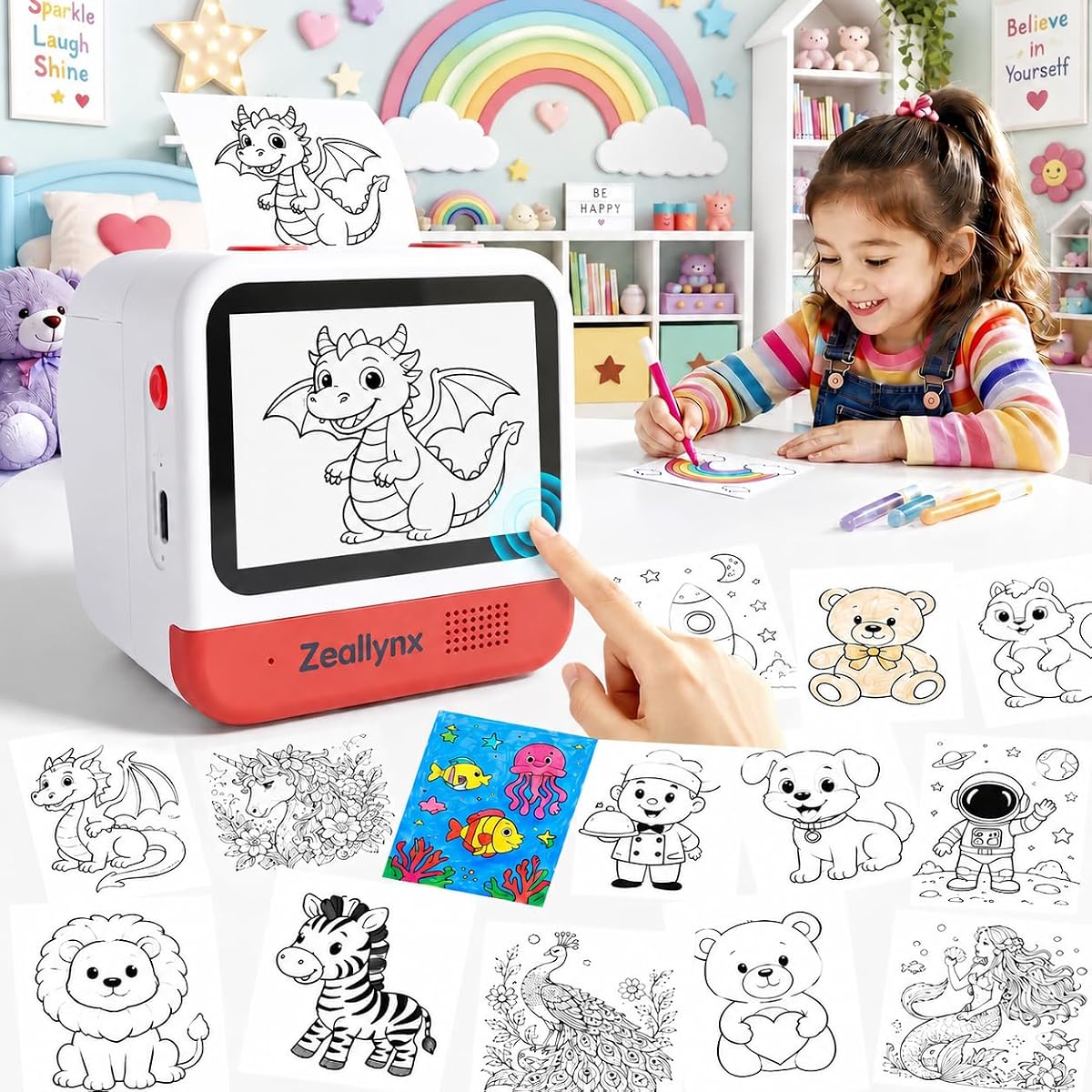

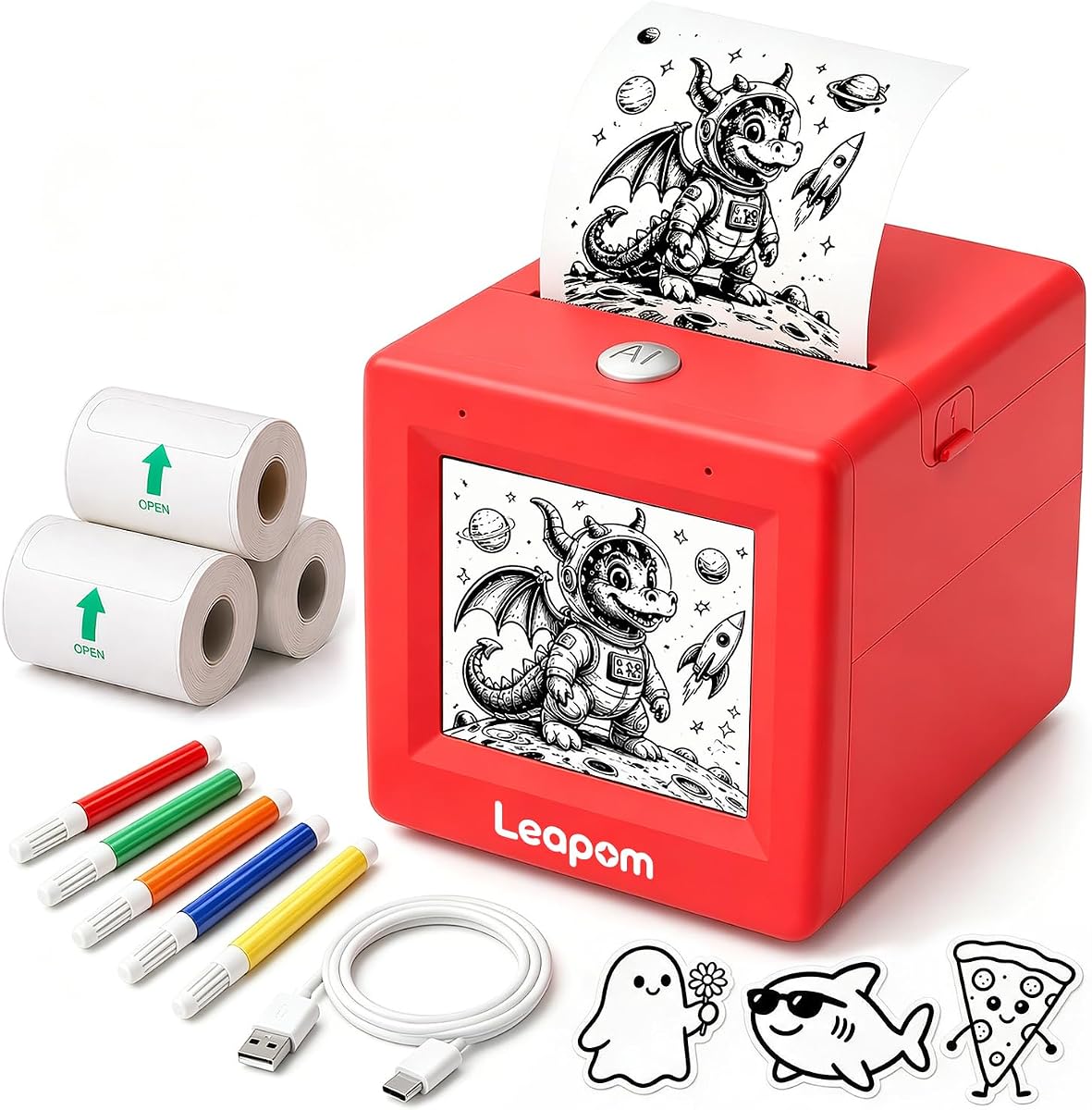


This AI Sticker Maker for Kids stands out with its seamless voice-to-sticker generation and touchscreen interface. Rated highly for ease of use, it transforms spoken ideas into printable art instantly.
We may earn a commission when you buy through this link, at no additional cost to you.
The standout feature is its voice activation without needing an app. Children simply speak their ideas, and the device generates matching stickers using AI. This encourages creativity while keeping setup simple for parents.
While it prints only black-and-white lines, the included watercolor pens invite kids to color their creations. This adds an extra layer of fun and artistic expression to the process.
Ideal for ages 4 and up, this printer is a perfect gift for birthdays or holidays. It balances technology and creativity well, making it a top choice for families seeking an engaging educational tool.
Kids can speak ideas like a dragon playing with flowers and watch them turn into stickers instantly.
Built-in content filtering ensures every prompt remains age-appropriate without storing any personal data.
We may earn a commission when you buy through this link, at no additional cost to you.
The Liene PixCut S1 delivers professional-quality color stickers with integrated printing and cutting in one device. Its 300 DPI resolution and dye-sublimation technology ensure vivid, long-lasting results.
We may earn a commission when you buy through this link, at no additional cost to you.
AI image extraction and precise cutting features make it ideal for custom labels and gifts. Users can upload photos and let the device handle design adjustments automatically for flawless edges.
Though it requires an app connection, the workflow is streamlined for efficiency. The durable, scratch-resistant output makes it suitable for daily use and commercial projects.
Best suited for crafters and small businesses, this model excels in versatility and output quality. It is the go-to choice when color and durability are top priorities.
Eliminate the need for separate machines by printing and cutting stickers in one seamless step.
Dye-sublimation technology ensures colors stay vibrant and true-to-life on every sticker.
We may earn a commission when you buy through this link, at no additional cost to you.
This mini sticker printer offers exceptional value with instant voice-to-sticker capabilities and a color preview screen. It is perfect for budget-conscious creators wanting quick, fun sticker projects.
We may earn a commission when you buy through this link, at no additional cost to you.
Users can preview designs on the LED screen before printing to avoid waste. Seven art styles ranging from anime to sketch provide diverse creative outputs for every idea.
The compact size and lightweight build make it easy to carry anywhere. USB-C charging ensures convenient power sources at home or on the go.
Ideal for kids and casual crafters, this model combines simplicity and creativity. It is a fantastic entry point into AI-driven sticker making without breaking the bank.
The color LED screen lets you review designs before printing to save paper and effort.
Choose from seven styles including cartoon and anime to match any creative mood.
We may earn a commission when you buy through this link, at no additional cost to you.
This sticker printer combines touchscreen control with voice activation for a seamless user experience. It allows independent use without requiring smartphones or complex app setups.
We may earn a commission when you buy through this link, at no additional cost to you.
Children can navigate modes and preview content easily with the touchscreen. Voice input complements this by enabling quick idea generation without typing or drawing.
The device includes both sticker and plain thermal paper rolls for varied projects. Built-in TF card support lets users save designs for future reprinting.
Best for classrooms and kids seeking simplicity, this model reduces technical barriers. It focuses on creative freedom rather than advanced features.
Kids can use the printer without relying on parents for phone connections or app installations.
Explore ten modes from line art to comic strips for endless inspiration.
We may earn a commission when you buy through this link, at no additional cost to you.
The Stickerbox Mini Sticker Maker offers a screen-free approach to creative play, focusing on voice interaction. It is designed to keep kids engaged offline after printing.
We may earn a commission when you buy through this link, at no additional cost to you.
Built with privacy-first principles, it is COPPA compliant and only listens when the button is pressed. This ensures safety and reduces parental worries about data collection.
Once printed, children can color and decorate their stickers with included pencils. This encourages hands-on creativity and storytelling without digital distractions.
Perfect for ages 5 and up, this model supports independent play and imagination. It is an excellent choice for families wanting to limit screen time while embracing tech.
After printing, the fun goes offline so kids can focus on coloring and decorating.
KidSAFE certification ensures every feature meets strict child privacy and safety standards.
We may earn a commission when you buy through this link, at no additional cost to you.
Designed for toddlers and young children, this sticker maker simplifies voice-to-image creation for early learners. Its compact size fits easily into little hands for independent use.
We may earn a commission when you buy through this link, at no additional cost to you.
The kit includes thermal paper and markers to start creating immediately. This fosters communication skills and artistic expression through hands-on activities.
Though the output is simple black-and-white, it serves as an excellent coloring tool. Parents can help guide ideas to ensure age-appropriate prompts.
Ideal for birthday gifts for ages 3+, this model balances tech and creativity safely. It encourages imagination without overwhelming young users with complexity.
Combines technology and creativity to help children develop communication and artistic skills.
Lightweight design ensures children can use it independently anywhere at home or school.
We may earn a commission when you buy through this link, at no additional cost to you.
This smart portable printer combines an HD screen with voice activation for versatile sticker making. It supports both creative art and daily labeling needs effectively.
We may earn a commission when you buy through this link, at no additional cost to you.
Users can type or speak ideas via the Fun Print app to generate instant black-and-white images. The clear screen helps review designs before committing to print.
Included rolls of regular and adhesive paper expand its use cases. This makes it ideal for journaling, crafts, and organizational labels.
Best for families and students, it balances functionality and portability. The compact size ensures it fits anywhere for creative inspiration on the go.
Type or speak ideas freely to generate custom images tailored to your exact request.
Use adhesive rolls for labels and regular paper for notes to stay organized.
We may earn a commission when you buy through this link, at no additional cost to you.
The T02 Mini Thermal Printer serves as both a sticker maker and study aid. Its compact build and Bluetooth connectivity make it highly portable for various tasks.
We may earn a commission when you buy through this link, at no additional cost to you.
AI functions like photo cutout and voice-to-image add creative value. Beyond stickers, it works for study notes, to-do lists, and organizational labels.
Included thermal paper rolls ensure immediate use out of the box. The device is compatible with iOS and Android for seamless smartphone integration.
Ideal for students and young professionals, it combines fun and utility. This multi-functional approach makes it a versatile addition to any desk or bag.
Print flashcards and study notes with clarity to support academic learning effectively.
Connect via Bluetooth for easy file transfers and creative app-based editing.
We may earn a commission when you buy through this link, at no additional cost to you.
This maker offers six distinct art styles to inspire diverse creative projects. Connectivity options include both Wi-Fi and Bluetooth for flexible setup and operation.
We may earn a commission when you buy through this link, at no additional cost to you.
Kids can speak or type ideas via the app to generate custom stickers quickly. Content filtering ensures safety while encouraging imagination through varied outputs.
The thermal printing method is inkless and environmentally friendly. Included paper rolls support immediate use for coloring and decorating.
Suitable for ages 4 to 12, it balances safety and creativity. This model is an excellent gift for children who enjoy artistic expression and DIY crafts.
Choose from anime to sketch styles to match every idea and mood.
Use Wi-Fi for direct printing or Bluetooth for app-based creative control.
We may earn a commission when you buy through this link, at no additional cost to you.
This sticker maker simplifies setup with its 3.5-inch touchscreen and direct Wi-Fi connection. Users can create and print without any app downloads or installations.
We may earn a commission when you buy through this link, at no additional cost to you.
Voice commands allow children to generate original designs quickly. A built-in voice companion inspires ideas and answers questions to encourage learning.
The inkless thermal process ensures clean and smudge-resistant prints. Included adhesive paper supports coloring and journaling for creative fun.
Best for ages 3 to 12, it promotes independent creation safely. This model is a standout choice for families valuing simplicity and quick setup.
Direct Wi-Fi connection means no complex pairing or downloads are required for use.
Voice companion suggests creative ideas to help kids brainstorm new projects.
We may earn a commission when you buy through this link, at no additional cost to you.
Choosing the right AI sticker printer requires considering connectivity, print quality, and creative features. This guide highlights the factors to prioritize for your needs.
Most models use Wi-Fi or Bluetooth to connect with smartphones. Some require app installations while others work directly through device touchscreens. Simpler setups are better for kids to use independently without technical help.
Look for devices that offer flexible connection options without compromising privacy.
Thermal printers usually produce black-and-white outputs suitable for coloring. Some premium models offer color dye-sublimation prints for detailed stickers. Higher resolution ensures sharper edges and better design fidelity.
Decide whether color output is essential or if black-and-white is sufficient.
Voice activation enables hands-free creation ideal for younger children. Touchscreens offer more control for older users. Combining both inputs increases flexibility and ease of use for different ages.
Choose input methods that match your children's tech comfort level.
Compact designs fit easily into bags for travel or school use. Larger devices might offer better screens but less portability. Weight and dimensions matter for independent handling by children.
Select a size that balances display quality with carrying convenience.
Many kits include paper rolls, markers, or coloring tools. Having these included reduces initial costs and setup effort. Check paper types to ensure compatibility with future refills.
Prioritize bundles that provide everything needed to start creating immediately.
Kid-friendly devices often feature content filtering and COPPA compliance. Devices that do not store personal data provide peace of mind for parents. Built-in security ensures appropriate prompts are generated.
Always review privacy policies and safety certifications before purchase.
Multiple art styles and templates enhance creative possibilities. AI image extraction or chat features add advanced functionality. More features mean more opportunities for varied projects.
Pick devices offering styles or tools that inspire your kids.
Prices vary widely from budget-friendly mini printers to premium all-in-one systems. Consider long-term paper costs and durability. A slightly higher upfront cost may save on consumables later.
Balance initial price with features and durability for best value.
To begin using your sticker printer, ensure the device is charged or connected to power. Install any required apps if needed, or connect directly via Wi-Fi if supported by the model.
Speak clearly into the microphone or use the touchscreen to input your desired designs. Preview images on-screen before printing to save paper. Adjust settings if you want specific art styles or formats.
Regularly clean the printer head and exterior with a soft cloth to prevent dust buildup. Replace paper rolls as needed and store them in dry conditions to avoid jams.
Most AI sticker printers are designed for children aged 3 to 12 years. Younger kids benefit from simple voice input while older users can explore touch or app features. Always check product specifications for age recommendations.
No, most models use thermal printing technology that requires no ink or toner. Instead, they use heat-sensitive paper rolls to produce clear black-and-white prints. This makes them mess-free and easy to maintain.
Only premium models like the Liene PixCut S1 offer color dye-sublimation printing. Most devices produce black-and-white line art that children can color manually. Choose based on your need for color output.
Built-in content filters automatically block or modify inappropriate requests to ensure safety. These systems are designed to keep all output age-appropriate. Parents should also supervise usage for young children.
Thermal paper rolls are widely available from many suppliers and online stores. Most brands use standard sizes compatible across devices. Check product details to confirm compatibility before buying extra paper.
Yes, they are ideal for creating flashcards, diagrams, and personalized labels. Many models include features useful for note-taking and study aids. Their portability makes them great for classroom use.
We highlighted ten top-performing AI sticker printers ranging from budget-friendly to premium options. Models like the AI Sticker Maker for Kids and Liene PixCut S1 stand out for creativity and quality.
Prioritize features such as voice input, app flexibility, and safety measures based on your needs. Choose a device that matches your child's age and tech comfort for the best experience.
Prices and stock fluctuate frequently so always check current deals before finalizing purchases. We hope this guide helps you find the perfect tool for endless creative fun.