
Qanba N3 Drone 2 Wired Joystick
4.5Editor score
Officially licensed Sony product
Full control panel layout
Affordable pricing point
Discover the top arcade stick for PS5 options for 2026. This guide compares ten fight sticks featuring official licensing, customizable components, and precise
Finding the right arcade stick for PS5 can transform your fighting game experience. A quality stick offers tactile feedback and precision that controllers cannot match. It helps you execute complex moves with confidence during intense matches.
We analyzed ten top-rated fight sticks available for PlayStation 5. Our comparison focuses on build quality, component types, and official licensing. Each product brings unique strengths for different player preferences and budgets.
Each pick below highlights key features and performance characteristics. We include detailed breakdowns to help you choose wisely. Remember that availability and pricing can change frequently online.
4.5Editor score

4.6Editor score
4.5Editor score
This side-by-side comparison highlights the key specifications and unique attributes of each arcade stick. Use this overview to quickly identify which model aligns with your specific gaming needs and setup requirements.


The HORI PlayStation 5 Fighting Stick Alpha stands out as a top choice for serious fighters. It holds a strong rating from users who appreciate its build quality. The official licensing means it works seamlessly with PS5 fighting titles.
We may earn a commission when you buy through this link, at no additional cost to you.
Its standout feature is the use of HORI proprietary Hayabusa buttons and joystick. These components are known for responsiveness and durability. Players can execute fast combos with confidence during matches. The stick also opens easily for customization or repairs.
While it is an investment, the value lies in its tournament-grade construction. The design allows you to swap artwork or modify internals without tools. This flexibility keeps the stick relevant as your skills improve over time.
If you want a reliable stick that feels like home console gear, this is a solid pick. It balances performance and customization well. We recommend it for players who plan to compete or play daily.
Hayabusa buttons provide a distinct tactile feel that many competitors lack. Their durability reduces wear during intense sessions.
Being officially licensed by Sony ensures no driver issues or compatibility glitches on PS5. You get plug-and-play functionality right out of the box.
We may earn a commission when you buy through this link, at no additional cost to you.
The Nacon Daija Arcade Fight Stick brings professional features to a competitive price. It has a solid rating among users who value customization. The official licensing guarantees it works with PS5 games.
We may earn a commission when you buy through this link, at no additional cost to you.
What makes this stick interesting is its deep software support. You can map buttons and create profiles easily on PC. The included SANWA joystick and buttons add a high-end touch. The textured palm rest helps you maintain comfort during long play.
A unique trait is the customizable front plate and audio jack. This allows you to personalize the look and connect headsets directly. These features are often missing on simpler sticks. It offers a lot for the cost.
Choose this if you want to tweak controls without breaking the bank. It is great for players who want a tailored experience. The audio and mapping tools make it versatile for home use.
The intuitive software lets you create game profiles without coding. This makes adapting to different fighting games simple and fast.
The textured palm rest prevents slipping during intense combos. It adds a layer of ergonomics that helps reduce fatigue.
We may earn a commission when you buy through this link, at no additional cost to you.
The MAYFLASH Arcade Stick F700 appeals to players who game across multiple platforms. It earns a good rating for its versatility and wireless support. It works well with PS5 fighting games when wired or paired.
We may earn a commission when you buy through this link, at no additional cost to you.
Its main strength is flexibility. You can connect via Bluetooth, 2.4G, or USB. This means you can switch between PC, console, or handhelds easily. The turbo function adds a layer of control for specific moves. The receiver stores safely inside the unit.
While not officially licensed by Sony, it still performs reliably for fighting titles. The build is sturdy enough for home use. Sanwa compatibility ensures you can upgrade parts later. It is a smart choice for cross-platform gamers.
Pick this if you need one stick for many devices. It saves space and money by covering all your bases. The wireless option is perfect for couch play away from your console.
Three connection types let you choose the best fit for any setup. Bluetooth is ideal for wireless while USB ensures zero lag.
Turbo settings allow you to automate rapid button presses. This helps with specific moves or grinding tasks in games.
We may earn a commission when you buy through this link, at no additional cost to you.
The Qanba N3 Drone 2 Wired Joystick offers a streamlined experience for PS5 players. It holds a strong rating for reliability and official support. Being licensed by Sony means it works without issues on PS5.
We may earn a commission when you buy through this link, at no additional cost to you.
Key strengths include the Qanba buttons and lever which are known for quality. The touch panel adds convenience for navigation menus. The microphone input with mute is useful for online chats during matches. It is designed for straightforward use.
Trade-offs include lack of internal customization options. It is more of a plug-and-play device. However, this keeps it affordable and simple. The compact size fits well on smaller desks or tables.
Buy this if you want a no-fuss licensed stick. It is great for beginners who do not need to modify parts. The official status ensures peace of mind for PS5 use.
The touch panel allows quick navigation of console menus. This saves time when setting up matches or accessing apps.
Microphone input with mute gives you direct control over comms. You can talk to friends without switching to a controller.
We may earn a commission when you buy through this link, at no additional cost to you.
The MAYFLASH Arcade Stick F700 Elite takes the F700 platform to a higher level. It has a strong rating for its reliable performance and parts. It serves as a great choice for serious fighters who want quality.
We may earn a commission when you buy through this link, at no additional cost to you.
It comes with premium Sanwa components pre-installed. This means you get high-end buttons and a precision joystick right away. The anti-slip rubber mat keeps the stick steady. You can also update firmware to ensure compatibility with newer systems.
While it costs more than the base model, the components justify the price. The reliability helps maintain performance over time. It is ideal for those who want to avoid swapping parts immediately.
Opt for this if you prioritize component quality. It bridges the gap between budget and pro gear. The wireless options add convenience for flexible play.
Sanwa parts are industry standards for fighting games. They offer smooth movement and clear feedback during inputs.
The anti-slip mat prevents movement during fast play. This ensures your hand position remains consistent throughout the fight.
We may earn a commission when you buy through this link, at no additional cost to you.
The MAYFLASH F500 Arcade FightStick is an affordable option for casual gamers. It earns a decent rating for its versatility. The inclusion of Magic Boots makes it easier to use on PS5 without extra controllers.
We may earn a commission when you buy through this link, at no additional cost to you.
It supports many systems like Xbox, PC, and Switch. This makes it a great travel stick. The turbo functions add utility for practice. Headset output is a nice touch for parties or voice chats.
Trade-offs include a simpler build compared to premium sticks. It is lighter and less rigid. This might not suit heavy users but works for beginners. The wide compatibility saves cost on adapters.
Choose this if you want a versatile stick without overspending. It covers most console needs with one device. The Magic Boots solve the PS5 compatibility issue easily.
Magic Boots act as a controller bridge for PS5. This removes the need to keep a dualsense attached for play.
It works with legacy consoles like Xbox 360 and modern PCs. This gives you value across multiple gaming generations.
We may earn a commission when you buy through this link, at no additional cost to you.
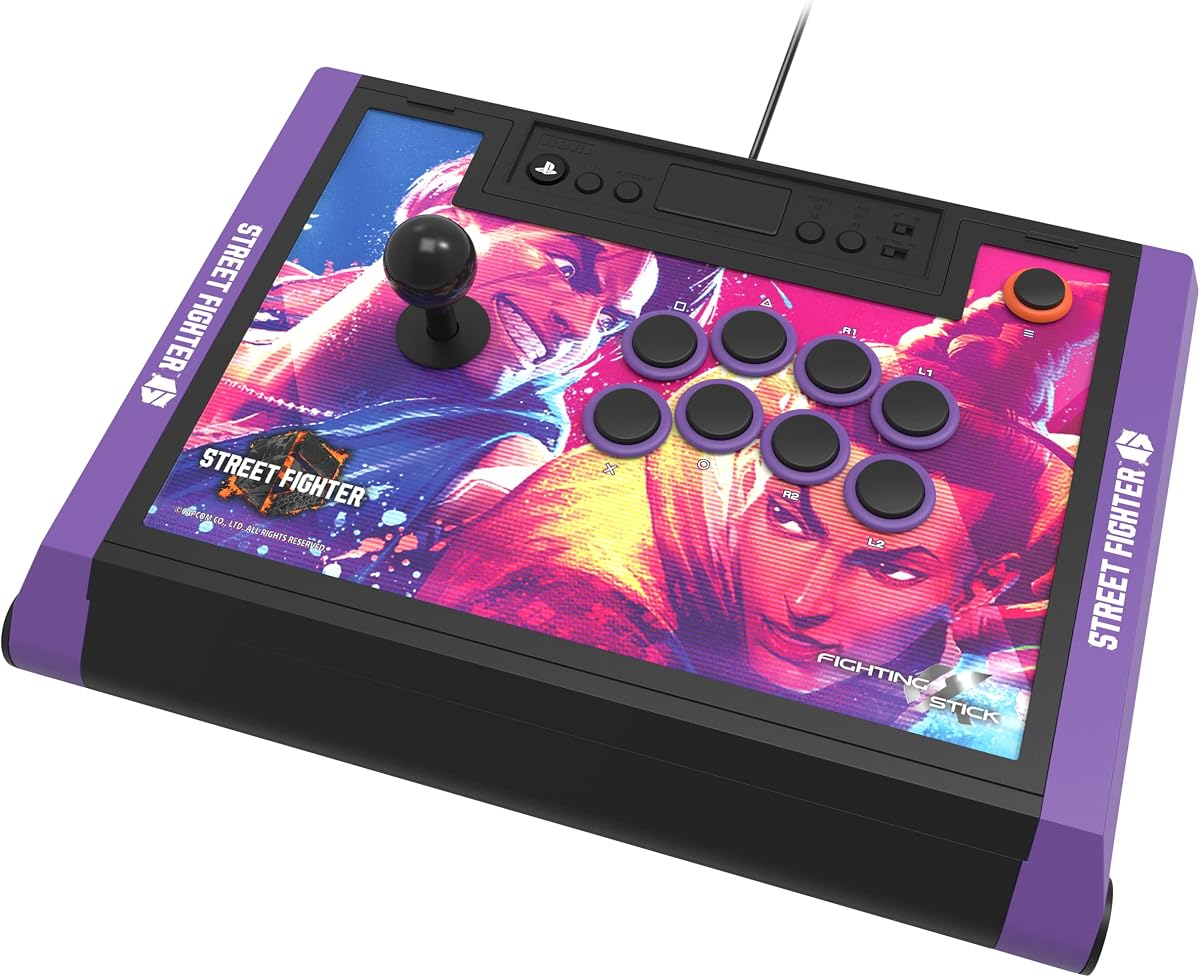
The HORI PlayStation 5 Fighting Stick Alpha (Street Fighter 6 Edition) is a themed variant for fans. It carries a strong rating from dedicated players. It keeps the core features of the Alpha model with unique artwork.
We may earn a commission when you buy through this link, at no additional cost to you.
Its main appeal is the exclusive Street Fighter 6 design. You get official licensing from both Sony and Capcom. The Hayabusa buttons and joystick provide tournament-ready performance. You can also swap top panel art easily.
Trade-offs include the higher price compared to standard models. Some may prefer plain designs. However, it stands out visually on your desk. It feels like a collector piece too.
This is perfect if you love the Street Fighter series. It adds character to your setup without sacrificing function. The performance matches the standard Alpha for competitive use.
Sony and Capcom collaboration ensures authentic designs and compatibility. This adds value for fans of the franchise.
The top panel can be swapped for personal art. This lets you keep the theme or change it later.
We may earn a commission when you buy through this link, at no additional cost to you.
The Qanba Q7 Obsidian 2 Wired Joystick offers versatile mode switching for different consoles. It holds a good rating for build quality and features. It is officially licensed for Sony systems ensuring reliability.
We may earn a commission when you buy through this link, at no additional cost to you.
It features a physical switch to change between PS5 PS4 and PC. This saves time and manual configuration. The touchpad helps with console navigation. You can also swap joystick tops to adjust to your style.
Trade-offs include the lack of wireless capability. It requires a cable connection. However, this keeps latency low. The swappable tops offer a unique customization feature not found on all sticks.
Select this if you play on multiple Sony platforms often. The switch makes transitions seamless. The official license ensures all inputs register correctly.
The physical switch allows instant changes between devices. This avoids needing to reconfigure settings manually.
Swappable Sanwa tops let you adjust the stick feel. You can tailor the grip to your preference.
We may earn a commission when you buy through this link, at no additional cost to you.
The HORI PlayStation 5 Fighting Stick Alpha (TEKKEN 8 Edition) brings official Tekken branding to the table. It has a strong rating for its performance and quality. It maintains the reliable core of the Alpha line.
We may earn a commission when you buy through this link, at no additional cost to you.
It features official TEKKEN 8 top panel artwork. You also get Bandai Namco licensing alongside Sony. The Hayabusa components ensure pro-level performance. The top panel is downloadable and swappable.
Trade-offs involve the higher price. If you are not a Tekken fan, the art may not appeal. Yet the build quality remains top tier. It is a great display for any fan of the series.
Choose this if you want a premium Tekken setup. It combines functionality with fandom. The reliability ensures it serves you well for years.
Bandai Namco official approval adds value and authenticity. It ensures the design matches the latest game standards.
Tournament grade construction supports intense practice sessions. It delivers consistent responses for complex combos.
We may earn a commission when you buy through this link, at no additional cost to you.
The GuileKeys GK-18 Leverless Arcade Stick offers a distinct layout for advanced players. It earns a good rating for its tech specs. It replaces the joystick with buttons for all-direction input.
We may earn a commission when you buy through this link, at no additional cost to you.
Its key strength is the leverless design which reduces input errors. It includes RGB and an OLED screen for status. The switches are hot-swappable so you can change them without soldering. The RP2040 chip ensures low latency.
Trade-offs include a steep learning curve. Traditional stick players may find it hard to adapt. However, it offers unique customization. It is best for those who want total control.
This is for players ready to try a new approach. It offers high customization and modern features. The low latency makes it competitive for online matches.
Four direction buttons replace the joystick lever. This minimizes wear and reduces movement errors.
Hot-swap switches allow easy replacement of components. This lets you tailor the tactile feel to your taste.
We may earn a commission when you buy through this link, at no additional cost to you.
Choosing the right arcade stick for PS5 involves several key factors that affect performance and longevity. Consider these aspects to find a model that fits your skill level and setup.
Official licensing ensures the stick works without issues on PS5. Non-licensed sticks may need adapters or extra steps.
Always check for Sony or game publisher licenses.
Buttons and joystick quality dictate responsiveness. Look for brands like Sanwa or Hayabusa for durability.
High-quality components prevent premature wear during intense use.
The case material affects stability. Wooden or heavy plastic frames reduce sliding during play.
A sturdy base helps maintain control in competitive matches.
Some sticks allow internal part swaps or faceplate changes. This adds flexibility for upgrades.
Choose a model that opens easily for maintenance.
Most PS5 sticks use USB wired connections. Some offer Bluetooth or wireless options.
Wired connections often provide lower latency for competitive play.
If you game on PC or Switch too ensure cross-platform support. Check if extra adapters are needed.
Universal compatibility increases the value of the stick.
Standard sticks use a joystick. Leverless layouts offer a different experience.
Traditional sticks are easier to learn for beginners.
Themed designs can add visual appeal. Look for customizable top panels if you want variety.
Personalization keeps the setup fresh over time.
Start by connecting the stick to your PS5 using the included USB cable. Ensure the console recognizes it before launching any games.
Clean the joystick and buttons regularly to prevent dust buildup. Use compressed air or a soft cloth to wipe surfaces gently.
Store the stick in a dry place when not in use. This helps protect electronic components from moisture damage.
Yes, it offers better precision for directional inputs. It reduces wrist strain during long sessions. Most pro players prefer it for competitive play.
Official licensed sticks work directly without adapters. Third-party sticks may require a converter. Check product details before buying.
Many models support PC via USB. Some work with Steam or emulators. Check system requirements for compatibility.
Some models allow software mapping. Others need internal rewiring. Look for software support if you want this feature.
With care, they last several years. High-use components may need replacement. Maintenance extends overall durability.
Yes, most models are designed for SF6. Official licenses guarantee compatibility. Check reviews for any specific issues.
Wired is usually safer for competitive play. Some Bluetooth sticks have low latency. Test if unsure before using online.
Ball tops provide smooth movement. Lever tops give more control. Choose based on personal preference.
We highlighted ten top arcade sticks for PS5 in this guide. Each model offers unique strengths for different needs.
Prioritize official licensing and component quality for longevity. Match the features to your gaming style.
Prices and stock may vary so check current listings before buying.