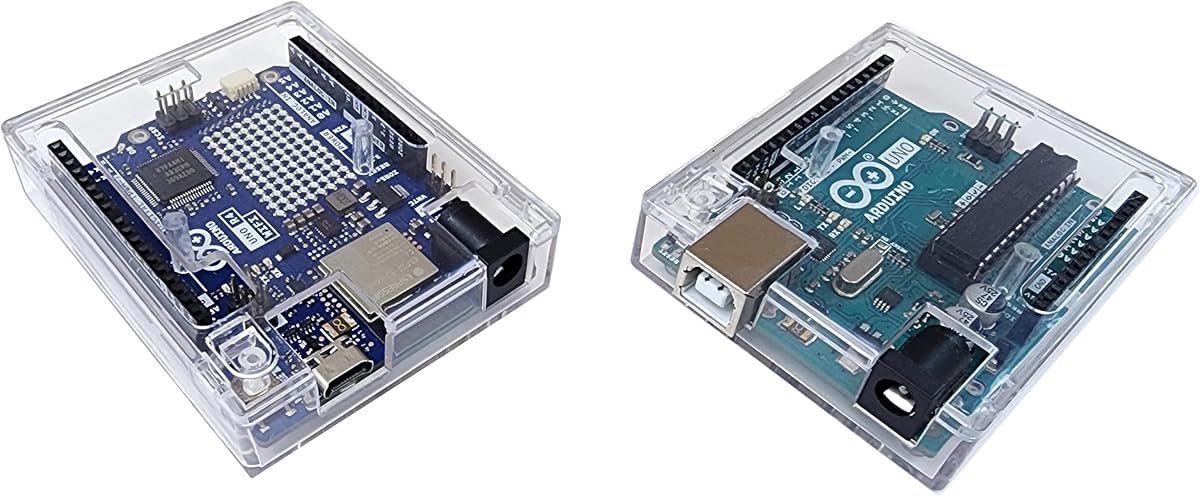
Enclosure for Arduino Uno R3
4.6Editor score
Snap-lock assembly design
Transparent ABS material
External reset access point
Discover the best Arduino enclosure options for your projects. We compare top picks for protection, durability, and fit to help you secure your electronics
Protecting your Arduino projects requires a reliable enclosure that shields against dust, moisture, and physical damage. A good case ensures longevity and safety for your electronics in various environments.
We evaluated ten top-rated enclosures based on compatibility, material quality, and ease of use. Our selection includes transparent cases, waterproof boxes, and versatile options for different project needs.
Each pick highlights specific strengths and ideal use cases for your builds. Please note that product availability and details may change over time, so verify specifications before purchasing.
4.6Editor score

4.7Editor score

4.0Editor score
Here is a side-by-side comparison of all ten selected Arduino enclosures. This table helps you quickly identify the right fit based on size, material, and key features for your specific needs.
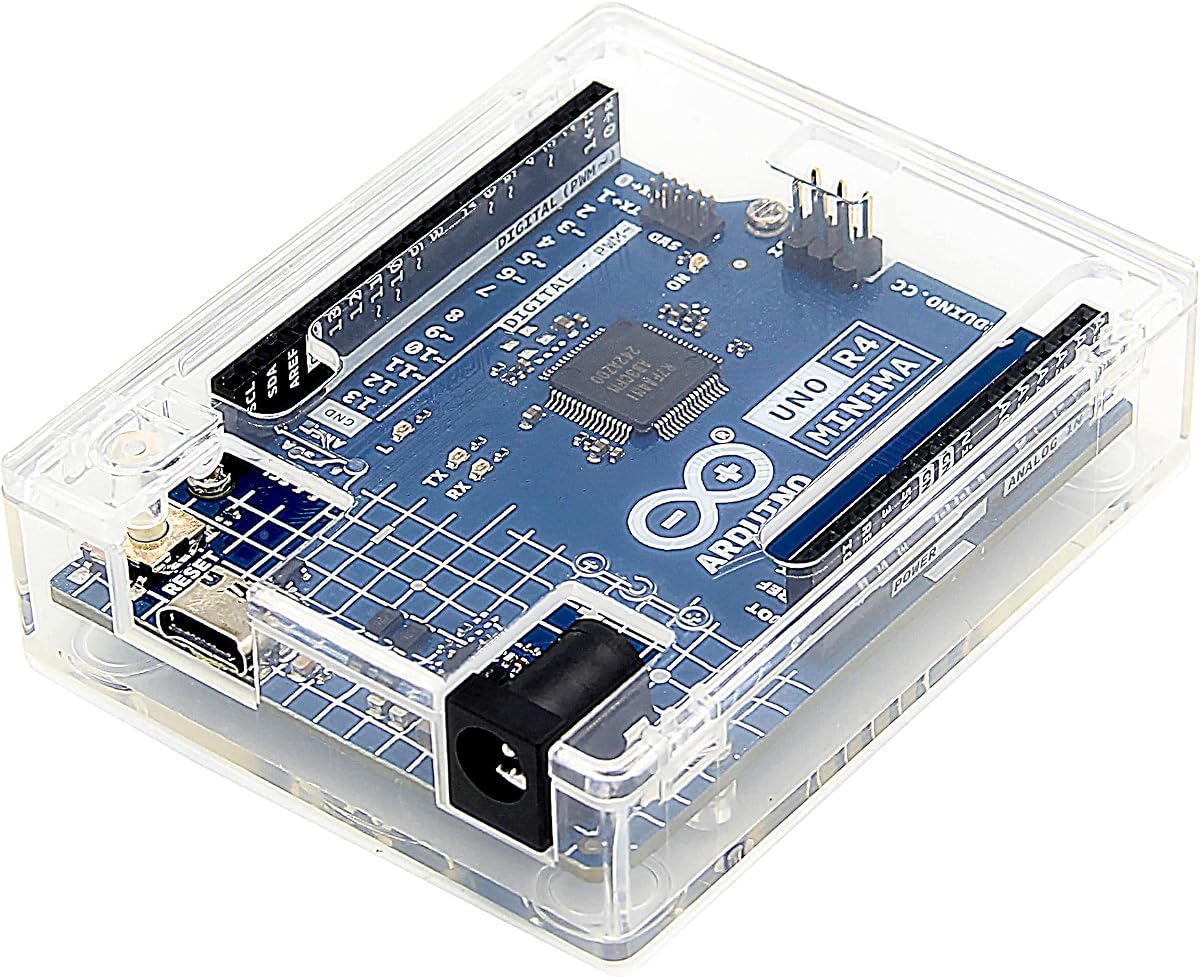


This transparent enclosure is designed for Arduino Uno R3 and R4 models. It offers a simple snap-lock design that requires no tools for assembly. The clear material allows you to see the board inside.
We may earn a commission when you buy through this link, at no additional cost to you.
The case holds the board firmly in place using minimal force. An external access point ensures the reset button remains usable without opening the box. This design prioritizes convenience and visibility for your projects.
While it lacks waterproofing, the ABS material provides decent protection against dust and bumps. The lack of screws speeds up setup but might offer less security in high-vibration environments.
Ideal for indoor hobbyists who need quick access and visibility. This enclosure balances cost and functionality well for standard desktop Arduino setups.
The snap-lock mechanism allows you to secure your board in seconds without tools. An external reset access point ensures you never need to open the case to restart your project.
The transparent ABS material lets you monitor LEDs and components easily. This feature is particularly useful for debugging or when you need to check connections quickly.
We may earn a commission when you buy through this link, at no additional cost to you.
The Geekworm case is a transparent ABS box designed for Uno R3 variants including WiFi and Minima. It comes with screws and rubber pads for stable mounting. The design includes holes for airflow.
We may earn a commission when you buy through this link, at no additional cost to you.
Installation is straightforward using the provided hardware. The '+' and '-' holes help manage heat dissipation during operation. This makes it suitable for projects running for extended periods indoors.
The case is lightweight and portable but does not seal against water. The screws add security compared to snap designs, though they require a driver. Users should ensure the board is dry before closing.
Choose this for indoor projects needing heat management and secure fit. It is a reliable choice for standard development boards that need basic protection.
The design incorporates specific holes to promote airflow around the board. This helps prevent overheating during long-running tasks or when using high-power components.
Unlike snap cases, this option includes screws to fix the board in place. Rubber pads are also provided to cushion the board and prevent slipping inside the box.
We may earn a commission when you buy through this link, at no additional cost to you.
This project box offers IP65 waterproof protection ideal for outdoor or harsh environments. It is made of high-quality ABS that resists impact and corrosion. The size accommodates various layouts comfortably.
We may earn a commission when you buy through this link, at no additional cost to you.
The box is designed to be drilled and shaped without cracking. This allows custom openings for connectors or displays. A sealing gasket ensures the cover maintains its weatherproof integrity when closed.
The black color absorbs heat more than transparent options. It is heavy enough to stay put but requires mounting hardware for fixed installations. The space inside allows room for wiring and power supplies.
Select this for projects exposed to rain or dust. Its versatility makes it a top choice for reliable Arduino enclosures in challenging conditions.
The IP65 rating effectively blocks splashing water and dust. This makes it suitable for garden sensors or outdoor displays where moisture resistance is critical.
The ABS material is sturdy yet easy to drill. You can create precise holes for buttons, sensors, or cable entries to tailor the box to your specific project needs.
We may earn a commission when you buy through this link, at no additional cost to you.
This two-piece ABS enclosure snaps around the Arduino Uno R3 to hold it firmly. It includes an integrated power switch and a reset key for easy control. All connectors remain accessible for wiring.
We may earn a commission when you buy through this link, at no additional cost to you.
The case provides tough protection for the UNO while maintaining portability. The power switch allows you to turn the board on or off without unplugging. This feature is useful for battery-powered setups.
The reset key ensures you can restart the board without accessing the button directly. However, the internal switch mechanism adds bulk compared to standard snap cases. It is designed for desktop or moderate use.
Great for projects needing quick power control and reset access. It is a solid choice for those who prefer physical switches over software resets.
The included power switch simplifies turning your project on and off. This is particularly beneficial for portable builds where plugging and unplugging power is inconvenient.
A reset key is provided to interact with the board's reset button easily. This saves you from having to open the case every time you need to restart the firmware.
We may earn a commission when you buy through this link, at no additional cost to you.
This larger project box provides ample space for complex Arduino setups. It features fixed ears for wall or pole mounting to secure your project. The IP65 rating protects against rain and dust effectively.
We may earn a commission when you buy through this link, at no additional cost to you.
The extra room allows you to include larger power supplies or shields easily. The sealed design ensures your electronics stay dry even in humid environments. It is constructed from high-quality ABS for impact resistance.
While larger than standard cases, this size supports more advanced configurations. You may need to use internal brackets to keep the board steady. The fixed ears make installation on vertical surfaces straightforward.
Ideal for complex projects needing room for expansion. Choose this when your build includes multiple components or larger accessories that won't fit in smaller enclosures.
The increased dimensions allow space for extra boards, batteries, or wiring. This flexibility is perfect for projects that grow in complexity over time.
Fixed ears on the side simplify mounting on walls or poles. This ensures the enclosure stays stable and aligned properly in outdoor installations.
We may earn a commission when you buy through this link, at no additional cost to you.
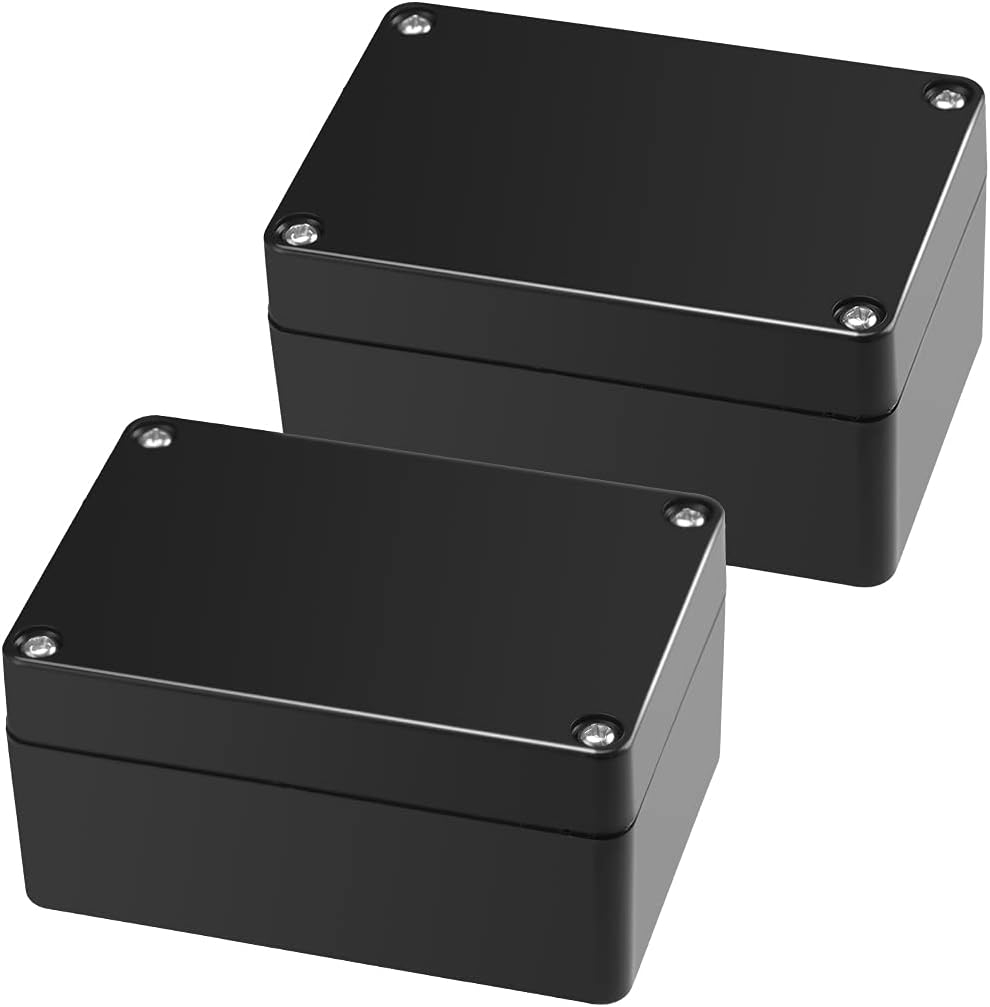
This pack includes two small IP65 waterproof junction boxes. They are perfect for multiple small Arduino projects or backups. The fixed ears allow easy wall mounting in tight spaces.
We may earn a commission when you buy through this link, at no additional cost to you.
Each box is compact yet durable with sealed gaskets to keep out moisture. They are made of ABS plastic that can be drilled for custom openings. This saves money compared to buying individually.
The size is best for standalone sensors or small controllers. They might not fit large shields but are great for minimal setups. Ensure you seal drilled holes properly to maintain the rating.
Buy this for multi-unit deployments where cost efficiency matters. It is a smart choice for installing several weather-resistant sensors across a property.
Getting two boxes in one package provides better value than single units. This is ideal if you need to outfit multiple locations or have a backup ready.
The smaller size fits discreetly in narrow spots. Despite the size, the IP65 rating ensures protection against rain and dust effectively.
We may earn a commission when you buy through this link, at no additional cost to you.
This transparent clear computer box fits the Arduino UNO R3 precisely. It snaps together securely with a two-piece injection molded design. Features include an integrated power switch and a reset key.
We may earn a commission when you buy through this link, at no additional cost to you.
The clear material helps you monitor activity inside without opening the case. All connectors remain accessible for easy wiring. The power switch simplifies on-off cycles without disconnection.
It offers a good balance of visibility and protection for indoor use. The reset key adds convenience for frequent testing. However, it lacks sealing for moisture resistance.
Select this for projects needing visibility and switch control. It is a reliable and affordable option for desktop Arduino applications.
The transparent construction allows easy viewing of internal components. This is helpful for monitoring LED status or identifying issues quickly.
Integrated power and reset controls streamline operation. These features reduce the need to fiddle with external power sources or tiny buttons.
We may earn a commission when you buy through this link, at no additional cost to you.
The Sixfab enclosure is designed for outdoor IoT projects with Arduino and Raspberry Pi. It features IP65 dustproof and water-resistant protection to keep electronics safe. The clear cover allows visual access.
We may earn a commission when you buy through this link, at no additional cost to you.
RF-friendly ABS plastic supports antenna use inside or externally via grommets. It includes standoffs, screws, and fittings for a complete setup. The base plate supports multiple board orientations for flexibility.
While premium priced, it offers specialized features for professional or harsh environments. Assembly is required as it comes unassembled. The protection level justifies the cost for critical applications.
Ideal for advanced outdoor projects needing wireless connectivity. Choose this when you need certified protection and support for various development boards.
The RF-friendly design ensures signals pass through easily. This makes it perfect for wireless IoT applications where antennas need clear paths.
The mounting base supports various board types and sizes. You can adjust the orientation to fit different project layouts inside the box.
We may earn a commission when you buy through this link, at no additional cost to you.
This two-pack offers compact waterproof boxes for multiple Arduino projects. The solid ABS construction is easy to drill for meters or sockets. IP65 rating protects against dust and splashing water.
We may earn a commission when you buy through this link, at no additional cost to you.
Six internal screw holes provide mounting options for prototype boards. This adds flexibility for securing the board inside the case. The build is sturdy for long-term use.
These boxes are suitable for small electronic assemblies needing moisture resistance. You may need to add your own seals if exposed to heavy rain. They are a cost-effective option for basic protection.
Buy this for small-scale outdoor or workshop projects. It provides reliable protection for standard electronic components at a budget price.
The six internal screw holes simplify mounting PCBs securely. This ensures your board stays in place during movement or vibration.
The ABS material allows easy customization of entry points. You can create openings for cables or displays without damaging the structure.
We may earn a commission when you buy through this link, at no additional cost to you.
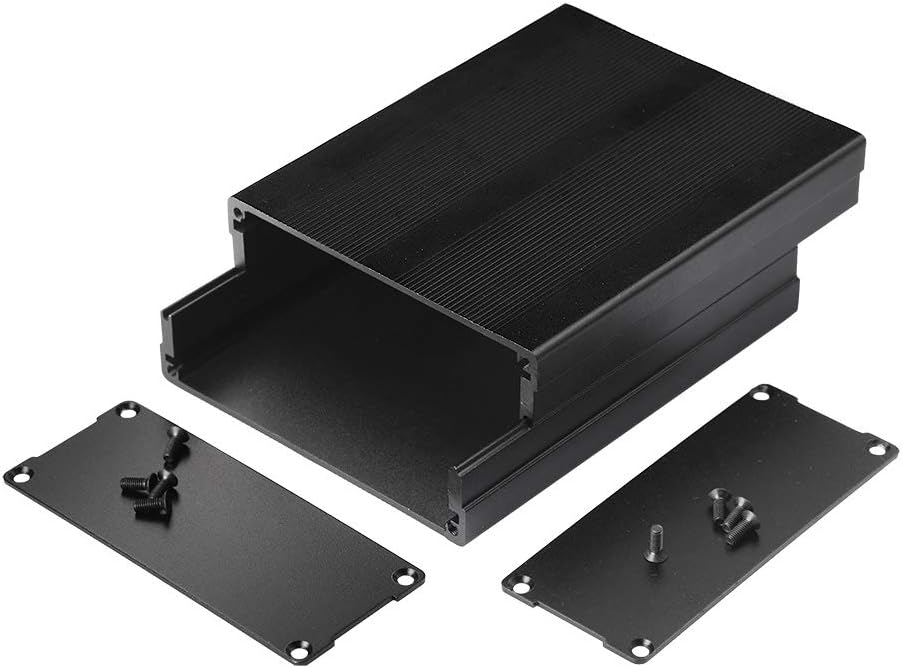
This aluminum enclosure offers a heavy-duty option for your Arduino projects. It features built-in slots to hold PCBs and a sliding cover for easy access. The finish is sandblast matte anodized for durability.
We may earn a commission when you buy through this link, at no additional cost to you.
Metal construction provides excellent electromagnetic shielding and heat dissipation. This is beneficial for high-power or noisy electronic setups. The design ensures components stay secure without extra brackets.
The sliding cover allows quick internal adjustments without full disassembly. It is more durable against heat and impact compared to plastic. However, it is heavier and requires careful handling to avoid sharp edges.
Select this for projects requiring thermal management or EMI shielding. It is ideal for professional-grade builds needing robust metal protection.
Metal enclosures dissipate heat much better than plastic. This helps maintain stable temperatures for high-power components during operation.
Aluminum offers natural electromagnetic shielding for sensitive circuits. This ensures your project remains interference-free in electrically noisy environments.
We may earn a commission when you buy through this link, at no additional cost to you.
Selecting the right Arduino enclosure depends on your specific project requirements. Consider factors like material, size, and environmental protection to ensure longevity.
ABS plastic is common for its balance of durability and ease of drilling. Aluminum offers better heat dissipation and shielding but is harder to modify.
Choose based on your need for heat management versus ease of customization.
IP65 rated enclosures protect against water and dust, ideal for outdoor projects. Standard plastic cases are usually indoor-only and rely on seals.
Ensure you have proper gaskets if exposure to moisture is expected.
Verify the internal dimensions match your board and any shields or sensors. Extra space helps with wiring and power supply placement.
Measure your components before ordering to avoid fit issues.
Some enclosures come with mounting ears for wall or pole attachment. Others may require self-drilling or additional brackets.
Decide if you need a stationary setup or portable case.
Snap-on cases are easier to assemble but may be less secure. Screw-together designs offer better stability but need tools.
Consider how often you will need to access the inside of the box.
Transparent cases allow you to see LEDs and components without opening. Opaque options look more professional but hide internal activity.
Select based on whether monitoring internal status is important for your build.
Check for cable entry points or the ability to drill grommets. Proper sealing around cables maintains weather protection ratings.
Plan your cable routes to ensure a secure and tidy setup.
Ensure the enclosure is specifically designed for your Arduino model or size. Some cases are tailored for specific boards like the Uno R3.
Verify the product description matches your hardware exactly.
Start by measuring your Arduino board and any attached components. Ensure the internal dimensions of the chosen enclosure provide enough room for all parts.
Install your board using the provided screws or mounting clips. Leave some space between components to allow for airflow if the case is not ventilated.
If using for outdoor projects, apply sealant to any drilled holes to maintain the waterproof rating. Check the gasket regularly to ensure it remains intact.
ABS plastic is the most common material because it is affordable and easy to drill. Aluminum is better for projects needing heat dissipation or electromagnetic shielding. Your choice depends on your specific needs for durability and modification.
Waterproof enclosures are essential if your project will be outdoors or exposed to moisture. For indoor use, standard plastic cases are usually sufficient. Always check the IP rating if you expect exposure to rain or dust.
Many plastic enclosures can be drilled or cut to create custom openings. Use sharp tools and take care not to crack the plastic. If you modify a waterproof box, ensure you seal any new holes properly.
Most cases come with mounting holes or screws to fix the board in place. Use the provided hardware to prevent the board from shifting during movement. If not included, small rubber bands or double-sided tape can work temporarily.
Yes, larger project boxes can accommodate multiple boards or complex setups. Look for spacious enclosures with enough internal volume. Ensure you consider airflow to prevent overheating with multiple devices.
A case usually refers to a simple cover for indoor protection. An enclosure often implies a more robust design with seals or mounting options for professional or outdoor use. The terms are sometimes used interchangeably.
Some enclosures are designed to fit multiple board types like Arduino and Raspberry Pi. Check the dimensions and compatibility in the product description. Not all cases will fit different board sizes or port locations.
Clean the exterior regularly and check the gasket for wear or damage. Ensure all screws are tightened to maintain the seal. Avoid exposing it to chemicals that might degrade the plastic or gasket material.
The best Arduino enclosure depends on whether you prioritize cost, protection, or customization. Our top picks cover budget options, waterproof designs, and versatile cases for various environments.
Prioritize IP ratings for outdoor use and material for heat management. Ensure the dimensions fit your specific board and accessories to avoid unnecessary modifications.
Always verify the latest product details and availability before purchasing. Prices and stock can change, so check current listings to confirm your final choice.