
Yealink Sp92 Conference Speaker
4.1Editor score
AI noise cancelling technology
13ft radius coverage range
20 hour battery life
This guide compares the top Bluetooth speakerphones for the home office, evaluating audio clarity, microphone performance, connectivity options, and battery
Choosing the right Bluetooth speakerphone for the home office is essential for maintaining professional communication standards. A quality device ensures your voice is heard clearly while minimizing background noise that can disrupt important calls and meetings throughout the day.
We evaluated ten top-rated models based on real-world performance, microphone array quality, connectivity flexibility, and battery endurance. Each product was assessed for its ability to deliver clear audio in various home office environments, from quiet desks to bustling open spaces.
Every selection in this list highlights key features, pros, cons, and ideal use cases to help you make an informed decision. Please note that product availability and pricing may change frequently, so verify current details before purchasing your next conference device.
4.1Editor score
4.4Editor score

4.6Editor score
This side-by-side comparison outlines the core specifications and strengths of each model to help you quickly identify which speakerphone aligns best with your specific home office requirements and budget constraints.

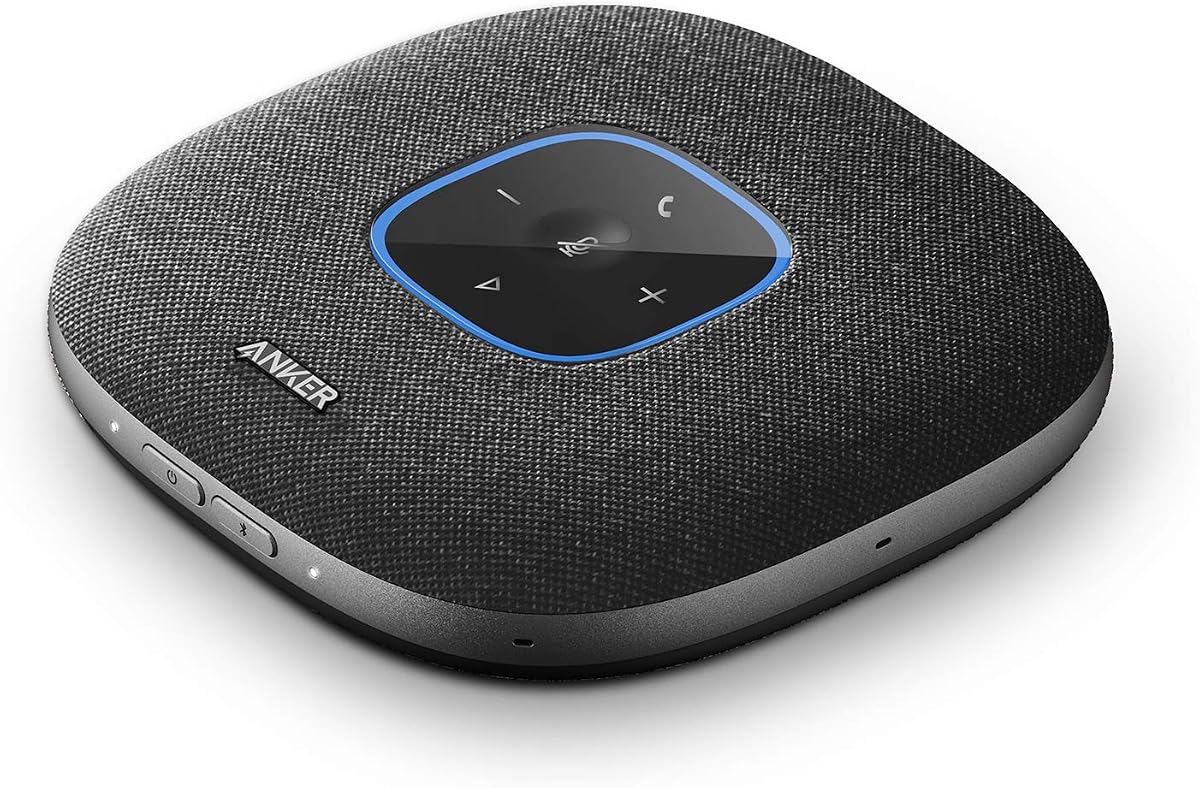


The Anker PowerConf Speakerphone stands out as a top-tier solution for home office professionals seeking reliable audio conferencing capabilities. With a rating of 4.4 stars, users praise its ability to transform any space into a functional meeting room through advanced microphone technology.
We may earn a commission when you buy through this link, at no additional cost to you.
Its six-microphone array ensures that voices are captured clearly from any direction, while Voice Radar 3.0 technology leverages AI deep learning to suppress background noise and cancel echo effectively. This makes it ideal for environments where distractions like typing or household noise are common.
While the device offers robust performance, its size and price may not suit every budget or desk setup. However, the investment pays off through consistent clarity and the convenience of a 24-hour battery life that supports all-day meetings without needing a power outlet.
If you prioritize professional-grade audio quality and need a device that integrates seamlessly with Zoom and other platforms, this speakerphone is a strong recommendation. It balances portability with powerful features to meet the demands of hybrid work environments.
The 360-degree arrangement of six microphones ensures that no matter where participants sit, their voices are picked up with equal clarity and precision during calls.
With up to 24 hours of call time on a single charge, users can take meetings anywhere without worrying about running out of power during critical business hours.
We may earn a commission when you buy through this link, at no additional cost to you.
The Anker PowerConf S330 USB Speakerphone offers a straightforward and reliable solution for home offices that prioritize stable connectivity over wireless flexibility. Its plug-and-play design eliminates the need for driver installations, making setup quick and hassle-free for any user.
We may earn a commission when you buy through this link, at no additional cost to you.
Four high-sensitivity microphones provide 360-degree voice coverage, ensuring that all participants within a three-meter radius are heard clearly. The smart voice enhancement feature works to eliminate background noise while simultaneously enhancing human voices for a more professional meeting experience.
While it lacks the extensive battery life of its Bluetooth counterparts, the wired connection ensures uninterrupted performance during long meetings. The 1.75-inch driver paired with passive bass radiators adds surprising depth to both voice calls and music playback during breaks.
This model is best suited for users who remain seated at a desk and prefer the reliability of a USB connection. It delivers consistent audio quality without the complexity of pairing devices, making it an excellent choice for focused work environments.
Users can connect directly via USB-C with the included adapter, allowing for immediate use without software configuration or wireless pairing delays.
The combination of a large driver and passive bass radiators ensures that voices sound natural and full, avoiding the thin audio often found in smaller speakers.
We may earn a commission when you buy through this link, at no additional cost to you.
The Anker PowerConf S3 bridges the gap between wireless convenience and wired reliability, offering both Bluetooth 5 and USB-C connectivity options. This versatility makes it a practical choice for users who switch between mobile devices and desktop computers frequently throughout the workday.
We may earn a commission when you buy through this link, at no additional cost to you.
Its six-microphone array and real-time voice optimization algorithm work together to ensure that voices are balanced and clear regardless of distance from the device. The double talk feature is particularly useful, allowing multiple speakers to talk simultaneously without words being skipped or lost.
While the app control provides useful customization, it may add a layer of complexity for users who prefer simple plug-and-play devices. However, the ability to fine-tune settings can significantly enhance performance in noisy environments or for specific meeting requirements.
For those seeking a balanced device that supports a wide range of platforms without sacrificing audio quality, the S3 is a compelling option. Its design accommodates the dynamic needs of modern home offices where flexibility is key.
The double talk capability ensures that natural conversation flows smoothly even when multiple people speak at once, preventing audio cutting out.
Custom DSP algorithms adjust voice levels and reduce noise in real time, adapting to changing room conditions for consistent call quality.
We may earn a commission when you buy through this link, at no additional cost to you.
The Jabra Speak 510 continues to be a popular choice among professionals due to its reputation for reliable audio quality and user-friendly design. With an impressive rating of 4.7 stars, it delivers crystal-clear audio that makes every call sound sharp and professional.
We may earn a commission when you buy through this link, at no additional cost to you.
Setup is straightforward and can be completed in seconds, allowing users to jump into meetings without technical delays. The speaker supports both Bluetooth and USB connections, providing the flexibility to switch between devices as needed without compromising performance.
While it may lack some of the advanced AI noise cancellation features found in newer models, its core functionality remains robust. The portable design ensures it can easily move between home offices or travel locations, maintaining consistent quality wherever work happens.
This model is ideal for users who value simplicity and brand trust over cutting-edge features. It provides a solid foundation for professional calls without the complexity of advanced settings or apps.
The device is designed to be ready for use immediately upon connection, minimizing downtime and allowing immediate focus on the meeting agenda.
It works seamlessly with a wide range of devices including desk phones, mobile phones, and soft-phone applications, ensuring broad usability.
We may earn a commission when you buy through this link, at no additional cost to you.
The Yealink Sp92 Conference Speaker offers exceptional value for home offices seeking advanced features without a premium price tag. Its AI noise cancellation technology can filter over 1,000 types of background noise, ensuring accurate speech reproduction even in noisy environments.
We may earn a commission when you buy through this link, at no additional cost to you.
With a 20-hour battery life, this device supports all-day usage without frequent recharging. The compact design weighs just 276 grams and includes a carrying case, making it easy to transport between locations or store neatly when not in use.
While it may not match the audio richness of higher-end models, its clarity for speech is highly effective. The Microsoft Teams certification ensures seamless integration with popular platforms, while dual full-duplex microphones support natural multi-person conversations.
For budget-conscious users who still demand professional audio quality, the Sp92 stands out as a top contender. It balances cost with functionality effectively, delivering reliable performance for standard meeting needs.
The AI system actively identifies and suppresses specific background sounds like keyboard taps or HVAC hum, keeping the focus on human voices.
A fully charged battery provides up to 20 hours of continuous calls, reducing the need for daily charging and supporting extended work sessions.
We may earn a commission when you buy through this link, at no additional cost to you.
The Lenovo Speakerphone brings enterprise-grade audio capabilities to home offices with its eight beamforming microphones and AI-powered noise cancellation. This configuration prioritizes voices effectively while reducing background distractions, making it ideal for teams with frequent collaborative meetings.
We may earn a commission when you buy through this link, at no additional cost to you.
Full duplex audio ensures that participants can speak and listen simultaneously without interruption, creating a more natural conversation flow. The dedicated Teams button provides quick access to collaboration environments, streamlining the start and management of meetings.
Its durability is enhanced by IP54 dust and splash resistance, which protects the device against minor accidents in shared spaces. The dual Bluetooth connectivity allows pairing with multiple devices, ensuring flexibility for users who switch between phones and laptops.
For professionals who require high reliability and are integrated into Microsoft Teams ecosystems, this speakerphone is a robust choice. It delivers sound quality that matches more demanding work requirements and environments.
The beamforming technology actively focuses on human voices while ignoring ambient sounds, ensuring clear audio capture even from a distance.
Built to withstand dust and splashes, the device offers peace of mind for users who work in less controlled or shared home office settings.
We may earn a commission when you buy through this link, at no additional cost to you.
The Jabra Speak2 55 brings a fresh design and updated features to the conference speaker market with its latest 2025 edition. It includes a USB-C charging adaptor to keep the device running longer, addressing common concerns about battery longevity and charging compatibility.
We may earn a commission when you buy through this link, at no additional cost to you.
Four beamforming microphones pick up sound from all directions while voice level normalization equalizes surrounding voices for consistent volume. This ensures that quieter participants are heard as clearly as louder ones, improving overall meeting equity and engagement.
Fully compatible with Microsoft Teams, this speaker complements Jabra video solutions seamlessly for a unified communication setup. The included carry pouch and USB cable make it ready for travel, though its battery life is slightly lower than some competitors.
Ideal for users seeking modern aesthetics and solid performance within a professional ecosystem, this device delivers reliable audio quality. It balances style with functionality to meet the needs of contemporary home office workflows.
Voice level normalization automatically adjusts the volume of different speakers so everyone is heard clearly regardless of their initial volume.
The box includes essential accessories like a USB-C cable and carry pouch, ensuring users can start using the device immediately out of the box.
We may earn a commission when you buy through this link, at no additional cost to you.
The Jabra Speak 510 MS remains a solid choice for users relying on softphone applications like Microsoft Lync. It offers HD voice conversations that ensure sound quality is crisp and clear, facilitating better understanding during calls.
We may earn a commission when you buy through this link, at no additional cost to you.
With up to 15 hours of talk time, this device supports extensive usage throughout the workday. Its design connects seamlessly via Bluetooth or USB to PCs, tablets, and smartphones, providing flexibility for different devices and preferences.
While it lacks modern AI noise cancellation, its core audio performance is robust and reliable. Users appreciate the simplicity and effectiveness of this classic model, which has stood the test of time in professional environments.
For those with existing setups using compatible software, this speakerphone integrates effortlessly without requiring updates or complex configurations. It continues to deliver value through dependable connectivity and sound clarity.
Optimized for platforms like Windows Lync, this device ensures seamless audio routing for users relying on desktop communication tools.
A single charge supports up to 15 hours of continuous talk time, allowing for full day usage without frequent interruptions.
We may earn a commission when you buy through this link, at no additional cost to you.
The Jabra Speak 710 UC offers immersive sound quality that elevates both calls and music for users who value audio richness. Its in-room coverage supports up to six people, making it suitable for larger home office meetings or small group sessions.
We may earn a commission when you buy through this link, at no additional cost to you.
Setup is intuitive and requires no IT support, allowing users to connect to laptops or phones via USB or Bluetooth in seconds. The Link 370 adapter ensures a stable wired connection when needed, providing flexibility for various environments.
Certified for Zoom and Google Meet, this speakerphone integrates seamlessly with leading conferencing platforms. Its lightweight design and included travel pouch make it easy to transport, ensuring high-quality audio wherever work takes place.
Ideal for teams needing superior audio depth and broader room coverage, this model combines performance with portability. It serves those who require a reliable tool for collaborative sessions.
The speaker produces deep, rich audio that enhances voice clarity and music quality, creating a more engaging experience for all participants.
Official certifications for Zoom and Google Meet ensure compatibility and reliability when using these critical communication tools daily.
We may earn a commission when you buy through this link, at no additional cost to you.
The YAMAHA YVC-330 Portable represents the premium tier of home office speakerphones, featuring SoundCap technology that provides far field noise reduction. This effectively eliminates background noise outside a three-foot range, focusing purely on active speakers for crystal-clear communication.
We may earn a commission when you buy through this link, at no additional cost to you.
Three unidirectional microphones with human voice activity detection allow the device to distinguish speech from noise accurately. The self silence feature mutes the microphone automatically when no one is speaking, preventing unnecessary noise transmission to participants.
With support for five to eight people, it handles small conference meetings well. Connectivity options include USB 3.0, NFC, and Bluetooth, offering flexibility for various setups and devices without needing adapters.
For users seeking the highest audio fidelity and advanced noise control features, this device justifies its investment. It delivers professional-grade performance that stands out in demanding environments.
SoundCap technology focuses on the three-foot range around the device, effectively filtering out distant background noise for cleaner audio.
The microphone mutes itself automatically when participants are not speaking, reducing background noise transmission and keeping calls clean.
We may earn a commission when you buy through this link, at no additional cost to you.
Selecting the right Bluetooth speakerphone requires evaluating several key factors that directly impact meeting quality and usability in your specific home office setup.
The number and arrangement of microphones determine how well the device picks up voices from different directions. Models with 360-degree arrays are ideal for multi-person meetings where participants move around, while directional mics suit single-user desk setups.
Look for at least four microphones with beamforming technology to ensure voice clarity regardless of position or distance from the speakerphone.
Effective noise cancellation is critical for home offices where background sounds like typing or household activity can disrupt calls. Advanced models use AI to filter specific frequencies and reduce echo dynamically during meetings.
Prioritize devices that explicitly mention AI noise reduction or echo cancellation to maintain professional audio quality in busy environments.
Bluetooth offers wireless flexibility, while USB provides a stable connection for desktops. Consider whether you need dual connectivity options to switch seamlessly between mobile devices and laptops without interruptions.
Ensure the speakerphone supports the connection types your primary devices use to avoid compatibility issues or performance limitations.
Battery life impacts how long you can use the device without plugging into power, especially for mobile work or travel. Models range from 12 to 24 hours of talk time, with some offering fast charging support.
Choose a battery capacity that matches your daily meeting load to avoid interruptions during critical calls or long sessions.
Certifications for platforms like Zoom or Microsoft Teams ensure seamless integration and optimized audio settings. These approvals often guarantee better reliability and fewer connection issues during use.
Check that the device supports your primary conferencing tools to maximize compatibility and audio performance.
Physical dimensions affect how the speakerphone fits on your desk or travels with you. Compact models are easier to store and transport but may sacrifice some audio depth or microphone range.
Balance portability with size requirements based on whether you primarily stay at one location or need to move frequently.
Speaker drivers and passive radiators influence how clear and full your voice sounds to others on calls. Look for specifications indicating driver size and bass response for richer audio quality.
Ensure the volume is sufficient to fill your room without distortion to maintain professional sound levels.
Pricing ranges significantly from budget-friendly options to premium models. Consider which features are essential for your needs to avoid overspending on capabilities you won't use.
Compare overall value based on battery life, audio quality, and warranty to find the best fit for your budget and requirements.
Start by pairing your device via Bluetooth or connecting through USB-C. Follow the manufacturer instructions to ensure recognition by your computer or phone before joining your first call. Test audio levels and microphone sensitivity to confirm settings are optimal.
During meetings, place the speakerphone centrally in the room to maximize 360-degree pickup if available. Avoid covering the microphones or placing it near noisy appliances that could interfere with sound capture. Use mute buttons when not speaking to minimize background noise.
Maintain the device by keeping it in a cool dry place when not in use. Regularly clean dust from microphone grilles using a soft dry cloth to prevent sound quality degradation. Recharge the battery periodically even if unused to preserve its lifespan and performance.
Bluetooth models offer greater mobility and device flexibility for users who switch between multiple devices. However, wired USB connections provide more stable and reliable audio without signal dropouts. Choose based on your need for movement versus consistent performance during calls.
A minimum of 15 hours of talk time covers most full workdays without requiring midday charging. Look for devices offering 20 to 24 hours if you have frequent meetings or travel often. Ensure fast charging capabilities for quick top-ups between calls.
Most modern speakerphones work plug-and-play via USB or Bluetooth without needing drivers. Some may offer optional apps for customization but core functionality does not depend on them. Always check system compatibility before purchase to ensure seamless operation.
Place the speakerphone away from walls and use models with active echo cancellation to minimize sound reflections. Lower speaker volume slightly to prevent feedback loops with nearby devices. Ensure your microphone is positioned correctly away from direct speaker output.
Most major brands support both macOS and Windows operating systems through standard Bluetooth or USB connections. Verify specific certification claims for platforms like Zoom or Teams on product pages. Avoid using proprietary software that limits cross-platform usability.
Most speakerphones effectively capture voices up to 13 feet or four meters away from the center of the device. Larger rooms may require units with enhanced beamforming or higher-end noise cancellation technology. Consider your desk size and participant positions when selecting.
We highlighted top performers like the Anker PowerConf Speakerphone for overall reliability, the Yealink Sp92 for budget-conscious buyers, and the YAMAHA YVC-330 for premium audio quality. Each model delivers distinct strengths catering to different needs and work environments.
Prioritize features that match your primary use case, such as battery life for frequent travelers or microphone count for group calls. Ensuring compatibility with your conferencing platforms will significantly enhance your meeting experience and productivity levels.
Prices and availability fluctuate frequently so always verify current listings before purchasing to secure the best deal. We recommend checking user reviews for recent feedback on durability and software updates to make an informed choice.