
Learning Resources Code & Go Robot Mouse
4.5Editor score
Ages 4 plus ready
Builds sequencing skills
Includes maze grids walls
This guide compares the top coding toys for kids including robots and kits that teach programming skills through interactive play and educational challenges.
Coding toys introduce children to programming logic and problem solving through hands on play. These educational tools transform abstract concepts into tangible experiences that build confidence and curiosity in young learners.
We evaluated ten leading coding toys based on educational value ease of use and engagement. Our analysis covers screen free options app enabled robots and build yourself kits for various age groups and skill levels.
Each pick demonstrates unique ways to learn sequencing loops and algorithms. Prices and availability change so verify current details before purchasing to ensure the best fit for your child's needs.
4.5Editor score

4.1Editor score

4.6Editor score
This side by side comparison highlights key features and specifications for all ten selected coding toys to help you find the right fit.






The Thames & Kosmos My Robotic Pet stands out as a top choice for children ready to explore robotics and coding through hands on construction. Rated 4.1 stars by users it combines physical building with screen free programming using action cards that make learning accessible and fun.
We may earn a commission when you buy through this link, at no additional cost to you.
This kit includes articulated joints and realistic movement simulation through a color sensor infrared sensor and RGB LEDs. Kids can program the chameleon to move react and camouflage using colored cards which reinforces sequencing and logical thinking without relying on tablets or computers.
While the build process can take time and requires adult help for younger children it is part of the educational value. The comprehensive manual guides users through assembly and explains how nature inspires engineering design making it a deep learning experience.
Ideal for ages 8 and up this robotic pet offers three play modes that keep engagement high. Whether in coding wild or pet mode it provides a versatile platform for introducing STEM concepts in an approachable way.
Using physical action cards eliminates screen time while teaching core coding principles like sequencing and conditional logic through tangible interaction.
The manual explains how real world biology inspires robotic design helping children connect natural systems to engineering solutions.
We may earn a commission when you buy through this link, at no additional cost to you.
The Makeblock mBot is an entry-level coding robot toy designed to introduce electronics robotics and computer programming through interactive software. With a rating of 4.6 stars it offers a seamless transition from Scratch to Arduino for growing learners.
We may earn a commission when you buy through this link, at no additional cost to you.
Children can build the robot in about 15 minutes and then engage with remote control features like line following and obstacle avoidance. The open source system allows compatibility with over 100 electronic modules and 500 parts encouraging endless customization.
Three free Makeblock apps and mBlock software provide rich tutorials that help kids create projects independently. The metal construction ensures durability while the clear instructions support successful assembly even for beginners new to robotics.
This kit makes an awesome gift for birthdays or school events as it fosters creativity and technical skills. The ability to expand with add-on packs means the learning curve continues as children advance in their coding journey.
Rich tutorials and coding cards help children use all functions of the mBot to create projects by themselves.
Compatible with LEGO parts and a large variety of electronic modules for advanced configurations and learning.
We may earn a commission when you buy through this link, at no additional cost to you.
The Sphero Mini packs a ton of fun into a tiny programmable robot the size of a ping pong ball. With a 4.6 star rating it serves as a perfect entry into robotics for beginners using Bluetooth connectivity to interact with devices.
We may earn a commission when you buy through this link, at no additional cost to you.
Kids can create custom games and code using the free Sphero Edu app through drawing on screen drag and drop blocks or JavaScript. The drive mode allows playful STEM inspired games with joystick slingshot and tilt controls for immediate engagement.
Included traffic cones and bowling pins inspire obstacle course fun right out of the box. While battery life is around one hour per charge the compact design makes it easy to store and play anywhere with limited space.
This educational robot is more than a toy it inspires the creators of tomorrow through hands on applied learning. Arcade style games and coding challenges make it a versatile tool for learning programming concepts in a fun way.
Use Sphero Mini as a game controller for arcade style games in the Sphero Play app for fun on the go.
Supports multiple coding methods including drawing blocks and JavaScript to suit different learning preferences.
We may earn a commission when you buy through this link, at no additional cost to you.
The Learning Resources Code & Go Robot Mouse Activity Set is designed with early learners in mind to support coding for kids ages 4 and up. Rated 4.5 stars it introduces programming basics through simple buttons and matching coding cards without screens.
We may earn a commission when you buy through this link, at no additional cost to you.
Children strengthen sequencing logic and directional understanding as they program the mouse to navigate mazes. The kit includes 16 maze grids 22 maze walls and 30 double-sided coding cards providing extensive opportunities for trial and error learning.
Teachers can use this kit for STEM centers and rotations making it a strong introduction to robotics coding in educational settings. The activity guide offers structured challenges to help emerging programmers build confidence through playful exploration.
This hands on coding robotics kit is a practical choice for introducing technology concepts early. With affordable pricing and durable components it delivers significant educational value while keeping young coders engaged and motivated.
Emerging programmers build confidence through playful trial and error with simple buttons and matching coding cards.
Teachers can set up repeatable coding activities using maze grids and activity cards for small group work.
We may earn a commission when you buy through this link, at no additional cost to you.
The TEACH TECH Mech-5 is a one-of-a-kind mechanical coding robot designed to inspire young engineers to learn about mechanical engineering principles and coding basics. With a 4.5 star rating it emphasizes learning by doing through a mission-based entry-level design.
We may earn a commission when you buy through this link, at no additional cost to you.
This robot can throw lift kick and draw by snapping coding buttons onto the coding wheel. It is an in-depth STEM building project that follows detailed step-by-step assembly instructions requiring multiple hours of build time for proper construction.
Children aged 10 and up will enjoy watching the robot move after building and coding it. The hands-on nature of the kit ensures a true STEM experience that goes beyond simple pre-assembled toys to foster deeper understanding.
Mech-5 is geared toward future engineers who want to explore how mechanical systems interact with code. The combination of physical assembly and functional coding makes it a rewarding challenge for older kids ready for complex tasks.
Follow detailed step-by-step assembly instructions to ensure proper assembly and enjoy a true STEM experience.
Snap coding buttons onto the coding wheel to control the robot mechanical movements and actions.
We may earn a commission when you buy through this link, at no additional cost to you.
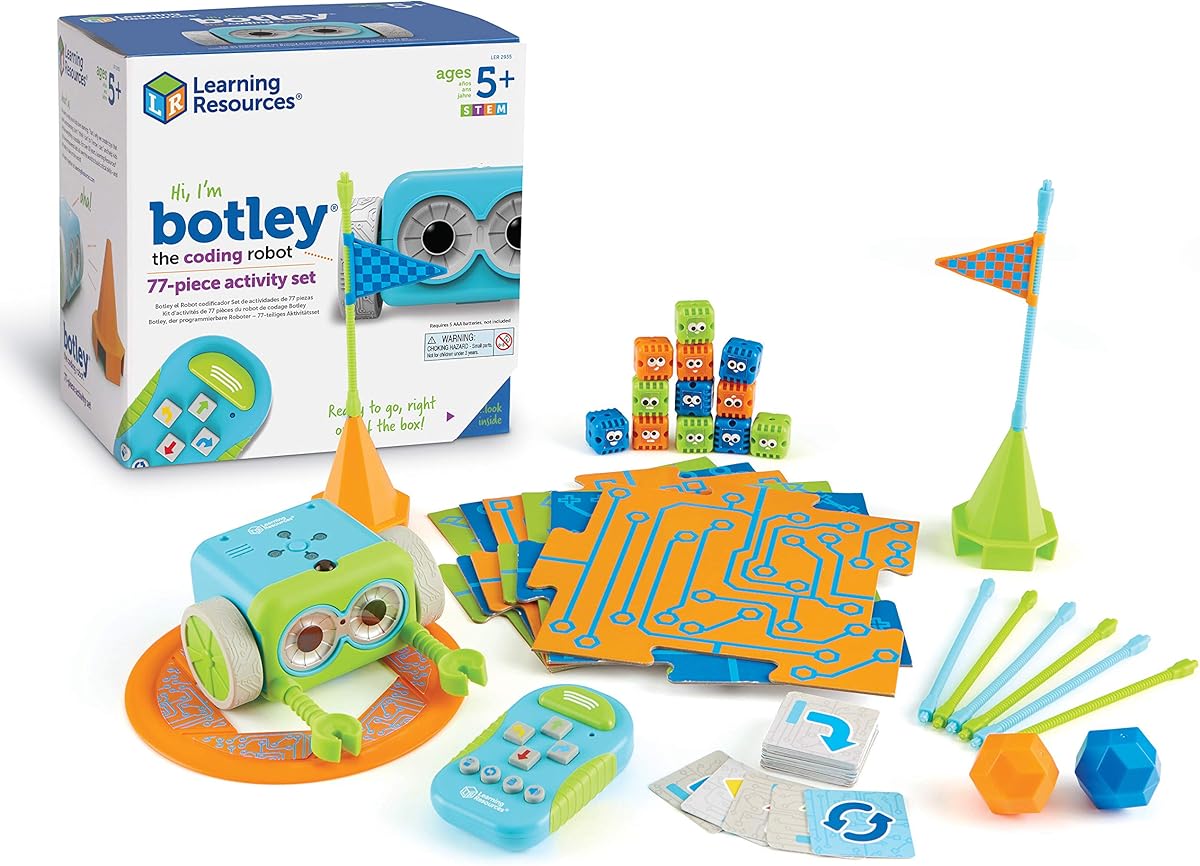
Learning Resources Botley The Coding Robot Activity Set helps children learn early STEM skills while playing and having fun. Rated 4.6 stars it teaches kids to code with active screen-free play that promotes critical thinking and problem-solving skills.
We may earn a commission when you buy through this link, at no additional cost to you.
Botley is ready to code right out of the box using a remote programmer to send commands without needing a phone or tablet. It can detect objects follow looping commands and navigate obstacle courses with hidden features to unlock for extended engagement.
The 77-piece activity set includes detachable robot arms 40 coding cards and 27 obstacle building pieces. This open-ended design lets kids create custom challenges and stories making every play session unique and educational.
This screen-free robot is an excellent choice for families wanting to limit screen time while teaching programming concepts. Its ease of use and durable construction make it a favorite for home and classroom environments alike.
Botley's easy-to-use remote programmer sends commands and gets him rolling without needing a phone or tablet.
Botley has the ability to detect objects in front of him and avoid them while following black-line paths.
We may earn a commission when you buy through this link, at no additional cost to you.
The Ozobot Evo Coding Robot Kit introduces children grades K-12 to coding in a fun and interactive way. With a 4.6 star rating it stands out by offering both online coding with Ozobot Blockly and screen-free learning with Color Codes.
We may earn a commission when you buy through this link, at no additional cost to you.
Five skill levels allow the kit to grow with the child's abilities making it a long-term educational investment. Access to over 700 free lessons covering STEAM CS and core subjects enhances critical thinking and problem-solving skills significantly.
The durable Evo robot and accessories are designed to withstand classroom use. Color code markers are housed in a hard shell zip case for convenience and organization which makes it practical for educational environments.
No prior coding experience is required making this kit accessible for parents and teachers new to coding. The user-friendly Get Started guide and zip case ensure a smooth introduction to coding and robotics for beginners.
Ozobot Blockly comes with five skill levels from beginner to master coding making it suitable for a wide age range.
Access to over 700 free lessons covering STEAM CS and core subjects enhances critical thinking skills.
We may earn a commission when you buy through this link, at no additional cost to you.
The Learning Resources Botley 2.0 The Coding Robot Activity Set uses a simple remote to introduce early coding ideas through playful cause-and-effect actions. With a 4.5 rating it builds confidence and curiosity for young future coders at home or in the classroom.
We may earn a commission when you buy through this link, at no additional cost to you.
Kids use included coding cards to design command sequences strengthening planning logic and sequencing skills. As they advance the robot adds depth with multi-step coding paths 45 degree turns and object-sensing reactions to challenge problem-solving.
Lights sounds and playful music enhance multisensory fun with 16 secret code combinations offering open-ended play. The 78-piece kit includes coding cards boards and stackable obstacle pieces for custom mazes and fresh adventures every time.
This friendly robot for kids grows with their abilities providing multiple new challenges that refine strategies and design. It is an excellent choice for keeping young creators engaged while learning essential programming concepts.
As kids advance the robot adds depth with multi-step coding paths 45 degree turns and object-sensing reactions.
The 16 secret code combinations offer open-ended play for curious young creators to invent imaginative stories.
We may earn a commission when you buy through this link, at no additional cost to you.
The Wonder Workshop Dash Robot is designed for kids aged 6-11 and provides a STEM advantage right out of the box. With a 4.6 star rating it offers fun and engaging coding activities with no assembly required.
We may earn a commission when you buy through this link, at no additional cost to you.
Dash can sing dance navigate obstacles and respond to voice commands. Learning coding concepts like sequencing loops and algorithms happens through hands-on play and challenges using five apps for Apple Android and Fire OS.
The box includes a robot building brick connectors and a USB charging cable. Increased memory and longer battery life allow up to 5 hours of active play which supports extended learning and engagement sessions.
This award-winning robot is used in over 40000 schools globally to teach STEM skills. With no camera required it focuses on interactive coding and challenges making it a reliable educational tool for classrooms and homes.
Use the five apps for Apple iOS Android OS and Fire OS including Blockly Wonder and Path for versatile learning.
This kid's programmable robot can respond to voice commands and navigate obstacles through playful interaction.
We may earn a commission when you buy through this link, at no additional cost to you.
TaleBot Pro is a coding robot for kids 3-5 that offers interactive map instant voice feedback for an instructive and creative learning environment. Rated 4.7 stars it helps toddlers learn while engaging with rich stories and developing language skills.
We may earn a commission when you buy through this link, at no additional cost to you.
This storytelling toy features a recording function that allows kids to record voice commands and imaginative tales. Children press command buttons to make the STEM robot walk draw sing dance and speak supporting up to 256 commands.
The educational robot is compatible with Lego blocks to build more shapes and improve creativity. It supports 10 languages and offers touch-based controls without complex language making it safe and accessible for diverse learners.
Developing key skills like critical thinking problem-solving and sequencing TaleBot Pro is an ideal choice for back-to-school supplies and holiday gifts. It helps develop cognitive and communication skills through interactive maps and storytelling.
Toddlers 3-5 can learn while engaging with rich stories and develop their language skills and creativity.
Touch-based controls without complex language engage autistic children through multi-sensory play and feedback.
We may earn a commission when you buy through this link, at no additional cost to you.
Choosing the right coding toy depends on age interest and learning goals. This guide helps you select the most suitable option.
Coding toys are designed for specific age ranges that match cognitive development. Younger children benefit from simple button based interfaces while older kids can handle complex app-based programming.
Select a toy that matches your child's current abilities to ensure engagement without frustration.
Screen-free options use physical cards or buttons to teach coding logic without digital devices. App-based robots connect to tablets or phones to unlock more advanced features and visual feedback.
Choose screen-free if you want to minimize device use or app-based for interactive graphical programming.
Some coding toys require building and assembly which adds to the learning experience. Others come pre-assembled for immediate play. Consider how much time your child wants to spend building.
Build kits offer deeper engineering lessons while pre-assembled sets provide instant gratification and coding time.
Many kits include manuals lessons or online resources that guide learning progress. These resources are essential for parents and teachers wanting structured educational pathways.
Check if the toy comes with activity cards or free online lessons to support extended learning.
Advanced sets often allow compatibility with extra modules or other building systems like LEGO. Expansion packs let children grow with the robot as skills improve over time.
Look for open-source systems or modular designs if you plan to invest in long-term learning.
Features like color sensors object detection or voice recognition open up more creative possibilities. These sensors teach how robots interact with the physical world.
Prioritize robots with multiple sensors if you want advanced interactivity and real-world applications.
Coding toys should withstand repeated handling and assembly cycles. Metal components and sturdy materials are preferred for classroom use or active play.
Verify build materials and reviews regarding durability before making a purchase for frequent use.
Most coding robots run on standard batteries like AA or AAA which are often not included. Rechargeable options are convenient but may need more maintenance.
Ensure you have spare batteries or a charging cable available to avoid interruptions during play.
Always read the manual before starting to understand assembly and coding instructions. Follow steps carefully to ensure all parts are connected correctly and sensors work properly.
Keep coding cards and accessories organized in a dedicated container to prevent loss. Store the robot in a dry cool place away from direct sunlight when not in use.
Regularly check battery levels and replace or recharge as needed. Update any companion apps to the latest version to access new features and fixes.
Children as young as 3 can start with simple screen-free toys like TaleBot Pro or Code & Go Robot Mouse. Older kids aged 8+ can handle more complex robotics and app-based coding systems like Sphero Mini or Makeblock mBot.
Not all coding toys need a smartphone. Screen-free options like Botley and the Robotic Pet use physical cards or remotes. However app-based robots like Sphero and Dash require a compatible device for full functionality.
Most coding toys require standard batteries like AA or AAA which are not included in the box. Check the product details for specific requirements and ensure you have spares ready for immediate use.
Yes beginner coding toys introduce logic and sequencing that form the foundation for advanced programming. Older children can combine these with more complex kits or software to deepen their technical skills.
Yes several products like the Robotic Pet Botley and Code & Go Robot Mouse offer screen-free coding experiences using cards remotes or physical interfaces to teach programming basics.
Keep the robot clean and dry and avoid exposing it to moisture. Check connections and battery contacts regularly and store accessories in an organized case to prevent damage or loss.
The Thames & Kosmos Robotic Pet Makeblock mBot and Ozobot Evo lead the pack with their unique features and educational value. Each offers a distinct approach to teaching coding through play and problem-solving.
Prioritize age appropriateness and screen preferences when selecting a toy. Whether you prefer building kits or ready-to-play robots there is an option that suits every learner's style.
Prices and availability can change so check current details before buying to ensure you get the best value for your chosen coding toy.