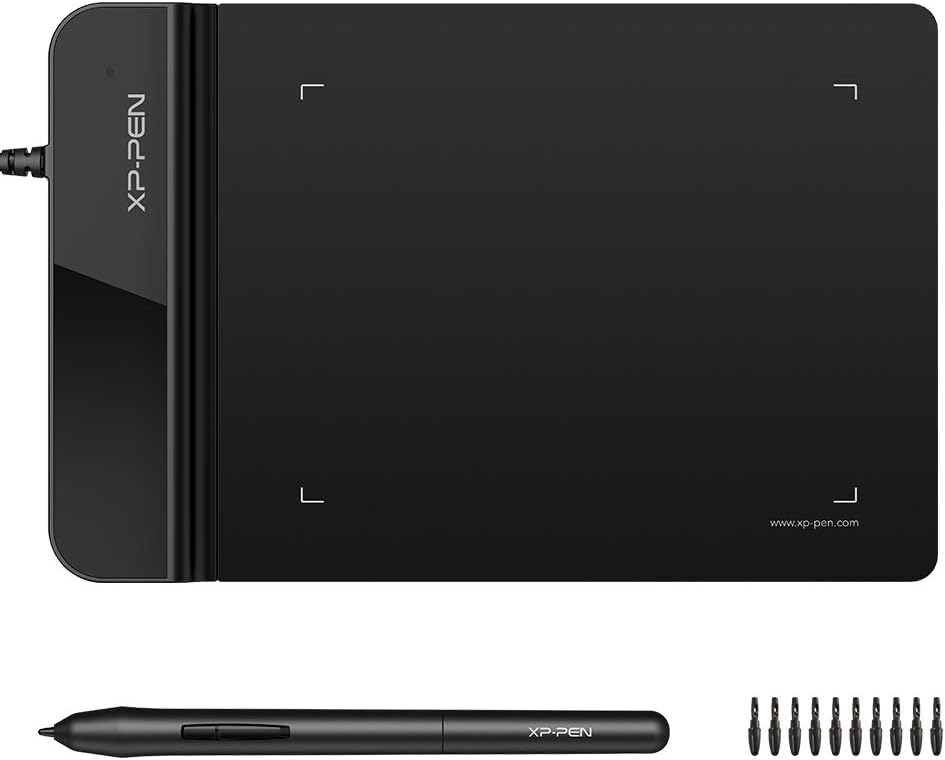
XPPen G430S OSU Drawing Tablet
4.2Editor score
Ultra thin two millimeter design
Eight thousand nine hundred ninety two pressure levels
Ideal for online teaching and remote work
Digital signature pads for PC streamline document workflows by enabling secure electronic signing directly on your computer. These devices replace paper processes with efficient digital solutions for modern businesses and remote teams.
We evaluated ten leading models based on build quality, software compatibility, signing experience, and value. Our analysis covers diverse options from budget-friendly tablets to professional-grade capture pads with advanced features.
Each pick highlights key strengths, ideal use cases, and potential limitations. Prices and availability change frequently, so verify current details before purchasing to ensure the best fit for your specific needs and budget.
4.2Editor score

4.3Editor score

4.3Editor score
As an Amazon Associate we earn from qualifying purchases.
This side-by-side comparison highlights the core specifications and capabilities of each digital signature pad, helping you identify the model that best matches your workflow requirements and technical environment.



The XPPen StarG640 Digital Graphic Tablet stands out as the top choice for users seeking a versatile digital signature solution without breaking the bank. With a solid 4.3-star rating from numerous users, this device offers a reliable balance of performance and affordability for both personal and professional workflows.
We may earn a commission when you buy through this link, at no additional cost to you.
Its standout quality lies in the battery-free PN01 stylus, which eliminates the need for constant recharging during long signing sessions. The six by four inch active area provides ample space for natural handwriting while maintaining a slim two-millimeter profile that ensures portability across different work environments.
While it lacks a built-in display, requiring users to look at their computer screen while signing, this trade-off keeps the device lightweight and cost-effective. The need for driver installation on Mac systems may add a minor setup step, but once configured, it integrates smoothly with popular software like Word and Zoom.
This tablet is ideal for remote workers, educators, and small businesses that need a dependable tool for e-signatures and document annotation. Its compatibility with Chromebooks makes it particularly valuable for educational settings where collaborative digital work is essential for daily operations.
The G640 works flawlessly with Microsoft Office apps like Word and PowerPoint, allowing you to insert signatures directly into documents without extra steps.
Chromebook support enables students and teachers to collaborate on Google Jamboard, making it perfect for virtual classrooms and remote learning scenarios.
We may earn a commission when you buy through this link, at no additional cost to you.
The PenPower ePaper SignPad offers a unique approach to digital signing by focusing on speed and seamless integration with everyday communication tools. With a 4.2-star rating, users appreciate its ability to transform handwritten signatures into digital assets instantly without complex software configurations.
We may earn a commission when you buy through this link, at no additional cost to you.
Its key strength is the one-tap functionality that sends signatures directly to your computer, compatible with PDF, Word, and image formats. The built-in timestamp and printed name feature enhance traceability, making it suitable for business approvals where audit trails are necessary for compliance purposes.
While the device excels at quick tasks, users requiring deep enterprise integration may find that custom SDK services are needed beyond the standard package. The price point is higher than basic drawing tablets, but the specialized features justify the cost for teams prioritizing efficiency.
This pad is best suited for professionals who frequently handle contracts, quotes, and internal approvals on the go. Its compatibility with messaging platforms like Zoom and Slack allows for real-time collaboration, turning routine signing tasks into smooth collaborative workflows.
Eliminate printing by signing contracts and insurance forms digitally, saving time and reducing paper waste in your daily operations.
Use it to sketch workflows or brainstorm ideas with your team, making it a versatile tool beyond just signature capture.
We may earn a commission when you buy through this link, at no additional cost to you.
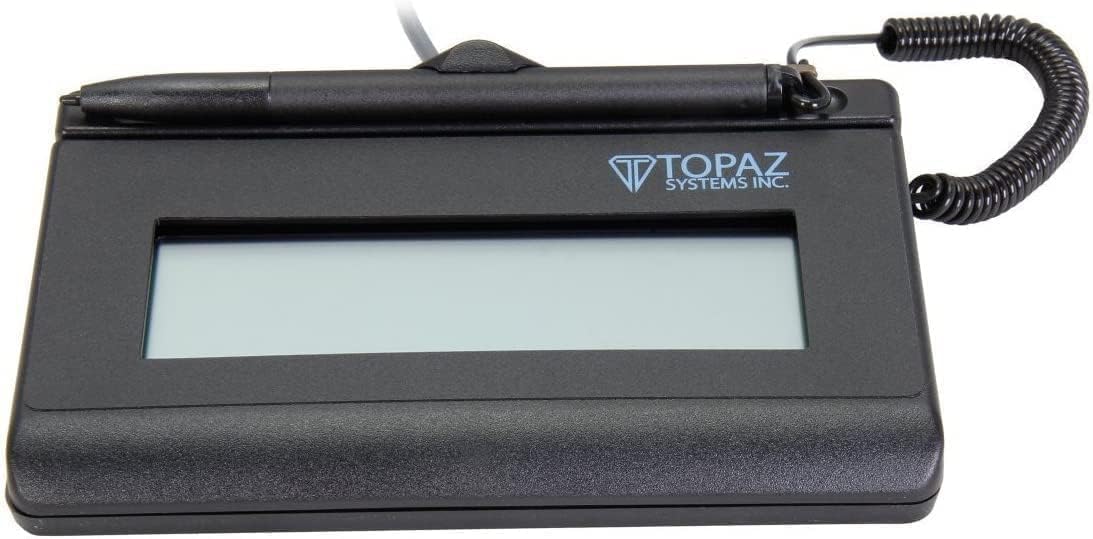
The Topaz Systems Topaz T-S460-HSB-R SigLite represents the premium end of the spectrum with its focus on durability and business-grade reliability. With a 4.3-star rating, this signature pad is engineered for environments where frequent signing and long-term performance are critical requirements.
We may earn a commission when you buy through this link, at no additional cost to you.
Its standout features include a modern ambidextrous design that accommodates both left and right-handed users comfortably, along with high-quality biometric capture capabilities that add an extra layer of security to signed documents. The USB interface ensures plug-and-play simplicity across PC networks.
While the price is higher than consumer-grade drawing tablets, the rugged build and specialized business features justify the investment for organizations deploying multiple units. The basic LCD capabilities may not suit creative needs, but for pure signature capture, it delivers consistent results.
This device is ideal for banks, healthcare providers, or corporate offices that require reliable, secure, and high-volume signature processing. Its compatibility with PC systems and available pack options make scaling deployment across different departments straightforward and efficient.
Enhance document security with high-quality biometric and forensic capture features that validate the authenticity of every signature.
The ambidextrous design ensures comfort for all users, reducing fatigue during long signing sessions in busy office environments.
We may earn a commission when you buy through this link, at no additional cost to you.
The XPPen G430S OSU Drawing Tablet is an excellent choice for budget-conscious users who need a compact digital signing solution without sacrificing core functionality. With a 4.2-star rating, this device offers impressive features like 8192 pressure levels at a very accessible price point for students or freelancers.
We may earn a commission when you buy through this link, at no additional cost to you.
Its ultra-thin two-millimeter profile makes it incredibly portable, fitting easily into laptop bags for signing on the go. The battery-free stylus ensures uninterrupted use, and the eight thousand pressure levels provide smooth, natural lines that mimic traditional pen-on-paper writing experiences effectively.
The small four by three inch active area may feel cramped for users accustomed to larger surfaces, but it is sufficient for simple signatures. Mac users need to grant system permissions during setup, which adds a slight step but ensures secure integration with the operating system.
This tablet works well for individuals who need a simple tool for online teaching or quick document signing. Its compatibility with Office apps and support for both left and right-handed users make it a versatile option for varied personal workflows.
Weighing almost nothing, this tablet allows you to sign documents anywhere, from coffee shops to client meetings on the road.
The battery-free stylus means you never have to pause work to charge, ensuring continuous signing during long document reviews.
We may earn a commission when you buy through this link, at no additional cost to you.
The Topaz T-LBK462-BSB-R SignatureGem offers a professional-grade solution for users who need robust signature capture with the added value of a renewed product. With a 4.0-star rating, it provides enterprise-level features like biometric capture at a lower price than brand-new equivalents.
We may earn a commission when you buy through this link, at no additional cost to you.
Its rugged signing area is built for high-volume environments where reliability is essential. The virtual serial via USB interface ensures broad compatibility with legacy systems, while the LCD display allows for custom text or instructions during the signing process for clients.
While the renewed status means conditions can vary, the core functionality remains strong for business use. The higher price point compared to basic drawing tablets reflects its specialized forensic capabilities and durability, making it a smart choice for compliance-heavy industries.
This pad is best suited for organizations that need secure, verifiable signatures without the cost of entirely new hardware. Its small size and portability make it easy to deploy across multiple office locations or bring to client sites for on-site signing.
Virtual serial via USB interface ensures seamless connection with enterprise systems and legacy software commonly used in business settings.
Use the LCD display to show custom text or instructions to signers, guiding them through complex forms or legal documents.
We may earn a commission when you buy through this link, at no additional cost to you.
The Topaz T-S460-HSB-R USB Electronic Signature Capture Pad is a straightforward, cost-efficient device designed for users who need reliable signature capture without extra frills. With a 4.4-star rating, it offers high-quality capture techniques that ensure clear and accurate digital representations of handwritten signatures.
We may earn a commission when you buy through this link, at no additional cost to you.
Its non-backlit design contributes to a longer operational lifespan by reducing power consumption and component wear. The USB interface provides simple plug-and-play setup, making it easy to integrate into existing office networks without complex installation steps or driver conflicts.
While the lack of backlighting may limit use in very low-light conditions, it remains effective in standard office environments. The basic design focuses on core functionality, ensuring that every signature captured is high-quality without unnecessary features that increase cost.
This pad is ideal for small businesses or departments with tight budgets that still require professional-grade signing capabilities. It works well for occasional signing needs where cost-efficiency and reliability are prioritized over premium features or customization options.
The non-backlit design reduces component wear, ensuring the device lasts longer in high-traffic office environments with daily use.
USB plug-and-play functionality means you can start signing documents immediately after connecting to your computer.
We may earn a commission when you buy through this link, at no additional cost to you.
The Wacom Signature Tablet STU500 is a durable option built for public-facing signing environments where reliability matters. With a 3.2-star rating, it serves as a robust tool for high-traffic areas, offering features like a hardened glass signing surface that withstands frequent use.
We may earn a commission when you buy through this link, at no additional cost to you.
Its four-by-three-inch monochrome LCD provides sharp text visibility even in bright lighting, making it suitable for counters or service desks. The maintenance-free electronic pen ensures you never worry about replacing batteries during busy signing sessions, keeping workflows uninterrupted.
While it scores lower than newer models, its rugged construction makes it viable for specific use cases. The reflective display technology offers high contrast without backlighting, but the older design may lack modern connectivity features found in recent devices for advanced integration.
This tablet is best for organizations like government offices or utilities where customers sign documents regularly. Its ability to capture millions of signatures reliably makes it a practical choice for environments prioritizing endurance over cutting-edge features.
Designed for high-volume public use, the hardened glass surface ensures durability even with constant daily signing requests.
The reflective display technology ensures clear viewing even under bright office lights, improving user experience during signing.
We may earn a commission when you buy through this link, at no additional cost to you.
The Topaz T-LBK462-BSB-R SignatureGem 1X5 brings backlit LCD functionality to professional environments where visibility is key. With a 4.0-star rating, this device combines enterprise-grade durability with a display that works well in varied lighting conditions, ensuring signers can see instructions clearly.
We may earn a commission when you buy through this link, at no additional cost to you.
Its rugged signing area is built to withstand heavy usage, while the USB virtual serial interface ensures compatibility with complex enterprise systems. The high-quality biometric and forensic capture capabilities make it ideal for industries requiring strict verification protocols for security.
While the price is higher due to specialized features, the backlit display adds significant value for low-light scenarios. Users may find the setup more complex than basic tablets, but the robust capabilities justify the investment for businesses with stringent signing requirements.
This pad is best suited for healthcare or financial sectors where secure, verifiable signatures are needed. Its portability and durability make it a reliable workhorse for offices that need to move signing stations between departments or client meetings frequently.
The backlit LCD display ensures clear visibility in low-light environments, reducing signing errors caused by poor screen viewing conditions.
High-quality biometric capture provides an extra layer of security, allowing forensic verification of signatures when needed for compliance.
We may earn a commission when you buy through this link, at no additional cost to you.
The Topaz Systems SigLite T-LBK460-HSB-R offers a highly rated renewed option with third-generation technology for improved efficiency. With an impressive 4.9-star rating, this device delivers strong performance at a value-oriented price, making enterprise features accessible to more users.
We may earn a commission when you buy through this link, at no additional cost to you.
Its touch-screen signing surface allows for a more intuitive user experience compared to older models, while the small size ensures it fits easily into mobile workspaces. The biometric and forensic capture features maintain the high security standards expected from Topaz professional devices.
While the renewed condition means each unit may show minor signs of previous use, functionality remains top-tier. The higher price compared to basic tablets reflects the advanced generation technology and security features, offering a smart balance for value-seeking professionals.
This pad is ideal for organizations that want professional-grade signing tools without the cost of brand-new units. Its USB connection and printer output support make it a versatile choice for offices that need to sign, verify, and print documents quickly and reliably.
Third-generation touch-screen technology offers smoother, more responsive signing interaction than older models.
Choosing a renewed model provides access to enterprise features at a lower cost, making premium signing affordable.
We may earn a commission when you buy through this link, at no additional cost to you.
The TOPAZ SYSTEMS T-L460-HSB-R stands out as a reliable choice with a two-year factory warranty, offering peace of mind for long-term use. With a 4.8-star rating, this model combines solid build quality with included software to streamline the setup process for new users.
We may earn a commission when you buy through this link, at no additional cost to you.
Its HID USB interface ensures broad compatibility across different operating systems without needing custom drivers, while the LCD allows for custom displays to guide signers. The included software package simplifies integration with existing document workflows, saving time during deployment.
While the price is higher than basic tablets, the warranty and software inclusion provide significant value for businesses prioritizing support. The device is robust enough for regular office use, and the warranty helps mitigate potential maintenance costs during the coverage period.
This pad is best suited for small to medium businesses that want a hassle-free signing solution. Its combination of warranty, software, and standard USB connectivity makes it an excellent choice for organizations that need dependable performance with minimal technical support.
The two-year factory warranty ensures protection against manufacturing defects, giving you confidence in your long-term investment.
Access ready-to-use software that simplifies signature integration into your workflows without extra setup expenses.
We may earn a commission when you buy through this link, at no additional cost to you.
Selecting the right digital signature pad requires balancing features, budget, and workflow needs. Below are key factors to consider before making your purchase decision.
Ensure the device supports your current PC setup whether Windows, Mac, or Chromebook. Some models need specific drivers for Mac, while others plug-and-play universally. Always check official support lists before buying.
Verify OS compatibility early to avoid frustrating driver issues after purchase.
Larger active areas like 6×4 inches offer more natural signing space but reduce portability. Smaller 4×3 inch models fit easily in bags but may feel cramped. Decide based on whether you need a stationary or mobile solution.
Match active area size to your typical signing frequency and travel needs.
Battery-free styluses like EMR avoid charging downtime, ideal for long signing sessions. Battery-powered pens offer pressure sensitivity but require periodic charging. Consider how often you need uninterrupted use when picking.
Prioritize battery-free pens if continuous signing is critical for your workflow.
Devices with built-in LCDs let signers see what they are signing directly on the pad. However, most tablets rely on computer screens. Displays add cost but improve clarity for complex forms.
Choose display models for public counters; screen-based models work fine for internal use.
Higher-end pads offer biometric or forensic capture to verify signature authenticity. These are essential for regulated industries like healthcare or finance. Basic models just capture the image without extra verification.
Invest in biometric features if compliance or legal verification is a priority.
Rugged signing areas with hardened glass extend device life in high-traffic settings. Consumer-grade tablets may wear down faster under daily office use. Check if the model is rated for business environments.
Select durable, rugged models for frequent signing tasks to avoid replacement costs.
Some pads come with dedicated software for PDF or Word integration, while others rely on third-party tools. Check if custom SDK support is available for enterprise systems like ERPs or CRMs.
Ensure the device supports your document workflow software or allows necessary integrations.
Prices range from affordable consumer tablets to premium enterprise pads. Set a budget based on essential features; avoid paying for capabilities you won't use. Renewed models offer great savings if warranty is acceptable.
Focus on value: balance cost with necessary features for your specific signing needs.
Set up your device by connecting via USB and installing required drivers from the manufacturer. Follow the official guide carefully to ensure compatibility with your OS and signature software. Restart your computer after installation for best results.
Clean the signing surface with a soft, dry cloth to avoid scratches or residue buildup. Never use harsh chemicals that could damage the screen or pen tip. Store the device in a cool, dry place when not in use.
Regularly check pen nibs and replace them if worn to maintain consistent pressure sensitivity. Keep firmware updated through the manufacturer site to access performance improvements. If issues arise, contact support before attempting complex troubleshooting.
Yes, most digital signature pads create legally binding signatures when integrated with compliant software. Ensure your solution meets standards like ESIGN or eIDAS for legal validity. Always use secure workflows to protect document integrity and signer identity.
Some pads require specific drivers or software, while others work as HID devices. Most integrate well with common apps like Word or Adobe Acrobat. Check the product details for required software before purchasing to avoid setup hurdles.
Many models support Mac, but some need specific permissions or drivers during setup. Always verify compatibility on the manufacturer site before buying. Mac users should grant necessary system access to ensure smooth functionality.
Use a soft, lint-free cloth slightly dampened with water to wipe the surface. Avoid abrasive materials or chemicals that might scratch the glass or LCD. Regular gentle cleaning keeps the device responsive without causing damage.
Many modern pads use battery-free stylus pens that do not need charging. Some advanced models use battery-powered pens with pressure sensitivity. Check product specs to confirm if the pen requires a power source.
Yes, most pads integrate with PDF readers to allow direct signing on documents. Ensure your software supports the device driver for seamless workflow. Look for compatibility with Adobe or other PDF tools before buying.
Our top picks highlight diverse options like the XPPen StarG640 for overall versatility, the PenPower ePaper SignPad for quick one-tap signing, and the Topaz T-S460-HSB-R for premium business needs.
Prioritize compatibility with your existing software, required security features like biometric capture, and your budget. Choose between portability and larger active areas based on whether you work remotely or at a fixed desk.
Always verify current pricing and availability before purchase since these can change frequently. Matching your workflow needs to the right model ensures efficient, secure digital signing for your organization or personal projects.