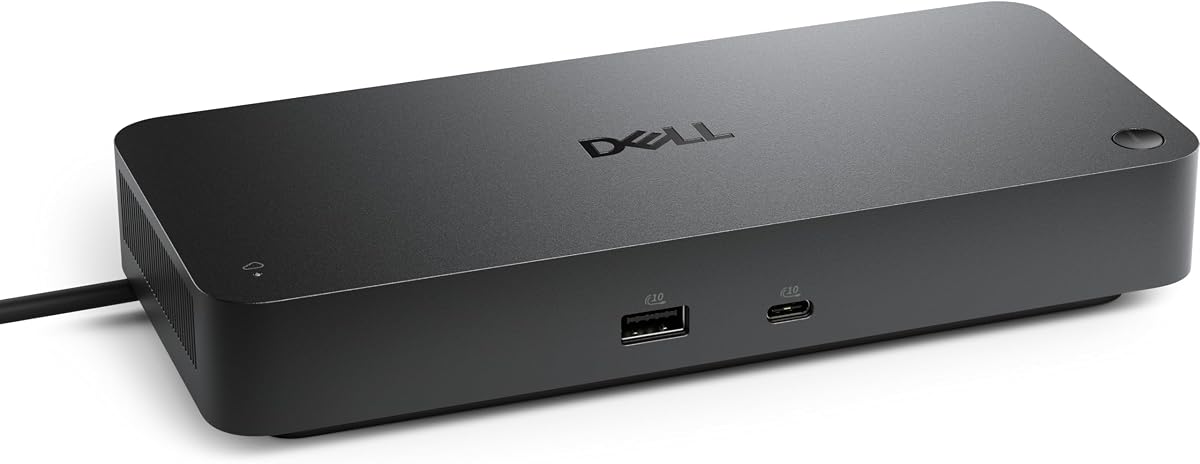
Dell Pro Thunderbolt 4 Smart Dock SD25TB4
4.2Editor score
Thunderbolt 4 speeds
130W charging power
Remote Wi-Fi management
This guide compares the top docking station for Dell Pro 14 Plus options available in October 2026 to help you choose the right connectivity hub.
Finding the right docking station for Dell Pro 14 Plus ensures your workspace remains organized and efficient. A quality hub connects multiple displays, peripherals, and power sources seamlessly through a single cable.
We compared ten leading models based on port selection, power delivery, display support, and build quality. Each entry offers unique strengths for professionals seeking reliable expansion for their Dell systems.
Each pick highlights key features and real-world performance to help you decide quickly. Remember that product availability and pricing can fluctuate regularly across major online retailers.
4.2Editor score

4.5Editor score

4.3Editor score
The following table provides a side-by-side comparison of all ten featured models to highlight their distinct specifications and capabilities for your workspace needs.

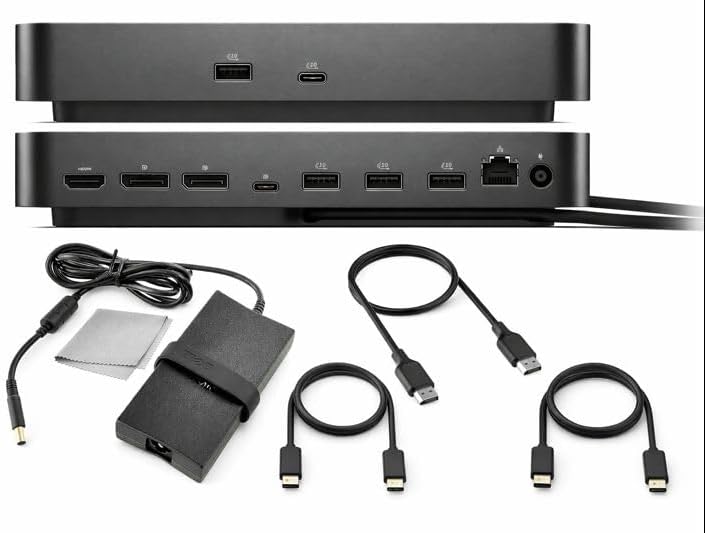


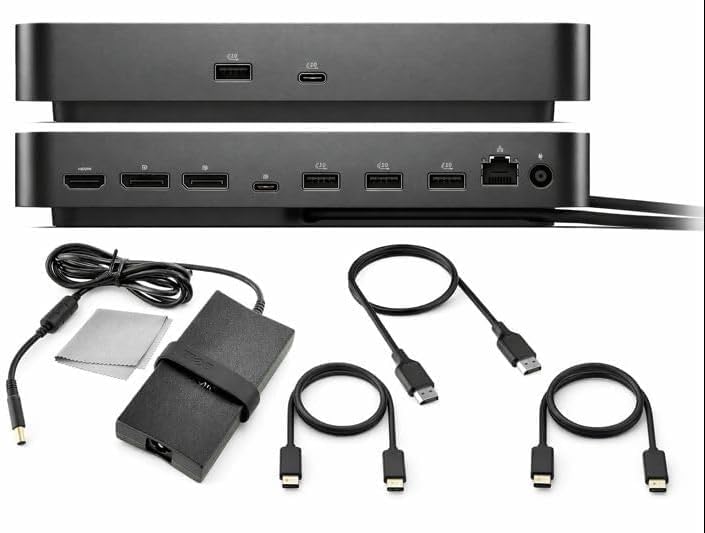

This docking station for Dell Pro 14 Plus stands out as a robust choice for modern workspaces. It offers powerful compatibility with new AI PCs while delivering reliable power and display output for productivity tasks.
We may earn a commission when you buy through this link, at no additional cost to you.
The design focuses on manageability and sustainability, offering up to four high-res displays and a durable connection. IT teams will appreciate the flexible management features that keep users working without disruption across their fleet.
While it is optimized for Dell systems, it also supports non-Dell PCs effectively. The ambidextrous cable allows for flexible routing on your desk, though the specific connectors may require attention to avoid strain over time.
Professionals needing a reliable, sustainable, and powerful hub should choose this model. It balances modern work needs with environmental considerations, making it an excellent pick for eco-conscious enterprises.
Flexible management capabilities ensure IT teams can keep users productive with minimal disruption.
Built with 65% recycled materials and reduced standby power to lower environmental impact.
We may earn a commission when you buy through this link, at no additional cost to you.
The Dell Pro Smart Dock SD25 brings enterprise-grade security and remote manageability to your desktop. It allows you to configure and update docks over Wi-Fi, which is ideal for distributed workforces.
We may earn a commission when you buy through this link, at no additional cost to you.
Its focus on security includes WPA3 encryption and hardware-based encryption to protect sensitive data. This ensures that your connection remains safe from unauthorized access while you work confidently.
Maintenance is effortless since updates can be scheduled during off-hours. This reduces interruptions for end users and ensures your entire fleet stays compliant without manual intervention.
Enterprises prioritizing secure and manageable connectivity should choose this dock. It simplifies IT operations while maintaining high standards for data protection and sustainability.
WPA3 encryption and tamper-resistant hardware safeguard sensitive data effectively.
Schedule updates during off-hours to ensure fleet compliance without user interruptions.
We may earn a commission when you buy through this link, at no additional cost to you.
This Thunderbolt 4 dock is ideal for creative professionals who need immense bandwidth and multi-display support. It delivers up to 130W charging for Dell laptops and fast data transfer through dual Thunderbolt ports.
We may earn a commission when you buy through this link, at no additional cost to you.
With support for up to four 4K monitors, it handles data and AI workloads effortlessly. The remote Wi-Fi management ensures you can handle fleet updates without touching each device physically.
Business-level security features like DMA protection and PXE boot add a layer of safety for corporate environments. The compact design fits well on busy desks while maintaining a sustainable build.
Power users needing maximum speed and display capability should choose this dock. It offers premium connectivity features that justify the cost for demanding workflows and secure environments.
Supports up to four 4K monitors ideal for creative and data-intensive work.
Dual Thunderbolt 4 ports provide high-speed data and video chain capabilities.
We may earn a commission when you buy through this link, at no additional cost to you.
The Anker Prime Docking Station offers extensive connectivity with 14 ports to manage all your devices. It supports dual displays and can charge up to four devices simultaneously with up to 160W total output.
We may earn a commission when you buy through this link, at no additional cost to you.
Data transfer speeds up to 10Gbps ensure efficient movement of large files across multiple peripherals. The versatility of having both USB-A and USB-C ports makes it flexible for various legacy and modern devices.
While it is great for Windows and ChromeOS, macOS users should note that external displays will be identical. Linux users might find limited support, so checking your OS requirements is essential before purchasing.
Users seeking a versatile and powerful budget-friendly dock should choose this model. It brings high-end features like dual displays and fast charging to a broader audience without compromising much on quality.
Capable of charging up to four devices simultaneously with 160W total output.
Efficiently manage data across multiple devices with speeds up to 10Gbps.
We may earn a commission when you buy through this link, at no additional cost to you.
This bundle provides a complete docking solution with all necessary accessories for instant setup. It includes the dock, a powerful adapter, and essential cables like HDMI, DisplayPort, and USB-C to connect your monitors.
We may earn a commission when you buy through this link, at no additional cost to you.
The inclusion of a premium microfiber cleaning cloth adds value by helping you keep your screens spotless. This thoughtful addition makes it a professional-ready kit that simplifies your initial desk setup.
While the rating is lower than standalone units, the convenience of having everything included can outweigh this for many users. The 30-day return guarantee also ensures you can try it with confidence.
Users looking for a hassle-free complete setup kit should choose this bundle. It saves time finding separate cables and offers a straightforward way to connect your peripherals immediately.
Comes fully equipped with cables and adapter for instant multi-monitor connectivity.
Includes a premium microfiber cloth to keep your screens and laptops dust-free.
We may earn a commission when you buy through this link, at no additional cost to you.
The WD25Z model stands out with an impressive 180W charging capability, suitable for high-performance laptops. It maintains the reliable USB-C connectivity that Dell docks are known for in professional environments.
We may earn a commission when you buy through this link, at no additional cost to you.
With a high rating, this dock suggests strong user satisfaction regarding its performance and stability. It serves as a solid choice for users prioritizing raw power delivery and connection reliability.
Although detailed specifications are minimal in some sources, the core function of providing ample power and connectivity is clear. This makes it ideal for workstations that require consistent and strong performance.
Users needing high-wattage charging and reliable USB-C docking should choose this model. It delivers strong power output and maintains the quality standards expected from Dell professional docks.
Provides 180W charging performance ideal for demanding professional workstations.
High rating indicates strong reliability and performance in daily professional use.
We may earn a commission when you buy through this link, at no additional cost to you.
This model offers a comprehensive connectivity solution with HDMI, DisplayPort, and USB-C for multiple displays. It delivers 100W power to laptops and includes fast 2.5GbE Ethernet for stable network connections.
We may earn a commission when you buy through this link, at no additional cost to you.
The USB hub includes four USB-A ports and one USB-C port for fast data transfer and powering peripherals. This mix of ports ensures you can connect legacy devices alongside modern high-speed ones.
A three-year warranty adds confidence to your purchase, reflecting the manufacturer's commitment to quality. However, if you need more than dual displays, other models in this guide might serve better.
Users needing reliable dual 4K support and fast networking should choose this dock. It balances performance and durability well with a solid warranty for long-term peace of mind.
Experience high-speed internet with a 2.5GbE Ethernet port for stable connections.
Multi-port USB hub offers fast data transfer speeds for various connected devices.
We may earn a commission when you buy through this link, at no additional cost to you.
This bundle delivers a high-performance docking experience with 130W charging and support for up to four displays. It comes with essential HDMI, USB-C, and DisplayPort cables plus a cleaning cloth.
We may earn a commission when you buy through this link, at no additional cost to you.
The 2.5GbE Ethernet ensures you stay connected with fast and stable internet speeds. Having all necessary cables included makes setting up your workspace straightforward and complete.
With a perfect rating, this product demonstrates exceptional quality and user satisfaction. However, the higher price point reflects the premium features and the bundle convenience.
Professionals needing maximum display support and a complete kit should choose this model. It offers high power and perfect ratings for those ready to invest in a premium docking experience.
Supports up to four displays simultaneously for enhanced professional multitasking.
Includes premium HDMI and USB-C cables for a complete setup right out of the box.
We may earn a commission when you buy through this link, at no additional cost to you.
The WD25 dock offers a reliable mix of power and connectivity for professional environments. It supports up to 100W power delivery for Dell laptops and includes fast Ethernet for stable internet.
We may earn a commission when you buy through this link, at no additional cost to you.
Its USB hub includes four USB-A ports and one USB-C port for transferring data quickly and powering peripherals. The three-year warranty adds confidence to its build quality and performance.
While it focuses on essential features rather than extensive extras, its high rating suggests strong reliability. Users looking for a no-fuss connection hub will find this model meets their core needs effectively.
Users seeking a reliable and essential docking solution should choose this model. It offers strong power and Ethernet capabilities without unnecessary complexity, backed by a solid warranty.
Stay connected with a built-in 2.5GbE Ethernet port for faster internet.
Includes versatile USB ports for fast data transfer and powering peripherals.
We may earn a commission when you buy through this link, at no additional cost to you.
This dock supports up to four WQHD displays, making it ideal for high-resolution multitasking needs. It delivers 100W power to Dell systems and features a durable compact design with sustainable materials.
We may earn a commission when you buy through this link, at no additional cost to you.
With six USB ports and 2.5GbE Ethernet, you can connect multiple devices and enjoy fast network speeds. The ambidextrous cable allows flexible routing for an optimized desktop setup.
The use of 65% recycled plastic and reduced power consumption highlights its environmental benefits. This makes it a responsible choice for organizations focused on reducing their footprint while maintaining productivity.
Users seeking a sustainable and compact dock with strong multi-display support should choose this model. It balances performance with environmental responsibility for modern workspaces.
Supports up to four WQHD displays via HDMI 2.1 and DP1.4 for multitasking.
Made with recycled plastic and offers reduced standby power to lower environmental impact.
We may earn a commission when you buy through this link, at no additional cost to you.
Selecting the right docking station requires considering power, ports, and compatibility to ensure it meets your specific workflow needs.
Ensure the dock provides sufficient wattage to power your Dell Pro 14 Plus and any connected peripherals. Most models offer between 100W and 180W, which is generally adequate for laptops and high-power accessories.
Choose a dock with enough power to handle your laptop and connected drives simultaneously without requiring a separate power source for the laptop.
Evaluate how many external monitors you need and their resolution. Some docks support dual displays while others support up to four, which is crucial for multi-monitor setups.
Verify that the video ports like HDMI and DisplayPort match your monitor's requirements for resolution and refresh rate.
Check for the mix of USB-A and USB-C ports to ensure you can connect all your peripherals without extra adapters. Having enough ports for keyboards, mice, and drives is essential.
Prioritize models with multiple USB-C ports if you plan to connect devices that require USB-C connectivity and high-speed data transfer.
Ethernet ports provide more stable and faster internet connections than Wi-Fi. Look for models with 2.5GbE ports if you require consistent high-speed network access.
A dedicated Ethernet port ensures reliable connectivity for tasks that depend on fast and stable data transfer.
Look for durable materials and a compact footprint that fits your workspace. Sustainable options made with recycled materials are increasingly available and preferred by environmentally conscious buyers.
Choose a design that allows for flexible cable routing to maintain a clean and organized desk setup.
Enterprise users may benefit from docks with remote management features via Wi-Fi. This allows for updates and configuration changes without physical access to each device.
Ensure the dock integrates well with your existing IT management tools for seamless deployment and maintenance.
Security is paramount for business environments. Docks with encryption, secure enclosure, and tamper-resistant hardware help safeguard sensitive data.
Prioritize models with enterprise-grade encryption protocols to protect your connection and data from unauthorized access.
Check the warranty period offered by the manufacturer to ensure long-term reliability. Many Dell docks offer three-year warranties which provide peace of mind for professional use.
Consider models with accessible customer support channels in case technical issues arise during daily operations.
Connect the docking station to your Dell Pro 14 Plus using the included high-quality USB-C cable. Ensure the connection is secure to maintain stable data and power delivery.
Plug your peripherals such as monitors, keyboards, and drives into the appropriate ports. Organize cables neatly to avoid clutter and ensure airflow around the dock.
Keep the dock clean by regularly dusting it with a microfiber cloth. Avoid exposing it to extreme heat or moisture to prolong its lifespan and maintain performance.
Most docks come with a high-quality USB-C cable designed for data and power transfer. Ensure you use the included cable or a certified replacement to maintain performance and safety.
Yes, many of the reviewed docks support up to four displays depending on the ports used. Check the specific model specifications to confirm the maximum number of monitors supported.
Some models like the Dell Pro Dock offer compatibility with non-Dell PCs. However, full functionality may be limited compared to Dell systems. Verify compatibility before purchasing.
Check your laptop's power requirements and add extra for peripherals. Most docks offer 100W or more which should be sufficient for most Dell Pro 14 Plus configurations.
Enterprise models like the Dell Pro Smart Dock allow remote management over Wi-Fi. This feature helps IT teams update and configure docks without physical access.
Yes, many modern docks are built with recycled materials and reduced power consumption. Look for sustainability claims like 65% recycled plastic to reduce environmental impact.
The top picks highlight the versatility and power of the Dell Pro and Anker models for different needs. Whether you need maximum power or versatile ports there is a dock for every professional.
Prioritize power delivery and display support to ensure your workflow remains efficient and uninterrupted. Security and manageability are also key factors for enterprise environments.
Check current prices and availability regularly to ensure you get the best value for your investment. Investing in the right hub enhances your workspace and productivity significantly.