
Surface Docking Station Triple Displays
4.8Editor score
Triple display output
12-in-1 port variety
72W fast charging
Discover the top docking stations for Surface Pro in October 2026. We compare ports, charging, and display support to help you choose the perfect dock.
Finding the right docking station for your Surface Pro is essential for transforming a portable tablet into a powerful desktop workstation. A good dock expands connectivity options significantly, allowing you to connect multiple monitors, peripherals, and network cables with a single plug. This guide explores the best options available to maximize your productivity and streamline your setup effectively.
We have evaluated a wide range of docking solutions based on compatibility, port variety, charging power, and display capabilities. Our analysis considers official Microsoft products as well as third-party alternatives that offer enhanced features like triple display support and faster data transfer speeds. Each entry in this list provides detailed insights into what makes it stand out for Surface users.
Every product review highlights key specifications, pros, cons, and ideal use cases to help you make an informed decision. Please note that prices and availability can change frequently, so always check the current listing for the most up to date information. We aim to provide clear, honest, and detailed information to support your purchasing journey today.
4.8Editor score

4.4Editor score

4.5Editor score
This side-by-side comparison highlights the key specifications of all ten selected docking stations. We examine port types, video output capabilities, charging wattage, and unique features to help you quickly identify which model fits your specific workflow needs.




The Microsoft Surface Thunderbolt 4 Docking Station stands out as the premier choice for users seeking maximum performance and reliability. With a solid rating of 4.4 stars, it offers lightning-fast connectivity that transforms your Surface into a full desktop powerhouse. This dock is designed to handle high-bandwidth tasks while maintaining a sleek, professional aesthetic on your desk.
We may earn a commission when you buy through this link, at no additional cost to you.
Its standout feature is the inclusion of Thunderbolt 4 ports, which allow for rapid data transfer and support for dual 4K monitors. This capability ensures that creative professionals and power users can multitask across multiple screens without any lag or bandwidth bottlenecks. The quick charge capability further enhances productivity by recharging your laptop in just 2.5 hours, keeping you working without interruption.
While the price point is higher than some alternatives, the robust build quality and exclusive features justify the investment for serious users. The eco-friendly design using 20% recycled ocean-bound plastic adds an ethical dimension to this premium product. Additionally, raised tactile indicators on each port make it easy to identify connections instantly, reducing setup time and frustration.
If you require the highest level of performance and seamless integration with your Microsoft Surface ecosystem, this is the ideal choice. It is particularly well-suited for professionals who need reliable dual 4K display support and fast charging capabilities. We highly recommend this dock for anyone looking to elevate their workspace with top-tier connectivity.
Thunderbolt 4 technology ensures high-speed data transfers and dual 4K display support for ultimate productivity.
Made with recycled materials and featuring tactile port indicators for easy identification and eco-friendly use.
We may earn a commission when you buy through this link, at no additional cost to you.
The Microsoft Surface Dock provides a straightforward and reliable way to expand your Surface devices connectivity options. Rated 4.5 stars, this classic dock works seamlessly with a wide range of Surface Pro, Surface Book, and Surface Laptop models. It is designed to transform your mobile device into a desktop PC with a simple magnetic plug-in mechanism.
We may earn a commission when you buy through this link, at no additional cost to you.
Key strengths include four USB 3.0 ports for versatile peripheral support and dual Mini DisplayPort outputs for connecting external monitors. The gigabit Ethernet port ensures stable network connectivity, which is essential for office environments. Its magnetic Surface Connect cable simplifies daily use by allowing quick attachment and detachment without worrying about alignment or loose ports.
While it lacks the advanced speed of Thunderbolt connections, it remains a solid choice for users who prioritize simplicity and broad compatibility. The inclusion of an audio out port and external power supply ensures your device stays powered while connected to multiple devices. It serves as a dependable hub for everyday tasks and essential connectivity.
This dock is best suited for users who need basic expansion without the need for cutting-edge display technologies. It offers a clean and functional solution that integrates well with older and newer Surface models alike. For those who value stability and ease of use, the Microsoft Surface Dock is a trustworthy option.
The Surface Connect cable attaches magnetically for a quick and secure connection every time you dock.
Four USB 3.0 ports and dual Mini DisplayPort outputs provide extensive connectivity for your peripherals.
We may earn a commission when you buy through this link, at no additional cost to you.
This 12-in-1 Surface Docking Station is engineered for users who need extensive multi-monitor capabilities to boost their workflow efficiency. With a rating of 4.1 stars, it supports triple displays by combining two HDMI ports and one VGA port, allowing you to extend your workspace across three screens. This setup is particularly useful for professionals who require significant screen real estate.
We may earn a commission when you buy through this link, at no additional cost to you.
The dock offers a comprehensive array of connectivity options including USB-C and USB-A ports for data transfer at up to 5Gbps. It also features SD and TF card slots for quick access to media files, making it ideal for photographers and content creators. The 3.5mm headphone jack and 100Mbps Ethernet port ensure you stay connected to audio and network resources seamlessly.
Users should note that achieving triple display output requires turning off the Surface screen itself. Additionally, the VGA port supports up to 1080P, which may not meet high-resolution needs for some tasks. However, the included power adapter ensures stable operation and charging for your connected device during extended use.
For those seeking an affordable way to achieve a triple-monitor setup with a Microsoft Surface device, this dock offers excellent value. It simplifies cabling and provides all necessary ports in one compact unit. We recommend it for users who prioritize screen quantity over maximum resolution per monitor.
Supports triple displays with HDMI and VGA ports to maximize productivity and screen space.
SD and TF card slots along with USB ports provide fast data transfer for external drives and cameras.
We may earn a commission when you buy through this link, at no additional cost to you.
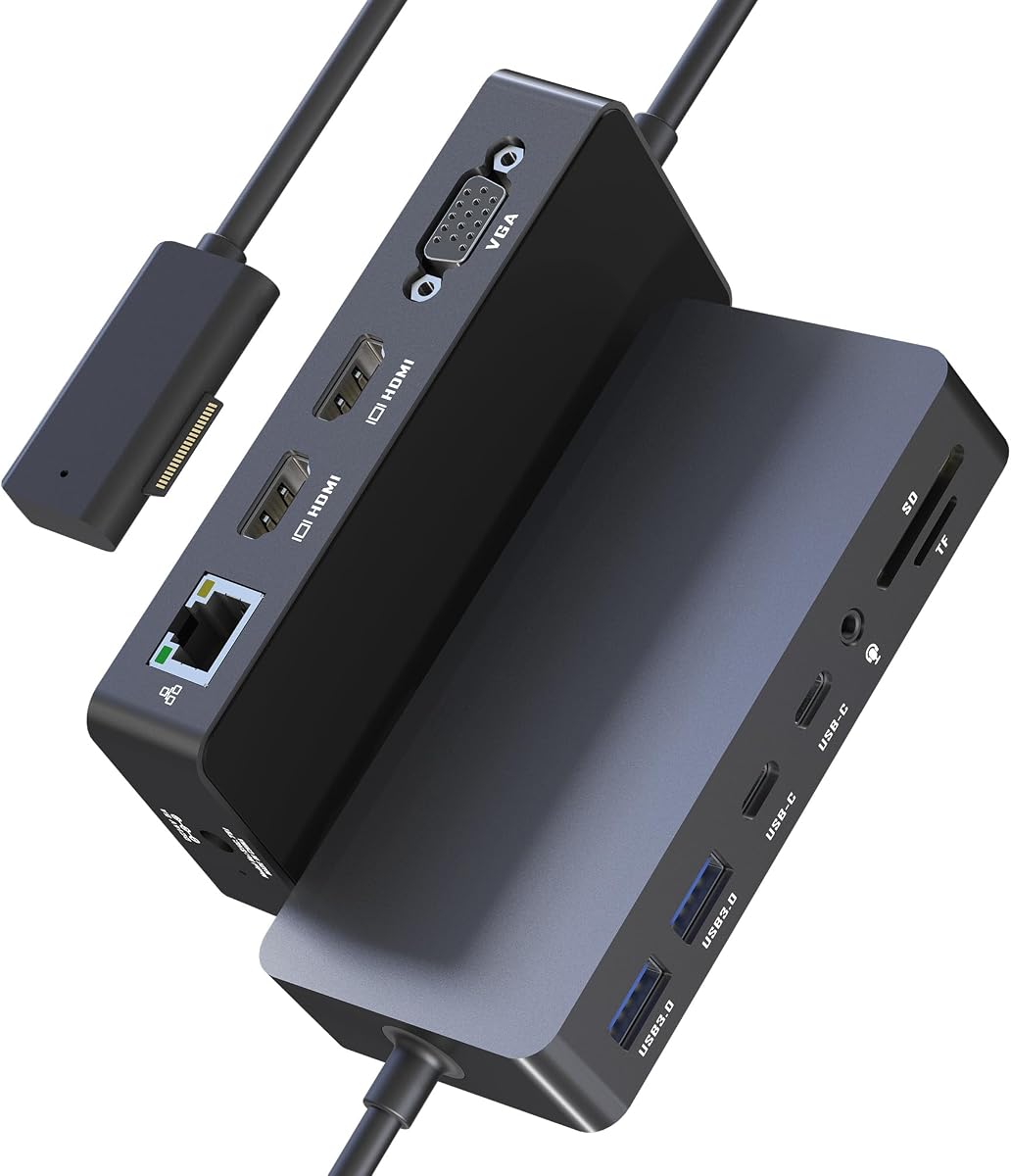
This Surface Docking Station earns a high 4.8 rating for offering robust features at an affordable price point. It provides a versatile 12-in-1 connectivity solution that supports triple displays through dual HDMI and VGA outputs. This makes it an excellent choice for budget-conscious users who still demand high functionality and professional-grade output.
We may earn a commission when you buy through this link, at no additional cost to you.
The dock delivers blazing-fast data transfer speeds through USB 3.0 and USB-C ports, enabling rapid file transfers from external drives. The included 72W power supply is a significant upgrade from standard chargers, ensuring your device remains charged while powering peripherals. Its minimalist modern design pairs seamlessly with any MS Surface laptop for a clean desk setup.
While the VGA port limits resolution to 1080P, the HDMI ports support 4K at 30Hz for crisp visuals. The stable network connection via RJ45 Ethernet and audio output via 3.5mm jack further round out its capabilities. Users appreciate the worry-free support and plug-and-play setup that eliminates driver headaches.
If you need a reliable and budget-friendly dock that supports multiple monitors and fast charging, this model is highly recommended. It balances cost with performance effectively, making it accessible for students and remote workers. We value its strong user rating and comprehensive feature set for everyday professional use.
Achieve a triple-monitor setup without breaking the bank while maintaining solid charging and data transfer speeds.
Includes a 72W adapter for stable charging and offers multiple USB ports for connecting various peripherals.
We may earn a commission when you buy through this link, at no additional cost to you.
Designed for seamless integration, this 12-in-1 Surface Dock offers universal compatibility across a wide range of Microsoft devices. With a 4.2 rating, it enables triple-screen setups using dual 4K HDMI and a VGA port. This configuration allows professionals to extend or mirror displays effectively for enhanced multitasking and productivity.
We may earn a commission when you buy through this link, at no additional cost to you.
The included 72W DC power port ensures your device stays charged even while multiple peripherals are connected. High-speed data transfer is supported through USB-A and USB-C ports at up to 5Gbps speeds. Additionally, dedicated SD and TF card slots simplify access to photos and videos from camera cards for creatives.
The product includes a comprehensive 18-month warranty and user manual for peace of mind. Users should note that connecting three external screens requires turning off the Surface screen. However, the reliable 100Mbps Ethernet port ensures stable internet access for video conferences and large file transfers.
This dock is an ideal solution for those seeking plug-and-play convenience without driver installation. It simplifies the workspace by consolidating all necessary ports into one unit. We recommend it for anyone needing flexible connectivity and extended warranty support for their Surface device.
No drivers are required, allowing for immediate setup and use across various Surface models effortlessly.
72W charging capability supports simultaneous device charging and peripheral power for uninterrupted work.
We may earn a commission when you buy through this link, at no additional cost to you.
The Microsoft Surface Dock 2 is a premium docking solution designed to instantly turn your Surface into a high-performance desktop PC. It carries a 4.5 rating and supports dual 4K displays at 60Hz for high-resolution, immersive visuals. This makes it ideal for users who demand smooth refresh rates and sharp image quality for creative or analytical work.
We may earn a commission when you buy through this link, at no additional cost to you.
Equipped with four USB-C ports (two front, two rear) and two USB-A ports, it offers extensive peripheral connectivity. The 199W power supply ensures that both your laptop and all connected devices remain charged and operational simultaneously. A 3.5mm audio jack and gigabit Ethernet port further enhance its utility for multimedia and networking tasks.
The dock includes a longer Surface Connect cable and security lock support for added convenience and safety. While the price is higher than third-party alternatives, the official build quality and performance specifications justify the cost. It is engineered to deliver a clean and organized desktop experience with minimal cable clutter.
For professionals seeking the ultimate in connectivity and display performance, this dock is the gold standard. It is best suited for high-end workflows that require dual 4K monitors and fast data access. We recommend this model for those who prioritize reliability and premium features over budget constraints.
Supports dual 4K displays at 60Hz for stunning visual clarity and smooth performance on external monitors.
Multiple USB-C and USB-A ports allow you to connect a wide array of peripherals without additional adapters.
We may earn a commission when you buy through this link, at no additional cost to you.
This Microsoft Surface Dock 2 bundle is designed to provide a complete desktop transformation experience. With a high rating of 4.8 stars, it includes everything needed for instant setup including a 199W power supply and an extended 80cm Surface Connect cable. The dock supports dual 4K monitors at 60Hz for high-resolution visuals.
We may earn a commission when you buy through this link, at no additional cost to you.
Users benefit from versatile connectivity options including two front-facing and two rear-facing USB-C ports for modern peripherals. The inclusion of two rear USB-A ports ensures backward compatibility with older devices. Kensington-compatible security lock support adds an extra layer of protection for valuable work setups in public or shared spaces.
The dock ensures your device remains charged while running multiple external devices and high-power displays. Its design focuses on seamless integration and performance for professional environments. The wide device compatibility covers various Surface Pro, Book, and Go models, making it a versatile choice.
This dock is best for users who require a high-power, fully equipped solution without needing separate accessories. The included power adapter and extended cable simplify the setup process significantly. We highly recommend it for those seeking a comprehensive and reliable docking experience.
Includes a 199W power supply and extended cable for a hassle-free setup that reaches any desk location.
Kensington security lock support ensures your dock and laptop remain secure in office environments.
We may earn a commission when you buy through this link, at no additional cost to you.
This 12-in-1 Surface Pro Dock offers a compelling alternative for users needing dual 4K at 60Hz HDMI output. It supports triple monitor setups through MST technology, boosting multitasking efficiency for traders and designers. The dock includes a dedicated 100W DC charging adapter to keep your laptop charged while powering all peripherals.
We may earn a commission when you buy through this link, at no additional cost to you.
Fast data transfer is handled by dual 5Gbps USB 3.0 and USB-C ports, along with integrated SD and TF card readers. The gigabit Ethernet port ensures low-latency connections for smooth video conferencing. A 3.5mm audio/mic jack completes the suite of essential ports for communication and entertainment.
The plug-and-play design eliminates the need for extra drivers or complex software installations. It is precision-engineered for broad compatibility across Surface Pro and Laptop models. Users appreciate its reliability as a future-proof upgrade for mobile tablet workflows.
If you need a high-performance dock that supports triple screens and fast charging without relying on Thunderbolt exclusivity, this is a strong candidate. It is best suited for creative professionals who demand crisp visuals and flexible connectivity. We recommend it for those balancing performance with budget considerations.
MST technology enables three external monitors simultaneously for enhanced workflow efficiency and productivity.
100W DC charging ensures your device stays powered while running multiple high-demand external devices.
We may earn a commission when you buy through this link, at no additional cost to you.
This renewed Microsoft Surface Dock 2 offers premium performance with the added benefit of sustainability. It supports dual 4K at 60Hz display output and includes a 199W power supply and USB-C cable for immediate use. With a 4.7 rating, it delivers consistent performance and durable design for various workspaces.
We may earn a commission when you buy through this link, at no additional cost to you.
The dock features integrated thermal management to ensure consistent operation even under heavy loads. It supports 10Gbps data transfer and multi-screen video connectivity through a single cable connection. Wide compatibility extends to Surface Pro, Laptop, Go, and Book models for versatile use.
Users receive a complete bundle with original accessories and a 1-year limited hardware warranty for peace of mind. This option is ideal for those seeking high-end features at a potentially lower price point than brand-new units. It remains a reliable choice for professional setups requiring stability.
We recommend this renewed dock for buyers who prioritize quality and eco-friendly options. It provides all the essential features of the premium dock while minimizing waste. Ensure you check renewal conditions when purchasing to align with your specific expectations.
A renewed option that offers top-tier connectivity and display support while reducing environmental impact.
Integrated thermal design ensures consistent performance and reliability during extended daily use.
We may earn a commission when you buy through this link, at no additional cost to you.
This Surface Dock offers a clean and functional design for users needing reliable connectivity without complex features. It includes dual MINI DP ports for connecting external monitors along with four USB 3.0 ports for various peripherals. The 90W power supply ensures your device stays charged while connected to the dock.
We may earn a commission when you buy through this link, at no additional cost to you.
The docking station supports gigabit network access to ensure high internet speeds and stability. Its magnetic Surface Connect cable allows for easy attachment to compatible devices. The compact design helps keep the desktop tidy while providing essential expansion options for daily tasks.
Resolution limits on the two interfaces may affect high-end displays, but it meets most daily needs effectively. Users should note that simultaneous outputs may reduce resolution compared to single display setups. The 1-year warranty with replacement coverage adds value and peace of mind for buyers.
We recommend this dock for basic users who need reliable USB expansion and monitor connectivity. It is best suited for home or office setups where extreme performance is not the primary goal. It serves as a dependable entry point for Surface device expansion.
Provides essential USB and display ports to streamline your workspace without unnecessary complexity.
90W charging and gigabit network ensure consistent performance and reliable internet access.
We may earn a commission when you buy through this link, at no additional cost to you.
Selecting the right docking station requires considering your specific connectivity, display, and power needs. We have identified key factors that determine which dock will best serve your workflow.
The number and type of displays your dock supports are critical for multitasking. Look for docks that offer HDMI or DisplayPort outputs matching your monitor resolution requirements. Ensure the dock supports the refresh rate you need for smooth visuals, especially if you work with video or design.
Prioritize docks that support dual or triple monitors if you need more screen space for complex workflows.
Your dock should provide sufficient power to charge your Surface while connected to peripherals. Higher wattage adapters like 72W or 100W ensure your device remains charged during heavy use. Check if the dock supports fast charging to reduce downtime during work sessions.
Select a dock with enough power output to sustain your device and all connected external accessories.
A wide range of USB ports including USB-C and USB-A allows you to connect multiple peripherals. Look for USB 3.0 or higher speed options for fast data transfer with external drives. Include docks with SD card slots if you often work with camera media files.
Ensure the dock includes enough USB-C and USB-A ports to avoid needing extra adapters.
Ethernet ports provide stable network connections important for video calls and large downloads. Audio jacks allow connection to headphones or speakers for clear sound during meetings. These features ensure a complete desktop-like experience when working remotely.
Choose a dock with gigabit Ethernet and audio jacks for reliable communication tools.
Ensure the dock connects seamlessly with your specific Surface model via Surface Connect or Thunderbolt. Official Microsoft docks offer the highest compatibility whereas third-party docks may require checking specific model support. Compatibility issues can lead to charging or display failures.
Always verify that the dock is compatible with your exact Surface device generation.
Robust construction ensures longevity and reliable daily operation in demanding environments. Look for docks with thermal management features to prevent overheating during extended use. Warranty terms provide assurance against defects and support for long-term satisfaction.
Opt for docks with solid build materials and comprehensive warranty coverage.
A compact design reduces desk clutter and keeps your workspace organized. Ports should be easily accessible with clear labeling for convenient connection. Some docks offer eco-friendly materials which may align with personal values.
Select a dock with a minimal footprint and intuitive port layout for efficiency.
Compare the features against the price to determine the best value for your needs. Premium docks may cost more but provide faster speeds and better build quality. Consider long-term benefits of higher performance when deciding your budget.
Balance cost with essential features to find the most economical yet capable option.
Begin by connecting all your external peripherals such as monitors, keyboards, and mice to the docking station before attaching the power cable. This order prevents potential connection issues and ensures all devices are recognized correctly by the dock.
Attach the Surface Connect cable or Thunderbolt cable to your Surface device and then to the dock. Ensure the connection is secure and the charging indicator lights up to confirm power delivery. Your device should remain charged while all peripherals are powered on.
Regularly clean the dock ports to prevent dust accumulation which can lead to connectivity problems. Store cables neatly to avoid tangling and damage to the connector pins. Following these maintenance steps will extend the life of your dock and maintain optimal performance.
Yes, certain docking stations support triple display setups by combining HDMI and VGA or multiple HDMI ports. You may need to turn off the Surface screen itself to achieve three external displays depending on the dock model. Always check the specific dock specifications to confirm triple display support and resolution limits.
Most Surface devices require at least 65W to 72W to maintain charge while docked with peripherals connected. For high-performance models or additional power-hungry devices, a 100W or 199W adapter ensures stable charging. Using a lower wattage adapter may result in slow charging or battery drain.
Most Surface docks support plug-and-play operation and do not require extra drivers for basic connectivity. However, some advanced features or third-party docks may benefit from updated drivers for optimal performance. Always check the manufacturer website for any specific software requirements.
Surface Connect docks use a proprietary connector designed specifically for Surface devices ensuring secure and reliable charging. USB-C docks offer broader compatibility but may not support all Surface specific features. Both types can provide video and data output but connection methods vary.
Yes, many modern docks support Power Delivery over USB-C to charge compatible Surface devices. Ensure the dock outputs enough wattage to sustain your device during active use. Not all USB-C ports deliver charging power so verify the dock specifications before purchase.
Check the manufacturer website or Microsoft Store for any available firmware updates for your dock model. Some docks update automatically when connected to a Windows device with the latest OS. Keeping firmware updated ensures compatibility and security for your connected devices.
Third-party docks vary in compatibility and may not support every Surface Pro model equally. Always check the manufacturer's compatibility list before purchasing to confirm support for your specific device. Official Microsoft docks generally offer the broadest compatibility across all models.
Restart both your Surface device and the docking station to reset connections and refresh display settings. Ensure all cables are securely plugged in and that the monitor input is set to the correct source. Updating your graphics drivers may also resolve compatibility problems with external screens.
We have explored ten top docking stations ranging from official Microsoft products to third-party alternatives with unique features. Each option offers distinct advantages depending on whether you prioritize display performance, charging speed, or budget.
Consider your daily workflow needs when selecting a dock focusing on port variety and display capabilities that match your tasks. Investing in a quality dock ensures your Surface transforms into a reliable and efficient desktop workstation.
Always check current prices and availability as they can change frequently to get the best deal for your chosen model. We hope this guide helps you find the perfect docking solution to enhance your productivity and workspace setup.