
WD 2TB My Passport
4.6Editor score
Password protection
Hardware encryption
Slim durable design
This guide compares the top encrypted secure external hard drives for security and performance featuring hardware encryption and rugged designs for safe data
Choosing the right encrypted secure external hard drive is essential for protecting sensitive data from unauthorized access. With cyber threats evolving daily, hardware encryption ensures your files remain safe even if the device is lost or stolen.
We evaluated ten top-rated models based on encryption standards, durability, and user experience. Our analysis covers FIPS validated options and budget-friendly choices to help you find the perfect balance between security and performance.
Each pick highlights unique strengths like brute force protection and cross-platform compatibility. Prices and availability can change quickly so check the current details before making your final decision for secure storage.
4.6Editor score

4.5Editor score

4.8Editor score
This side-by-side comparison highlights the key specifications of all ten selected drives to help you quickly identify the model that fits your security and storage requirements.


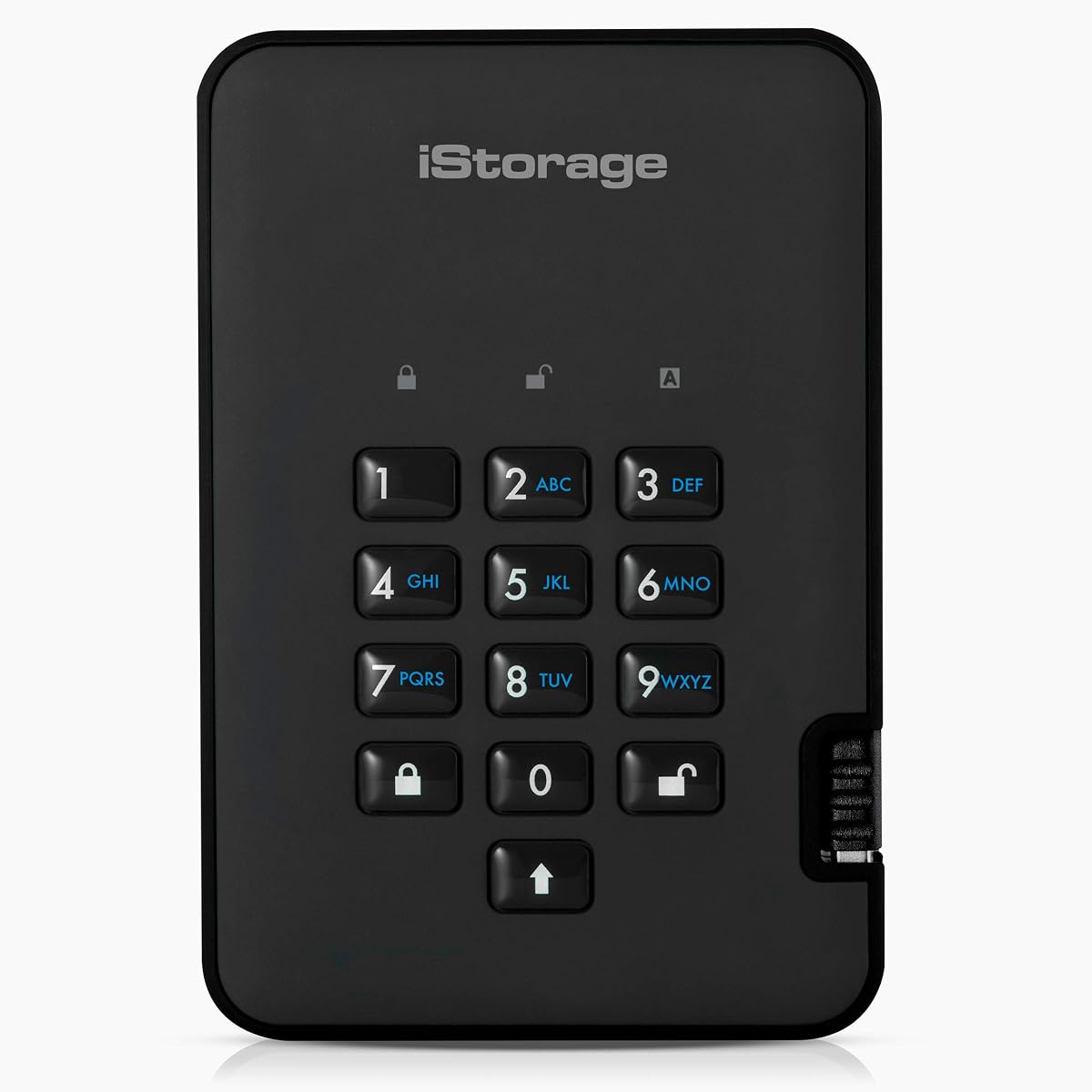

The Apricorn 1TB Aegis Padlock stands out as a top choice for users needing robust security without software dependencies. With a high user rating it delivers reliable protection using military grade algorithms validated for government standards.
We may earn a commission when you buy through this link, at no additional cost to you.
Its hardware encryption ensures data is secure the moment it hits the drive eliminating the need for vulnerable software keys. The USB 3.0 connection provides fast transfers making it practical for daily backups of large files.
While the price is higher than standard drives the included security features justify the cost. The brute force self destruct mechanism adds a critical layer of safety against unauthorized access attempts.
Anyone handling sensitive corporate or personal data should consider this drive for peace of mind. Its rugged build and sealed design make it ideal for travel or field work where physical protection matters.
The drive uses FIPS PUB 197 validated algorithms ensuring your data meets strict government security requirements without extra setup.
Sealed from physical attacks by tough epoxy coating the drive resists damage from drops or environmental hazards during transport.
We may earn a commission when you buy through this link, at no additional cost to you.
This fortress model offers higher FIPS validation making it suitable for regulated industries requiring strict data protection. Users appreciate the added reliability of a device manufactured domestically with consistent quality control.
We may earn a commission when you buy through this link, at no additional cost to you.
The integrated USB cable reduces clutter and the risk of losing connectors while on the go. A wear resistant keypad ensures long term usability even with frequent PIN entries by multiple team members.
The higher price reflects the enterprise level certifications and build quality. For organizations prioritizing compliance and physical durability this drive provides a secure foundation for sensitive storage needs.
It is best suited for professional environments where data integrity is critical. The balance of security and practical features like the integrated cable makes it a strong choice for office or field use.
FIPS 140-2 Level 2 validation ensures the drive meets strict federal standards for cryptographic modules used by government and enterprise sectors.
Made in the USA with a wear resistant keypad this drive is engineered to withstand frequent use in demanding professional settings.
We may earn a commission when you buy through this link, at no additional cost to you.
With five terabytes of storage this drive supports extensive archival needs while maintaining high security standards. The FIPS Level 3 validation offers the highest tier of physical protection against tampering attacks.
We may earn a commission when you buy through this link, at no additional cost to you.
The separation of admin and user modes allows for better control over who can modify settings or access data. Two read-only modes add flexibility for distributing information without risk of accidental changes.
The investment is significant but justified for those needing large secure storage in one device. The rugged design ensures the data remains protected even in challenging environments where security is paramount.
Ideal for data centers or media professionals needing secure large scale backups. This drive balances massive capacity with top-tier encryption to keep valuable assets safe from both digital and physical threats.
FIPS Level 3 validation provides tamper evident and tamper response features that detect and react to unauthorized physical access attempts.
Separate admin and user modes plus two read-only modes allow precise control over data access and modification permissions for teams.
We may earn a commission when you buy through this link, at no additional cost to you.
This drive offers an accessible entry point for users needing basic security without breaking the bank. Its slim profile and high ratings make it a favorite for everyday portability and simple file protection.
We may earn a commission when you buy through this link, at no additional cost to you.
The included backup software helps users protect against ransomware automatically. Password protection adds a layer of security ensuring that files are safe from prying eyes if the drive is misplaced.
While it lacks the military grade hardware of premium models it serves general users well. The three year warranty provides added confidence in the product reliability for casual storage tasks.
Best for individuals needing a reliable backup solution with basic encryption. Its ease of use and software integration make it a convenient choice for students or home offices prioritizing budget and function.
Offering password protection and hardware encryption at a lower price point this drive makes security accessible for everyday personal use.
Included software defends against ransomware and automates backups so your files are protected without requiring technical expertise.
We may earn a commission when you buy through this link, at no additional cost to you.
For those needing massive storage without the premium price tag this model delivers five terabytes with basic security features. It is an ideal choice for media files and large archives where capacity is key.
We may earn a commission when you buy through this link, at no additional cost to you.
Password protection and included backup software provide essential safeguards for personal data. The hardware encryption works seamlessly with the software ensuring files are secure during transit or storage.
While not as rugged as specialized secure drives it meets general needs well. The warranty supports long term use and gives buyers confidence in the durability of the drive.
This drive suits users who prioritize capacity and value over military grade protection. It is a practical option for home users managing large media libraries who want some security without complexity.
Five terabytes of storage allows for extensive media and document archives at a price point that remains affordable for most consumers.
Password protection and software encryption ensure your files are kept private while remaining accessible with your chosen credentials.
We may earn a commission when you buy through this link, at no additional cost to you.
This drive focuses on flexible access control through separate admin and user modes. It is designed for teams where different permission levels are required for security and operational efficiency.
We may earn a commission when you buy through this link, at no additional cost to you.
Programmable brute force defense allows customization of security settings to match organizational policies. Data recovery PINs ensure access can be restored if a user loses their primary PIN.
The configurator compatibility allows detailed management of drive settings through a dedicated interface. This level of control is beneficial for IT departments managing secure storage across multiple devices.
Best for business environments needing tailored security permissions. Its focus on admin control and recovery options makes it a practical tool for managed data security in professional settings.
Separate admin and user modes let organizations assign specific access levels to ensure the right people see the right data.
Data recovery PINs provide a safety net to regain access if a primary PIN is lost or forgotten by a user.
We may earn a commission when you buy through this link, at no additional cost to you.
Designed for desktop use this drive offers robust security in a solid aluminum enclosure. The FIPS validation and self destruct feature make it ideal for secure environments like offices or labs.
We may earn a commission when you buy through this link, at no additional cost to you.
TAA compliance ensures it can be used in government contracts where procurement standards are strict. The secure pin number access adds a physical layer of security beyond standard digital passwords.
While not portable this model shines where stationary secure storage is needed. The build quality and domestic production support higher reliability standards and easier compliance for regulated entities.
Best for organizations needing secure stationary storage. Its compliance features and physical security make it a strong choice for government or enterprise desktop backups where regulations apply.
Solid aluminum enclosure provides physical protection for the internal drive ensuring it withstands impacts and tampering attempts.
TAA compliant and made in the USA this drive meets strict procurement standards required for government and defense sector use.
We may earn a commission when you buy through this link, at no additional cost to you.
This drive stands out for its rugged IP56 rating making it dust and water resistant for harsh environments. The hardware encryption works without any software ensuring compatibility across many devices.
We may earn a commission when you buy through this link, at no additional cost to you.
Common Criteria EAL 5+ certification provides a strong benchmark for security assurance. The ability to use any OS means it works well for mixed tech environments using Windows Mac or Linux.
While write speeds are lower than some competitors the security and durability are top tier. This makes it a good choice for field work where physical conditions are unpredictable or extreme.
Best for users needing a rugged secure drive for outdoor or industrial use. Its lack of software dependency and high security standards make it reliable for professionals on the move.
IP56 certification protects the drive from dust and water allowing it to operate reliably in outdoor or industrial settings.
No software required means the drive works on any device with a USB port ensuring easy access for all users.
We may earn a commission when you buy through this link, at no additional cost to you.
Featuring a touchscreen this drive simplifies complex setup processes for users needing advanced security. The FIPS 140-3 validation is among the newest standards ensuring modern protection against threats.
We may earn a commission when you buy through this link, at no additional cost to you.
Remote management capabilities allow audits and detonation to protect data if the device is lost. The USB-C support ensures compatibility with the latest devices without needing extra adapters for connectivity.
The high price reflects the cutting edge technology included in the device. Organizations willing to invest in top tier security will appreciate the remote control and latest compliance features.
Best for tech-savvy enterprises requiring modern compliance. The touchscreen and remote features make this drive a powerful tool for managing secure data in dynamic IT environments.
FIPS 140-3 validated security ensures the drive meets the latest federal standards for cryptographic modules in secure systems.
Remote device detonation and audit features give administrators powerful tools to manage and protect data across distributed teams.
We may earn a commission when you buy through this link, at no additional cost to you.
This drive combines SSD speed with robust security features for users needing fast secure storage. With a high rating it offers excellent performance for transferring large encrypted files quickly.
We may earn a commission when you buy through this link, at no additional cost to you.
Separate admin and user modes allow flexible security management similar to other Aegis models. The data recovery PINs ensure that access can be restored if primary credentials are lost or forgotten.
The brute force defense protects against unauthorized access attempts maintaining data integrity. The SSD technology means faster transfer speeds compared to traditional mechanical hard drives.
Best for professionals needing speed and security in one package. Its performance and security features make it ideal for creative pros or analysts handling large sensitive datasets regularly.
Read and write speeds up to 350 mBPS ensure fast data transfer for large files without compromising security.
Separate admin and user modes plus brute force defense provide comprehensive control over who can access your data.
We may earn a commission when you buy through this link, at no additional cost to you.
Selecting the right secure drive involves understanding encryption standards, physical durability, and capacity needs to ensure your data remains protected.
Look for hardware encryption using AES 256-bit standards which provide military grade security. Hardware encryption is more secure than software because it does not rely on the host computer for key management.
Choose drives with FIPS validation if you work in regulated industries. This ensures the drive meets federal standards for cryptographic modules and provides verified security.
Rugged drives with epoxy coatings or aluminum enclosures protect against drops and physical tampering. If you travel frequently consider drives with IP ratings for dust and water resistance.
A durable design ensures the drive survives harsh conditions. Look for sealed designs that prevent physical access to the internal components for added safety.
Match the drive capacity to your storage requirements. Larger capacities allow for extensive backups but may be less portable than smaller models.
Assess your current data size and future growth. Select a drive that offers enough space without compromising portability or cost.
USB 3.0 or USB 3.1 interfaces provide faster transfer speeds compared to older USB 2.0 standards. SSD based drives offer even higher performance for large file transfers.
Consider the connection types available on your devices. USB-C support ensures compatibility with modern laptops and tablets.
Some drives allow separate admin and user modes for better security management. This is useful for teams where different permission levels are needed.
Check if the drive supports multiple user accounts. This feature allows for shared access while maintaining individual security logs.
Brute force defense mechanisms protect against repeated password attempts. Some drives include a self-destruct feature if too many failed attempts occur.
Prioritize models with configurable brute force settings. This allows you to balance convenience with maximum security based on your needs.
Certifications like TAA compliance or Common Criteria EAL ensure the drive meets specific government or enterprise standards. This is essential for public sector procurement.
Verify the required certifications for your organization. Using compliant drives ensures you meet legal and regulatory obligations.
Secure drives vary in price based on features and capacity. Determine a budget that balances security needs with affordability.
Invest in a drive that offers the necessary protection for your data. Sometimes paying more for higher security is worth the investment.
Always enter your PIN or password correctly before accessing data. Failed attempts may trigger security locks so remember your credentials carefully.
Safely eject the drive before unplugging it to prevent data corruption. Use the operating system eject function to ensure all transfers are complete.
Store the drive in a cool dry place when not in use. Avoid exposure to extreme temperatures or direct sunlight to maintain performance.
Hardware encryption uses a built-in chip to encrypt data which is more secure than software encryption that relies on the host computer. Hardware encryption ensures that even if the drive is connected to a compromised computer, the data remains safe.
Most modern FIPS drives are compatible with macOS provided you use the correct cable and drivers if needed. However some older models may have limited support so check the product details for Mac compatibility.
If you forget your PIN you may lose access to the data permanently unless the drive has a recovery mechanism. Some models offer data recovery PINs so keep these stored in a secure place away from the drive.
Hardware encrypted drives typically work without installing any software. You simply enter the PIN on the keypad and access the drive like a standard storage device on any operating system.
Yes almost all secure external hard drives are compatible with Windows. They function as standard storage devices once unlocked making them easy to integrate into existing Windows environments.
You can use standard copy and paste or backup software supported by your operating system. Ensure the drive is unlocked before initiating the backup process to allow data to be written.
If you travel often or work in harsh environments a rugged drive is worth the investment. It protects against physical damage and ensures your data remains safe even in adverse conditions.
FIPS 140-2 Level 2 validation means the drive meets specific security requirements for cryptographic modules including physical security mechanisms. This is a standard often required for government and enterprise security.
We have explored ten top choices ranging from budget friendly models to premium secure drives. Each option offers unique features to match different security and capacity needs.
Prioritize encryption standards and physical durability when making your decision. Choosing a drive with hardware encryption ensures your data is protected regardless of how it is used.
Prices and availability may change so review current listings before purchasing. Secure data protection is a vital investment for individuals and organizations alike.