
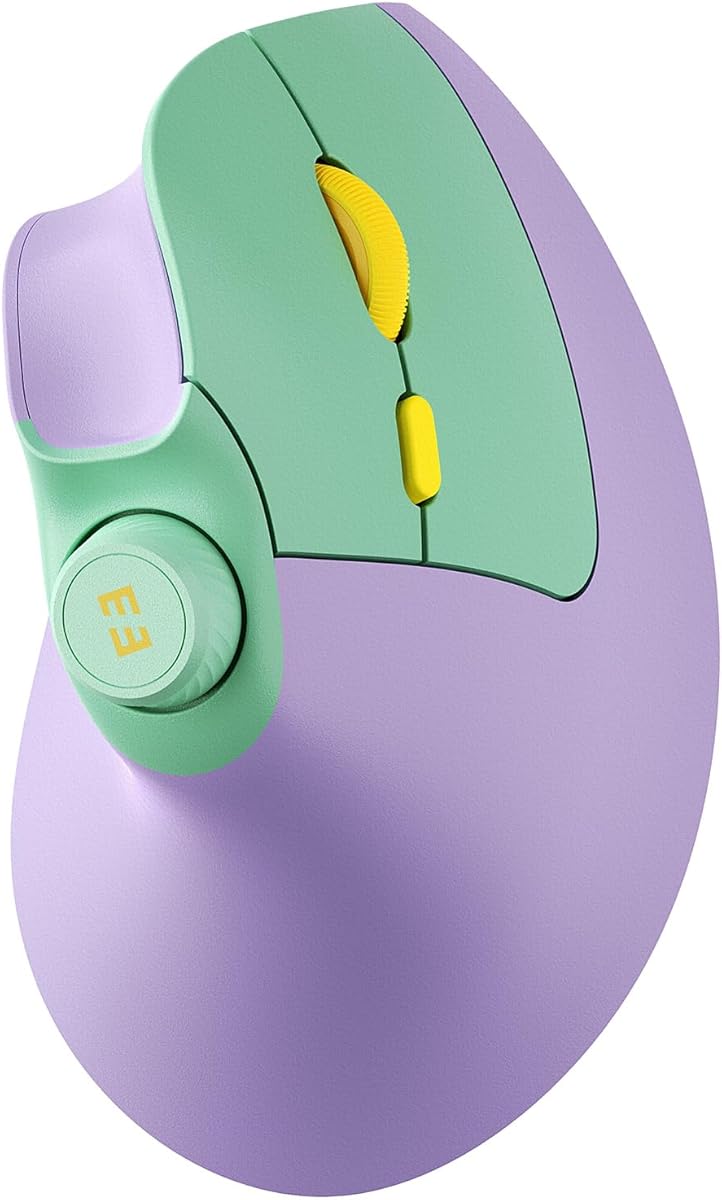
TECKNET Ergonomic Mouse Wireless Bluetooth Vertical
4.4Editor score
6 adjustable DPI levels
Silent click technology
Multi device switching
Discover the top ergonomic mice for wrist pain designed to reduce strain and improve posture. We compare ten leading models to find the best fit for your needs.
Choosing the right ergonomic mouse can significantly reduce wrist strain and improve comfort during long work sessions. These devices are designed to promote a natural handshake position, minimizing the risk of repetitive strain injuries and carpal tunnel syndrome for daily users.
We evaluated ten leading vertical mice based on design, connectivity, battery life, and user feedback. Our analysis focuses on how well each model supports neutral wrist alignment and reduces muscle activity compared to standard flat mice used in typical office environments.
Each pick highlights key features, pros, and cons to help you decide quickly. Please note that availability and specific offers may vary over time. We recommend checking the latest details before making your final purchase decision for your workspace setup.
4.4Editor score

4.4Editor score

4.4Editor score
This side by side comparison highlights the key specifications and features of all ten selected vertical mice. It helps you quickly identify which model matches your hand size, connectivity needs, and ergonomic requirements for better wrist health.



The Logitech Lift Vertical Ergonomic Wireless Mouse is designed to help you lift yourself up from desk fatigue. It features a 57 degree vertical angle that promotes a natural handshake position for your forearm. This design aims to reduce muscle strain and improve posture throughout your workday.
We may earn a commission when you buy through this link, at no additional cost to you.
Its ergonomo certified status means leading experts tested it for comfort and health benefits. The mouse includes a softly textured grip and a snug thumb rest for added coziness. You can connect via Bluetooth Low Energy or Logi Bolt USB to various operating systems including Windows and macOS.
While highly rated, the mouse is designed specifically for small to medium right hands. Users may need a few days to adjust to the vertical shape before it feels natural. However, the reduced wrist pressure often makes this learning curve worthwhile for daily computer users.
If you need a reliable wireless mouse that supports wrist health without sacrificing features, the Lift is a top choice. It offers customizable buttons, whisper quiet clicks, and a SmartWheel for seamless navigation. This model balances performance and comfort for everyday office productivity.
The vertical design keeps your wrist in a neutral position to lower muscle activity and strain during extended use.
Enjoy up to two years of battery life with a single AAA battery to minimize maintenance and downtime.
We may earn a commission when you buy through this link, at no additional cost to you.
The Anker 2.4G Wireless Ergonomic Mouse offers a scientifically designed structure that promotes a healthy neutral handshake wrist position. This vertical shape helps reduce strain and amplify your productivity during long work sessions. It is an excellent choice for those seeking ergonomic benefits at a lower cost point.
We may earn a commission when you buy through this link, at no additional cost to you.
You get superior sensitivity with 800, 1200, or 1600 DPI optical tracking technology. This ensures smooth and precise movement on various surfaces for both work and leisure. The mouse also features next and previous buttons to make webpage browsing effortless without reaching for keyboard shortcuts.
On the downside, this model relies on a 2.4G USB receiver and does not support Bluetooth connections. Some users might find the click sounds unavoidable compared to silent options. However, the durable build and power saving mode after eight minutes of inactivity help extend usability.
For users who prioritize budget without compromising on basic ergonomic features, this Anker mouse delivers solid performance. It includes a comprehensive set with a USB receiver stored in the mouse. The eighteen month warranty provides peace of mind for your purchase.
Multiple DPI settings allow you to adjust sensitivity for detailed tasks or fast scrolling.
The mouse enters a power saving mode automatically to preserve battery life during idle periods.
We may earn a commission when you buy through this link, at no additional cost to you.
The TECKNET Ergonomic Mouse features a vertical design that places your palm at a near vertical angle to reduce wrist pressure. This helps mitigate pain caused by prolonged inverted mouse usage. It is designed for right handed use only but offers significant comfort improvements for most users.
We may earn a commission when you buy through this link, at no additional cost to you.
Connectivity is flexible with Bluetooth 5.0 or 2.4GHz USB modes. You can seamlessly switch between three devices to boost work efficiency. The mouse operates quietly with nearly silent clicks, which is ideal for libraries or shared office spaces where noise control matters.
While the silent feature works well, other function buttons may still produce sound. Side buttons are not compatible with macOS systems. The battery life is optimized by entering deep sleep mode after inactivity, and a low battery LED light alerts you when replacement is needed.
This mouse provides high performance with six adjustable DPI levels up to 4800 DPI for precise tracking. If you need a quiet, versatile vertical mouse without breaking the bank, this model is a strong contender. The thirty six month warranty shows confidence in its durability.
Left and right click buttons are nearly silent to avoid disturbing others during work or study.
Support for Bluetooth and USB allows connection to a wide range of laptops and desktops.
We may earn a commission when you buy through this link, at no additional cost to you.
The UGREEN Ergonomic Wireless Mouse is designed with a natural vertical handshake position that reduces wrist rotation and muscle strain. This makes it a great choice for users with larger hands who spend long hours on the computer. Its ergonomic form helps maintain a relaxed arm posture.
We may earn a commission when you buy through this link, at no additional cost to you.
Quiet click buttons keep your workspace peaceful while the five button layout supports efficient navigation. You can easily switch DPI settings to match tasks from precise editing to fast scrolling. The PTFE glide feet ensure smooth movement and reduced surface friction on any surface.
The mouse supports both 2.4G wireless and Bluetooth connections with a ten meter range. Smart sleep mode helps extend battery life powered by a single AA battery. However, some users might prefer rechargeable options for convenience over disposable batteries.
For those who value silence and smooth tracking, this UGREEN model delivers consistent performance. It is fully compatible with Windows, macOS, Linux, ChromeOS, and Android systems. If you need a reliable wireless mouse for daily office work, this is a solid option.
Durable PTFE glide pads ensure effortless cursor movement with minimal friction.
Switch between Bluetooth and USB connections seamlessly based on your device setup needs.
We may earn a commission when you buy through this link, at no additional cost to you.
The ProtoArc EM11 NL is designed specifically for small to medium hands with lengths under 7.5 inches. It features a rechargeable battery that can be conveniently charged using the included Type C cable. This model helps reduce wrist strain by aligning with your natural grip posture.
We may earn a commission when you buy through this link, at no additional cost to you.
You can connect up to three devices via dual Bluetooth or 2.4G USB A connectivity. The silent click sound helps you focus on work without distractions. However, the forward and back buttons are not compatible with Mac OS systems and buttons are not programmable.
There is a learning curve as users may need one to two weeks to get used to the vertical shape. The design puts your forearm in a more natural position to lower repetitive strain injury risks. Adjusting your palm position is encouraged for best comfort results.
If you have smaller hands and prefer a rechargeable option, this mouse offers solid ergonomic support. It works with Windows and Android systems effectively. The back and forward buttons help navigate websites efficiently on supported platforms.
Designed for smaller hands to ensure a secure and comfortable grip during use.
Connect via Bluetooth or USB receiver to switch between devices easily and efficiently.
We may earn a commission when you buy through this link, at no additional cost to you.
The Lekvey Ergonomic Mouse uses a scientific ergonomic design to encourage a healthy neutral handshake wrist position. Most customers find it significantly reduces wrist pain after just a three to five day adjustment period. It is suitable for medium or large hands seeking comfort.
We may earn a commission when you buy through this link, at no additional cost to you.
You get a high capacity rechargeable battery that supports over 150 hours of continuous use on one charge. This eliminates the need to buy disposable batteries. The one nano USB receiver makes it easy to use without Bluetooth pairing or drivers.
While the lack of Bluetooth may limit some users, the plug and play functionality is straightforward. Three DPI levels allow easy sensitivity adjustments for different tasks. The package includes a USB receiver and a long Type C charging cable for your convenience.
If you want a simple rechargeable mouse that focuses on reducing strain, this model is worth considering. The thirty six month manufacturer warranty backs the product. It is compatible with Windows and Mac systems for broad usability.
The rechargeable battery offers extensive use time before needing another charge cycle.
Works with a wide range of Windows versions and Mac OS without extra software.
We may earn a commission when you buy through this link, at no additional cost to you.
The TECKNET Ergonomic Mouse supports Bluetooth 5.0 and 2.4G connectivity for fast and reliable connections. It features a 52 degree vertical angle designed to reduce wrist pain and fatigue. The silent click technology minimizes noise to allow distraction free work in quiet spaces.
We may earn a commission when you buy through this link, at no additional cost to you.
Its built in 600mAh rechargeable battery offers up to two months of use on a single charge. Six adjustable DPI levels help you adapt from pixel perfect editing to fast paced gaming. The side buttons let you navigate web pages with speed and efficiency.
Forward and back buttons may not be available on Mac systems. However, the durable design withstands six million clicks for long term efficiency. The mouse glides smoothly over various surfaces including wood and paper for accurate tracking.
If you need a mouse that balances silent operation with high performance, this model stands out. The thirty six month support for registered users adds value. It is suitable for professionals who value efficiency and wrist health.
Click noise is reduced by 99 percent to keep your environment quiet and focused.
Built to withstand six million clicks for long term use in busy work environments.
We may earn a commission when you buy through this link, at no additional cost to you.
The seenda MOU-302 features a vertical ergonomic design that keeps your wrist in a neutral straight line. It includes a built in volume control button to adjust music or media directly from the mouse. This boosts efficiency for streamers and remote workers needing quick control.
We may earn a commission when you buy through this link, at no additional cost to you.
You can connect to three devices simultaneously via 2.4G USB or two Bluetooth channels. The mouse is silent and precise with adjustable DPI settings for smooth control. It is suitable for office environments or shared spaces where noise control matters for comfort.
Its built in 500mAh battery lasts up to two months per charge with USB C charging. This is ideal for travelers or busy professionals who value convenience. However, Mac OS users might find some functions limited compared to Windows setups.
If you need a mouse with media control and reliable connectivity, this model is a strong pick. It works with Windows, macOS, iOS, Android, and Chrome OS. The wide compatibility ensures it fits diverse device setups at home or work.
Adjust volume and pause playback without leaving your current window for better workflow.
Long lasting battery life reduces the frequency of charging and waste.
We may earn a commission when you buy through this link, at no additional cost to you.
The Logitech MX Vertical Wireless Mouse uses a natural handshake position to reduce muscular activity by ten percent. It features a unique 57 degree vertical angle to reduce pressure on your wrist. The design has been tested with criteria set by leading ergonomists for improved posture.
We may earn a commission when you buy through this link, at no additional cost to you.
Its 4000 DPI high precision sensor results in four times less hand movement compared to standard mice. A cursor speed switch instantly adjusts DPI speed and accuracy with the touch of a button. The textured rubber surface assures a natural grip for various hand shapes.
The premium price reflects its advanced engineering and ergonomic approval. Users need a USB receiver for connection as noted in the package details. However, the form is shaped for the human hand to improve comfort during long sessions without performance loss.
If you are looking for a high end solution to prevent wrist strain, this mouse is a top candidate. It combines advanced tracking with comfort features designed to lower muscle strain. For professionals seeking quality, this model delivers reliable ergonomic support.
High precision tracking ensures accurate cursor movement with minimal hand travel.
Textured rubber surface provides stability and comfort during extended daily use.
We may earn a commission when you buy through this link, at no additional cost to you.
The TECKNET 2.4G Wireless Ergonomic Vertical Mouse features a 60 degree vertical grip to cut wrist strain. It includes six programmable buttons and five adjustable DPI levels to speed up your workflow. The thumb shortcuts reduce repetitive click fatigue for better long term comfort.
We may earn a commission when you buy through this link, at no additional cost to you.
Reliable 2.4GHz wireless technology provides a stable connection of up to ten meters. This allows easy pairing and quick switching between desktops, tablets, and laptops. The left and right buttons feature a silent design to ensure a focused workspace environment.
Users may resist the shape at first due to correcting years of poor posture. It is recommended to give it three days to adjust. After the transition, a flat mouse will feel awkward compared to this ergonomic shape.
If you want a mouse that supports smart workflow customization, this model is a good fit. It comes with a thirty six month warranty for reliability. The investment in your wrist health pays off with daily comfort.
Program shortcuts to reduce clicks and increase daily efficiency.
Quiet operation ensures a comfortable and distraction free workspace for all.
We may earn a commission when you buy through this link, at no additional cost to you.
Selecting the right ergonomic mouse requires evaluating several factors to ensure comfort and compatibility with your devices.
Ergonomic mice vary in size to suit different hand dimensions. Measure your hand from wrist to tip of middle finger to find a model that fits comfortably. A poor fit can increase strain rather than reduce it.
Choose a mouse that supports your natural grip to avoid cramping or over extension during use.
Decide if you prefer Bluetooth or USB wireless connections. Bluetooth saves USB ports but may have pairing steps while USB offers plug and play ease. Some mice support both for flexible device switching.
Ensure the connection method matches your computer capabilities for stable performance.
Rechargeable mice reduce waste and long term costs but require charging cycles. Battery operated mice offer convenience with replacements. Consider how often you use the mouse to determine which type suits your workflow better.
Look for models with clear battery indicators to avoid unexpected power loss.
Adjustable DPI allows you to change cursor speed for different tasks. Higher DPI is useful for large screens while lower DPI aids precision work. Multiple levels provide flexibility without changing mouse settings manually.
Choose a mouse with easy DPI switching to adapt quickly during multitasking.
Silent click options are ideal for shared spaces or quiet offices. Standard clicks may be audible and disrupt focus. If noise is a concern, check for dedicated silent switch models.
Balance noise reduction with feedback quality to ensure clicks feel responsive.
Verify that the mouse supports your OS fully. Some features like side buttons may not work on macOS. Ensure drivers or software are available for your specific system version.
Check product notes for OS specific limitations to avoid functionality issues.
Durable materials ensure longevity under daily use. A strong warranty like thirty six months indicates manufacturer confidence in reliability. This protects your investment against early failures.
Prioritize brands with good support records for peace of mind.
Vertical angles like 57 degrees or 60 degrees affect wrist posture. Higher angles may offer more neutral positioning for some users. Find the angle that feels most natural for your arm alignment.
Adjustment time is normal when switching to a new vertical angle.
Allow a few days to adjust to the vertical shape by alternating use. Start with short sessions before using the ergonomic mouse all day.
Keep the surface clean for smooth tracking. Wipe PTFE feet occasionally to maintain glide quality.
Update software if available to ensure all buttons work correctly. Check battery levels regularly to avoid sudden power loss during tasks.
Vertical mice promote a neutral handshake position that reduces wrist rotation. This lowers muscle strain and pressure on the carpal tunnel. Many users report decreased discomfort after adjustment.
Most users adapt within a few days to a week. You might notice awkward movements initially. Practice daily to improve comfort and productivity.
Some vertical mice offer high DPI for gaming. However, precision aiming may be harder due to the shape. Test for your specific game needs before purchasing.
Most models are designed for right handed use only. A few options support ambidextrous designs. Check product specs carefully before buying if you are left handed.
No, only specific models offer silent click buttons. Standard mice may produce audible sounds. Look for features labeled silent or quiet if noise is a priority.
Bluetooth saves USB ports but requires pairing. USB offers plug and play ease. Choose based on your available ports and device compatibility.
1000 to 1600 DPI works well for typical office tasks. Adjust up for larger screens or down for precision. Flexibility is key for different apps.
Wipe the surface with a dry cloth. Avoid using liquids on buttons. Clean the feet occasionally to maintain smooth movement on your desk.
The Logitech Lift, TECKNET 4800 DPI, and Logitech MX Vertical stand out for comfort and features. These models balance ergonomics with productivity tools for daily use. They offer reliable support for reducing wrist strain effectively.
Prioritize hand size fit and connectivity needs when making your choice. Rechargeable options may suit budget conscious users better. Silent clicks can also improve focus in shared environments.
Check current offers and availability before purchasing. Prices and stock vary over time. Select the mouse that best fits your daily workflow and health goals for long term comfort.