
Cable Matters Punch Down Tool
4.3Editor score
Removable 110 blade
Adjustable impact settings
Spring-action mechanism
This guide compares the top ten Ethernet punch down tools for network installations, evaluating blade types, impact settings, durability, and compatibility to
Choosing the right Ethernet punch down tool is crucial for reliable network installations. A good tool ensures precise wire termination, reduces installation time, and prevents damage to sensitive cable components during setup.
We evaluated ten leading products based on user reviews, build quality, and feature sets. Our analysis covers impact settings, blade compatibility, and ergonomic design to help you find the perfect match for your needs.
Each pick highlights specific strengths like budget friendliness or professional durability. Keep in mind that prices fluctuate regularly, so verify current costs before making your final purchasing decision today.
4.3Editor score

4.8Editor score

4.7Editor score
Here is a side-by-side comparison of all ten products featured in this guide. Each entry includes key specifications and direct links to help you quickly identify the best tool for your specific networking tasks.


This Cable Matters tool offers reliable performance for budget conscious users. It holds a 4.3 star rating and features a standard 110 blade for common network termination tasks.
We may earn a commission when you buy through this link, at no additional cost to you.
The twist-and-lock blade design ensures secure retention during use. Adjustable impact settings allow you to fine-tune force for different cable types without needing multiple tools.
While it handles most DIY jobs well, the plastic body may show wear with heavy daily use. This trade-off is acceptable given its low cost and sufficient performance for occasional projects.
Ideal for hobbyists and small offices needing an affordable solution. If you terminate cables infrequently, this tool provides excellent value without compromising essential termination accuracy.
The groove aligns with the handle detent to prevent loosening during operation.
Select Lo or Hi settings to match the specific cable termination requirements.
We may earn a commission when you buy through this link, at no additional cost to you.
The Klein Tools VDV427-300 stands out for its professional-grade build quality. With a 4.8 star rating, it delivers precise connections consistently for both data and voice cables.
We may earn a commission when you buy through this link, at no additional cost to you.
Its Metal Injection Molding blade ensures long-lasting sharpness. The cushioned handle reduces hand fatigue during extended installation sessions, making it ideal for technicians.
While slightly more expensive, the durability justifies the investment. It may lack some specialized features found in niche tools, but its core performance is unmatched.
Best suited for professionals who need reliability. If you install networks regularly, this tool offers the balance of comfort and precision you require.
Enhanced durability ensures the cutting edge remains sharp through many uses.
The cushioned handle provides a non-slip grip for safer operation.
We may earn a commission when you buy through this link, at no additional cost to you.
TRENDnet offers a versatile solution with both 110 and Krone blades. Its 4.7 rating reflects strong performance across various installation scenarios and standards.
We may earn a commission when you buy through this link, at no additional cost to you.
The twist and lock holder keeps blades secure during transport. NDAA and TAA compliance make it a preferred choice for government projects in specific regions.
You get a three-year manufacturer protection which adds peace of mind. However, the blade storage mechanism could be more robust for frequent travelers.
Choose this for projects requiring Krone or 110 versatility. If you need a reliable tool with official compliance, this model fits those criteria well.
Interchangeable blades allow work on both 110 and Krone blocks easily.
The holder prevents blade loss during transport with a secure lock.
We may earn a commission when you buy through this link, at no additional cost to you.
This tool expands compatibility by including both 110 and 66 blades. With a 4.4 rating, it serves well for general network wiring tasks needing variety.
We may earn a commission when you buy through this link, at no additional cost to you.
The removable blade storage enhances usability during transport. Adjustable impact settings let you switch between different cable types without swapping tools constantly.
Durability might be an issue with heavy professional use. Yet, for most contractors, the versatility offers a significant advantage over single-blade alternatives.
Perfect for jobsites with mixed panel types. If you encounter both 110 and 66 blocks frequently, this tool streamlines your workflow effectively.
Both 110 and 66 blades allow use with different block types.
Twist and lock sockets keep blades secure when not in use.
We may earn a commission when you buy through this link, at no additional cost to you.
VCELINK adds value with a wirepuller and mini stripper. Its 4.3 rating suggests solid performance for those who want extra tools in one package.
We may earn a commission when you buy through this link, at no additional cost to you.
The double cutter head design cuts excess cables efficiently during punching. Adjustable impact settings cater to different cable requirements for precise termination.
The included tools might feel like extra weight in your kit. Still, the convenience reduces the need to carry separate devices for simple tasks.
Ideal for DIYers wanting all-in-one convenience. If you need to cut and strip often, this tool simplifies your workflow significantly.
Clean up extra cables easily with the integrated side pullouts.
A mini wire stripper helps with quick cable prep tasks.
We may earn a commission when you buy through this link, at no additional cost to you.
This speed tool cuts all wires in one smooth operation. With a 4.6 rating, it dramatically reduces installation time for compatible keystone jacks.
We may earn a commission when you buy through this link, at no additional cost to you.
Designed for VCE C265 series, it fits slim ports perfectly. The SK5 steel blade resists rust and ensures sharp cutting throughout its life.
Its specialization means it is not for general use. However, for high-volume installations using specific jacks, the efficiency gains are substantial.
Best for specialized contractors using VCE products. If you install many wall plates, this tool speeds up your job considerably.
Terminate all eight wires simultaneously for up to eight times faster work.
Swap the SK5 steel head when dull instead of buying a new tool.
We may earn a commission when you buy through this link, at no additional cost to you.
Rapink focuses on safety and ease of use with its design. Rated 4.2, it prevents finger injuries common with traditional tools.
We may earn a commission when you buy through this link, at no additional cost to you.
The built-in housing keeps jacks in place for perfect crimps. Adjustable trimming depth allows fine-tuning to avoid damaging the keystone structure.
It is limited to Rapink keystone jacks only. But if you use that brand, the safety and speed benefits make it a smart choice.
Suitable for those prioritizing safety. If you want to avoid hand injuries while working with specific jacks, this tool helps.
Eliminate finger pinching risks during keystone termination tasks.
Securely hold jacks for better crimp alignment and accuracy.
We may earn a commission when you buy through this link, at no additional cost to you.
Fluke Networks delivers top-tier quality with a lifetime warranty. Its 4.7 rating confirms consistent performance for demanding professional environments.
We may earn a commission when you buy through this link, at no additional cost to you.
The EverSharp blade ensures precise cuts every time. The soft touch rubber handle improves grip and reduces fatigue during long sessions.
It is the most expensive option available, but durability justifies the cost. You pay for reliability and brand reputation that professionals trust.
Choose this if budget is secondary to performance. For mission-critical networks where reliability is paramount, this tool offers unmatched assurance.
Enjoy complete coverage for the lifetime of the tool.
The 66/110 cutting blade maintains sharpness for consistent results.
We may earn a commission when you buy through this link, at no additional cost to you.
This kit provides all necessary tools for modular cable work. With a 4.8 rating, it is perfect for technicians needing a full setup.
We may earn a commission when you buy through this link, at no additional cost to you.
The precision punchdown tool features the exclusive DuraBlade for clean cuts. It includes data plugs and a storage bag for organized transport.
It is broader than just a punch tool, which might be extra. Yet, having everything in one kit saves time on individual purchases.
Best for installers starting out. If you need a full coax and data setup in one package, this kit delivers excellent value.
Includes crimp tool, stripper, and punch tool for all needs.
The precision cutting edge ensures accurate and clean wire termination.
We may earn a commission when you buy through this link, at no additional cost to you.
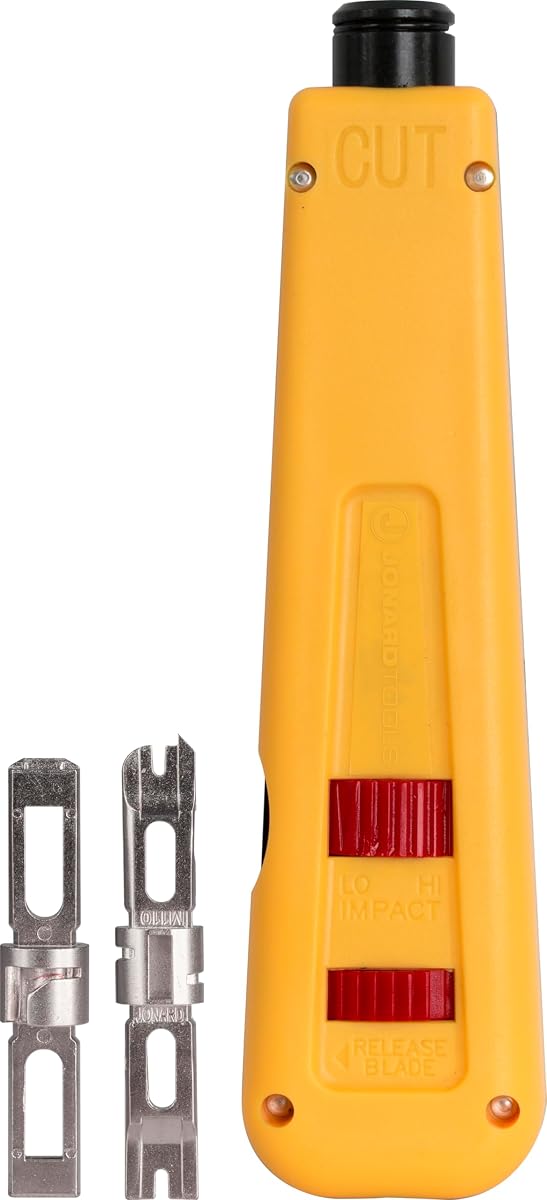
Jonard offers a durable manual option with color-coded features. Rated 4.5, it is tested for high impact cycles ensuring long service life.
We may earn a commission when you buy through this link, at no additional cost to you.
The body is color coded to help identify the cut side quickly. Adjustable impact settings allow customization for different cable termination needs.
It lacks automatic spring assistance, relying on manual force. Still, its durability makes it a solid choice for those preferring mechanical simplicity.
Ideal for technicians who prefer manual control. If you value tested durability over automatic features, this tool meets that need well.
Half yellow and half blue body for easy cut side identification.
Nickel plated blades ensure long life during high impact use.
We may earn a commission when you buy through this link, at no additional cost to you.
Choosing the right tool depends on your specific needs and frequency of use. Consider these factors to find a device that fits your workflow.
Ensure the tool matches the blocks you use. Most support 110, while some offer 66 or Krone options for variety.
Select a tool with interchangeable blades if you work with multiple block types regularly.
Adjustable force lets you customize the pressure for different cables. This prevents damage to delicate wires during termination.
Look for Lo/Hi switches to switch between voice and data cables easily.
Heavy use requires metal injection molded or hardened steel components. Plastic bodies may wear faster in professional environments.
Choose metal blades for long-lasting sharpness and reliability over time.
Comfortable grips reduce hand fatigue during long installation sessions. Soft-touch or cushioned handles improve overall usability.
Prioritize tools with non-slip surfaces for safer operation.
Some tools include spudgers or storage for spare blades. This adds convenience for on-site maintenance.
Check for included storage compartments to keep your tool organized.
Speed tools cut all wires in one step, reducing time significantly. However, they are often brand-specific for keystone jacks.
Use these if you terminate many similar jacks for efficiency.
A lifetime warranty indicates high confidence in product quality. It also protects your investment against defects.
Look for brands offering long-term support for replacement parts.
Basic tools cost less but may lack advanced features. Determine your usage frequency to justify the expense.
Invest in premium tools only if you need consistent professional results.
Start by selecting the correct blade for your panel type. Insert the wire into the slot and apply pressure until the tool clicks.
Adjust the impact setting based on cable thickness. Use low force for thin voice wires and high force for thicker data cables.
Store blades securely after use to prevent dulling. Clean the mechanism periodically to remove dust and debris from the spring.
Most tools support 110 blocks, but check for 66 or Krone compatibility if needed. Interchangeable blades are ideal for mixed environments.
Yes, adjustable force prevents damage to wires. Low settings are for thin voice cables while high settings suit thicker data cables.
Metal blades are sharper and last longer. They provide consistent cuts which is crucial for reliable network connections.
It is a specialized tool for terminating keystone jacks. These often cut all wires in one step to save time on wall plates.
Yes, most tools handle voice cables. Ensure the blade matches the specific jack or block you are working with.
Check the blade orientation and impact setting. A dull blade or low impact may prevent it from cutting the excess wire.
Use a twist and lock mechanism to swap blades. Keep a spare blade in the storage compartment for quick changes.
If you install many jacks, yes. It saves time significantly, but ensure it fits your specific keystone brand.
We reviewed ten tools ranging from budget models to professional grade options. The best pick depends on your specific cable types and installation needs.
Prioritize durability and blade compatibility to ensure clean cuts every time. A good tool prevents common wiring errors that affect network performance.
Remember that prices change frequently. Check current listings before buying to ensure you get the best value for your investment.