
SSK Portable SSD 1TB
4.5Editor score
1050MB/s read speed
Lightweight aluminum case
Mac compatibility ready
This guide compares the top external SSDs for Mac Mini M4 to help you choose the perfect high-speed storage solution for your workflow needs.
Finding the right external SSD for your Mac Mini M4 is essential for expanding storage without sacrificing performance. Modern workflows require fast data access for video editing, coding, and large file transfers.
We evaluated ten top-rated drives based on speed, compatibility, durability, and value. Our analysis focuses on models that work seamlessly with macOS and Apple Silicon chips for optimal efficiency.
Each pick highlights key features, pros, and cons to help you decide. Prices and availability may change frequently, so verify details before purchasing your next storage upgrade today.
4.5Editor score
4.5Editor score

3.9Editor score
This side-by-side comparison details the key specifications of all ten selected drives to help you find the perfect match for your Mac Mini M4 setup.




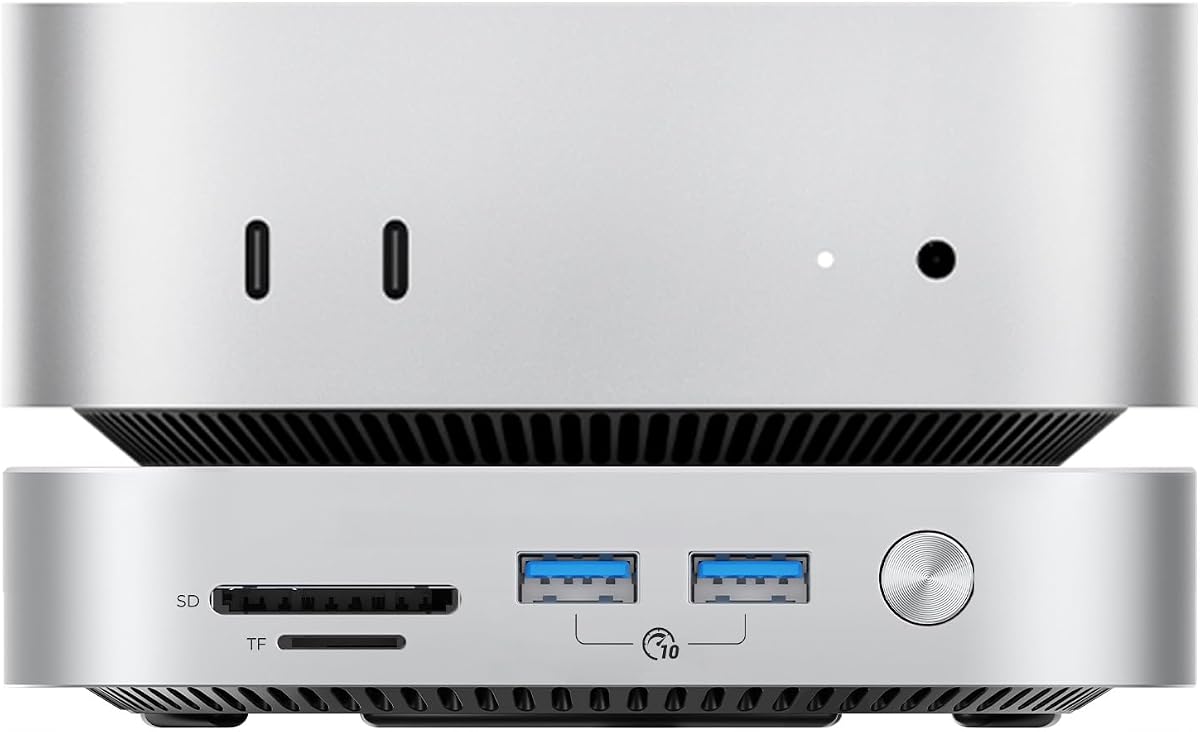
The ORICO 2TB External SSD stands out as the top choice for Mac Mini M4 users needing significant storage expansion. With a rating of 4.5 stars, this drive offers a unique dual-SSD expansion design that attaches directly to the Mini for seamless integration.
We may earn a commission when you buy through this link, at no additional cost to you.
Its standout feature is the 3200MB/s transfer speed, which supports heavy 4K and 8K video workflows without bottlenecks. The drive also includes three USB 3.0 ports and card readers, effectively acting as a hub for peripherals while keeping your desk organized.
While the price reflects its premium features, users should note it requires specific Mac Mini compatibility for the best experience. However, the cooling design ensures sustained performance, making it ideal for 24/7 operation in creative studios.
If you are a developer or creative pro needing instant access to large files on your Mac Mini M4, this drive delivers unmatched utility. It balances speed, capacity, and ecosystem compatibility better than any other option reviewed.
This unique design allows you to double storage without compromising the Mini's elegant desktop footprint.
Multiple USB ports and card readers turn the SSD into a versatile docking station for all your peripherals.
We may earn a commission when you buy through this link, at no additional cost to you.
The Samsung T7 Portable SSD is a trusted option for Mac Mini M4 users seeking reliability and speed. With a stellar 4.7 rating, it delivers consistent 1050MB/s read speeds suitable for general file transfers and 4K video recording.
We may earn a commission when you buy through this link, at no additional cost to you.
Its aluminum unibody construction provides robust protection against drops and heat, ensuring data safety during travel. The drive is optimized for macOS and works seamlessly with the Mini's USB-C ports without needing extra adapters or complex setup.
While it lacks the extreme speeds of Thunderbolt models, its balance of cost and performance makes it a practical daily driver. Users may find the 1TB capacity limiting for massive archives, but it serves well for active project files.
For those prioritizing brand reputation and solid build quality, the T7 remains a benchmark in portable storage. It is an excellent choice for professionals who need dependable backups and quick access to creative assets.
The solid aluminum body withstands drops up to six feet, protecting your valuable data from accidental damage.
Whether using PC or Mac, the T7 ensures extensive compatibility for heavy-duty application usage.
We may earn a commission when you buy through this link, at no additional cost to you.
The Lexar 2TB ES3 External SSD offers a compelling mix of capacity and speed for Mac Mini M4 owners. With 2TB of storage and read speeds up to 1050MB/s, it handles large file transfers efficiently while remaining easy to carry.
We may earn a commission when you buy through this link, at no additional cost to you.
Its internal double-layer graphite sheets help dissipate heat during intensive tasks, ensuring consistent performance without throttling. The sleek design fits easily into pockets, making it ideal for on-the-go editing sessions or presentations.
Drop resistance up to two meters adds a layer of security for users who travel frequently with their drives. While it does not support the highest-end Thunderbolt interfaces, it meets the needs of most standard workflows effectively.
If you need more than 1TB of space without breaking the bank, this drive is a smart investment. It delivers reliable performance and durability, making it a solid choice for students and professionals alike.
Built-in graphite sheets conduct heat away quickly, keeping the drive cool even during blazing fast transfers.
The sleek and sturdy build ensures easy portability while maintaining robust protection for daily use.
We may earn a commission when you buy through this link, at no additional cost to you.
The Sandisk 1TB Extreme Portable SSD delivers near-dual speeds of 2000MB/s, making it perfect for Mac Mini M4 users who work with large media files. This speed allows quick access to 4K footage and high-res project data.
We may earn a commission when you buy through this link, at no additional cost to you.
Its IP65 rating protects against spills and dust, while the rugged casing handles drops up to 3 meters. This durability ensures the drive stays reliable in various environments, from home studios to outdoor shoots.
256-bit AES encryption keeps private files secure with password protection, adding peace of mind for sensitive client work. Although it is smaller in capacity, the speed and durability justify the investment for professionals.
For creators needing fast, secure, and rugged storage, this drive is a top-tier option. It excels in handling demanding tasks while maintaining a form factor that fits easily in any bag or pocket.
IP65 rating and drop protection keep your data safe from spills, dust, and accidental falls.
Built-in encryption helps keep private files secure with password protection and hardware-based security.
We may earn a commission when you buy through this link, at no additional cost to you.
The Lexar ES3 1TB Portable SSD is an ultra-lightweight choice for Mac Mini M4 users who prioritize portability. Weighing only 42g, it is small enough to slip into any pocket while offering speeds up to 1050MB/s.
We may earn a commission when you buy through this link, at no additional cost to you.
Despite its slim size, it supports wide compatibility across Android, iOS, and gaming consoles. This versatility makes it a flexible tool for content creators who switch between multiple devices and platforms daily.
Included data protection software adds security to your files with 256-bit AES encryption. While the lightweight design is convenient, some users may prefer a more rugged casing for heavy travel.
If you need a drive that is easy to carry and fast enough for daily backups, this model fits the bill. It offers a balance of speed and convenience that appeals to mobile professionals on the go.
Weighing just 42g, this drive is smaller than a card and fits effortlessly in your pocket.
Includes encryption software to protect files and keep your sensitive data safe.
We may earn a commission when you buy through this link, at no additional cost to you.
The SSK Portable SSD 1TB offers excellent performance at a budget-friendly price point for Mac Mini M4 users. With read speeds reaching 1050MB/s, it delivers reliable data access without the premium cost of top-tier brands.
We may earn a commission when you buy through this link, at no additional cost to you.
Its SLC caching technology ensures steady transfer speeds even when handling large files. This optimization helps maintain consistency during long backups or exports, making it a practical tool for daily use.
The aluminum alloy case keeps the drive cool during operation, protecting internal components from overheating. An LED light provides immediate visual feedback on activity, which is a nice touch for tracking file transfers.
If you are looking for a cost-effective way to expand storage on your Mini, this drive is a strong contender. It balances performance and price well, making it accessible for students and casual users alike.
Adaptive TRIM and SLC caching ensure consistent speeds and extended drive longevity.
Includes both USB-C and USB-A cables for easy cross-platform file transfers and backup.
We may earn a commission when you buy through this link, at no additional cost to you.
The Crucial X10 2TB Portable SSD is designed for creators needing fast access to large file sets on Mac Mini M4. With read speeds up to 2100MB/s, it handles demanding tasks like gaming and video editing efficiently.
We may earn a commission when you buy through this link, at no additional cost to you.
Its IP65 rating protects against dust and water, making it suitable for travel and outdoor use. This ruggedness ensures that your data remains secure even in less-than-ideal environmental conditions.
Bonus software like Acronis True Image adds value by providing backup solutions right out of the box. This integration simplifies the setup process, helping you get started protecting your files immediately after purchase.
For those needing substantial storage without compromising on speed, this drive is a reliable choice. It combines durability, performance, and added software value to serve a wide range of professional needs.
IP65 dust and water resistance plus drop resistance to 9.8 feet ensure reliability wherever you go.
Enjoy three months of Mylio Photos plus and Acronis True Image when you purchase and register.
We may earn a commission when you buy through this link, at no additional cost to you.
The Samsung T9 Portable SSD delivers sustained speeds of 2000MB/s, making it a top choice for Mac Mini M4 users needing fast project transfers. Its advanced thermal guard ensures the drive stays cool during heavy use.
We may earn a commission when you buy through this link, at no additional cost to you.
The Dynamic Thermal Guard technology actively controls heat, maintaining ideal temperatures for peak performance. This feature prevents throttling during long editing sessions, ensuring consistent speeds when you need them most.
Samsung's Magician Software keeps the drive up to date with the latest firmware and encryption features. This proactive approach to drive health helps maintain reliability and security over time.
For creators prioritizing speed and sustained performance, the T9 is an excellent investment. It offers next-gen connectivity that future-proofs your setup while maintaining the compact design you expect.
Advanced thermal solution withstands and controls heat to keep the SSD at ideal temperatures even in heavy use.
Firmware updates, encryption, and drive health monitoring keep the T9 working like new.
We may earn a commission when you buy through this link, at no additional cost to you.
The SABRENT Rocket Nano XTRM offers Thunderbolt 3 speeds of 2700MB/s for Mac Mini M4 users needing raw power. This performance level is ideal for uninterrupted 4K/6K video editing and rapid file backups.
We may earn a commission when you buy through this link, at no additional cost to you.
Its compact aluminum body ensures effective heat dissipation during sustained transfers. This design protects your data while maintaining a form factor that fits easily in a shirt pocket.
Included Thunderbolt and USB-C cables eliminate the need for additional purchases. This convenience makes it ready to use with a variety of devices right out of the box.
If speed is your absolute priority and you work with massive video files, this drive delivers. It combines professional performance with portability, making it a solid tool for high-end creatives.
Delivers up to 2700 MB/s for uninterrupted 4K/6K video editing and high-speed project transfers.
Register within 90 days for a free extension of your standard warranty to five years.
We may earn a commission when you buy through this link, at no additional cost to you.
The SanDisk Professional 4TB PRO-G40 is an extreme choice for Mac Mini M4 users needing massive storage and rugged protection. With speeds up to 3000MB/s, it handles the heaviest workflows effortlessly.
We may earn a commission when you buy through this link, at no additional cost to you.
Its IP68 rating and crush resistance protect against severe environmental hazards. This level of durability ensures safety for data in harsh conditions, making it suitable for field work and travel.
While it carries a premium price, the 4TB capacity offers unparalleled convenience for archiving large projects. The drive arrives Mac-ready in APFS format, saving setup time and ensuring immediate compatibility.
If you need the ultimate blend of capacity, speed, and durability, this drive is worth considering. It is built to survive almost any challenge while providing professional-grade performance for demanding tasks.
IP68 dust and water resistance plus high crush protection keeps data safe in extreme environments.
Up to 3000MB/s read and 2500MB/s write allow moving massive files quickly.
We may earn a commission when you buy through this link, at no additional cost to you.
Selecting the right external SSD involves balancing speed, capacity, and durability to match your specific workflow requirements on the Mac Mini M4.
Ensure the drive supports USB-C or Thunderbolt for best compatibility with Mac Mini M4. Thunderbolt offers the highest speeds for creative workflows while USB 3.2 provides excellent value.
Match the interface to your usage needs to avoid bottlenecks during large file transfers or video editing.
Choose a capacity that accommodates your current project files plus future growth. 1TB to 2TB is often sufficient for active work while 4TB suits extensive archives.
Evaluate how many large files you keep to decide between standard and high-capacity models.
Look for drives with IP ratings for water and dust resistance if you travel often. Shock protection ensures safety against accidental drops during transport.
Prioritize rugged features if you work in varied environments outside the home studio.
Select drives specifically certified for macOS to ensure plug-and-play functionality without needing extra drivers. APFS formatting options save time during setup.
Check compatibility with your macOS version to avoid any software conflicts.
Read and write speeds affect how fast files load or save during your work. Higher speeds are crucial for 4K or 8K video editing workflows.
Balance speed with budget since ultra-fast options cost more than standard models.
Slim and lightweight designs fit easily into bags for mobile professionals. Consider the physical size if you plan to use the drive on the go.
Aesthetics may matter for desk setups but should not compromise functionality.
Password protection and encryption keep sensitive files safe from unauthorized access. Some drives include software for easy management of security settings.
Look for encryption options if you handle confidential client data regularly.
Reputable brands offer multi-year warranties to cover defects and provide peace of mind. Check support availability to ensure help if issues arise.
A solid warranty can justify a higher price by reducing long-term risk.
Connect the drive using the provided cable to a USB-C or Thunderbolt port on your Mac Mini M4. Ensure the port supports the drive's speed to avoid slow transfer rates.
Format the drive using Disk Utility if it is not already Mac compatible. Choose APFS for the best performance and integration with macOS features.
Safely eject the drive before unplugging it to prevent data corruption. Store it in a protective case when traveling to shield it from physical damage.
Most drives come with the necessary USB-C or Thunderbolt cable but check the package contents. Using the original cable ensures optimal speed and prevents connection issues with your Mini.
All listed drives are compatible with recent macOS versions including Sonoma and Ventura. They generally require no special drivers for plug-and-play operation with Apple Silicon chips.
Yes, most modern drives support direct video editing especially 4K footage. Ensure the drive has enough read speed to keep playback smooth without stuttering.
Most external SSDs work with Time Machine for automatic backups. You may need to format the drive specifically for Time Machine using Disk Utility.
Feel the casing during use; excessive heat may indicate throttling or poor ventilation. Use the provided software if available to monitor drive temperature and health.
Many drives listed have drop resistance but sudden shocks can still cause data loss. Handle with care and use protective cases to minimize physical stress on the unit.
We have explored ten diverse SSD options ranging from budget-friendly to premium Thunderbolt models for Mac Mini M4 users. Each drive offers unique strengths tailored to different workflow needs and capacity requirements.
Prioritize speed and compatibility for professional video work or consider budget options for general storage. Your choice should reflect how you use your Mini and what data you protect most.
Verify current prices and availability before purchasing since deals change frequently online. Investing in the right storage ensures your Mac Mini M4 remains a powerful and efficient tool.