
GRAUGEAR 20Gbps Type E Key A Front Panel USB C Header Extension Cable
4.6Editor score
20Gbps transfer speed support
Double shielded EMI/EMI wires
Includes metal PCI bracket
Front panel USB C headers are essential components for modern desktop builds, enabling users to access high-speed connectivity directly from the case exterior. These adapters transform internal motherboard headers into accessible ports, supporting everything from fast data transfers to charging modern peripherals with reversible plug designs.
We evaluated ten leading products based on speed capabilities, build quality, and compatibility with various motherboard standards. Our analysis focuses on real-world performance metrics, installation ease, and durability to ensure you select a solution that meets your specific hardware requirements without compromising system stability.
Each pick highlights unique strengths such as raw transfer speeds, multiple port configurations, or specific motherboard header support. Prices fluctuate regularly due to market demand, so verify current listings before purchasing to ensure you secure the best value for your specific upgrade path today.
4.6Editor score

4.6Editor score

4.6Editor score
As an Amazon Associate we earn from qualifying purchases.
This side-by-side comparison breaks down the key specifications, speed capabilities, and connector types for each of the ten selected products to help you quickly identify the best fit for your motherboard and case setup.


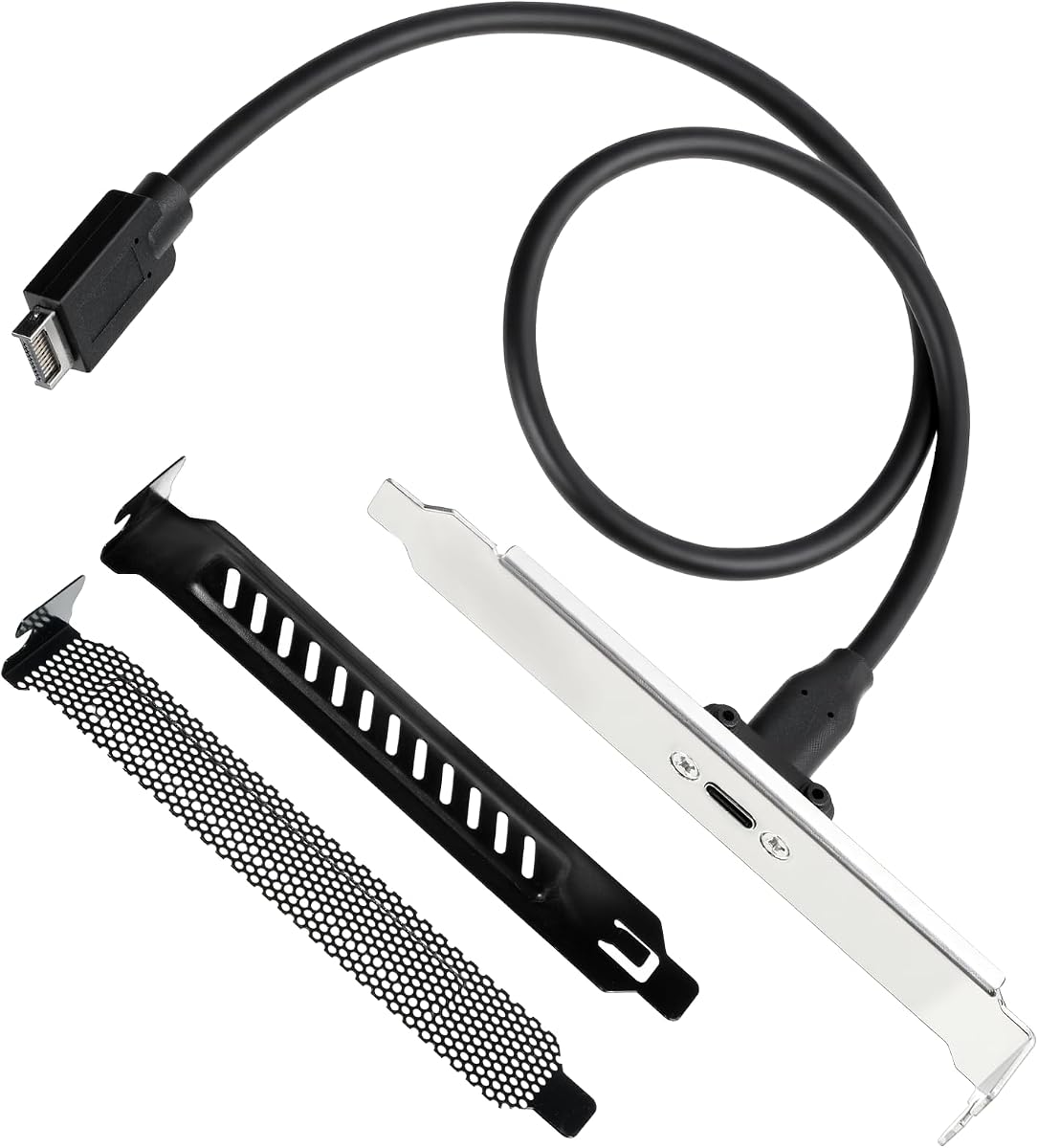


This adapter is highly rated for its ability to bring 20Gbps speeds to the front of your case using a Type-E header. It is a robust solution for users needing fast data transfer directly from the chassis.
We may earn a commission when you buy through this link, at no additional cost to you.
The double-shielded wires help prevent electromagnetic interference, ensuring stable performance even in crowded builds. Its metal construction offers durability that outlasts many plastic alternatives found in the market.
The only trade-off is that older motherboards may lack the required 20-pin Type-E header. However, adapters exist to convert older headers if necessary. This keeps the setup clean and modern.
Buyers seeking top-tier speed and reliability for their desktop upgrades should prioritize this cable. It is a solid choice for anyone wanting seamless high-speed USB-C access.
This model supports USB 3.2 Gen 2×2, delivering up to 20Gbps when connected to compatible controllers. This is essential for large file moves and external drive performance.
Constructed with sturdy metal and double-shielded wires, this cable resists wear and signal interference. It is built to last through years of daily use.
We may earn a commission when you buy through this link, at no additional cost to you.
This adapter is designed for high-speed data transfers, supporting USB 3.2 Gen 2×2 up to 20Gbps. It transforms internal headers into accessible front ports for modern devices.
We may earn a commission when you buy through this link, at no additional cost to you.
The 60cm length provides flexibility for routing cables within larger cases. The included PCI bracket ensures a clean and secure fit on the back panel of the computer.
While it requires specific headers, the performance gain justifies the dependency. Backward compatibility with slower speeds ensures it works with a wide range of peripherals without issues.
If you prioritize speed and build quality, this is a premium option. It is ideal for power users who need reliable, fast connectivity directly from their PC case.
Supports phones, tablets, and storage drives via the front USB-C connector. This reduces cable clutter by moving frequently used ports to the front.
The PCI bracket helps keep the adapter in place, reducing strain on the internal motherboard connector. This improves long-term stability for the port.
We may earn a commission when you buy through this link, at no additional cost to you.
This unit offers both USB and USB-C ports on the front panel, providing flexibility for different device types. It supports up to 20Gbps speeds for fast data handling.
We may earn a commission when you buy through this link, at no additional cost to you.
The adapter uses Type-E and USB3.0 headers, meaning your motherboard needs to support both. This allows for a richer connectivity experience directly from the front of your PC.
The dual-shielded wiring and metal construction ensure stable performance and longevity. Users report excellent reliability with high-demand peripherals like external SSDs and docks.
Choose this if you need both traditional and modern ports without opening your case. It is a balanced solution for diverse connectivity needs in desktop environments.
Offers both USB-A and USB-C connectors to accommodate legacy and modern devices. This maximizes usability without needing extra cables for adapters.
Supports USB 3.2 Gen 2×2 to deliver the fastest possible transfer rates for compatible devices. Ideal for external drives and high-bandwidth peripherals.
We may earn a commission when you buy through this link, at no additional cost to you.
This hub converts a 3.5 inch drive bay into four high-speed ports. It combines USB-C and USB 3.2 Gen 2 connectivity for versatile front-panel access.
We may earn a commission when you buy through this link, at no additional cost to you.
Users must connect a SATA power cable to run this hub reliably. This ensures stable power delivery for high-draw devices like external drives without strain.
It features over-current and short-circuit protection, adding safety layers for connected gear. The metal housing fits standard 3.5 inch bays for a clean look.
Opt for this hub if you need multiple high-speed ports in one spot. It is a robust choice for those managing many peripherals at the front of the case.
Includes two USB-C ports at 10Gbps and two USB 3.2 ports for flexible connectivity. Great for docking stations or external storage arrays.
Built-in protection against over-current and voltage spikes protects both the hub and connected devices. This ensures safe operation even with high-power peripherals.
We may earn a commission when you buy through this link, at no additional cost to you.
This PCIe card adds front USB and USB-C ports to your system. It is a solid option when your motherboard lacks the necessary headers for these connections.
We may earn a commission when you buy through this link, at no additional cost to you.
It supports 5Gbps speeds which are sufficient for most standard peripherals. The internal expansion design keeps the front panel clean and integrated with your case.
Built-in voltage regulation and polymer capacitors ensure stable power for connected devices. This prevents issues with high-power draws that might affect weaker boards.
Pick this if you need extra headers without changing your motherboard. It is a cost-effective way to modernize your desktop connectivity options quickly.
Installs into any empty PCIe x1 slot to provide immediate port access. This is perfect for older PCs needing modern USB-C support.
Uses explosion-proof capacitors for safe voltage regulation. This protects connected devices from power fluctuations during operation.
We may earn a commission when you buy through this link, at no additional cost to you.
This hub fits into a 3.5 inch bay and provides three USB ports. One is a high-speed USB-C port capable of 20Gbps transfers for premium performance.
We may earn a commission when you buy through this link, at no additional cost to you.
You must have both a Type-E and a USB3.0 header available to use this. This allows for the high speeds on the front while keeping legacy support.
Over-current and short-circuit protection are built into the unit to keep your devices safe. The included screws help mount it securely within the PC chassis.
This is ideal if you want both speed and volume of ports. It balances modern connectivity with practical expansion for demanding desktop setups.
The USB-C port supports 20Gbps for rapid file transfers. This is essential for users working with large media or external backups.
Combines one USB-C and two USB 3.0 ports to handle different device needs. This variety ensures you can connect multiple gadgets at once.
We may earn a commission when you buy through this link, at no additional cost to you.
This cable transforms a standard USB 2.0 header into a Type-C port. It is perfect for users who want modern connector styles without buying new hardware.
We may earn a commission when you buy through this link, at no additional cost to you.
Speeds are limited to 480Mbps as it uses USB 2.0 standards. This is adequate for basic peripherals like mice, keyboards, and low-speed storage drives.
It requires no drivers and is easy to install. The short length makes it ideal for compact cases where long cables are not needed.
Consider this if you just need a modern connector style on the front. It offers a practical upgrade path for older systems efficiently.
Adapts 9-pin headers to USB-C for better compatibility with new devices. This is a simple fix for older motherboards.
Focuses on basic data transfer and power. It does not support video or audio output which keeps costs low.
We may earn a commission when you buy through this link, at no additional cost to you.
This adapter converts a Type-E header to a front USB-C port. It supports 20Gbps speeds and includes PCI covers to maintain a neat build appearance.
We may earn a commission when you buy through this link, at no additional cost to you.
The cable is flexible and durable with PVC insulation. It is designed to handle frequent plugging and unplugging of devices on the front panel.
While ratings vary, the inclusion of slot covers adds value for users who want a finished look. The installation process is straightforward for most standard cases.
Look to this if you need a standard adapter with added finishing touches. It provides a solid balance of performance and build completeness.
Includes PCI slot covers to close unused slots and prevent dust. This helps keep your internal components cleaner over time.
Uses flexible PVC wiring to resist bending and breaking. This ensures longevity for your daily connectivity needs.
We may earn a commission when you buy through this link, at no additional cost to you.
This cable uses a flat TPE design to allow easy bending and folding. It is ideal for cases with tight internal routing requirements where thick cables fail.
We may earn a commission when you buy through this link, at no additional cost to you.
It supports up to 10Gbps transfer speeds and even provides 100W of power for charging. The Type-E to USB-C connection works with modern high-speed devices.
The cable is double shielded to maintain signal stability during heavy transfers. Users report reliable performance with high-demand devices like external SSDs.
Choose this cable if you need to route cables through crowded spaces. Its flexible construction solves many common installation challenges effectively.
Thin flat cable makes it easier to hide inside the case. This improves airflow and looks cleaner for custom builds.
Supports up to 100W of power delivery for fast charging. This allows you to charge laptops or tablets directly from the front.
We may earn a commission when you buy through this link, at no additional cost to you.
This adapter provides one fast USB-C port and two standard USB ports. It is a well-rated solution for those who want both modern and legacy options.
We may earn a commission when you buy through this link, at no additional cost to you.
It requires both a Type-E and a USB3.0 header to function. This setup allows for maximum versatility on the front of your computer chassis.
Users praise its stability and build quality. The included bracket helps secure the unit and offers a clean look on the back panel of the case.
Opt for this if you want a complete front panel expansion solution. It is a top choice for maximizing both speed and port count.
Combines one USB-C and two USB-A ports to handle diverse needs. This ensures compatibility with almost any device you own.
Uses double-shielded wires for consistent data transfer. This keeps speeds reliable even during heavy file loads.
We may earn a commission when you buy through this link, at no additional cost to you.
Selecting the right front panel USB C header requires understanding your motherboard capabilities and specific connectivity needs. This guide breaks down the essential factors to ensure a seamless upgrade experience.
Check your motherboard manual to confirm available internal headers. Most modern boards include a Type-E 20-pin header for USB-C while older ones may only have USB 2.0 or 3.0 headers.
Ensure your motherboard has the correct pin layout before buying a cable to avoid compatibility issues and wasted money.
Different cables support varying speeds from USB 2.0 to 20Gbps USB 3.2 Gen 2×2. Higher speeds are critical for external SSDs and high bandwidth devices.
Prioritize 20Gbps options if you frequently transfer large files or use external drives to maximize performance.
Decide between single USB-C adapters or hubs that offer multiple ports. Hubs provide more flexibility but require more power and internal space.
If you need multiple connections, consider hubs that combine USB-C and USB-A for versatile front panel usage.
Some front panel adapters deliver power for charging devices like laptops. Look for support for 100W power delivery if fast charging is a priority.
Ensure your power supply has a free SATA power connector if the hub requires external power for stable operation.
Metal brackets and double-shielded cables help prevent signal interference and improve durability. These features are essential for stable high-speed transfers.
Invest in adapters with robust construction to protect your data and hardware from electrical noise and physical strain.
Measure the distance from your motherboard header to the case front panel to select the right cable length. Standard lengths range from 17cm to 60cm.
Choose a cable that is long enough to route easily but not so long that it creates clutter inside the case.
Most adapters are plug and play but some require specific PCIe slots or SATA power. Consider your comfort level with installing internal hardware before purchasing.
If you want a simple setup, pick a cable that only requires plugging into a motherboard header without extra components.
Select adapters that support the latest USB standards to ensure longevity. USB 3.2 Gen 2×2 is a future-ready standard for upcoming devices.
Opt for newer standards now to avoid needing replacements as your devices become more demanding over time.
Power down your PC and unplug the power supply before opening the case. Locate the internal headers on your motherboard using the user manual to identify the correct ports for your adapter.
Plug the adapter securely into the header and route the cable to the front panel of your case. Secure the mounting bracket with screws to prevent the connector from loosening over time.
Regularly check the connections to ensure no dust or debris accumulates around the ports. Keep the area clean to maintain signal quality and prevent potential electrical shorts or physical damage to the connectors.
Most front panel USB C headers are plug and play and do not require manual driver installation. Your operating system automatically detects the USB controllers once connected properly.
Type-E headers are specifically designed for USB-C and support higher speeds up to 20Gbps. USB 3.0 headers are older and generally support lower speeds with different physical connector shapes.
Not every motherboard has the required Type-E header for USB-C. Check your motherboard specifications before buying to ensure compatibility with the adapter you choose.
Choose a simple cable if you only need one USB-C port. Opt for a hub if you need multiple ports including both USB-A and USB-C for various devices.
Many USB hubs require an additional SATA power connector from the power supply. Verify that your PSU has a free SATA power cable before buying a hub.
Yes USB USB 3.2 headers are backward compatible with older USB 3.0 and 2.0 devices. This ensures you can connect a wide variety of peripherals regardless of their speed.
No a front panel adapter does not affect system performance. It simply routes existing motherboard signals to the front of your case for easier access.
No these adapters are designed for desktop computers with internal headers. Laptops typically do not have accessible motherboard headers for these types of expansions.
We explored ten diverse options ranging from simple cables to robust multi-port hubs. The top picks include the GRAUGEAR 20Gbps Type E cable for pure speed and the 3.5 inch hub for port flexibility.
Prioritize your motherboard header availability and speed needs when making your decision. Ensure the adapter supports the latest standards to future-proof your build against outdated connectors.
Remember to check current prices and product listings before buying as inventory changes often. Selecting the right adapter ensures your desktop setup remains modern and efficient for years.