
Folio Cover Keyboard
4.7Editor score
Includes wireless mouse
Rainbow backlight modes
Auto wake sleep function
Finding the right accessory for your new tablet can transform how you work and create on the go. A quality keyboard case turns your device into a portable workstation. It offers protection while adding essential input methods. Look for strong magnetic attachments and comfortable key spacing. Ensure the case fits your exact model number perfectly. Compatibility is crucial for avoiding issues with charging ports and buttons.
We evaluated ten top-rated keyboard cases designed specifically for the Galaxy Tab S10 Lite and related FE models. Each product was assessed on build quality, typing experience, and additional features like trackpads or stylus holders. We considered user feedback and official specifications to determine value. Battery life and charging speed were also key factors. Our goal is to help you find a solution that enhances productivity without adding unnecessary bulk.
Each pick in this list highlights specific strengths such as budget friendliness or premium trackpad functionality. You will find detailed breakdowns of what makes each option stand out. Note that prices and availability can change frequently. Always verify your tablet model before purchasing. The right choice depends on your specific needs for travel, office work, or creative tasks. Check the latest offers to ensure you get the best deal available today.
4.7Editor score

4.4Editor score

4.4Editor score
As an Amazon Associate we earn from qualifying purchases.
This side-by-side comparison highlights the key specifications and features of each top-rated keyboard case to help you make an informed decision for your Galaxy Tab S10 Lite.

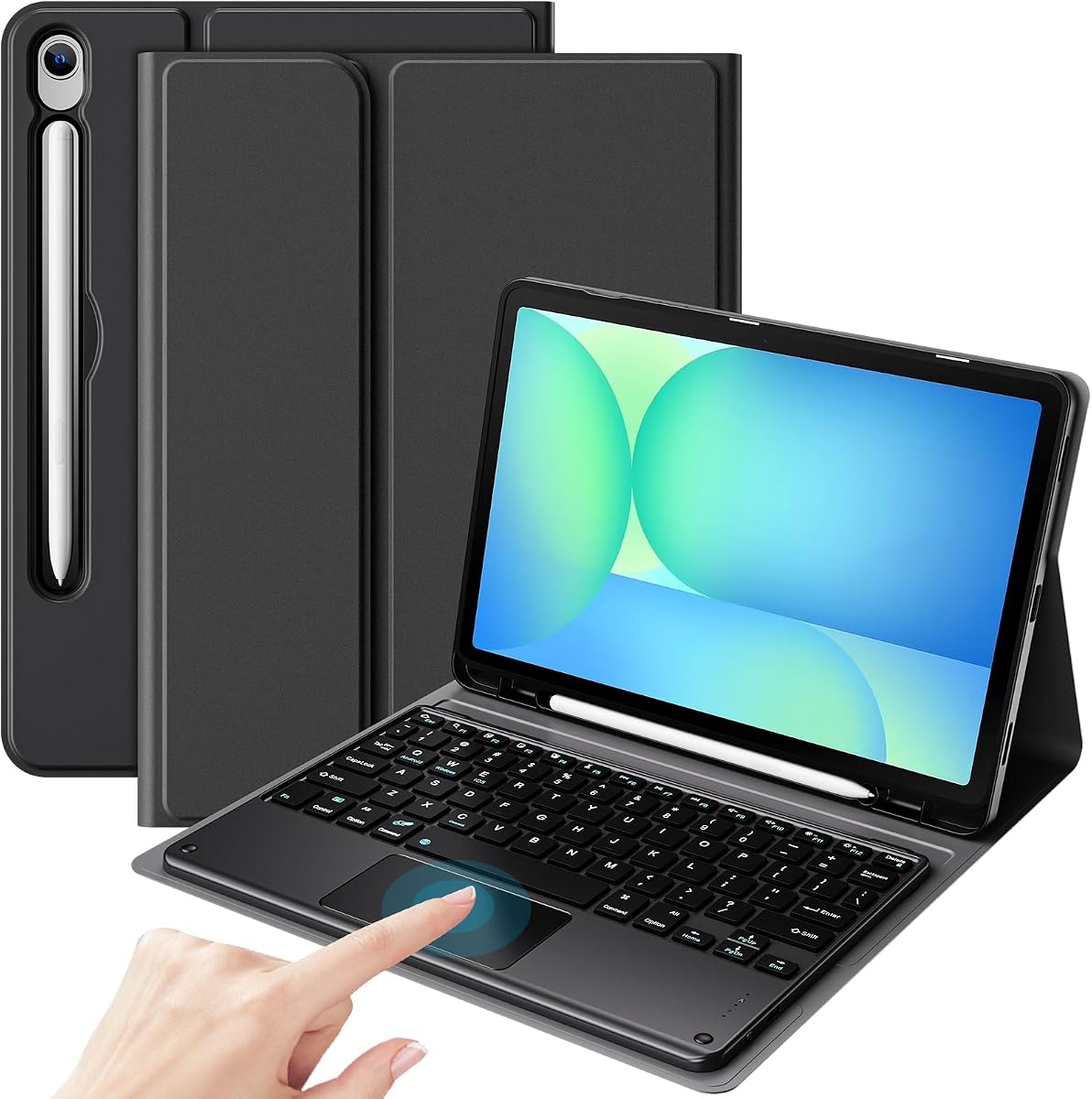


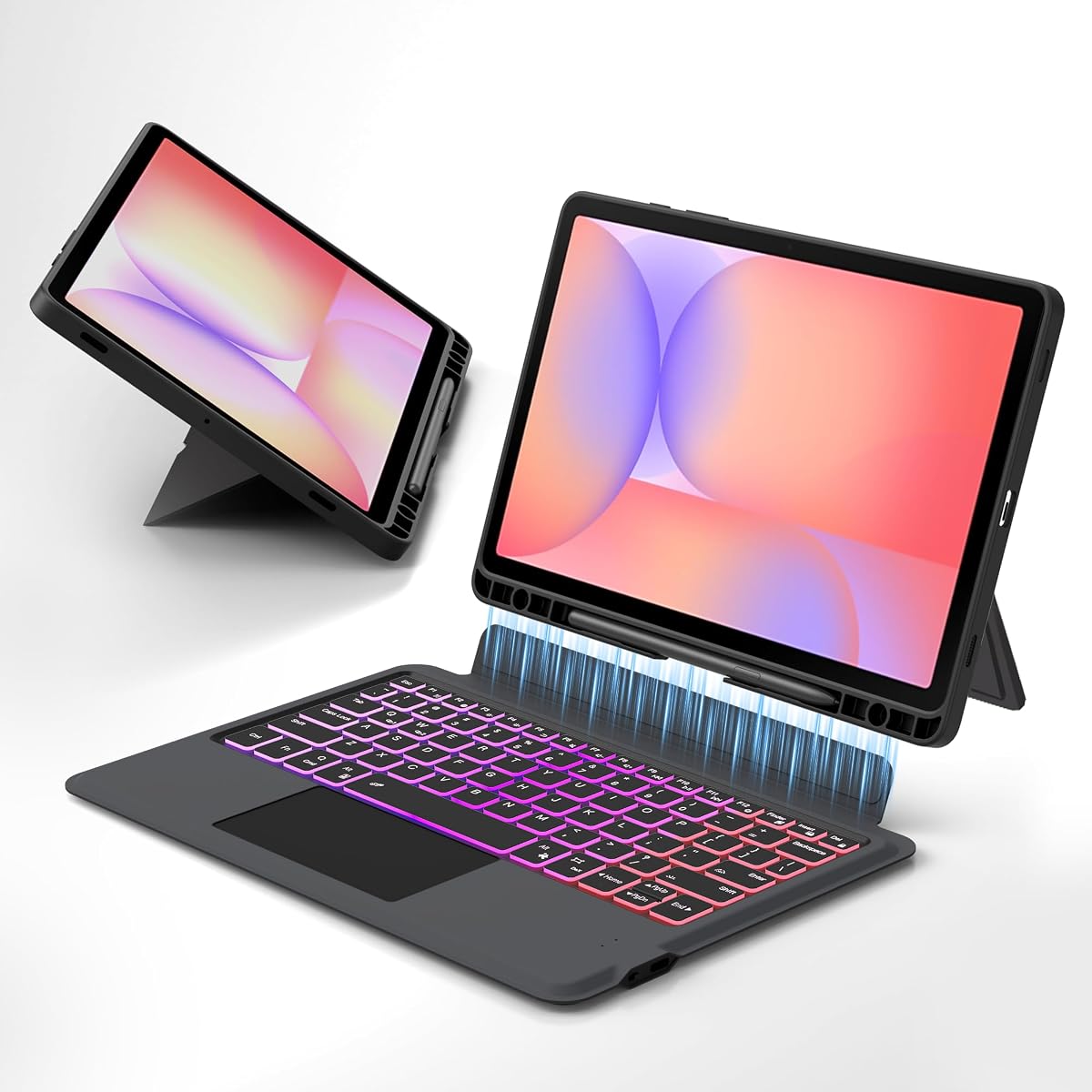

The FINTIE Keyboard Case stands out as a top choice for users seeking reliable protection and a solid typing experience. With a rating of 4.4 stars, it offers a balance of durability and functionality. The case features a removable keyboard that doubles as a stand, allowing for three distinct viewing angles. This design is particularly useful for adjusting your setup based on whether you are typing or watching content.
We may earn a commission when you buy through this link, at no additional cost to you.
Key strengths include the dual protection system which combines a PU leather cover with a polycarbonate shell. This setup absorbs drops and bumps effectively while keeping the device secure. The keyboard connects via Bluetooth and supports a 10-meter range for flexibility. Charging is handled through a Type-C port which fully powers the keyboard in just two hours. Additionally, the built-in S Pen holder ensures you never lose your stylus while on the go.
Trade-offs involve the lack of a built-in trackpad which may require touch input for navigation. The keyboard is also limited to specific models including the S10 Lite and S9 FE so check compatibility before buying. However, the auto sleep wake function saves battery and the ergonomic keys reduce noise during long sessions. These minor points do not detract significantly from its overall value proposition for daily users.
This case is ideal for students and professionals who prioritize protection and a laptop-like feel without extra cost. If you need a versatile accessory that keeps your tablet safe and easy to type on this is a strong recommendation. The magnetic detachment allows for quick switching between modes which enhances workflow efficiency. It provides a practical solution for converting your tablet into a productive workstation anywhere.
The combination of a PU leather cover and polycarbonate shell ensures that your tablet is shielded from accidental drops and daily wear and tear effectively.
A rechargeable battery charges fully in two hours via Type-C and includes an energy-saving mode after ten minutes of inactivity for extended usage.
We may earn a commission when you buy through this link, at no additional cost to you.
The Dexnor Keyboard Case delivers a premium experience with its aluminum alloy hinge and high-precision multi-touch trackpad. Users appreciate the sturdy build quality that transforms the tablet into a stable laptop instantly. The trackpad supports multi-finger gestures making document editing and web browsing smoother. This accessory is designed for those who want a more robust setup than basic folio cases offer.
We may earn a commission when you buy through this link, at no additional cost to you.
A standout feature is the inclusion of two S Pen holders one built into the keyboard and another cut-out slot on the back cover. This ensures your stylus is secure and easily accessible without taking up extra space. The keyboard features seven solid color backlights with adjustable brightness levels for typing in low light. The battery provides up to 200 hours of working time which is exceptional for extended use without frequent recharging.
While the price is higher than budget options the added features justify the investment for power users. The aluminum hinge allows for seamless adjustments to perfect viewing angles which enhances ergonomics during long work sessions. One note is that it does not fit the larger S10 FE Plus models so verify your device before purchasing. The lifetime technical support adds confidence to the purchase decision.
This case is perfect for business professionals who need a reliable trackpad and robust build for presentations and typing. If you value precise navigation and long battery life this option offers a comprehensive solution. The included USB-C cable and detailed manual make setup straightforward. It effectively bridges the gap between a tablet and a laptop for productivity tasks.
The high-precision multi-touch trackpad supports multi-finger gestures for efficient document editing and navigation without needing to touch the screen directly.
Two holders keep your S Pen secure with a magnetic slot on the keyboard and a cut-out on the back cover for charging and storage convenience.
We may earn a commission when you buy through this link, at no additional cost to you.
The Folio Cover Keyboard offers exceptional value by including both a keyboard and a wireless mouse in the package. Its rating of 4.7 stars highlights user satisfaction with the comprehensive set. The RGB rainbow backlight with seven adjustable colors and breathing modes adds a modern touch for typing in the dark. This option appeals to those who want extra peripherals without paying for them separately.
We may earn a commission when you buy through this link, at no additional cost to you.
Features include a built-in pen slot for convenient stylus storage and auto wake sleep functionality to extend battery life. The case folds into a slim folio for solid protection against dust and splashes. The keyboard pairs via Bluetooth and features a breathing light mode that cycles through patterns. The mouse allows for easier cursor control which is helpful for browsing and editing documents on the tablet.
Trade-offs involve the separate connectivity for the mouse which means managing two devices instead of one. The hinge design is simpler compared to premium options but still supports three viewing angles effectively. Some users might find the RGB lighting distracting if they prefer a minimalist look. However the price point makes it a very accessible choice for families or casual users.
This kit is best for users who need a complete package to start using their tablet as a laptop right away. If you want the convenience of a mouse and colorful lighting on a budget this choice stands out. The durable PU leather exterior ensures your device stays safe during travel. It provides all the essential tools needed for everyday productivity and entertainment.
The package includes a wireless mouse which enhances navigation efficiency for document editing and web browsing without requiring additional purchases.
Seven adjustable backlight colors and a breathing light mode provide visual enjoyment and comfort in low-light environments for extended typing.
We may earn a commission when you buy through this link, at no additional cost to you.
The ProCase Keyboard Case focuses on productivity with a multi-gesture touchpad that supports efficient operation without touching the screen. Users can browse pages and manage files easily using swipe and tap gestures. The sturdy exterior shields the device from drops and scuffs while the ultra-slim design ensures easy portability. It is designed specifically for the 2025 S10 Lite and FE models ensuring a precise fit.
We may earn a commission when you buy through this link, at no additional cost to you.
Key strengths include three adjustable angles that work perfectly for typing and video calls. The detachable magnetic keyboard allows you to switch between laptop and tablet mode in seconds. A built-in slot keeps your stylus secure and always within reach for quick note-taking. The low power design extends overall usage time which is beneficial for all-day travel without constant charging.
Trade-offs are the lack of backlighting which might make typing difficult in dark environments. The model compatibility is strict so verify your device number before buying. However the responsive touchpad adds significant value over basic keyboards that lack navigation tools. The stability of the stand ensures no wobbling during intensive typing sessions.
This case is ideal for professionals who need a responsive trackpad and a stable typing surface. If you prioritize smooth navigation and a slim profile this option fits the bill well. The full protection features keep your device safe while maintaining access to all ports. It offers a balanced blend of utility and portability for daily tasks.
The responsive touchpad supports various gestures for browsing and managing files without needing to touch the screen for a smoother workflow.
The ultra-slim design ensures easy portability while the sturdy exterior shields the device against drops and scuffs effectively during travel.
We may earn a commission when you buy through this link, at no additional cost to you.
The Case Keyboard Pink offers a unique aesthetic with a vibrant design and a detachable magnetic keyboard. It features a selectable backlight mode with seven iridescent colors for typing at night. The honeycomb grid pattern in the inner layer protects against overheating and extends lifespan by more than 30 percent. This model is perfect for users who want style alongside standard functionality.
We may earn a commission when you buy through this link, at no additional cost to you.
A key feature is the full 360 degree protection against scratches bumps or dents. The anti-slip slots allow you to move the tablet forward or backward to find the perfect angle for writing or reading. The built-in pen holder makes it easy to carry the pen with your device securely. The detachable design means you can use the case as a simple cover when needed.
Trade-offs include the lack of an integrated trackpad requiring touch inputs for navigation. The mouse requires separate pairing which can be slightly inconvenient compared to built-in solutions. However the honeycomb cushioning adds significant protection value that standard foam does not match. The pink option stands out in a sea of black and grey cases.
This case is best for creative professionals who value color and strong protection for their device. If you want a case that looks unique and keeps your tablet safe from overheating this is a great choice. The magnetic keyboard attaches securely and the auto sleep wake function saves battery. It offers a stylish and practical solution for tablet users.
The honeycomb grid pattern in the inner layer protects your tablet from overheating and increases its lifespan by more than 30 percent.
Seven iridescent backlight colors allow you to choose a favorite hue for smooth typing in the dark and add personal flair to your device.
We may earn a commission when you buy through this link, at no additional cost to you.
This generic keyboard case provides a multi-functional touchpad that supports quick navigation and various gesture controls. Users can enjoy convenient operation with click and swipe gestures to improve work efficiency. The rainbow backlight modes include a pulse lighting mode for a unique visual experience. The case is designed with a durable scratch-resistant leather outer layer for everyday protection.
We may earn a commission when you buy through this link, at no additional cost to you.
A key feature is the honeycomb mesh design in the inner layer which prevents overheating and extends the tablet lifespan. The three-point stand design allows for free adjustment of the tablet angle with anti-slip texture. Precise cutouts ensure all functions like cameras and ports work properly without removing the case. The lightweight design allows for easy storage of the keyboard and mouse in your bag.
Trade-offs are the basic appearance which lacks the unique colors of other options. There is no included mouse so you will need to buy one separately. However the touchpad sensitivity is high enough for most daily tasks. The breathing light mode offers a pleasant typing experience without being distracting.
This case is suitable for users who want a functional touchpad and strong protection without extra cost. If you prioritize internal cooling and gesture support this option delivers well. The durable leather layer keeps your device safe from scratches and bumps. It provides a reliable setup for productivity and content consumption.
The honeycomb mesh design in the inner layer prevents overheating and extends the tablet lifespan by over 30 percent.
Rainbow backlight modes include a pulse lighting mode for a unique visual experience even when working in the dark at night.
We may earn a commission when you buy through this link, at no additional cost to you.
The Samsung Book Cover Slim is an official accessory designed to provide a PC-like experience for supported tablets. It features a dedicated AI key that gives quick access to AI assistance such as Bixby or Gemini. The slim and lightweight design maintains a sleek modern look while protecting your device. This cover installs instantly with magnets holding it securely in place for easy attachment.
We may earn a commission when you buy through this link, at no additional cost to you.
A major strength is the integration with DeX Mode for a convenient PC-like experience. Wireless Keyboard Sharing allows you to connect to compatible Galaxy devices to type or navigate on them easily. This feature is perfect for switching between your tablet and phone without changing keyboards. The keyboard delivers a comfortable typing experience with a full row of Android-OS shortcut keys for media and volume.
Trade-offs include the higher price point which is typical for official accessories. It is also limited to supported models so you must check if your specific tablet is included. However the convenience of the AI key saves time for frequent users. The wireless sharing capability enhances ecosystem usability significantly.
This cover is ideal for users invested in the Samsung ecosystem who value official features. If you want direct AI access and seamless device switching this option is unmatched. The slim design ensures your device stays protected without adding bulk. It transforms your tablet into a versatile tool for productivity.
The dedicated key gives you quick access to AI assistance so you can simply tap it and let Bixby or Gemini handle your query easily.
Wireless Keyboard Sharing allows you to connect to compatible Galaxy devices and type or navigate on them with ease.
We may earn a commission when you buy through this link, at no additional cost to you.
The GreenLaw Keyboard Case stands out with dual Bluetooth channels that support two devices simultaneously. You can switch between your tablet and smartphone using FN keys for seamless workflow. The touchpad records the smallest movements allowing for precise interaction with just one hand. The keyboard features seven gorgeous colors with three brightness settings to match your preference.
We may earn a commission when you buy through this link, at no additional cost to you.
A standout feature is the ability to work steadily with your tablet and phone on the same keyboard. The detachable design means the keyboard or case can be used alone for flexibility. The magnetic effect fixes the keyboard while typing and the case has three built-in card slots. The viewing angles are adjustable for a more comfortable experience during long sessions.
Trade-offs include the lack of an included mouse requiring separate purchase for cursor control. The price is higher than budget options which may limit appeal for some users. However the dual-device functionality is unique and valuable for multitaskers. The precision touchpad supports left and right movement easily.
This case is best for users who need to manage multiple devices on one keyboard. If you want precise navigation and adjustable brightness for typing at night this is a great fit. The card slots add utility for storing business cards or cash. It offers a professional solution for hybrid work environments.
Dual Bluetooth channels support 2 devices simultaneously so you can switch between typing and working with your tablet and smartphone easily.
The touchpad records the smallest movements allowing you to interact quickly and precisely with just one hand for efficient navigation.
We may earn a commission when you buy through this link, at no additional cost to you.
The One-Click DEX Mode Keyboard Case uses alloy hinges for a 270-degree stepless adjustment allowing for multiple scenarios. The smart trackpad supports multiple gestures for editing documents and building presentations with speed. The well-spaced touch keyboard has a full row of Android-OS shortcut keys for media and volume. The keyboard is made of high-end ABS material with a spring mechanism for a tactile response.
We may earn a commission when you buy through this link, at no additional cost to you.
Features include a dedicated S Pen slot to place the pen when fully charged so you never have to hunt around. The keyboard has a unique detach button allowing the keyboard and case to be used separately. The four versatile usage modes let you type sketch view and read without removing the tablet. Precise sections enable full access to all connections and sensors without removing the case.
Trade-offs are the lack of an AI key compared to official Samsung options. The hinge is robust but not as sleek as aluminum alloy versions. However the tactile keys help reduce errors compared to a screen keyboard. The stepless adjustment offers more flexibility than fixed-angle stands.
This case is ideal for users who want a real laptop feel and flexible viewing angles. If you need tactile keys and a trackpad for productivity this is a solid choice. The detachable design adds versatility for different usage modes. It delivers a comprehensive experience for work and creative tasks.
The spring mechanism under each button ensures a tactile response every time you click helping you type faster with fewer mistakes.
Precision hinges and self-locking damping allow 270-degree stepless adjustment for use in work game reading or drawing scenarios.
We may earn a commission when you buy through this link, at no additional cost to you.
The Magic Style Case offers an ergonomic 125-degree viewing angle that ensures maximum comfort for study and work. The floating cantilever stand design allows you to easily adjust the angle of your tablet for any need. The built-in large touchpad supports full multi-finger gestures for smooth navigation like swipe and pinch. It is crafted with premium materials plus a durable hinge mechanism for long-lasting reliability.
We may earn a commission when you buy through this link, at no additional cost to you.
Features include seven different solid color backlighting options with three brightness settings for clear typing. The convenient USB-C port fully charges the keyboard in just a few hours and offers up to 80 hours of continuous typing. The surface is made of stain-resistant material making it easy to remove stains and fingerprints easily. Dedicated shortcut keys on the top row instantly increase work efficiency.
Trade-offs are the limited model compatibility so check your device before buying. There is no included mouse which requires separate purchase for navigation. However the stain-resistant surface keeps the keyboard looking new for longer. The ergonomic angle is designed for maximum comfort during long sessions.
This case is best for users who want ergonomic comfort and a clean durable design. If you need precise navigation and long battery life for travel this fits well. The floating cantilever stand ensures easy adjustment for any scenario. It provides a superior user experience with reliable materials and features.
The ergonomic 125-degree viewing angle ensures maximum comfort for study work and entertainment tasks over long periods.
The surface is made of stain-resistant material making it easy to remove stains fingerprints and so you do not have to worry about using it anywhere.
We may earn a commission when you buy through this link, at no additional cost to you.
Selecting the right keyboard case requires evaluating compatibility, input features, and protective qualities to ensure the accessory meets your daily workflow needs.
Always verify that the case is designed specifically for the Galaxy Tab S10 Lite model numbers SM-X400 or SM-X406B. Many cases are shared with the S10 FE or S9 FE so check the packaging to confirm it fits your exact device before purchase.
Ensure the case matches your tablet model to avoid fit issues with ports and buttons.
Look for Bluetooth keyboards that offer a stable 10-meter range for flexibility. Some options support dual devices allowing you to switch between your tablet and phone without disconnecting.
Prioritize Bluetooth connectivity that supports stable connections and multiple devices.
A high-sensitivity trackpad allows for multi-finger gestures like swipe and pinch for efficient navigation. Cases with trackpads reduce the need to touch the screen repeatedly.
A built-in trackpad significantly improves navigation and efficiency for work tasks.
Backlit keys with adjustable colors and brightness levels are essential for typing in low light. Choose models with seven color options to match your environment or preference.
Select a keyboard with adjustable backlight options for comfortable night typing.
Long battery life such as 80 hours of continuous typing ensures you can work all day without frequent charges. Type-C charging is standard and should fully power the keyboard in a few hours.
Look for long battery life and fast Type-C charging for minimal downtime.
A dual protection system combining a hard shell and soft interior prevents drops and scratches effectively. Honeycomb cushioning or anti-slip grooves add extra safety for the tablet.
Ensure the case offers full edge coverage and shock-absorbing materials for safety.
Adjustable stands with three or more angles allow for comfortable viewing and typing. Stepless adjustment or self-locking damping ensures the tablet stays put.
Choose a case with multiple adjustable stand angles for ergonomic use.
Built-in slots for the S Pen prevent loss and keep your stylus within reach. Some cases offer magnetic holders or cut-out slots on the back for storage and charging.
Look for a dedicated pen slot to keep your stylus secure and accessible.
To begin using your keyboard case magnetically attach the keyboard to the front cover ensuring alignment with the tablet's sensors. Once connected open the lid to wake the device automatically via the auto wake function.
For navigation use the trackpad with standard gestures like tapping to click or swiping to scroll. To switch between apps use the dedicated Android shortcut keys found on the top row of the keyboard.
Care for the keyboard by keeping it clean with a soft dry cloth and storing it in a cool dry place. Charge it via Type-C when the battery indicator shows low and avoid exposing it to direct sunlight or moisture.
Many cases in this guide are designed for both the S10 Lite and S10 FE models. Always check the product specifications to confirm compatibility with your exact device model number before purchasing to ensure a perfect fit.
Battery life varies by model but most options offer between 80 and 200 hours of continuous typing. The rechargeable battery charges fully in a few hours via Type-C cable for minimal downtime during use.
Yes most detachable magnetic keyboards allow you to use the keyboard independently from the protective cover. This provides flexibility to type on a desk or use the case as a simple folio cover when needed.
Most third-party keyboards support both Android and iOS operating systems. The layout typically defaults to Android with dedicated shortcut keys for media and volume control on your Samsung tablet.
Many of the top keyboard cases include a built-in S Pen holder or slot. This ensures your stylus is secure and within reach but note that the pen itself is usually not included.
Clean the keyboard with a soft dry cloth or a lint-free wipe. Avoid using harsh chemicals or liquids directly on the keys to prevent damage to the surface and internal components.
We have reviewed ten excellent keyboard cases that offer protection and productivity features for the Galaxy Tab S10 Lite. From budget-friendly options with RGB lights to premium cases with trackpads there is a solution for every user.
Prioritize features like trackpad presence battery life and stand adjustability to match your workflow. Whether you need a mouse for navigation or an AI key for quick access choose based on your specific daily needs.
Always verify your model number before purchasing to ensure a perfect fit. Check current prices and availability on Amazon to get the best deal for your chosen accessory today.