
Redragon K585 Wired One-Handed RGB Gaming Keypad
4.4Editor score
Swap switches without soldering tools
USB pass-through port available
Seven onboard macro keys included
This guide compares the top ten gaming keypads for October 2026, evaluating performance, ergonomics, and customization for serious gamers.
Gaming keypads have become essential tools for players seeking to optimize their control schemes and enhance overall performance. These compact devices offer a streamlined alternative to full keyboards, allowing users to focus on critical commands without cluttering their desk space. Whether you are an MMO enthusiast or a competitive FPS player, the right keypad can significantly improve your reaction times and strategic execution.
To compile this comprehensive list, we analyzed market trends, user feedback, and technical specifications across a wide range of available models. Our evaluation process prioritized build quality, switch responsiveness, and the depth of customization options offered by each manufacturer. We also considered ergonomic design to ensure comfort during extended gaming sessions, recognizing that fatigue can undermine even the most skilled players.
Each selection in this guide highlights specific strengths that cater to different gaming styles and budget constraints. From budget-friendly options to high-end customizable boards, we have covered the spectrum to help you find the perfect match for your setup. Please note that prices and availability can fluctuate frequently, so we recommend checking current listings before making your final purchase decision.
4.4Editor score

4.2Editor score

4.3Editor score
The following table provides a side-by-side comparison of the top ten gaming keypads, highlighting key specifications and unique features to help you make an informed decision based on your specific needs.




The Keychron C0 HE 8K Wired One-Handed Gaming Keypad stands out as a top contender in the competitive gaming landscape. With a rating of 4.2 stars from verified buyers, it delivers performance that rivals full-sized mechanical keyboards. Its standout quality lies in the integration of Hall Effect magnetic switches, which offer unparalleled precision and speed.
We may earn a commission when you buy through this link, at no additional cost to you.
Key strengths include the 8K polling rate, which ensures inputs are registered with minimal latency. This is crucial for competitive titles where milliseconds matter. The magnetic switches allow for adjustable actuation points, meaning you can customize how far a key needs to travel before registering. This level of control is rare in this price segment.
Trade-offs involve the reliance on a web-based configurator rather than traditional software installation. While convenient, some users may prefer offline tools. Additionally, the price point is higher than budget options, but the performance justifies the investment for serious gamers looking for a tournament-grade edge.
This keypad is ideal for FPS players and streamers who need quick access to macros and OBS controls. The cross-platform support makes it versatile for multi-system setups. For those prioritizing speed and customization, the Keychron C0 HE is our top recommendation for the best overall gaming keypad.
Rapid Trigger allows keys to reset instantly upon release, enabling faster counter-strafing and movement without waiting for full key reset.
Using a browser-based tool eliminates the need to install heavy software, making setup quick and compatible with any operating system including macOS.
We may earn a commission when you buy through this link, at no additional cost to you.
The Redragon K585 Wired One-Handed RGB Gaming Keypad is the perfect entry point for gamers seeking to upgrade their setup without breaking the bank. Boasting a rating of 4.4 stars, it offers features typically found in more expensive models. Its standout quality is the ability to swap switches without soldering, allowing for endless customization.
We may earn a commission when you buy through this link, at no additional cost to you.
Key strengths include the seven onboard macro keys that facilitate instant combos for MMO and MOBA games. The USB pass-through port keeps your desk organized by allowing direct connection of a mouse or headset. The detachable magnetic wrist rest adds significant comfort, ensuring long sessions remain fatigue-free.
Trade-offs are minimal considering the price. It lacks wireless connectivity, which might limit flexibility for some users. The software is powerful but can be intricate for beginners. However, for the cost, the build quality and feature set are unbeatable in the budget category.
This keypad is best for casual gamers and those on a strict budget who still want a tactile experience. The swappable switches mean you can tailor the feel to match your main keyboard. If you want value without sacrificing functionality, the Redragon K585 is the clear choice for the best budget option.
The socket accepts 3-pin or 5-pin switches, letting you change the sound and feel of the keypad with standard mechanical keyboard tools.
Binding multiple commands to single keys simplifies complex ability rotations, making it easier to focus on gameplay mechanics rather than key searches.
We may earn a commission when you buy through this link, at no additional cost to you.
The AZERON Gaming Keypad represents the pinnacle of customization and ergonomic design in the one-handed gaming market. With a rating of 4.3 stars, it is designed for gamers who demand precision beyond standard key presses. Its standout quality is the integrated Hall Effect analog thumbstick that eliminates stick drift.
We may earn a commission when you buy through this link, at no additional cost to you.
Key strengths lie in the ability to configure 30 inputs for keyboard, mouse, or controller actions. The thumbstick supports WASD or 360-degree analog movement, bridging the gap between mouse and gamepad controls. The 3D printed customized keypad ensures a perfect fit for various hand sizes, enhancing comfort during play.
Trade-offs include the significant investment required compared to standard options. The complexity of the software and hardware setup requires time to master. However, for competitive players who want to merge mouse and keyboard precision into one device, this performance is unique and unmatched by competitors.
This keypad is best for enthusiasts willing to invest in a highly specialized tool for FPS and strategy games. The modular design allows for future updates, ensuring longevity. If you seek the ultimate ergonomic and functional upgrade for your setup, the AZERON is the definitive best premium gaming keypad.
The Hall Effect thumbstick allows for nuanced movement input, similar to a console controller, which can be advantageous in specific game genres.
Customized fits ensure the device molds to your hand, reducing strain and allowing for more natural positioning during extended gaming sessions.
We may earn a commission when you buy through this link, at no additional cost to you.
The Redragon K585 PRO Wireless One-Handed RGB Gaming Keypad brings the popular K585 series into the wireless era. Rated at 4.2 stars, it offers the same robust features without the cable clutter. Its standout quality is the dual-mode connectivity that allows for seamless placement anywhere on your desk.
We may earn a commission when you buy through this link, at no additional cost to you.
Key strengths include a battery life of 15 to 20 hours on a single charge, which is impressive for a RGB-enabled device. The ability to swap switches without soldering remains, ensuring you can match the feel to your primary keyboard. The 7 macro keys facilitate rapid command execution for MMOs.
Trade-offs involve the need to manage battery life, though the duration is sufficient for most sessions. The price is slightly higher than the wired version. However, the freedom from cables and the ergonomic benefits of untethered placement make this a compelling choice for those prioritizing convenience.
This keypad is ideal for gamers who prefer wireless setups for a cleaner look and greater desk mobility. It works well with both Windows and macOS systems. If you value cable management and flexibility without sacrificing performance, the K585 PRO is the best wireless gaming keypad available today.
Bluetooth offers lower power consumption while 2.4GHz ensures lower latency, giving you the choice based on your specific usage needs.
The battery life is designed to support full gaming sessions, reducing the frequency of charges and keeping you focused on gameplay.
We may earn a commission when you buy through this link, at no additional cost to you.
The Razer Tartarus V2 Left-Handed Gaming Keypad is a staple in the gaming peripheral market, known for its integration with the Razer ecosystem. With a 4.3 rating, it provides a comfortable and versatile tool for various genres. Its standout quality is the Chroma RGB system that syncs with over 30 partners.
We may earn a commission when you buy through this link, at no additional cost to you.
Key strengths include the 8-way directional thumbpad which offers console-like movement controls. The mecha-membrane switches provide tactile feedback similar to mechanical keys but with a softer touch for extended use. Fully programmable macros allow for complex command execution via Razer Hypershift.
Trade-offs are the membrane switches which may feel less crisp to mechanical enthusiasts. The features heavily rely on the software to function as intended. However, the aesthetic customization and ergonomic design make it a top choice for Razer fans looking to enhance immersion.
This keypad is best for players invested in the Razer ecosystem who want synchronized lighting and control. The thumbpad is particularly useful for RPGs and FPS games requiring precise movement. If you prioritize aesthetics and broad compatibility with other gear, the Tartarus V2 is an excellent choice.
Syncing with games and Philips Hue creates an immersive environment where lights react to in-game events, enhancing the overall atmosphere.
This hybrid technology combines the speed of mechanical switches with the comfort of a rubber dome, offering a unique tactile experience for users.
We may earn a commission when you buy through this link, at no additional cost to you.
The RedThunder One Handed Gaming Keyboard RGB Backlit 35 Keys is designed for gamers who value portability and simplicity. Rated at 4.4 stars, it offers essential features in a small package. Its standout quality is the driver-free plug-and-play functionality that ensures immediate use upon connection.
We may earn a commission when you buy through this link, at no additional cost to you.
Key strengths include the built-in game chip which enhances response speed for smoother gameplay. The macro recording via FN keys is straightforward, allowing users to automate commands without complex software. The big wrist rest supports long sessions by reducing physical strain on the hand.
Trade-offs include the limited RGB modes compared to competitors, offering static and breath modes primarily. The lack of advanced software means less customization for lighting. However, for users seeking a straightforward, plug-and-play solution that works across multiple operating systems, this device fits the bill perfectly.
This keypad is ideal for LAN parties or for those with limited desk space who need a quick setup. It supports Windows, Mac, and Linux systems effectively. If you want a no-nonsense keypad that just works without setup time, the RedThunder model is the best portable option for most users.
Using FN keys to start and stop recording allows you to set up macros quickly without needing to learn complex software interfaces or drivers.
All 35 keys are anti-ghosting, ensuring that even when multiple keys are pressed simultaneously, every input is registered accurately by the system.
We may earn a commission when you buy through this link, at no additional cost to you.
The AJAZZ AK029 Wired One-Handed Hall Effect Mechanical Gaming Keypad offers tournament-grade performance at an accessible price point. With a 4.5 rating, it is highly rated for its responsive switches. Its standout quality is the Bingyu Hall Effect magnetic switches which provide zero dead zone performance.
We may earn a commission when you buy through this link, at no additional cost to you.
Key strengths include the 8KHz polling rate and the ability to adjust actuation points with high precision. This ensures every tap registers instantly without debounce delay. The aluminum-reinforced build provides a stable feel, while the web-based driver allows for easy customization without installation.
Trade-offs include the smaller 29-key layout, which might not suit everyone. The reliance on a web driver can be a hurdle for those preferring native applications. However, the competitive edge provided by the rapid trigger technology makes it a strong choice for FPS gamers seeking speed.
This keypad is best for players focused on competitive titles like Valorant or CS2. The compact design frees up mouse space. If you want magnetic switch performance in a compact form factor, the AJAZZ AK029 is the best Hall Effect keypad for precision gaming.
Zero dead zone ensures that even the smallest movements or presses are registered, which is critical for high-speed reaction games.
The web driver opens in your browser, saving system resources and ensuring your profile travels with the device rather than the computer.
We may earn a commission when you buy through this link, at no additional cost to you.
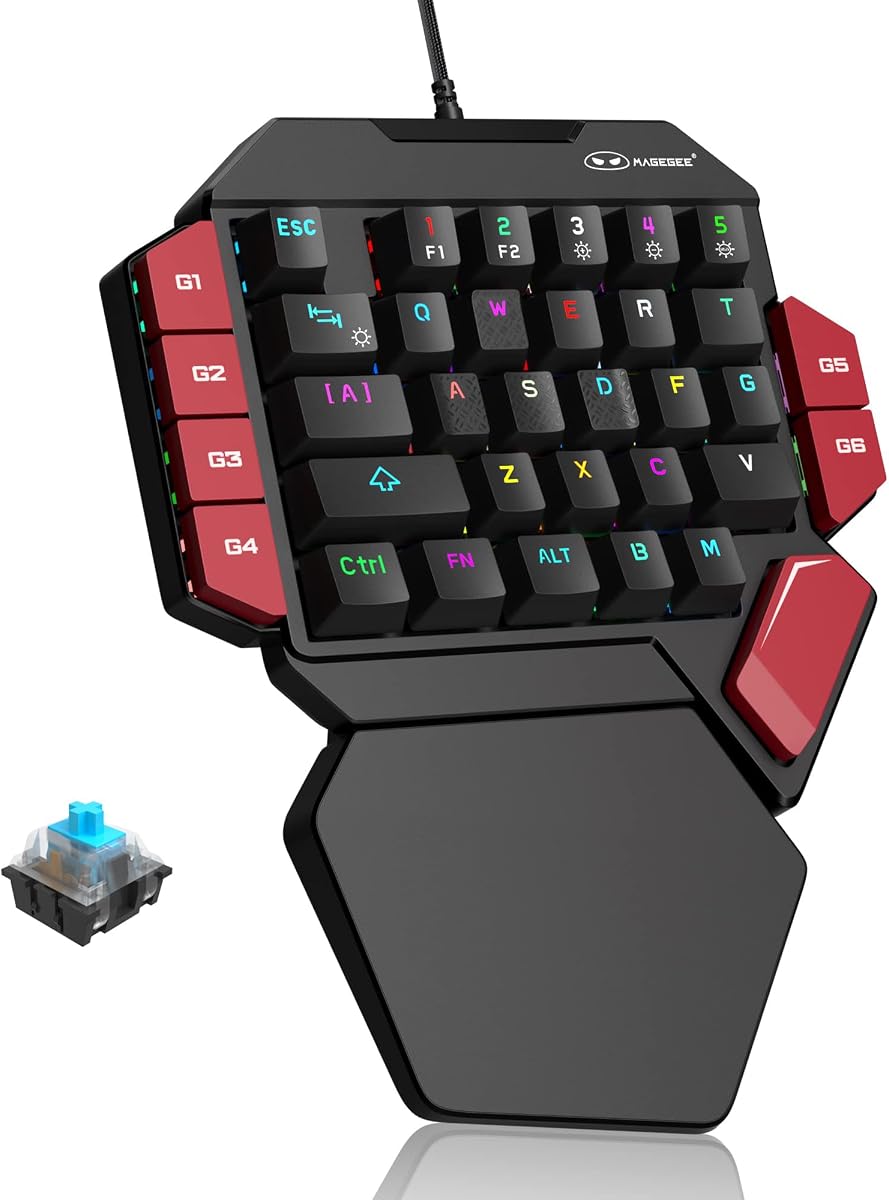
The MageGee One Handed Professional Gaming Keyboard RGB Backlit delivers a classic mechanical experience in a compact form. With a rating of 4.3 stars, it is favored for its tactile feedback. Its standout quality is the Blue switches that provide a distinct click and paragraph feeling.
We may earn a commission when you buy through this link, at no additional cost to you.
Key strengths include the 6 macro recording keys that allow for quick binding of sequences. The RGB backlit modes are vibrant and customizable via keyboard shortcuts. The ergonomic design with a big palm rest helps in reducing hand fatigue during long usage periods.
Trade-offs involve the loud click sound of the Blue switches, which might not be ideal for shared spaces. The lack of required drivers simplifies setup but limits advanced customization features. However, for users who love the sound and feel of mechanical keys, this offers great value.
This keypad is best for typists and gamers who enjoy a tactile response. The build is sturdy enough for daily use. If you want the satisfying click of a mechanical keyboard in a small package, the MageGee keypad is the best tactile option for this list.
Blue switches are known for their strong tactile bump and audible click, making them ideal for those who prefer clear feedback on every keystroke.
Recording macros is done directly on the device using FN keys, making it accessible even for users who do not want to install software.
We may earn a commission when you buy through this link, at no additional cost to you.
The Razer Tartarus V2 Mecha-Membrane Gaming Keypad is designed for players seeking deep immersion and integration. Rated at 4.2 stars, it excels in its ecosystem support. Its standout quality is the ability to sync with Razer hardware and Philips Hue for a cohesive visual experience.
We may earn a commission when you buy through this link, at no additional cost to you.
Key strengths include the analog trigger on the thumbstick which adds a new layer of control for supported games. The 32 programmable keys allow for extensive macro creation, while the soft-cushioned design ensures comfort over hours of play. This device is a hub for customization.
Trade-offs involve the higher price point compared to generic models. The need for the Synapse software means it works best within the Razer ecosystem. However, for gamers looking for a seamless experience across hardware and games, the benefits of this integration are substantial.
This keypad is best for those who already own Razer peripherals and want them to work together. The analog features add unique gameplay mechanics. If you value immersion and ecosystem synergy, the Tartarus V2 is the best immersive gaming keypad available for dedicated users.
Syncing your keypad with other Razer gear creates a unified lighting and control experience that enhances the visual and functional aspect of gaming.
The analog control allows for variable speed movement in supported titles, offering a more nuanced way to move characters compared to digital keys.
We may earn a commission when you buy through this link, at no additional cost to you.
The Redragon RM104 Wireless Gaming Keyboard with Knob is a unique device that combines keyboard functions with a smart control knob. With a 4.4 rating, it stands out for its versatility. Its standout quality is the intelligent knob that manages audio and lighting effortlessly.
We may earn a commission when you buy through this link, at no additional cost to you.
Key strengths include the tri-mode connectivity that allows switching between Bluetooth, 2.4GHz, and USB-C seamlessly. The 4000mAh battery ensures long life for continuous use. The software support allows for deep customization of buttons, making it adaptable to various workflows.
Trade-offs include the non-standard layout which may take time to get used to. The specific aesthetic design might not match every battlestation. However, the multi-device compatibility and audio controls make it a practical tool for streamers and multi-tasking users.
This keypad is best for streamers and users who need audio control alongside gaming keys. It works well with Windows, Mac, and consoles. If you want a device that combines gaming and media control in one unit, the RM104 is the best multifunction gaming keypad.
The smart knob lets you adjust volume or switch RGB modes without leaving the game, streamlining the interaction process for better focus.
Support for multiple devices allows you to switch between a PC and a Mac with ease, making it a versatile tool for different work environments.
We may earn a commission when you buy through this link, at no additional cost to you.
Selecting the right gaming keypad depends on your specific needs regarding connectivity, ergonomics, and customization options. This guide breaks down the essential factors to consider before making your purchase.
The type of switch determines the feel and response of the keypad. Mechanical switches offer tactile feedback and durability, while membrane switches provide a quieter and softer experience. Hall Effect magnetic switches are gaining popularity for their adjustable actuation and resistance to wear over time.
Consider your preference for sound and feel when selecting a switch type to ensure it matches your main keyboard and gaming style.
Key count ranges from 29 to 42 keys depending on the model. More keys provide more commands but can be harder to memorize. A standard 35 to 32 key layout is often the sweet spot for MMOs and RPGs. Compact models prioritize speed and ease of reach.
Choose a key count that aligns with the complexity of the games you play without overwhelming your ability to manage inputs.
Wireless connectivity offers desk flexibility but may introduce slight latency. Wired connections ensure consistent speed and no battery worries. Tri-mode connectivity allows switching between Bluetooth, 2.4GHz, and USB-C for maximum versatility across different devices.
Decide between wired stability and wireless freedom based on whether you prioritize competitive latency or a clutter-free setup.
A comfortable wrist rest and adjustable design are vital for long sessions. Look for magnetic or detachable rests to clean the surface easily. Ergonomic shapes reduce strain by positioning keys within easy reach of your hand. A proper fit prevents fatigue during intense gameplay.
Prioritize devices with solid wrist support to maintain comfort during extended gaming marathons.
Software determines how deep you can dive into macro and lighting settings. Web-based tools are convenient and cross-platform but may lack advanced features. Dedicated software allows for complex profiles and key remapping. Check if the device stores profiles locally to switch PCs easily.
Ensure the software ecosystem supports your operating system and offers the level of control you require for your games.
RGB lighting enhances the visual appeal and helps identify keys in dark environments. Customizable modes allow you to match your setup theme. Some devices offer sync with other hardware for a unified look. Lighting modes can be static, breathing, or reactive to game events.
Look for devices with customizable lighting options if aesthetics are a priority for your battlestation.
Gaming keypads range from budget-friendly to premium prices. Higher costs often bring better build quality and advanced features like magnetic switches. Budget models offer essential functionality and are great for casual use. Balance cost against performance needs to find the right fit.
Set a budget early to narrow down options while ensuring you do not sacrifice critical features like switch quality.
To maximize performance, install the necessary software and calibrate the keys or switches according to your preference. For Hall Effect switches, adjust actuation points to reduce travel time if needed. Map macros carefully to avoid accidental triggers during intense moments.
Clean your keypad regularly using compressed air to remove dust between keys. Avoid using harsh chemicals on the surface to preserve the coating. If the device has a detachable wrist rest, wash or wipe it periodically to maintain hygiene.
For wireless models, manage battery life by turning off RGB lights when not in use. Store the device in a safe place when transporting to prevent physical damage. Keep firmware updated to access new features and stability improvements.
Yes, even casual gamers can benefit from the added comfort and reduced desk clutter a keypad provides. It allows for focused control schemes without cluttering the main keyboard area.
Most modern gaming keypads offer macOS compatibility, especially those with web-based configurators. Always check the product specifications to confirm cross-platform support before buying.
Programming macros usually involves opening the dedicated software or using FN key combinations on the device. You record a sequence of inputs and assign them to a specific key for one-touch execution.
Hall Effect switches offer better durability and adjustable actuation which can improve speed in competitive games. However, mechanical switches are preferred by many for their classic tactile feedback and sound profile.
Gaming keypads are designed to work alongside a main keyboard or mouse rather than replace them entirely. They serve as a specialized input device for specific commands and movements.
Portable models like the RedThunder or Redragon options are ideal for LAN parties due to their compact size. Wired models ensure reliability while wireless options offer more flexibility.
Choosing a gaming keypad can transform your experience by optimizing control and comfort. The Keychron C0 HE 8K stands out for competitive play while the Redragon K585 offers great value for budget users. Each model brings unique strengths to the table.
Prioritize the features that matter most to you such as wireless connectivity, magnetic switches, or ergonomic design. Matching the device to your specific game genre and personal preferences ensures you get the most out of the investment.
Remember that prices fluctuate frequently so check current listings before purchasing. With the right keypad you can gain a competitive edge while maintaining comfort during long gaming sessions.