
msi Gaming GeForce GT 1030 4GB DDR4
4.5Editor score
Affordable entry level option
Low power consumption
Compact single fan design
Find the best GPU for Optiplex systems with our expert guide comparing top graphics cards for small form factor PCs and professional workloads.
Upgrading your Dell Optiplex with a dedicated graphics card can unlock new performance potential for work and entertainment. Choosing the right GPU requires careful attention to size, power, and compatibility.
We analyzed ten top-rated graphics cards specifically suited for small form factor and professional desktop environments. Our selection prioritizes low-profile designs, efficient power usage, and proven reliability for Optiplex chassis.
Each pick highlights key strengths and real-world suitability for different user needs. Please note that pricing fluctuates frequently, so always verify current costs before making your final purchase decision today.
4.5Editor score

4.7Editor score

4.3Editor score
This side-by-side comparison details the specifications and capabilities of the top ten graphics cards selected for Optiplex systems.
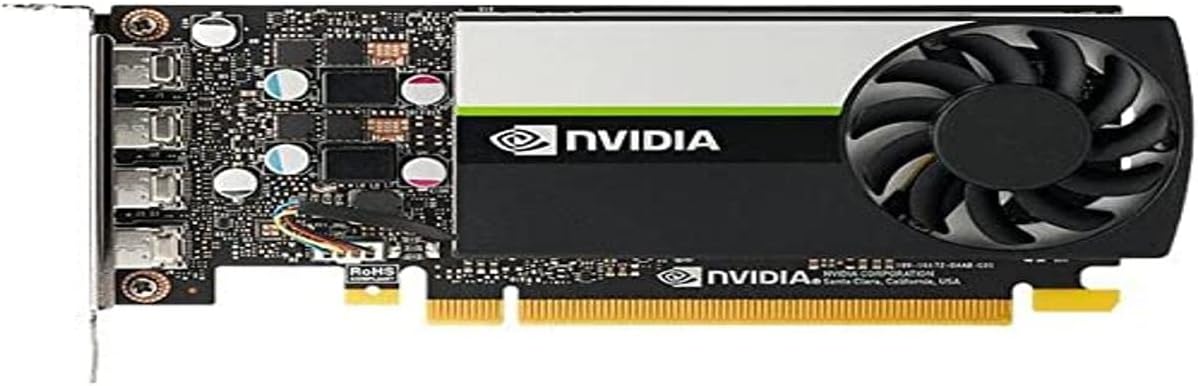


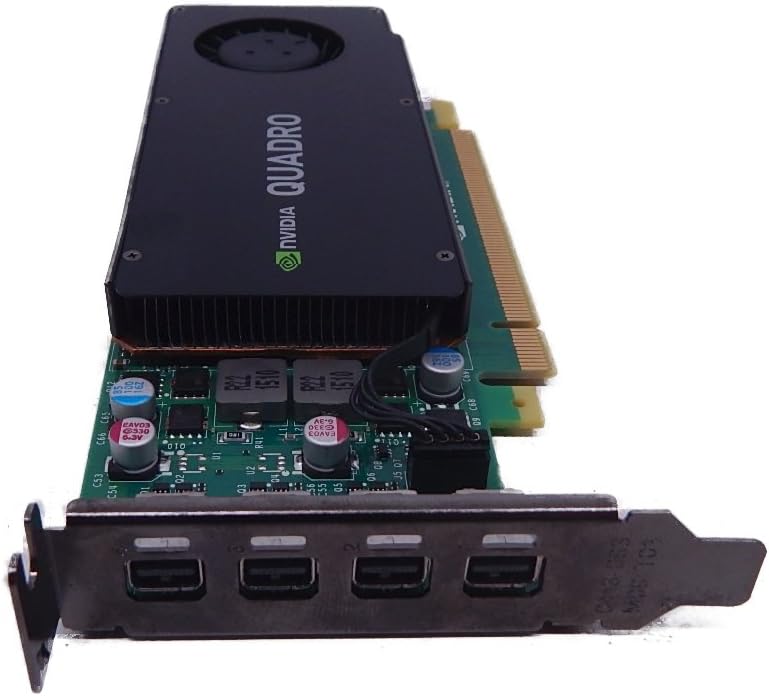
The PNY Nvidia RTX A400 stands out as the premier choice for Optiplex users needing professional-grade performance in a compact form factor. With a strong 4.7 rating, it delivers reliable compute power for demanding workflows without compromising on size efficiency.
We may earn a commission when you buy through this link, at no additional cost to you.
Its single-slot low profile design ensures easy installation in small chassis while the 768 CUDA cores handle AI and ray-tracing tasks effectively. The inclusion of four Mini DisplayPort outputs enables multi-monitor setups essential for modern professional environments.
While the power consumption is impressively low at 50W, this card prioritizes stability over raw gaming FPS. Users focused on productivity will find the trade-off acceptable given the robust feature set and ISV certifications included.
If you need a professional GPU that fits perfectly in an Optiplex case, the RTX A400 is the top recommendation. It balances performance, size, and connectivity to meet the unique constraints of business desktops.
The single slot low profile form factor ensures seamless integration into small business workstations without requiring extra space.
Support for four Mini DisplayPort 1.4a outputs allows for multi-monitor configurations ideal for productivity and data visualization.
We may earn a commission when you buy through this link, at no additional cost to you.
The msi Gaming GeForce GT 1030 offers an accessible entry point into dedicated graphics upgrades for Optiplex systems. Rated 4.5 stars, it provides a cost-effective way to enhance visual capabilities without breaking the budget or requiring major power changes.
We may earn a commission when you buy through this link, at no additional cost to you.
With a single fan design and low power needs, this card is ideal for basic multimedia tasks and light gaming. The 4GB DDR4 memory ensures smoother playback compared to integrated solutions while maintaining compatibility with slim chassis.
However, the DDR4 memory interface limits high-end performance potential. Gamers seeking high frame rates may find this insufficient, but office users and casual viewers will appreciate the value and efficiency it brings.
For those seeking the most affordable upgrade path, this GT 1030 is a smart choice. It delivers reliable basic graphics performance tailored for the constraints of small form factor desktops.
An affordable option for users needing a basic graphics boost without investing in high-end professional or gaming cards.
Designed to run efficiently with minimal power draw, making it safe for older power supplies in compact systems.
We may earn a commission when you buy through this link, at no additional cost to you.
The maxsun GeForce RTX 3050 combines premium gaming features with a slim profile tailored for small form factor builds. With a 4.3 rating, it offers robust performance through NV Ampere architecture while maintaining the compact size required for Optiplex cases.
We may earn a commission when you buy through this link, at no additional cost to you.
Features like NVIDIA DLSS and 6GB GDDR6 memory significantly boost gaming speeds without sacrificing image quality. The inclusion of HDMI 2.1 and DisplayPort 1.4a ensures support for modern high-resolution monitors and multi-monitor setups.
While performance is strong, the slim design may limit airflow in extremely tight enclosures. Users should ensure adequate clearance and consider power supply limitations before committing to this higher-end upgrade path.
For Optiplex users wanting serious gaming power, this RTX 3050 is a top-tier choice. It bridges the gap between professional utility and entertainment performance in a small package.
Utilizes DLSS and Ampere cores to enhance frame rates and visual fidelity in modern gaming titles efficiently.
HDMI 2.1 support enables high refresh rates and 8K output for future-proof visual entertainment setups.
We may earn a commission when you buy through this link, at no additional cost to you.
The PNY NVIDIA T600 delivers reliable professional performance designed for demanding visualization workflows. With a strong 4.6 rating, it ensures stability and speed for users running complex 3D graphics applications in small workstations.
We may earn a commission when you buy through this link, at no additional cost to you.
Powered by NVIDIA Turing architecture, this card offers double the performance of previous generations for specific workloads. It also includes dedicated video encoding engines that allow for efficient media creation without taxing the main 3D pipeline.
While highly capable, it is optimized for productivity rather than gaming. Users seeking maximum value for casual use might find it overkill, but professionals needing certified stability will appreciate the engineering quality.
For Optiplex systems used for design or engineering, the T600 is a solid investment. It balances high performance with the necessary reliability required for business-critical tasks.
Delivers double performance over previous generations allowing users to work on larger models with better interactivity.
Independent decode and encode engines ensure smooth video playback and creation without impacting 3D graphics.
We may earn a commission when you buy through this link, at no additional cost to you.
The ASUS Dual GeForce RTX 3050 is a robust gaming card featuring advanced cooling and durability enhancements. With a 4.7 rating, it stands out for its reliable build quality and efficient thermal management in small chassis environments.
We may earn a commission when you buy through this link, at no additional cost to you.
Its axial-tech fan design increases downward air pressure to cool components effectively, while IP5X dust resistance prolongs hardware lifespan. The 2nd generation RT Cores provide improved ray tracing capabilities for modern gaming titles.
However, the 2-slot design might limit compatibility with the smallest form factor cases. Users should check case dimensions carefully before purchase to ensure proper fit and cooling airflow within the system.
For Optiplex owners seeking a durable gaming upgrade, this card is a strong contender. It offers excellent performance and protection against dust while delivering a smoother gaming experience.
Axial-tech fan design maximizes cooling efficiency to maintain high performance during extended gaming sessions.
IP5X dust resistance and stainless steel brackets ensure long-term reliability in demanding environments.
We may earn a commission when you buy through this link, at no additional cost to you.
The msi Gaming GeForce GT 1030 offers a straightforward solution for upgrading basic graphics performance in Optiplex systems. With a 4.5 rating, it provides reliable support for multimedia and light tasks without demanding complex power configurations.
We may earn a commission when you buy through this link, at no additional cost to you.
Its overclocked design offers slightly better speeds than standard models, improving overall responsiveness for daily use. The compact form factor ensures it fits easily into small cases while maintaining efficient cooling through its single fan.
Gaming performance is naturally limited by its older architecture and DDR4 memory. However, for users needing to drive modern displays or run basic CAD software, this card delivers consistent value and reliability.
If you need an economical solution for basic graphics needs, the GT 1030 is a practical choice. It bridges the gap between integrated graphics and high-end dedicated cards effectively.
Provides a cost-effective entry point into dedicated graphics with reliable performance for everyday computing tasks.
The single fan and low profile layout ensure easy installation in compact workstation environments.
We may earn a commission when you buy through this link, at no additional cost to you.
The GIGABYTE GeForce RTX 3050 brings powerful performance with efficient thermal management for modern applications. Rated 4.6 stars, it is well-suited for users needing balanced graphics power in compact desktop configurations.
We may earn a commission when you buy through this link, at no additional cost to you.
Equipped with two WINDFORCE fans, this card maintains optimal temperatures during intensive tasks. The 6GB GDDR6 memory ensures smooth multitasking and supports high-definition content without stuttering or lag.
While the dual fan design improves cooling, it may not fit the slimmest chassis. Users should verify physical space before installation to ensure compatibility with their specific Optiplex system.
For Optiplex users wanting a balance of cooling and performance, this model is a strong option. It delivers reliable power for both professional work and casual entertainment effectively.
Dual WINDFORCE fans ensure consistent cooling to prevent throttling during demanding graphical workloads.
6GB of GDDR6 memory provides ample bandwidth for high resolution rendering and multitasking.
We may earn a commission when you buy through this link, at no additional cost to you.
The msi Gaming RTX 3050 LP delivers high performance in a low profile package tailored for compact systems. With a 4.5 rating, it provides a significant upgrade over integrated graphics while fitting into smaller chassis.
We may earn a commission when you buy through this link, at no additional cost to you.
Featuring a 1492 MHz boost clock and 6GB GDDR6 memory, this card handles modern gaming and rendering tasks smoothly. Its multiple output options ensure flexibility for connecting various display configurations.
Because it is a low profile card, airflow can be limited in tightly packed cases. Users should ensure adequate ventilation to maintain stable performance during extended use.
For Optiplex users needing a balance of size and power, this LP card is an excellent choice. It combines strong specs with compact dimensions for versatile use.
Overclocked boost clocks ensure faster processing for graphics-intensive applications without compromising stability.
Low profile design ensures compatibility with small form factor cases without requiring custom modification.
We may earn a commission when you buy through this link, at no additional cost to you.
The PNY NVidia Quadro K1200 offers reliable legacy professional performance suited for older Optiplex systems. With a 4.4 rating, it provides stable graphics processing for design applications within a compact low profile footprint.
We may earn a commission when you buy through this link, at no additional cost to you.
Equipped with four Mini DisplayPorts, it supports multi-monitor configurations essential for productivity. The low power requirements make it compatible with older power supplies without needing extra connectors.
While it lacks modern gaming features, its stability makes it a dependable choice for business environments. The included 3-year warranty adds peace of mind for long-term office usage scenarios.
If you have an older Optiplex requiring a professional upgrade, this card fits well. It prioritizes reliability and display connectivity over raw speed for daily operations.
Designed to work seamlessly with older PCIE 2.0 systems while maintaining professional reliability standards.
Four Mini DisplayPorts provide versatile connectivity for multi-monitor setups without requiring additional adapters.
We may earn a commission when you buy through this link, at no additional cost to you.
The NVIDIA Quadro P1000 combines modern architecture with professional-grade reliability for demanding workloads. With a 4.5 rating, it offers a significant boost over previous generations while fitting efficiently into compact system designs.
We may earn a commission when you buy through this link, at no additional cost to you.
Certified for professional applications, this card ensures smooth operation in industry software. Its ability to support up to four 4K displays makes it ideal for multi-screen professional environments.
While optimized for workstation tasks rather than gaming, it delivers exceptional value for professionals. The energy efficient design ensures stable performance without excessive power consumption.
For Optiplex users needing professional-grade graphics, this model is a dependable investment. It provides the stability and power required for complex visual workloads effectively.
ISV certification ensures compatibility and stability for demanding professional applications in business environments.
Supports up to four 4K displays allowing for expansive workspace layouts without compromising system performance.
We may earn a commission when you buy through this link, at no additional cost to you.
Selecting the right graphics card for an Optiplex requires balancing performance needs with physical constraints and power limits.
Many Optiplex models are Small Form Factor (SFF) which restricts card length and height. Look for low-profile cards that fit vertically in narrow cases.
Always measure your case dimensions before purchasing to ensure the card will fit without blocking other components.
Optiplex systems often come with limited wattage power supplies that cannot support high-end cards. Check your PSU wattage and connector availability.
Choose cards that draw power solely from the PCIe slot without requiring external connectors to avoid compatibility issues.
Identify if you need the card for gaming, video editing, or basic office tasks. Professional cards offer stability while gaming cards offer frame rates.
Your primary workload should dictate whether you choose a Quadro/Tesla series or a GeForce RTX series card.
Modern tasks require sufficient video memory to handle high resolutions and complex textures. Aim for at least 4GB to 6GB of VRAM.
GDDR6 memory is faster and more efficient than DDR4 or GDDR5, providing better overall performance in compatible cards.
Ensure the card has the necessary ports to connect your monitors. HDMI and DisplayPort are standard, but check for specific versions needed for refresh rates.
Multi-monitor setups require cards with multiple outputs like Mini DisplayPort or multiple HDMI slots to function correctly.
Small cases have limited airflow which can lead to overheating. Look for cards with efficient fan designs or passive cooling if necessary.
Avoid cards with bulky heatsinks that might block other slots or restrict ventilation within the chassis.
Most modern GPUs use PCIe x16 but older Optiplex systems might have PCIe 2.0. Ensure backward compatibility to avoid performance throttling.
Newer cards will still work in older slots but may not reach their full potential speed due to bandwidth limits.
Professional cards often come with better warranties and driver support compared to consumer versions. Check manufacturer policies before buying.
A longer warranty period provides peace of mind for critical business workloads that require uninterrupted operation.
Always install your new GPU when the system is powered off and unplugged to prevent electrical damage. Use an anti-static wrist strap if available.
Ensure the card is securely seated in the PCIe slot and held in place by the mounting bracket screws to prevent connection issues.
Update your graphics drivers immediately after installation to ensure compatibility and unlock full performance capabilities for your OS.
No, you must ensure the GPU fits physically and does not exceed the power supply limits. Check for low-profile compatibility and power requirements before purchasing.
The MSI GT 1030 is a top budget choice because it is affordable, fits most small cases, and requires no extra power connectors for simple upgrades.
Yes, updating drivers is essential for performance and compatibility. Download the latest drivers from the manufacturer's website immediately after installation.
Many Optiplex PSUs are low wattage. Check your model's specs to ensure it can handle the power draw of gaming cards without external connectors.
Quadro cards are certified for professional apps with stable drivers while GeForce is optimized for gaming and consumer entertainment performance.
Yes, many low-profile cards draw power solely from the PCIe slot. Check the card specs to ensure it does not require additional power cables.
Use compressed air to blow out dust from the fans and heatsinks. Turn off the system and hold fans still to prevent motor damage during cleaning.
Yes, SFF cases have limited airflow. Ensure your chosen card has efficient cooling or consider adding case fans to improve ventilation.
We reviewed ten top options for Optiplex upgrades covering everything from budget friendly entry points to professional grade performance.
Prioritize physical size and power limits first before considering raw performance to ensure your system remains stable and functional.
Always check current prices and availability since these values change frequently across different retailers and online stores today.