
Marspark 2 Pcs Heated Mouse Pad
3.6Editor score
Plush wrist rest included
Large internal space
Two pack value
Discover the top hand warmer mouse pads for cold desks. This guide compares heating types, safety features, and comfort to help you choose the best model.
Cold hands can ruin your productivity and comfort during long work or gaming sessions. A hand warmer mouse pad provides targeted heat to keep your fingers and palms toasty without heating the entire room. These devices combine ergonomic design with efficient heating elements to create a cozy workspace even in chilly conditions.
We evaluated ten top-rated models based on heating performance, safety certifications, ease of use, and overall comfort. Our analysis covers enclosed cocoon styles, desk heaters with mouse spaces, and large heated desk mats. Each product was reviewed for build quality, temperature control options, and user feedback to ensure reliable recommendations.
Every pick in this list highlights key strengths and potential trade-offs so you can find the right fit for your setup. Whether you need a portable solution or a full desk mat, these options offer consistent warmth. Keep in mind that availability and specific model details may vary over time as manufacturers update their offerings.
3.6Editor score

4.2Editor score
4.5Editor score
This side-by-side comparison breaks down the unique features of each model to help you decide quickly. Look at heating methods, safety protections, and design styles to find what fits your desk and needs best.


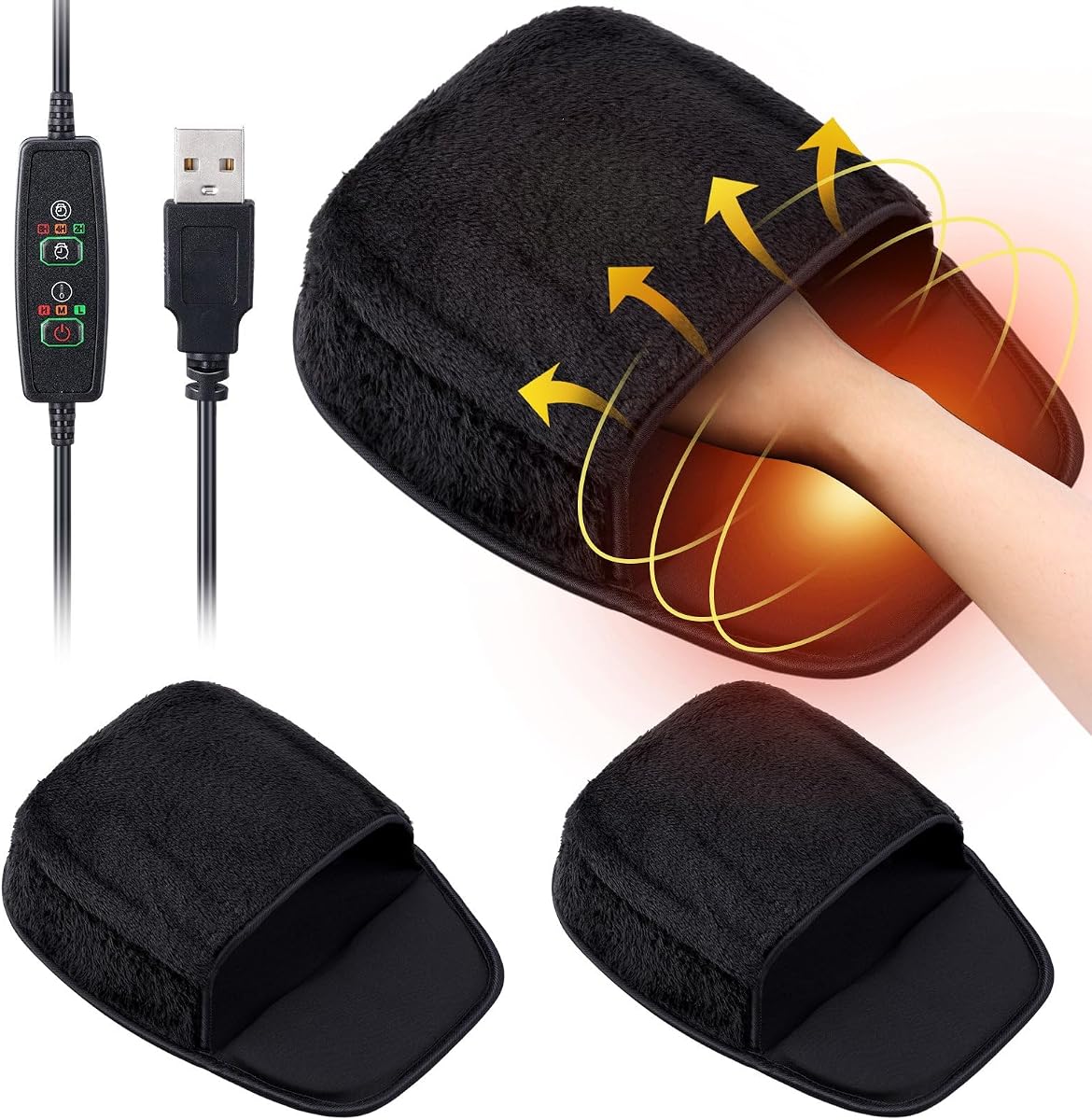

This model stands out as the top choice due to its unique enclosed design that wraps your hand completely. It holds a solid rating from users who appreciate the consistent warmth provided by the PTC heating element. The built-in controller gives you precise control over temperature and timing without needing external software.
We may earn a commission when you buy through this link, at no additional cost to you.
The enclosed cocoon design ensures that your fingers, knuckles, and palm stay warm simultaneously. This is a significant improvement over flat mats that only warm your wrist. The three temperature levels allow you to customize comfort based on how cold your environment is. Additionally, the auto shut-off timers provide peace of mind during long sessions.
While the soft neoprene shell offers excellent insulation, it may require occasional repositioning if it gets bumped. The USB power requirement means you need an available port, but this keeps energy consumption low. The removable heating element makes cleaning simple which helps maintain hygiene over time.
Anyone who works at a desk in a cold office or home environment will benefit from this device. It is particularly useful for those with circulation issues who need consistent warmth. The combination of safety features and ergonomic support makes it a reliable daily companion for work or gaming.
The enclosed design ensures no part of your hand gets left out in the cold during use.
Multiple auto shut-off timers and certified compliance ensure safe operation around your desk.
We may earn a commission when you buy through this link, at no additional cost to you.
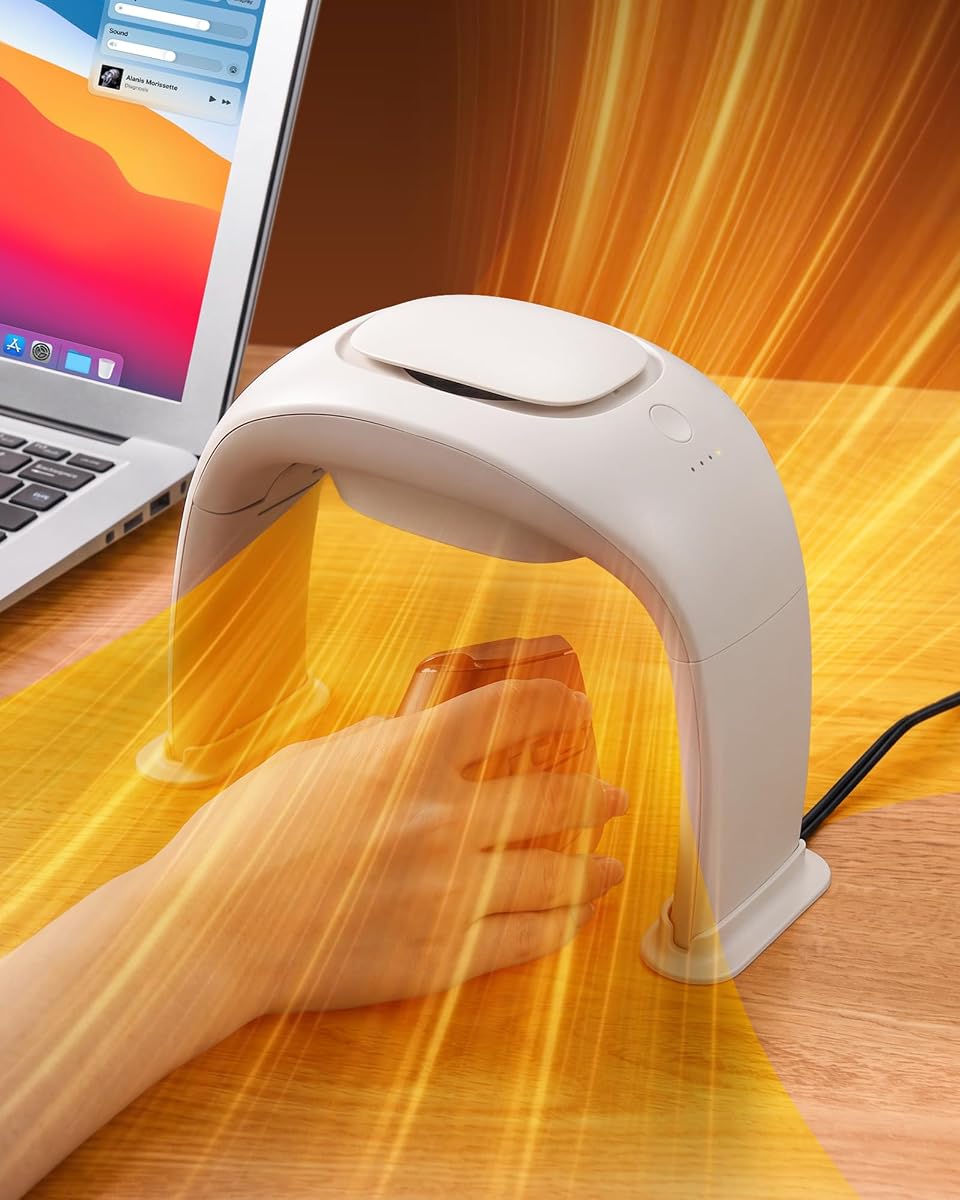
This premium option delivers powerful warmth through a 100W ceramic heating system. It earns high praise for its exceptionally quiet operation which keeps your focus on tasks. The design allows full mouse movement without restriction while keeping your hand warm from all angles.
We may earn a commission when you buy through this link, at no additional cost to you.
The ceramic heating technology provides fast and even heat distribution across the wide angle air guide. You can choose from three heating modes to match your comfort needs precisely. The energy-saving chip adjusts power automatically to maintain temperature without wasting electricity. This efficiency makes it suitable for all-day use.
Because it uses a standard plug rather than USB it takes up a wall outlet but offers higher power. The foldable design helps reduce clutter when you are not using it. The tipping auto shut-off feature adds an extra layer of safety against accidental knocks.
Ideal for users who want maximum warmth and quiet performance in a home or office setting. It works well for gamers and professionals who spend hours at the desk. The investment in a higher power unit pays off in consistent comfort and durability.
Operating at less than 20 decibels it ensures no distraction from your work or games.
Three adjustable modes let you cycle between gentle warmth and continuous high heat as needed.
We may earn a commission when you buy through this link, at no additional cost to you.
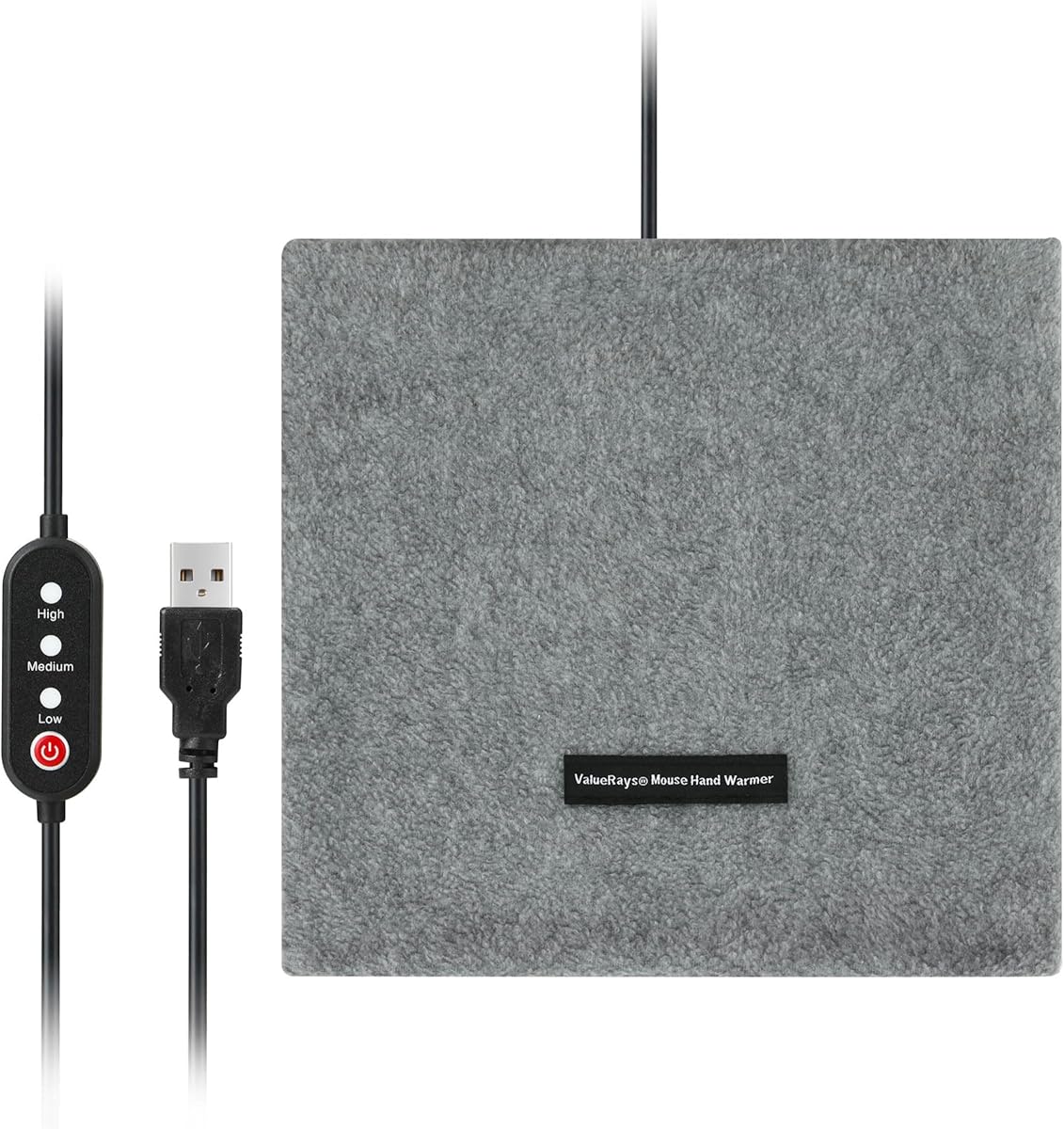
This budget-friendly option offers a two-pack solution for home and office use. It features a soft plush surface that feels comfortable against your skin during use. The inclusion of a wrist rest adds ergonomic value at an affordable price point.
We may earn a commission when you buy through this link, at no additional cost to you.
The design is straightforward with a USB connection that heats up to a suitable level quickly. The large internal space allows flexible mouse movement without taking up too much desk room. You can use the heater separately or with the pad depending on your preference.
While it lacks temperature controls the consistent warmth provided is sufficient for most users. The separate heater design means you have flexibility in how you arrange your desk. However, it requires manual unplugging to stop heating which adds a small step to the routine.
Perfect for students or anyone looking for an entry-level solution without spending much. The two-pack ensures you have a spare or can use one at different locations. It is a practical choice for basic warmth needs on a tight budget.
Get two units for the price of one ideal for sharing or having backups around the house.
The plush material provides a soft touch that reduces friction during long typing or gaming sessions.
We may earn a commission when you buy through this link, at no additional cost to you.
This model combines MCH and PTC ceramic heating for reliable performance. It offers a wide temperature range that accommodates various comfort preferences. The foldable design makes it easy to store when not in use on your desk.
We may earn a commission when you buy through this link, at no additional cost to you.
Safety is prioritized with tip-over protection overheat protection and an anti-scald grille. These features ensure the unit remains safe even if knocked over or left on too long. The noise level is low enough to avoid disrupting your workflow during operation.
The anti-slip silicone base keeps the unit stable during vigorous mouse movements. You can adjust the temperature with a simple one-button operation that cycles through settings. While the interface is basic it gets the job done without complexity.
Recommended for users who need a balance of safety features and portability. It fits well in dorms or shared spaces where storage space is limited. The safety mechanisms provide confidence for unattended use within reasonable limits.
Tip-over and overheat safeguards ensure the device shuts off if something goes wrong unexpectedly.
Foldability allows you to tuck it away neatly when you do not need extra heat.
We may earn a commission when you buy through this link, at no additional cost to you.
This two-pack option focuses on comfort with a thick plush surface for your hands. The detachable heating element allows for easier cleaning and maintenance over time. It is designed to be skin friendly and comfortable during extended use periods.
We may earn a commission when you buy through this link, at no additional cost to you.
The internal heating pad provides a stable environment for your hands during work or gaming. You can connect it via USB to any standard port for power. The size offers enough room for flexible mouse movement without obstruction.
Users should note that the durability of the heating element may vary with frequent use. It is recommended to unplug the USB plug after use to extend the service life. This simple practice helps avoid potential wear issues over time.
Suitable for casual users who prioritize comfort over advanced features. The two-pack ensures you have options for different locations or a spare if one wears out. It is a straightforward solution for basic warmth needs.
The detachable heating pad allows you to clean the plush cover without damaging the electronics.
The plush material distributes heat softly for a comfortable feel on your skin.
We may earn a commission when you buy through this link, at no additional cost to you.
This heated desk pad covers both your mouse and keyboard area for full workspace warmth. It features a durable PU leather surface that resists water and is easy to clean. The large size ensures your hands stay warm from every angle during use.
We may earn a commission when you buy through this link, at no additional cost to you.
Three heat settings let you choose between quick warm-up and all-day comfort. The four-hour auto shut-off feature helps prevent overheating if you forget to turn it off. The control box is located at the left corner for easy access during operation.
Because it is designed for US outlets it works best in regions with 110V power. The pad doubles as a writing pad or blotter when the switch is off. This multifunctionality adds value beyond just heating during cold months.
Ideal for users with large desks who want uniform warmth across their workspace. It is perfect for winter use to keep fingers and arms comfortable. The safety certifications provide confidence for continuous use in office or home settings.
The large dimensions cover your entire desk area for consistent heat across your hands and arms.
Use it as a desk pad or writing surface when heating is not needed for year-round utility.
We may earn a commission when you buy through this link, at no additional cost to you.
This unit combines high power with ultra-quiet operation for a premium experience. The double ball bearings and aviation turbine design contribute to its low noise profile. It offers three temperature settings with optimized logic for efficient heating cycles.
We may earn a commission when you buy through this link, at no additional cost to you.
The wide activity space supports both left and right-handed users comfortably. You can freely operate your mouse without restrictions while enjoying full hand warmth. The smart energy-saving chip reduces power once the target temperature is reached.
Foldable legs make it easy to store after use without taking up much space. It is lightweight enough to carry for business trips or travel. The 12-month warranty adds peace of mind for your purchase.
Best for users who value quiet performance and portability in a high-power unit. It fits well in bedrooms or gaming rooms where noise matters. The warranty support ensures you have assistance if any issues arise.
The heating cycles ensure even warmth without wasting energy or causing unnecessary heat spikes.
Lightweight and foldable features make it easy to take your warmth anywhere you go.
We may earn a commission when you buy through this link, at no additional cost to you.
This model uses infrared heating for a different approach to warmth at your desk. It features a manual control switch that lets you turn the heat on or off easily. The USB power connection makes it simple to plug into any laptop or desktop.
We may earn a commission when you buy through this link, at no additional cost to you.
The design is straightforward without extra complexity or controls. It serves as a basic solution for those who need occasional warmth. The compact size fits well on smaller desks where space is limited.
Details about temperature ranges are minimal so it works best for general comfort. The manual switch ensures you have direct control over when heating is active. This simplicity can be a plus for users who prefer basic electronics.
Suitable for light users who need occasional assistance with cold hands. It is easy to integrate into any existing setup without special requirements. Keep in mind it offers fewer features compared to more advanced models.
The manual switch gives you immediate command over when the device is active.
Just plug in the USB cable to start using it without any drivers or apps.
We may earn a commission when you buy through this link, at no additional cost to you.
This two-pack option includes built-in wrist cushions for added ergonomic support. It offers three temperature modes with timed auto-off features for safety. The non slip rubber base keeps the pad firmly in place during active use.
We may earn a commission when you buy through this link, at no additional cost to you.
The auto-off timers let you set it and forget it without worrying about power waste. You can choose heat levels from gentle warmth to toasty relief based on conditions. The portable weight makes it easy to move between locations as needed.
The non-slip base ensures stable control whether you are working or gaming. This prevents the pad from sliding around during intense sessions. The two-pack value is ideal for different rooms or as backups.
Best for users who want safety timers and wrist support at a low cost. It works well for students or casual users who need reliable warmth. The ergonomic features help reduce strain during long hours at the computer.
The built-in wrist cushion fits your natural curve to reduce pressure and fatigue.
Timed auto-off prevents overheating and saves power when you leave your desk.
We may earn a commission when you buy through this link, at no additional cost to you.
This multi-function pad features a premium PU leather construction for durability and style. It offers three adjustable temperature settings controlled by pressing the switch button repeatedly. The non-slip leather bottom ensures it stays secure during typing or gaming.
We may earn a commission when you buy through this link, at no additional cost to you.
The large size covers significant desk area which provides warmth for hands and arms. It can be used as a desktop pad keyboard hand warmer or even under-desk foot warmer. This versatility makes it a practical addition to your workspace setup.
Cleaning is easy thanks to the smooth leather surface that resists stains and scratches. It protects your desk while providing consistent warmth during cold months. The instruction manual supports proper usage to ensure safety.
Ideal for users who value aesthetics alongside functionality in their desk setup. It suits those looking for a unified pad for multiple uses. The lack of ratings suggests it is a newer option to watch.
The PU leather design adds a polished look to your desk while protecting the surface.
Use it for mouse control keyboard warmth or even foot warmth as conditions change.
We may earn a commission when you buy through this link, at no additional cost to you.
Selecting the right hand warmer mouse pad depends on your specific needs and workspace setup. Understanding key factors helps you find a model that offers reliable warmth and safety.
Heating technology varies between PTC ceramic, infrared, and electric elements. PTC ceramic is common for its fast heating and energy efficiency. Infrared provides deep warmth but may be less common in mouse pads. Check how the element distributes heat to ensure your whole hand stays comfortable.
Look for PTC ceramic elements for balanced performance and safety.
Temperature control allows you to adjust heat based on your comfort. Some models offer fixed warmth while others have multiple settings. Adjustable settings let you increase heat when needed or lower it when you feel too warm. This flexibility extends to battery life and comfort levels.
Prioritize models with at least two or three temperature settings.
Safety features are crucial for any heating device used near electronics. Look for auto shut-off timers to prevent overheating if you forget to turn it off. Tipping protection ensures the device shuts off if knocked over. Certifications like UL or CE indicate tested safety standards.
Always choose units with auto shut-off and certified safety ratings.
Power source determines where you can use the device. USB models plug into your computer or power bank for portability. Wall plug models offer more power but need an outlet nearby. Consider your desk setup to decide which fits your cables and ports best.
Match the power source to your available ports and outlet access.
Design impacts how well the warmer fits your workflow. Enclosed cocoon designs wrap your hand for full warmth. Open desk heaters allow free mouse movement. Ergonomic wrist rests reduce strain during long sessions. A non-slip base keeps the unit stable on your desk.
Choose a design that balances warmth with your need for mouse freedom.
Size affects how much desk space the warmer takes up. Large desk mats cover more area but may not fit small desks. Foldable or lightweight models are easier to move for travel. Ensure the internal space is large enough for your mouse movements.
Verify dimensions match your desk space and portability needs.
Cleaning is important to maintain hygiene and longevity. Some models have removable heating elements or washable covers. Look for materials that resist stains and odors. Regular cleaning keeps the surface comfortable for your hands over time.
Opt for models with removable parts or washable surfaces.
Durability ensures the device lasts through frequent use. Check build materials and any warranty coverage. A warranty provides protection against defects. High quality materials like flame retardant plastic add to longevity. Read user feedback for real-world durability insights.
Select units with solid warranties and durable build materials.
Begin by connecting the device to a compatible power source. Ensure your USB port or outlet is functioning correctly before turning it on. Place the pad flat on your desk in a stable position away from edges. This prevents accidental tipping and ensures even heat distribution.
Adjust the temperature settings to your preference. Start with a lower setting and increase if you need more warmth. Avoid using the highest setting for extended periods to prevent overheating. Most units heat up within minutes so test carefully before resting your hands.
When finished, turn off the device and unplug it from the power source. Clean the surface regularly with a damp cloth to remove dust or spills. For models with removable parts, wash according to instructions. Proper care extends the lifespan of your device and keeps it hygienic.
Most models include auto shut-off timers to prevent overheating when left on too long. However, it is not recommended to use them unattended overnight. Always turn off and unplug the device when you are not actively using it for safety.
Yes, these devices are designed to work with wired wireless and Bluetooth mice. The internal space is generally large enough to accommodate standard mouse movements. Ensure the surface material does not interfere with your mouse sensor for optimal tracking.
Power consumption varies by model. USB devices usually draw around five watts while larger wall units may use up to one hundred watts. Always check the specifications to ensure your power source can handle the load without issues.
Yes, many models connect via USB which is compatible with most laptops. Ensure your laptop USB port can provide sufficient power if required. Some units may work better with desktop computers due to higher power availability.
First check the power connection to ensure it is plugged in securely. Verify the outlet or USB port is working by testing another device. If the unit has a switch reset it and try again. If issues persist consult the manual or contact support.
Most devices use gentle heat levels designed for comfort. However, if you have sensitive skin start with the lowest setting to test tolerance. The soft materials on many models help reduce friction and irritation during use.
Unplug the device before cleaning. Wipe the surface with a damp cloth and mild soap if needed. For models with removable heating elements, remove the pad and wash according to instructions. Let it dry completely before using again to avoid damage.
Keeping hands warm can improve circulation for some users by preventing cold-induced constriction. However, they are not medical devices. If you have circulation concerns consult a healthcare professional for advice alongside using these comfort devices.
The top picks offer a range of options from budget to premium choices. The enclosed cocoon designs provide the most complete hand coverage. High power units deliver fast warmth for demanding environments.
Prioritize safety features like auto shut-off and certifications for peace of mind. Choose a power source that fits your desk setup and portability needs. Consider ergonomic elements like wrist rests for long-term comfort.
Remember that prices and availability can change over time. Always check current details before purchasing to ensure you get the best value. Stay warm and comfortable with the right choice for your workspace.