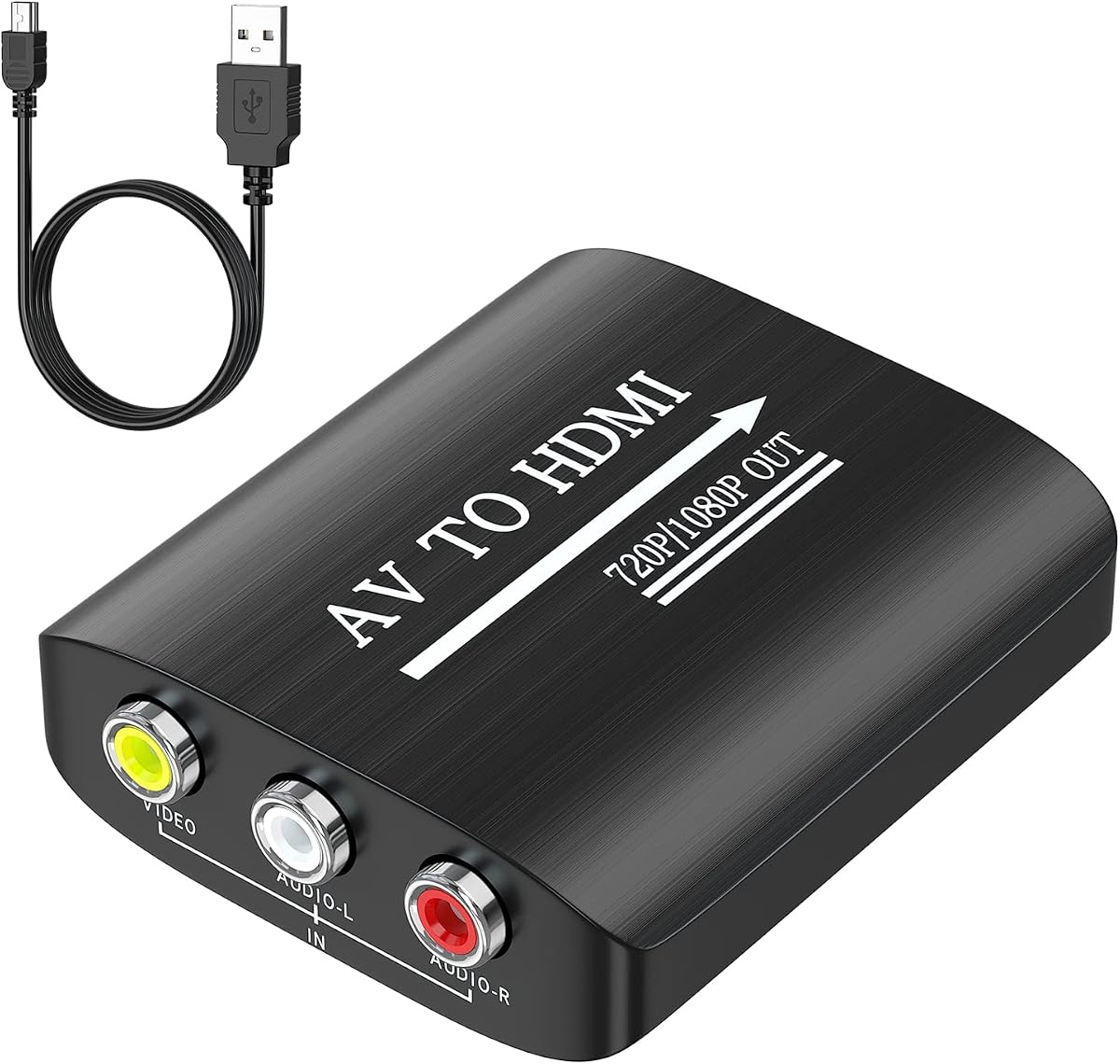
GINGIN AV to HDMI Converter
4.3Editor score
Converts composite AV to HDMI 720p
Supports multiple retro console formats
Requires external USB power source
This guide compares the top HDMI Adapter for PS1 options to help you connect your classic console to modern displays with quality video conversion.
Connecting your classic PlayStation 1 to a modern television requires the right hardware. An HDMI adapter for PS1 bridges the gap between legacy analog signals and contemporary digital displays. Choosing the right converter ensures your retro gaming sessions look sharp and perform smoothly on today's screens.
We evaluated ten leading adapters based on signal fidelity, ease of use, and compatibility. Our comparison covers models that support RGB and component signals along with those that handle standard composite inputs. Each product offers unique features to suit different console configurations and display requirements.
Each pick highlights specific strengths like aspect ratio switching or low latency performance. Note that product availability and pricing may vary over time. We recommend checking current listings for the most up to date information before making your final selection for your gaming setup.
4.3Editor score

4.6Editor score

4.2Editor score
The following table provides a side by side overview of each adapter's key specifications and compatibility features. This helps you quickly identify which model matches your specific console and display needs without digging through lengthy descriptions.


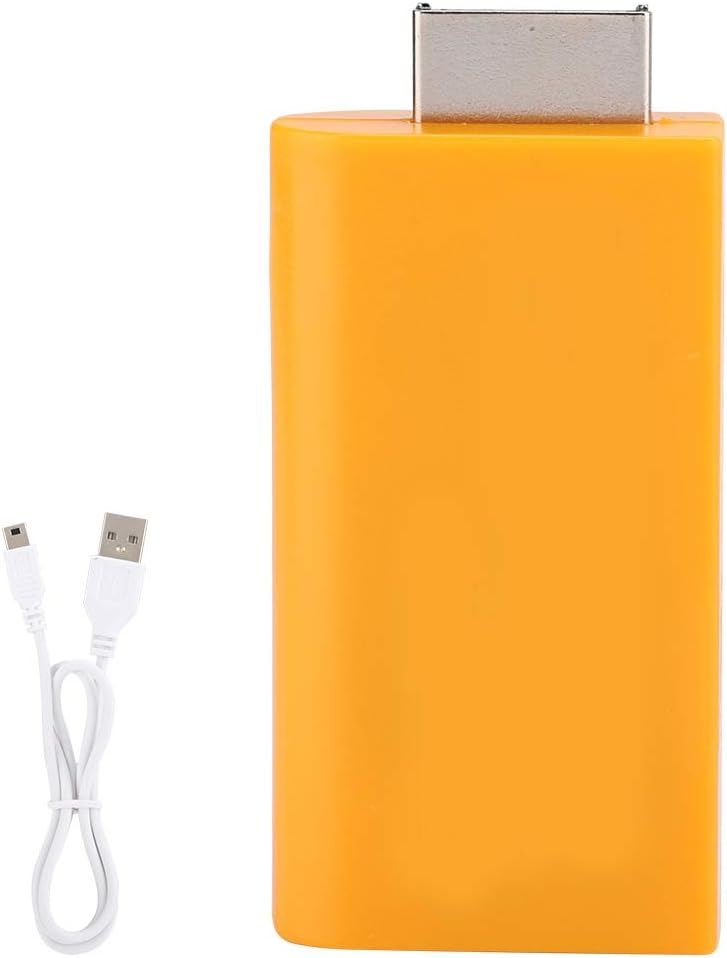

The HD Link HDMI Cable stands out as the top choice for connecting your PS1 to modern displays. It offers a 4.6 star rating based on user feedback regarding its performance. The standout quality lies in its ability to upscale analog signals with precision while maintaining color accuracy and detail.
We may earn a commission when you buy through this link, at no additional cost to you.
This converter processes analog RGB signals into digital HDMI outputs which makes it ideal for HDTVs and projectors. Users appreciate the toggle switch that allows switching between 4:3 and 16:9 aspect ratios. This feature ensures you can enjoy games in their original proportions or adapt to widescreen monitors without distortion.
While the adapter performs well it does require an external Micro USB power source which might be an extra cable for some setups. The detachable HDMI cable design is a nice touch allowing you to use your own long cables if needed. It does not improve the native video quality but transfers the signal cleanly.
Buyers seeking a reliable plug and play solution for PS1 or PS2 will find this adapter excellent. It is particularly suitable for those who value aspect ratio control and low latency during gameplay. The included 1 year warranty adds peace of mind for your retro gaming investment.
The adapter provides great precision in colors and resolution details at a competitive price point. This ensures your classic games look as good as possible on high definition screens without introducing significant lag or artifacts.
With the built in switch you can easily toggle between standard and widescreen formats. This flexibility allows you to match your display settings perfectly whether you are using an old CRT or a new flat panel.
We may earn a commission when you buy through this link, at no additional cost to you.
This adapter uses the console's S-Video signal to provide a cleaner conversion path compared to standard composite options. It receives a solid 4.3 star rating from users who appreciate the included HDMI cable. Its main advantage is the direct use of S-Video for better color separation and clarity.
We may earn a commission when you buy through this link, at no additional cost to you.
The package includes a 1.5 meter HDMI cable and a Micro USB power cable making setup straightforward. You simply connect the converter to the AV Multi-Out port and plug it into a power source. The display quality depends on your original console signal and the display settings but it is a robust solution.
Keep in mind that this adapter cannot improve video quality beyond what your console outputs. You must have a PS1 or PS2 that supports S-Video for this to work effectively. If your console lacks this feature you may need to rely on composite adapters which are less detailed.
Ideal for users who want a complete kit without buying extra cables this converter is a strong contender. It works best with consoles that have functional S-Video outputs. The simple plug and play design ensures you start gaming quickly without technical hurdles.
By utilizing the Y/C signal from the AV port this adapter avoids the color bleeding common in composite video. This results in a sharper image with better definition for your retro titles.
The inclusion of a 1.5m HDMI cable means you do not need to source your own cable immediately. This convenience makes it a turnkey solution for connecting your console to a nearby TV or monitor.
We may earn a commission when you buy through this link, at no additional cost to you.
This adapter offers a cost effective way to convert PS1 and PS2 signals to HDMI while supporting True RGB output. It holds a 4.1 star rating and is designed for portability and ease of use. The main strength is its ability to handle RGB signals without complex setup.
We may earn a commission when you buy through this link, at no additional cost to you.
The device features a male PS2 input and male HDMI output making it compact and flexible. You do not need to buy extra cables as it includes a micro USB cable for power though it does not include a wall adapter. It works best with Sony consoles and does not support PS3.
Users should note that this adapter transfers video signals but does not enhance the source quality. If your console outputs a blurry signal the adapter will not sharpen it. It is strictly a conversion tool that ensures compatibility with modern HDMI displays and monitors.
This option is best for those seeking an affordable way to connect their PS1 to an HD TV. It is suitable for casual gamers who want a simple plug and play experience. Just ensure you have the proper power supply to run the device.
True RGB output ensures that the color information from the console is preserved during conversion. This helps maintain the intended visual look of games compared to composite conversion methods.
The adapter is small and light making it easy to transport between different gaming setups. Its flexible cable connections allow you to place the unit conveniently near your console or TV.
We may earn a commission when you buy through this link, at no additional cost to you.
The GINGIN AV to HDMI Converter is the most affordable option in our list making it the best budget pick. It receives a 4.3 star rating and converts standard composite AV inputs to 720p or 1080p HDMI. Its key benefit is the broad compatibility with various retro gaming systems.
We may earn a commission when you buy through this link, at no additional cost to you.
This adapter is plug and play and requires no drivers to function. You simply connect the AV cables and hook up the included USB power cable to a 5V source. It supports standard TV formats like PAL and NTSC which helps users from different regions.
It is important to note that the adapter cannot improve the video quality of the source. If you use it with PS2 ensure the console is set to RGB output for the best results. It is purely a converter that brings old signals to modern ports.
Buyers on a tight budget will find this adapter perfect for basic connectivity. It is ideal for those who want to connect multiple types of retro devices to one TV. The low cost makes it a safe trial for retro gaming setups.
This adapter works with PS1, PS2, PS3, Xbox 360, Wii, and more. This versatility means you can use one adapter for multiple consoles without buying different converters for each system.
It handles various TV signal standards including PAL and NTSC which is essential for imported consoles. This ensures that games from different regions display correctly on your modern HDTV.
We may earn a commission when you buy through this link, at no additional cost to you.
This adapter earns the premium badge due to its built in RGB to YPbPr switch which allows flexible video modes. It holds a 4.2 star rating and provides a component cable quality display with HDMI output. The standout feature is the durability and extensive support warranty.
We may earn a commission when you buy through this link, at no additional cost to you.
The cable supports all PlayStation output resolutions and includes a 12 month warranty for repair or replacement. This makes it a solid investment for collectors who want long term reliability. You can switch modes to ensure the correct setting for your specific console model.
While it is more expensive than basic adapters the added features justify the cost for serious users. It is designed to be robust and plug and play with ease. The durability ensures it will last through many gaming sessions without failure.
Premium users looking for quality and warranty support should choose this adapter. It is suitable for those who value build quality and specific video mode control. The extended support gives you confidence in your purchase for long term use.
The adapter delivers component cable quality display which enhances color depth and separation. This is a significant upgrade over standard composite connections for those seeking better visuals.
The inclusion of 12 months support warranty sets it apart from cheaper alternatives. This means if you encounter any issues the manufacturer will repair or replace the unit within a year.
We may earn a commission when you buy through this link, at no additional cost to you.
The Tengchi converter is a straightforward adapter with a 4.4 star rating for its ease of use. It converts RCA composite inputs to 1080p HDMI output which is compatible with most HD TVs. It includes the necessary cables to get started immediately.
We may earn a commission when you buy through this link, at no additional cost to you.
You simply hook up the USB power cable and connect the RCA inputs to your console. The adapter supports PAL and NTSC formats ensuring compatibility with various console regions. It is designed to be portable and easy to operate without technical knowledge.
Note that this adapter does not support 3D or 4K resolutions so it is limited to standard HD. It is a solid choice for retro consoles that only output analog signals. The one year warranty adds a layer of security for your purchase.
This adapter is ideal for users who want a hassle free connection to an HDTV. It works well with PS1 and other devices with standard composite inputs. The included cables make it a complete solution for basic gaming needs.
The device is plug and play and requires no setup steps. You just connect the cables and it works immediately which is perfect for non technical users.
The package includes an HDMI cable and USB cable so you have the essentials ready. This reduces the need to buy extra accessories right away.
We may earn a commission when you buy through this link, at no additional cost to you.
This adapter is 4-in-1 compatible with PS1, PS ONE, and PS2 consoles. It receives a 4.2 star rating and supports both RGB and Component signals. The standout quality is its ability to upscale analog signals to digital 1080P HDMI for modern displays.
We may earn a commission when you buy through this link, at no additional cost to you.
It includes a built in RGB to YPbPr switch that allows you to choose the correct setting for your console. This ensures the signal matches what your TV expects. The adapter is designed to provide zero transmission loss for audio and video.
Users must ensure they switch modes correctly for their specific console to avoid display issues. PS1 units output RGBS while PS2 can do RGBS or YPbPr. This versatility makes it a strong choice for mixed console collections.
Buyers with both PS1 and PS2 consoles will appreciate the dual signal support. It is suitable for those who want higher resolution output on modern monitors. The advanced signal processing helps maintain color and detail effectively.
The adapter upscales the analog signal to 1080P which maximizes the potential on HDTVs. This ensures your games look their best on screens that support high definition.
The switch allows you to toggle between RGB and Component to match your needs. This adaptability helps optimize the visual quality depending on the console model.
We may earn a commission when you buy through this link, at no additional cost to you.
This adapter stands out for its true Plug and Play design that requires no manual video settings. It has a 4.2 star rating and includes a built in button to switch aspect ratios. This makes it incredibly easy to use for any gaming setup.
We may earn a commission when you buy through this link, at no additional cost to you.
You can switch between 4:3 and 16:9 modes directly on the adapter to match your display. The converter supports PAL and NTSC formats which ensures compatibility with consoles from different regions. It is compact and portable ideal for family game nights.
The device maintains original resolution but does not enhance image quality beyond that. You should have your own HDMI cable ready since it is not included in the package. It is a simple solution that prioritizes ease of setup.
Ideal for families and casual gamers who want a simple setup this adapter is perfect. It is easy to carry and use anywhere with an HDMI TV. The aspect ratio button is a great convenience for switching between different games.
The built in button allows you to change the display mode easily. This is useful for games that look best in 4:3 while others might benefit from 16:9.
Unlike other adapters this one works without changing console video output configurations. You just connect it and start playing which saves time on troubleshooting.
We may earn a commission when you buy through this link, at no additional cost to you.
This converter features an anti interference design to maintain signal clarity during gaming sessions. It has no listed rating but is designed for durability with tinned copper wires. The compact form factor makes it easy to carry and store.
We may earn a commission when you buy through this link, at no additional cost to you.
The device is plug and play and does not require any drivers for installation. The shielded cable helps reduce interference which ensures a stable connection to your HDTV. It is lightweight and practical for setups at home or on the go.
Each internal wire is tinned to resist oxidation which ensures long term use. The palm sized form fits easily in a bag or drawer which is great for transport. It is a versatile option for those who travel with their console.
Buyers looking for a durable and portable option will find this adapter useful. It is suitable for those who want a clean connection without signal loss. The shielded design adds a layer of reliability for daily use.
The anti jamming interface and shielded cable help keep the signal clean. This prevents noise from disrupting the video or audio during your sessions.
The tinned copper wires resist oxidation and damage over time. This means the adapter will last longer even with frequent connecting and disconnecting.
We may earn a commission when you buy through this link, at no additional cost to you.
The Y.D.F adapter supports PS1, PS2, and PS3 models which makes it a flexible choice. It holds a 4.4 star rating and includes a switch for 4:3 and 16:9 aspect ratios. It is designed to be portable and flexible for easy use.
We may earn a commission when you buy through this link, at no additional cost to you.
This converter allows you to switch screen ratios on the fly without console settings. It is plug and play and requires no drivers to function. The device transfers video signal cleanly but does not improve the source quality.
The adapter is compatible with PlayStation consoles only and does not support other brands. This ensures optimized performance for the PlayStation lineup. It is ideal for users who want a simple switch for different game resolutions.
Buyers with multiple PlayStation models will appreciate the compatibility. It is a good choice for those who need aspect ratio control easily. The flexible design ensures it fits well with various setup configurations.
This adapter works with PS1, PS2, and PS3 which simplifies your setup. You can use one device for different generations of PlayStation consoles.
The built in switch lets you change screen ratios instantly. This is helpful for adapting to different games or monitor preferences without rebooting.
We may earn a commission when you buy through this link, at no additional cost to you.
Selecting the right adapter depends on your console's video output capabilities and your display needs. We break down the key factors to help you make an informed decision.
Different adapters support composite, S-Video, or RGB signals. PS1 consoles primarily use composite or RGB outputs so choose an adapter that matches your console's AV Multi Out port. S-Video adapters offer better color separation than composite ones.
Check your console model to determine the best signal type for your setup.
Modern TVs require HDMI inputs for digital signals. Ensure the adapter supports 1080p or 720p outputs to match your display capabilities. Some adapters upscale the signal which can improve clarity on high definition screens.
Higher resolution support ensures compatibility with modern HDTVs and monitors.
Most retro games were designed for 4:3 screens. Adapters with a physical switch to toggle between 4:3 and 16:9 allow you to see the image correctly on widescreen TVs. This prevents stretching or letterboxing during gameplay.
Look for an adapter with a built-in switch to handle different display formats easily.
These adapters need external power to function and usually require a 5V Micro USB source. Check if the product includes a USB cable or if you need to use your own power adapter. Some kits include the cable but not the wall plug.
Verify power accessories to ensure you can connect the adapter without extra purchases.
Ensure the adapter is explicitly listed as compatible with PS1. Some converters only work with PS2 or PS3 so verify the list before buying. Cross compatibility with PS2 is common but not guaranteed for all models.
Confirm compatibility with your specific console model to avoid connection issues.
Durable connectors and shielded cables help maintain signal integrity over time. Look for products with tinned connectors and robust housing to resist wear. A better build ensures a stable connection during long gaming sessions.
Prioritize products with strong construction for long-term reliability.
Some brands offer a one year warranty or repair options. This protects your investment if the adapter fails unexpectedly. Check the seller policy to understand what support is included with the purchase.
A warranty adds value and security to your purchase decision.
Prices vary based on features like aspect ratio switches or build quality. Determine your budget and balance cost with the features you need most. A budget adapter may lack features like RGB support but still works for basic setups.
Compare features against price to find the best value for your needs.
First connect the adapter to your PS1 console using the AV cables. Insert the composite or S-Video plugs into the AV Multi Out port and the corresponding adapter inputs. Ensure the connections are snug to avoid signal dropouts.
Next plug the USB power cable into the adapter and connect it to a 5V USB source. Turn on the console and let the adapter detect the signal before switching on the TV. The display may take a few seconds to sync.
Finally adjust the aspect ratio switch if your adapter has one to match your TV. If the image is distorted switch between 4:3 and 16:9 modes until the game looks correct. Store the adapter in a dry place to prevent dust accumulation.
Most adapters transfer the signal without enhancing the native resolution. They convert analog to digital but do not upscale the game texture or clarity. Some models claim better processing but the source signal limits the quality.
Yes most modern TVs have HDMI inputs which these adapters use. Ensure your TV supports 1080p or 720p signals for optimal viewing. Older TVs without HDMI may require different conversion methods.
No you typically need a standard USB power source. A USB wall adapter or power bank works well to run the device. The USB cable is usually included but the wall plug might not be.
Use 4:3 for original aspect ratio and 16:9 if your TV is widescreen. Some games may look stretched in 16:9 mode but it fits the screen better. Switch to 4:3 to avoid distortion on the display.
Many of these adapters support both PS1 and PS2 models. Check the product description to ensure PS2 compatibility is listed. PS2 can output RGB or component signals which some adapters handle.
Most converters aim for low latency to prevent input lag during gameplay. High quality models usually have minimal delay. Avoid models with poor signal processing if you play action games.
We reviewed ten adapters ranging from budget options to premium models. The HD Link HDMI Cable stands out as the top choice for signal processing. The GINGIN adapter is perfect for those seeking affordability.
Prioritize compatibility and aspect ratio support when selecting an adapter. Ensure the device matches your console's output type like RGB or S-Video. This ensures the best image quality and stable connection.
Prices and availability may change so check current listings before buying. We recommend verifying the latest specs to ensure compatibility with your TV. Your retro gaming experience depends on the right setup.